No website can stand without a strong backbone.
And that backbone is technical SEO.
Technical SEO is the structure of your website.
Without it, everything else falls apart.
Imagine you wrote the most amazing content in the world. It’s content that everyone should read.
People would pay buckets of money just to read it. Millions are eagerly waiting for the notification that you’ve made it available.
Then, the day finally comes, and the notification goes out. Customers excitedly click the link to read your amazing article.
That’s when it happens:
It takes over 10 seconds for your web page to load.
And for every second that it takes for your web page to load, you’re losing readers and increasing your bounce rate.
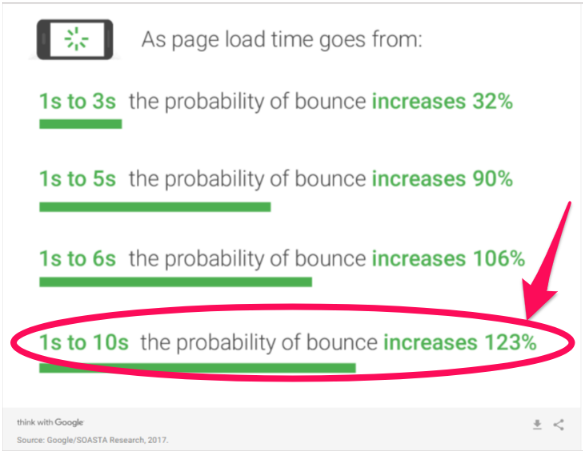
It doesn’t matter how great that piece of content is. Because your site isn’t functioning well, you’re losing precious traffic.
That’s just one example of why technical SEO is so critical.
Without it working, nothing else really matters.
That’s why I’m going to walk you through the most important aspects of technical SEO. I will explain why each one is so crucial to your website’s success and how to identify and resolve problems.
The future is mobile-friendly
First, let’s talk about mobile devices.
Most people have cell phones.
In fact, most people act like their cell phone is glued to their hand.
More and more people are buying and using cell phones all the time.
I actually have two of them. I own a work cell and a personal cell.
This is becoming more common as “home phones” become a thing of the past.
Google has recognized this trend. They’ve been working over the past few years to adapt their search engine algorithms to reflect this new way of life.
Back in 2015, Google implemented a mobile-related algorithm change.
People started calling it “mobilegeddon.”
This was only the beginning of Google moving the focus from computer-based browsing to mobile-based.
On November 4, 2016, Google announced their mobile-first indexing plans.
Google’s mobile-first indexing could be a game changer.
Mobile traffic is now more popular than desktop traffic.
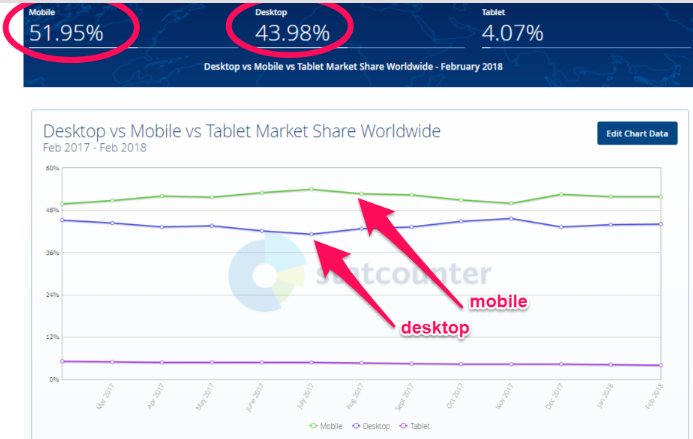
And even more importantly, about 57% of all visits to retail websites come from mobile devices.
You can see why Google’s intention is to begin using the mobile version of websites for rankings.
Just to make sure you knew they were serious, Google reminded us of this change on December 18, 2017.
Why do we care what Google is doing?
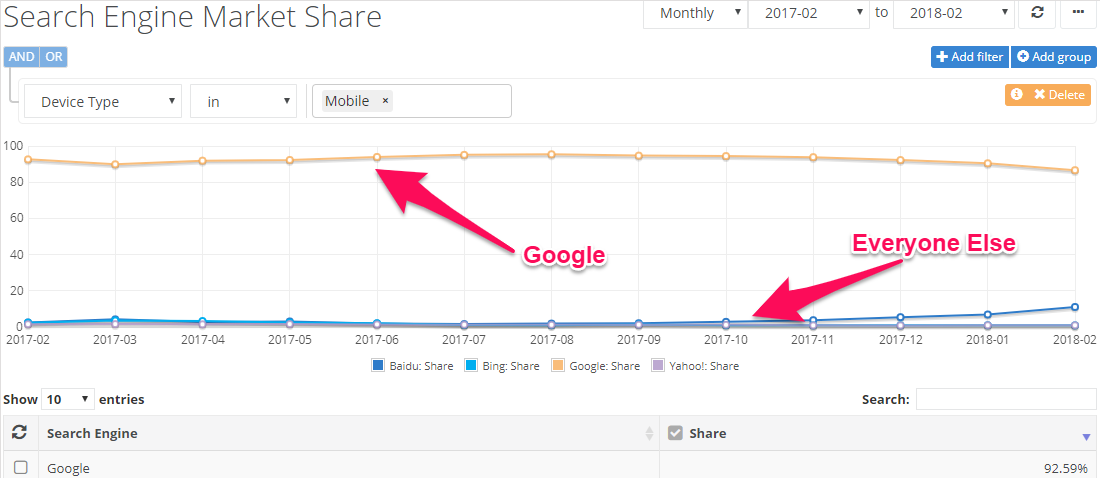
They own almost 93% of the mobile search engine market.
In fact, mobile-first indexing has created enough conversation among marketers that it’s one of the key topics of this year’s Pubcon conference.
You need to make sure that your site is ready for this change.
The easiest way to do this is to have a responsive site or a dynamic serving site that knows to adjust to screen size.
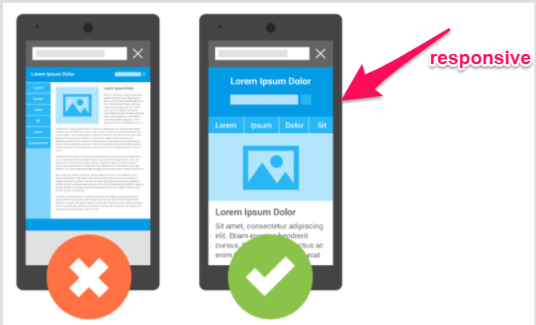
If you have a separate site for mobile, you need to do the following:
- Make sure that the mobile version of your site still has all of the critical content, such as high-quality pictures, properly-formatted text, and videos.
- Your mobile site needs to be structured and indexed just like a desktop site.
- Include metadata on both versions of your site: mobile and desktop.
- If your mobile site is on a separate host, make sure it has enough capacity to handle increased crawling from Google’s mobile bots.
- Use Google’s robots.txt tester to make sure Google can read your mobile site.
You might already have some of those covered, but it’s important to be sure your site is ready for mobile-first.
Speed is critical to success
Whether you’re running a desktop site or a mobile one, speed is critical.
If I have to wait for a site to load, I’m going to leave it.
Like I said before, load time is a major reason that people abandon pages and sites. With every second it takes for your page to load, more people are giving up on it.
If your website loads too slowly, readers will just click back to the search engine and try the next relevant link.
This is called “pogo-sticking.” And Google hates pogo-sticking.
If Google sees that people are leaving your page within the first five seconds of landing on it, they’re going to drop you down in the search results.
It won’t matter how great everything else is if you don’t have enough speed built into your sites.
Have you been focusing your SEO efforts on bounce rates, customer engagement, or time on site?
If so, you should be focusing on site speed because it will impact all of those metrics, too.
How can you know if your speed isn’t up to par?
There are a number of online sites that can test this for you.
A quick online test from WebPagetest or Google’s PageSpeed tools can give you a general idea of how your site is measuring up.
A more advanced tool I like is GTmetrix. It will help identify exactly what is slowing down your site.
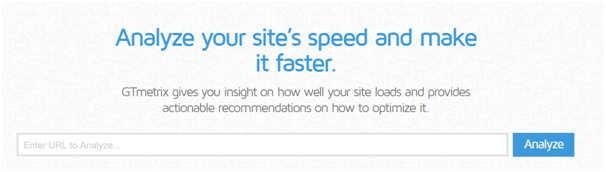
Make sure you test multiple pages. One page might load blazing fast, but you could be missing four that are slow as molasses.
Aim to test at least ten pages. Choose the pages that you know are the largest and have the most images.
Here are some common reasons a site has speed issues:
- The images are too big and poorly optimized.
- There is no content compression.
- The pages have too many CSS image requests.
- Your website is not caching information.
- You’ve used too many plugins.
- Your site is not using a CDN for static files.
- Your website is running on a slow web host.
You might not be able to get a perfect score on Google’s PageSpeed Insights the first time, but you can certainly improve it.
Site errors will tank your rankings
Site errors are frustrating.
It doesn’t matter if we’re talking about customers or search bots. No one likes site errors.
Site errors are most often a result of broken links, incorrect redirects, and missing pages.
Here are a few things you need to keep in mind in regard to site errors.
You need to deal with 404 errors.
When’s the last time you clicked a link on your search engine results and ended up seeing an ugly 404 error page?
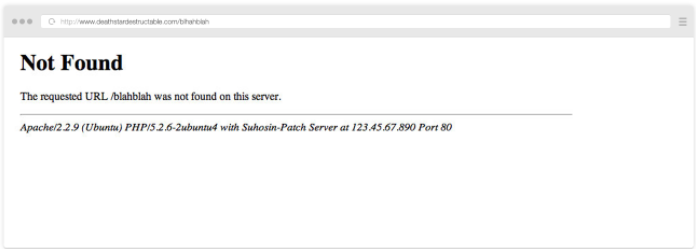
You probably clicked “back” immediately and moved on to the next link.
404 error pages will increase customer frustration and “pogo-sticking.”
As I mentioned above, Google hates this.
You don’t want to have 404 errors on your website. But here’s the reality:
Every website is going to have 404 errors at some point. Make sure you know how to fix them.
For the occasions when you miss 404 errors, make sure that you at least customize your error pages.
Make sure you’re using 301 redirects properly.
A 301 redirect is a permanent redirect to a new page.
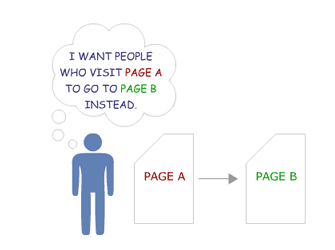
A 302 redirect is a temporary redirect.
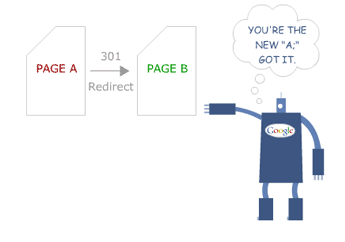
Using a 302 instead of a 301 can affect your readers and your search result rankings.
If you use a 301 redirect, search engines give the new page the same “trust” and authority that the old page had.
This means that if your old page was at the top of search engine rankings, your new page should take over that ranking. Of course, this is assuming that everything else is the same.
If you only use a 302 redirect, the bots see it as temporary.
Before 2016, this meant Google did not give the new page any of the old authority.
Currently, Google says that any 30X redirect will keep the same page ranking.
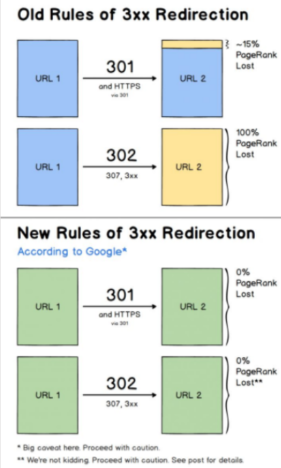
Despite the reassurance from Google, there is still some doubt about whether this is true or not.
The fine print in the image above says, “proceed with caution.”
The risk is that leaving a 302 redirect active for too long will make you lose traffic.
It won’t matter how outstanding your other SEO tactics are.
It’s not worth the risk.
Even using 301 redirects can negatively impact your search engine rankings.
This is because they can slow down your site speed. They can also signal that there is a problem with the structure of your website.
Google sees this as an issue. They don’t want to send traffic to sites they believe will be hard to navigate.
Anything that hints that your website is not user-friendly is going to harm your search engine rankings.
Find and fix your broken links.
You’re on a web page, you’re reading an interesting article, and it has a link to something you want to know more about.
You click the link, and nothing happens.
You’re probably slightly annoyed, right?
What happens if you experience this a few times on the same website?
I’m going to guess that you’re not going to be happy. I know I wouldn’t be.
It’s easy to end up with a broken link. You could have external links to pages that the webmaster has moved or shut down.
It can happen to anyone.
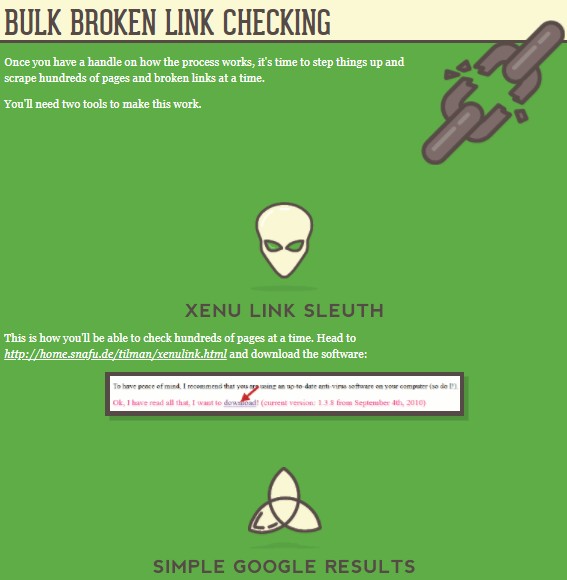
So how do you find them fast and fix them before they impact your customers and your rankings?
Don’t worry. It’s not as complicated or time-consuming as you might fear.
You just need to use the two tools and follow the four steps from this article.
Watch out for duplicate site content.
There are two major problems with duplicate content.
One is having content that is the duplicate of someone else’s.
This problem should be obvious. Someone has plagiarized.
Google is constantly trying to improve their ability to detect duplicate content, and they’re getting pretty good at it.
Unfortunately, the bots aren’t high-tech enough to know which of you ripped off the other, so Google will penalize both of you.
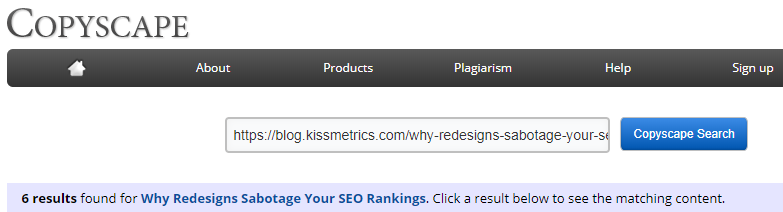
To help you avoid penalties, you can use Copyscape to make sure the content on your webpage is not too close to any other web pages.
The second problem is that if you have too much duplicate or repetitive content on your own website, it can be really annoying for your regular, dedicated fans.
No one wants to read five different blogs that all basically say the same thing.
If your readers find that your articles are too similar, they will just stop following you.
After all, they’ll begin to believe you don’t actually have anything new to say.
Duplicate content within your site may not just be from a lack of ideas.
It can also be a result of page refreshes or updates (if your update is on a “new” page with a new URL).
So, how can you find out if you have duplicate content?
Siteliner can help you find any duplicate content on your own website.
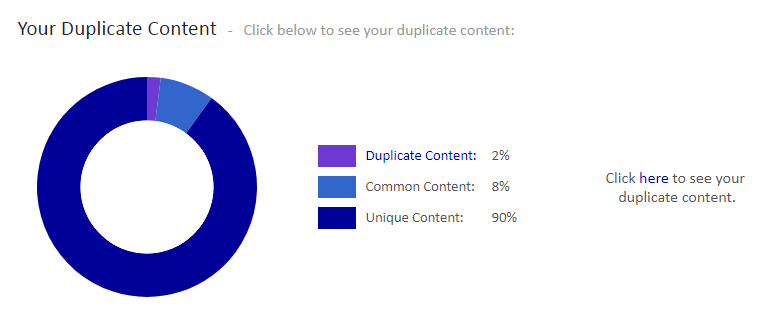
If you find duplicate content on your site, the easiest solution is to delete it.
But remember: You can’t just hit the delete button if the page is already indexed.
Remember the discussion above about site errors!
If you are about to delete an indexed web page, be sure to use a permanent 301 redirect.
What if you don’t want to delete a page? After all, we know too many redirects can be bad as well.
The next best option is to add a canonical URL to each page that has duplicate content.

This will tell search engines that you know that your site has indexed pages that are duplicate content, but that there is one version that you want the search engine to direct visitors to.
Know about other website errors.
Like I mentioned above, poor website structure will hurt your rankings.
Make sure you’ve built your website with properly-structured data.
This means using categories and web page groupings that make sense.
Solid structure helps improve the searchability of your site.
For example, what if I want to know if you’ve written an article on technical SEO?
I’m not about to scroll through hundreds of blog posts looking for one on that topic. Instead, I will go to the search box and type in my keywords like I would on a search engine.
If you structure your website properly, it will show me any articles related to that subject. Not only that, but it will pull them up quickly.
It’s a lot easier for your site to find relevant articles if it only has to search through a category rather than your entire website.
Remember that speed is one of the top issues for sites. Structured data allows users and bots to find related articles faster.
Building your structured data (which some refer to as schema markup) isn’t all that technical.
Schema.org exists for the sole purpose of helping improve the schema markup of websites.

How does schema impact your search results?
It helps describe your content to search engines.
That means that it helps Google understand what your website is really all about.
It also helps Google create rich snippets.
Here’s a normal Google snippet:

Now, check out a Google rich text snippet.

You can probably guess which one has a better click-through rate.
This isn’t about content or on-page SEO. This is all technical SEO.
Some other technical site errors you need to watch out for are:
- Page sizes that are too large
- Having issues with using meta refresh
- Hidden text occurring on your pages
- Unending data, such as calendars that go out for 100 years
Never ignore crawl errors
Search engines send bots to crawl your site all the time.
A crawl error means the bots found something wrong that will impact your search engine ranking.
First, make sure that you have a working sitemap and that your web pages are all indexed.
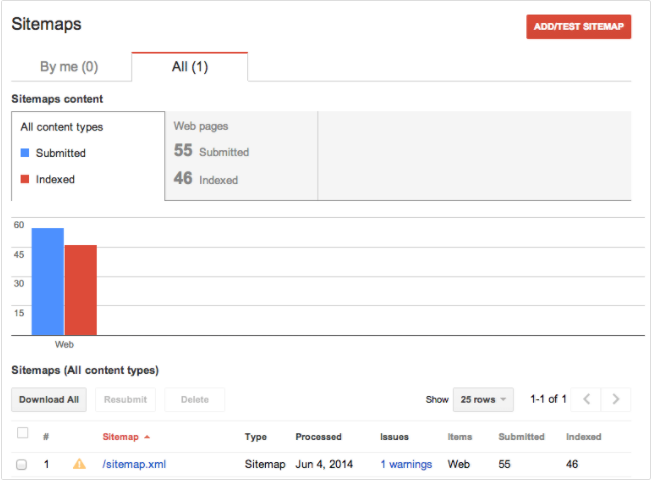
If Google can’t read a sitemap, then it can’t even try to crawl your site.
It won’t know your site even exists.
Avoid being the lost, forgotten soul by making sure you have an XML sitemap on your website.
Of course, step two is providing that sitemap to the search engines.
Once you’ve done this, the search engine should be able to index your pages.
This basically means filing them for review so they can measure them against all other similar pages and decide how to rank them.
If you get a no index error, it means that Google didn’t register your pages.
If they’re not registered, they will not appear on the search engine results page.
Even with the best content in the world, your traffic will be nonexistent if you don’t show up on search results pages. If you don’t believe me, look at these statistics:
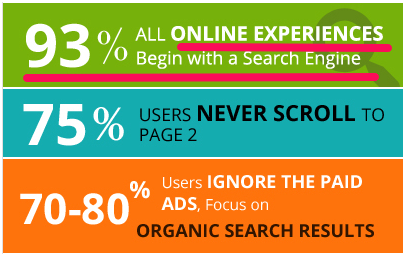
One common reason that pages don’t index properly is URL issues.
Make sure that your URLs aren’t too long or messy.
Avoid having any URLs that have query parameters at the end of them.
Other indexing problems could be title tag issues, missing alt tags, and meta descriptions that are either missing or too long.
Beyond indexing issues, there are other kinds of crawl errors.
In many cases, the error is due to one of the site content errors that I talked about in the last section.
Other types of crawl errors are:
- DNS errors
- Server errors (which could be a speed issue)
- Robots failure
- Denied site access
- Not followed (which means that Google is unable to follow a given URL)
Image issues can cause you a lot of problems
Visual content is a vital part of content marketing and on-page SEO.
The problem is that this on-page SEO strategy can often lead to technical SEO issues.
Images that are too large can tank your speed and make your site less mobile-friendly. Broken images can also hurt the user experience, increasing page abandonment.
You know you need lots of high-quality images. But now I’ve just told you that the very thing supposed to help your rankings can hurt them.
What do you do?
It’s easy. Just smush your images with Smush Image Compression and Optimization.
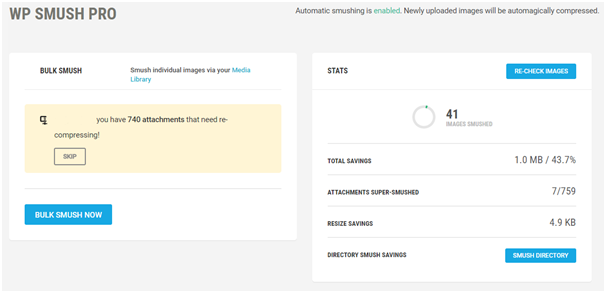
This plugin will shrink your images down so that their size doesn’t slow down your site.
The best part is that it can do this without impacting the image quality. You get the faster load, without sacrificing beauty.
You can also use WP Super Cache for creating a static image of your website. It’s a similar WordPress plugin to Smush Image Compression and Optimization.
Super Cache can lessen the amount of data your site uses and speed up your load time.
What about broken images?
Searching for broken images is the same as searching for broken links. You want to use a tool that can search your site for any broken images.
Most tools that check for broken links can also check for broken images.
Are your images using alt attributes? Since you might not always catch broken images right away, this can be helpful.
You can use a website like SEO SiteCheckup to see if you’ve set up alt attributes on your site.
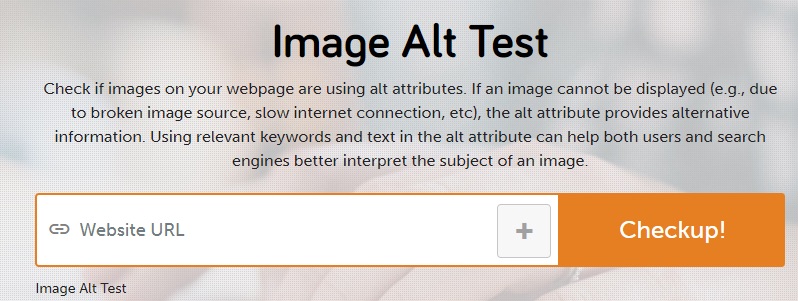
If your image ends up broken, the alt text provides alternative information.
Security matters more now than ever before
Google has been cracking down on security.
You used to be able to assume that http:// would be at the start of every website address.
But that’s no longer the case.
Google has warned that as of July 2018, Chrome will begin to warn users if a site is insecure.
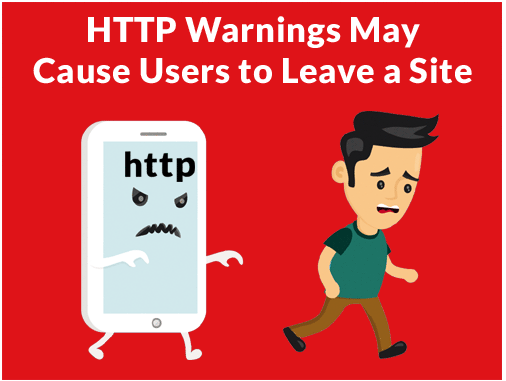
No matter how excellent your content is, customers are less likely to click through to a website when a browser warns them that it might be unsafe.
If your address is still using http, you could begin losing traffic fast (if you aren’t already).
Chrome is the browser with the largest market share in the world.
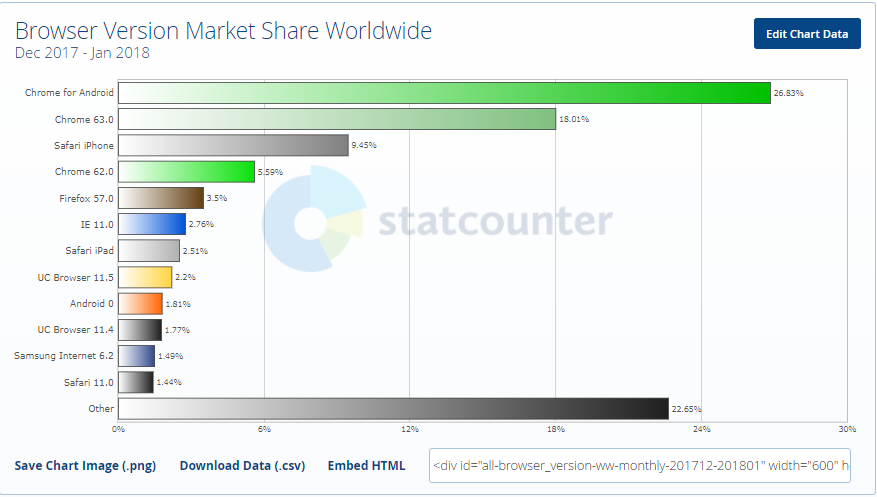
Google has already made it pretty clear that they prefer https sites.
Just take a look at how Chrome already highlights the security of https sites:

There are different types of SSL, so you’ll want to be sure you do your research to pick the right one for your site.
Conclusion
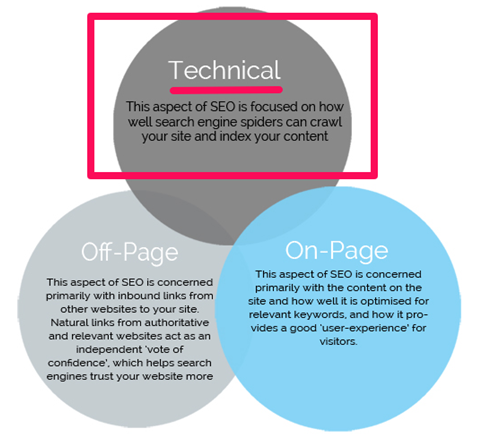
There are three different aspects of SEO, and technical SEO is the most important of the three.
SEO guidelines are constantly changing.
Every time a major search engine significantly updates their algorithm, SEO has to adapt.
But the good news is that the frequency of changes for Technical SEO is lower than the others.
After all, it’s not like search engines or readers will suddenly decide they’re okay with slower speeds.
If anything, you will see the average acceptable speed continue to drop. Your site simply has to be faster if you want to keep up with SEO demands.
Your website has to be mobile-friendly. This is only going to become more important over time, too.
It has to work without errors, duplicate content, and poor images.
Search engines also have to be able to crawl it successfully.
These things are all critical.
They are crucial to your success on search engines and with actual readers and customers. If you want to prioritize your SEO efforts, make sure you tackle the technical aspects first.
As I’ve mentioned several times, it won’t matter how amazing your on-page SEO is if you fail at technical SEO.
It also won’t matter how great you are at off-page SEO if you’re horrible at the technical stuff.
Don’t get overwhelmed by the idea of it being “technical” or complex.
Start with the big, critical aspects discussed above and tackle them one problem at a time.
How have you found success with technical SEO on your site?
About the Author: Neil Patel is the cofounder of Neil Patel Digital.

from The Kissmetrics Marketing Blog https://ift.tt/2JfEALb
via
IFTTT


