Friday, 1 January 2021

Best EMR Systems

Disclosure: This content is reader-supported, which means if you click on some of our links that we may earn a commission.

In the fight to stay organized, healthcare professionals have an uphill battle.

Billing is more complicated than the human genome.

Government regulations add extra steps to every task.

Decisions are time-sensitive.

Small mistakes can have serious consequences.

On top of all of this, everyone’s busy. There’s no extra time to search for a patient record or reorder an incorrect prescription.

The best electronic medical records (EMR) systems can simplify a lot of the complex challenges today’s providers face.

They are not a silver bullet by any means, but finding a product that works for your practice will make you more efficient today and better prepared for tomorrow.

Here are the top EMR systems that are helping practices improve care, reduce burnout, and make every day less stressful for everyone who walks in the door.

The Top Four Options for EMR Systems

  1. CareCloud – Best for growing specialty practices
  2. athenahealth – Best for switching to a new system
  3. SimplePractice – Best for health and wellness providers
  4. Kareo – Best for independent practices

The Different Types of EMR Systems

Not so long ago, EMR systems were the tool for turning paper charts into digital resources. They made patient data easier to access and track.

People still need these functions, but today you are going to see very few standalone EMR systems. Instead, you will find EMR systems will come as part of a larger electronic health records (EHR) system.

EMR vs EHR Systems

Here’s the key difference between the two:

  • Electronic medical records are a digitized version of a patient’s chart.
  • Electronic health records include information from all doctors involved with a patient’s care.

With EMR systems, people within the organization could access a patient’s chart. With EHR systems, on the other hand, medical records can be shared between multiple providers, labs, and insurers.

This ability to share complete EHRs is critical in today’s healthcare environment. 

You may already know the reasons why EMR systems are being phased out in favor of EHRs. I’m not going to go in-depth here, though you can certainly read about it if digging into healthcare legislation blows your hair back (see specifically the HITECH Act).

Suffice it to say, new laws and changes in technology have made EHR systems essential.

This can be confusing though. 

Many providers still need to digitize and organize the work of their office. EMR systems are perfect for that, and so there’s still a lot of online search for the term.

And because people are asking the internet for EMR systems, you’ll see vendors offering “EMR systems” and directing you to their EHR, or calling their products EMR/EHR solutions.

Some vendors seem to use EHR and EMR interchangeably. Likely, they will continue to do so as long as people are searching for EMRs.

For all the haziness and craziness of the situation, providers who need an EMR system today are really just looking at two major product categories:

  1. EHR systems
  2. Practice management suites

Let’s go through both of these so you can figure out which one is going to help you get your practice to where it needs to be.

I’m still going to talk about EMR systems, but just know that it is going to come as part of a solution with a different name.

Electronic Health Records Systems

EHR systems include everything providers need from traditional EMR systems to take their practice online. They can digitize charts, connect them to schedules, and keep each patient visit as efficient as possible.

For practices looking to go paperless, these products can be extremely helpful. They will help you turn file cabinets into searchable digital drives. This saves so much time for doctors, nurses, and staff who can quickly access everything they need from any device.

In addition to tracking patient records, EHR systems help with:

  • Billing
  • Insurance
  • E-prescribing
  • Lab work and tests

In this sense, an EHR “follows the patient,” giving all parties involved with a patient’s care the information they need to keep the process moving forward.

Most often, you will find EHR software offered as one part of a complete array of tools for managing a practice. Vendors like Kareo and athenahealth offer stand-alone EHR systems, which can be a great starting point for making the transition online.

Practice Management Suites

A practice management suite is designed to centralize all of the administrative, clinical, financial, and legal processes within a single platform.

In addition to EMR/EHR capabilities, they include:

  • Advanced reporting
  • Patient engagement
  • Revenue cycle management
  • Telehealth

As robust as these solutions are, they are not just for large organizations. In fact, these products work really well in the small practice setting. 

With limited staff, solo providers simply don’t have the time to manage 7 or 8 different tools to interact with each patient. Practice management suites are highly customizable, allowing providers to unify and trim down their workflow to its essential elements.

Small practices also benefit from the rich reporting features. 

Dashboards and data visualization tools help providers understand trends in clinical data. This can help practices decrease wait times, improve patient engagement, hit regulatory goals, and better manage risk.

How to Choose the Best EMR System for You

The right EMR system provides support for overburdened staff by streamlining critical administrative tasks.

The wrong EMR system can make things worse.

According to a study from the American Medical Association, the average family physician spends 86 minutes per day doing administrative tasks after they leave work.

This so-called “pajama time” has become an awful reality for every physician stuck using a well-intentioned but poorly-performing EMR system. 

And it’s not just doctors who are affected by this. Nurses, staff, pharmacists, and—most of all—patients suffer the consequences of inefficient systems.

Just knowing which solutions are popular is not enough. Sometimes a good system is implemented poorly or deployed in a place where it doesn’t fit.

So, how do you pick an EMR system that actually benefits employees and patients?

There’s no easy answer, but by following these three steps you can start to hone in on the right product.

Understand the features you really need

There are an astonishing number of features included with every EMR solution. Most individuals will never use the majority of them.

It’s not surprising, given that these systems are built to work for different types of doctors in a wide variety of clinical settings.

Go into your search with a list of must-have features and functionality. Every product is going to come with digitized charts and patient tracking, but what does that mean for your practice?

In other words, which system has the features that will help receptionists, nurses, doctors, and patients get from A to B? How will each set of features map to your actual patient flows?

A to B is an over-simplification, but also not. One of the most common complaints about EMR systems is that they take too long to accomplish routine tasks.

Ordering a prescription or procedure shouldn’t require scrolling through hundreds of irrelevant options. If a solution includes e-prescribing, ensure that it can be customized to actually save time.

The more A to B tasks your EMR system streamlines, the more time all staff have to spend engaging with patients.

Consider a specialty option

A welcome trend is the growing number of EMR systems tailor-made for specialty practices.

I like these because they solve two problems associated with traditional, general-use EMRs. 

One, providers get exactly the tools they need instead of a platform freighted with unnecessary features.

Two, each feature has the appropriate depth for the specialty in question. Laser settings are automatically recorded on charts for dermatologists. Orthopedic surgeons can share large-file imaging results with ease.

Instead of workflows and templates designed for the “textbook clinic,” these products meet the specific needs of today’s specialists.

Prepare for integration and implementation

It’s much easier to deploy an EMR system that integrates with the billing, imaging, and other platforms you use.

Some EMRs centralize those responsibilities within a single platform. If that’s the route you go, what’s it going to be like to move everything from multiple platforms?

The transition from paper to EMR or from one EMR to another is taxing under any circumstances. If the pieces of the puzzle don’t fit together, it can be even worse.

To make the best of a difficult challenge, find a vendor who is willing to help bring data from your existing platform to theirs as part of the deployment.

I definitely recommend reading reviews from actual customers about the kind of service they receive during and after implementation. If you are supposed to get a dedicated service rep, how dedicated are they?

It’s also not 100% on the vendor. What kind of in-house IT support will make everyone’s life easier? Under-budget for this at your own risk.

Upskilling a few “super-user” staff members who can fix issues on the spot will go a long way towards smoothing out the daily frustrations of moving to a new system.

#1 – CareCloud — Best for Growing Specialty Practices

CareCloud is a practice management suite that gives doctors more time to spend with their patients and more resources to invest in their practice. 

It unifies the tools providers need to manage every step of the patient relationship in their specific setting. Users can customize charts, reuse order sets, and share content with their colleagues.

The decision support features are quite advanced. This cuts down on the potential for medical errors by immediately flagging issues like dangerous drug combinations and dietary restrictions.

In addition to delivering real-time information at the point of care, quality chart data translates into rich reporting in CareCloud. 

Track the performance indicators that matter most, get an instant snapshot of where things stand, and keep an eye on how they evolve.
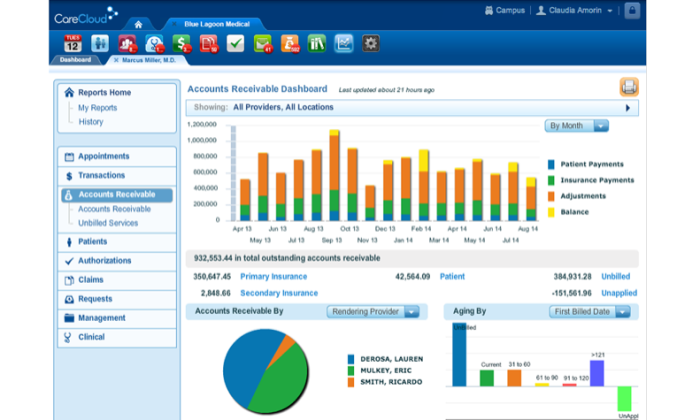
The EMR and revenue cycle management features work really well together. Providers can use what they discover to improve the quality of patient care and better steward a small practice over financial and regulatory hurdles.

One of the reasons CareCloud works so well is that they offer 24 specialty specific solutions. These deliver tremendous out-of-the-box functionality to providers who would otherwise be stuck configuring their system.

For pain management, physical therapy, podiatry, proctology, pulmonology—and that’s just the p’s—clinicians and physicians can get to work on CareCloud right away.

Some of the highlights of CareCloud include:

  • E-prescribing
  • Real-time patient flows
  • Patient portal
  • Drag-and-drop scheduling
  • Quality initiative reporting
  • Mobile app

In addition, they make a lot of additional tools available to speciality practices through their Content Store. Find solutions for insurance, billing, scheduling, and record-keeping that are built by other providers in your specific field.

You’ll have to get in touch with CareCloud for pricing, whether you want to use Charts—their EHR module—or the entire practice management platform.

It’s a great option for speciality practices that are looking to grow. CareCloud will streamline every process—from insurance to patient handoffs—because it has everything a specialist needs with none of the bloat.

#2 – athenahealth — Best for Switching to a New System

athenahealth consistently develops trusted healthcare software for hospital systems, small private practices, and everything in between. 

They offer a full practice management suite, athenaOne, which provides EHR, billing, patient engagement, population health, care coordination, and epocrates, a best-in-class mobile app.

Alternatively, providers can use athenaClinicals, the EHR component of athenaOne. Their products work well with many other options on the market, so practices don’t have to migrate all their systems at once.

This makes it a great option for practices that see EMR/EHR a key step in the gradual process of future-proofing their entire practice.

One of the biggest draws of athenaClinicals is how easy it is to navigate. It’s a really intelligent platform that is continually auto populating patient data and prioritizing important information. 
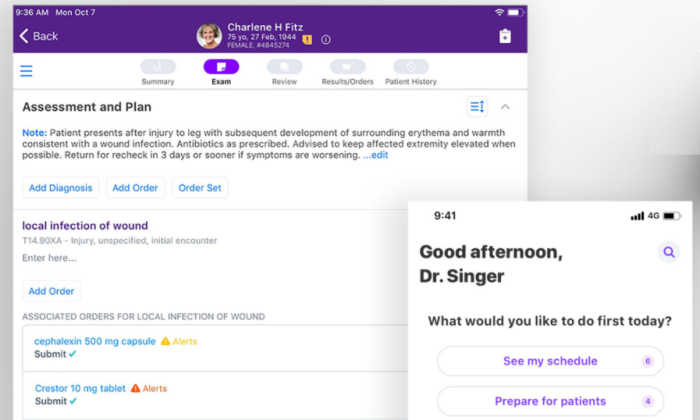
A lot of the platform’s recommendations come from trends it picks up on in your network, like routine processes and orders. If patients being seen for one treatment are often prescribed a certain medication, it will be right there without any search required.

Stop struggling with ever-changing procedure codes and insurance protocols. athenahealth monitors federal quality programs and makes best practices available immediately.

Some of the other standout features include:

  • Secure voice, text, and email reminders
  • Patient portal
  • Decision support
  • Rich reporting
  • Mobile app
  • App marketplace

Even though the user interface is great, there is a learning curve because the platform is so deep. In other words, the control that makes athenahealth such a great long-term solution requires a little getting used to in the short term.

I think it’s worth it, because it’s the last tool staff will ever have to learn.

The platform has proven itself capable of handling the most challenging healthcare IT environments.

Never switch again.

The cost of athenahealth’s integrated suite is based on a percentage of monthly collections. The idea is that they partner with your practice instead of locking you in a contract and charging for upgrades. 

They do well if you do well. Many companies report that the increased efficiency with billing and collections offsets the costs almost entirely, to say nothing of its impact across the practice.

athena’s customer support has a solid reputation and they have a lot of experience helping clients move their data over securely.

If you are stuck on paper or with a system that’s not getting it done, athenahealth will do what it takes to make you their next satisfied member.

#3 – SimplePractice — Best for Health and Wellness Providers

SimplePractice is an affordable practice management suite that’s delivering value to therapists, dieticians, social workers, and other providers in the mental health and wellness space.

It’s a great price for small clinics and private practices that want to centralize charts, notes, appointments, insurance, and billing in one intuitive platform.

There’s a patient portal, so both sides benefit from the accessibility. Clients can upload documents and even book their own appointments (on your terms, of course). 

Speaking of accessible, SimplePractice empowers providers to meet with their clients, regardless of where they are coming from, or ability to come in.

Every consultation can be managed securely online, thanks to features like paperless intakes, online booking, and HIPAA-compliant telehealth solutions.  

Not every community has the local resources in place to serve those who need care. And even when patients have a nearby office, taking time to come in for appointments can still pose problems.

SimplePractice can help providers stay in touch with clients, no matter how busy or far away they are.

It’s great for an entire practice, but focusing in on the EMR features, SimplePractice comes with:

  • Template library
  • Diagnosis and treatment plans
  • Searchable ICD-10 codes
  • Secure text messaging
  • Appointment reminders
  • Superbills
  • Mobile App

There’s also customizable patient intake forms and surveys, which allow providers to ask questions in the right way. They can be sensitive, specific, and leave enough room for people to share their thoughts.

They offer plans for solo practices starting at $39/month. 

Group practice rates start at $98/month for 2 clinicians. Each additional user costs $39/month.

Features like telehealth and billing are extra charges, as they are with other platforms. On SimplePractice, however, the added costs are transparent—$10/month per user for telehealth and electronic claim filing starts at 25¢ per claim.

Practices that don’t need these features, or use something else, aren’t stuck paying, and those that need them have a predictable cost at the end of the month. 

Predictable, affordable, and complete. That’s SimplePractice. Try it free for 30 days.

Their Switching Team will help you import everything and live support is included with every plan.

#4 – Kareo — Best for Independent Practices

Kareo is an all-in-one solution for practice management that’s designed to meet the particular needs of an independent practice. 

This is their focus. You never have to worry about competing with massive hospitals for their attention.

Kareo isn’t hospital software that’s been pared down. The platform is a simple set of three integrated modules: Clinical, Billing, and Engage. 

There aren’t a million components to get the complete system and, more importantly, each part works fine on its own. 

If a company just needs a dependable EHR, for example, Kareo Clinical has everything they need.
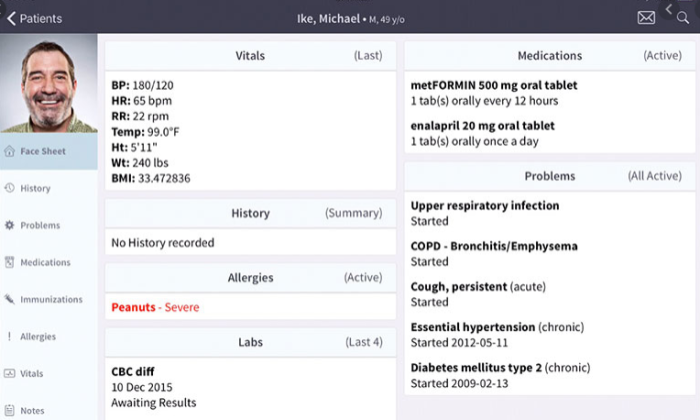
Charts are easy to read with space for notes. They feel simple, despite the wealth of information you can add. Kareo is optimized for all screen sizes, letting providers prescribe a medication or create a bill in minutes from any device.

The e-prescribing features save providers time and patients money. With Kareo’s integrated prescription discounts, doctors can compare prices and find savings for their patients.

They have a lot of great templates and forms that can be customized quickly, plus “same-as-last-time” features that streamline routine documentation. 

Other helpful tools include:

  • Patient portal
  • Customizable dashboards
  • Secure messaging
  • Decision support
  • Rich reporting
  • App marketplace

Kareo flowsheets are one of the most useful reporting features, showing doctors a patient’s key vitals and lab results over time. This makes it easier to analyze progress and track several aspects of a patient’s health at once.

None of these great features take long to master. There are self-service online resources like Kareo University, which many users find helpful.

But you are not on your own. After you sign up, they provide a free Kareo success coach for the first 60 days who will help with transferring and digitizing files. 

Their customer support is available via phone, email, and chat to answer all those insurance billing questions.

For independent practices that want an efficient, simple way to manage medical records, Kareo Clinical is going to overperform. 

Summary

Providing quality care is hard. 

That’s the root of the problem when it comes to finding a workable EMR system. Often, people put off switching to a better system because it’s such a pain.

Kareo and athenahealth do a lot to make the process easier. Independent practices should opt for Kareo because it’s built to fit their needs. For everyone else, athenahealth is a dependable long-term solution no matter how their practice evolves over time.

Looking at speciality practices, CareCloud is going to be the easiest to get up and running. So much of the backend organization has been done already. Templates and forms are ready to go and you don’t have to sort through irrelevant options.

For those working in the health and wellness space, SimplePractice is a perfect platform. It’s got competitive, predictable pricing and a rich set of features designed to nurture the most sensitive patient relationships.

The post Best EMR Systems appeared first on Neil Patel.


from Blog – Neil Patel https://ift.tt/2X01TAT
via IFTTT

What is Games as a Service (GaaS) and What Does it Mean For Marketers?

What is Games as a Service (GaaS) and What Does it Mean For Marketers?

Games as a Service (GaaS) was introduced as a barrier between consumer cost concerns and user engagement. It offers a way to bring down customer acquisition costs and has been proven to keep users in a game for far longer than the pay-to-play method. EA Games, for example, increased its market value from $4 billion to $33 billion in just six years after introducing GaaS content.

Games as a Service acts as a continuous revenue service for developers, allowing them to break their reliance on the one-time purchase. With more games being developed every year, GaaS gives them a competitive advantage in the fight for user attention. It also allows advertisers to get exposure in some of the most popular games played in today’s market.

What Is Games as a Service (GaaS)?

Games as a Service refers to games that operate without initial purchasing costs and instead, make their profits on subscriptions or in-game purchases.

Games as a Service allows video games to be monetized even after they are released and it has been proven to keep players more engaged longer. Instead of beating a level, losing interest, and forgetting the game in the back of their closet, players are constantly brought back in with the promise of new and upgraded content.

GaaS games can often be streamed directly from the cloud to a user’s device, which allows them to be accessed from anywhere, anytime. It also allows for better cross-platform functionality, a crucial part of staying competitive in the gaming industry.

This strategy allows games to be updated weekly, monthly, or sometimes even daily to keep users engaged. New content often comes in the form of “drops” or “releases” when announcing new content—a technique that echoes Supreme’s luxury marketing strategy.

Games as a Service has also been referred to as “cloud gaming,” “gaming on-demand,” “live service games,” or “game streaming.” Some popular Games as a Service games include Candy Crush, Fortnite, Destiny, and Overwatch.

Features like unique billing and subscription services have completely shifted the gaming business model. In a Games as a Service environment, payments are unique and personalized, offering a wide range of accessibility to incoming gamers.

Games as a Service Payment Options

  1. Flat billing, where a user is charged the same amount weekly, monthly, or annually
  2. Volume-based billing, which changes the charge based on consumption
  3. Tiered model, where a customer is charged based on a unit range

In addition to these updated payment options, Games as a Service players have the ability to pay via cryptocurrencies, in smaller payments, and with more frequency.

This new business model is certainly changing the landscape of gaming by offering accessibility, usability, and big profits all around.

Games as a Service Microtransactions

A microtransaction is a business model in which customers pay a low fee for a quick transaction, usually to purchase virtual items or unlock new features.

An example of this would be a player paying $2 to buy a new horse for their character to ride, or $1 for a new hat.

Microtransactions allow developers to monetize their games in a number of ways, far beyond the initial purchase point. Some games will require a small fee to unlock the next level or to access new features. These transitions are often referred to as “in-game purchases.”

On their own, these transactions may seem insignificant. Can a developer really profit when every player is only spending a dollar?

Think about it this way.

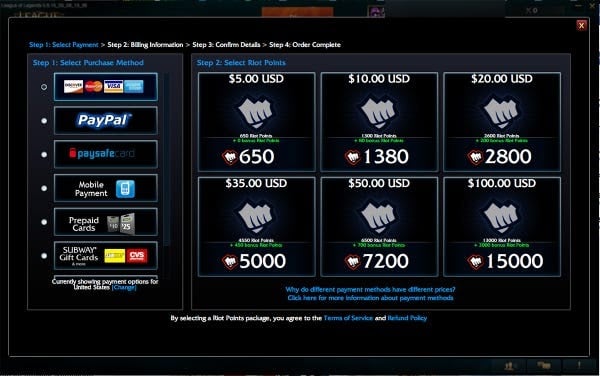
The online game League of Legends (LoL) is played by 115 million people, worldwide.

If each of those players spends even $5 while in the game, then they’ve made just over half a billion dollars.

games as a service screenshot of league of legends in game purchase screen

Virtual Currency

Virtual currency is used in many games, either as a trade-in value for real funds or to purchase features while playing. These currencies can come in the form of jewels, gold coins, tokens, and more. They can also be collected by completing quests, slaying monsters, and other such in-game activities.

Popular cryptocurrencies, like Bitcoin and Litecoin, can also be used in certain games. In games such as Lordmancer II by Active Games, gamers can even earn cryptocurrency by acquiring game assets and trading them in the in-game market.

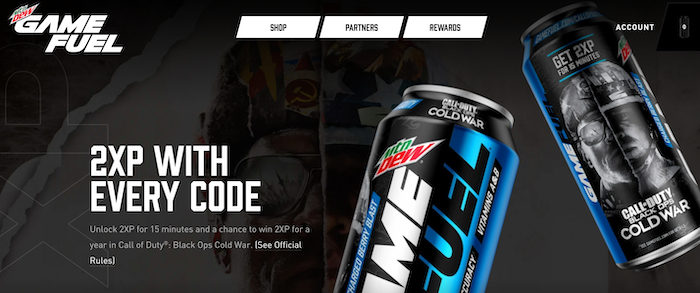
Brands are also getting into the action by offering gamers virtual currency or exclusive game add-ons by buying their products and entering codes into their virtual storefronts. Mountain Dew and Butterfinger are two examples of brands successfully bridging the gap between physical brands and the virtual gamer environment.

games as a service mtn dew

Games as a Service Business Models

There are several Games as a Service business models that offer creative, experimental, and exciting new ways of monetizing the gaming industry. It’s important to note this field is still evolving and new models, regulations, and content strategies will continue to shape its growth.

Selling In-Game Content to Players

One of the most effective ways of continuing to monetize a game even after its release is to continue selling products to players in the game.

In certain Games as a Service models, players can pay to buy new equipment for their characters, unlock new levels or features, and even increase their abilities.

Loot boxes are one of the most well-known in-game content transactions, where players pay a small fee ($1-$3) to pull special items from a virtual box. This tactic has been accused of promoting gambling with children and it has been banned in some European countries. That being said, their profits are tremendous. Loot boxes are projected to earn $50 billion by 2022 and companies can often sponsor items.

The revenue from in-game purchases provides an incentive for game developers to continue updating and improving their games. For players, it brings new and exciting content more often, and in higher-quality.

Pay-to-Play

Pay-to-play refers to games that customers have to pay for to access. For many games, this means paying for a physical copy of a game and playing it as much as you want.

Certain games, such as World of Warcraft (WoW), only require you to pay-to-play after you reach a certain level, or after a predetermined amount of playtime. This way, players can explore the game, see if it piques their interest, and then invest once they know they want to commit. WoW operates on a subscription-based service, which requires a monthly fee in exchange for playtime.

Some companies who follow this model also use other Games as a Service tactics, such as selling in-game content or paying for new downloadable content (DLC). According to Newzoo, a games market insight firm, 2.7 billion people will spend around $159.3 billion on online games in 2020, so it’s safe to say this method is working.

Ad Placements

With an increasing amount of users now participating in Games as a Service, it’s no wonder advertisers have seen a huge market.

In-game ad placements allow developers to expand their revenue streams beyond pay-to-play models and even beyond the Games as a Service model.

Ads can be shown as videos on loading screens, or they can even be adapted into the game, such as Gatorade’s advertising in NBA 2K18’s “The Neighbourhood” mode.

In fact, players don’t even mind seeing the ads in their games. A 2018 Ipsos study found that 47% of users can recollect an ad they saw while playing a game, meaning it was part of the experience, and not an annoyance. What’s more, 50% of users found watching the ads to be “visually appealing.”

Overall, Games as a Service platforms offer a wide new world of advertising possibilities.

games as a service hotwheel and rocket league ad placement

Paying for New Content

One popular way to increase in-game revenue is to constantly add new content to a game that players need to pay for to access.

Fortnite is one of the most popular examples of this method, where players have to buy into each new “season” of content. The seasons come out four times annually, but developers also earn revenue through microtransactions between seasons.

This is a great way to keep a player base active while spending far beyond the initial release of a game. It is also a big value-add for existing users, who benefit from new and exciting content on a regular basis.

Even free-to-play platforms can benefit from this strategy as it monetizes new content instead of existing.

Game Bundles

Game bundles are a collection of multiple titles, conveniently bundled into one package that users can purchase, usually at a discount.

Bundles are often used by game developers as a way to engage new users with their existing games, by offering high-value titles along with less popular ones. This is an easy way to generate new leads on an existing, but not widely popular product.

Game bundles reduce the unit cost of games and help increase the potential reach of developer products. It’s a simple and easy way to promote certain products or to increase the revenue of a normally unprofitable product. Brands have also worked with developers in the past to offer sponsored bundles with perks.

games as a service bundle example

Cloud Gaming Services

Cloud gaming services offer unlimited access to a wide variety of games. These platforms usually operate on a subscription basis, where users pay a monthly or annual fee in order to get access to the library. A normal subscription is around $4.99-$19.99 a month.

Cloud gaming services focus on high-end, graphics-heavy games that usually require more sophisticated hardware to run. All games are hosted in the cloud and can be streamed to user devices.

One of the great benefits of cloud gaming services is that users can save money by not paying for each game individually.

Some examples of cloud-gaming services include Steam, Amazon Luna, Sony PlayStation Now, Google Stadia, and Microsoft Project xCloud.

Multigaming Platform Apps

Some platforms offer a large number of games that users can play by downloading an app.

Many of these platforms also let users earn money while they play, making them an exciting new trend in the gaming community.

Some of the most popular multigaming platform apps are WinZO, MPL, Coco, Hago, and BaaziNow.

Premium Memberships

Some platforms, such as Roblox, offer many games for free, but some can only be accessed by paying a premium membership. This is a strong incentive for users to become more entwined with a certain platform. It also makes their premium games more lucrative.

Premium memberships can range greatly in price and services offered. Some also offer virtual currency through purchases or discounts on future purchases. Ultimately, it’s all about benefiting the buyer and increasing return on investments.

games as a service tiles of many online games shown on Roblox platform

Conclusion

With the introduction of Games as a Service, the gaming industry has seen a major shift in the way it approaches consumer sales.

Now, developer goals have moved from selling as many copies of a game as possible, to maximizing recurring revenue.

The future of Games as a Service is still evolving, but we can expect to see more innovative and exciting ways of getting games and brand exposure to players in the coming years.

Do you have any products that could integrate with the Games as a Service model?

The post What is Games as a Service (GaaS) and What Does it Mean For Marketers? appeared first on Neil Patel.


from Blog – Neil Patel https://ift.tt/3o73YXB
via IFTTT

Thursday, 31 December 2020

Best Free Project Management Software

Disclosure: This content is reader-supported, which means if you click on some of our links that we may earn a commission.

Being on top of work feels so much better than the reverse.

A stakeholder asks you a third-decimal-place question about a future project. You nail it. The answer is ready and the evidence is two clicks away.

With the right project management software, it’s easier to operate at a high level.

It’s like wearing the right pair of shoes.

If you’ve never tried project management software, these free options are a great place to start.

And if you are using a frustrating tool, struggle no more.

These are the best free project management software options available right now.

Seriously, all of these products are free to use forever.

The Top 4 Free Options for Project Management Software

  1. Trello – Best for Lightweight Project Management
  2. Wrike – Best for Marketing Teams
  3. Jira – Best for Agile Teams
  4. ClickUp – Best for Large Organizations

How to Choose the Best Free Project Management Software for You

This stuff isn’t magic. You get out what you put in.

I like to think of project management software as a blank workspace waiting for a business to move in.

It gives every task a home so projects aren’t just roaming free-range across email chains, chat threads, post-it notes, and casual conversation.

One of the best parts about a free forever platform is that you actually have the chance to see what happens once you plug your business in.

Work with it for months and try a few different types of projects out. 

I know freelancers and even small companies that have been able to get along just fine for years on a freemium plan.

So which one is for you?

Let’s walk through the core aspects of project management software and how they can have an impact.

Basic Structure

Every good project management tool is stupid simple. This is especially true for freemium plans.

But they’re not all organized in the same way. Some use traditional folders and lists, whereas others track tasks entirely on boards.

How will your team’s work fit into each space?

The better the fit between a platform’s basic structure and your team’s projects , the better they can use the software to get to where they want to go.

After all, with free project management software, you want it to fit your organizational processes, not change those to fit the freemium platform you choose.

Ideally, project management software will help evolve your business processes in a positive direction. But not overnight.

Collaboration

These platforms enable people to work together better by making business workflows transparent. Everyone can see the status of projects and tasks.

This puts people on the same page, all the time. And when changes need to be made, users can alert one another with comments or by tagging teammates. This draws the right attention to the exact point of the issue.

With less uncertainty, people are free to act instead of waiting on a long email chain to finally arrive at an answer. 

Some platforms will keep a comment history associated with each individual task. Others will have an activity feed that logs updates made to the task.

These capabilities make it much easier for teams to know when a task is 100% done.

Scheduling

The tools I like let you assign users and due dates to tasks. Very simple, very helpful.

Whether you are building out on a board or a list, you can toggle views to see tasks displayed on a calendar. 

Updating the task due date will update the calendar as well, keeping everyone on the same page.

With some of the more robust free options, like ClickUp, you can set dependencies to govern the schedule. 

Reporting

Because it’s loaded with information about what teams are doing, reports generated by project management software provide a lot of insight.

I’m talking about measuring productivity, identifying trends, and staying under budget. This information can really help managers steer their teams productively.

Some of the options on this list, like Jira, have pre-built reports that are ready to go for any project.

Not all free project management software comes with reporting features. 

Trello, for example, doesn’t provide anything out of the box. That said, you can tie in a third-party analytics platform to do the heavy lifting.

Automation

Automation in free project management software is limited, no doubt. But anyone can use it.

It’s just a taste of what these platforms can do, but the early exposure can pay dividends in the long run.

When it comes time to bump up into a higher tier, users are ready to take advantage of automation instead of being intimidated by these power features.

This isn’t a make-or-break it criteria, but if users find they can eliminate some busywork from their day, it might increase buy-in to the platform.

The Different Types of Free Project Management Software

There’s a stunning array of diversity to think about when you are looking at the straight-up best project management software out there.

When it comes to free forever plans, the field narrows.

There are really two types of free project management software out there:

  • Board-based
  • List-based

You’ll find some overlap, but understanding the differences between these types will help you find a solution built to fit your needs.

Free Board-Based Project Management Software

These products have an organizational hierarchy that goes something like this:

Team→Board→List→Card

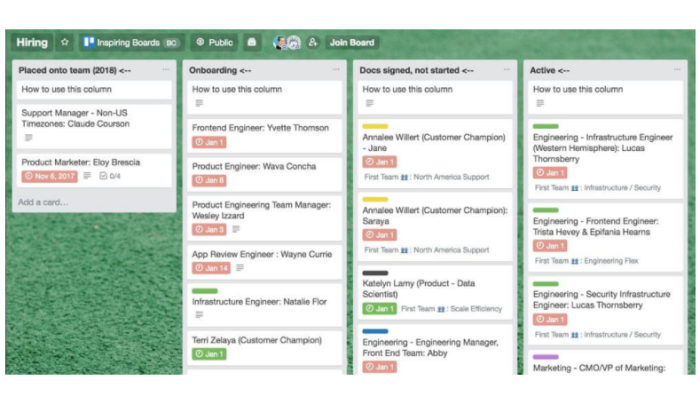
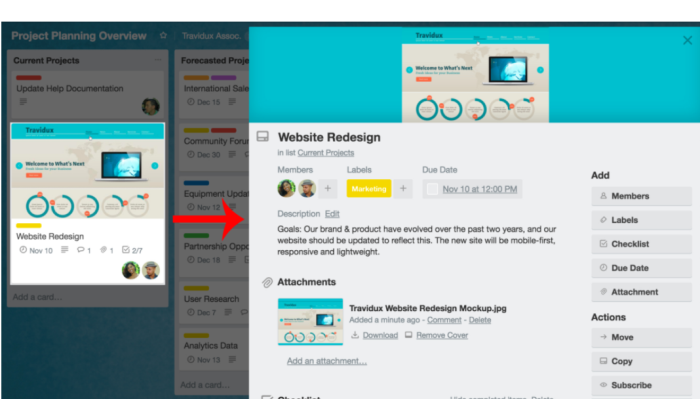
Here’s a screenshot from Trello, one of the most popular board-based options in the world:

This is the board, which all members of the team can see. Each card is a task, and it is under the appropriate list

With Trello and other board-based software, teams spend most of their time on the board. This involves going into tasks to add detail and check off complete tasks and potentially switching to calendar view to check bandwidth.

Does your current workflow map well to this cards-and-boards layout? 

Free List-based Project Management Software

These products have an organizational hierarchy that goes something like this:

Team→Folder→List→Task

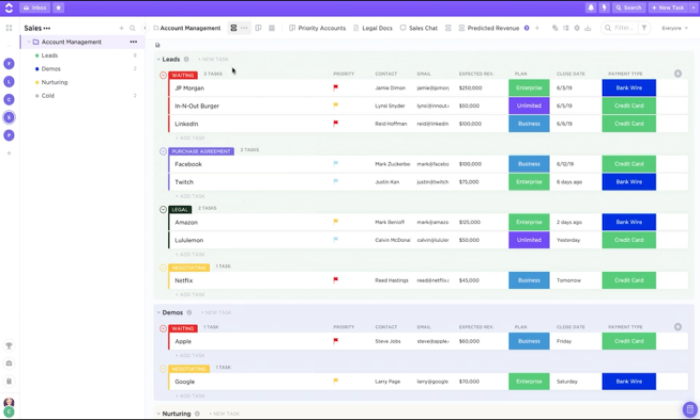
ClickUp is a great example of how a list-based product helps teams stay on track:

The team has their folders listed on the left. Very traditional. Each folder contains lists, which are broken down into tasks.

List-based software can make it easier for teams to stay organized than a board that gets cluttered. In ClickUp and other good options, the list is drag and drop, so it’s not any harder to use.

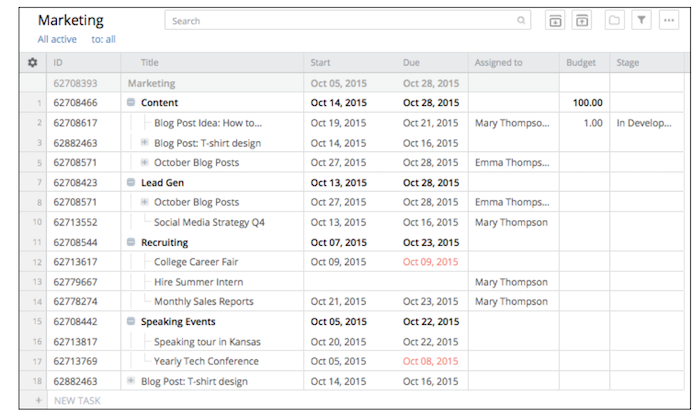
In Wrike, another list-based project management solution, you can even view your projects as a spreadsheet.

Looking at both types, there’s a lot of flexibility to view projects in different forms, like list, board, calendar, or table.

Because of this, it might seem like the boundary between these two is a little fuzzy.

From my perspective, though, flexible viewing does not always equal flexible managing. 

Trello works great when you are building on a board. ClickUp works great when you are building on a list.

Sure, they can also do what the other does to some extent. I just think they work best when you are using them as designed.

And, since all of these products are free forever, it’s not going to break the bank to pilot one of each type and see what you and your team think.

#1 – Trello — Best For Lightweight Project Management

Trello is one of the most user-friendly project management options on the market. Maybe that’s why more than 1 million teams are using Trello around the world.

When I say user-friendly, I mean there is virtually zero learning curve to engaging with the product.

Drag. Drop. Click. Done.

Boards are made up of cards and lists. Clicking on any card brings up all of the relevant details, such as who’s responsible, what needs to get done, and when it must be done by.

Obviously agile teams will dig the Kanban-style setup, but Trello is so basic (in a good way) that people can build out boards within whatever framework suits them best.

Staying on track in Trello is so easy, it’s almost fun.

Assign people to tasks and they’re notified instantly when changes are made. There’s a comment feed built into every task and team members can use @mentions to call out specific issues.

Users can switch from board to calendar view to see their tasks spread out week to week. They can also “watch” cards to which they are not assigned, something that is great for managers.

The Trello platform has two main power features. 

There are Power-Ups, which let you tie in a third-party service. It could be a time tracker, a Gantt chart creator, or a collaboration tool like Slack.

And then there is Butler, an AI-service that finds repetitive tasks and helps you automate them. You can create buttons that kick off simple workflows, or schedule tasks to be created.

With Trello’s free version, you get:

  • 10 boards per team
  • Unlimited cards and lists
  • The ability to add attachments to cards, up to 10 MB each
  • Two-factor authentication
  • One Power-Up per board
  • 50 Butler commands per month

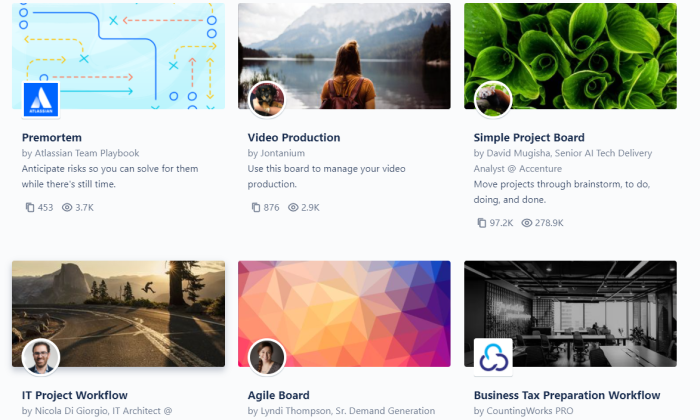
It’s incredibly easy to build what you need in Trello. There is still a lot of freedom to create the structure you need, but they also offer a range of templates for project management:

There’s also templates ready to go for HR, sales, support, and other departments.

Trello’s got you covered for lightweight project management. There’s definitely a ceiling when it comes down to what you can track on each board, even compared to other free project management software.

For a single team, though, managing a sales pipeline, content calendar, or something of similar scope is going to be a breeze.

#2 – Wrike– Best For Marketing Teams

Wrike is a really versatile project management platform with a free forever version for teams of up to five. 

There are a few reasons why it works so well for marketing teams compared to some of the other best free project management software.

First off, the collaborative features are really well-developed. 

You can store tasks within projects or folders. Teammates can add comments, tag colleagues with @mentions, and attach files directly to any task, folder, or project. 

Okay, I hear you saying, “It sounds like some of the other free project management software.” 

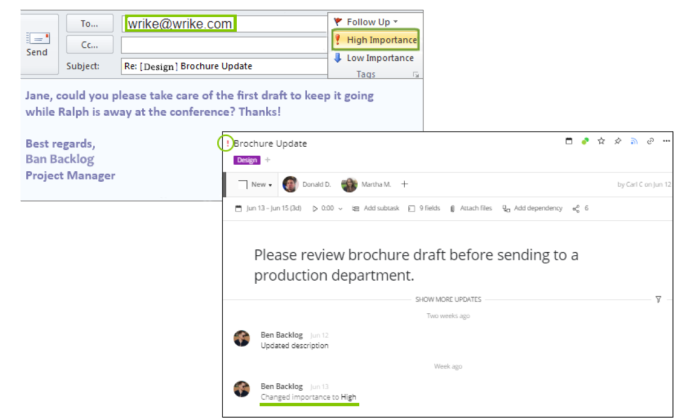
But, what makes Wrike so effective out-of-the-box for marketing teams is that email integration is included. Users can update, create, and prioritize tasks directly from their email.

It’s great for your team, but you can also invite clients and contractors. These users are designated as Collaborators. Basically, you can share projects and plans without having to worry that external users will make serious changes.

Another useful feature for keeping track of marketing campaigns at scale is the Table View, which breaks out all tasks into a spreadsheet view:

These and other time-saving features help marketing teams stay on track and save time. 

The Real-time Activity Stream, for instance, provides users with a feed of all the updates and comments on projects they’re assigned. Users can quickly filter the activity stream to see the updates that matter most.

Some of the other nifty features included with the free version of Wrike include:

  • Board view
  • Drag-and-drop task management
  • Mass edits
  • Cloud storage integrations
  • Microsoft 365 integration
  • 2GB storage
  • Mobile App

If Wrike ends up being a good solution, they’ve got paid plans that are tailor-made for marketing and creative teams. 

Wrike for Marketers is a business-level project management software dedicated to helping teams across the company create on-brand experiences at scale. They offer a 14-day free trial so teams can get a sense of everything that comes with the premium platform.

Wrike for Marketers Performance takes the analytics and workflow automation to another level. 

There are pre-built dashboards, advanced reporting features, data visualization tools, and integrations with an additional 400 apps.

For marketing teams, Wrike is an excellent choice. Their free project management software is enough for a team to get started, and their paid plans will take a company to the next level.

#3 – Jira — Best for Agile Teams

Jira is built from the ground up to serve teams that work within an agile framework. 

The customizable task boards are ideal for Scrum and Kanban, but so is Trello. 

What separates Jira in terms of working well for agile teams are the baked-in reporting and roadmap features. 

For managing a single team, both these features are huge time-savers. They work behind the scenes to turn all the information on your boards into visual intelligence.

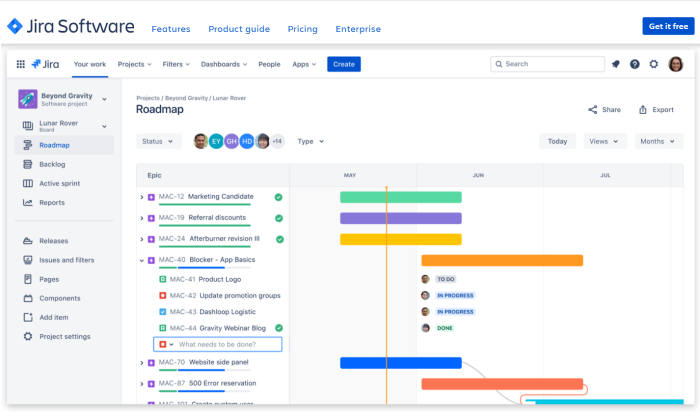
Roadmaps help you track the bigger picture by placing work on a timeline that clearly maps project dependencies. 

Rather than a Gantt chart, which tracks outputs, a roadmap tracks outcomes, like solving customer problems. Work feedback, product vision, and goals into your roadmap, not just the deliverables, to get a better picture of long-term strategy.

Whether it’s a new product or sprint increment, roadmaps help teams connect their daily work to the team’s progress toward the overall goal.

There are also 12 standard agile reports available for any Jira project. 

There’s nothing users have to do to configure these. Jira automatically takes your boards and cranks out really helpful reports for agile project management, like burndown charts, velocity charts, and sprint reports.

The free version of Jira comes with other helpful features for agile teams like:

  • 10 users for one site
  • Customizable workflows
  • Automation
  • Backlogs
  • Apps and integrations
  • 2GB file storage
  • File sharing
  • Business continuity and disaster recovery

A word about a few of these features. Since Jira is an Atlassian product (like Trello), there’s a really long list of apps and integrations that are going to work.

The customizable workflows and automation are definitely limited with the free version of Jira, but you can work many third-party tools into your processes. 

With Jira, the deliberately agile design means that teams and leaders have to do less finagling to get the tools they need. 

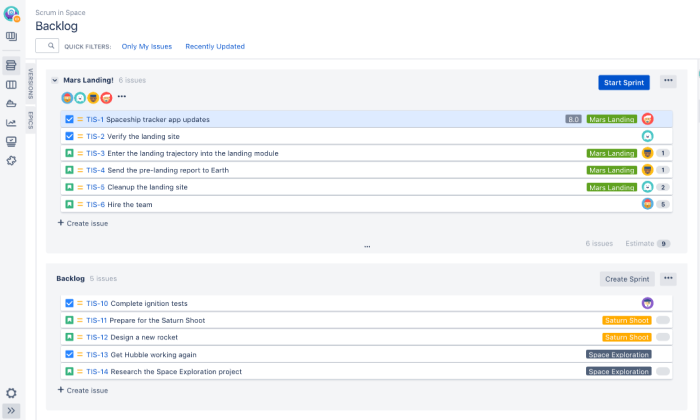
Backlogs, for instance, can be set up with other free project management software. In Jira, however, they are a dedicated feature that has been designed for backlog grooming and sprint planning.

Instead of spending time to configure the system, teams can start using Jira on day one. 

Another helpful feature is that each task is assigned a unique key and ID. This is great for ticketing and bug-tracking.

Give their free forever version a shot and find out why so many agile teams depend on Jira.

#4 – ClickUp — Best For Large Organizations

ClickUp offers the most control and functionality in the free project management software category. It’s my pick for larger organizations for two reasons. 

One, the free platform is generous enough to accommodate multiple teams. More than that, the simple structure is built to scale. 

The number two reason is customizability. Each team can configure their workspace to suit their specific needs. 

Let’s dig a little deeper into both these reasons.

The free version allows for five Spaces, each of which is enough to support an individual team. Spaces can hold up to 400 folders, which can in turn hold up to 100 lists.

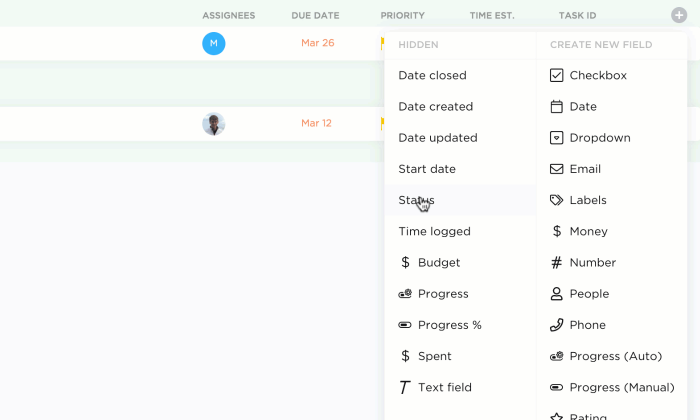
Lists are where tasks live and ClickUp allows for unlimited tasks in every list. You can also create up to 100 custom fields for lists to track whatever is most important about each task.

And it’s still super intuitive. 

Everything is drag and drop and you can toggle between list, board, and calendar views. There’s even a “me” view that shows only tasks assigned to the user.

When it comes to tasks, this is where ClickUp’s customizability really shines. 

Here’s a list of some of the things you can do within tasks

  • Assign members to task
  • Comment thread with @mentions
  • Assign comments to members
  • View activity feed
  • Track time
  • Add due dates
  • Create checklists for sub-tasks
  • Change status
  • Set dependencies
  • Move tasks to different folders
  • Draft rich text task description
  • Add attachments: docs, images, videos

Yes. I’m still talking about the free forever ClickUp plan. It’s almost like they are too generous.

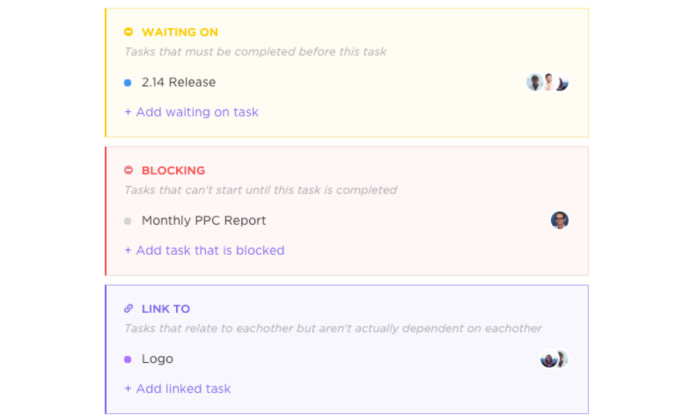
To set dependencies, for example, users simply indicate that a task should wait on another task to start or block another task in the workflow from starting.

And because you can track dependencies and due dates, ClickUp’s free version provides 100 uses of their Gantt chart feature.

Honestly, I’ve barely covered half of what ClickUp can do.

It’s my top pick for larger organizations that want free project management software they can actually use. 

Little things—like how every task in ClickUp has a unique ID—make staying organized at scale possible.

Plus, the hierarchy of spaces, folders, lists, and tasks is simple and flexible enough to work for just about any use case. 

In the end, ClickUp really forces teams to stay organized as they build out. You can’t put a price on that.

Summary

If we take all the frosting off the cake, what we really have left is a simple real-time system that captures a team’s workflow.

Finding the right free project management software is about understanding how each platform accommodates the local needs of each team.

If you are just starting to explore project management software, the free version of Trello is a great place to begin. It takes no time to master and has enough functionality for teams to tackle lightweight projects.

For companies that need a little more power out of their project management solution, ClickUp is the best bet. The feature set is robust compared to other tools and it will work well across multiple teams.

On the marketing side, Wrike provides email integration, which I think is essential. That’s something that only comes with paid versions from other vendors. 

In addition to that, both the internal and external collaborative features are rich. This makes it easier to interface with customers and coordinate behind the scenes.

Workplaces that subscribe to an agile methodology will find that Jira has been hand-crafted to suit their needs. The out-of-the-box reporting and deliberate design make it very attractive.

The post Best Free Project Management Software appeared first on Neil Patel.


from Blog – Neil Patel https://ift.tt/34YBgAK
via IFTTT
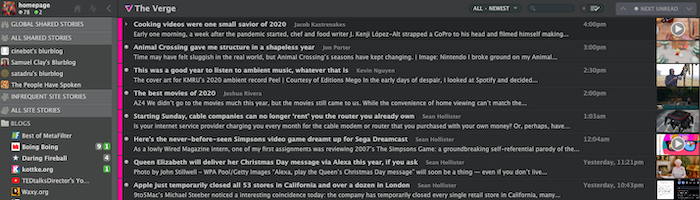
10 Alternative RSS Readers if You Still Miss Google Reader

10 Alternative RSS Readers if You Still Miss Google Reader

The mid-aughts to early 2010s were the heyday for RSS feeds like Google Reader. It felt like everyone was using them.

Then, in 2013, Google Reader was switched off, and their popularity has dwindled.

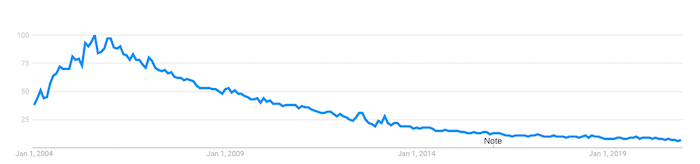
Dwindled, but not vanished entirely. Google Trends data shows a massive dropoff since RSS hit its peak back around 2005. But interest has been pretty stable since about 2015:

Google Reader popularity of RSS

What does this tell us?

While RSS feeds aren’t the must-use resource they once were, there’s still a dedicated base of users who aren’t prepared to say goodbye.

If you’re one of them, you might still be searching for the perfect alternative to your beloved Google Reader. Here are a few options, as well as some practical tips on using them to improve your content marketing strategy.

What Was Google Reader?

Google Reader was an RSS reader. RSS, which stands for “really simple syndication,” is an XML-based format used to distribute and share online content. It allows users to subscribe to news feeds from their favorite website and receive updates every time they post new content.

Google launched Google Reader in 2005 and quickly built up a loyal following because it was simple, efficient, and free. But as online habits changed, usage declined, prompting the search giant to permanently retire Google Reader back in July 2013.

10 Alternative RSS Readers to Google Reader

While Google no longer saw the value in RSS readers, lots of people still find them useful. Presumably, if you’re reading this article, you’re one of them, so here are ten Google Reader alternatives to try out.

Feedly 

  • Priced from: Free
  • Best for: Cutting through the noise

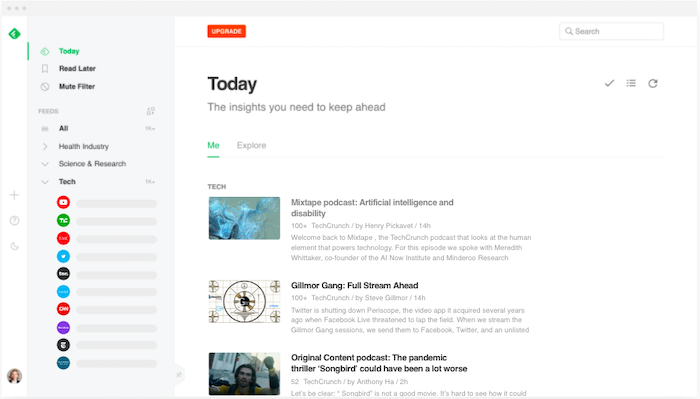
RSS readers can become victims of their own effectiveness. Say you want to curate all the latest news on a topic like blockchain, or a keyword like Microsoft. Pretty soon, you’ll have more relevant content than you could ever read.

Feedly is all about providing a decluttered RSS experience. Its free tier allows you to follow up to 100 sources, from news sites to YouTube channels. But the real value comes from its AI assistant, Leo.

Google Reader alternatives Feedly

Leo allows users to define what content is most relevant to them. You can prioritize by keywords, trends, topics, similar articles, and even critical software vulnerabilities. Then teach Leo what’s useful to you by upvoting or downvoting its recommendations.

Inoreader

  • Priced from: Free
  • Best for: Saving the content you love long-term

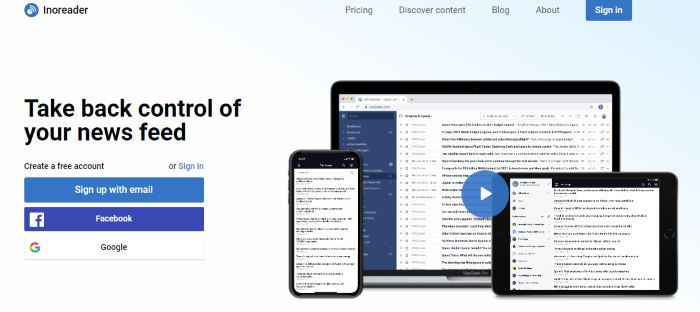
Inoreader has one feature that sets it apart from all the other Google Reader alternatives: the ability to build long-term archives of content.

inoreader google reader alternative

Most RSS readers only store content for a short period. But with Inoreader, limited-time archives aren’t a thing. The content you’ve already read is stored permanently, so you can access it at any time.

To stop things from getting unmanageable, Inoreader allows you to categorize your feeds into folders and add tags to individual articles.

Bloglovin’

  • Priced from: Free
  • Best for: Lifestyle content curation

Unlike most Google Reader alternatives, Bloglovin’ focuses on a single niche: lifestyle content. That means everything from fashion and beauty, to travel and interior design. Its colorful, image-heavy interface feels more like a social media site than an RSS reader.

Google Reader alternatives Bloglovin

Similar to Pinterest, Bloglovin’ lets you curate content around the lifestyle topics and themes most helpful to you. So if you’re planning a wedding or a big DIY project, you can start a new collection and expand it with relevant content.

Flowreader

  • Priced from: Free
  • Best for: Combining RSS and social feeds

Flowreader is an easy-to-use tool that acts as a one-stop-shop for content from all your favorite websites, plus your most-loved accounts on Twitter, YouTube, Reddit, and Pinterest. It saves you a lot of time navigating between multiple sites to access the content you most want to see.

Because it posts content in chronological order, Flowreader effectively lets you bypass Twitter’s recommendations algorithm, which means you can read tweets in the order they were posted.

Feedreader

  • Priced from: Free
  • Best for: Doing the basics

There’s nothing too complex about Feedreader; it just works. Basic and ad-free, this web-based RSS reader lets you subscribe to your favorite feeds and star items to view later. Your subscriptions can be categorized for easier navigation, while a bunch of keyboard shortcuts makes it simple to expand articles, mark items as starred, or refresh the results.

NewsBlur 

  • Priced from: Free
  • Best for: Filtering what you don’t like

It may not have the slickest interface, but NewsBlur is deceptively sophisticated. For one thing, it allows you to access the full text from each source right there in the RSS reader, which keeps your browser clean and uncluttered, while the free product tier lets you subscribe to up to 64 feeds.

Google Reader alternatives NewsBlur

NewsBlur’s most interesting feature is its filtering. Select a piece of content, then tell the app what you like or dislike about it, including:

  • Key phrases in the headline or body copy
  • The author
  • The publication
  • The categories that are relevant to that piece of content

Spend some time selecting your preferences and NewsBlur becomes a super helpful tool for accessing only the types of content you find most valuable.

Feedspot 

  • Priced from: Free
  • Best for: Advanced filtering

While it does all the things you’d expect a Google Reader alternative to do, Feedspot goes a step further with its advanced filtering functionality. This allows you to:

  • Make searches within all the feeds you follow, including blogs, news sites, RSS feeds, YouTube channels and social sites
  • Filter results from one or more specific feeds
  • Search phrases within the title only
  • Browse by exact phrase matches

All of which makes it easier to track down the content you most want to see, right now, from the sites and platforms that are most relevant to you.

The Old Reader 

  • Priced from: Free
  • Best for: Finding recommendations from people you trust
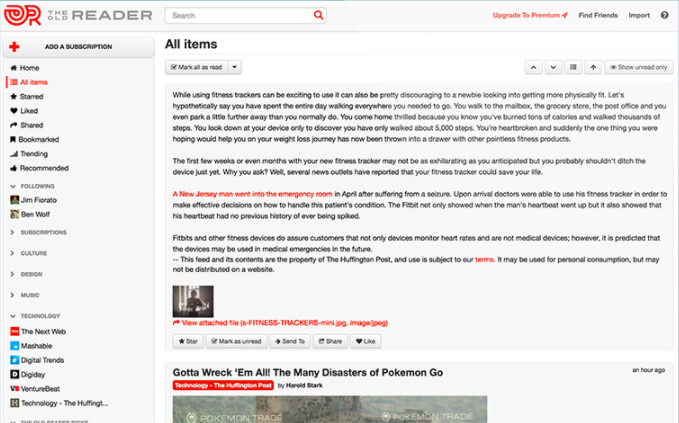
Google Reader alternatives The Old Reader

The Old Reader works best when used in groups. Connect with your Facebook or Google account to follow people in your network who also use The Old Reader, then you’ll be able to see the content they recommend. That way, you’ll never miss a piece of content they find useful or interesting.

Feeder 

  • Priced from: Free
  • Best for: RSS on the go

Feeder offers Chrome, Firefox, Safari, and Yandex extensions, making it easy to view your RSS feeds on desktop. But perhaps its most useful feature is the dedicated Android and iOS apps, which allow you to see all the headlines from your favorite sites, plus a simple view of the full content, on mobile. Great for when you absolutely need to keep up with the news but aren’t at your computer.

Netvibes

  • Priced from: Free
  • Best for: Social media monitoring

While Netvibes works great as a traditional RSS reader, its real strength lies in its ability to automate interactions between multiple platforms, apps, and devices. Think of it as like the Zapier of RSS readers.

So how does that work in practice?

Well, Netvibes currently integrates with 43 apps, including Gmail, Google Drive, LinkedIn, and Twitter. It also does a ton of stuff, from monitoring stocks to tracking your health. From a marketing perspective, the biggest “win” is as a social media monitoring tool.

Rather than presenting you with a feed of new social posts from people you follow, Netvibes allows you to dig deeper. For example, you can create a feed for @mentions of your brand on Twitter, or one dedicated to a certain hashtag.

That makes it easy for you to keep updated on what people are saying about you or follow topics relevant to your business.

How to Use RSS Readers to Benefit Your Content Marketing

Google Reader alternatives aren’t purely for finding content. They can be a vital part of your content marketing efforts, too.

Create Your Own RSS Feed

You’ve got a blog or resource hub, and you’re producing fantastic content. But you’re struggling to bring people back to your site.

Setting up your own RSS feed can be a big help. That way, subscribers will see all your latest content every time they access their favored RSS reader. It’s a great way to amplify your content, and best of all it’s completely passive. Once you’ve implemented your RSS feed, it’ll do all the hard work.

Be sure to compel readers to subscribe to your feed by incorporating clear calls-to-action (CTAs) throughout your content. Consider adding an RSS button to your content hub landing page, too:

Keep on Top of Industry News & Thought Leadership

Does your audience come to you for your take on the latest news impacting your industry? Then an RSS reader can ensure you’ll always be one of the first to know about any new developments and key announcements.

Let’s say you’re in the marketing niche. You want to keep up to date with what’s going on, so you can react to it fast by creating your own content. Consider adding the following types of accounts to your favorite Google Reader alternative:

  • The Twitter accounts of thought leaders like Rand Fishkin, Jeff Bullas, and Mari Smith (and me!)
  • Marketing blogs and social feeds from big industry players like Google and Facebook
  • Industry news sites like NeilPatel.com, Search Engine Journal, and Digiday
  • Your biggest competitors’ blogs (it pays to be aware of the content they’re creating, too)

Segment all of those feeds into categories so they’re easy to browse. Then get into the habit of spending five minutes at the start of every day, or on your lunch or coffee break, reading through all the latest news.

Curate Your Own Newsletter

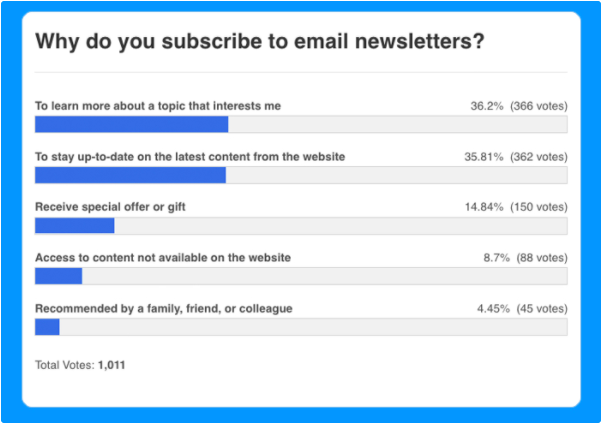
Why do people subscribe to newsletters? Well, according to one study, about three-quarters of people subscribe to learn more about topics they find interesting, or to keep abreast of content from their favorite websites.

Google Reader how to use RSS feeds in content marketing

With that in mind, you can quickly and easily create your own newsletter featuring all the biggest developments in your industry, simply by curating all the top content pulled in by your RSS reader.

Include a couple of CTAs to sign up in prominent spots on your website, and you’ve got yourself a low-effort way to build up a mailing list and generate a bunch of leads.

Inspire Your Content Creation

Sure, I create a lot of content, but even I get writer’s block sometimes! If you’re struggling to come up with new topics for your blog, or podcast, or YouTube channel, your RSS reader can help.

Check out what other people in your niche are discussing. Look out for trends, breaking news, or subjects you feel passionately about and have an opinion on. And presto, there’s all the content inspiration you need.

Conclusion

RSS feeds may have gone out of fashion in the last few years, but that doesn’t mean they’re not worth your time. While everyone else gets their news from the cluttered, algorithm-influenced world of social media, you can use a Google Reader alternative to cut through all the noise and find the most relevant content.

That means you’ll never miss an important piece of news ever again. Use my tips to drive your content marketing plans, or even help you with lead generation. What’s not to like?

What’s your favorite Google Reader alternative and why?

The post 10 Alternative RSS Readers if You Still Miss Google Reader appeared first on Neil Patel.


from Blog – Neil Patel https://ift.tt/38NbaS8
via IFTTT