Thursday, 1 April 2021

Best WordPress Directory Plugins

Disclosure: This content is reader-supported, which means if you click on some of our links that we may earn a commission.

A functional online directory plugin will help you deliver business or personal information by location or category for internal or external use. 

Whether you want to build a glossary of names and terms for your employees or a comprehensive business index, a good directory plugin for your WordPress website will help you do just that. 

Directory plugins serve a simple purpose: to create a user-friendly database with up-to-date details for both your customers and internal team. Your plugin of choice will give you access to this information along with pictures, location information, and contact details. 

As there are many directory plugin options out there, I’m here to make it easier for you by narrowing it down to the top five best directory plugins for your WordPress website—so you won’t have trouble finding the right one for you. 

#1 – Business Directory Review — The Best for Extensive Directory Categories 

If you’re looking for a wide variety of directory categories to choose from, the Business Directory plugin is an excellent option. 

This plugin allows you to easily build the directory you want by seamlessly pairing it with any WordPress website. 

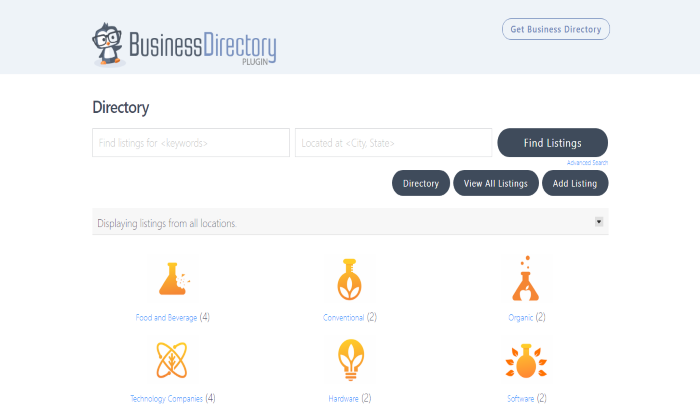
It doesn’t matter what type of directory you wish to build because the Business Directory plugin has it all. The plugin covers the basic local business directories as well as employee, member, restaurant, medical, tour and travel, hotel, software review sites, and book review site directories. 

Along with its extensive category list, Business Directory offers a simple installation process that WordPress users can rely on. 

With its easy directory templates, you can change the style and layouts to suit your preferences. This plugin also lets you have full-field control to create your own custom fields for simple list navigation.  

Some other helpful features include: 

  • Free and paid submissions for extra traffic or revenue 
  • Mobile-friendly listings 
  • Google maps 
  • PayPal and Stripe integration 
  • Full image support 
  • Rating module 

Business Directory offers three pricing plans, including: 

  • Basic: $199 per year for one site, unlimited listings, and one year of support 
  • Pro: $399 per year for up to five sites with all basic features and priority support (most popular)
  • Elite: $599 per year for unlimited sites with all pro features and all directory themes

These pricing plans may be quite expensive for some, so I recommend the Business Directory plugin for those who need a diverse range of categories for their directory. All pricing plans come with a 14-day money-back guarantee. Try it today.

#2 – GeoDirectory Review — The Best Customizable Directory Plugin for WordPress
Customization is important for directory plugins, which is where GeoDirectory comes in. GeoDirectory is an excellent option for website owners who are looking for ultimate flexibility and customization options. 

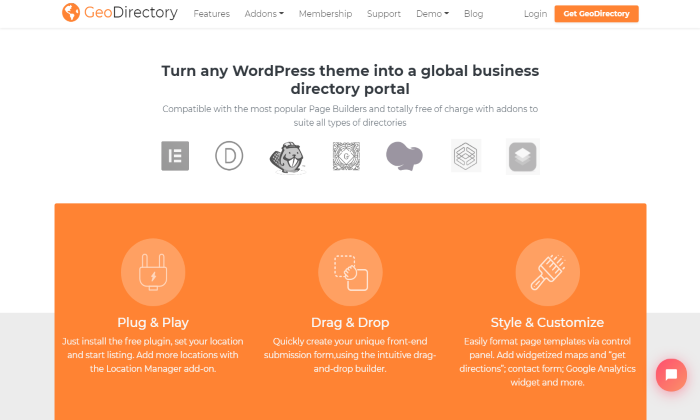
With its incredible compatibility, this plugin works with any WordPress theme and allows you to easily customize your page the same way you do for your actual website and theme. GeoDirectory also lets you customize 40+ widgets, shortcodes, and blocks, and all features are available in any format. 

This plugin offers an intuitive drag-and-drop tool that helps you organize and reorder listing pages while easily adding customized tabs, fields, and content. 

Custom fields also come with a fully customizable and unique badge system that you can include in your listings. These badges include terms such as new, featured, and recently updated. You can also add badges with counts, video icons, and social links. 

By using GeoDirectory, your WordPress website will benefit from multiple advanced features, including: 

  • Add business hours to any listing 
  • Ratings and reviews 
  • Developer-friendly system  
  • Pre-built templates 
  • Advanced integrations 

As one of the most comprehensive directory plugins on the web, GeoDirectory offers four different pricing plans: 

  • Four Months: $99 paid every four months 
  • Six Months: $129 paid every six months 
  • One Year: $199 paid every 12 months (most popular) 
  • Lifetime: $995 paid once 

Every plan includes all products, add-ons, and premium support for the corresponding period. If recurring subscriptions aren’t your thing, GeoDirectory offers single four, six, and 12-month plans. A 30-day money-back guarantee covers all plans, except for the Lifetime tier. Learn more.

#3 – Connections Business Directory Review — The Best Free WordPress Directory Plugin
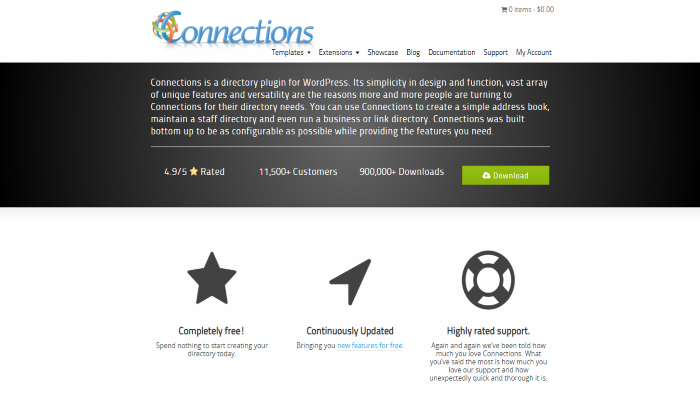
With its high-quality and supportive features, Connections Business Directory is a great free option for those looking for a starter plugin. With over 900,000 downloads, this plugin will help you seamlessly integrate your customized directory with your WordPress website. 

The Connections Business Directory system and database have been carefully crafted for maximum compatibility with WordPress, so your installation experience is smooth and simple—especially for website owners with little technical knowledge. 

The plugin is also completely scalable and gives you the option to manage hundreds of entries within your directory. 

Another outstanding feature of Connections Business Directory is the robust templates. For a free plugin, it offers you a decent range of templates to get you started—with a template pro package available for an additional cost. 

Apart from it being free, which is a huge bonus, Connections Business Directory has prominent features, such as: 

  • 30+ languages are translation ready 
  • Many free and premium extensions 
  • Repeatable fields 
  • Free support forum 
  • Developer-friendly with open APIs 

As you can install Connections Business Directory for free, they don’t have any pricing plans. However, you can purchase premium add-ons and extensions for an affordable price. Some of the most popular add-ons include the Widget Pack for $9.99 and the Custom Category Order for $4.99.

Template bundles include: 

  • Extension Pro Pack: $29.99 for one site 
  • Template Pro Pack: $59.99 for one site 
  • Pro Pack: $74.99 for one site

Although these prices are very affordable, it’s also important to create a budget not to overspend on the extras. In that case, you may find a different directory plugin with additional features for around the same price.

#4 – Advanced Classifieds and Directory Pro Review — The Best WordPress Plugin with Multifunctional Features
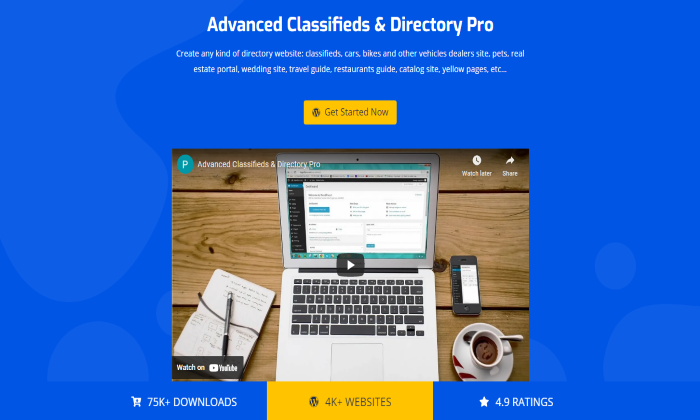
Create a powerful business directory using the Advanced Classifieds and Directory Pro (ACADP) plugin. With its unique unlimited features, you can build an advanced directory from scratch with little to no effort. 

Even though this plugin offers customizable settings and layouts for an easy view of your listings, the multifunctional widgets are by far the best feature to take advantage of. 

ACADP has a wide variety of WordPress-compatible widgets that offer a more convenient way for you to add and manage content on your website without complex code, making it a perfect tool for beginners. 

ACADP specifically designs the widgets to showcase listing-related information and tools for easy navigation. The widgets include ACADP search/filter, categories, locations, listings, listing address, listing contact, and listing video. 

Your website will easily support these widgets and all users need to do is hover and click on the widget they need for extra information. 

Being quite a comprehensive plugin, you will benefit from many features, including: 

  • Advertiser and user panel functions 
  • Backend management 
  • Email notifications 
  • Bookmark tools with advanced search and filtering 
  • Unlimited listings, categories, locations, and custom fields

ACADP has two pricing plans you can pay for monthly, yearly, or with a one-time life fee, which includes: 

  • Starter: Free and includes one site with unlimited listings, categories, locations, and custom fields plus email templates.
  • Professional: $9.99 per month, $95.98 per year, or $289.99 lifetime and includes one site with all starter features and payment gateways.

ACADP offers between three and five sites on the Professional plan, but you will have to pay additional costs according to how many sites you want. They also offer a 30-day money-back guarantee for all plans and a 20% discount on the lifetime plan. 

#5 – Name Directory Review — The Best Directory Plugin for an Online Glossary Builder
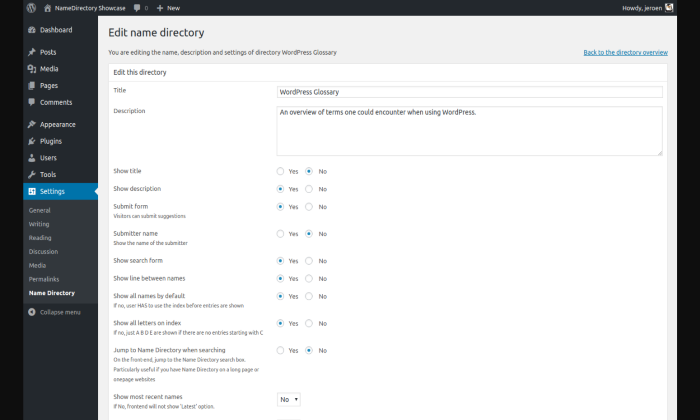
Name Directory is another free plugin, however, it’s a little different from the other options on this list as it isn’t a standard business index plugin. If you are a beginner looking for a more basic database that can build online glossaries for your WordPress website, Name Directory is an excellent option. 

With a similar control panel view to the WordPress administration panel, you will have a simple time adding to, navigating, and managing your online glossaries through Name Directory. You can add multiple directories with this plugin with simple shortcodes to copy and paste into the database. 

Every online glossary you build also has a few customization options to alter the directory’s layout and functionality. 

Even though this is a basic directory, there are still a wide variety of configuration options you can choose from to help maintain your online glossaries. 

Some of these include the option to show/hide title, description, and search function, select the number of columns to display, enter the subject of the directory, and limit the number of words in your description with a ‘read more’ link. 

Because it is an entirely free plugin, there are limited features, but Name Directory includes: 

  • An in-depth support forum with the developers 
  • Import CSV files 
  • Customization for listings 
  • Language support 

Name Directory is free to download and install. However, the developer team offers paid customization for anyone looking at a more extensive plugin at a low price. 

What I Looked at To Find The Best Directory Plugins for WordPress

Now that you know my top five recommendations for the best directory plugin for WordPress, it’s time for you to look for the right product for your website. 

To make it easier for you, I narrowed down the top three criteria that helped me find the best options above. All you have to do is weigh up these criteria against your personal needs to find the perfect plugin for you. 

Not every plugin will have all three criteria, but it’s important to find a plugin with at least one or two of these for you to use your website to its maximum potential. 

Customization for Listings 

Being able to customize your old and new listings is paramount to the success of your business index. 

Having a flexible and customizable plugin like GeoDirectory will make sure your listings are up-to-date for your users. 

Not being able to customize your directory will heavily impact your business due to lack of functionality, so it’s imperative to find a plugin that offers at least some customizing options. 

Rating and Review System

A rating and review system is paramount for letting your users express their opinions about your listed businesses. 

Just like the Business Directory Plugin that offers a rating module, it helps to bring more inclusivity to your website by allowing users to rate businesses on a scale of one to five. 

Plus, ratings and reviews help users decide on the most trusted service, and you can risk losing business without it. 

Bookmarking Tools 

A plugin that offers any sort of bookmarking tool will help transform your website. 

ACADP is one of the directory plugins that have this tool alongside advanced searching and filtering features. 

This tool will allow your users to bookmark individual listings for future reference, making it incredibly convenient while saving time. 

Your business index won’t completely suffer without it, but it’s a handy tool that will increase consistent traffic for your website.

Conclusion 

Finding the best directory plugin for your WordPress website depends on a few factors like customization, a rating and review systems, and bookmarking tools, among other features. 

Looking for these elements is a great place to start, as it will ensure you get the maximum support from your desired plugin. Use my top picks to start your search:

  1. Business Directory Plugin – Best for extensive directory categories 
  2. GeoDirectory – Best customizable plugin 
  3. Connections Business Directory – Best free WordPress plugin
  4. Advanced Classifieds and Directory Pro – Best plugin with multifunctional features
  5. Name Directory – Best plugin for an online glossary builder

I’d recommend the GeoDirectory and Business Directory Plugin to anyone looking for extensive and highly customizable directory plugins for your WordPress website. 

GeoDirectory is the most customizable option on the list, with excellent WordPress compatibility and an intuitive interface. As a developer-friendly system, anyone can transform and customize the pre-existing databases to suit your every need. 

Business Directory Plugin is also great for extensive categories. If you have multiple niches and locations you wish to cater to, this plugin has it all in terms of options. It’s also mobile-friendly and has great payment integration options if you want to earn as you go. 

That being said, the other three directory plugins are excellent options that highly suit beginners. 


from Blog – Neil Patel https://ift.tt/3pRLbiP
via IFTTT

10 Small Business Examples of the Best Instagram Bios

10 Small Business Examples of The Best Instagram Bios

Instagram is extremely popular. The image-heavy platform is the fifth most-used social media network in the world, with over 1.2 billion users.

If you don’t have a presence on Instagram, you’re missing out on building an audience and increasing your sales.

To get the most out of Instagram, you should create a solid Instagram bio so users can get a clear, concise idea of who you are, what you’re about, and, most importantly, what you can offer them.

Here are ten of the best Instagram bios for small businesses and explain why they’re excellent. We’ll also include tips for crafting a strong bio and what must-haves to include on your company account.

10 of the Best Instagram Bios for Small Businesses

Here are several small-business Instagram bios that hit the mark and why. We’ve also included takeaways you can use for your own company.

1. Ellevest

best Instagram bios - ellevest instagram page bio

Ellevest is a digital investing platform. CEO Sallie Lee Krawcheck co-founded the company to empower women to take greater control over their financial future.

Why This Instagram Bio Is Great

The Ellevest Instagram bio works because it clearly states who the business is for (by women, for women), the industry it’s in (financial services), and the type of business model it uses (membership-based). This gives the reader a good idea of the target audience and what they’ll achieve through the service.

The company also includes a Linktree link in its bio, a platform allowing you to showcase additional links to content you want to share with your followers. This link points users to multiple brand blog posts and membership webpages.

You can borrow this for your own small business. After all, a Linktree link isn’t just a content-sharing opportunity: You can walk people directly to your landing pages via Instagram, cutting through the noise so they can more easily buy from you.

2. Pura Vida Bracelets

best instagram bios - pure vida

Pura Vida, which translates to “Pure Life,” is more than just a bracelet retailer. The company has a community of over 800 artisans in countries such as Costa Rica, El Salvador, and India who earn money crafting homemade jewelry.

Why This Instagram Bio Is Great

First off, the Pura Vida Bracelets Instagram bio is structured with various emojis, which saves space and gives off a fun vibe. “Fun” works here because the company features tons of colorful images of smiling people modeling the products—it’s on-brand.

Second, the emojis-as-bullet-points help clearly state the bio’s main areas of focus, particularly “FREE SHIPPING.” This is good for small businesses to highlight, especially if your main competitors don’t offer it.

Lastly, the branded hashtag, #PuraVidaBracelets, is a nice touch. Small-business retailers should consider implementing a personalized hashtag as a way to social-listen and reshare UGC across social while getting their brands’ names out there.

3. The Freckled Hen Farmhouse

best instagram bios - the freckled hen farmhouse

Created by lifestyle blogger Natalie Freeman and her husband Luke, The Freckled Hen Farmhouse is both a brick-and-mortar and online shopping destination. This general store has everything from home goods to local products to garden supplies.

Why This Instagram Bio Is Great

The Freckled Hen Farmhouse Instagram bio doesn’t cater to one audience over the other. Instead, it caters to both in-person and online shoppers.

The bio includes its store hours, local delivery options, and phone number. Additionally, the company plugs its rental cottage in the bio, adding more opportunities for loyal customers to spend money on the brand. Finally, it includes a Linktree link leading to its store website, newsletter sign-up page, and seasonal and year-round category pages.

If you’re a small business with an online and offline space, it’s a smart idea to speak to all your customers in your Instagram bio.

4. Lush Cosmetics

best instagram bios - lushcosmetics

Lush is a values-driven brand. Founded in London, the cosmetics company prides itself on fresh products, no unnecessary ingredients, and cruelty-free testing.

Why This Instagram Bio Is Great

Unlike our other examples, the Lush Cosmetics Instagram bio keeps it short and sweet, saying, “We’re creating a cosmetics revolution to save the planet,” followed by two emojis, its branded hashtag, and a Linktree link.

The message is direct, and words and phrases like “revolution” and “save the planet” feel bold and exciting coming from a makeup brand. Similarly, small brands can, and should, experiment with how they describe their company, as long as it feels relevant—otherwise, it will come off as confusing, or worse, inauthentic.

This bio is a good reminder, too, that just because you have more space doesn’t mean you need to use it. That in itself is a departure from jam-packed bios and even a bit surprising. Our brains like novelty, so don’t be afraid to do things a little differently for your business.

5. Later

best Instagram bios - later instagram page bio

Later is a leading Instagram marketing platform. The company boasts millions of users, and social media professionals, brands, and influencers can use the tool to manage content across Instagram, Pinterest, and even TikTok.

Why This Instagram Bio Is Great

There are a lot of things working for the Later Instagram bio. First, the company does a great job expanding the copy beyond its name to better reach users on the platform who may be looking for this type of service (social marketing platform).

By improving its Instagram SEO with relevant keywords, the brand increases its chances of being found. Plus, “Later” is a common word, so it’s good to add more context for searchers.

Next, the company states it’s the “#1 Marketing Platform for Instagram.” Piggy-backing off SEO, this is good to market to potential users.

Small businesses can optimize their bios with applicable keywords and feature brag-worthy accomplishments to get readers’ attention.

6. ALOHA

best Instagram bios - aloha instagram page bio

ALOHA produces USDA organic, vegan, and gluten-free protein powders, drinks, and foods. The brand shares plenty of recipes and UGC on its site and social media platforms.

Why This Instagram Bio Is Great

Taking a page out of Later’s book, the ALOHA Instagram bio asserts the company as its industry’s leader. While the brand keeps the copy to a minimum, it focuses on the keywords its customers care about, like “organic” and “plant-based.”

ALOHA also changed its profile picture to showcase it was named a Certified B Corporation. These companies must meet strict social and environmental standards, among others. If your small business has a prestigious distinction or won a big award, it’s worth highlighting it in this space.

7. Lokal

best Instagram bios - lokal hotel instagram page bio

A husband-and-wife duo created the Lokal Hotel after dreaming up ways they could improve the Airbnbs where they’d stayed and the hospitality experience in general. This home-away-from-home brand offers hyper-local lodging in the Philadelphia and Southern New Jersey regions.

Why This Instagram Bio Is Great

The Lokal Hotel Instagram bio covers a lot of ground. It includes a specific category, “boutique hotels | cabins” instead of just “hotel,” so those seeking this particular experience can find it, and expands on this with “apartment suites & homes.”

On top of the location and branded hashtag, the bio points out the Linktree where guests can book their stay, sign up for its newsletter, and more.

Other small businesses, especially those in this space, can take a few cues from this bio. By keeping all this information centralized, you could keep potential guests engaged and on your page longer.

8. GOODEE

best Instagram bios - goodee instagram page bio

GOODEE is a top online marketplace. Designers and entrepreneurs Byron and Dexter Peart founded the company to curate brands that not only looked good but sparked good too. As such, they only work with artisans who prioritize positive environmental or social impact.

Why This Instagram Bio Is Great

The GOODEE Instagram bio lays out what the business is (a curated marketplace) and its focus (good design meets good purpose). Like ALOHA, pointing to the company’s B Corp designation and 1% for the Planet certification aligns with its mission and signals to consumers what’s important to the business.

This is both sincere and savvy: 72 percent of U.S. consumers believe it’s important “to buy from companies that reflect their values,” according to Retail TouchPoints.

So, if your small business is values-driven, don’t shy away from including that in your marketing and messaging. After all, the customers you seek are also seeking you.

9. Rumpl

best Instagram bios - rumpl instagram page bio

Rumpl operates in the outdoor-industry space and helps keep campers and adventurers warm. After a successful Kickstarter launch, the company continues to grow and expand its inventory.

Why This Instagram Bio Is Great

There’s beauty in the simplicity of the Rumpl Instagram bio. It mentions its best-known item—blankets— and gives a brief, relatable description of the materials in them. The company also mentions its “Shark Tank” appearance and includes a branded hashtag and link to a current giveaway.

Instagram contests are popular and can help accelerate your brand growth. This is especially true if you partner with another company and can leverage each other’s audiences. It’s something your small business should consider (and then promote in your Instagram bio, of course!).

10. Letterfolk

best Instagram bios - letterfolk instagram page bio

This home-decor biz produces letter boards, tile sets, paper goods, and more. A married couple founded Letterfolk, and the company has developed a big following thanks to its thoughtfully designed products and national press hits.

Why This Instagram Bio Is Great

Instead of using the company’s Instagram bio to direct followers to use certain hashtags, Letterfolk invites its followers to check them out, saying, “See LF products in the wild,” followed by relevant hashtags. Using this hashtag, consumers can view how other people use and display their products. By making this tweak, it feels more community-oriented right away.

Another notable distinction: It’s stated in the bio that Joanna and Johnny are not only a husband-and-wife team but also a small business.

Since some shoppers specifically look to buy from smaller companies, this is an excellent way to get in front of potential shoppers. If you don’t call-out your small-biz standing in your bio, consider adding it and see if there’s an increase in engagement.

5 Tips for Creating the Best Instagram Bio for Your Small Business

Now that you’ve seen examples of some of the best Instagram bios for businesses, let’s recap the top ways to make yours stand out.

1. Use Creative Elements

Some brands add emojis to the mix in their Instagram bios. Aside from highlighting your brand’s personality, these icons can help influence readability. This could help your messaging stand out. So, you might want to try cutting back on copy and increasing white space by including emojis.

Brands can also change up font styles in their Instagram bios. This adds variety. However, be careful to make sure the script is readable, and don’t overuse it.

2. Show Your Brand’s Personality

You want to capture your brand’s personality in your Instagram bio. Experiment with copy, emojis, and other creative ways to show it off.

Don’t be afraid to play around a bit and have fun with your followers, either. Drizly’s Instagram bio comes to mind:

best Instagram bios - drizly instagram page bio

Be careful not to mistake “social media” as an excuse to depart from your familiar brand voice, though. For example, a hospital using laughing emojis in its bio wouldn’t be a fit—and might even make patients nervous! Alternatively, seeing emojis on the BarkBox Instagram bio feels completely in-line with the company’s fun reputation.

Bottom line: Know your brand and know your audience.

3. Share User-Generated Content

You don’t need to develop a campaign to create a hashtag—though it doesn’t hurt. Creating a hashtag unique to your small business is a good way to create brand awareness and help build your community.

Craft a hashtag that includes your company name or captures your ethos. For instance, if you think #JustDoIt, chances are, your brain goes to Nike.

From there, you can encourage your customers to include your hashtag in their social posts and reshare that user-generated content (UGC) on your channels.

You can also repurpose UGC for stories and other content. Incentivize users to share posts with your hashtag for discounts, contests, or just the opportunity of possibly featuring them on your platforms.

4. Clearly State Your Brand’s Purpose

You only have so many characters to work with in your Instagram bio. Use this space to clearly state what your small company does and be direct in your ask. For example:

  • Do you want to build a community? Include your branded hashtag and ask followers to use it.
  • Are you looking for newsletter subscribers? Include a link in your bio.
  • Are you looking to increase sales? Add a Linktree pointing to multiple product pages so users can find what they’re looking for.

Whatever your goal, be clear about it.

5. Include Links, Hashtags, and More

You have a hard stop when it comes to characters within the bio itself. However, there are options to expand on more details about your business and even cross-promote your other companies or personal pages. Consider including the following:

  • intentional calls to action (CTAs)
  • Instagram handles for your other related brands
  • your location and hours of operation if you own a physical store
  • your contact information
  • your branded hashtag
  • links to current promotions or contests
  • a Linktree (or similar) link leading readers to other content

Conclusion

The best Instagram bios authentically match your brand and serves your users.

Checking out the bios of the pages we’ve listed can help you get a feel for what’s working across the board. Also, see what your competitors are doing, and don’t be afraid to experiment with different formats.

Social media is an important aspect of digital marketing. Our agency can help if you are having trouble developing a social media strategy. We also offer assistance with content marketing and SEO.

Once you’ve polished your page, Instagram can be a powerful marketing tool for your business. So don’t skimp on putting the work into it.

What do you like about your favorite brands’ Instagram bios?


from Blog – Neil Patel https://ift.tt/2PSTjne
via IFTTT
Squarespace Review

Disclosure: This content is reader-supported, which means if you click on some of our links that we may earn a commission.

Do you need a way to build beautiful sites without needing to learn all the technical stuff?

Squarespace would be one of my top recommendations. It’s an intuitive website builder that enables anyone to create beautiful websites easily and quickly.

The elegant platform was started in 2004 by a University of Maryland college student and has since flourished. Today, Squarespace is an incredibly popular website builder that millions of people have used to establish their online image.

Squarespace Compared to The Best Website Builders

Squarespace stands out for one main reason: it is amazingly easy to create beautiful websites for even the most clueless novice. Though it didn’t make our list of best site builders, Squarespace is still worth reviewing as one of the top website builders on the market today.

In our review of the best site builders, we painstakingly went through each website builder to determine the four top choices for different needs and use cases.

I’ve been building sites for years at this point, so you can bet I know a thing or two about what makes a great website builder. Once you read it, you can make the most informed choice. See all of our top picks for the best website builders. Let’s dive in. 

Who is Squarespace Best For?

Without a doubt, Squarespace is the best website builder for designers, artists, and ecommerce stores that want to create appealing sites with incredible visuals with minimal fuss. This makes it an excellent choice for small business owners that want a leg up visually but might not have the budget or know-how for it all.

Since Squarespace is a hosted solution, you don’t have to get into any extra steps to find a server or install software. You can create a beautifully designed site right on your browser, all in one place. 

Bottom line? Squarespace is great for creative people that like to work with templates and a style editor that lets you personalize even the smallest site details. Still, there are major pros and cons to take into account. 

Squarespace: The Pros and Cons

Pros

Responsive site templates: Squarespace offers more than 100 site templates to choose from. Best of all, they’re already built to be mobile responsive. A perk you might not always get with templates from other website builders.

Unlimited storage space: Squarespace offers unlimited storage on every plan. This is stellar news for creative sites that’ll inevitably build an extensive media library over time. With Squarespace, you won’t have to worry about hitting a storage or bandwidth limit.

Supportive live chat: Stuck? No need to worry. With its live chat feature, there is always an agent there ready to help you solve any site building problem you might run into. 

Webinars and help guides: As with most website builders, Squarespace does have a bit of a learning curve as far as the backend is concerned. But to remedy this, it has built an extensive library of detailed help guides and webinars that’ll get you to Squarespace expert level in no time. 

Built-in email marketing: One of my favorite Squarespace features is their built-in email marketing tool. To put it simply, it’s an add-on that empowers you to build eye-catching emails with beautiful templates without having to go through a third party. I don’t know about you, but the less software I have to deal with to get the job done, the happier I am. And you get plenty of integrated analytics to boot. 

Tools built specifically for ecommerce sites: Squarespace doesn’t stutter when it comes to who they cater to. As soon as you find out about them, it’s clear they care about visuals, but they also care about equipping you with the best ecommerce tools to create a dynamic online store. This helps narrow down your web builder choices if you’re specifically looking to create a great ecommerce site. 

Cons

Limited control over your domain name: If you buy your domain name through Squarespace, you won’t be able to migrate it to another hosting provider if you ever decide to do so. This can be a determining factor in whether you want to call Squarespace your site’s home and purchase your domain name in-house.

Limited SEO features: Lots of digital experts question the SEO capabilities of Squarespace. While there are plenty of success stories of sites ranking on Google, optimizing your posts and pages on Squarespace isn’t as intuitive as with other website builders like WordPress or Drupal. If SEO is the primary way you’ll drive traffic to your site, this is a point worth considering.

Squarespace Pricing

Now, what exactly do you need to pay to start using Squarespace and all its beautiful templates? Well, you can pick from a few excellent options

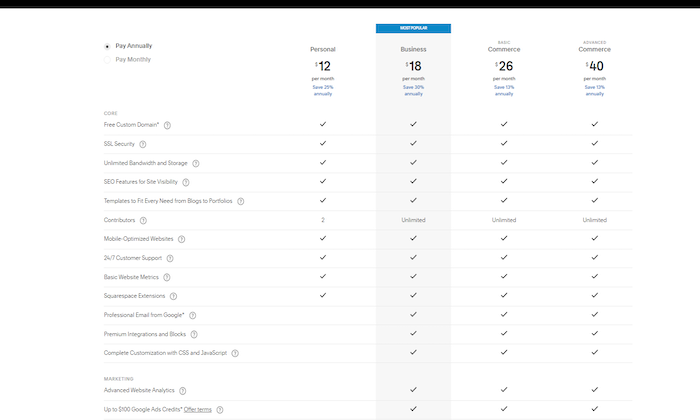
  • Personal – $12 per month billed annually
  • Business – $18 per month billed annually
  • Basic Commerce – $26 per month billed annually
  • Advanced Commerce – $40 per month billed annually

Let’s start with stating the obvious: Squarespace isn’t the cheapest web builder and host out there. But if you’re primarily looking to easily build jaw-dropping websites that catch your target audience’s attention, the price tag for even a personal plan might not be an issue for you.

Personal

Once you decide to go with the Personal tier, you’ll get access to basic site features like a free custom domain, SSL certification, unlimited bandwidth and storage, additional SEO features, access to Squarespace extensions, and 24/7 customer support.

All for $12 per month. While you can get all this and sometimes more with other web builders for less, it’s still worth looking into each of their tiers for a Squarespace plan that fits your needs. 

Business

Squarespace’s business tier is great if you’re trying to find a reasonable price point for an online store with entry-level tools. With its Business tier, you get everything in the Personal tier plus a suite of fully integrated ecommerce tools that’ll equip you to sell and track inventory, accept payments, and more.

You’ll also be able to sell an unlimited number of products, accept donations, and give your customers the ability to create and send gift cards. Bottom line? The Business Squarespace tool is what you should start with for a beginner to intermediate ecommerce business.

Basic Commerce

Think of Squarespace’s Basic Commerce tier like the Business tier’s older brother. While you’ll get all the business tier capabilities, you get a few more powerful perks if you go the $26 a month route.

With Basic Commerce, your online store will be ready to quickly list and tag your products on both Facebook and Instagram, have access to advanced ecommerce analytics, and even create customer accounts. While other web builders can offer a similar mix of services, Squarespace categorizes them so that they uniquely cater to online selling.

Advanced Commerce

Possibly the most significant appeal of the Advanced Commerce tier for Squarespace, at $40 a month, is that there are no transaction fees.

What does this mean for your ecommerce business? A built-in payment gateway ready to process payments with absolutely none of the fees that can quickly cut into your profit margin. 

While you get everything in all the previous tiers, you also get advanced tools to handle shipping, advanced discounts, as well as an abandoned cart recovery strategy that can put more money in your pocket. It’s clear Squarespace has thought of everything when it comes to successfully building an ecommerce business with special attention to both the frontend and backend of things. For this, I’d say they deserve plenty of brownie points. 

But don’t take my word for it. I recommend you carefully read through each of their pricing levels to see which one appeals to you the most. Once you lock into a website builder, it can take a lot of extra work and hassle to switch to a new one. 

Now, let’s see how Squarespace’s main offerings stack up and what you can learn about each of them as far as building your best website goes. 

Squarespace Offerings

There are tons of features Squarespace offers to create and optimize your site. Overall, their offerings separate into three distinct yet helpful categories where they concentrate their web builder tools. Taking a closer look at each one can help you make the best web builder decisions. 

Website Builder and Hosting

Squarespace likes to call itself the leader in web design. And this claim isn’t made in vain. The drag-and-drop web builder and site templates help you create portfolios and professional websites that stand the test of time. To complement their roster of web builder tools, they also offer site analytics as a nice plus.

While I wouldn’t call Squarespace the absolute best content management web builder, it undoubtedly does its due diligence in the design and visual department. It also hones in on the flexibility you’ll need to create a portfolio that’s up to par with your design needs.

Ecommerce

Squarespace does its fair share in the ecommerce department, too, making them a strong contender to house your online store. Their offerings empower you to sell anything, whether it’s products, services, or by booking appointments of any kind. 

If you’re a brand that cares about first impressions to drive sales, Squarespace takes care of you not only with plenty of store templates but also a robust backend that can streamline your work order management. This sets it apart as a web builder tool for selling online since some others simply don’t go the extra mile in this department.

Squarespace goes as far as enabling you to create a membership site, which speaks volumes as far as innovation and keeping up with trends go. Not every web builder out there gets specific with the tools they provide. This is yet another feature that differentiates Squarespace from the rest. 

Brand Building Tools

If there’s one thing Squarespace focuses on as a web builder tool, it’s branding. We’ve already discussed Squarespace as a heavily visual builder. But this doesn’t mean they lack tools in the brand strategy department.

Squarespace lets you create dynamic email campaigns that are just as creative and visually powerful as your site. This means you can easily click and drag the products on your site that you want to showcase or let your audience know about a storewide sale. 

Along with email, Unfold is Squarespace’s unique “storyteller tool.” With it, you can create awe-inspiring social content that’s easily shareable for additional brand exposure. Filters, sticker packs, and easy image editing let you tell your story as a unique brand.

Squarespace is a groundbreaker in the web builder space when it comes to catering to a visual community. They do this by unifying both powerful website building tools that get results and the beauty of design. 

As a website builder that doubles as a host, you won’t see many other Squarespace-like builders that are truly comparable. At the same time, lots of Squarespace features make it more of a niche website builder. It caters to its intended audience powerfully well. 

The Best Website Builders

To make your best choice in website builders, don’t forget to read my in-depth review of four other top website builders you should consider. Here’s a quick overview for your convenience:

  1. Wix — Best for general use
  2. Weebly  — Best for beginners
  3. Shopify — Best for ecommerce
  4. WordPress — Best for content management

Squarespace is a reliable web builder for creatives, artists, and ecommerce stores that keep visuals at the forefront of their business strategy. While its site plans tend to be a bit pricier, Squarespace more than makes up for it by allowing you to build and host your site all in one place and equipping you with a long list of site templates you can customize to your heart’s content. 

Now it’s your turn. What has your experience with Squarespace been? I’d love to hear about it below. 

Get started with Squarespace today and start building your site. 


from Blog – Neil Patel https://ift.tt/3pEXX4e
via IFTTT
SiteGround Review

Disclosure: This content is reader-supported, which means if you click on some of our links that we may earn a commission.

SiteGround is one of the most popular web hosting providers out there. Over two million website users trust SiteGround for their hosting needs. 

They offer a wide range of hosting options, plans at different price points, and phenomenal customer support. Whether you’re a small blog, medium-sized business, or large online store, SiteGround has an option for you. 

In a nutshell, SiteGround is a host that your business can grow with, which is pretty darn important. 

SiteGround Compared to The Best WordPress Web Hosts

SiteGround fares exceptionally well against other products in its category. It’s without a doubt a key contender for top web hosting for WordPress services. 

But what I love most about it is that they’re both extremely scalable and dedicated to supporting your WordPress website. They are actually one of only three web hosts that are officially recommended by WordPress.

Whether you’ve got 10,000, 25,000, or 100,000 visitors each month, there is a plan for you. There is also room for exponential growth for websites starting out without committing to the highest available plan. 

SiteGround also supports your WordPress website with their specifically designed features (which we’ll discuss below) and their 24/7 WordPress wizard customer support team. 

But I appreciate that you may have different needs or wish to explore your hosting options a bit further before committing to one host. 

That’s why we’ve taken the time to research and test some of the top web hosts for WordPress for you. Be sure to see all of my top picks before making your decision. 

Who is SiteGround Best For?

If I were extremely broad, I would say SiteGround is excellent for just about anyone who wants to host their website on WordPress. 

But to get specific, I’d say SiteGround is best for a small website owner who has little to no experience running a website and expects their website to grow over time. With flexible plans and excellent customer support, SiteGround is great for beginners and scaling over time.

SiteGround: The Pros and Cons

The Pros

Top-Notch Customer Support: Ever had seemingly unresolvable issues with technology and tried everything under the sun to fix it to no avail? Yeah, me too. 

Building a website doesn’t have to be scary or traumatic when you have SiteGround support on your side—your wish is their command. The customer support team is phenomenal. They receive almost a 100% satisfaction rating every year. 

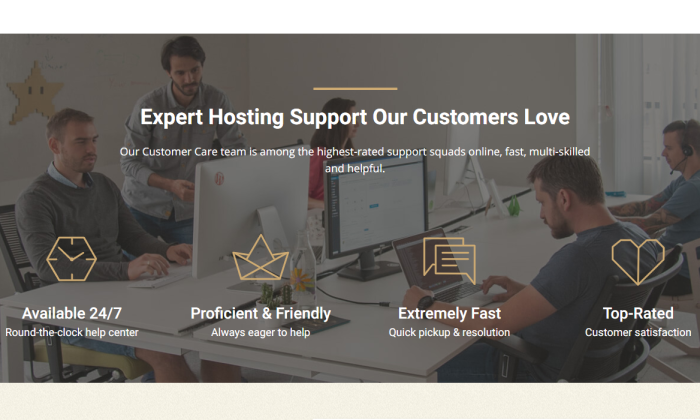
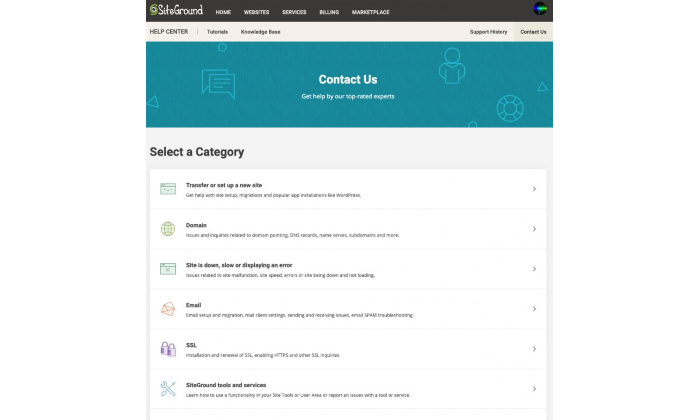
Their 24/7 support comes via a live chat channel, phone support, and a helpdesk ticketing system. Even the most complex issues are resolved in an average time of 15 minutes, so you can get back to business asap. 

These things are super important for a beginning website owner to combat the inevitable challenges they face.

WordPress Recommended: SiteGround hosts over 80% of the two million domains on WordPress. With this in mind, it’s no surprise that they are experts at managing WordPress. 

Many of the support team are highly trained in WordPress and will happily assist you with WordPress related troubleshooting, compared to other hosts, who will simply tell you it’s not their issue (which truthfully, it isn’t). 

This is also why SiteGround has developed and implemented WordPress-specific features, such as the SG Optimizer, WP Auto Update, and Supercacher, in their plans.

Low Introductory Price & Money-Back Guarantee: With a monthly hosting solution starting as low as $6.99 per month, SiteGround is a perfect option for even the most beginner website creators. 

Furthermore, the lead-in hosting plan includes all of the key features a new website owner would want in a plan, rather than having the absolute bare-bones to get the user to commit to a higher plan immediately. 

If something goes wrong, or your website doesn’t function the way you expect it to, you can get a full refund of your hosting fees within 30 days of signup.

Excellent Uptime & Site Speed: Uptime and site speed go hand-in-hand. Uptime refers to the amount of time the server stays up and running, while site speed refers to how quickly your website loads. 

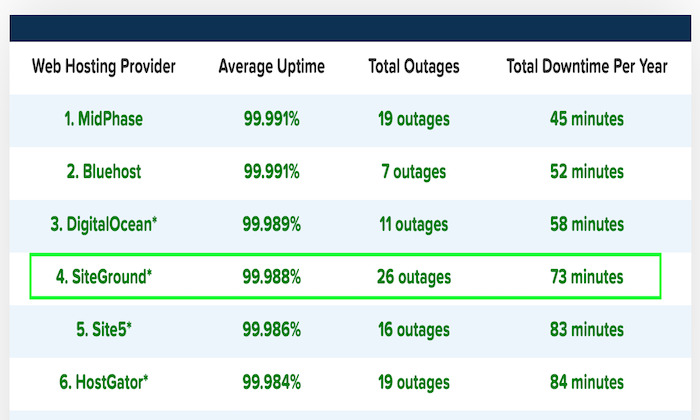
You can see below that SiteGround’s average uptime over 12 months is 99.98%, with only 73 minutes of total downtime over the whole year. Reliable uptime means your website is virtually guaranteed to be running around the clock, keeping visitors happy.

Have you ever heard the notion that if your page doesn’t load within three seconds tops, you’ll lose the visitor’s interest? 

You won’t have to worry about that with SiteGround. They claim that they load your website four times faster than other hosts, so you won’t have to worry about visitors losing interest while waiting for your graphics to load. 

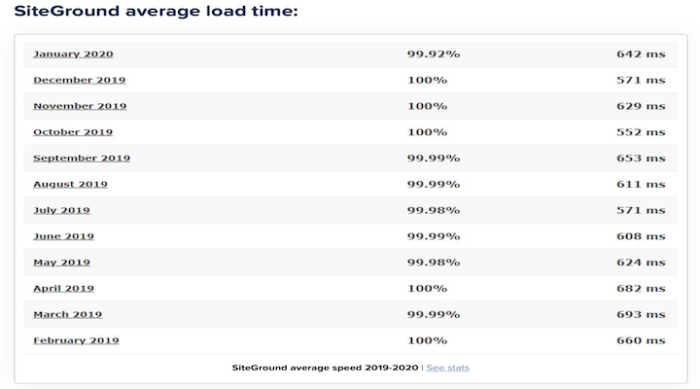
And, as you’ll see here, their slowest load time between 2019 to 2020 was 693 ms. 

Free Website Transfer: Many people are worried about making the switch to a new host. After all, it’s a scary process. What if you lose your entire website or cause irreparable damage? 

With SiteGround, you don’t need to worry. They’ll do it for you.

Most hosts will just move the files over. But SiteGround will also make the necessary tweaks to ensure everything is working smoothly for you after the transition. 

No blood, sweat, tears, or big bucks required in switching to a new host. SiteGround includes the WordPress migrator plugin in their plans, though if you prefer a professional to do it, it will cost you only $30 per website. 

Free Daily Back-Up: Most hosts will only back your website up every other day or even once a week. So, if anything happens to your website that you can’t fix, you might be forced to go back an entire week, meaning you’ll lose everything you’ve done in the meantime. 

But, with SiteGround, the worst-case scenario is that you’ll only lose the changes you’d made in the 24 hours since the last back-up. If that’s not peace of mind for someone making constant changes to their website, I don’t know what is! 

Great for Scalability: When you’re just starting out in business, there is no way but up, right? With SiteGround’s flexible range of plans, you don’t have to worry about outgrowing your host. Simply upgrade your plan as your business grows.  

The Cons

Renewal Price: As dreamy as the promotional rates of SiteGround’s hosting plans are, once the honeymoon is over, it’s truly over. 

When you renew, your rates will jump up quite high. The cost of your plan will essentially triple across the board once your promotional period is over. Ouch.

The best way to combat this is to sign up for the longest term available on the promotional period, which is either 24 or 36 months before you face the higher renewal rates.

No Monthly Billing Cycle: The higher renewal rates might be easier to cop if you could pay month-to-month. But unfortunately, monthly billing is not something that SiteGround offers. 

Personally, this is not a deal-breaker for me, but I can certainly appreciate how it may be restrictive and frustrating for some.

Storage Limitations: The low amount of storage space available on the shared hosting plans is unlikely to bother most of you reading this post. However, if your site does grow beyond 40 GB, you’ll have no choice but to switch to the more expensive cloud hosting plans. 

The StartUp plan includes just 10,000 site visitors, so if your website traffic grows exponentially too quickly off the bat, you may find yourself needing to upgrade your plan sooner than you think. 

SiteGround Pricing

SiteGround offers three tiers for their hosting options:

  • StartUp
  • GrowBig
  • GoGeek

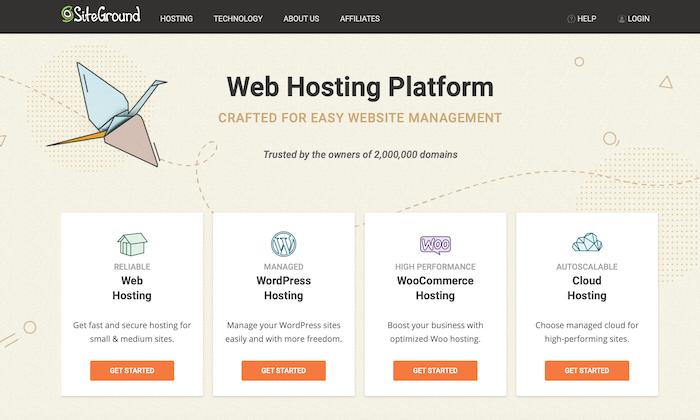
These tiers’ pricing remains the same across the board for web hosting, WordPress hosting, and WooCommerce hosting. Cloud hosting has its own levels and pricing, which we’ll discuss. 

StartUp 

As the name suggests, this plan is perfect for those new to business or looking for smaller websites. The StartUp plan allows you one website, 10 GB of space, and up to 10,000 monthly visitors. Pricing starts at $6.99 per month on the introductory offer. 

Some other features included in this plan are:

  • Free WordPress Installation
  • Free SSL
  • Daily Backup
  • Free Cloudflare CDN
  • Free Email 

Overall, it’s a great plan for those who are just getting started. The only thing to be wary of is outgrowing your monthly visitors limit. If you think you’re going to scale quickly, it would be worth starting straight off with the GrowBig plan.

GrowBig  

The GrowBig plan is perfect for medium-sized businesses or those who know they will be managing more than one website. You’ll have access to unlimited websites, 20 GB of web space, and up to 25,000 monthly visitors. Pricing starts at $9.99 per month on the introductory offer. 

Aside from the features included in the StartUp plan, this plan also includes:

  • On-demand Backup copies
  • Speed-boosting Caching 
  • Staging environment 
  • Add collaborators to your site

It’s easy to understand why GrowBig is SiteGround’s best-selling plan. It includes a range of great features that are easy to use and will fit the brief most in need of a website out there that expects a steady traffic flow. 

GoGeek

The GoGeek is the most extensive shared hosting plan SiteGround has to offer. As the name suggests, it’s designed for ‘technology geeks’ who want lots of control over their website. 

The GoGeek plan will give you unlimited websites, 40 GB of web space, and up to 100,000 monthly visits. Needless to say, it’s truly designed for large businesses with a high volume of traffic. Pricing starts at $14.99 per month on the introductory offer. 

The GoGeek plan includes all the features mentioned above, as well as: 

  • Register your clients with white-label access to Site Tools
  • Use more server resources for higher process execution time
  • Ultrafast PHP for faster page loads
  • Priority support from SiteGround’s most experienced customer support agents

In a nutshell, this plan is for those of you who know what you’re doing with websites. If you don’t understand some of the plan’s technological features, it may not be the best plan for you. Unless, of course, you have a specialist on your team to manage your website and need access to high volume traffic capabilities. 

Cloud Hosting

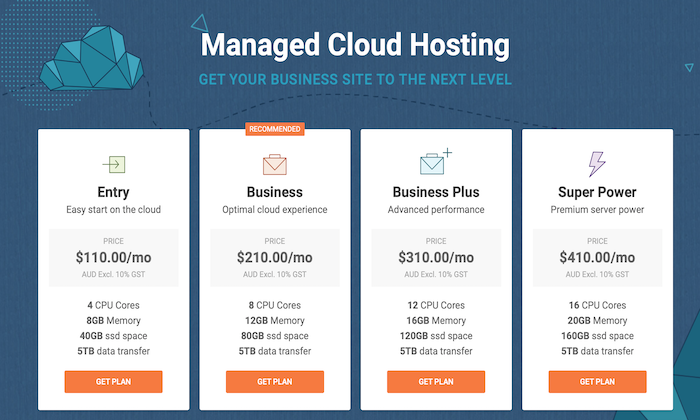
We’ll touch on the cloud hosting product offerings shortly, but in terms of pricing, there are four plans for SiteGround’s cloud hosting: Entry, Business, Business Plus, and Super Power. 

As you can see in the screenshot below, the pricing ranges from $110 to $410 per month. The major difference in the plans is CPU cores, memory, and SSD space. 

Due to the easy scalability of the cloud hosting options (which you’ll learn about shortly), you can confidently start with the Entry plan if it’s your first time using cloud hosting. 

SiteGround Offerings

SiteGround Web Hosting

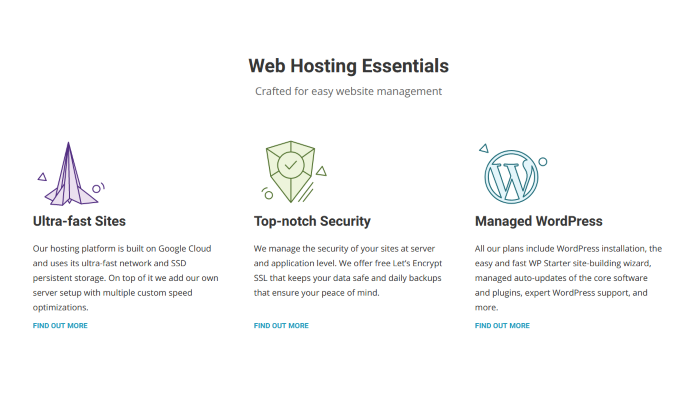
SiteGround offers fast and secure web hosting for websites of any kind. Their general web hosting product is optimized for a range of Content Management Systems (CMS) such as WordPress, Drupal, Joomla, and more. 

You’ll be able to build and launch your website quickly and easily with their full website solution, including your choice of site builder: WordPress or Weebly. If you’re an online store, you’ll be able to install the shopping cart of your choice for free. 

Domain registration is easy and affordable with SiteGround, so you’ll be able to enjoy the convenience of managing both your domain and your site in one place. 

You’ll also have access to an unlimited number of email accounts when you create your domain, which is perfect for managing different areas of your business. 

SiteGround WordPress Hosting

SiteGround is one of the few web hosting companies that offer hosting options specifically for WordPress. As mentioned previously, they are even highly recommended directly by WordPress. 

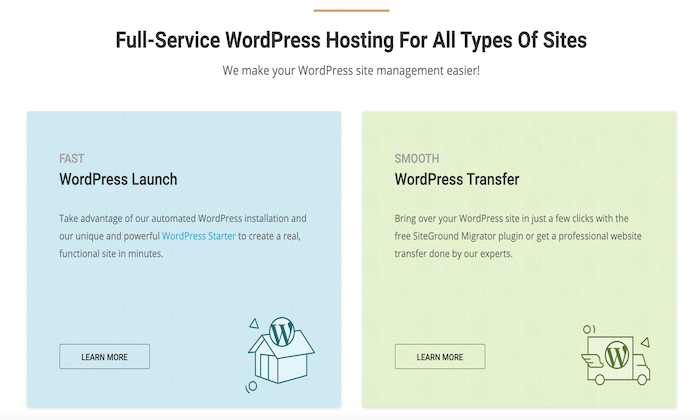
With SiteGround, you won’t need to download and install WordPress manually. Instead, you’ll be able to automate the process with a simple click of a button using the WordPress Launch feature. 

Upon login to your new website, you’ll be prompted to set your site up simply and easily with SiteGround’s WordPress Starter kit. The whole process takes minutes from start to finish, even for a beginner!

One of the most popular features of SiteGround’s WordPress hosting is the free SiteGround Migrator plugin. This feature is perfect for users who may hold their website with another host and wish to transfer over to SiteGround. 

Better yet, if you’re not confident in your abilities to navigate the migrator plugin, you can have a WordPress whiz from SiteGround do it for you for an additional fee. 

SiteGround WooCommerce Hosting

SiteGround also offers hosting options for users looking to build a powerful online shop using WooCommerce. This plan comes with WooCommerce pre-installed, saving you time and hassle, allowing you to straightaway focus on uploading products to your online store. 

With WooCommerce, you can sell any type of product or service online. SiteGround will support your ecommerce growth by keeping your website safe with a unique AI anti-bot system, free pre-installed SSL, and custom Web Application Firewall (WAF).

If you choose the WooCommerce GrowBig or GoGeek plan, SiteGround will also include a convenient staging tool. You’ll be able to develop your store safely, testing changes and updates made on the staging copy before going live. 

SiteGround Cloud Hosting

Cloud hosting is a relatively new way to host websites. It’s an ideal solution for businesses and websites of medium to larger sizes, who have the capacity to grow very quickly. If you are starting to outgrow your shared hosting plan, cloud hosting is the next step. 

SiteGround’s cloud hosting will provide you with guaranteed resources with your very own RAM and CPU. You can also upgrade the RAM, CPU, and disk space of your cloud plan at any time. Better yet, there is no downtime with this process—the resources are added immediately. 

If you want to automate the scaling process, you can do that, too! SiteGround’s unique auto-scale option will adjust your CPU and RAM to meet the needs of unexpected traffic surges, preventing any slowness or downtime. 

The best part is that the scalable amount is pre-determined by you, so you’ll still have control over the scale’s parameters. 

Finally, cloud hosting with SiteGround will also include a free dedicated IP. This feature will give you peace of mind that your website is safe from IP blacklist due to other webmasters’ actions.

The Best WordPress Web Hosting Service

Not sold that SiteGround is the perfect match for you? Or maybe you simply want to know what else is out there, so you can ensure you’ve chosen the best of the best. I get it. 

That’s why we’ve written a whole post about the best WordPress web hosting services out there. Here are the contenders I’ve reviewed:

  1. Bluehost — Best WordPress hosting for new websites
  2. WP Engine — The best for managed WordPress hosting
  3. Hostinger – The best for cheap WordPress hosting
  4. SiteGround — The best support for affordable WP hosting
  5. DreamHost — The lowest day one spend for WP hosting
  6. Nexcess — The Best For Customized Managed Hosting Solutions
  7. A2 Hosting — The best for moving an existing site to better WP hosting

The bottom line: Would I recommend SiteGround for your web hosting needs? Absolutely.

They have a range of plans to suit any business and budget, and they compete well with their competitors in terms of features. They excel in site speed time and offer phenomenal customer service. With all this in mind, they are a sound choice.


from Blog – Neil Patel https://ift.tt/3dMqTF9
via IFTTT