Friday, 30 July 2021

7 Link Shortener Alternatives to Goo.gl

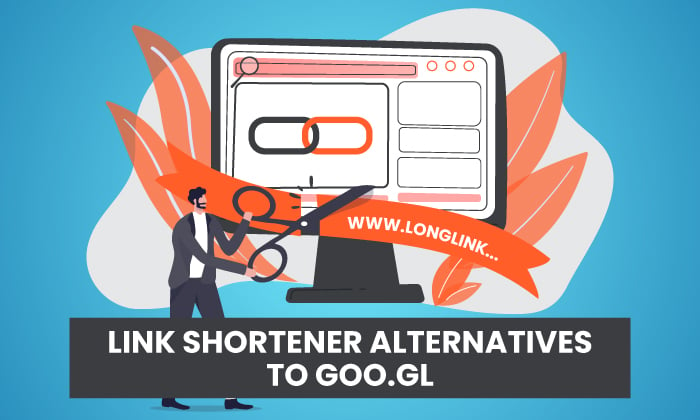
7 Link Shortener Alternatives to Goog.gl - featured image

When you’re trying to drive traffic to your website and generate new leads, the goal is to make your content as attractive as possible. After all, with so much competition out there, it’s important you stand out from the crowd and grab someone’s attention right away, right? 

The answer’s yes!

Just like you spend time and energy creating visually appealing content for users to enjoy, you shouldn’t forget the finer details: namely, your links.

Yes, really. URLs matter. Let me show you why link shortening is worth your time and what link shoortening alternatives to Goo.gl are worth trying.

What Is Link Shortening?

Link shortening takes longer links, with their confusing combination of numbers, letters, and special characters, and turns it into a short, readable link.

Here’s an example from NASA’s Twitter feed. The link is only a few characters long, it contains the NASA branding, and it’s clear where the link redirects to:
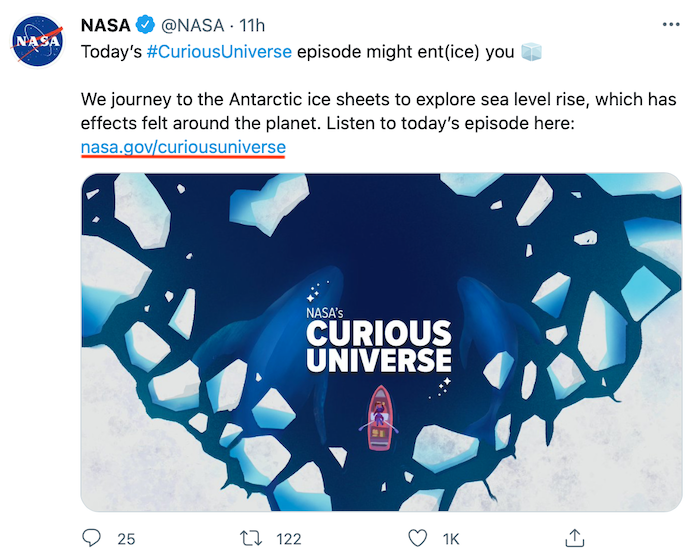
Link Shortener Alternatives to Goo.gl - Example from NASA Twitter Feed

Here’s another example. When you click the link, it takes you to a YouTube video. The destination is fairly clear from the short link (youtu.be) even though it’s unbranded, meaning there’s no mention of NASA’s name in the link:
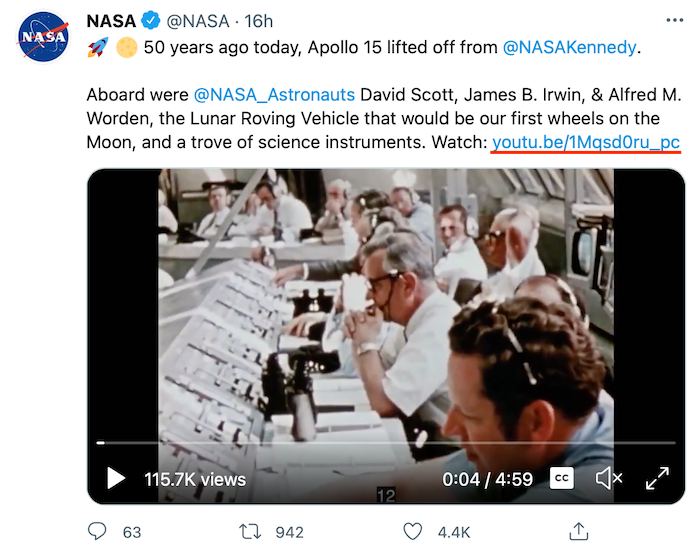
Link Shortener Alternatives to Goo.gl - Example of NASA YouTube Video

The original “longer” link looks like this: https://www.youtube.com/watch?v=1Mqsd0ru_pc

Which one do you think looks more attractive on a website or social media post? Which one would you be more likely to click on?

Chances are, it’s the first option, and the reality is, your potential customers feel the same way.

Why Should You Use a Link Shortening Tool?

OK, so that’s how link shortening works, but is it worth your time? Here’s a bit more detail.

In most cases, URL shortener tools also track how many people click your links. You can track who clicked your link to calculate the success of ad campaigns or content marketing strategies you’re running. From a marketing perspective, link shorteners are invaluable.

It’s also ideal for social media posts, where you might have a limited number of characters to convey your message. Shortening URLs and focusing on content makes it easier to engage your followers.

Finally, short URLs are more attractive. They’re easier to read and make your content more user-friendly. You can also create branded links with URL shorteners to reinforce your brand message at the same time.

Since great marketing is all about creating a great experience for your customers and building awareness, short URLs are a crucial tool.

To be clear, it’s not always worth shortening URLs. For example, if you’re just linking from one page on your website to another, there’s no need to shorten the link.

If you need help figuring out which links to shorten and which ones to leave alone, check out my consulting services.

How Did Goo.gl Work?

Google’s own URL shortening tool, Goo.gl, launched back in 2009.

At first, it only worked with Google applications, meaning you could only shorten URLs for the Google toolbar. However, Google made the tool available to the public in 2010, which made it simpler for all website owners to access and use.

Goo.gl offered a simple means to create shorter, more readable URLs. All you had to do was input your long URL and Goo.gl generated a smaller URL without lines of extra characters:
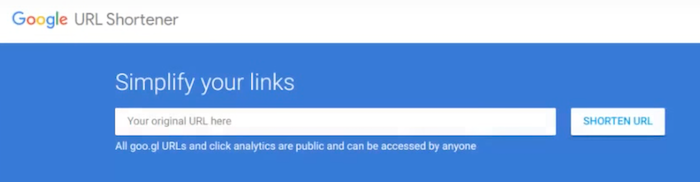
Link Shortener Alternatives to Goo.gl - How Did Goo.gl Work

You didn’t need a Google or G Suite account to create a one-off URL, either. However, if you wanted to keep track of all your custom URLs, you could create an account and view all your shortened links at a glance:
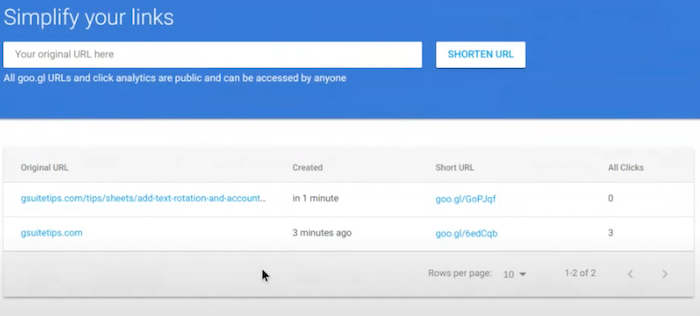
Link Shortener Alternatives to Goo.gl - Screenshot of Simplifying Links with Goo.gl

Website owners could also track how many people clicked the shortened URL, which helped with marketing strategy creation:
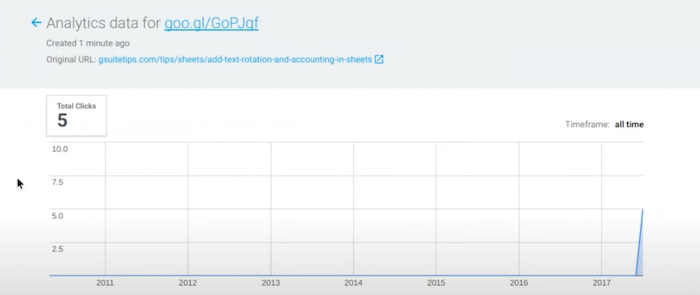
Link Shortener Alternatives to Goo.gl - Website owners could track how many people clicked the shortened URL

Why did Google shut down Goo.gl, though? Put simply, Goo.gl wasn’t designed for anything other than desktop browsing. As browsing habits changed and it became more common for people to access the web through mobile devices or apps, Google realized the tool just wasn’t flexible enough to stay competitive.

The answer? Firebase Dynamic Links, or FDL, which replaced Goo.gl back in 2019. As we’ll see in a moment, FDL improves upon Goo.gl in a few ways, although it’s not the only URL shortening tool worth considering.

7 Goo.gl Replacements

There are many other link shortening tools out there, so how do you choose the right one for your needs? To help you narrow your search, here are seven promising alternatives to Goo.gl you can try right now.

1. Firebase Dynamic Links

Since Firebase Dynamic Links (FDL) replaced Goo.gl, it’s a good tool to start with if you’re focusing on app creation and development.

Firebase works similarly to Goo.gl, since you’re still creating short URLs. However, these URLs are no ordinary links: they’re “smart” links, or Dynamic Links.

When a user clicks on a FDL link, they’re directed to exactly where you want them to go in your Android or iPhone app… even if they don’t already have the app installed. They simply download the app and the right page loads automatically.

Cool, right?

It doesn’t matter whether they click through from a desktop browser or mobile device, either. They will be directed to a compatible version of your website, so there’s no need for you to generate different URLs for each platform.

If you’re focusing on app-based marketing, definitely consider FDL. There’s a free plan available, although the paid plan has some nice features.

2. Rebrandly

Do you want to create unique branded links using custom domain names? Then Rebrandly could be for you.

Trusted by global brands like IBM and Shopify, Rebrandly is more than just a URL shortening tool. It’s a link management platform designed to help you build entire marketing campaigns around branded links in just a few clicks.

Without leaving your browser, you can create and share links across over 100 integrated apps including Twitter, LinkedIn, and Facebook. Plus, you can measure your campaign results from the dashboard.
Link Shortener Alternatives to Goo.gl - Rebrandly

It’s free to sign up, but paid packages start at just $29 per month, which gives you access to more detailed metrics and a larger number of branded links. If you’re looking for an enterprise-level solution for larger teams, reach out to Rebrandly for a custom quote.

3. Ow.ly

If you’re already using Hootsuite, Ow.ly is worth a look.

You can shorten any link posted to social media right from the Hootsuite dashboard. This lets you view everything from your campaign ROI to your link metrics at the same time. There’s no need to switch between different tools (unless you’re also using other platforms like Google Analytics.)

Ow.ly comes free with every Hootsuite account, too, so you don’t need a paid subscription to benefit from the tool. Sounds good, right?

All that said, Ow.ly’s only available to Hootsuite users, so it’s not the right tool for everyone, but it’s worth a try if you already use Hootsuite.

4. Bitly

For enterprise-grade link management, consider Bitly, one of the most comprehensive tools out there.

With Bitly, you’re not just creating short, branded links. You’re turning those links into valuable marketing tools. Bitly offers some of the most in-depth campaign management tools available to help you track everything from clicks to organic shares.

It’s a useful tool for tracking customer journeys without hopping between different CRMs, making it ideal for larger companies looking to track data and grow their campaigns efficiently. You can even generate QR codes to engage customers and drive sales.

What’s more, Bitly is trusted by the likes of Amazon, Disney, and Gartner, so you know it’s a platform that delivers on its promises! Packages start at $29 per month.

5. TinyURL

No roundup of link shortening tools is complete without TinyURL, the very first program of its kind:
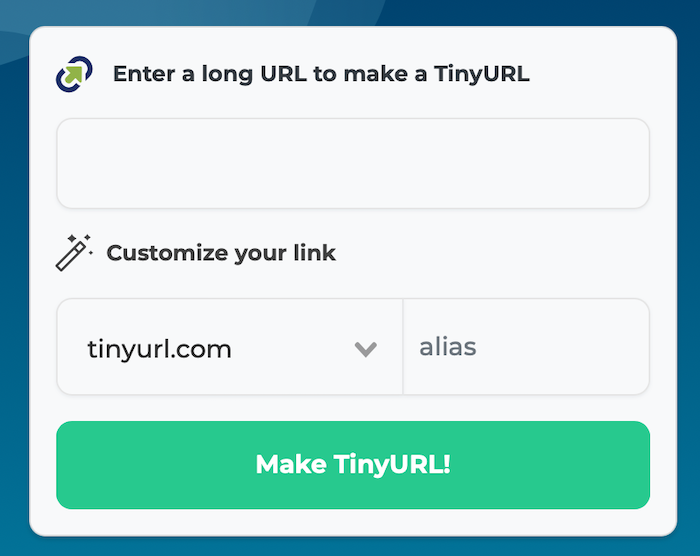
Link Shortener Alternatives to Goo.gl - TinyURL

You don’t need an account to shorten one or two short URLs. To get the most of the platform, sign up for a free account which allows you to create an unlimited number of URLs and track clicks.

The Pro package starts at $9.99 per month and offers advanced tracking options. For businesses looking to run high-volume ad campaigns, the Bulk package may be a better option at $99.00 per month.

If you’re looking for a no-fuss way to shorten your URLs and track some metrics, TinyURL is worth a go.

6. BL.INK

Are you a small business owner looking to launch marketing campaigns but don’t need a large-scale solution? BL.INK was designed for you.

With BL.INK, you can quickly share shortened URLs across social media channels and even send actionable links by SMS or messaging platforms. BL.INK seamlessly integrates with existing worktools and CMS, so you can easily track link performance and view the data alongside other metrics.

Packages start at $48 per month, making it one of the more expensive tools on the list. However, you can try it free for 21 days, which is a bonus.

If you’re not looking for an enterprise-level solution but want more than just a basic shortening tool, consider BL.INK.

7. Sniply

Do you want to add a CTA to every shortened link you create? Now you can, thanks to Sniply.

On the surface, Sniply works like any other link shortener. However, it offers a unique level of customization: you can embed a colorful CTA button with every link you share across social media.

Not only do your links look more appealing because they’re shorter, but they’re more actionable than ever:

Link Shortener Alternatives to Goo.gl - Sniply

Pricing is reasonable, too, with packages starting at $29 per month. However, if you want to add more than one team member, you’ll need to opt for a more expensive tier.

Link Shortener Frequently Asked Questions

What is link shortening?

Link shortening, or URL shortening, lets you change how a link displays to users. You can make a URL appear shorter or even add branding and still send users to the correct page.

What’s the point of link shortening?

A link shortening tool turns a long, rambling link into something memorable to share with prospects, which is handy on social media. You can also track the number of real people visiting your website, which provides more accurate analytics information.

Why did Google stop supporting Goo.gl?

Google made the changes in response to how people use the internet. Its new tool, Firebase Dynamic Links, is more flexible than Goo.gl and lets site owners redirect users on mobile apps rather than just desktop websites.

When should you not use link shortening?

Since one of the main reasons we shorten links is for tracking purposes, you don’t need to shorten links if you’re just linking from one page on your website to another.

Link Shortener Conclusion

Are the alternatives to the Goo.gl link shortener worth your time? Absolutely. With the range of link management tools out there, you can quickly generate short, readable links to showcase your brand and drive traffic to your website.

What’s more, there’s a link shortening tool to suit every marketing strategy, whether you’re looking for a no-fuss, budget-friendly option or want to invest in an enterprise-level solution.

Have you tried a link shortening tool yet? How has it improved your conversions or made it easier to track your performance?


from Blog – Neil Patel https://ift.tt/3l9vYes
via IFTTT

Thursday, 29 July 2021

How to Craft Lead Magnets Your Customers Can’t Ignore

How to Craft Lead Magnets Your Customers Can't Ignore

Getting traffic to your site is nice, but there’s not much of a point if those visitors don’t convert.

There’s one tactic I use above all others to generate new leads:

A lead magnet.

They aren’t some newfangled tech trend. They’ve been an essential marketing tool for decades.

With lead magnets, you give people something for free in exchange for an email address and permission to send them more offers—for example, a free ebook or an SEO checklist.

However, not all lead magnets are effective.

Let’s take about how lead magnets work and explore how to create one that drives leads.

How Lead Magnets Can Grow Your Business

The lure of ‘free’ is compelling, according to Predictably Irrational author Dan Ariely.

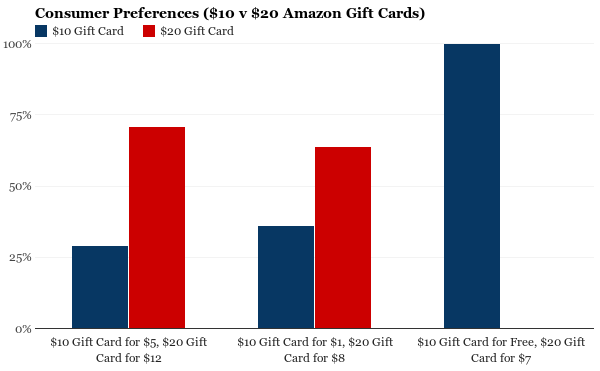
He proved this by giving groups of people the option to select from different Amazon gift cards. Respondents could choose from receiving either:

  1. A $10 Amazon gift card for free, or
  2. A $20 Amazon gift card for only $7

If you were to look at that objectively, based on cold hard math, you’d see that the second option was the better value ($13 vs. $10.)

Check out the third column on the far right to see which one won:

the power of free how to create lead magnets that work

It wasn’t even close! Everyone sampled chose the free $10 option instead.

Ariely calls this the Zero-Price Effect because humans don’t see the downside to something that’s free.

Ariely ran a related experiment. They staged a promotion for free tattoos and had people line up outside the store.

These people were waiting in line with full knowledge of what they were doing.

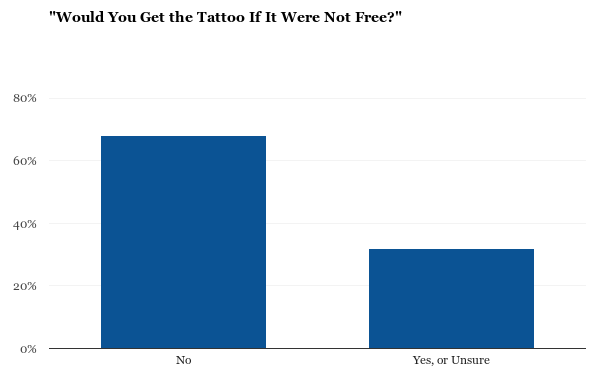
Yet when Ariely asked them if they’d be waiting to get the same tattoo if it wasn’t free, 68 percent of respondents said no!

would you get this tattoo if it wasnt free guide to lead magents

In other words, people took time out of their busy schedule to commit permanent ink to their skin simply because it was free.

Good lead magnets, when done correctly, have the same effect (albeit without the same long-lasting effects).

They pass along a useful ebook, webinar, or email course, asking for very little (if anything) in return from visitors.

You leverage the power of free to kickstart the first step in your customer value optimization process.

Lead magnets are nothing new.

They get a lot of attention today because of how persuasive and powerful they can be.

One of the best ways to incorporate them today is with a content upgrade. People are already on your site, seeking something out.

Think about it:

They went to Google and typed in something specific to end up on your blog post.

A lead magnet sweetens the pot by providing additional insight on the same exact topic they were reading about.

Brian Dean used the content upgrade strategy to boost his conversions by 785 percent in one day.

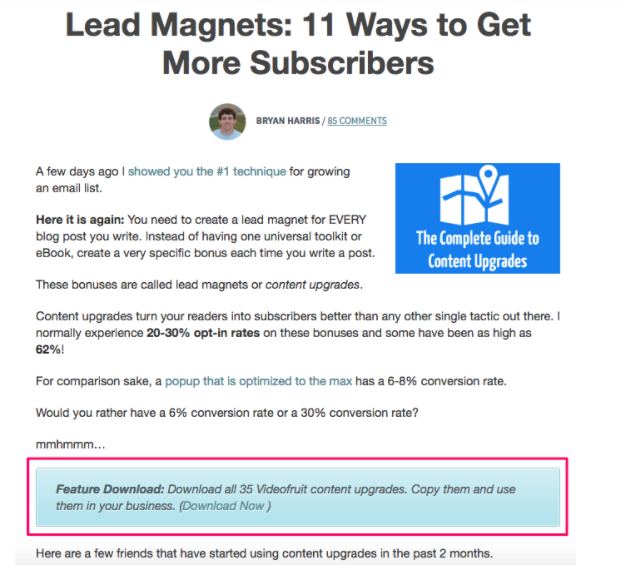
Brian Harris of Video Fruit is seeing a 20-30 percent opt-in rate from blog posts where he links not one, not two, but three times to his lead magnet.

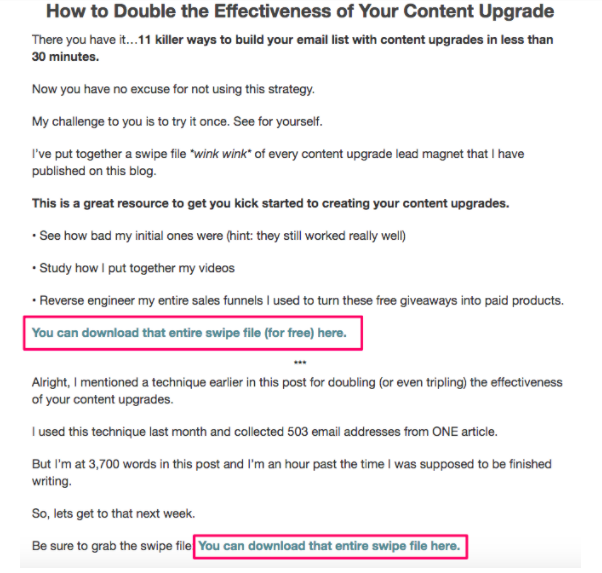
For example, the first comes right in the introduction:

lead magnet example video fruit

Then he follows up that up with another two more for good measure down at the bottom:

lead magent example use content upgrages

The blog post goes through an in-depth analysis of how content upgrades can get you more leads. Then it distills those insights and actionable tips down so that you can easily start implementing the same tactics on your site (after downloading the lead magnet, of course).

If you want to see the same results, your lead magnet has to abide by a few rules.

The form or medium doesn’t matter necessarily. Instead, success typically comes down to a few >key ingredients:

  1. Does your audience care about it?
  2. Is there value to it?
  3. Does it solve a problem and/or give the audience something they need?

So how do you figure those things out?

Let’s dive into what the best lead magnets have in common to find out.

How to Create Lead Magnets That Drive Conversions

Now that you know why lead magnets are important (to get you more leads!) let’s talk about how to create one that drives conversions like mad.

Find Out What Your Customers Want

Saying you need to “know your audience” sounds obvious and trite. However, it’s one of those things that everyone talks about, but no one seems to know how to do.

The big clue is in the reception. If your digital copies aren’t flying off the shelf when it goes live, your issue typically comes back to a mismatch with your audience.

Thankfully, this can be an easy fix if you know where to look.

Start by looking for what people are already paying for.

That might sound counterintuitive because lead magnets are free.

However, if someone is willing to part with their hard-earned cash for something, it’s a sure sign that they’re committed.

For example, one of my favorite places to start is the Kindle Marketplace.

Let’s say I’m about to create a lead magnet in an industry I know nothing about: cooking. (Seriously, nothing.)

I could guess or make a few assumptions about which cooking lead magnet would work best. Or I could head on over to the Kindle Marketplace and see what’s already working well.

It’s not just the topic you’re looking for at this point, but also the ‘format’ that resonates with an audience.

Here’s what I mean.

Go to the Amazon Kindle Marketplace look at the sidebar on the left-hand side. There, you’ll find all the book categories and then subcategories upon subcategories upon subcategories. (In other words, drilling down to find your niche and your audience.)

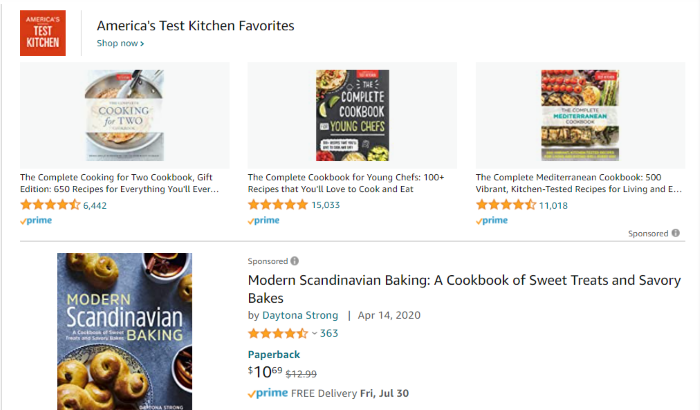
Here’s what the bestsellers look like in European cooking and food:

lead magnet example cook books

Ok, now we’re getting somewhere.

Most are unsurprisingly recipe books. However, that first one is especially interesting.

It’s a “cooking for two,” book which means the people buying it are looking for quick, no-fuss meals in smaller portions.

See?

That tells you a lot about the audience and what their preferences are. The Mediterranean one on the far right is another indication — those meals tend to be easy and healthy.

So these people might be looking for a new recipe cookbook, but that doesn’t mean they want some haute cuisine that requires working for hours in the kitchen.

Instead, these (presumably) busy people want something relatively quick and healthy.

Next, the trick is to put something together that’s like these examples but somehow different, better, or unique.

For example, let’s dive a little deeper into books reviews to see what they say.

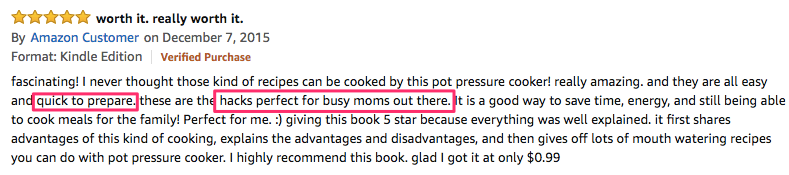
Here’s a positive review to kick things off:

book review example for lead magnet guide

Awesome! Two of our assumptions are already being proved correct.

People like this example because it provides recipes that are “quick to prepare. “

Busy moms might be foodies. However, foodies probably aren’t going to be buying this book.

That completely changes how you might create, package, design, and even promote this ebook already.

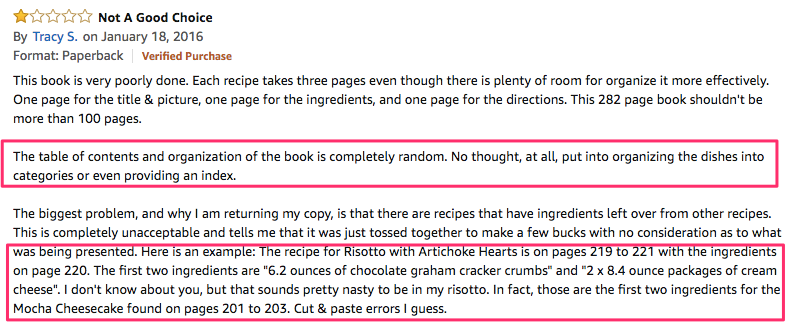
Positive reviews are helpful to start with, but many times you can learn more from negative reviews. Check this out:

lead magnet example

First, this book’s organization and table of contents aren’t up to snuff for this reviewer. They’re even giving you the answer here, too: “… organizing the dishes into categories or even providing an index.”

Good ideas! These are the little details that you or I wouldn’t have thought of because we might not be experts on cooking already.

However, a little bit of research has already revealed a few nuggets of wisdom.

Then, this reviewer goes on to complain about some of the editing and attention to detail towards the bottom.

Easy — let’s also have a subject-matter expert help edit this work to ensure accuracy (critical in cooking) is on point.

Use Audience Feedback to Refine Your Lead Magnet Idea

Now let’s take this one step further by simply asking the audience which versions of our idea they’d prefer.

For example, write up a simple blog post that explains what you’re thinking about creating and ask for ideas or improvements.

This does two things at the same time:

  1. It helps you get feedback to incorporate into the creation of your lead magnet.
  2. And it helps you ‘seed’ the market so that people are already primed to download it when you push the lead magnet live.

Soliciting feedback from people who aren’t yet on your email list can help you better understand how to get them on the list eventually. Here’s what I mean.

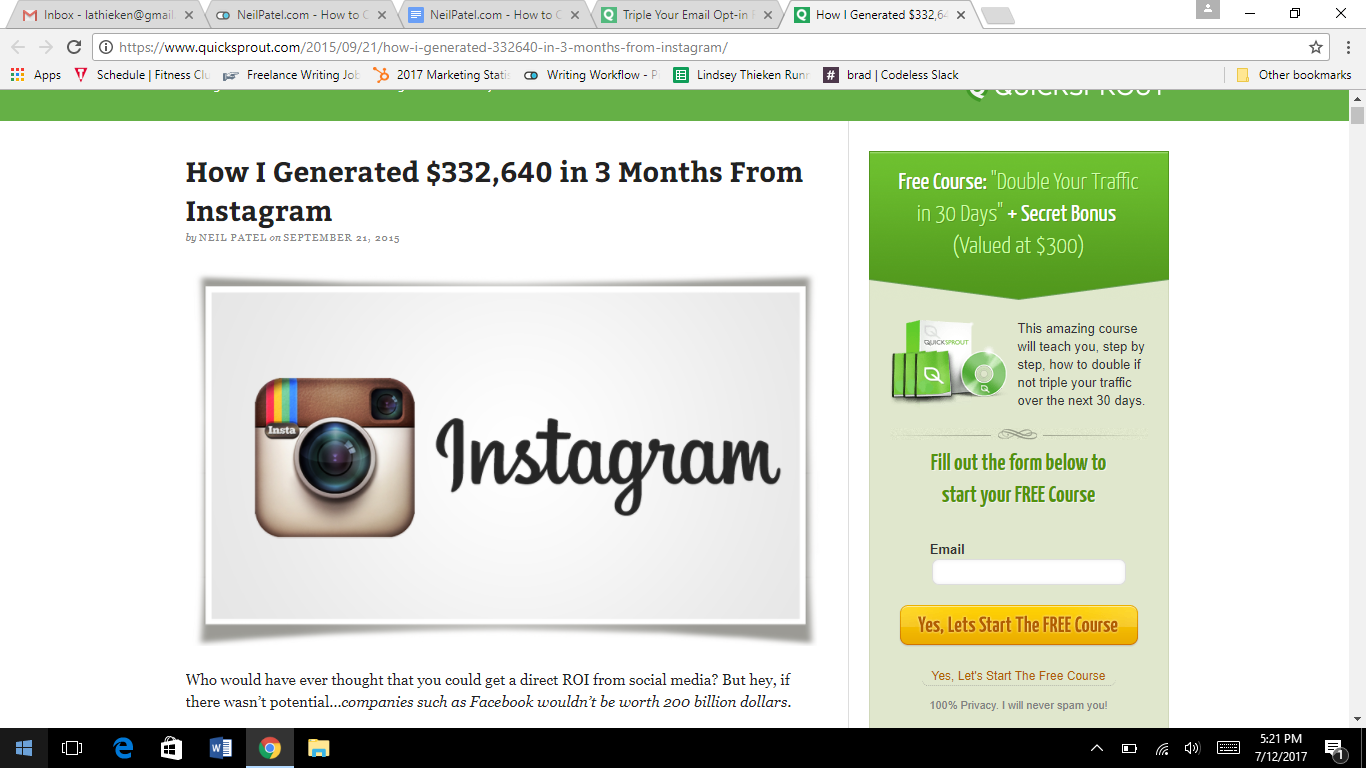
Take this post on how an Instagram user-generated more than $300,000.

how I generated money from instagram lead magnet example

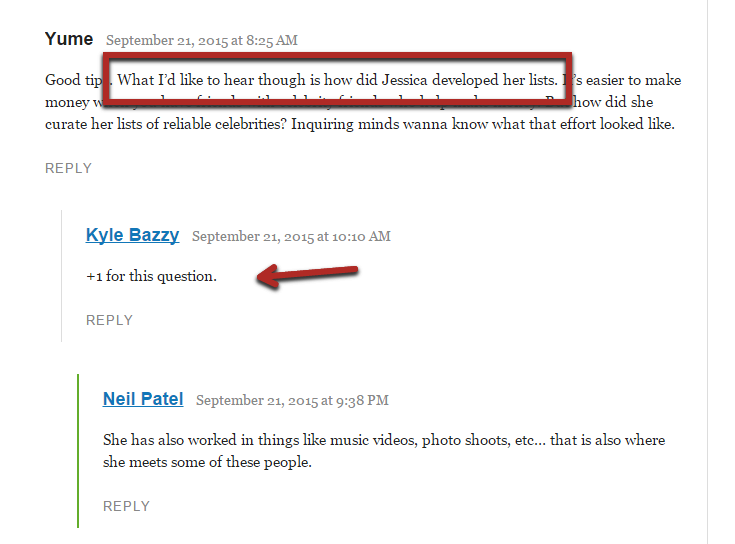
If you take a close look at the comments section of the post, you’ll find a couple of readers asking about how the Instagram user made her lists.

lead magnet example ask questions to develop a magnet people want

Multiple people are now requesting the same information in the comments, which means there must be built-in demand for this information.

Lead magnets are ‘free,’ but users still have to part with their precious contact info. They won’t do that for just anything.

So you need to create content that interests the audience.

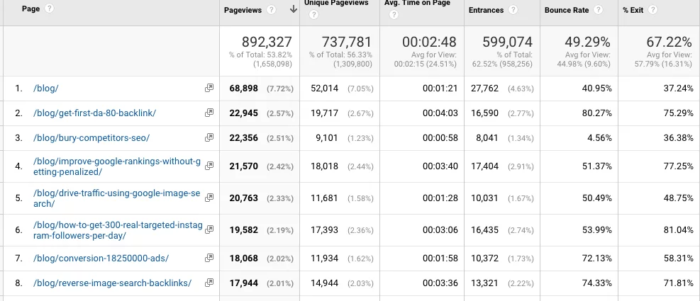
Let’s check out Google Analytics to see which pages (and topics) are performing best:

neil patel GA dashboard for lead magnet example

Start by segmenting all your posts into categories.

Sometimes your site already has this done if you included categories in your URL string. For example, Unbounce uses the category “PPC” in this blog post:

find a lead magnet idea screenshot of URL

So you can search for URLs in your most popular content that feature PPC.

You’ve now painstakingly compiled insight into what your customers want. Your next job should be insanely easy at this point: Give them what they’re asking for!

Being Specific About The Value

Picture someone on your site reading your perfectly crafted blog post about the latest trends in European cooking when a pop-up appears offering a printable “Be a Better Cook” guide.

Huh? That generic printed piece of paper is going to make them a better cook? How?

No, thank you.

What if it was a printable checklist on the “Ten Top-Rated Dinner Recipes from France and Italy?”

Now imagine you visit the landing page for Digital Agency Day because you want to see when the upcoming date is to make sure you don’t miss any of the great information.

DigitalAgencyDay microsite cropped lead magnet example

You’re hemming and hawing about signing up for the live event because you’re not sure if you’ll be able to make it.

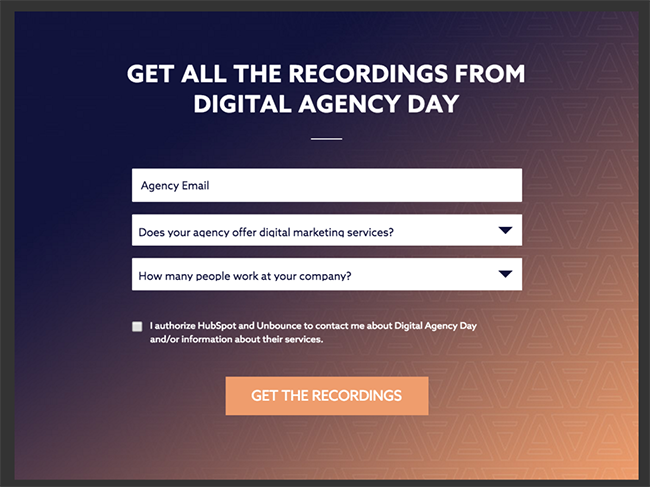
Then an exit overlay catches you before leaving, suggesting you sign up to receive the recordings when ready:

DAD overlay for lead magnets

Ok, that’s something you can get behind.

It’s specific and relevant, so it immediately makes sense.

So you’ll probably hand over your email.

It’s no surprise that this example resulted in a 19.03 percent conversion rate increase.

DAD Rooster results

People aren’t going to sign up for something they don’t think is useful.

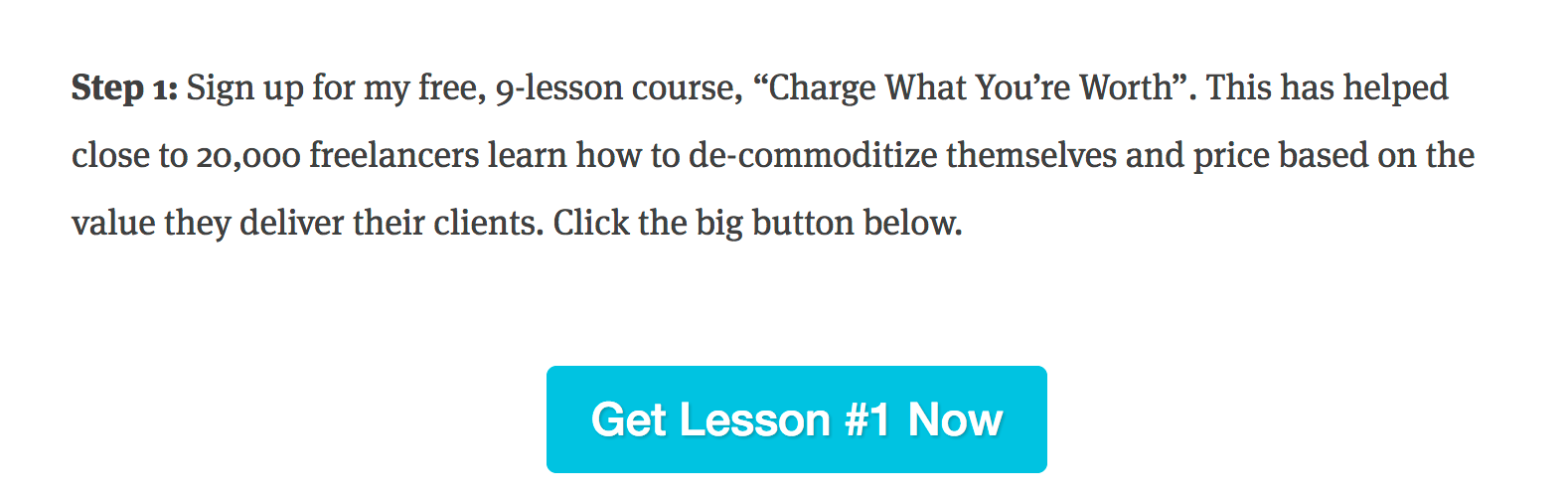
For example, check out this 9-part lesson from Brennan Dunn:

Charge what youre worth course 1

It targets a massive pain point for freelancers (“charging what you’re worth”).

It’s incredibly detailed and in-depth (“9-lesson course”).

There’s social proof that proves its value (“20,000 other freelancers”).

Brennan could easily charge for something like this, and people would still buy it.

It’s that good.

Checklists or cheat sheets can provide immediate value by giving people something they could put to use right now.

A longer multi-part course (like this example) or in-depth ebook can provide that long-term value people will reference for weeks (and months) to come.

Side-step these three issues, and you won’t just churn out another cookie-cutter lead magnet.

Instead, you’ll create a marketing asset that kicks off a long, profitable relationship with a new customer.

Design A High-Quality Lead Magnet

Remember the complaint on the first cookbook a few minutes ago? The poor organization and presentation detracted from the content and overall experience for that reviewer.

Now imagine what happens if you gave your email to get a downloadable guide filled with poor image quality and lots of typos. Same thing, right?

Unsubscribe.

The goal here is to get these users to move on from the freebie and eventually make a purchase. You can’t do that without attention to detail. You also need to show your value.

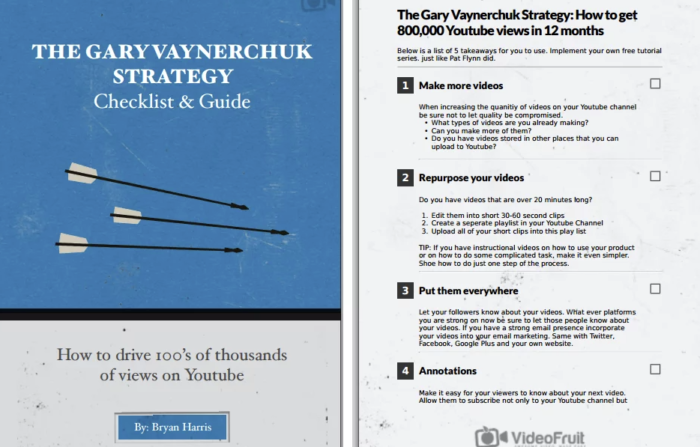
Check out this checklist from Bryan Harris of Video Fruit.

Looks pretty snazzy, right? Not just another boring rundown filled with typos.

video fruit lead magnet example


Don’t have the design skills or staffing to get this done? Hire a professional from Dribbble or Behance.

If you need a little extra help to enhance your own work, check out Beacon.

You can even hire a pro on Fiverr to do this for you, or you can do something similar by using a simple Google Doc.

Lead Magnet Frequently Asked Questions

What is a lead magnet?

A lead magnet is a free offer businesses offer in exchange for contact information from prospective leads. Examples include an ebook, discount code, free course, or checklist.

What makes a great lead magnet?

A great lead magnet must be valuable to your target audience. Aim to solve a problem or make their job or life easier in some way. For example, a business coach might offer “10 things to do before your next job interview.”

How much does a lead magnet cost?

They should be free to your leads. For businesses, the costs should be for research, creation, and distribution. These consts can vary widely based on the lead magnet and resources available. For example, if you have an in-house marketing team and graphic design person, the costs would be minimal.

What are the best types of lead magnets?

The best lead magnet is one your users find valuable, which can vary by industry, business model, and target audience. Common examples include ebooks, white papers, webinards, checklists, work sheets, coupon codes, and short courses.

Lead Magnets Conclusion

Lead magnets are one of the best ways to gather audience insight, generate leads, and even start the nurturing process to make the ultimate conversion (to revenue) easier.

Once they’ve signed up for the useful, relevant, and high-quality freebie, you establish yourself as a thought-leader on that topic and create a new customer relationship.

This means they’ll think of you when they need more information. They’ll come back for more. And they’ll come back to buy.

The good news is that these aren’t difficult to create, either. You need to take the time to dive deep into what your customers want and what they don’t want.

Then all you have to do is give them exactly what they’re already asking for.

What is your favorite lead magnet example?


from Blog – Neil Patel https://ift.tt/3leX6sr
via IFTTT
How to Get Listed in The YouTube Recommendation Sections

How to Get Listed in The YouTube Recommendation Sections

It’s widely known YouTube is the world’s second-largest search engine.

However, did you know the majority of video viewing on YouTube doesn’t actually originate from the search bar?

In fact, the video platform has confirmed its YouTube recommendation engine is responsible for more than 70 percent of the total time spent watching content on the site.

That means if you want to get more eyes on your YouTube content, it’s in your interest to understand how YouTube recommendations work.

What Is the “YouTube Recommended” Section?

As with any site, YouTube wants you to stick around for as long as possible. The more videos you watch, and the longer you watch for, the more ads it can serve you, and the more revenue it generates.

That’s precisely why the YouTube recommendation function exists. It’s designed to guide users toward content they love and actively want to watch, based on a range of factors (more on that later). 

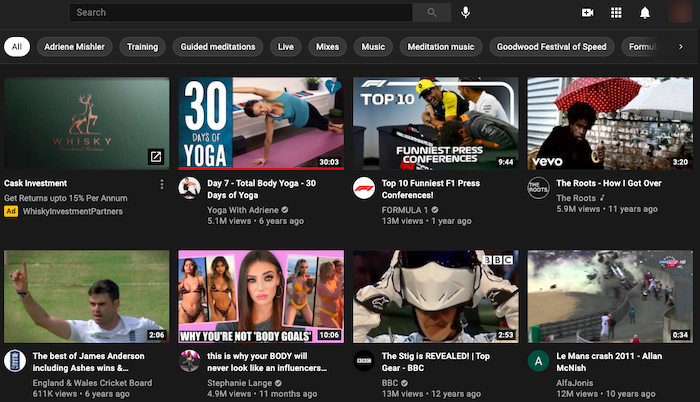
YouTube recommendations appear in two places:

  1. On the homepage.
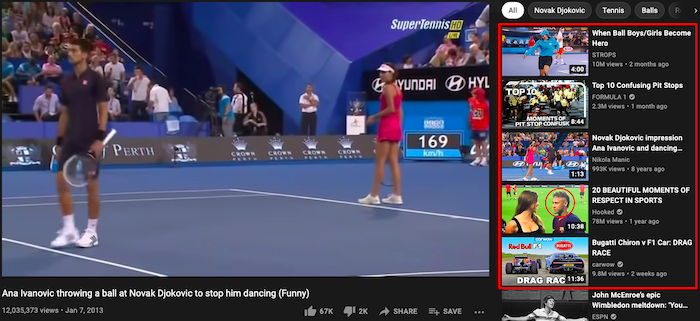
  2. In the “up next” section alongside the video you’re already watching:
What do YouTube recommendations look like?

Benefits of Getting in the YouTube Recommended Sections

If your goal is to drive more video views on YouTube, it’s impossible to overstate the importance of the YouTube recommendation engine.

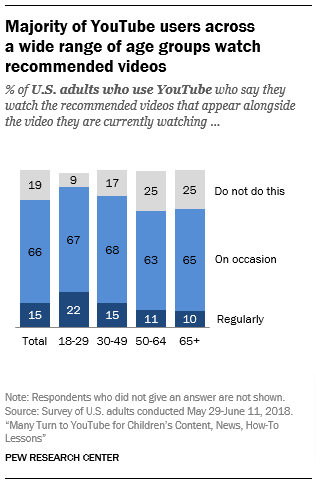
Whether or not they know it and understand how it works, most YouTube users make regular use of YouTube recommendations. According to a survey from Pew Research Center, 81 percent of users occasionally watch recommended videos, while 15 percent do so regularly.

How to Get Listed in the YouTube Recommendation Section - How many people watch YouTube recommended videos

Importantly, YouTube’s audience skews younger, with 95 percent of 18 to 29-year-olds in the U.S. using the platform. Pew’s data shows us those younger users are more likely to find new content through the YouTube recommendation engine. More than one-fifth of users in that age group regularly watch recommended videos, compared to just one-tenth of users aged 65+.

Benefits of Getting in the YouTube Recommended Sections

Pew Research’s study also demonstrates just how powerful a YouTube recommendation can be. It used YouTube’s API to analyze 98,508 videos recommended by the YouTube algorithm. Over the six weeks of the study, those videos saw their view counts increase by an average of 38.5 million views. One video had 34,000 views when it was first discovered by Pew and almost 30 million by the final time it was recommended.

In short, if your video is recommended by YouTube, your visibility increases exponentially.

YouTube Recommended Sections Algorithm Factors

As with Google, YouTube’s recommendation algorithm is shrouded in secrecy and is constantly tweaked and tested to deliver the most accurate and helpful results. However, we know it takes a range of signals into account, including:

  • your viewing and search history (provided you have enabled them)
  • your channel subscriptions
  • contextual factors such as your location and the time of day

Additionally, YouTube uses a video’s retention rate, or the average percentage that people watch, as a sign of its quality. A high retention rate indicates a video is relevant, high-quality, and enjoyable, which means YouTube is happier to recommend it to other viewers.

YouTube also regularly asks users about their experiences on the platform, either in relation to individual videos or to the YouTube recommendation system in general. It uses this direct feedback to inform future algorithmic decisions in a bid to deliver the best experience.

Tips and Strategies for Getting Listed in the YouTube Recommended Sections

Just as every website owner wants to rank at the top of Google, every YouTuber wants their content to be recommended by the platform. Unfortunately, with more than 500 hours of video being uploaded to YouTube every minute, not all of them are going to succeed. 

Follow these six tips to increase your chances of winning a cherished YouTube recommendation.

1. Optimize Your Metadata

YouTube’s algorithm is smart, but it isn’t human. It doesn’t literally “watch” a video and decide whether or not to recommend it. Instead, it analyzes user behavior and metadata to make intelligent decisions.

Optimizing your metadata can boost your presence in YouTube recommendations (and also in search results). Specifically, metadata optimization means focusing on your:

  • video descriptions
  • titles
  • tags

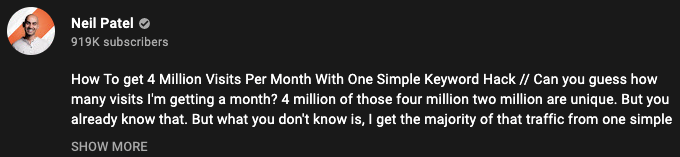
Video Descriptions

Tips and Strategies for Getting Listed in the YouTube Recommended Sections - Optimize Your Metadata

The description is the text below your videos. As well as explaining what your content is about, it helps users find videos in the first place. Your descriptions should:

  • accurately describe the video
  • describe the type of content you create
  • compel users to subscribe to your channel
  • incorporate links to other relevant videos and playlists

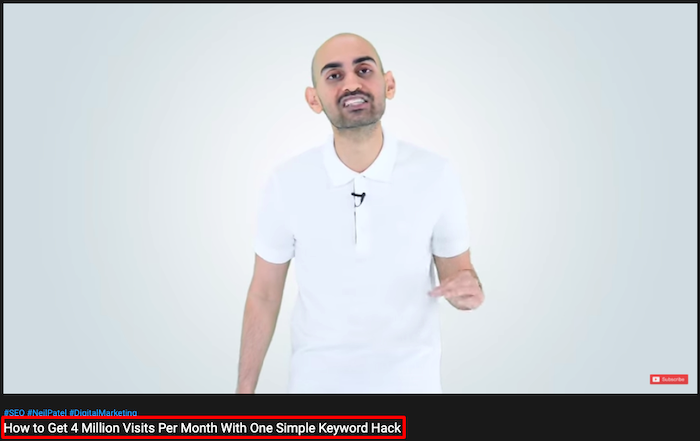
Titles

Tips and Strategies for Getting Listed in the YouTube Recommended Sections - Optimize Your Titles

Think of the title as your video’s headline. Its job is simple: persuading people to click. To do that, it should:

  • incorporate relevant keywords toward the start of the title
  • accurately represent the content of your video
  • include episode numbers where relevant
  • be regularly updated to keep your content fresh

Tags

Tips and Strategies for Getting Listed in the YouTube Recommended Sections - Optimize Your Tags

Tags are keywords that help people find your videos through search and recommendations. You can view a video’s tags by right-clicking on the video page, hitting “View Page Source,” and searching for “keywords.” Your tags should:

  • thoroughly and accurately describe your content
  • incorporate keywords from your video title
  • appear in order of relevance
  • fit within the 270-character limit

2. Localize Your Content 

I’ve already mentioned how YouTube considers your country and time of day in deciding what content to recommend.

That means you need to create content that’s relevant to your audience’s location and optimize it to increase your chances of appearing in YouTube recommendations and search bars. To do that, ensure your content is found by localizing your video metadata.

Fortunately, localizing your metadata doesn’t require uploading multiple versions of the same video, each with a different set of descriptions, titles, and tags. Instead, you can simply do it through the YouTube user interface, or by uploading a CSV file containing your translated metadata by following these six steps:

  1. Download the template “Video – Localization Update” from the Content Delivery Templates page.
  2. Add your translated metadata to the template.
  3. Save the file as .csv.
  4. Click “Validate & Upload” in the “Content Manager” menu.
  5. Click “Select Files” and choose your .csv file.
  6. Click “Process Package”.

3. Tap Into Trending Topics

Localization isn’t just about adjusting your metadata for multiple languages; it’s also about creating content that’s relevant to audiences in the locations you want to reach. 

After all, YouTube specifically uses the phrase “locally relevant news” when explaining the factors driving its YouTube recommendation engine. In short, if you create content around trending subjects that are relevant to your audience, you have a better chance of winning a YouTube recommendation.

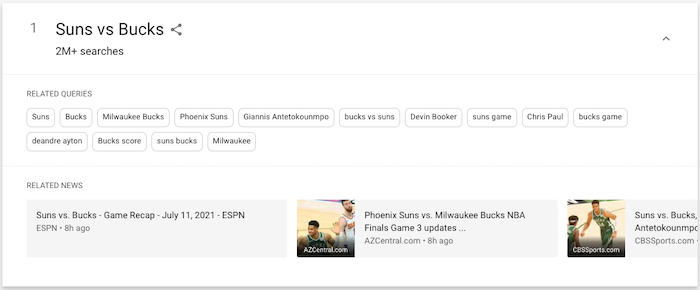
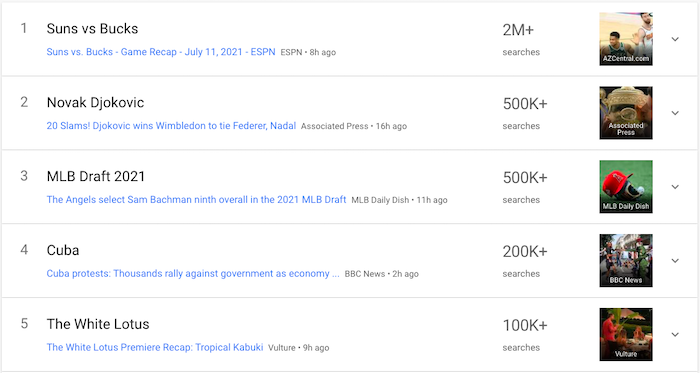
Another Google tool can help you find those trending topics. Visit Google Trends and explore the “recently trending” section, which shows results from 47 countries. Here’s an example of how it looks for the U.S.:

Tips and Strategies for Getting Listed in the YouTube Recommended Sections - Tap Into Trending Topics

We know those are the topics American audiences were searching for on July 11. By clicking into each of those examples, we can find out even more information, such as related queries. These add further context to the search and tell us what people are interested in finding out:

YouTube recommendation sections - How to create trending content

Based on this info, if you had a basketball channel, you could create a match preview focusing on key players like Devin Booker and Giannis Antetokounmpo, or a report discussing the score and highlighting key statistics.

What if those results are too top-level and you need to drill down into a specific topic? Google Trends can do that, too. Just click “Real-time Search Trends” and choose from five categories:

  1. Entertainment
  2. Health
  3. Sci/Tech
  4. Sports
  5. Top stories

4. Focus on Keeping the Beginning of Your Video as Engaging as Possible

Remember: an important factor in winning a YouTube recommendation is whether other people who clicked the same video watched it all the way through.

In reality, there are no guarantees people will stick around once they’ve clicked your video. One study analyzed over 56,000 YouTube views across four small but effective YouTube channels and found an average view duration of 50-60 percent of the total length. Those are comparatively high-performing channels; many see much poorer results.

What can you do to encourage your viewers to watch your videos from start to finish?

YouTube itself has long said the first 15 seconds can make or break your video. Get your audience engaged early by:

  • grabbing their attention from the outset, either through eye-catching visuals or by saying something interesting or surprising
  • clarifying what your video is about straight away, so viewers can be sure they’ve come to the right place
  • revealing what you’ll be discussing later in the video, without giving too much away

5. Encourage Viewers to Like & Share Your Content

YouTube uses various metrics to assess and understand a video’s popularity, such as:

  • click-through rate
  • average view duration
  • average percentage viewed
  • likes and dislikes
  • surveys

How does it get all that data? Well, every time a video is uploaded, YouTube serves it on the homepage for a small number of users. If they click on and engage with it by watching it to completion, sharing it, or hitting “like,” that video will appear on more homepages.

In this way, popular videos can quickly snowball. They get a bunch of views and engagement, which means they show up on more homepages, helping them to generate even more views and engagement. It’s a virtuous circle.

As such, it’s in your interest to encourage as many people to like and share your content as possible. That’s why so many YouTubers urge their audience to hit the “like” button after watching.

Additionally, bear in mind your most loyal viewers are most likely to engage with and share your content. It stands to reason someone who’s watched 20 of your videos all the way through will be more likely to share your next video than someone who’s never even heard of you before.

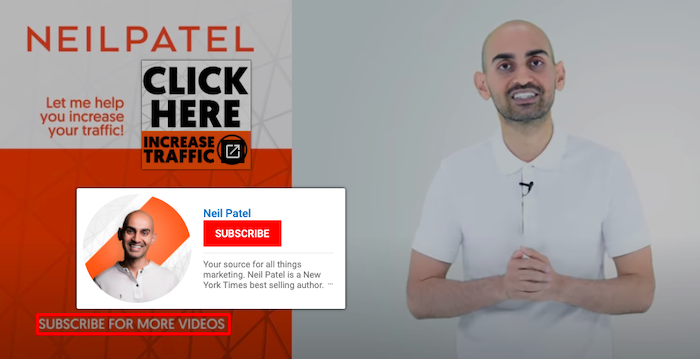
That’s why I often encourage people to subscribe to my channel at the end of my videos:

Tips and Strategies for Getting Listed in the YouTube Recommended Sections - Encourage Viewers to Like & Share Your Content

6. Upload Custom Thumbnail Images

For your videos to attract the attention of the YouTube recommendation engine, you need people to watch them. One of the best ways to do that is by adding custom thumbnails to every video you post.

The thumbnail appears in lists of video results, just above the video title, so it plays a key role in persuading people to click. While YouTube will happily auto-generate a thumbnail for you, I highly recommend making your own.

YouTube’s own figures show 90 percent of top-performing videos have custom thumbnails, and while we can’t categorically say that’s because of the thumbnail, it’s too strong a correlation to ignore.

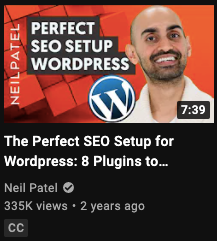
Tips and Strategies for Getting Listed in the YouTube Recommended Sections - Upload Custom Thumbnail Images

Follow these steps to create custom thumbnails that users just can’t help but click:

  • consider your thumbnail image before shooting the video so you can capture multiple images
  • review thumbnails for similar videos to ensure yours stands out
  • make your image as high-resolution as possible, while remaining under the 2 MB limit
  • bear in mind the ideal dimensions of 1280 x 720 pixels (or an aspect ratio of 16:9)
  • save your thumbnail as a JPG, GIF, BMP, or PNG

One final point: to upload a custom thumbnail image, you’ll first need to verify your YouTube account.

YouTube Recommended Sections Frequently Asked Questions

Will it hurt my chances of appearing in the recommended section if my other videos haven’t received much traffic?

Probably not, but if your other videos don’t have long user retention times or engagement (such as likes and shares), there’s less chance YouTube’ll recommend them. 

Will I be alerted if my video reaches a recommended section?

You are likely to notice if a video has reached a YouTube recommended section, due to a sudden boost in views or new subscribers. If a video seems to be growing and growing, it’s likely you’ve scored a top spot for your target audience.

How often does YouTube update its algorithm?

YouTube has made several major updates to its algorithm down the years, from optimizing for clicks and views, to prioritizing watch time and satisfaction. Also, bear in mind YouTube has multiple algorithms for ranking content in the different areas where videos appear, including the home page, suggested videos, and search results, all of which are regularly updated.

Where do the recommended sections appear in YouTube?

YouTube recommendations appear on the homepage and in the “up next” section.

YouTube Recommended Sections Conclusion

If you’re serious about monetizing your YouTube channel or getting a lot of views, you can’t afford to ignore the YouTube recommendation system. It’s the single biggest factor in getting people to see your videos once they’re within the YouTube platform.

Fortunately, if you’re already creating high-quality videos, you don’t need to do anything radically different to appear in a YouTube recommended section. Optimize your metadata, focus on driving engagement, and design compelling thumbnails, and you’ll give yourself the best possible chance of catching YouTube’s eye.

What tactics do you use to generate more engagement from your YouTube videos?


from Blog – Neil Patel https://ift.tt/2WxYeNE
via IFTTT