Paid ad costs are rising. In highly competitive industries, you can expect to pay $50 or more per click. As a result, many businesses are looking to lower paid ad costs by increasing ad relevance.
Dynamic keyword insertion is an ideal strategy to improve relevancy and lower paid ad costs. When used correctly, it can help deliver highly relevant ads with little extra work.
If you aren’t sure what dynamic keyword insertion is or how to make the most of it, you are in the right place.
Today, we’ll cover everything you need to know about dynamic keyword insertion, including what platforms offer it, how it works, and best practices to make the most of them.
What Is Dynamic Keyword Insertion?
Dynamic keyword insertion is a paid ad feature that uses machine learning or AI to customize online ads to match users’ search queries.
For example, if you create an ad for a shoe store, you could use dynamic keyword insertion to add “women’s running shoe” or “red women’s running shoe” to display ads that use the exact same words the user searched.
Using the same terms users type into a search engine assures users you have exactly the product they are looking for.
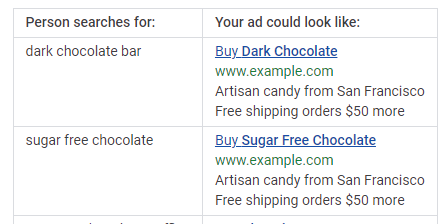
Here’s how Google text ads using dynamic keyword insertion might look:
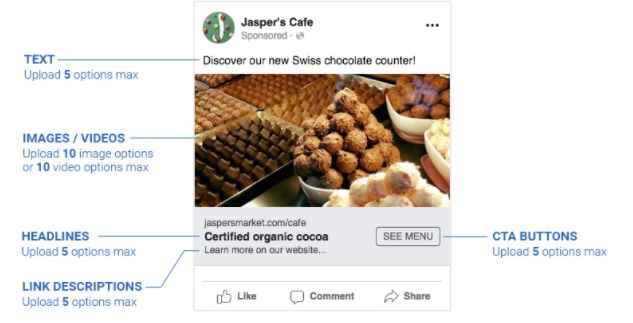
Dynamic ads can change nearly every aspect of your ads, including the main keyword, images, CTA button, and even the landing page users are sent to.
Several ad platforms offer dynamic keyword insertions, including Google Ads and Facebook.
Why Should You Use Dynamic Keyword Insertion? Pros and Cons
Figuring out how to set up PPC ad campaigns is hard enough. Should you worry about dynamic keyword insertion? There are definite pros and cons to this strategy. Here’s what you need to know.
The benefits of dynamic keyword insertion include:
Increase ad relevance: Matching your ads to searchers’ queries makes your ad more relevant to users.
Dynamic ads stand out: Google bolds dynamically inserted terms, making them more visible to users and may increase the click-through rate.
Improve your quality score: Dynamic ads are more relevant, which can increase their quality score and help you reach more users.
Effective for retargeting: Retargeting users with the exact item they already looked at can be highly effective for recovering lost shopping carts and building brand trust.
Less to manage: Dynamic ads allow you to target several related keywords with one ad. While it may take slightly longer to set up, you’ll have fewer ads to manage overall.
Dynamic ads are easier to manage, more relevant, and can improve click-through rates. Sounds great, right? There are a few cons you should be aware of before diving in.
The cons of dynamic keyword insertion include:
Longer keywords might not display correctly: Long-tail keywords can indicate buyer intent, but they may not display correctly in dynamic ads. In this example, the ad displays “chocolate” because the target keyword is too long to fit in the ad.
Can create awkward ads if you aren’t careful: Ads are generated automatically based on a list of keywords you create. If you don’t make sure all the terms match every version of your ad, it could create awkward wording, such as “Great prices on Couch!” (This, of course, can be prevented by being careful with your keyword list.)
Possible trademark issues: If you bid on competitors’ brand name or trademarked products, your ads could be pulled for trademark infringements.
Dynamic Keyword Insertion Best Practices & Tips for Marketers
Dynamic keyword insertion is an ideal strategy to stand out in a competitive PPC environment. By matching users’ search queries, your business can lower your cost per click, improve your quality score, and deliver highly targeted ads.
However, the process might seem complicated, especially if you are newer to the world of PPC. Here are four best practices to help you create effective dynamic ads.
1. Don’t Use Broad Match Keywords
Dynamic ads are used to create highly relevant ads, so using broad keywords isn’t effective.
For example, if you want to create an ad for a broad term like “body wash,” there’s no point in using a dynamic ad. On the other hand, if you want to target a precise term like “orange scented body wash for sensitive skin,” dynamic ads are a great choice.
There are two reasons for this: using broad keywords can create awkward ads, and it can also cause your ads to show up for terms that just aren’t relevant.
Instead, reserve dynamic keyword insertion for longer, precise keywords. Here are a few examples of keywords that would be a good fit for dynamic ads:
women’s red rain boots
black Oakley Holbrook
certified organic face wash
These are very precise terms that indicate buyer intent, making them ideal for dynamic keyword insertion.
2. Make Sure Asset Options Make Sense Together
Dynamic ads allow you to create multiple versions of an ad, but they don’t just plug different keywords into the exact same ad. Instead, you can upload multiple assets for each part of your ad.
For example, Facebook allows you to add multiple text, headlines, images, link descriptions, and CTA options.
Options are great, but they can also cause issues.
Take a look at the ad example above. Let’s say the business decided to target Swiss chocolate, chocolate-covered cherries, and taffy in the same ad and uploaded a picture of each. Their chocolate-covered cherry image could end up displayed next to text promoting their Swiss chocolate.
Poorly designed dynamic ads can create awkward (and even funny) ads, but they also reduce trust in your brand and decrease conversions.
Ensure all assets make sense together, no matter which headline, image, or CTA is displayed.
You’ll also want to check grammar. For example, say you create an ad with the headline “Stop by to check out our top….” If your keyword list includes the term “Couch,” you could end up with an ad that reads, “Stop by to check out our top Couch.” Pay special attention to plural and singular words.
3. A/B Test Ads for Maximum CTR
Dynamic ads allow you to create multiple versions of the same ad, but that doesn’t mean you should ignore A/B testing. In fact, dynamic ads enable you to test even more options.
For example, you could test:
headlines
link descriptions
CTA buttons
text
images
keywords
To test dynamic ads, create multiple versions of the same ads targeting the same keywords, then change one element.
For example, you could create two versions of an ad targeting running shoes and use multiple images in one ad, and a single image with text overlay in the other. Run the ads for at least two weeks and see which version drives the most clicks and conversions.
Dynamic keyword insertions are designed to create highly relevant ads, so make sure each ad group is closely related. For example, you might create an ad for different colors of the same product, but you wouldn’t use different products in the same dynamic ad group.
A restaurant might use “bacon burger,” “double cheeseburger,” and “bleu cheeseburger” in the same ad group, but they wouldn’t want to use “bacon cheeseburger,” “wings,” and “onion rings” in the same ad group.
Instead, make sure each ad group targets one group of closely related products or services.
How Do I Create a Dynamic Inserted Keyword?
Several paid ad platforms offer dynamic keyword insertion, including Google and Facebook. While the exact process can vary by platform, this guide will help you get started no matter where you create your ads.
Create a list of target keywords for your dynamic ad group
Perform keyword research to see what terms users search in your industry. Make sure the terms are specific and related. For example, cheese pizza, pepperoni pizza, sausage pizza. Avoid short and broad keywords.
Set a goal for your ad
What do you want your ad to do? For example, you might want to increase app downloads, drive sales, or generate leads. Facebook and Google Ads both offer different ad formats based on your goal. Facebook ad goals include catalog sales, app installs, lead generation, conversions, traffic, and messages.
Choose assets (and make sure they match!)
Dynamic ads don’t just plug in a different keyword to the exact same ad. You can also upload several images, videos, headlines, CTAs, and landing pages. Select several versions of each asset, but make sure each version can work in every configuration.
Create different ads for plural and singular search terms, so your ads are grammatically correct. Also, make sure that your ad text and headlines are within the character limit for the platform.
Launch your ads and track the results
Once your ads are created and you’ve made sure all configurations make sense, it is time to launch your ad. Track KPIs that matter to your brand, such as click-through rates or conversions. Keep an eye on quality scores as well. A low-quality score can raise your CTR.
KI works by using machine learning or AI to insert terms that match users’ search queries to deliver more relevant ads. This allows businesses to deliver highly relevant ads without spending hours creating different ads for each possible search query.
Should I Use Dynamic Keyword Insertion?
If you are using paid ads, absolutely. They are relatively easy to set up and can increase click-through rates and conversions.
What Are Dynamic Ads?
Dynamic ads are ads that change based on the users’ search queries. For example, a user searching for Nike shoes will see an ad for a Nike shoe, while a user searching Adidas will see an ad for Adidas. You might think they are different ads, but they might be the same dynamic ad that automatically replaces the text and image to match your search.
What's the Difference Between Static and Dynamic Ads?
Static ads stay the same no matter what search the user types in. Dynamic ads change to match searchers’ queries. They may change their ad copy, image, or even the landing page.
When Should You Not Use Dynamic Keyword Insertion?
Do not use dynamic keyword insertion for broad match keywords or unrelated search terms. Broad match terms (like shoes or couches) and unrelated search terms (think wings and burgers in the same ad) can create awkward ads and lack the relevancy that is important for dynamic ad success.
Dynamic Keyword Insertion: Conclusion
Are you struggling to create successful paid ads? Dynamic keyword insertion might be the silver bullet you’ve been looking for. By matching ads to searchers’ queries, you can create highly relevant ads that cost less and are more likely to drive clicks.
Several ad platforms offer dynamic ads, including Google Ads and Facebook. If you have trouble getting your ads set up, our team would be happy to help.
Are you considering dynamic keyword insertion in your paid ads? What challenges are you facing?
from Blog – Neil Patel https://ift.tt/2WNmhsk
via IFTTT
Disclosure: This content is reader-supported, which means if you click on some of our links that we may earn a commission.
Do you want to skip the read and get right to my top pick?Nextivawins overall, but if you are just looking to send, receive, or sign a fax right now for free, go with FaxBurner.
I use an online fax service, which lets me handle everything directly from my phone or laptop.
There’s no equipment to buy or maintain. And since my fax service runs through the internet, I don’t have to pay for an expensive traditional phone line.
It’s easier to stay organized, too. Each fax I receive is a digital document. I can print it out if I need to, or I can save the fax like it’s any other file. I never have a problem finding it later.
You might say, “Neil, that all sounds good—but what about a business that depends on faxing, day in and day out?”
To that, I say even more reason to go with an online fax service. You can stop buying toner cartridges and go paperless. Help the environment and save money while doing it.
I’ve put together reviews of the top seven online fax services and a brief guide about how to choose the right one for you. Keep reading and never worry about faxing again.
#1 – Nextiva vFax Review – The Best for Offices with Fluctuating Faxing Needs
There’s a pretty wide gap in low-usage online fax services. Some providers’ lowest-cost plan still allows for hundreds of faxes each month; others offer free or cheap plans that only cover a few dozen monthly faxes.
What if your needs don’t neatly map to one of those volume levels? How do you get the best price if you need to send hundreds of faxes for a few months but rarely need to touch it the rest of the year?
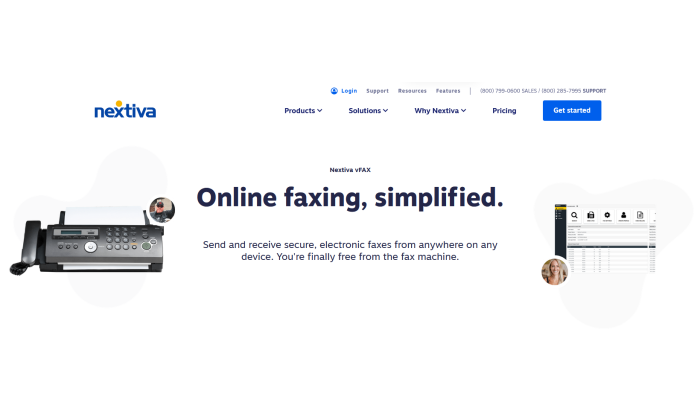
Go with Nextiva’s standalone online fax service, vFax.
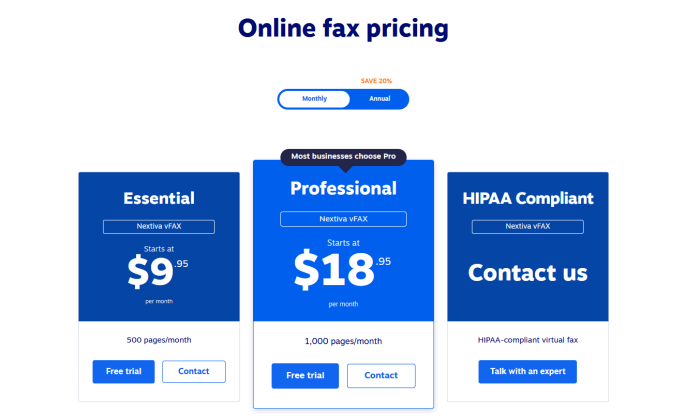
They have one of the best monthly rates out there with no annual commitment. You get up to 500 pages per month for just $9.95. Again, that’s on monthly pricing (the rate comes down to $7.95 per month when you pay for a year upfront).
So with no commitment and one of the best rates in the category, you can rest easy knowing Nextiva vFax can accommodate your busy faxing periods without being a weight around your neck when you don’t need it.
For example, if you really just need to fax from Q4 through tax season, you can pay per month for vFax and then drop it during the leaner summer months. There’s no penalty for doing so and you can restart the service once October comes around again.
If you need more than 500 pages per month during that period, just take one step up to the Professional vFax plan. That’s just $18.95 per month—again, on monthly billing with no commitment—to allow for up to 1,000 pages.
Nextiva can even work on a custom quote if you need your faxes to be HIPAA compliant.
Get the best deal for your office if your faxing needs vary quite a bit throughout the year. Go with Nextiva vFax.
#2 – RingCentral Fax Review – The Best for Offices That Fax a Lot
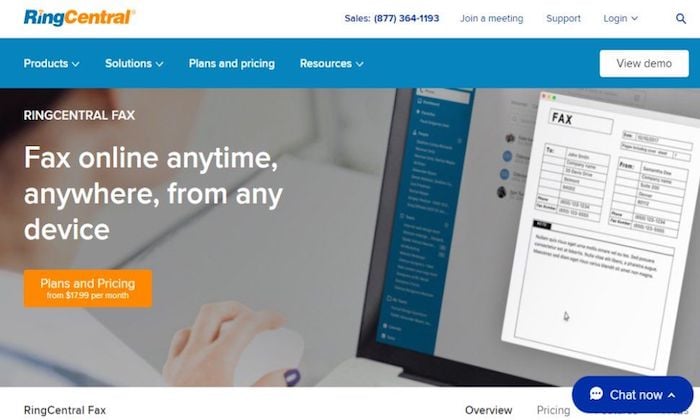
If you and your employees fax on the daily, I would definitely explore the idea of getting RingCentral Fax. Large volume faxing is extremely affordable and easy to manage, regardless of how many pages you need to send.
RingCentral gives you the option to get standalone services, or to purchase online fax as part of a large bundle.
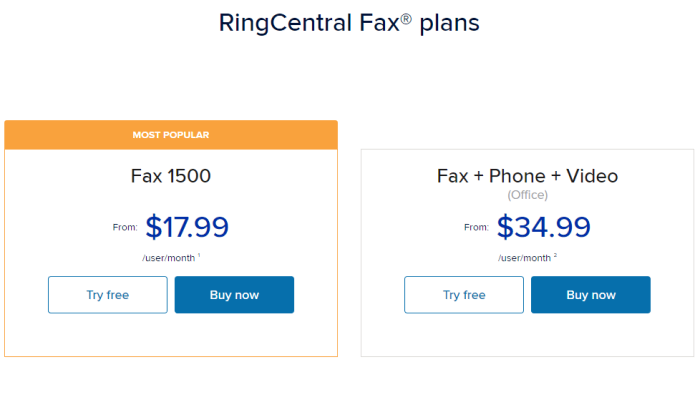
Let’s look at the standalone fax plan first, RingCentral Fax 1500. This gives you 1,500 pages per month, which comes out to roughly 50 pages a day. You’re allowed a single user, but up to 25 trusted email addresses on the account. That’s key.
It’s like replacing and streamlining a single fax machine in a busy office.
For offices that know 50 pages per day isn’t going to get them close to where they need to be, there’s RingCentral MVP. You get unlimited online fax alongside one of the best business phone systems.
In addition to unlimited faxing, you get unlimited voice and video calling, business texting, and team messaging.
Problem solved.
This is where RingCentral distances itself from the other good online fax services I reviewed. None of the others include anything like that, so if you are in the market for more communication tech than just online faxing, RingCentral is your best option.
Even if it’s just the fax service you want, nobody else offers an unlimited amount—and certainly not for such a low rate.
Whether you need the unlimited service or not, getting fax through a well-known communications provider like RingCentral is peace of mind in itself. You are using a trusted network and have access to expert customer support via the web and phone.
It’s not something you need all the time. But, at 4:30 on Friday when the title agency is waiting for that signature, it’s nice to have someone to call.
As you would expect, the service is modern and well-designed. You can run a call center from the RingCentral mobile app—it can handle your faxes just fine. Snap pictures of documents and fax them from your phone.
The web app is simple to use, as is email. Another real plus about RingCentral is the mature administrative interface. It’s easy to add new users or phone numbers and keep track of everything, even if you have multiple locations or remote employees.
Take advantage of a huge number of integrations with popular cloud storage services on RingCentral’s App Gallery like Box, Dropbox, Evernote, OneDrive, and Google Drive.
If you have to keep track of a lot of faxes, these integrations will save a ton of time and simplify your workflows. Store and archive faxes as you would anything else.
Emphasize the benefits: easy to use, easy to implement into workflows and stay organized. Store and archive faxes as you would anything else.
So how much does all this cost?
RingCentral Fax 1500 is $17.99/ month per user if you sign up for a year, or $22.99 if you pay month to month. You get 1,500 pages free each month, and it’s 4.9¢ per page after that.
Or you can go with RingCentral MVP, get unlimited faxing, and never have to worry about how many pages you send.
If you are in the market for a combined fax and business phone solution, look no further. RingCentral MVP is a complete communication platform, complete with business phone number and conferencing calling so you can loop everyone in on a deal and fax from the same app.
You can handle HIPAA compliant faxing with RingCentral, but you’ll have to get in touch with your account manager to set it up. This is why I recommend SRFax for companies that need a compliance-friendly solution.
The frequent faxer will appreciate the ease and transparent pricing of RingCentral. Try either RingCentral Fax or MVP free for 15 days.
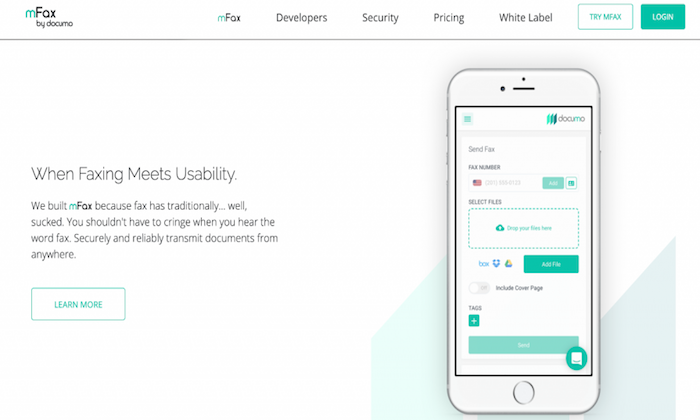
mFax is the complete solution for offices that can’t go completely cloud. Some companies still need to work with hard copies or have fax machines and multifunction printers they want to keep using.
With mFax you can get the best of both worlds. Not only will that equipment still work, it will perform even better and you can ditch expensive phone lines forever.
Typically, online fax uses the same VoIP (voice over internet protocol) technology as voice and video communications. This helps bundle services, but mFax has built a network specifically for fax, so you’ll get better quality and reliability.
The other major benefit for hybrid offices using mFax is the plug-and-play FaxBridge hardware adapter. Instantly connect any fax machine to the internet so you can route incoming faxes directly to email.
It’s easy to set up the FaxBridge, which ties all of your fax hardware into the new cloud system. Everything will be through the internet, so you can stop paying for an expensive traditional phone line.
Basically, you get the scalability and flexibility of cloud-based service without having to rework the way you do business. Users can access the machines they need with the FaxBridge, or work directly from their email or browser.
Every fax is automatically stored with mDrive, the company’s cloud storage service. They give you the first GB of storage for free and you can tag faxes to make storage and retrieval much easier.
No matter how you store or transmit your documents, mFax is extremely secure. It’s GLBA, SOX, and PCI compliant. mFax will sign a BAA, and the company offers purpose-built solutions for healthcare, legal, and financial services companies.
Any office can feel completely safe using mFax, whether their employees are in the office, working from home, or on-the-go. There’s no mobile app, but the browser-based access is responsive to your screen size and just as secure.
mFax and mDrive are part of the Documo Suite—which also includes mSign—a cost-effective eSignature solution. Whether you just want to fax or need signatures, the entire suite is simple to navigate. Teach someone once and they will be fine for life.
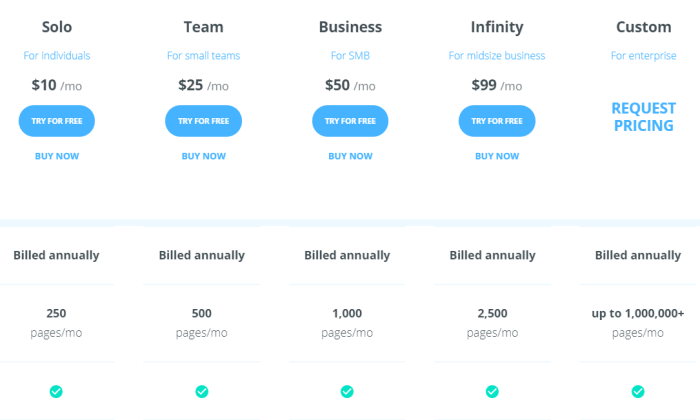
There are a range of plans available:
In my opinion, the Solo plan is kind of a misnomer. With a page limit of 250 per month, this might be all that a small office needs. Of course, you only get one user with Solo, which might limit some companies.
With the Team plan, you get five users and access to an admin interface to help everyone stay organized. One thing I really like about mFax is that the cost for adding users and phone numbers decreases as you move up pricing tiers. So does the overage cost.
By the time you hit the Infinity plan, the price per additional phone number has dropped to $2, which is less than half the cost of other vendors.
Another selling point of mFax is the US-based customer support, which is a great resource should something go wrong or for employees who need help when they’re working from home.
mFax can help the hybrid office like no other service I looked at. No matter how many offices or machines you have, mFax gives you the technology to keep faxing secure and affordable.
#4 – HelloFax Review – The Best for Remote Offices
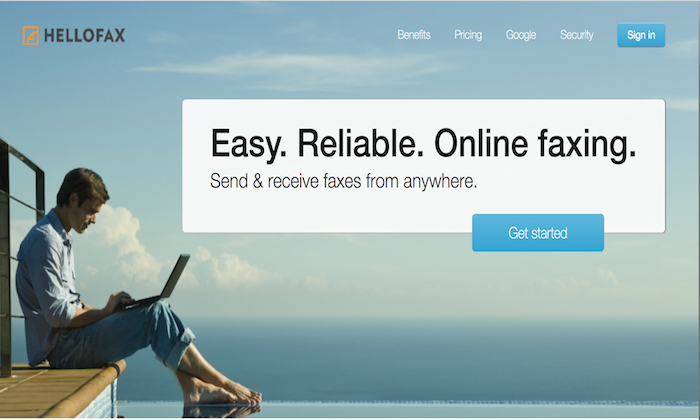
HelloFax is a secure online fax service built for the modern cloud office.
Sure, every solution I’ve reviewed is cloud-based. But HelloFax comes with features that make it especially appealing to companies that can’t depend on in-person interactions to keep the ball rolling.
For a clear example, let’s talk about having the ability to sign documents. It’s included with every HelloFax plan (including the free one). Many online fax services don’t let you sign docs or, at least, make you pay extra.
You can also edit documents in HelloFax, another capability that many other options lack. This is a huge time and hassle saver.
Resolve minor document errors when they happen, not seven emails later.
For the remote office, this is a big deal. People can’t exactly just drop by to rectify a spelling mistake or sign something they forgot. HelloFax takes the problem away, no white-out frustration necessary.
There’s no mobile app, which might strike you as a downside, but HelloFax doesn’t need one. The web app is clean, easy to use, and optimized for mobile. You can use your phone to take pictures and fax just as you would with any app.
HelloFax also provides unlimited cloud storage. Everyone will have access to sent faxes, no matter where they are.
Alternatively, you can make use of HelloFax’s cloud storage integrations with Box, Dropbox, Evernote, Google Drive, and OneDrive.
You choose how you want to keep things organized and HelloFax will make it happen.
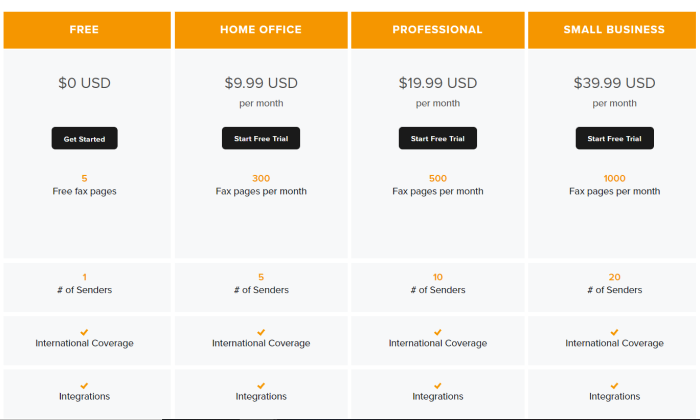
The pricing isn’t low, but it’s reasonable given that the eSignature solution and unlimited storage come with every plan.
The Free plan is limited to the web app and sending five faxes. This is more limited than FaxBurner’s freemium plan, which lets you receive faxes. Still, it’s an excellent choice if you have to send a fax with a signature and you don’t want to pay.
Upgraded plans come with more pages, the ability to receive fax. You’ll also be able to fax directly from your email, as well as fax multiple recipients at the same time.
It’s not the cheapest plan out there, but it’s deep. HelloFax supports a wide range of file and image types. You also get more control over your documents, in terms of being able to edit and sign them.For the remote office that’s already working in the cloud, HelloFax is a good choice.
#5 – SRFax Review – The Best for Faxing Regulated Documents
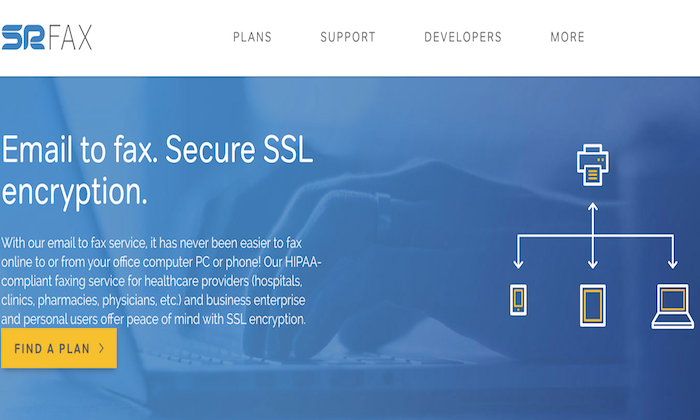
SRFax is a great option for businesses that have security and compliance concerns.
Transferring information over the internet always comes with the risk of interception. It doesn’t matter if you are a small company—a single compromised document could result in a costly lawsuit or fine.
SRFax meets or exceeds every guideline for security set out by the NSA, NIST, and Council on Cybersecurity. It’s the safest way to fax on the market.
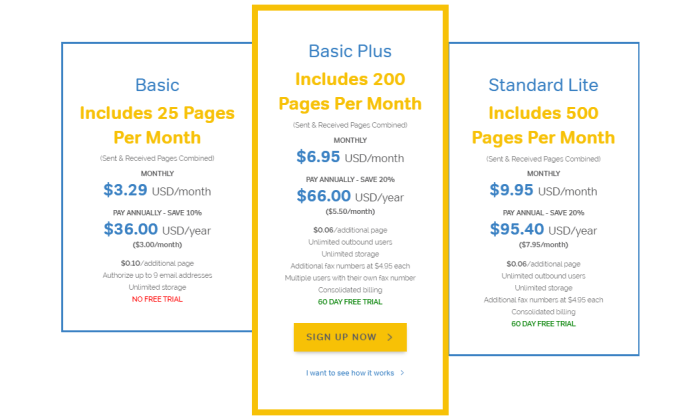
With plans starting as low as $3.29, SRFax offers affordable protection for businesses that need to fax occasionally. From there, plans scale up to attractive price-per-page rates for companies that need high volume.
The individual psychiatry practice, the 10-person dentist office, the biggest hospital in the state, or the multinational law firm—really, anyone who needs to fax documents in compliance with regulations—can find an SRFax plan that fits the bill.
Security is the big selling point for SRFax. The company’s data centers are locked down similar to Google and Amazon Web Services. Encryption is always enabled, keeping your fax safe at every step of the transfer for your device to the recipient and back.
No matter where you are or what device you are using, you can fax with complete peace of mind.
Every PDF or TIFF you receive is scanned for viruses before you get it. No need to worry about opening that attachment.
This is a pretty big deal for lenders, lawyers, and other professionals who have clients faxing documents in. Not everyone has a fax machine, so it’s not uncommon for an office to receive a fax from a public library, print-and-copy shop, or other network with unknown security.
SRFax offers specific plans for healthcare providers that need to meet stringent HIPAA regulations and will sign a business associate agreement (BAA). The purpose-built online fax platform comes with features to make compliance easier, including audit trails and automated deletion.
Really, no matter what kind of regulations you are up against, SRFax has you covered.
There are three different sets of plans to choose from: Standard, Healthcare, and Enterprise.
There are six Standard plans in total. The Basic plan is fairly limited. You get 25 pages per month, but it’s only $3.29. It’s good if you rarely need to fax but need a secure option.
With the next plan up, Basic Plus, you get unlimited storage, unlimited outbound users, and up to $200 pages each month.
Standard plans run all the way up to Professional, which includes 2,500 pages per month for $45.95. This is a better deal at scale than you are going to get with mFax, which has comparable security.
Looking at the Healthcare plans, which are configured to meet HIPAA, you can get the small office set up with a plan for as low as $7.95 per month. It’s capped at 200 pages, but prices remain extremely reasonable up through the higher plans, which can support up to 20,000 pages per month.
SRFax also offers Enterprise plans, which start at 5,000 pages per month. You get unlimited authorized email addresses, no-charge PGP encryption, and optical character recognition (OCR).
With OCR, you’ll be able to search the text of documents you faxed, which makes retrieving documents a whole lot easier.
SRFax is my top recommendation for any business that has to send secure faxes.
You can try it free for 60 days, which is more than the few weeks you get to test-drive others.
#6 – FaxBurner Review – The Best Free Online Fax Service
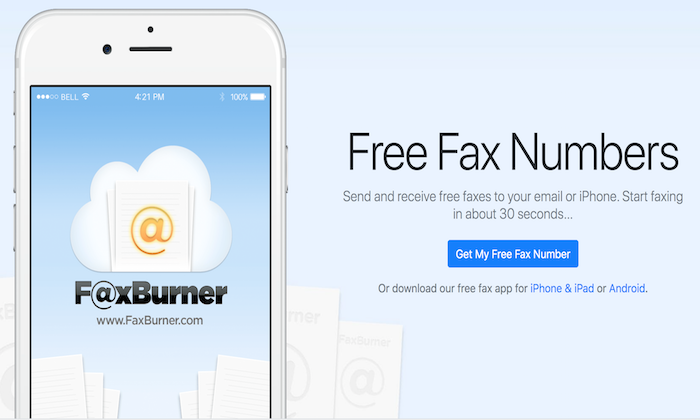
FaxBurner is a web and mobile application that so many people love. It has garnered a rating of 4.9 stars on the App Store with more than 14,000 reviews.
It’s perfect for the person who suddenly needs to fax.
First off, you can use it for free to fax a limited number of pages.
Second, you can get a FaxBurner account set up in about 30 seconds.
People rave about it.
Whether they are faxing a request for an absentee ballot or trying to receive an important tax document before a deadline, users are so grateful for FaxBurner.
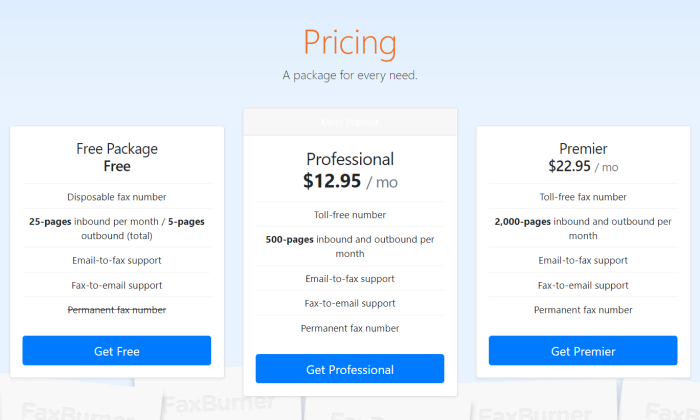
That’s right, FaxBurner’s free plan will let you send and receive faxes, which is quite distinct from other freemium plans.
Once you create your free FaxBurner account you can send up to five pages and receive up to 25 at no cost. After that you have to pay per page or upgrade your plan.
When you want to use your free fax, FaxBurner gives you a temporary number that works for 24 hours. If you don’t use all your complimentary faxes, you can request another number again later.
Send faxes from your mobile phone or with email. Take pictures of the page you want to fax. It’s that simple.
You’re not struggling to figure something out during an already stressful situation, or worrying if your document is actually going to arrive. FaxBurner sends you a notification so you know for sure.
Another really nice perk is that you can sign documents from your mobile app. So if you are looking for a free online fax service with digital signatures, this will work. No need to find a printer to sign.
Because it’s my top pick for the freemium category, I haven’t spent much time talking about the premium FaxBurner plans.
These plans can be a good option for the mobile-first company. There’s no web app. You can fax from your email or a mobile device. From the mobile app, you can see every fax you’ve ever sent, or integrate FaxBurner with Dropbox.
HelloFax is my top recommendation for the remote office because it has a wider range of integrations and gives you deeper document editing/signing tools.
If you aren’t worried about those factors, then you should take a hard look at FaxBurner, which gives you higher page limits at lower cost than HelloFax.
For those of you just looking for a free way to fax, FaxBurner should be your first and last option. Send and receive faxes in a few minutes without paying a cent.
Use FaxBurner free today or upgrade to a premium plan. If you aren’t satisfied, they will refund your money within the first 30 days of service.
#7 – MetroFax Review – Cheapest Way to Fax 500+ Pages per Month
If you are looking for the best bang for your buck, check out MetroFax.
The company offers some of the lowest price-per-page rates of any online fax service. There’s no activation fee, no fee for ending your service early, just stress-free affordable faxing.
The best part about the great price is that the service is not cut-rate at all. You get a fully-featured mobile app, local or toll-free number, and the ability to fax more than 170 countries.
You can attach up to 10 documents to a single fax totaling up to 18 MB. Some of the other providers let you send larger faxes, but it’s one of the few drawbacks.
MetroFax supports most of the common document and image formats. There’s no problem sending spreadsheets, for example.
I really like how Metrofax automatically retries failed sends twice, and notifies you immediately once your fax has gone through.
Another convenient feature that helps keep costs down is that you can add five email addresses to a single Metrofax account. Instead of having to purchase multiple subscriptions, you can get a small team set up for one low cost.
There’s no hidden fees. No bonus charges. It’s not the most beautiful platform out there, but it’s got the reliability and security where it counts. ADP, Allstate, and US Bank all use Metrofax to keep costs down.
Let’s take a look at what you get.
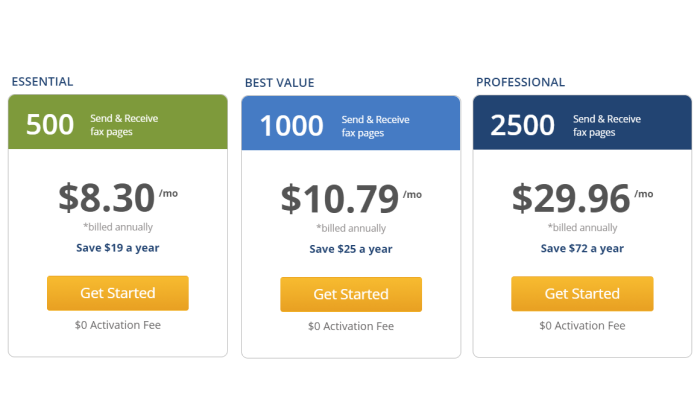
The Essentials plan lets you fax up to 500 pages per month for $8.30. This is less than SRFax and FaxBurner for the same number of pages, two of the other more economic options I reviewed.
Upgrading to the aptly named Best Value plan, you get double the number of pages for a few dollars more. This is where MetroFax really starts to stand out. To get 1,000 pages with mFax would be $50/month, which is five times more expensive.
With any plan you pick, you get a low overage rate of 3¢ per page. That’s as good a rate as you will find.
For companies worried about the commitment or high upfront cost of a subscription, MetroFax offers great month to month rates. Best Value “jumps” to $12.95/month, which is the same cost as FaxBurner with twice the page limit.
At a certain volume, RingCentral’s unlimited fax plan becomes the better buy. But if you don’t always hit those high numbers, it may not actually be the most cost-effective.
A Professional plan from Metrofax gets you 2,500 pages per month, or around 80 pages a day. If you are in that neighborhood, Metrofax might be better than RingCentral.
Put it all together—the good price, low overage fees, and ability to add multiple emails to a single account—and you have one of the cheapest ways to get your faxes from point A to B.
It’s not the most feature-rich platform, but if you’re in the market for an online fax service that won’t break the bank, start here.
What I Looked at to Find the Best Online Fax Service
Some companies have limited use for online fax. It’s something they need to interface with particular vendors or customers, but not a critical part of their business per se.
Other companies need an online fax service they can depend on that works across all departments.
Either way, you want something that’s easy to use when you need it. Every online fax service I’ve picked lets you fax from the web, email, or a mobile device.
Some of the freemium plans may have limits in this regard, but if you are paying for one of these services, know that you have the flexibility to send and receive faxes no matter where you are.
But which one of these services are going to fit your needs and budget? Let’s take a close look at the major criteria you need to assess as you evaluate my top picks.
Monthly Fax Volume
How much do you fax? You’ll want to have a decent estimate of how many pages you send and receive via fax each month.
If you are just looking to send a fax randomly, FaxBurner and HelloFax give you a limited amount of free faxes. Only FaxBurner gives you the ability to receive free faxes, though.
For companies where faxing is a regular part of business, you’ll have to get a paid plan. This is going to have a set number of pages each month you can fax. If you go over that limit, you will get an overage charge, which is typically a few cents per page.
Fortunately, there are a range of services and plans out there, so you should be able to find something that dovetails with your needs.
There are affordable plans with low monthly limits that are perfect for the company that needs to send a fax every now and again. The Basic plan from SRFax is the lowest cost to start at $3.29/month for 25 faxes****.
High-volume fax plans come with hundreds or thousands of pages before you start hitting overages. These plans are definitely pricier and may require signing up for an annual subscription, but they make a ton of sense for offices that fax all the time.
Metrofax and RingCentral offer plans with very good price-per-page rates at high-volume. If you don’t want to worry about page limits at all, the RingCentral MVP plan comes with unlimited faxing.
Users and Phone Numbers
Do you need a single fax line for the office? Or do you need individual phone numbers for multiple people to manage their own faxing?
FaxBurner will give you a temporary phone number to send and receive a limited number of faxes for free. If you upgrade your plan, FaxBurner provides a permanent number and a lot more pages.
If you can get by with a single phone number for fax, but you want a lot of people to be able to use it, I recommend SRFax, MetroFax, or RingCentral. These companies allow multiple emails to access a single fax line.
With all but the entry-level plan for SRFax, you get unlimited outbound users, and additional lines only cost $4.95 each. That price is fairly standard, and you won’t need a ton of numbers to get everyone onboard because so many users have access to each line.
For companies that need a lot of individual numbers, I recommend mFax because the price goes down as you grow. Higher tier plans come with discounts on adding users and lines, dropping down as low as $2 per additional phone number at the Infinity tier.
Document Requirements
But there is more to think about than just security when it comes to your document requirements.
If you just have to fax PDFs, any option is going to work fine, but other formats may not be supported depending on the service.
Double-check each vendor against your needs. RingCentral and mFax can handle a broad range of formats and file types that includes most every kind of document you’d want to send.
You also want to be conscious of limits on page length, especially if you are shopping around the freemium or low-cost options. Some of these plans will limit the number of pages you can send, which can cause issues for long documents.
Companies that use fax as a routine part of their business often need to be able to do more than just send and receive. They may need the ability to:
Edit fax documents
Attach a cover page
Add/Accept digital signatures
These features are extremely helpful as they eliminate extra steps and the need for additional third-party services to get the job done.
One of the reasons I like HelloFax so much is that it comes with deep document editing and digital singing tools. This saves everyone a ton of time when there are minor corrections or missing signatures.
Explain why these features eliminate extra steps and the need for additional services. Call out HelloFax for handy editing features that saves everyone time when there are minor corrections slowing an approval down.
Security & Privacy Regulations
Are you faxing sensitive information like social security numbers, patient records, or financial data? If you are, then you need to make sure your online fax solution can handle the required regulations.
Now all of the options I picked are secure and the companies have taken every precaution to ensure that faxes can’t be snooped or stolen.
That said, some online fax providers have built their service to comply with especially strict regulations like HIPAA (Health Insurance Portability and Accountability Act) for healthcare or the GLBA (Gramm–Leach–Bliley Act) for financial services.
If your company is subject to these (and other) regulations, you want to make sure that your online fax service is compliant.
My number one recommendation is SRFax because the company has gone over the top to ensure security and privacy of its service. mFax is another good option, if you are worried about compliance.
Both of these companies have plans that can handle HIPAA, GLBA, payment card industry, and other regulations. They will also sign a business associate agreement (BAA) which protects your company from facing the wrath of government regulators if something goes wrong.
If you need HIPAA-compliant online fax, do not use an online fax service that won’t sign a BAA.
Document Archiving
If you’re using an online fax service to send and automatically digitize documents, it should come with document archiving as well. By this, I mean there should be easy ways to store, retrieve, and share any fax.
Some online fax services provide online databases so users can easily save faxed documents.
SRFax is a really great option for archiving because every plan comes with unlimited storage. You also have the ability to tag faxes, which makes filing and finding them later a whole lot easier.
HelloFax also gives you unlimited storage. With other vendors there are limits, depending on the plan you choose.
One thing to look for is integration with the cloud storage services you already use. RingCentral, mFax, HelloFax and FaxBurner all have integrations with popular products.
You’ll be able to store and send faxes directly from DropBox, Google Drive, OneDrive and others.
This is going to streamline workflows and help everyone stay organized with less work. Plus you can take advantage of the great search functions in these platforms to find files quicker.
Summary
You have a lot of options for online fax services. A lot.
My picks are all good, but chances are one is going to work better for your situation than the others. To recap:
Nextiva – Best for offices with fluctuating faxing needs
MetroFax – Cheapest way to fax 500 or more pages per month
It comes down to what you need. The totally remote office is going to love HelloFax, whereas hybrid offices are going to like mFax more.
If you need to fax a lot for one chunk of the year and then never have to for the rest, there’s no better deal than Nextiva.
RingCentral can work really well in either situation, but it’s only a good buy for companies who fax a large number of pages each month.
SRFax is the best for companies in healthcare, financial services, and other verticals where faxing sensitive information is a part of daily business.. You benefit from always-enabled security and tools to help your employees maintain compliance with regulations.
Metrofax is a value-buy. It doesn’t come with all the capabilities of other services, but it handles the essential faxing requirements quite well at a great price.
And if you are looking for the best free online fax service, I recommend FaxBurner. Send, receive, and sign a few faxes for free.
What company do you use to send online faxes?
from Blog – Neil Patel https://ift.tt/3lXENoI
via IFTTT
Artificial intelligence (AI) tools for media let you create content at scale in a previously impossible way and you don’t even need design experience to create something impressive.
AI isn’t new. The film and gaming industries both use it regularly, for instance. But, these sectors have only scratched the surface of AI capabilities.
On a seemingly daily basis, new AI tools emerge to help people create articles, video scripts, logos, and more. Naturally, these tools have investors excited. However, they’ve plenty to offer to content creators, marketers, and digital agencies too.
Let’s look at how some of these AI tools for media can transform the way you work.
1. Podcastle
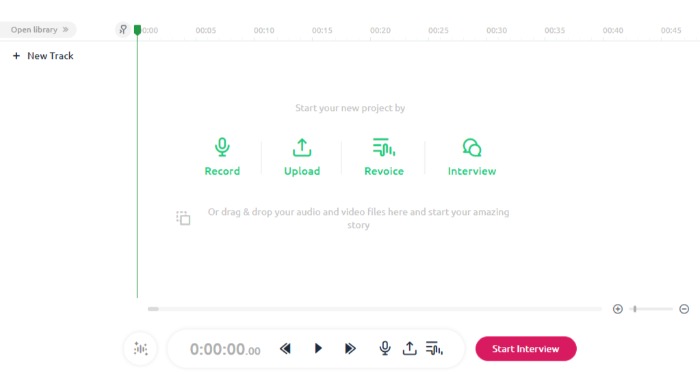
Podcastle, which has raised more than $1 million, is an extension for the Google Chrome browser. This free tool lets you create custom podcasts with just a few clicks.
With Podcastle, you can:
quickly transcribe your podcasts
create and edit content with the text editors
turn text into podcasts
revoice content
record live interviews
make autosaves
access unlimited content publishing and projects
Getting Started with Podcastle
Set up a Podcastle account by clicking on the green “create” link in the top right-hand corner.
Depending on what you want to do next, visit the tutorials page for step-by-step instructions.
Podcastle Cost
Podcastle’s free service gives you access to:
45 minutes of one-time audio recordings
four hours of monthly audio recordings
capacity for one host and two interviewees
magic audio processing
And more.
There’s also a “storyteller” package for $11.99 a month. Storyteller has all the above features, plus:
additional recordings and interviewing capacity
10 hours of transcription every month
high-quality downloads and revoicing
unlimited magic audio processing
2. Let’s Enhance
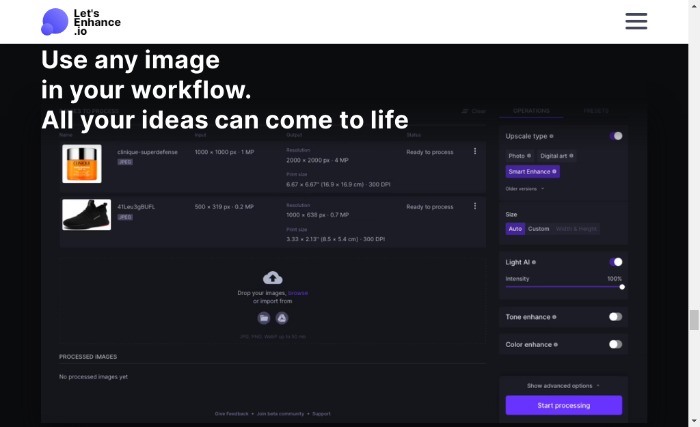
Let’s Enhance takes any photo you upload and analyzes the photo quality, color, contrast, etc. Then, if the picture needs enhancement, it automatically color corrects and retouches the image with minimum input.
Other features include:
batch processing
custom sizing
resolution increasing
resizing and upscaling
This program isn’t just for personal use. Let’s Enhance is also recommended for real estate and e-commerce, where you need clear, high-quality images.
Getting Started With Let’s Enhance
Upload an image to Let’s Enhance, and the algorithm enhances it as much as possible without compromising quality.
The algorithm provides a slider for tweaking parameters like contrast, hue, brightness, and saturation. You can also apply additional filters.
Let’s Enhance Cost
Let’s Enhance has subscription, business, and pay-as-you-go options.
Subscriptions for personal use run from $0 for a one-time, five-credit trial to $34 for 500 image credits per month.
Businesses can pay from $72 for 1,000 credits per month to $290 for 5,000 credits per month, plus get API access.
Pay as you go options range from $9 to $39 and let you use the program only when you need it.
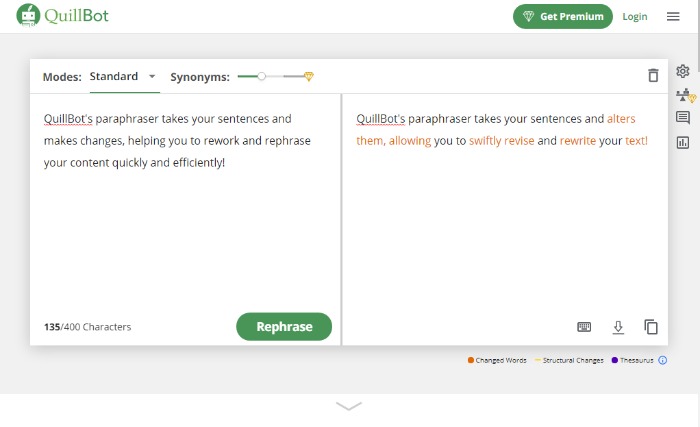
3. QuillBot
QuillBot is one of the few quality paraphrasing tools on the market. This comes in handy when you want to avoid being repetitive when writing long pieces. It may also help you rework product descriptions.
The program has two main modes: one with synonyms and one without.
The first preserves the original sentence’s meaning while only changing certain words.
The second mode alters the word order so the sentence sounds more natural.
Other features include:
grammar checker
summarizer
citation generator
Getting Started With QuillBot
Upload or paste a document into QuillBot, then hit the “Paraphrase” button.
There’s nothing more to it! (However, be sure to proofread, just to be safe.)
QuillBot Cost
The free version gives users a 700 character paraphraser and a 5,000 character summarization limit. Free users also get:
three synonym options
three writing modes
Chrome and doc extensions
Premium gives a 25,000 Summarizer and 10,000 Paraphraser character limit and processes 15 sentences simultaneously, as well as:
four synonym options
seven writing modes
wider range of tones
sentence shortener and expander
Premium costs $14.95 for month-to-month use, $9.95 a month if paid semi-annually, or $6.67 per month for the annual option.
4. KinetiX
Investors believe in Europe-based KinetiX, which recently secured $608k in capital funding. It turns your videos into 3D animations with quick editing options and filters.
Other features include:
customization and collaboration
prototyping
3D visualization
access to characters and animations
automated workflow
Getting Started With KinetiX
KinetiX uses a drag-and-drop interface available on the front page. Just drop in any .fbx file or paste in a YouTube URL and click the “generate” button underneath.
You can upload a selection of video content, like your own recordings, MP4, and YouTube content.
The tool then creates an animated character in seconds.
KinetiX Cost
The KinetiX tech AI tool is free for personal use. However, if you want to use it for commercial purposes, fees begin at 15€ per month.
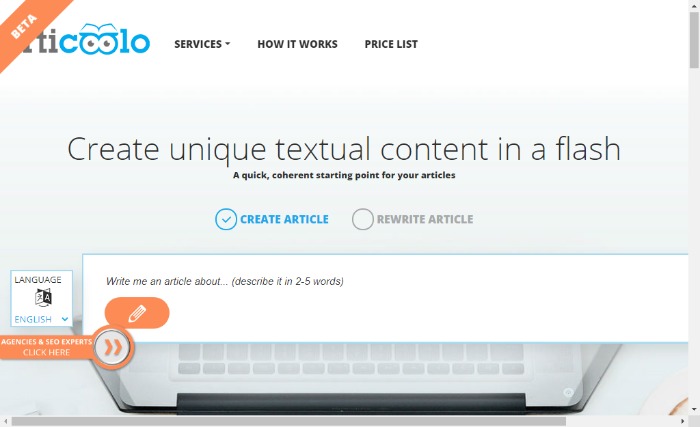
5. Articoolo
Articoolo is an AI writing assistant that generates content in a fraction of the time it would take to write it yourself.
Additionally, it has a
quote and image finder
title generator
article summarizer
writer’s helper
Most marketers and business owners need content in a hurry at some point, or you may spend time looking for that perfect quote or image. This AI app can do that quickly.
It’s also great for anyone that wants a starting point with title ideas or to rewrite large volumes of content for repurposing.
Getting Started With Articoolo
To start using the tool, enter your topic and then wait for Articoolo to get to work. That’s all you need to do!
Articoolo Cost
Pay per use ranges from $19 for ten articles or $99 for 100 articles.
Subscribers pay $29 a month for 30 pieces and up to $99 a month for 250 articles.
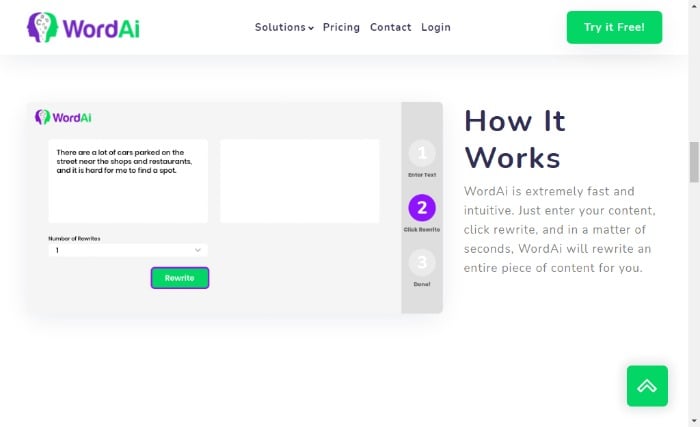
6. Word.ai
Word.ai helps copywriters rework content with a natural-sounding voice. It creates up to 1,000 rewrites of an article, giving users plenty of variety if they want to use the same piece of content in multiple ways. It can also work as an editing tool.
Other features include:
sentence restructuring
split sentences
quality enhancement
clarity enhancement
Getting Started With Word.ai
Click the green button in the top right-hand corner of the screen. The button will take you to the subscription deals.
Click the “start my free trial” button for your preferred option.
Then Word.ai asks you to sign up and create a password.
Word.ai Cost
New users get a free three-day trial. After that, you can pay $57 per month or an annual fee that breaks down to $27 per month (quite the deal in comparison!). For heavy use, they offer an enterprise level at various prices.
7. Synthesia
If you need to create video content in a hurry, Synthesia could be the tool. Each video can be up to thirty minutes long, and you can upload any custom backgrounds and your own avatar.
Features include:
50 available languages
PowerPoint capabilities
synthetic or authentic voices
background music
Aside from marketing videos or product demos, you could use it for:
training
personal videos
video chatbots
Getting Started With Synthesia
Click “create account” in the top right-hand corner to create a free demo video and understand Synthesia better.
To start creating your content, enter your text into the browser. Your video will be ready in minutes.
Synthesia Cost
Personal pricing is $30 a month for video credits. Custom pricing is available too, but you must speak to the sales team.
8. Rephrase.ai
Rephrase.ai is a powerful video creation tool that enables people to quickly create and share quality videos in a matter of minutes.
You can add text, images, animations, and video clips within the easy-to-use interface.
It has a wide use of applications, including educational and explainer videos, personalized customer touchpoints, digital marketing, and outreach. To understand how the video creator works, they offer a handy tutorial.
Getting Started With Rephrase.ai
Begin by signing up and selecting the category you’re interested in.
Answer a series of questions about how and why you plan to use the program.
Watch a short instructional video, then accept terms and conditions.
Rephrase.ai Cost
Plans begin at $25 for ten banner credits a month. Each credit equals one minute of video. Rephrase.ai also has an enterprise option—contact them for details.
9.Designs.ai
Designs.ai incorporates several AI tools for media creation, including a logo and banner maker and a mock-up generator.
You create designs by dragging shapes on the canvas, which you then adjust with your mouse or keyboard input. You also have the option of changing variables for fonts, colors, and backgrounds.
Features include:
cloud storage
massive image library
speech maker
assistive tools
unlimited usage and projects
branding kit
Getting Started With Designs.ai
Click “Try for free” in the upper right-hand corner, choose which project you want to try out, and follow the prompts to get started.
Designs.ai Cost
Design.ai’s basic tier is $29 per month, and its pro level is currently $69 per month. If you pay annually, you save 34 percent. For large-scale work, contact them about an enterprise contract.
Frequently Asked Questions About AI Tools for Media Creation
What Are the Different Types of AI Tools for Media Generation?
AI tools for media are in extensive use and serve a wide variety of purposes. These include natural language generation, voice synthesis, sentiment classification, and text summarization.
How Do AI Tools for Media Help in Content Creation?
Tools that generate content are usually made for a specific purpose and consist of software-generated texts and visuals. They may include chatbots and automatic translation tools, as well as writing assistants for blogs, social media, and PPC ads. The list goes on and on.
These tools help save you time and resources, especially if you lack the expertise to create the content or visuals yourself.
How Much Do AI Tools for Media Cost?
There is a range of AI tools to create content that engages customers and improves conversions. The costs vary depending on your needs and the type of tools you’re using.
What Are the Three Types of AI?
AI is a broad term used to describe a machine that can perform human intelligence processes. The three types of AI are narrow-AI, general AI, and superintelligence.
AI Tools for Media Creation Conclusion
For a long time, artificial intelligence has helped us perform everyday tasks more quickly and efficiently. Now, AI became more intelligent, creating media like articles and videos.
With these tools, a marketer can create quality content with ease, even if they don’t have expertise in making videos, creating podcasts, or graphic design.
Even for the experienced, AI tools for media have multiple advantages, saving people time and freeing up their resources for other tasks.
Tools like Rephrase.Ai, Word.AI, and KinetiX are changing how we create content and make it
from Blog – Neil Patel https://ift.tt/2WOWUGq
via IFTTT
B2B and B2C content marketing require entirely different strategies. However, whether you’re targeting businesses or individual consumers, one point remains the same: Content matters.
Content is how you boost brand awareness, build trust in your company, and empower your customers to solve their problems. However, you can’t just create the occasional blog post or paid ad and hope to generate results.
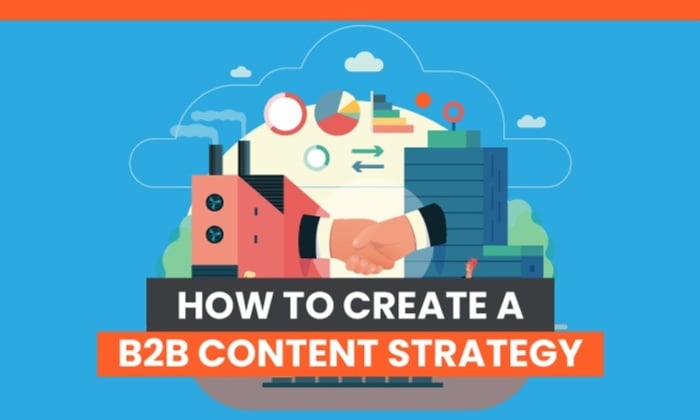
Instead, you need a targeted B2B content marketing strategy to reach your marketing goals.
Let me show you why a strategy is so important and help you figure out how to reach those valuable business prospects.
Why Do You Need a B2B Content Marketing Strategy?
A content marketing strategy is like a roadmap or a blueprint. While it’s not set in stone, a marketing strategy is a set of guidelines to help you get from point A to point B.
Without a roadmap, you’re more likely to get lost. There’s a higher chance you’ll lose sight of your business goals, and you might struggle to get back on track.
A marketing strategy, then, is key to helping you create the right content at the right time to reach your target clients in the shortest time possible.
You can’t just use any old content marketing strategy, though.
As mentioned, B2B content marketing presents different challenges from B2C content marketing. With B2B, you’re targeting other businesses, whereas, with B2C, you’re targeting individual consumers.
While consumers might be impressed by influencer marketing and emotive product launch campaigns, businesses won’t be swayed by these tactics. Instead, businesses want authoritative content.
They want useful, actionable information to help them solve real commercial challenges and grow their organizations. A clear, methodical marketing strategy can help you create the content needed to impress this audience.
How to Create a B2B Content Marketing Strategy
Every B2B content marketing strategy is unique. However, successful content marketing campaigns typically start with well-defined objectives and a clear understanding of your long-term goals.
Remember, don’t let the whole idea of a marketing “strategy” intimidate you. It’s surprisingly simple to get started once you understand what’s involved, so if you’re ready to build a successful content marketing campaign, here’s where to begin.
1. Identify Your Audience and Their Needs
There’s nothing more important than your user base.
Remember, the whole point of creating content is to convert your audience into paying clients, so your content must meet their specific demands and needs. If your content doesn’t resonate with your audience, they won’t move through your sales funnel.
Then, segment your prospective audience into subgroups based on, for example, buyer behavior.
Decide whether you’ll target all these subgroups or if you want to focus on one or two specific segments.
Once you’ve identified your audience, you can tailor your content to match their specific demands.
Ultimately, what matters to your core audience should matter to you, so you must first identify their problems and then consider how you can solve them through your content.
2. Use Micro-Targeting to Narrow Down Your Focus
You’ve identified your target audience, you know what matters to them, and you’re ready to give them a great user experience.
Now, it’s time to actually find those businesses online and generate brand awareness. How do you ensure that your content reaches the right audience, though? It’s all about using the right short and longtail keywords.
Start by using microtargeting. Through microtargeting, you use analytics data to reveal key information such as buyer behavior, preferences, and popular search terms or keywords. Then, you can use a variety of popular keywords in your content to help your audience find you through Google and other search engines.
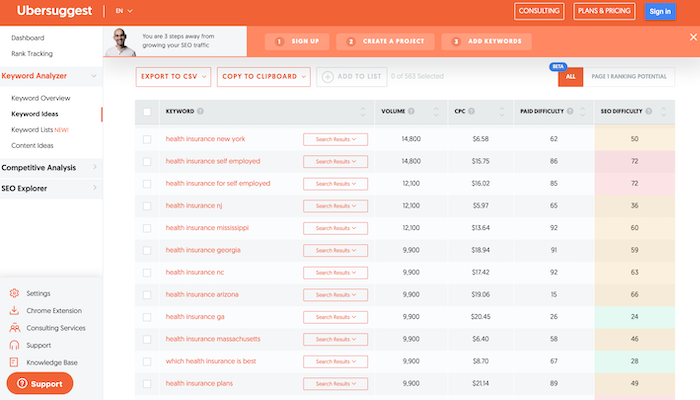
Check out Ubersuggest for your keyword research. Enter a primary keyword, such as “health insurance,” and scroll through the “keyword ideas” for inspiration:
Carefully chosen keywords can help you reach the businesses most likely to require your services.
3. Research Competitors in Your Niche
Unless you’re in a super unique niche, chances are you have numerous competitors vying for your audience’s business.
Look at what makes them successful and research what they’re offering your target customers. What can you offer that sets you apart from your competition?
You need a unique selling point (USP) to draw customers, so consider what you could do better than your competitors and highlight what makes you unique when you’re selling your goods and services to prospects. Here are some tips for doing just that:
Identify your competitors.
Evaluate their strengths and weaknesses.
Clarify what makes your business unique and build your USP around your strengths.
Not sure where to get started? Look to your target audience. Who else are they following? What other businesses are they interested in? Go back to your audience research and see what it reveals.
4. Define Your Goals
Every great marketing strategy needs clearly defined goals to help you stay on track and measure your progress.
How do you choose the right goals? By following the SMART objective. SMART goals are Specific, Measurable, Achievable, Relevant, and Time-bound.
In other words, you’re setting a clear, realistic goal that you can achieve in a certain amount of time. The results are measurable, meaning there’s some quantifiable way you can measure your success and track whether you achieved the goal.
To set SMART goals, ask yourself the right questions. For example, what are you trying to achieve? What steps will you take to reach your objective? Finally, how will you know if you achieved your goal?
If you don’t have the answers to questions like these, your goals need a little more work before you’re ready to develop your marketing strategy.
5. Create Multi-Layered Content
Sure, words are great. After all, you’re trying to impress your audience and demonstrate your industry expertise.
Too much text is pretty daunting, though. If someone’s reading your article and they’re confronted by line after line of unbroken text, you could quickly lose their interest.
The answer? Multi-layered content. With multi-layered content, you’re basically using media such as text, videos, and images to create a visually engaging user experience.
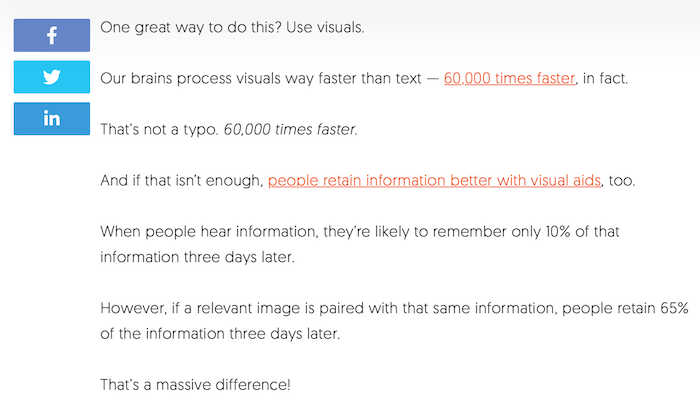
We’ll use one of my own posts on visual marketing as an example. Sure, I include plenty of informative text to educate readers:
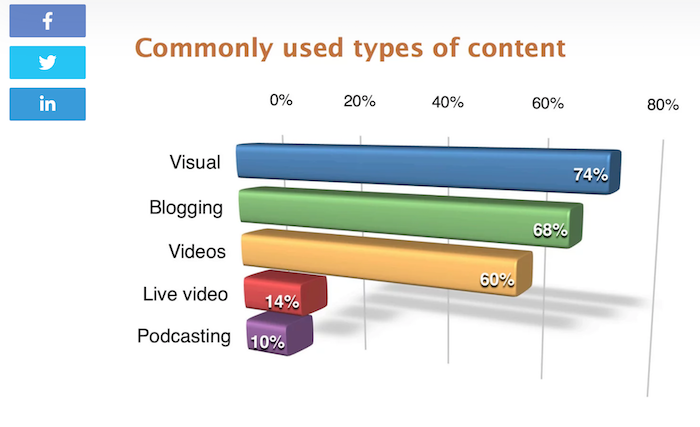
However, I also include images to illustrate my points and break up the walls of text:
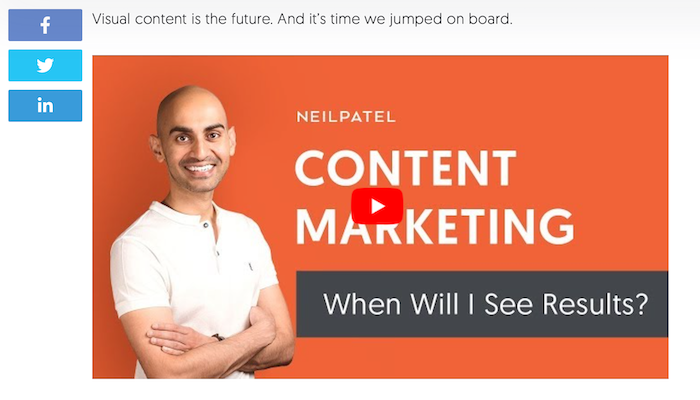
Finally, I include videos for users who prefer a more interactive experience:
You’re targeting business clients. They’re busy people. Keep your content engaging and break it up with a blend of media types to hold their interest and keep your business memorable.
6. Measure Your Results
How do you know if you’re achieving those SMART goals you set earlier? By measuring your results or tracking progress using tools like Google Analytics.
Tracking metrics gives you key insights into what works and, of course, what doesn’t. Once you know what content works best, you can invest your energy into those areas and grow your business more effectively.
Try not to worry if you haven’t met some performance goals. Honestly, not everything you try will work out. Not every ad will generate leads, partnerships can fail, and some content may go unnoticed.
That’s all okay. In fact, it’s normal. Remember, you’re experimenting with different angles, so if something’s not working, just pivot and try something new.
7. Prioritize Link Building and Collaboration
Want to build brand exposure? Consider collaborating with other businesses. More specifically, make (and accept) some guest posts.
You might be wondering how letting another entrepreneur post on your website helps your own marketing goals. However, this is your opportunity to showcase your connections to your audience.
If your audience sees that other industry leaders want to collaborate with you, then guess what? They’ll immediately trust you more, which makes them more likely to explore your services.
On the other hand, say you want to make a guest post on another website. Great. Not only will the post boost your exposure and increase your authority within your niche, but it’s essentially free advertising for your brand. Sounds like a win-win, right?
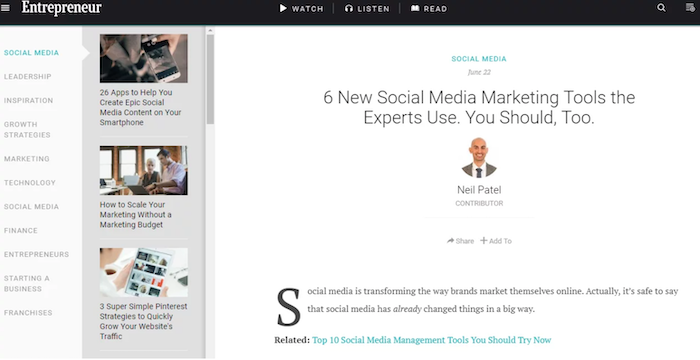
Here’s an example from when I guest posted on Entrepreneur. Through this opportunity, I had the chance to reach a wider audience and help support their marketing goals:
Don’t be afraid to collaborate as part of your B2B content marketing strategy.
8. Promote Your Content Across Different Platforms
Where do your prospective customers hang out? If you researched your audience earlier, you already know the answer to this question, so your focus should now be on reaching these prospects as part of a targeted marketing campaign.
How you reach these potential clients all depends on your audience demographics, but here are some general tips.
First, improve your website’s discoverability in search engines. The goal is to secure a first-page search ranking for your chosen keywords, so optimize your pages for SEO by adding meta descriptions, including alt text with your images, and using keywords strategically.
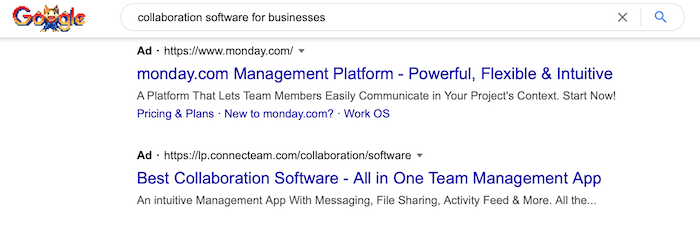
Next, run a paid ads campaign. Paid ads ensure you shoot to the top of the search rankings for specific keywords. Monday.com, for example, is one of the first search results you see when you Google “collaboration software for businesses:”
Aside from Google Ads and LinkedIn, you could also run paid ads on popular platforms like Twitter and Facebook. It all depends on where your target audience spends their time, so do your research to generate the best ROI from your paid ad campaigns.
Do you need any advice on choosing the right keywords for paid ads or platforms to market your B2B company? Check out my consulting services to see how my team could help.
Frequently Asked Questions About B2B Content Marketing
Before you start building your own B2B content marketing strategy, here are some quick takeaways to reflect on.
What Is B2B Content Marketing?
B2B content marketing is a strategy for creating, sharing, and promoting content designed to appeal to a business audience. The goal is to use content to build brand awareness and find new clients.
How Is B2B Content Marketing Different From B2C?
With B2B marketing, you’re targeting business clients. You’re trying to demonstrate your experience, expertise, and skill to convince businesses to work with you.
On the other hand, B2C marketing involves targeting individual consumers. You’re focusing on nurturing leads, building an emotional connection with people, and convincing them to buy a specific product.
What Makes a Good B2B Content Marketing Campaign?
A good B2B content marketing campaign should help build trust in your company, provide valuable information to your audience, and inspire companies to choose your products and services.
Above all, a great content marketing strategy should establish you as an industry leader or innovator in your chosen niche.
Research your target audience to understand what challenges they face, and create content designed to help solve those problems. You should also check out competitors for content ideas and keep an eye on news channels. Aim for a blend of evergreen and timely content to keep your articles, videos, and podcasts varied and fresh.
B2B Content Marketing Guide: Conclusion
Do you want to establish your company as an industry leader? Are you trying to convince businesses to choose your company over your competitors? Then a solid B2B content marketing strategy can help you stay on track.
Focus on creating useful content and cultivating a sense of trust in your company, and don’t be afraid to step back and make changes if something’s just not working. Remember, a strategy is a roadmap: It’s not set in stone. Let it guide you, but don’t let it hold you back when you’re ready to move in a new direction.
Have you tried B2B content marketing yet? How are you finding the process?
from Blog – Neil Patel https://ift.tt/2Ymn6ZL
via IFTTT