Thursday, 2 September 2021

Best Call Center Software

Disclosure: This content is reader-supported, which means if you click on some of our links that we may earn a commission.

Nothing scares new business away like hard-to-reach customer service or disorganized sales calls.

By using the best call center software, you can outfit your teams with the tools they need to communicate effectively. And it won’t cost that much at all so long as you have a good internet connection.

Forget about the requirements of physical office space or a landline. Modern call center software is all you need to get employees set up–no matter where they are working.

You still have the hard work of engaging your customers and clients, but all the heavy lifting associated with maintaining a call center is off your plate.

Read on for in-depth reviews of my top picks. I’ll explain what they offer and the types of businesses they work well for. After the reviews, I’ve included a brief guide to help you evaluate the leading options and find the one that’s best for you.

#1 – Nextiva — The Best Way to Take Your Call Center Virtual

We’re quickly leaving the days where call centers only exist in a phone bank in your building. VoIP has made communication from anywhere possible and Nextiva’s platform delivers a full solution for taking your call center and overall communications virtual.

It’s all built on Nextiva One, their all-encompassing VoIP solution that covers voice, video, text, fax, and team chat.

Some call centers can likely get away with the lowest-priced Nextiva One plan—Essential—because it comes with unlimited voice and video calling, an auto attendant, Outlook and Google Contacts integration, and local and toll-free numbers. For most teams, that just runs you about $20 per user per month (pricing scales up for fewer users and vice versa).

However, for useful extras like CRM integration, call pop, texting, and conferencing, I suggest the Professional plan, which is just $4 more per user per month than Essential.

Nextiva One is super easy to get set up since it’s completely VoIP-centered and cloud-based. And, you can get that and Nextiva’s call center software implemented in one fell swoop.

Nextiva call center software comes as an add-on of either $50 or $100 per user per month on top of your Nextiva One bill.
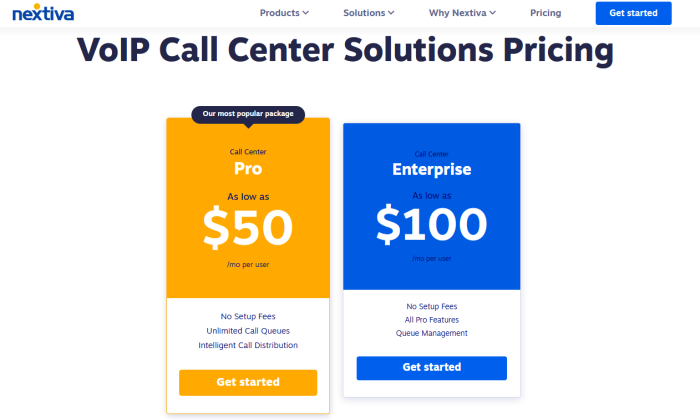
With both options, you get call recording, customizable reporting, automated call distribution, IVR for your auto attendant, and unlimited call queues.

The $100 Enterprise option unlocks more supervisor tools, like finer call routing management, call tagging, silent monitoring for supervisors to listen in on calls, and whispering to reps during pre-call.

What’s great is if you have an existing call center or need to spin one up, Nextiva makes it lightning fast to set up your cloud-based call center.

And since Nextiva can work on computers with its desktop app, mobile devices with its mobile app, and desk phones, you can have your virtual call center reps conduct their work from anywhere. Have a hybrid remote and on-premises call center, staff yours entirely with remote workers, or keep it truly in-house—any way you want it, Nextiva makes it work, and easily.

Get in touch with Nextiva to build your call center solution and make it futureproof with the power of VoIP.

#2 – Aircall — The Lowest Price on Complete Call Center Software
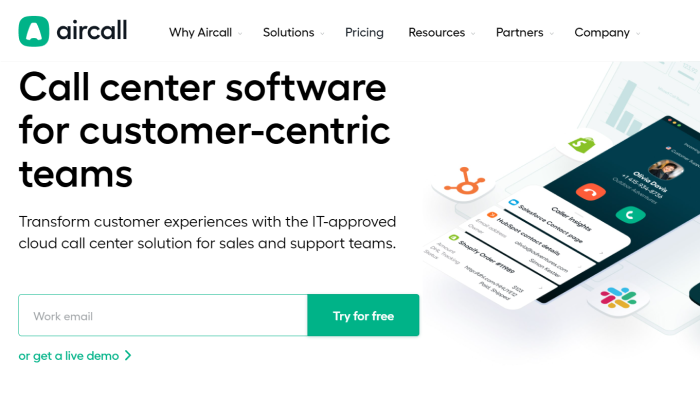
For less than half the cost of other good call center software, you can outfit your agents with Aircall.

Aircall is sleek and integrates with popular business apps. The interface feels lightweight and it’s super easy to navigate, even for first-timers.

You might think a low price would mean that you don’t get as many helpful features. That’s not really true.

Transfer calls to another agent. Make it a warm transfer and let the new agent know what’s happening before passing the customer over. View a customer’s record before you pick up the call without having to sign into your CRM. It’s all right there.
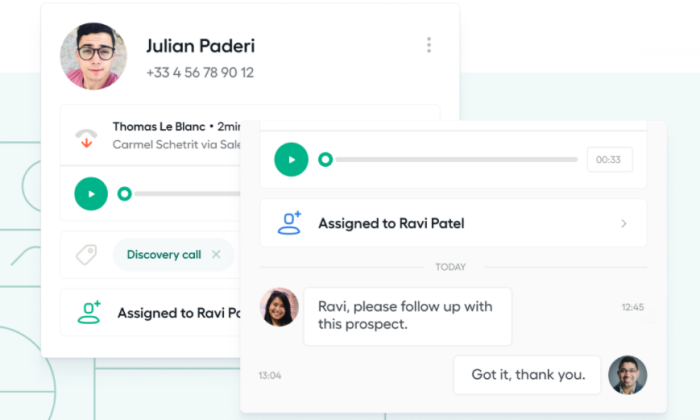
You’ll get real-time metrics, clear reports, and the ability to route incoming calls much the same as you get with the heavy-weight platforms. 

Set up an IVR to allow customers to find their way to the right department, manage call queues, and allow callers to get a call back later if the wait time is high.

Some of the other features include:

  • Skills-based routing
  • Call tagging
  • Ring groups
  • Shared contacts
  • Call conferencing
  • Power dialer

Simply highlight a list of contacts or select a list. The powerful auto dialer gets to work saving clicks and time for every conversation.

So why is Aircall so much less expensive? The main reason is that it’s not omnichannel out of the box. Yes, you can set up SMS messaging via the integration with Salesmsg, but that’s going to cost extra. The other more expensive products I reviewed offer all the channels in-house.

In a way, that’s the beauty of Aircall. It’s a simple yet powerful solution. It’s like the missing puzzle piece that connects voice communications with the rest of your business. 

Developers can use web hooks and APIs to extend Aircall’s connectivity with other software. Everyone else can use the one-click integrations with 85 apps like Salesfoce, HubSpot, Microsoft Dynamics, Zendesk, Slack, Shopify, Big Commerce, Intercom, and the list keeps growing.

If you are already using these apps, Aircall may be a great way to get the call center you need without breaking the bank.
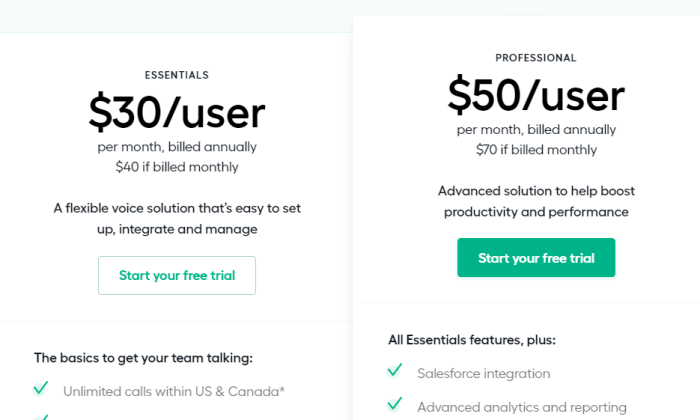
With the Essentials plan, which starts at $30 per user per month, you’re getting a complete call center for voice. This includes unlimited calling in North America. Remember that some vendors charge per minute for calls, so this can amount to a really big savings.

With the Professional plan, which starts at $50 per user per month, there are additional analytics and coaching features, as well as increased customer support. 

For large call centers, this is a good idea, as you will have a dedicated account manager and one-on-one onboarding to get everything hooked together right the first time.

One important thing to note is that Salesforce integration comes with Professional only. However, Essentials supports every other integration.I can’t overstate the ease of use for Aircall. You should really schedule a demo if you are interested in an affordable solution to empower your agents. Or just start a 7-day free trial today.

#3 – Five9 — Best for Reaching More Customers Without Adding Reps 
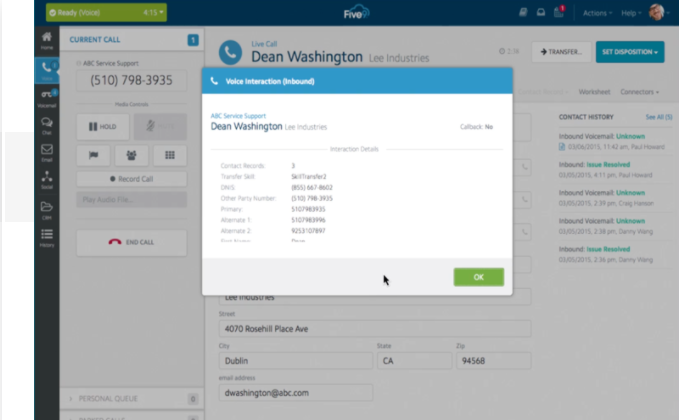
Five9 centralizes every channel you use within a single clean interface for your employees. It works for any call center application–Five9 is one of the leading providers in the space–but I think it stands out for sales teams.

Discover and connect with leads on social media. Call someone who just filled out a form on your landing page. Answer text inquiries with an email follow up.

No matter how your customers show interest, your reps can talk with them from a single platform. Whether you’re building relationships over a long sales cycle or telemarketing directly to consumers, Five9 gives your reps the tools they need.

You get an auto dialer with multiple modes for prospecting and working through call lists. It comes with built-in calls to manage Do Not Call Lists and maintain TCPA compliance, which lowers your risk of running into issues with outreach at scale.

The same rep who was making 10 calls an hour now makes 50 without breaking a sweat. Everything is tracked in a few clicks within the system, and they are on to the next lead.
Five9 has sales features like web callbacks that you certainly don’t expect from call center software. Say someone enters their contact information on your website to access content about your product. Five9 can get that contact information to the front of your call queue, ensuring a conversation with a lead who’s actively interested.

Strike while they care. Watch conversation rates climb instead of speaking to cold leads weeks later.

You can take advantage of skills-based routing, regardless of how customers are reaching out. Ensure that account executives are the first person to pick up when big clients call in. If they’re in a meeting, route the call to the next best person who understands this client’s needs.

Managers will have complete visibility into their team. It doesn’t matter if people are working from home or on-the-go. 

And supervisors aren’t the only ones with a bird’s eye view. Role-based dashboards let agents track their progress, as well. Executives get detailed information about how to steer the ship. 

Everyone knows what’s going on in their lane. There’s no surprises about hitting goals.

Like I said, Five9 is one of the major players in the communications space. You’ll have access to pretty much any call center feature there is. Some of the ones that best serve sales teams include:

  • Skill-based scheduling and forecasts
  • Agent scripting
  • Drag-and-drop IVR
  • Customizable KPIs
  • Gamification and virtual rewards
  • Integration with Microsoft, Oracle, Salesforce, and others

To get a price on Five9, you’ll have to reach out. I suspect it’s somewhere north of $100 per user per month, given what other omnichannel solutions cost. There are four different plans to choose from, so you don’t have to pay for features you’re not going to use.

Five9 doesn’t have a laundry list of integrations like some of the other tools I looked at, but 

Here, I want to step back for a second. I’m really highlighting the sales features because I think Five9 offers the most complete package in that regard. 

But you can run an amazing customer service call center with it. For sure. Universities and hospitals would be happy to use Five9 to centralize communications, especially if they are using some clunky system that looks nothing like the other tools they’re using.

Make it easier for every rep to reach more people. Make every conversation just a little bit better by giving agents the tools they need to connect on any channel. Get in touch with Five9 today to request pricing.

#4 – 8×8 Contact Center — Best for Large Customer Service Call Centers
8×8 Contact Center is one of the more robust tools on the market. 8×8 has been around for a long time and can fully support migration to a UCaaS contact center.

You can set it up for any size or purpose, but I recommend it highly for large customer service call centers. Why? Because working in these environments is stressful. There’s high turnover, as new agents struggle to deal with irate customers and veteran supervisors burnout.

8×8 gives you a complete set of tools to fully support agents and help supervisors keep morale high. You’ll be able to retain talent by making the day-to-day a little bit less hectic, and happier agents lead to happier customers.

Imagine day one for a new hire at a call center. If they’re working on 8×8, they’ll have everything they need as soon as they put on a headset. This includes easy access to a deep knowledge base of call scripts, best practices, and a library of recorded calls that showcase agents at their best.

The speech analytics tools are really helpful as well. You can use them to ensure that new hires are sticking to the script, and they will be able to read voicemails instead of having to listen to them. This makes it easier for agents to scan through the backlog for important calls.

Supervisors can use the speech analytics to discover trends in customer inquiries and potential gaps in efficiency that would be impossible to bring to the surface otherwise. They’ll also have a dashboard that reports important metrics clearly, making it easy to recognize when agents require more support.
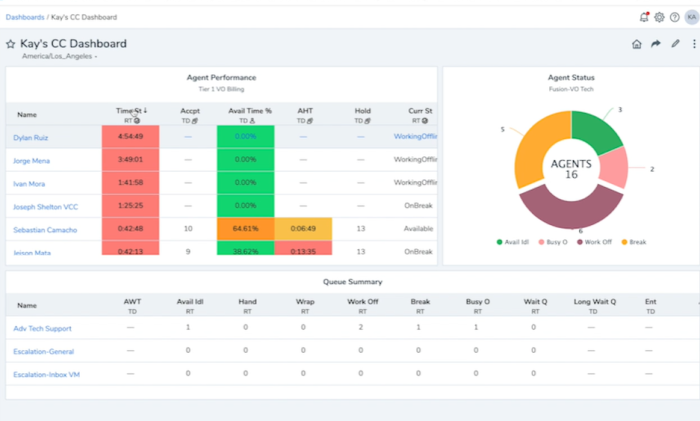
8×8 also offers an intelligent IVR that gives your customers self-service options. This lowers operational costs, as agents no longer have to speak with customers for simple requests. This cuts down your time to resolution, and keeps agents energized because they’re not handling the same call over and over again.

The ACD is capable of handling skills-based routing, so you can ensure that calls are getting to the right agents. This is important if you offer service in multiple languages, or have agents divided by departments based on expertise.

Intelligent routing is especially important for organizations that offer premium service packages to particular clients. These customers don’t want to get an entry-level agent who doesn’t understand the ins and outs of their system.

Both the ACD and IVR are easy enough to configure that you won’t have to worry about calling IT or 8×8 to build a solution that works. Simply use a visual drag-and-drop builder to customize.

8×8 Contact Center is highly extensible. There are integrations with tons of the top products you already use, and API’s that let developers add even more functionality. Additional features include:

  • Social media, chat, email, and SMS
  • Customer surveys and quality management
  • Call and screen recording
  • Payment processing
  • Virtual agent
  • Workforce management tools

While 8×8 offers support for every channel, you only need to pay for the ones you use. 8×8 Contact Center comes in the following packages:

  • Voice – starting at $87 per user per month
  • Omnichannel – starting at $107 per user per month
  • Advanced – starting at $146 per user per month

The pricing is extremely competitive. In fact, $107 for Omnichannel is just about the lowest you will find for a product that covers everything, including social media. One thing to note is that the speech analytics features only come with Advanced.

This is a really great solution for large organizations that want to give agents the best possible shot at success. Constantly onboarding new folks is a huge drain on productivity, and the revolving door doesn’t do much to create a culture of collaboration.

With 8×8 Contact Center, you can build out a system that works for you. Support your agents with best-in-class software, centralize their work across multiple channels, and position supervisors to help before issues get out of control.

Learn more about how 8×8 is helping companies today.

#5 – Dialpad — The Safe Way to Migrate a Traditional Call Center to the Cloud
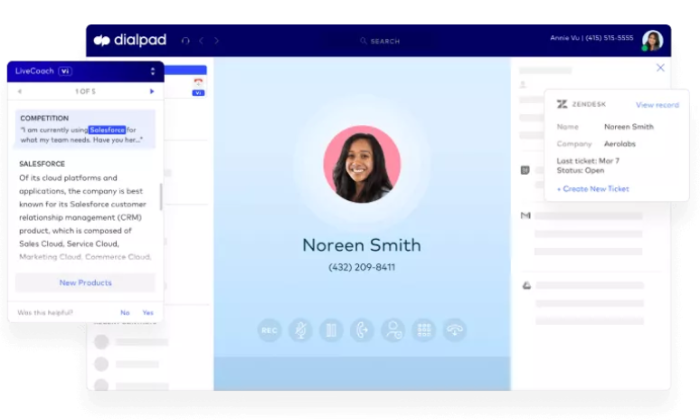
Dialpad is a phenomenal cloud-based call center that ties into traditional landline infrastructure. You can go total cloud day one, if you want, or stay hybrid and modernize at your own pace.

This allows companies to maintain their investment in hardware, while immediately taking advantage of the cloud-based platform. Unify your business phone system with text, chat, fax, and web conferencing. Allow your employees to work from the office as easily as from home.

Migrating your phone system to the cloud is stressful. Lots of vendors promise a turnkey solution, but anyone who has ever handled a large scale business communications transition knows it’s rarely that simple.

Dialpad offers two on-premise gateway options to connect your traditional phones to its cloud platform. Whether you rely on a traditional PBX or the PTSN, you can continue to use existing systems seamlessly.

The company offers continued support for desk phones, conference phones, and allows you to port numbers without a break in service. International numbers are available as well.

Instead of having to make a giant transition immediately, companies can phase out embedded technology at their own pace.

The best part is that the benefits are immediate. You get deep calling and routing features that are so much easier to manage than a traditional PBX. Plus, all of your channels are in a single interface for administrators and agents.

Some of the other highlights of the platform include:

  • Call routing and queues
  • Virtual hold
  • Real-time and historic reports
  • Call monitoring and coaching features
  • Data backup
  • Voice intelligence

The voice intelligence features of Dialpad are particularly well developed. It transcribes conversations, making it easier to search through later. Post-call summaries are generated automatically, complete with action items and a recorded meeting sentiment.

It can also assist agents by picking up on conversations and automatically providing relevant documentation.
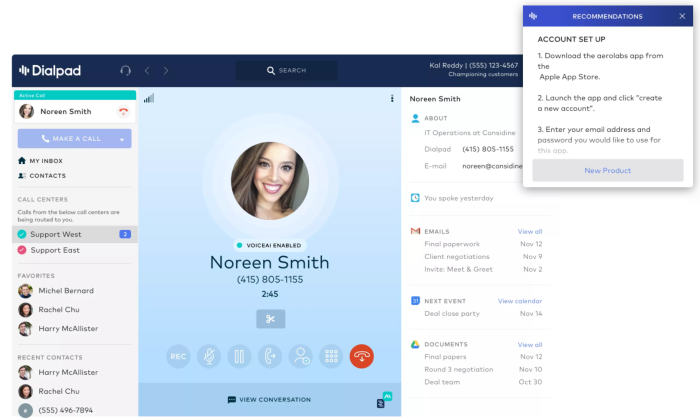
Your old phone line won’t do that on its own. But with Dialpad’s help, you can continue to use phones alongside VoIP, chat, and text. Regardless of how customers reach out, agents will interact through the centralized cloud platform.

Dialpad Pro starts at $125. This is typical for high-quality call center software, but one thing to like about Dialpad is that all the integrations come with Pro. This includes Salesforce, Zendesk, Slack, among others.

You also get unlimited calling in whatever country your account is based unlimited SMS, and MMS in North America. They also provide 24/7 phone support for all Contact Center plans.

If you are just looking for a sales call center solution, you might want to check out Dialpad Sell. You’ll get a lot of the same features that help teams stay organized, as well as a powerful outbound dialer.

No matter how you want to use it, though, Dialpad is definitely a good option for the modern call center. It may be the best if you are trying to make use of your business phone system, or want to move to the cloud gradually.

For a pain-free migration, get in touch with Dialpad today.

#6 – Talkdesk CX Cloud — Best for Helping Customers Answer Their Own Questions
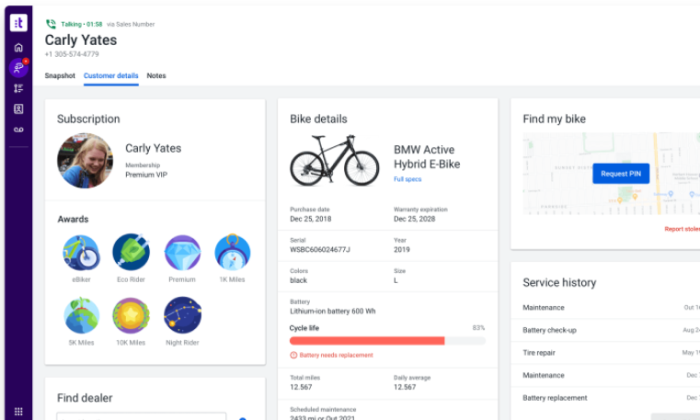
Putting important customer information at the fingertips of your agents is a must for any good call center software. All my recommendations do a great job with that, and Talkdesk CX is no exception.

Where it steps away from the competition is putting information within reach of your customers–without an agent ever answering a call. 

Using interactive voice response (IVR) allows people who call in to complete common tasks on their own and get the information they need. It’s a huge boost for both agent productivity and customer satisfaction. 

No call center software makes IVRs as easy to configure as Talkdesk CX. It’s not the only one on my list of recommendations that comes with a visual way to build IVRs, but its IVR studio is a cut above.

From the simple interface that lets you tailor customer journeys in a few clicks, to the AI alerts that keep caller flows flawless, the IVR studio feels truly modern.
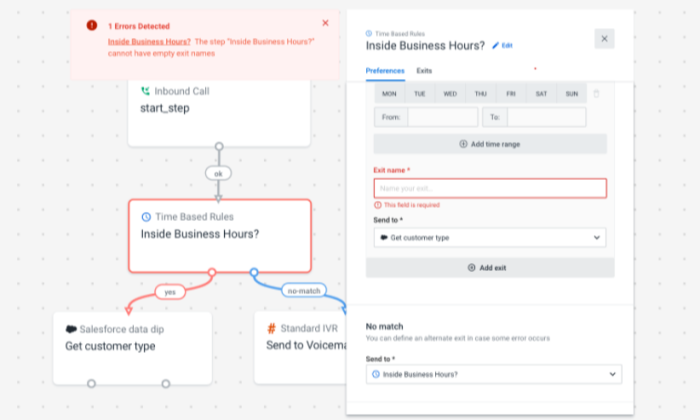
Sure, it’s possible to create an IVR that integrates your apps and databases with other options. But can you do it without writing a line of code?

Talkdesk CX lets admins and others build and customize IVRs quickly. There’s no need to get IT help just because departments shifted around. You’ll be able to give your customers a deeper range of options for self-service.

The more customers are able to help themselves, the more time agents are going to have to respond to other inquiries. There’s no sense tying your phone lines up with callers who want routine tasks or information.

It’s Payment Card Industry (PCI) compliant, so customers can pay bills and access account information directly from their phone. 

Your agents will never have to ask for the three digit code on the back of the card again.

And with Talkdesk, this isn’t just on voice. You’ll have the same IVR function for text-based conversations, like chat and SMS. Chatbots aren’t a perfect solution for every customer inquiry, but they work wonders for the basic stuff.

Surveys are easy to include and automate as well. What could go better next time? What additional services would people like to be able to handle on their own? You can find out quickly and adjust your IVR in a couple of clicks.

I know companies that used to have to outsource all the work for their IVR. In all fairness, it used to be super complex. Talkdesk CX is changing the game.

I focused on the IVR for this review because that’s really where it stands apart, but don’t lose sight of the fact that Talkdesk CX is as good as it gets in virtually every area.

You get crisp reporting dashboards for management, an intuitive interface for agents, and integrations with leading CRMs and ecommerce platforms. Some of the other standout features include:

  • AI agent assistance
  • Intelligent call routing
  • Predictive outbound dialer
  • Business intelligence tools
  • Speech analytics
  • Deep coaching tools

Supervisors can listen to recordings of agent calls and leave time-stamped comments to offer concrete feedback about how to improve. Even if everyone is remote, supervisors can pinpoint issues and upskill agents.

Everything is a few clicks. All the information is right there–for customers and agents.

You’ll have to get in touch with Talkdesk for pricing, but the IVR studio is included with every plan they offer. With premium plans, you’ll get a low-code editor to be able to customize even more.

Take a closer look at this next-generation call center and request a quote from Talkdesk today.

What I Looked at to Find the Best Call Center Software

I make calls when I’m thinking about committing to a new product or service. Lots of people do. 

The human connection is real, intimate, and—unfortunately—easy to mess up.

One dropped call. One mistaken name from an agent who’s spoken to 35 other people within the hour. 

It doesn’t take much to lose a lead or earn a 1-star review carved in digital stone on the internet.

You’re looking for a system that establishes trust with customers because they know they can call and speak with the right person quickly. 

It must also come with an interface that empowers agents by giving them insight into calls, client histories, and any other information they need to resolve issues in real-time.

Customers need prompt answers from helpful agents. End of story.

The best call center software comes with everything you need to meet these two fundamental call center objectives, and much more.

Here’s what you need to be thinking about as you make your choice.

Support For Every Channel Your Agents Use 

The best call center software includes way more than voice communication. This is why you’ll see a lot of solutions marketed as contact center software instead. This reflects the common sense reality that people use way more than just phones to communicate.

Phones are still critical, but for many businesses, the ability to handle more channels is becoming increasingly important.

Some customers want to text. You want to be able to respond, or be able to text people reminders after they called in to schedule an appointment.

Or maybe you want to be able to seamlessly switch to a phone conversation with a customer who reached out via chat. They’re dying to speak to an actual human (you know the feeling). Making it happen earlier than they expect.

Here’s a list of the channels you can tie into a modern call center solution:

  • Phone
  • VoIP
  • Email
  • SMS and MMS
  • Chat
  • Social media
  • Video and web conferencing

All of the solutions I looked at can handle most of these channels, though 8×8 Contact Center, Five9, and Talkdesk CX make it as easy as possible. These are known as omnichannel solutions, or unified communication as a service (UCaaS).

Regardless of how your customers make contact, your agents will be looking at every conversation within a single platform. They can see the whole relationship there, and give informed answers.

But not everyone needs everything. Some people don’t even need a blended call center that handles inbound/outbound calls. If inbound is all you need for customer service inquiries, just get that.

You will definitely have to pay over $100 per seat for UCaaS. If you really just want voice communications, Aircall is going to be less than half that, and it’ll be way easier to deploy.

There’s a big payoff for uniting all of your channels, but it’s going to take a lot of work and money to set up. The good news is that all my recommendations have tiered pricing and other options that let you add more channels over time.

You know what channels you use already, but what would you add if you could? Getting good call center software is an investment no matter how you swing it, so treat it as an opportunity to rethink how you connect with customers.

Ask them how they’d like to get in touch. Maybe they’d love it if they could text you. Maybe they already do and you just just don’t know.

Clear Visibility Into Agent Performance for Management

One of the key differences between call center software and a simple business phone system is quality assurance. Beyond the basic infrastructure to make calls, you are getting tools to organize and manage your workforce.

Supervisors know what their agents are doing in real time. They can jump in and listen on a call, whisper instructions the customer can’t hear, and help a new hire close their first sale.

They’re also better positioned to assist agents over time. With call recording, a customer service leader can supply tangible evidence in support of their guidance. Here’s exactly where you got off track–here’s another point where you were able to work back to the script successfully.

There are dashboards with clear metrics for supervisors, but also for sales managers and VPs. What’s the percentage of first call resolution? How many new leads are created per agent per month? Are you cutting average call time?

A lot of the most important metrics, such as cost per lead, are going to be a team effort between your call center software and CRM. Make sure the options you’re considering give you insight into the metrics that matter most.

Customers Connect to the Right Agent Automatically

Call center software comes with routing features that segment and direct incoming calls, potentially automating the processes which connect callers with the expert or agent they seek.

It could be making sure a priority support customer gets to speak with their dedicated service rep. Or it could be a lawyer ensuring that calls to her line go straight to a virtual receptionist while she runs to court to put out a last minute fire.

Here are a few of the popular call routing features you’re going to see:

  • Automatic Call Distribution (ACD): Greets customers and allows them to select from a main menu or enter extension to route themselves. 
  • Automated attendant: Takes calls when all agents are busy, plays hold music, relays wait times, and reminds callers that their time is valuable.
  • Intelligent call routing: Uses automation, AI, or interactive voice response to route customers to the most appropriate agent.
  • Mobile device routing: Allows calls to be routed to mobile devices.
  • Omnichannel routing: Allows calls to be routed across any channel.
  • Skills-based call routing: Assigns calls go to the right agent based on relevant skills, like fluency in a particular language.
  • Virtual hold: Gives customers the option to receive a call back when an agent is ready, instead of waiting on the phone.
  • Warm transfer: Lets customers speak to a new agent before the call is transferred, and allows the previous agent to explain any ground that’s already been covered.

These features make a big difference. With warm transfer, for example, customers don’t have to repeat information over and over again. Agents love this, too, because they’re not getting yelled at for having to ask.

Another important feature is interactive voice response (IVR). This enables customers to use a phone to access information from a connected database. This could be someone calling to find out their checking balance, hear the status of their order, or pay a bill.

If you have customers routinely calling to access information, you can free up a lot of phone time simply by implementing IVR. It’s a truly self-service solution that helps people get what they want, without ever talking to an agent.

This all sounds amazing, but who is going to maintain this system? 8×8 and Talkdesk CX have drag-and-drop applications for creating phone trees, call flows, and IVRs. This means an administrator can switch up the phone tree when someone new joins the team instead of having to wait on IT support.

Integrations With The Tools Your Teams Depend On

Cloud-based phone systems boast, “No hardware required,” or they “deploy out of the box.” 

It’s all really exciting, but will you really be “ready to start calling in minutes!” 

Maybe–it depends what you are trying to do and what systems you have to tie into your new call center software. 

Are you looking to connect to a popular CRM like Salesforce? It might be true one-click integration. 

But have you customized your CRM? If that’s the case, the connection may need a little more attention to work properly.

There are a lot of similarities in what call center software does in theory–helps you keep better track of customers, route calls quicker, and so on–but in practice, none of this is going to work if the integrations are finicky.

If your helpdesk software doesn’t pass data back and forth with your call center software, agents are going to lose track of tickets. If your calendar doesn’t sync, it’s going to be impossible to set appointments. You get the picture.

You have to test drive these products in order to figure out the true quality of the integration. 

There are native, pre-built, seamless, and direct integrations. What’s the difference between these? No one knows. Until you have seen it work in practice, take the term integration with a spoonful of salt.

Conclusion

Ten years ago, setting up a call center took months. Today, you can deploy one over the weekend. Let’s take a look at the entire list of my top picks:

  1. Nextiva – Best for taking your call center virtual
  2. Five9 – Best for reaching more customers without adding reps
  3. Aircall – The lowest price on complete call center software
  4. 8×8 Contact Center – Best for large customer service call centers
  5. Dialpad – The safe way to migrate your traditional call center to the cloud
  6. Talkdesk CX Cloud – Best for helping customers answer their own questions

Nextiva is a fantastic solution for running your call center in the cloud and making it totally futureproof.

Aircall is a really affordable option and it’s easy to get set up. It’s well within the small business price range, and you can try it for free for a week.

If you are just beginning your migration to the cloud, Dialpad is going to make your life a lot easier.

Follow the links to learn more about each product. My reviews are a good place to start, but you should get in touch for a demo or a trial. There’s no way to know how good call center software is until you’ve let agents experiment for a few days on the phone.


from Blog – Neil Patel https://ift.tt/2ViZ24Q
via IFTTT

What Is Dynamic Keyword Insertion: What It Is & How to Use It

What Is Dynamic Keyword Insertion: What It Is & How to Use It

Paid ad costs are rising. In highly competitive industries, you can expect to pay $50 or more per click. As a result, many businesses are looking to lower paid ad costs by increasing ad relevance.

Dynamic keyword insertion is an ideal strategy to improve relevancy and lower paid ad costs. When used correctly, it can help deliver highly relevant ads with little extra work.

If you aren’t sure what dynamic keyword insertion is or how to make the most of it, you are in the right place.

Today, we’ll cover everything you need to know about dynamic keyword insertion, including what platforms offer it, how it works, and best practices to make the most of them.

What Is Dynamic Keyword Insertion?

Dynamic keyword insertion is a paid ad feature that uses machine learning or AI to customize online ads to match users’ search queries.

For example, if you create an ad for a shoe store, you could use dynamic keyword insertion to add “women’s running shoe” or “red women’s running shoe” to display ads that use the exact same words the user searched.

Using the same terms users type into a search engine assures users you have exactly the product they are looking for.

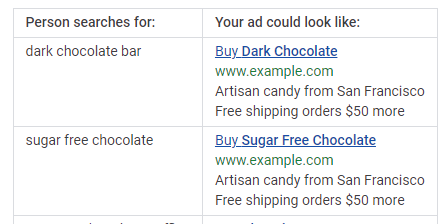
Here’s how Google text ads using dynamic keyword insertion might look:

example of how dynamic keyword insertions works in Google ads

Dynamic ads can change nearly every aspect of your ads, including the main keyword, images, CTA button, and even the landing page users are sent to.

Several ad platforms offer dynamic keyword insertions, including Google Ads and Facebook.

Why Should You Use Dynamic Keyword Insertion? Pros and Cons

Figuring out how to set up PPC ad campaigns is hard enough. Should you worry about dynamic keyword insertion? There are definite pros and cons to this strategy. Here’s what you need to know.

The benefits of dynamic keyword insertion include:

  • Increase ad relevance: Matching your ads to searchers’ queries makes your ad more relevant to users.
  • Dynamic ads stand out: Google bolds dynamically inserted terms, making them more visible to users and may increase the click-through rate.
  • Improve your quality score: Dynamic ads are more relevant, which can increase their quality score and help you reach more users.
  • Effective for retargeting: Retargeting users with the exact item they already looked at can be highly effective for recovering lost shopping carts and building brand trust.
  • Less to manage: Dynamic ads allow you to target several related keywords with one ad. While it may take slightly longer to set up, you’ll have fewer ads to manage overall.

Dynamic ads are easier to manage, more relevant, and can improve click-through rates. Sounds great, right? There are a few cons you should be aware of before diving in.

The cons of dynamic keyword insertion include:

  • Longer keywords might not display correctly: Long-tail keywords can indicate buyer intent, but they may not display correctly in dynamic ads. In this example, the ad displays “chocolate” because the target keyword is too long to fit in the ad.
  • Can create awkward ads if you aren’t careful: Ads are generated automatically based on a list of keywords you create. If you don’t make sure all the terms match every version of your ad, it could create awkward wording, such as “Great prices on Couch!” (This, of course, can be prevented by being careful with your keyword list.)
  • Possible trademark issues: If you bid on competitors’ brand name or trademarked products, your ads could be pulled for trademark infringements.

Dynamic Keyword Insertion Best Practices & Tips for Marketers

Dynamic keyword insertion is an ideal strategy to stand out in a competitive PPC environment. By matching users’ search queries, your business can lower your cost per click, improve your quality score, and deliver highly targeted ads.

However, the process might seem complicated, especially if you are newer to the world of PPC. Here are four best practices to help you create effective dynamic ads.

1. Don’t Use Broad Match Keywords

Dynamic ads are used to create highly relevant ads, so using broad keywords isn’t effective.

For example, if you want to create an ad for a broad term like “body wash,” there’s no point in using a dynamic ad. On the other hand, if you want to target a precise term like “orange scented body wash for sensitive skin,” dynamic ads are a great choice.

There are two reasons for this: using broad keywords can create awkward ads, and it can also cause your ads to show up for terms that just aren’t relevant.

Instead, reserve dynamic keyword insertion for longer, precise keywords. Here are a few examples of keywords that would be a good fit for dynamic ads:

  • women’s red rain boots
  • black Oakley Holbrook
  • certified organic face wash

These are very precise terms that indicate buyer intent, making them ideal for dynamic keyword insertion.

2. Make Sure Asset Options Make Sense Together

Dynamic ads allow you to create multiple versions of an ad, but they don’t just plug different keywords into the exact same ad. Instead, you can upload multiple assets for each part of your ad.


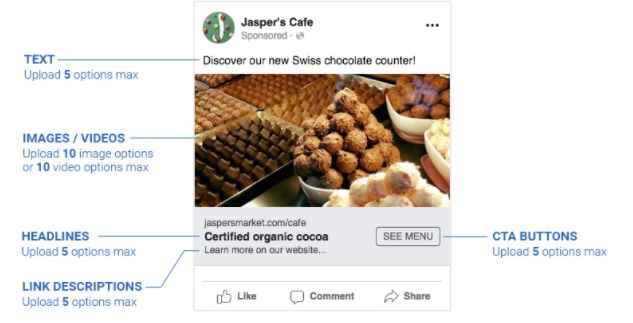
For example, Facebook allows you to add multiple text, headlines, images, link descriptions, and CTA options.

facebook example dynamic keyword insertion

Options are great, but they can also cause issues.

Take a look at the ad example above. Let’s say the business decided to target Swiss chocolate, chocolate-covered cherries, and taffy in the same ad and uploaded a picture of each. Their chocolate-covered cherry image could end up displayed next to text promoting their Swiss chocolate.

Poorly designed dynamic ads can create awkward (and even funny) ads, but they also reduce trust in your brand and decrease conversions.

Ensure all assets make sense together, no matter which headline, image, or CTA is displayed.

You’ll also want to check grammar. For example, say you create an ad with the headline “Stop by to check out our top….” If your keyword list includes the term “Couch,” you could end up with an ad that reads, “Stop by to check out our top Couch.” Pay special attention to plural and singular words.

3. A/B Test Ads for Maximum CTR

Dynamic ads allow you to create multiple versions of the same ad, but that doesn’t mean you should ignore A/B testing. In fact, dynamic ads enable you to test even more options.

For example, you could test:

  • headlines
  • link descriptions
  • CTA buttons
  • text
  • images
  • keywords

To test dynamic ads, create multiple versions of the same ads targeting the same keywords, then change one element.

For example, you could create two versions of an ad targeting running shoes and use multiple images in one ad, and a single image with text overlay in the other. Run the ads for at least two weeks and see which version drives the most clicks and conversions.

This guide to A/B testing will help you get started.

4. Keep Ad Groups Tightly Targeted

Dynamic keyword insertions are designed to create highly relevant ads, so make sure each ad group is closely related. For example, you might create an ad for different colors of the same product, but you wouldn’t use different products in the same dynamic ad group.

A restaurant might use “bacon burger,” “double cheeseburger,” and “bleu cheeseburger” in the same ad group, but they wouldn’t want to use “bacon cheeseburger,” “wings,” and “onion rings” in the same ad group.

Instead, make sure each ad group targets one group of closely related products or services.

How Do I Create a Dynamic Inserted Keyword?

Several paid ad platforms offer dynamic keyword insertion, including Google and Facebook. While the exact process can vary by platform, this guide will help you get started no matter where you create your ads.
  1. Create a list of target keywords for your dynamic ad group

  2. Perform keyword research to see what terms users search in your industry. Make sure the terms are specific and related. For example, cheese pizza, pepperoni pizza, sausage pizza. Avoid short and broad keywords.
  3. Set a goal for your ad

  4. What do you want your ad to do? For example, you might want to increase app downloads, drive sales, or generate leads. Facebook and Google Ads both offer different ad formats based on your goal. Facebook ad goals include catalog sales, app installs, lead generation, conversions, traffic, and messages.
  5. Choose assets (and make sure they match!)

  6. Dynamic ads don’t just plug in a different keyword to the exact same ad. You can also upload several images, videos, headlines, CTAs, and landing pages. Select several versions of each asset, but make sure each version can work in every configuration.

Create different ads for plural and singular search terms, so your ads are grammatically correct. Also, make sure that your ad text and headlines are within the character limit for the platform.

  1. Launch your ads and track the results

Once your ads are created and you’ve made sure all configurations make sense, it is time to launch your ad. Track KPIs that matter to your brand, such as click-through rates or conversions. Keep an eye on quality scores as well. A low-quality score can raise your CTR.

Dynamic Keyword Insertion Frequently Asked Questions

How Does Dynamic Keyword Insertion Work?

KI works by using machine learning or AI to insert terms that match users’ search queries to deliver more relevant ads. This allows businesses to deliver highly relevant ads without spending hours creating different ads for each possible search query.

Should I Use Dynamic Keyword Insertion?

If you are using paid ads, absolutely. They are relatively easy to set up and can increase click-through rates and conversions.

What Are Dynamic Ads?

Dynamic ads are ads that change based on the users’ search queries. For example, a user searching for Nike shoes will see an ad for a Nike shoe, while a user searching Adidas will see an ad for Adidas. You might think they are different ads, but they might be the same dynamic ad that automatically replaces the text and image to match your search.

What's the Difference Between Static and Dynamic Ads?

Static ads stay the same no matter what search the user types in. Dynamic ads change to match searchers’ queries. They may change their ad copy, image, or even the landing page.

When Should You Not Use Dynamic Keyword Insertion?

Do not use dynamic keyword insertion for broad match keywords or unrelated search terms. Broad match terms (like shoes or couches) and unrelated search terms (think wings and burgers in the same ad) can create awkward ads and lack the relevancy that is important for dynamic ad success.

Dynamic Keyword Insertion: Conclusion

Are you struggling to create successful paid ads? Dynamic keyword insertion might be the silver bullet you’ve been looking for. By matching ads to searchers’ queries, you can create highly relevant ads that cost less and are more likely to drive clicks.

Several ad platforms offer dynamic ads, including Google Ads and Facebook. If you have trouble getting your ads set up, our team would be happy to help.

Are you considering dynamic keyword insertion in your paid ads? What challenges are you facing?


from Blog – Neil Patel https://ift.tt/2WNmhsk
via IFTTT

Best Online Fax Services

Disclosure: This content is reader-supported, which means if you click on some of our links that we may earn a commission.

Do you want to skip the read and get right to my top pick? Nextiva wins overall, but if you are just looking to send, receive, or sign a fax right now for free, go with FaxBurner.

I use an online fax service, which lets me handle everything directly from my phone or laptop.

There’s no equipment to buy or maintain. And since my fax service runs through the internet, I don’t have to pay for an expensive traditional phone line.

It’s easier to stay organized, too. Each fax I receive is a digital document. I can print it out if I need to, or I can save the fax like it’s any other file. I never have a problem finding it later.

You might say, “Neil, that all sounds good—but what about a business that depends on faxing, day in and day out?”

To that, I say even more reason to go with an online fax service. You can stop buying toner cartridges and go paperless. Help the environment and save money while doing it.

I’ve put together reviews of the top seven online fax services and a brief guide about how to choose the right one for you. Keep reading and never worry about faxing again.

#1 – Nextiva vFax Review The Best for Offices with Fluctuating Faxing Needs

There’s a pretty wide gap in low-usage online fax services. Some providers’ lowest-cost plan still allows for hundreds of faxes each month; others offer free or cheap plans that only cover a few dozen monthly faxes.

What if your needs don’t neatly map to one of those volume levels? How do you get the best price if you need to send hundreds of faxes for a few months but rarely need to touch it the rest of the year?

Go with Nextiva’s standalone online fax service, vFax.

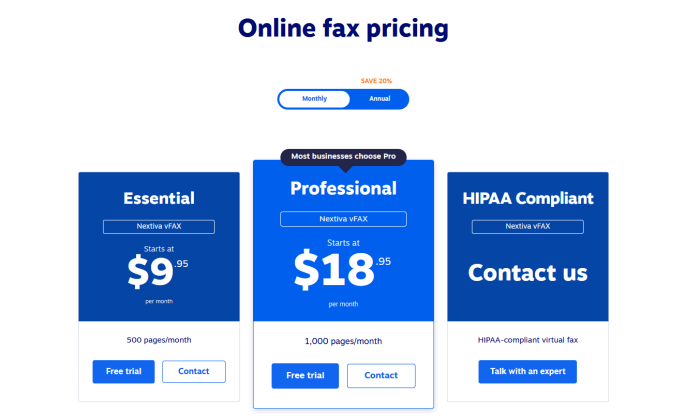
They have one of the best monthly rates out there with no annual commitment. You get up to 500 pages per month for just $9.95. Again, that’s on monthly pricing (the rate comes down to $7.95 per month when you pay for a year upfront).

So with no commitment and one of the best rates in the category, you can rest easy knowing Nextiva vFax can accommodate your busy faxing periods without being a weight around your neck when you don’t need it.

For example, if you really just need to fax from Q4 through tax season, you can pay per month for vFax and then drop it during the leaner summer months. There’s no penalty for doing so and you can restart the service once October comes around again.

If you need more than 500 pages per month during that period, just take one step up to the Professional vFax plan. That’s just $18.95 per month—again, on monthly billing with no commitment—to allow for up to 1,000 pages.

Nextiva can even work on a custom quote if you need your faxes to be HIPAA compliant.

Get the best deal for your office if your faxing needs vary quite a bit throughout the year. Go with Nextiva vFax.

#2 – RingCentral Fax Review The Best for Offices That Fax a Lot

If you and your employees fax on the daily, I would definitely explore the idea of getting RingCentral Fax. Large volume faxing is extremely affordable and easy to manage, regardless of how many pages you need to send.

RingCentral gives you the option to get standalone services, or to purchase online fax as part of a large bundle.

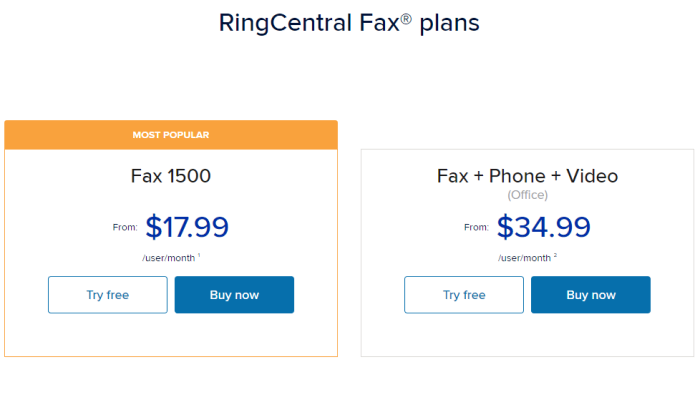
Let’s look at the standalone fax plan first, RingCentral Fax 1500. This gives you 1,500 pages per month, which comes out to roughly 50 pages a day. You’re allowed a single user, but up to 25 trusted email addresses on the account. That’s key.

It’s like replacing and streamlining a single fax machine in a busy office.

For offices that know 50 pages per day isn’t going to get them close to where they need to be, there’s RingCentral MVP. You get unlimited online fax alongside one of the best business phone systems

In addition to unlimited faxing, you get unlimited voice and video calling, business texting, and team messaging.

Problem solved.

This is where RingCentral distances itself from the other good online fax services I reviewed. None of the others include anything like that, so if you are in the market for more communication tech than just online faxing, RingCentral is your best option.

Even if it’s just the fax service you want, nobody else offers an unlimited amount—and certainly not for such a low rate.

Whether you need the unlimited service or not, getting fax through a well-known communications provider like RingCentral is peace of mind in itself. You are using a trusted network and have access to expert customer support via the web and phone. 

It’s not something you need all the time. But, at 4:30 on Friday when the title agency is waiting for that signature, it’s nice to have someone to call.

As you would expect, the service is modern and well-designed. You can run a call center from the RingCentral mobile app—it can handle your faxes just fine. Snap pictures of documents and fax them from your phone.

The web app is simple to use, as is email. Another real plus about RingCentral is the mature administrative interface. It’s easy to add new users or phone numbers and keep track of everything, even if you have multiple locations or remote employees.

Take advantage of a huge number of integrations with popular cloud storage services on RingCentral’s App Gallery like Box, Dropbox, Evernote, OneDrive, and Google Drive.

If you have to keep track of a lot of faxes, these integrations will save a ton of time and simplify your workflows. Store and archive faxes as you would anything else.

Emphasize the benefits: easy to use, easy to implement into workflows and stay organized. Store and archive faxes as you would anything else.

So how much does all this cost?

RingCentral Fax 1500 is $17.99/ month per user if you sign up for a year, or $22.99 if you pay month to month. You get 1,500 pages free each month, and it’s 4.9¢ per page after that. 

Or you can go with RingCentral MVP, get unlimited faxing, and never have to worry about how many pages you send. 

If you are in the market for a combined fax and business phone solution, look no further. RingCentral MVP is a complete communication platform, complete with business phone number and conferencing calling so you can loop everyone in on a deal and fax from the same app.

You can handle HIPAA compliant faxing with RingCentral, but you’ll have to get in touch with your account manager to set it up. This is why I recommend SRFax for companies that need a compliance-friendly solution.

The frequent faxer will appreciate the ease and transparent pricing of RingCentral. Try either RingCentral Fax or MVP free for 15 days. 

#3 –  mFax Review – The Best for Hybrid Offices

mFax is the complete solution for offices that can’t go completely cloud. Some companies still need to work with hard copies or have fax machines and multifunction printers they want to keep using.

With mFax you can get the best of both worlds. Not only will that equipment still work, it will perform even better and you can ditch expensive phone lines forever.

Typically, online fax uses the same VoIP (voice over internet protocol) technology as voice and video communications. This helps bundle services, but mFax has built a network specifically for fax, so you’ll get better quality and reliability.

The other major benefit for hybrid offices using mFax is the plug-and-play FaxBridge hardware adapter. Instantly connect any fax machine to the internet so you can route incoming faxes directly to email. 

It’s easy to set up the FaxBridge, which ties all of your fax hardware into the new cloud system. Everything will be through the internet, so you can stop paying for an expensive traditional phone line.

Basically, you get the scalability and flexibility of cloud-based service without having to rework the way you do business. Users can access the machines they need with the FaxBridge, or work directly from their email or browser. 

Every fax is automatically stored with mDrive, the company’s cloud storage service. They give you the first GB of storage for free and you can tag faxes to make storage and retrieval much easier. 

No matter how you store or transmit your documents, mFax is extremely secure. It’s GLBA, SOX, and PCI compliant. mFax will sign a BAA, and the company offers purpose-built solutions for healthcare, legal, and financial services companies.

Any office can feel completely safe using mFax, whether their employees are in the office, working from home, or on-the-go. There’s no mobile app, but the browser-based access is responsive to your screen size and just as secure.

mFax and mDrive are part of the Documo Suite—which also includes mSign—a cost-effective eSignature solution. Whether you just want to fax or need signatures, the entire suite is simple to navigate. Teach someone once and they will be fine for life.

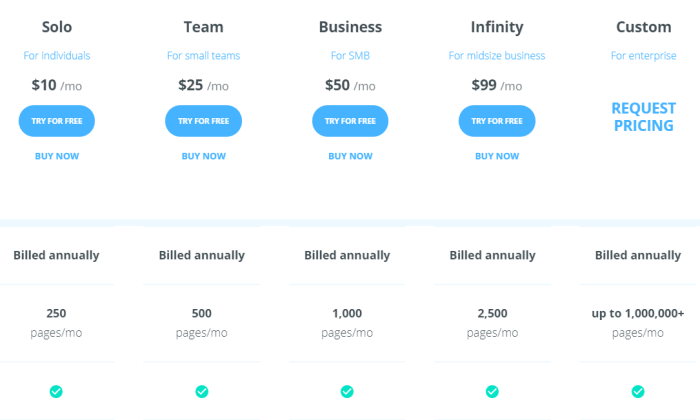
There are a range of plans available:

In my opinion, the Solo plan is kind of a misnomer. With a page limit of 250 per month, this might be all that a small office needs. Of course, you only get one user with Solo, which might limit some companies.

With the Team plan, you get five users and access to an admin interface to help everyone stay organized. One thing I really like about mFax is that the cost for adding users and phone numbers decreases as you move up pricing tiers. So does the overage cost.

By the time you hit the Infinity plan, the price per additional phone number has dropped to $2, which is less than half the cost of other vendors.

Another selling point of mFax is the US-based customer support, which is a great resource should something go wrong or for employees who need help when they’re working from home.

mFax can help the hybrid office like no other service I looked at. No matter how many offices or machines you have, mFax gives you the technology to keep faxing secure and affordable.

Try mFax free for 14 days with no obligation.

#4 – HelloFax Review The Best for Remote Offices

HelloFax is a secure online fax service built for the modern cloud office. 

Sure, every solution I’ve reviewed is cloud-based. But HelloFax comes with features that make it especially appealing to companies that can’t depend on in-person interactions to keep the ball rolling.

For a clear example, let’s talk about having the ability to sign documents. It’s included with every HelloFax plan (including the free one). Many online fax services don’t let you sign docs or, at least, make you pay extra.

You can also edit documents in HelloFax, another capability that many other options lack. This is a huge time and hassle saver. 

Resolve minor document errors when they happen, not seven emails later.

For the remote office, this is a big deal. People can’t exactly just drop by to rectify a spelling mistake or sign something they forgot. HelloFax takes the problem away, no white-out frustration necessary.

There’s no mobile app, which might strike you as a downside, but HelloFax doesn’t need one. The web app is clean, easy to use, and optimized for mobile. You can use your phone to take pictures and fax just as you would with any app.

HelloFax also provides unlimited cloud storage. Everyone will have access to sent faxes, no matter where they are.

Alternatively, you can make use of HelloFax’s cloud storage integrations with Box, Dropbox, Evernote, Google Drive, and OneDrive.

You choose how you want to keep things organized and HelloFax will make it happen. 

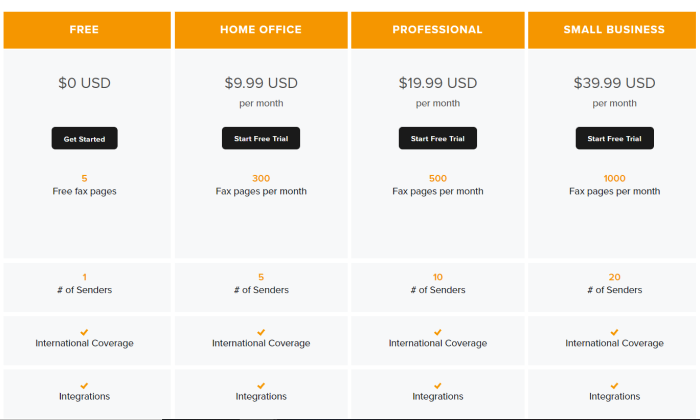
The pricing isn’t low, but it’s reasonable given that the eSignature solution and unlimited storage come with every plan.

The Free plan is limited to the web app and sending five faxes. This is more limited than FaxBurner’s freemium plan, which lets you receive faxes. Still, it’s an excellent choice if you have to send a fax with a signature and you don’t want to pay.

Upgraded plans come with more pages, the ability to receive fax. You’ll also be able to fax directly from your email, as well as fax multiple recipients at the same time.

It’s not the cheapest plan out there, but it’s deep. HelloFax supports a wide range of file and image types. You also get more control over your documents, in terms of being able to edit and sign them.For the remote office that’s already working in the cloud, HelloFax is a good choice.

Get started today for free, or get a 30-day free trial of one of the premium plans

#5 – SRFax Review The Best for Faxing Regulated Documents

SRFax is a great option for businesses that have security and compliance concerns. 

Transferring information over the internet always comes with the risk of interception. It doesn’t matter if you are a small company—a single compromised document could result in a costly lawsuit or fine.

SRFax meets or exceeds every guideline for security set out by the NSA, NIST, and Council on Cybersecurity. It’s the safest way to fax on the market.

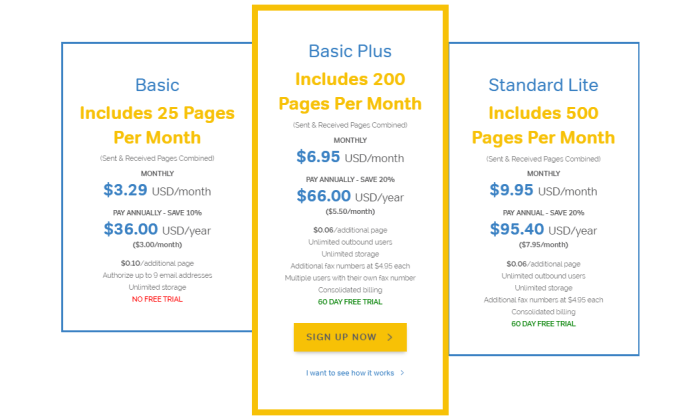
With plans starting as low as $3.29, SRFax offers affordable protection for businesses that need to fax occasionally. From there, plans scale up to attractive price-per-page rates for companies that need high volume.

The individual psychiatry practice, the 10-person dentist office, the biggest hospital in the state, or the multinational law firm—really, anyone who needs to fax documents in compliance with regulations—can find an SRFax plan that fits the bill.

Security is the big selling point for SRFax. The company’s data centers are locked down similar to Google and Amazon Web Services. Encryption is always enabled, keeping your fax safe at every step of the transfer for your device to the recipient and back.

No matter where you are or what device you are using, you can fax with complete peace of mind.

Every PDF or TIFF you receive is scanned for viruses before you get it. No need to worry about opening that attachment. 

This is a pretty big deal for lenders, lawyers, and other professionals who have clients faxing documents in. Not everyone has a fax machine, so it’s not uncommon for an office to receive a fax from a public library, print-and-copy shop, or other network with unknown security.  

SRFax offers specific plans for healthcare providers that need to meet stringent HIPAA regulations and will sign a business associate agreement (BAA). The purpose-built online fax platform comes with features to make compliance easier, including audit trails and automated deletion.

Really, no matter what kind of regulations you are up against, SRFax has you covered.

There are three different sets of plans to choose from: Standard, Healthcare, and Enterprise.

There are six Standard plans in total. The Basic plan is fairly limited. You get 25 pages per month, but it’s only $3.29. It’s good if you rarely need to fax but need a secure option.

With the next plan up, Basic Plus, you get unlimited storage, unlimited outbound users, and up to $200 pages each month.

Standard plans run all the way up to Professional, which includes 2,500 pages per month for $45.95. This is a better deal at scale than you are going to get with mFax, which has comparable security.

Looking at the Healthcare plans, which are configured to meet HIPAA, you can get the small office set up with a plan for as low as $7.95 per month. It’s capped at 200 pages, but prices remain extremely reasonable up through the higher plans, which can support up to 20,000 pages per month.

SRFax also offers Enterprise plans, which start at 5,000 pages per month. You get unlimited authorized email addresses, no-charge PGP encryption, and optical character recognition (OCR). 

With OCR, you’ll be able to search the text of documents you faxed, which makes retrieving documents a whole lot easier.

SRFax is my top recommendation for any business that has to send secure faxes.

You can try it free for 60 days, which is more than the few weeks you get to test-drive others.

#6 – FaxBurner Review The Best Free Online Fax Service

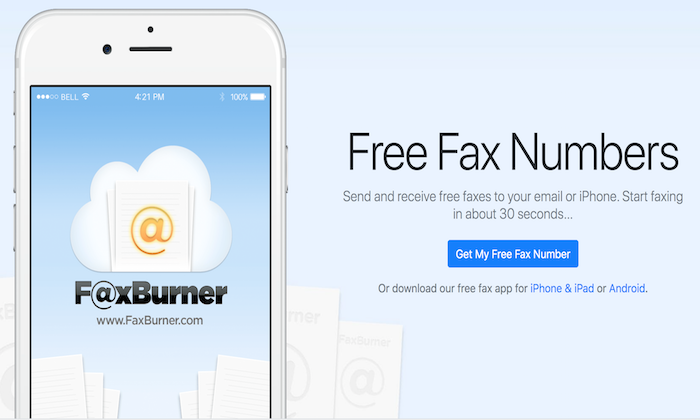
FaxBurner is a web and mobile application that so many people love. It has garnered a rating of 4.9 stars on the App Store with more than 14,000 reviews. 

It’s perfect for the person who suddenly needs to fax. 

First off, you can use it for free to fax a limited number of pages. 

Second, you can get a FaxBurner account set up in about 30 seconds.

People rave about it.

Whether they are faxing a request for an absentee ballot or trying to receive an important tax document before a deadline, users are so grateful for FaxBurner. 

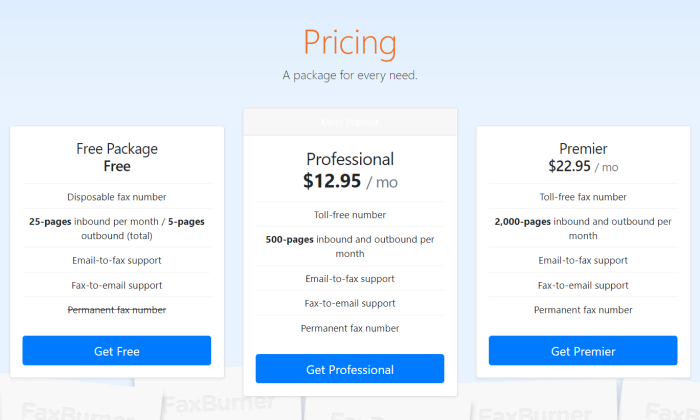
That’s right, FaxBurner’s free plan will let you send and receive faxes, which is quite distinct from other freemium plans.

Once you create your free FaxBurner account you can send up to five pages and receive up to 25 at no cost. After that you have to pay per page or upgrade your plan.

When you want to use your free fax, FaxBurner gives you a temporary number that works for 24 hours. If you don’t use all your complimentary faxes, you can request another number again later.

Send faxes from your mobile phone or with email. Take pictures of the page you want to fax. It’s that simple. 

You’re not struggling to figure something out during an already stressful situation, or worrying if your document is actually going to arrive. FaxBurner sends you a notification so you know for sure.

Another really nice perk is that you can sign documents from your mobile app. So if you are looking for a free online fax service with digital signatures, this will work. No need to find a printer to sign.

Because it’s my top pick for the freemium category, I haven’t spent much time talking about the premium FaxBurner plans.

These plans can be a good option for the mobile-first company. There’s no web app. You can fax from your email or a mobile device. From the mobile app, you can see every fax you’ve ever sent, or integrate FaxBurner with Dropbox.

HelloFax is my top recommendation for the remote office because it has a wider range of integrations and gives you deeper document editing/signing tools.

If you aren’t worried about those factors, then you should take a hard look at FaxBurner, which gives you higher page limits at lower cost than HelloFax.

For those of you just looking for a free way to fax, FaxBurner should be your first and last option. Send and receive faxes in a few minutes without paying a cent.

Use FaxBurner free today or upgrade to a premium plan. If you aren’t satisfied, they will refund your money within the first 30 days of service.

#7 – MetroFax Review Cheapest Way to Fax 500+ Pages per Month

If you are looking for the best bang for your buck, check out MetroFax

The company offers some of the lowest price-per-page rates of any online fax service. There’s no activation fee, no fee for ending your service early, just stress-free affordable faxing.

The best part about the great price is that the service is not cut-rate at all. You get a fully-featured mobile app, local or toll-free number, and the ability to fax more than 170 countries.

You can attach up to 10 documents to a single fax totaling up to 18 MB. Some of the other providers let you send larger faxes, but it’s one of the few drawbacks. 

MetroFax supports most of the common document and image formats. There’s no problem sending spreadsheets, for example.

I really like how Metrofax automatically retries failed sends twice, and notifies you immediately once your fax has gone through.

Another convenient feature that helps keep costs down is that you can add five email addresses to a single Metrofax account. Instead of having to purchase multiple subscriptions, you can get a small team set up for one low cost.

There’s no hidden fees. No bonus charges. It’s not the most beautiful platform out there, but it’s got the reliability and security where it counts. ADP, Allstate, and US Bank all use Metrofax to keep costs down.

Let’s take a look at what you get.

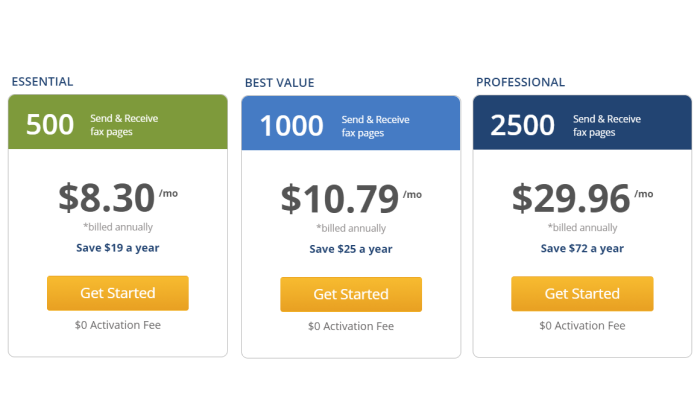
The Essentials plan lets you fax up to 500 pages per month for $8.30. This is less than SRFax and FaxBurner for the same number of pages, two of the other more economic options I reviewed.

Upgrading to the aptly named Best Value plan, you get double the number of pages for a few dollars more. This is where MetroFax really starts to stand out. To get 1,000 pages with mFax would be $50/month, which is five times more expensive.

With any plan you pick, you get a low overage rate of 3¢ per page. That’s as good a rate as you will find.

For companies worried about the commitment or high upfront cost of a subscription, MetroFax offers great month to month rates. Best Value “jumps” to $12.95/month, which is the same cost as FaxBurner with twice the page limit.

At a certain volume, RingCentral’s unlimited fax plan becomes the better buy. But if you don’t always hit those high numbers, it may not actually be the most cost-effective. 

A Professional plan from Metrofax gets you 2,500 pages per month, or around 80 pages a day. If you are in that neighborhood, Metrofax might be better than RingCentral.

Put it all together—the good price, low overage fees, and ability to add multiple emails to a single account—and you have one of the cheapest ways to get your faxes from point A to B.

It’s not the most feature-rich platform, but if you’re in the market for an online fax service that won’t break the bank, start here.

Try MetroFax free for 14 days before putting any money down.

What I Looked at to Find the Best Online Fax Service

Some companies have limited use for online fax. It’s something they need to interface with particular vendors or customers, but not a critical part of their business per se.

Other companies need an online fax service they can depend on that works across all departments.

Either way, you want something that’s easy to use when you need it. Every online fax service I’ve picked lets you fax from the web, email, or a mobile device. 

Some of the freemium plans may have limits in this regard, but if you are paying for one of these services, know that you have the flexibility to send and receive faxes no matter where you are.

But which one of these services are going to fit your needs and budget? Let’s take a close look at the major criteria you need to assess as you evaluate my top picks.

Monthly Fax Volume

How much do you fax? You’ll want to have a decent estimate of how many pages you send and receive via fax each month.

If you are just looking to send a fax randomly, FaxBurner and HelloFax give you a limited amount of free faxes. Only FaxBurner gives you the ability to receive free faxes, though.

For companies where faxing is a regular part of business, you’ll have to get a paid plan. This is going to have a set number of pages each month you can fax. If you go over that limit, you will get an overage charge, which is typically a few cents per page.

Fortunately, there are a range of services and plans out there, so you should be able to find something that dovetails with your needs.

There are affordable plans with low monthly limits that are perfect for the company that needs to send a fax every now and again. The Basic plan from SRFax is the lowest cost to start at $3.29/month for 25 faxes****.

High-volume fax plans come with hundreds or thousands of pages before you start hitting overages. These plans are definitely pricier and may require signing up for an annual subscription, but they make a ton of sense for offices that fax all the time. 

Metrofax and RingCentral offer plans with very good price-per-page rates at high-volume. If you don’t want to worry about page limits at all, the RingCentral MVP plan comes with unlimited faxing.

Users and Phone Numbers

Do you need a single fax line for the office? Or do you need individual phone numbers for multiple people to manage their own faxing?

FaxBurner will give you a temporary phone number to send and receive a limited number of faxes for free. If you upgrade your plan, FaxBurner provides a permanent number and a lot more pages.

If you can get by with a single phone number for fax, but you want a lot of people to be able to use it, I recommend SRFax, MetroFax, or RingCentral. These companies allow multiple emails to access a single fax line. 

With all but the entry-level plan for SRFax, you get unlimited outbound users, and additional lines only cost $4.95 each. That price is fairly standard, and you won’t need a ton of numbers to get everyone onboard because so many users have access to each line.

For companies that need a lot of individual numbers, I recommend mFax because the price goes down as you grow. Higher tier plans come with discounts on adding users and lines, dropping down as low as $2 per additional phone number at the Infinity tier.

Document Requirements

But there is more to think about than just security when it comes to your document requirements.

If you just have to fax PDFs, any option is going to work fine, but other formats may not be supported depending on the service. 

Double-check each vendor against your needs. RingCentral and mFax can handle a broad range of formats and file types that includes most every kind of document you’d want to send.

You also want to be conscious of limits on page length, especially if you are shopping around the freemium or low-cost options. Some of these plans will limit the number of pages you can send, which can cause issues for long documents.

Companies that use fax as a routine part of their business often need to be able to do more than just send and receive. They may need the ability to:

  • Edit fax documents
  • Attach a cover page
  • Add/Accept digital signatures

These features are extremely helpful as they eliminate extra steps and the need for additional third-party services to get the job done.

One of the reasons I like HelloFax so much is that it comes with deep document editing and digital singing tools. This saves everyone a ton of time when there are minor corrections or missing signatures. 

Explain why these features eliminate extra steps and the need for additional services. Call out HelloFax for handy editing features that saves everyone time when there are minor corrections slowing an approval down.

Security & Privacy Regulations

Are you faxing sensitive information like social security numbers, patient records, or financial data? If you are, then you need to make sure your online fax solution can handle the required regulations.

Now all of the options I picked are secure and the companies have taken every precaution to ensure that faxes can’t be snooped or stolen. 

That said, some online fax providers have built their service to comply with especially strict regulations like HIPAA (Health Insurance Portability and Accountability Act) for healthcare or the GLBA (Gramm–Leach–Bliley Act) for financial services.

If your company is subject to these (and other) regulations, you want to make sure that your online fax service is compliant. 

My number one recommendation is SRFax because the company has gone over the top to ensure security and privacy of its service. mFax is another good option, if you are worried about compliance. 

Both of these companies have plans that can handle HIPAA, GLBA, payment card industry, and other regulations. They will also sign a business associate agreement (BAA) which protects your company from facing the wrath of government regulators if something goes wrong. 

If you need HIPAA-compliant online fax, do not use an online fax service that won’t sign a BAA.

Document Archiving

If you’re using an online fax service to send and automatically digitize documents, it should come with document archiving as well. By this, I mean there should be easy ways to store, retrieve, and share any fax.

Some online fax services provide online databases so users can easily save faxed documents. 

SRFax is a really great option for archiving because every plan comes with unlimited storage. You also have the ability to tag faxes, which makes filing and finding them later a whole lot easier.

HelloFax also gives you unlimited storage. With other vendors there are limits, depending on the plan you choose.

One thing to look for is integration with the cloud storage services you already use. RingCentral, mFax, HelloFax and FaxBurner all have integrations with popular products. 

You’ll be able to store and send faxes directly from DropBox, Google Drive, OneDrive and others.

This is going to streamline workflows and help everyone stay organized with less work. Plus you can take advantage of the great search functions in these platforms to find files quicker.

Summary

You have a lot of options for online fax services. A lot.

My picks are all good, but chances are one is going to work better for your situation than the others. To recap:

  1. Nextiva – Best for offices with fluctuating faxing needs
  2. RingCentral Fax – Best for offices that fax a lot
  3. mFax – Best for hybrid offices
  4. HelloFax – Best for remote offices
  5. SRFax – Most for faxing regulated documents
  6. FaxBurner – Best free online faxing service
  7. MetroFax – Cheapest way to fax 500 or more pages per month

It comes down to what you need. The totally remote office is going to love HelloFax, whereas hybrid offices are going to like mFax more.

If you need to fax a lot for one chunk of the year and then never have to for the rest, there’s no better deal than Nextiva.

RingCentral can work really well in either situation, but it’s only a good buy for companies who fax a large number of pages each month.

SRFax is the best for companies in healthcare, financial services, and other verticals where faxing sensitive information is a part of daily business.. You benefit from always-enabled security and tools to help your employees maintain compliance with regulations.

Metrofax is a value-buy. It doesn’t come with all the capabilities of other services, but it handles the essential faxing requirements quite well at a great price.

And if you are looking for the best free online fax service, I recommend FaxBurner. Send, receive, and sign a few faxes for free.

What company do you use to send online faxes?


from Blog – Neil Patel https://ift.tt/3lXENoI
via IFTTT