Thursday, 2 December 2021

9 Digital Marketing Tips for the Holidays

9 Digital Marketing Tips for the Holidays

Black Friday, Cyber Monday, Super Saturday—the holiday season doesn’t lack shopping days. Add those to the traditional boost in consumer spending that occurs in the run-up to the holidays, and you have a recipe for a record sales quarter.

However, a bumper festive season doesn’t happen by accident. A comprehensive and thoughtfully crafted digital marketing strategy is necessary to make those sales rack up. 

That’s why today, I will run through my top digital marketing tips for the holidays. By the end of this article, you’ll have an arsenal of strategies you can execute to make your physical or metaphorical cash register sing. 

Why the Holidays Are the Best Time for Digital Marketing Success

Online shopping will be just as pivotal for consumers this festive season as last year. In 2020, online retail sales during the holiday period totaled $186 billion, and Cyber Monday was the biggest online shopping day in U.S. history. This year, the five days between Thanksgiving and Cyber Monday are projected to increase by 14 percent compared to 2020. 

The sheer demand for online shopping makes the holiday period one of the best times to launch a new digital marketing strategy, but competition between brands also makes an effective strategy necessary. 

It’s important to present a strong digital campaign given the potential propensity for consumers to seek out the kind of in-store events they missed out on in 2020. Research shows that while 70 percent of consumers report their shopping journey involves online touchpoints, only 14 percent of U.S. shoppers say they won’t shop in-store at all this season. 

9 Digital Marketing Holiday Tips

OK, enough background information. Use these nine digital marketing holiday tips to guarantee a holly-jolly holiday season.

1. Start Early and Have a Plan

The best holiday digital marketing plans start months before the festive season. To put it another way: If you haven’t already started planning your strategy, start now.

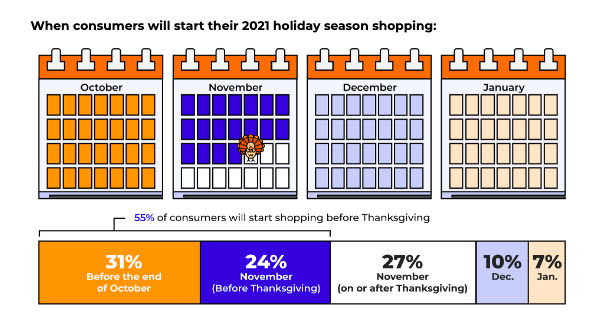
By the time you’re reading this, most consumers will already have started shopping. It’s estimated that 31 percent of U.S. consumers will start their shopping in October or earlier, and 55 percent will start before Thanksgiving. 
Digital Marketing Holiday Tips - Start Early and Have a Plan

Whenever you start, making a plan is crucial. Try to wing it during the holiday season, and you’ll be outperformed by competitors who have had their campaigns set up and scheduled months in advance.

Planning your strategy doesn’t have to be complicated.

Start by outlining the goals you want to achieve and the tactics you plan on using. Next, list all the assets you need to design and the marketing funnels you need to build. Finally, create a realistic timeline backward from the day you want to launch. 

Breaking your holiday digital marketing campaign up in this way will help show you exactly how much work needs to be done and how to make the best use of your time.

Most important of all, don’t freak out if you haven’t started planning yet. There’s still plenty of time to create a killer digital marketing plan. Focus on the shopping days that are still ahead of you and identify one or two effective strategies to put all of your efforts into.

2. Host a Contest

The holidays are a time for gift-giving, so what better way to get into the spirit of the season than by hosting a giveaway contest.

Not only is a contest a great way to give back to your consumers, but it’s also a fantastic way to drum up brand awareness, grow your social following, and build your email list. You can even use your contest to tease the holiday shopping deals and events you have coming up.

The great thing about hosting a contest online is that it’s quick, easy, and cheap to set up. You don’t even need to give away something extravagant to get people excited. A free product is all it takes to get your campaign going. 

3. Use Paid Campaigns to Increase Awareness

While I’ll always believe SEO should have a prominent place in any marketing campaign, the time-sensitive nature of the holiday season makes PPC ads essential.

Run awareness-based campaigns on every major paid ad channel. I’d recommend Google, Facebook, and Instagram at a minimum, but feel free to advertise on any channel you think is appropriate for your audience.

Be thoughtful with your budget. Specifically, you’ll want to make sure you spread your budget across the entire holiday season. While it’s tempting to front-load your budget and catch shoppers as early as possible, consumers may not be ready to purchase at the start of November.

There are a couple of strategies you’ll need to implement to be sure of this.

First, account for higher costs the closer you get to Christmas. Since retailers know that consumers are much more likely to make purchases the later it gets in the season, CPCs become more expensive, too.

Second, get rid of any campaigns that aren’t performing by the end of November. That way, you can save your budget for campaigns that convert.  

4. Use Promotions but Use Them Carefully

Promotions and discounts are something of a double-edged sword. On the one hand, they are a great way to drive traffic and increase conversion rates. At the same time, they have the potential to devalue your brand—especially at a time when rampant consumerism is so closely linked to environmental damage. 

In response, many brands have been distancing themselves from heavy discounts and Black Friday deals. Outdoor retail brand REI is closing its doors for the sixth year in a row and paying staff to take the day off and spend time with their family. Clothing brand Allbirds is raising prices on Black Friday and Cyber Monday, then donating the additional money to Mother Nature and matching it with their contribution.

Digital Marketing Holiday Tips - Use Promotions But Use Them Carefully

You don’t have to go that far, but you should use offers and discounts with caution.

Rather than trying to compete on price when consumers are looking for as much value as possible, why not deliver value in another way? Free shipping, gifts, and other rewards are a great way to retain brand value while offering the discounts holiday shoppers are eager for.

Another way to make discounts more meaningful is to limit them to existing customers. With this strategy, there’s no risk of devaluing your brand in the eyes of new customers, while rewarding existing customers for being loyal. What’s more, it’s much cheaper to retain a customer than acquire a new one, and a generous promotion may be enough to stop them from shopping with competitors over the holiday.

5. Create Holiday Gift Sets

If you’re looking for a way to increase conversions and boost your average order value (AOV), try bundling your products into holiday gift sets and selling them at a discount. Product bundles are particularly popular in the run-up to Christmas when shoppers are searching for the perfect gift.

Digital Marketing Holiday Tips - Create Holiday Gift Sets

Bundling is particularly common with health and beauty products, but there’s no reason it shouldn’t work in other sectors, too. For example, a yoga e-commerce store could bundle a yoga mat, block, carrier bag, and pair of leggings. A pet store could bundle dog food, a bed, and a collar. Whatever you sell, there’s almost certainly potential to bundle several products together. 

Don’t just guess which products will work well together. Harness the power of data and dive into your inventory analytics to see which products have been most popular and which are most frequently purchased together.

Of course, you don’t have to only include your best sellers. Bundling is a great way to sell less popular products that may not do so well on their own.

6. Create Laser-Targeted Email Campaigns

Email marketing generates on average $36 for every $1 spent, making it the highest returning marketing channel. It’s a no-brainer to include email in your digital marketing strategy.

​​Unfortunately, nearly every other brand includes it in their strategy, too.

That’s right; it’s not just you who gets bombarded with offers during the holidays. From November onwards, everyone’s inboxes start overflowing with Black Friday deals, special offers, and holiday greetings.

Not sending emails isn’t an option. If you don’t catch your audience’s attention, your competitors will. Your job is to make your emails stand out in a sea of sales messages.

Your secret weapons? Segmentation and personalization.

That’s not to say your subject line and email copy aren’t. You’ll have to nail those, too. You’ll also want to make sure emails are optimized for mobile.

There’s only so much you can optimize, however. When you send your email shouldn’t be one of them. There’s no shortage of statistics telling you the best time to send an email. The trouble is your competitors are reading the same articles, too, so forget best practices for a moment and stagger emails as much as possible throughout the day.

7. Be Socially Responsible

Customers are prioritizing corporate social responsibility more than ever. More than three-quarters of them are motivated to purchase from companies that work to make the world better, according to research by AFLAC. 

That means practicing social responsibility—whether that’s donating a portion of your profits to charity, creating environmentally-friendly products, or something else entirely—isn’t just the ethical thing to do. It makes business sense, too.

If you’re new to corporate social responsibility, start by supporting causes that align with your brand. For instance, it makes sense for a pet store to support a dog shelter, or a gardening brand to support an environmental nonprofit.

In both cases, customers will want to support the charity and may go out of their way to shop with your brand over a competitor. It’s also just nice to give back to something you care about. Tis the season for giving, after all.

Whatever causes you support, remember to be genuine. Your customers aren’t fools, and they’ll quickly be able to tell the difference between a company that is committed to being responsible and one that is greenwashing.

8. Try New Platforms

Ever been tempted to run a campaign on TikTok or Instagram Live? Don’t wait for the New Year to make a change; try a new marketing channel this holiday season.

While it can be reassuring to stick to the channels you know, there’s no guarantee they’ll be as effective as they always have been. The move away from Facebook’s suite of apps towards newer platforms, in particular, is well documented. 

Launching a campaign on a new platform may seem daunting, but if you treat it like an experiment, then it doesn’t matter if you fail. Better still, there’s every possibility you’ll hit it out of the park and uncover a profitable platform you can advertise on for years to come.

9. Make a Plan for Long-Term Success

My last holiday marketing tip doesn’t technically involve the holidays at all. It’s about how to squeeze as much return as possible from all the money you invest into holiday marketing throughout the rest of the year.

If your brand awareness ads are successful, you’re going to have a lot of people visiting your site. Hopefully, most of them will make a purchase. If they don’t, you’ll want to find ways of targeting them throughout the rest of the year to make sure that initial ad spend wasn’t wasted.

One of the best ways to do this without getting visitors to sign up for a mailing list is through retargeting ads. 

With retargeting ads on Google and Facebook’s ad network, you only serve ads to people who have previously visited your site. This is an incredibly cost-effective ad strategy and one of the best ways to keep your brand top of mind well into the New Year. 

Digital Marketing Holiday Tips: Frequently Asked Questions

Why is holiday marketing important?

Consumer spending is high during the holidays, but so is competition between brands. A holiday marketing strategy can help your business boost sales and increase market share. 

What makes a great holiday marketing strategy?

A great holiday marketing strategy is well-targeted, highly personalized, and focused on driving as many conversions as possible.

How can I increase sales during holidays?

A digital marketing strategy is one of the best and most cost-effective ways to increase sales during the holiday season.

Digital Marketing Holiday Tips Conclusion

The holiday season is rife with opportunity, and there’s no shortage of digital marketing strategies you can use to make 2021 your best season ever. It’s all about putting together a campaign that works for your brand.

Start by implementing one or two of the strategies I’ve listed above, then make sure you’re doing everything you can to improve your conversions. Finally, learn how you can keep your sales high after the holiday spike

Which digital marketing tip are you going to use first?


from Blog – Neil Patel https://ift.tt/3DeZhS9
via IFTTT

An In-Depth Guide to Google Analytics 4

An In-Depth Guide to Google Analytics 4

When it comes to website analytics, Google Analytics is second to none.

With the rollout of the latest release, Google Analytics 4 (GA4), the same can now be said of applications analytics, too. 

Google Analytics 4 was designed to be the latest generation of web analytics platforms—providing a base for marketers around the world to effectively analyze important customer usage metrics.

New report functions, enhanced features, and predictive insights make it an essential addition to any current Google Analytics setup.

What Is Google Analytics 4?

Google Analytics 4 (formerly known as App+Web), is a new property available on Google Analytics. It replaces the former property type “Universal Analytics.”

The latest generation of Google Analytics sells itself as focused on customer privacy. This comes in the face of some of the latest privacy laws, such as GDPR and CCPA. With privacy-first tracking, cross-channel data measurement, and AI-driven predictive analytics, GA4 is certainly an advanced property that many websites and apps will benefit from.

Google Analytics 4 Vs. Google Analytics (Universal Analytics)

The most obvious difference between Google Analytics 4 and Universal Analytics is that GA4 is a property that enables you to report on websites and applications. Universal Analytics only supports website analytics.

The measurement model itself is also different between the two.

Google Analytics 4 uses a new model that measures events and parameters. Universal Analytics uses a model based on sessions and pageviews.

That’s not all, however. GA4 has an array of new metrics. These include engagement metrics such as:

  • engaged sessions
  • engagement rate
  • engagement time

What Are the Benefits of Google Analytics 4?

Google Analytics 4 offers numerous benefits to users. Here are a few that stand out against the older generation of the property.

Cross-Platform Tracking 

What happens when users are active on more than one platform? With the old Google Analytics, it was a manual process that took time and effort. The new Google Analytics 4 tracks both web and app data in one property (hence the beta name of Google Analytics App+Web).

Cross-platform tracking enables you to see the complete customer journey, including acquisition, engagement, monetization, and retention. You can use GA4 to track the user experience from start to finish—and from platform to platform.

This is done through unique user IDs assigned during app or website login. 

With the appropriate gtag.js script, the user ID for each logged-in session will be sent from either the website or the application to Google Analytics. The ID will be reported to the GA4 property and any user metrics will be logged. When the user logs in again on an alternative platform, the reports will connect the user’s data to their unique ID and pick up where it left off.

This is incredibly useful information for any marketer, as it allows you to better understand the cross-platform experience of your users. The data can also be used to extrapolate information for a generalized demographic and build more accurate customer models.

All Measurements Are Events

With Universal Analytics, page views were the most important metric. This, and other hit metrics such as screen time, events, and transactions, were tracked extensively. The problem is that this gives a myopic view of customer interactions. 

With Google Analytics 4, all measurements are events. What does this mean for you?

Instead of measuring at just the session level, GA4 collects and stores all user interactions as separate events. You can still view session-level reporting, but the ability to break it down by interaction means more in-depth reports and insights. 

Instead of seeing generalized data, you can now gain a fuller understanding of your individual users when it suits your needs.

AI Insights for Predictive Metrics

While looking at past behaviors is helpful in understanding your audience, it doesn’t enable you to always make proactive decisions. With GA4’s powered predictive metrics, you can make data-driven decisions on a large scale.

What does this look like? For most businesses, predictive analytics can significantly impact retargeting campaigns. The metrics included in GA4 as of this writing are:

  • purchase probability
  • churn probability
  • revenue prediction

With the above metrics, you can create audiences based on their predicted behaviors. For example, users who are likely to purchase in the next 7 days or users that are likely to spend more than $500 in one shop. 

These audiences can then be targeted using active Google Ads campaigns or even on social media.

These metrics cannot only help to improve retargeting campaign success, but also improve website performance. You can create custom funnels for different audiences based on their behaviors and needs. The suggestions will continue to improve as more data is collected.

More Control

The greater the control you have over the data, the more you can do with it. While the Universal Analytics property has no shortage of data, it does have a lack of user control. You can create custom reports to a certain extent, but in many cases the customization possibilities are limited.

Google Analytics 4 offers more flexibility than the old Google Analytics. With GA4, you can create your own dashboard, enabling you to see the reports that matter most to your business. It even works well in conjunction with Google Data Studio so you can create custom visualizations of the data collected.

Even more than greater control over specific reporting, GA4 offers expanded segmentation capabilities. 

With GA4, you can create segments based on events which are essentially a subset of events that occurred on your website or application. This enables you to more accurately track customer interactions. For example, you can create segments on all conversion events that occurred in a particular location. These capabilities make it possible to take a more granular view of your users and their behaviors.

Should I Make the Switch to Google Analytics 4?

While the switch to Google Analytics 4 may seem overwhelming, it’s important to start gathering data for future use as soon as possible. The thing to remember is that Google Analytics 4 can only collect data from the date it is set up and enabled. It cannot collect historical data prior to that time. 

There has been no word from Google whether Universal Analytics will become obsolete in the future. However, it’s best to get used to the new property while you still have the time. The good news is you can have both a Universal Analytics property and a Google Analytics 4 property for your account. They will run side-by-side collecting data so you can begin to accustom yourself to the new property without losing your current reporting capabilities.

How to Set Up Google Analytics 4

Since Google Analytics 4 can be used for your website or application (or both), there are two separate setup processes. They are outlined below.

Alongside an Existing Property

If you currently have a Universal Analytics property for your website, then setup of a Google Analytics 4 property can be completed with the GA4 Setup Assistant.

  1. In Google Analytics, click “Admin” on the lower left of the screen.
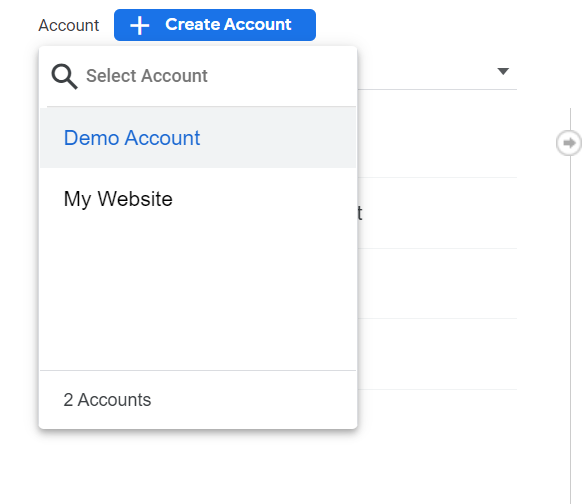
  2. In the Account column, select the desired account:
How to Set Up Google Analytics 4 - Account Column
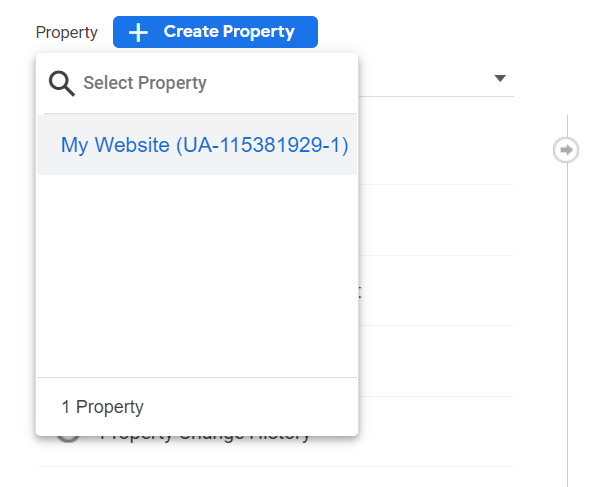
  1. In the Property column, select the Universal Analytics property that currently collects data for your website:
How to Set Up Google Analytics 4 - Property Column
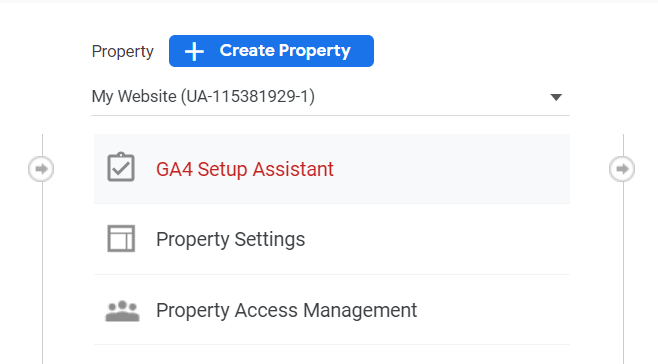
  1. In the Property column, select GA4 Setup Assistant:
How to Set Up Google Analytics 4 - Setup Assistant
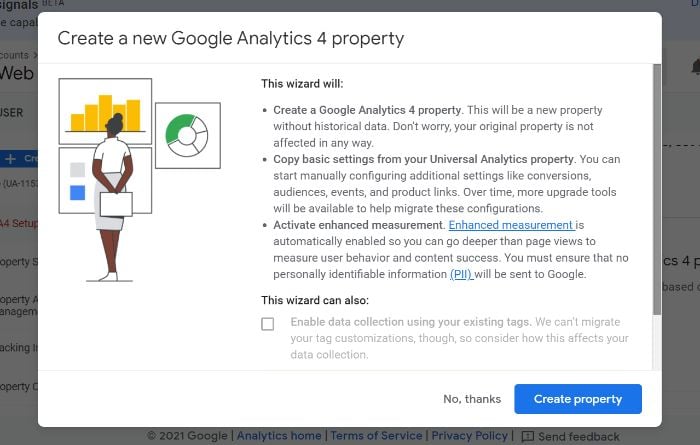
  1. Click “Get started” under “I want to create a new Google Analytics 4 property:” 
How to Set Up Google Analytics 4 - Create New GA4 Property
  1. If your site uses the gtag.js tag, you can select “Enable data collection using your existing tags.”
  2. Click “Create Property.”
How to Set Up Google Analytics 4 - Create a new Google Analytics 4 Property

If you are unable to “Enable data collection using your existing tags,” it’s for one of three reasons:

  1. Your website builder/CMS doesn’t yet support the gtag.js tag.
  2. You use Google Tag Manager.
  3. Your website is tagged with analytics.js.

In all three cases, you’ll need to add the tag yourself.

Google Analytics for Firebase

To upgrade your Firebase account to Google Analytics 4, follow these steps:

  1. Log in to the Firebase console.
  2. Go to Analytics > Dashboard on the left panel.
  3. Click “Begin upgrade” in the banner at the top of the page.
  4. Follow the on-screen instructions to complete the upgrade.

Once upgraded, you can find app analytics in both the Firebase console and Google Analytics.

Frequently Asked Questions About Google Analytics 4

What is Google Analytics 4?

Google Analytics 4 is a new analytics property offered by Google. It enables users to analyze data from websites, apps, or both websites and apps.

What is the difference between Google Analytics 4 and the old GA?

The main difference between Google Analytics 4 and the old GA is in what the two different property types track. Google Analytics 4 can track the analytics of both websites and applications, while the old GA can track only website analytics.

Is Google Analytics 4 free?

Similar to Universal Analytics, Google Analytics 4 is a free property type. There are no costs associated with using one (or more) GA4 properties on your account.

Are they getting rid of the old Google Analytics?

As of this writing, the “old” Google Analytics (Universal Analytics) is still available. This is unlikely to change in the near future. However, Google will likely discontinue Universal Analytics sometime in the future so as to focus on the continued development of GA4.

An In-Depth Guide to Google Analytics 4: Conclusion

When used to its fullest potential, Google Analytics is a powerful analytics tool that can provide invaluable insights. This is why it’s important to upgrade your account when possible. The latest upgrade available to users is the new property, Google Analytics 4.

There are numerous benefits to GA4, including cross-platform tracking, more control over data, and AI-driven insights. When you create a new GA4 property, it works alongside your current Universal Analytics property while also allowing you to gain additional data for future use. While UA is available indefinitely, the transition to GA4 isn’t mandatory but it’s highly recommended.

Fortunately, setting up a GA4 property on your website or app is easy. The steps as outlined above should take you less than 10 minutes to complete so there’s no excuse to put off the transition.

Which of Google Analytics 4’s features are you most excited about?


from Blog – Neil Patel https://ift.tt/3GbwRdx
via IFTTT

Wednesday, 1 December 2021

How to Do Healthcare and Medical SEO

How to Do Healthcare and Medical SEO

All SEO is not created equal.

The average cosmetic brand or fitness brand can take the usual approach with SEO. Optimize some images, start ranking for keywords.

Medical SEO, on the other hand, is an entirely different animal. Search engines use different techniques to rank medical sites. There are serious limitations on both what you can and cannot say, with serious consequences if you make a mistake.

If you’re new to medical SEO, it can be a lot to manage. Fortunately, I’ve put together a list of tips that should make your medical SEO journey significantly easier.

Why Do Healthcare, Medical Professionals and Businesses Need to Understand SEO?

Don’t the jargon fool you, the concept of SEO is actually pretty simple. SEO, or search engine optimization, is the process of making your site easier to find on Google. 

Essentially, Google has a series of factors it uses to calculate how relevant a site is to a particular search. The more relevant you are, the higher you rank. Simple, right?

There are plenty of reasons healthcare professionals should focus on medical SEO, but the biggest selling point is usually the influx of new patients via website traffic. The better your SEO is, the more likely you are to get new patients.

10 Tips for Healthcare and Medical SEO

SEO is generally viewed as one of the building blocks of most successful digital marketing strategies. If you’re serious about making an impact online, SEO provides a relatively straightforward path to marketing success, as long as you know what to focus on.

1. Think of Your Patients and the Search Terms They Use to Find Medical Professionals

If you want to elevate your SEO, it’s important that you start considering the search terms people are using to find medical professionals. Keywords are one of the most vital elements in the SEO landscape, and medical SEO is no exception.

Search engines use keywords to connect users and their searches with relevant information. If you want search engines to find your brand online, you need to choose the right keywords. Of course, that still leaves us with an important question. How on earth do you identify high-quality keywords?

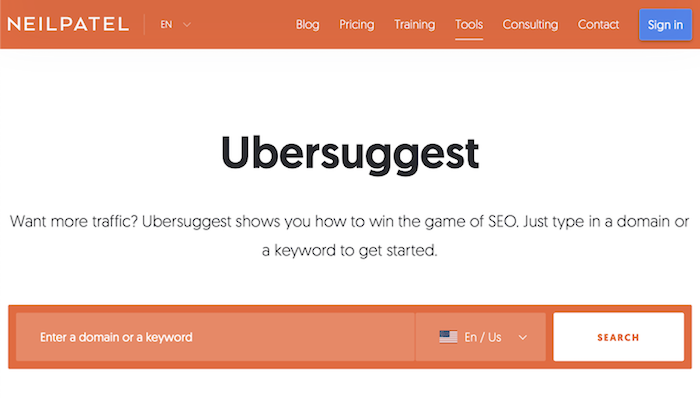
Keyword research is crucial but can be a challenge to wrap your head around at first. If you’re just getting started, you can use my free keyword search tool to get some clarity. 

ubersuggest seo tool

Fortunately, identifying the best keywords for your brand is less about stumbling onto a magic search term and more about understanding user intent. Eventually, you’ll want to start isolating pain points and cross-referencing your potential search terms with your competitor’s highest ranking keywords.

2. Focus on Earning a High EAT (Expertise, Authoritativeness, and Trustworthiness) Ranking

Keywords might be important, but they’re just the tip of the SEO iceberg. Search engines like Google have systems like EAT that can seriously impact your page rankings.

Search engines have a singular real commodity. When they help you get the answers you need fast, that’s a successful session. Search engines live and die by their ability to find users the right answer. In other words, if you want to rank highly and eventually end up on their first page, you need to provide genuine value. That’s where EAT comes in.

EAT stands for Expertise, Authoritativeness, and Trustworthiness, and it’s considered one of the most important factors for Google when determining overall Page Quality Rating. This is one of the ways Google separates the average amateur from the knowledgeable authority

Understanding this system is particularly important for those in the medical field because of the unique approach to improving it. If you want to achieve a high EAT score, your content should be created by those with expert medical knowledge. Beyond that, that content should be regularly updated and reviewed.

3. Understand Language Limitations Specific to Healthcare and Pharma Fields

When it comes to medical SEO, there are some rather serious limitations to what you can do. For starters, the AKS or Anti-Kickback Statute establishes both criminal and civil prohibitions against knowingly and willfully offering, paying, soliciting, or receiving any remuneration directly or indirectly to induce or reward.

Plus, we can’t forget about the Stark Law. If a physician has a financial relationship with an entity, then they may not make a referral to the entity for the furnishing of designated health services.

Make no mistake, these aren’t suggestions. These limitations come with hefty price tags, with as much as $100,000 for trying to get around them. That’s why as you develop your medical SEO strategy, it’s important you constantly ensure you aren’t violating any of your industry limitations. Competitor analysis is a great way to identify safe copy and content options if you’re ever unsure.

4. Make Your Site Navigation Easy and Intuitive for Users

When users can easily navigate your site, something interesting starts to happen. Simply put, the user actually sticks around. A site that’s confusing, poorly designed, structured, or optimized tests the user’s patience and creates friction. Sites that are easy to navigate improve your chances of keeping the user’s attention.

Beyond that, intuitive sites make exploring the site a more natural process. Your user should be able to quickly access the information they need and be presented with data that addresses their other pain points within your industry. The longer the user spends on your site, the more meaningful engagement you’ll receive.

Listen, there’s no denying that improving your user experience can improve your SEO. That being said, you shouldn’t just improve your site navigation because you’re developing a medical SEO strategy. Beyond the binary improvements to page ranking, your users will genuinely enjoy their time on your site, and I’d argue that’s just as important.

5. Adhere to Google’s YMYL (Your Money or Your Life) Rules

Medical SEO might have its own series of unique contributing factors to success, but easily one of the most important is what Google calls YMYL which stands for Your Money or Your Life. As far as Google is concerned, medical web pages are YMYL pages. Categorized as pages that could impact the future health, happiness, and financial stability of the users, Google holds medical pages to a high standard.

Why? Well, the answer is simple. The standards are higher because low-quality pages can be both dangerous and present serious medical consequences for users. One of the easiest strategies for improving your YMYL SEO ranks? Create high-quality content that’s both medically relevant and engaging. Speaking of creating content, let’s talk about content marketing.

6. Do Content Marketing

The term “content marketing” gets thrown around quite a bit in the digital marketing landscape, and with good reason. Creating valuable content is one of the easiest ways to both engage with and assist your audience.

If you’re not sure where to start, creating a regularly updated blog is typically a strong choice. Think of it this way. Your keywords and search terms are the bait, attracting users to your site. Your expertise and capacity are what users eventually agree to, once they see your value. One factor impacts the beginning of your user relationship, the other impacts the end.

Developing a content calendar and consistently making valuable content is the connective tissue between these two. When you have free content that people enjoy, you’re able to bring in traffic with your content. That traffic will then make it easier to improve your SEO through data and improve your visibility. 

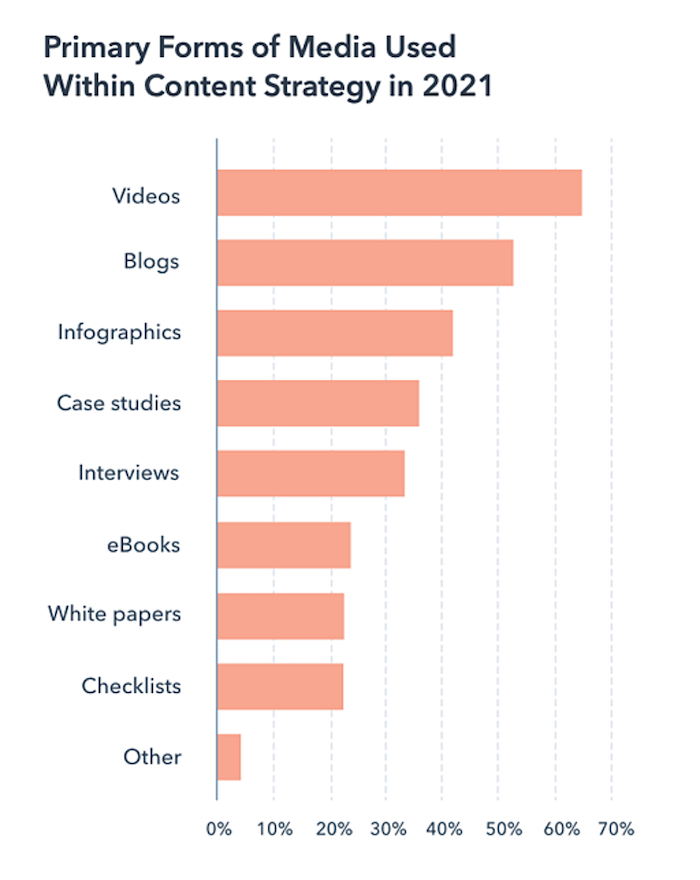
To be clear, you shouldn’t focus only on blog posts and white papers. Social media can indirectly impact your medical SEO ranking because you can get referral traffic. Don’t be afraid to branch out in other forms of media. With changing consumer behavior, video is maintaining its popularity. 

Primary forms of media used within content strategy in 2021

7. Use Short, Logical URLs

It may not seem like a massive issue to you, but short URLs can have a massive impact on the way users interact with your brand.

URLs typically go unnoticed, because there are so many other exciting options to focus on for medical SEO.

Of course, this goes back to the issue of user experience. When users have negative experiences with your brand, they’re less likely to make that crucial first conversion. Likewise, when you reduce friction throughout your brand experience, users take notice.

Short, logical URLs are just one of many signs that you care about your audience’s time and experience. Attention to detail matters and your site should be optimized for medical SEO at every angle.

8. Include Images of Staff, Your Office, and Your Equipment

You might think that just because we’ve been talking about blog posts and white paper, that there’s no room for other kinds of content on your site.

Fortunately, nothing could be further from the truth. Visual content can be a powerful tool, and visuals of your staff, office, and equipment are some of the most useful styles of content you can share.

Right off the bat, adding these images increases the chances that your users will trust your brand. Beyond that, they’re a great way to increase conversions. Here’s a little trick you may not know about. You can add keywords to your own images. By placing your keywords in the image file manually, you can further optimize your medical SEO. 

9. Identify Healthy SEO Practices

There are some guiding principles that you should be aware of, whenever you’re trying to identify healthy medical SEO practices.

As a general rule, you should be making copy, content, and pages primarily for users. There’s a temptation to create pages with SEO primarily in mind, but this is a common trap that businesses fall into.

Does it matter if Google thinks you’re interesting? Absolutely.

Is the user experience infinitely more important than some keyword optimization? Without a doubt.

Never try to trick your users into doing anything, it always backfires. Identify what makes your website unique, and what expertise you can bring to the site today to elevate the user experience.

10. Complete Your Google My Business Page

When it comes to SEO, there are certain contributing factors beyond your own site. One of the easiest ways to improve your SEO without touching your site is by completing your Google My Business page.

It might seem simple but make no mistake. This page can drastically change the way users experience your business online. Not only will this make local SEO more efficient, but it also puts you in Google’s local pack.

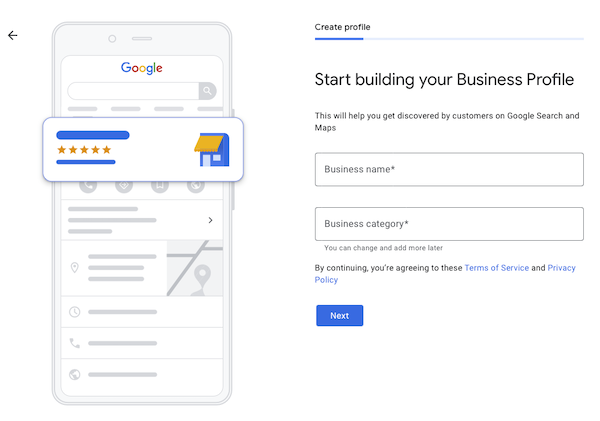
Google My Business Page

A local pack is a group of 4-5 business listings, appearing above organic search results. The logic here is that Google believes local results are more valuable than generic page results for a specific search term. In other words, you get a free boost in page ranking because you’re closer and more likely to be valuable.

Healthcare and Medical SEO Frequently Asked Questions

How long does it take for medical SEO to work?

Like any other form of SEO, medical SEO is not a quick fix. The idea is that gradually, over time, you’re creating an online presence that will outshine your competitors.

Are there healthcare SEO experts I can hire?

Absolutely! There are plenty of digital agencies that specialize in healthcare SEO, and some even offer free evaluations before getting started.

Is it better to use broad or specific targeted search terms in medical and healthcare SEO?

Generally, I like to experiment with both and use my results to inform future decision-making. That being said, focusing on specific terms makes content creation much easier.

Is it better to target diagnoses or symptoms when choosing keywords for healthcare and medical SEO?

It depends on your strategy. If you’re creating educational content, diagnoses can be pretty straightforward. If you’re trying to cast a wide net, and you have a good idea of what a symptom typically indicates, focusing on symptoms can be useful too.

Healthcare and Medical SEO Conclusion

The world of medical SEO might seem identical to your average SEO strategy at first, but looks can be deceiving. Medical SEO has plenty of unique challenges that businesses have to overcome, and quite a few limitations complicating things.

Still, the foundational elements of SEO are there. Focus on improving the user experience at every turn. Be thorough and reduce friction wherever you can. Establish online authority through content creation and create opportunities for meaningful engagement. If you’re able to do all that, your medical SEO strategy will blow your competition out of the water.

What’s your favorite SEO tactic that most people don’t know? Let me know in the comments below.


from Blog – Neil Patel https://ift.tt/3oexZat
via IFTTT

A Deep Dive Into Google Data Studio for Marketers

A Deep Dive Into Google Data Studio for Marketers

Data and analytics play considerable roles in marketing. From showing you trends to giving you insights into your target audience to helping you create effective campaigns, data is critical.

This is why Google Data Studio is a program every marketer should try out.

What Is Google Data Studio?

Google Data Studio is a free business intelligence (BI) tool from Google. You can use it to create centralized reports from different data sources from across the web—or even your platform. 

This BI program makes creating visually appealing and interactive reports and dashboards easy. In addition, the dashboards are fully customizable and easy to share, making Google Data Studio an invaluable tool for marketers.

By transforming raw data into strategic information, Google Data Studio helps marketers make decisions to help achieve their goals. Because the decisions are data-driven, the risks of failure are reduced.

Why Should You Use Google Data Studio?

With Google Data Studio, you can present your data in a meaningful way. 

You’re bombarded with vast amounts of data from your customer relationship management (CRM) tool, social media analytics, Google Analytics, and everywhere else. Knowing which data is useful and which isn’t can be invaluable, but separating the types can take forever if you do it manually. 

Data alone isn’t a panacea to your marketing woes. To run data-driven marketing campaigns, the data must clearly show what actions need to be taken.

This is where Google Data Studio shines.

While your inbuilt analytics reports give you raw data, your Google Data Studio dashboard allows you to only access essential data. With Google Data Studio, you can create dashboards answering specific questions about your business, marketing campaigns, or audience.

As a result, it becomes easier to know what actions to take.

What Are the Features of Google Data Studio?

Let’s look at some of the primary features of Google Data Studio and how you can use them as a marketer.

Easy-to-use Dashboard

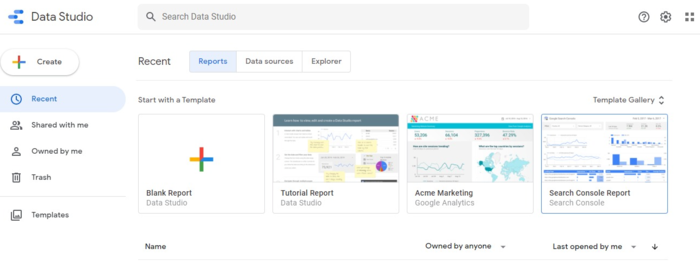
Google Data Studio’s dashboard’s user interface (UI) is designed to resemble Google Drive. If you’ve used Drive in the past, this should look relatively familiar.

What Are the Features of Google Data Studio - Easy to Use Dashboard

Here’s a brief overview of what you’ll find on the dashboard:

  • Search Data Studio Box: It enables you to search for reports, templates, data sources, and anything else in Data Studio.
  • “Create” Tab: Use this to create new Reports, add new data sources, and Explorers.
  • “Recent” Section: This gives you the option to quickly get to the most recent Reports, Data sources, and Explorer.
  • Templates: Find pre-made templates created from different data sources. You can easily customize these to suit your needs.

Connect Multiple Data Sources

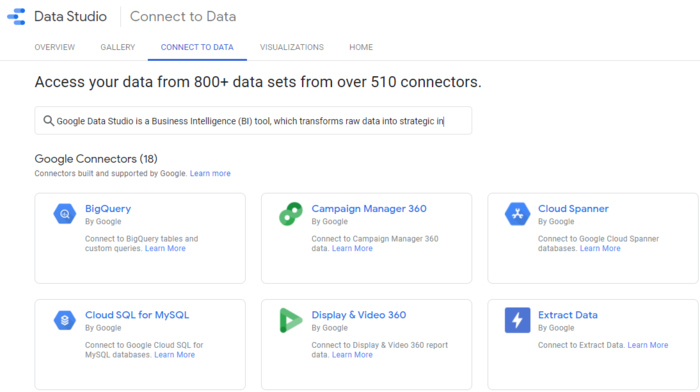
Google Data Studio allows you to connect multiple data sources. You can access your data via 510 connectors, with 18 from Google’s suite of platforms and the rest from third parties. 

What Are the Features of Google Data Studio - Connect Multiple Data Sources

Integrating your data on one platform helps you get a holistic view of what’s happening in your business. It also enables you to get an overview of what’s happening in your market.

Easy Data Transformation

Data transformation plays a critical role in helping to understand your next steps. This is one of the features you get with Google Data Studio. 

Google Data Studio transforms raw data into meaningful business intelligence, no matter how many data sources you pull from. This is made possible by the “Explorer” feature. The Explorer function allows you to work with your data and:

  • add dimensions
  • apply mathematical functions
  • apply arithmetic operators and custom formulas

These allow you to transform your data into actionable information. 

Powerful Data Visualization

Data transformation is an excellent way of turning data into easy-to-understand information. However, data visualization takes that to a whole new level. 

Simply put, human beings are visual creatures and generally process images faster than words or numbers.

Google Data Studio helps you visualize your data through reports and dashboards. You can turn your numbers into graphs, tables, maps, and any other visual aid. Data visualization makes data more accessible. The interactive nature of the visuals also makes for engaging presentations.

Easy Collaboration and Data sharing

The real-time collaboration feature that comes with Google Data Studio allows you to invite others to view or edit your dashboards at your discretion. Just as with other Google platforms, changes are saved automatically, and version history is kept.

Besides collaboration, you can also easily share your reports with clients or team members. The recipient will receive an email notification and a link to access the data.

Customizable Templates

Creating reports from scratch can be time-consuming and laborious. To speed up the process, Google Data Studio offers pre-built report templates. 

Because they’re fully customizable, all you need to do is add your data and tweak the images to your liking. This will save you hours, if not days, of work.

Ways for Marketers to Use Google Data Studio

How relevant is Google Data Studio for marketers?

Let’s look at a few ways you can use Google Data Studio in marketing efforts to answer that question.

1. Get a Clear Picture of Your Target Audience

Marketers need to understand their audience. This involves gathering a lot of data and connecting the dots to build a picture of who your ideal customer is.

Using Google Data Studio, you can polish up tons of data from different sources and turn them into meaningful information. 

This information, however, still needs some refining to make business sense. Google Data Studio helps you do this in a visually attractive way—a way in which all the dots start telling a story.

Google Data Studio is an excellent tool for turning data into stories that give you insight into audience demographic and psychographic data such as:

  • behavior
  • preferences
  • goals
  • pain points

With all this data expertly painted onto a canvas, it becomes easy to build your buyer personas. As a result, you can run more targeted and personalized campaigns, potentially leading to higher conversion rates. 

2. Measure Your Content Marketing Performance

Content marketing is a powerful way to reach your target audience and convert them into customers. However, measuring campaign success can be challenging.

That’s where Google Data Studios comes to the rescue.

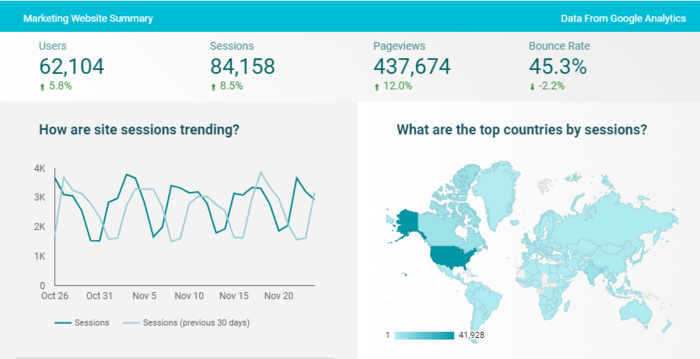
You can use the platform to create reports using data pulled from Google Analytics. The reports can be designed to clearly show all the essential metrics you need to gauge the performance of your content marketing campaigns.

Ways for Marketers to Use Google Data Studio - Measure Your Content Marketing Performance

You can tailor reports zeroing in on everything from brand visibility to engagement to lead generation.

3. Share Your Wins and Expertise on Social Media

Another clever way to use Google Data Studio is to showcase your wins and expertise on social media. Embedding your reports via the platform only takes a few clicks.

People love seeing products in action, but more than that, they like seeing results. 

Pulling data into Google Data Studio and creating a beautiful report is one way of doing just that. You can embed the link to your report on your favorite social media platforms.

Social media is a powerful platform to shine the spotlight on your achievements. When you add beautiful reports to the equation, you can outshine your competitors and woo new customers.

How to Create a Google Data Studio Report

Now that you know what Google Data Studio is, let’s quickly look at how you can create your reports.

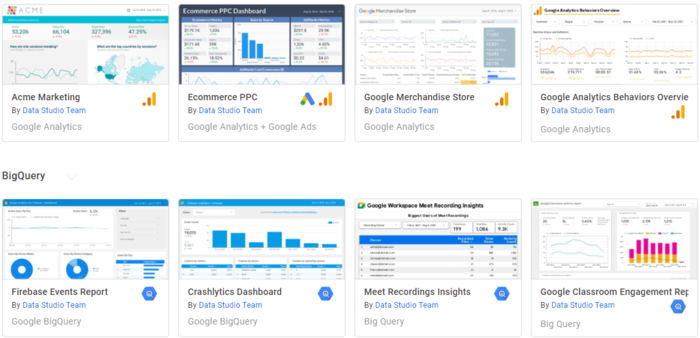
1. Choose Your Template

Data Studio comes with various pre-built templates, making your data visualization process speedy—assuming you can pick your favorite one quickly!

How to Create a Google Data Studio Report - Choose Your Template

Once you’ve picked a template, you can customize it to align with your brand style guide and ensure consistency across your reports. 

What if you have too much data to fit on one page? 

No problem, you can add multiple pages to your report templates.

2. Connect Your Data Sources

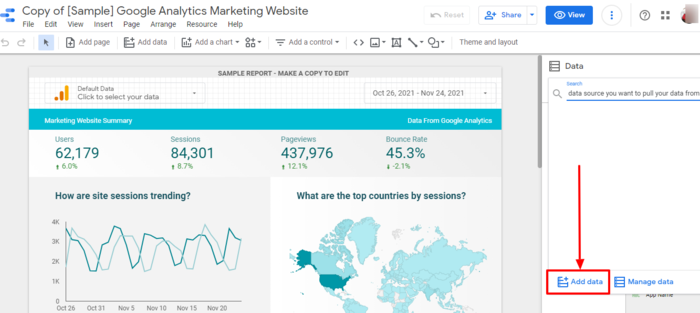
The next step to creating your report is connecting the data source you want to use to Google Data Studio.

How to Create a Google Data Studio Report - Connect Your Data Sources

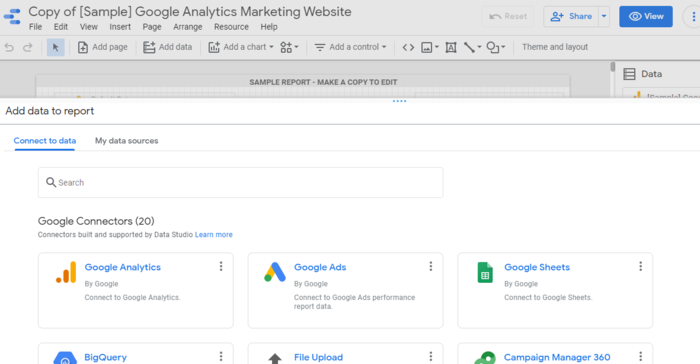
Clicking “Add data” opens the page where you can select the connector to pull from.

Pulling data into Google Data Studio with connector

Using the connectors automates what would otherwise be a tedious manual task.

3. Choose Your Metrics Well

For data to be relevant and valuable, choose the metrics you want to be included in your report. The metrics you use depend on the purpose of the report and who you’re presenting it to. 

For example, if your report focuses your return on ad spend (ROAS), include metrics like cost-per-click, overall ad spend, and revenue generated by ads.

4. Choose the Right Visuals to Represent Your Data

Another essential step to creating impactful reports is to choose the right visuals to represent your data. To do this, navigate to the toolbar and click on “Insert.” Then, choose from the selection of visuals presented. Examples include:

  • bar chart
  • pie chart
  • tables
  • scorecards
  • scatter chart

The right visuals help ensure your report is more meaningful and engaging to you and your audience.

5. Edit Your Report

Once you have populated your report with relevant data and selected the right metrics and visuals, you can now start editing your report. 

A few elements to consider as you edit your report include:

  • Controls: These enable the viewer to dynamically interact with the report data.
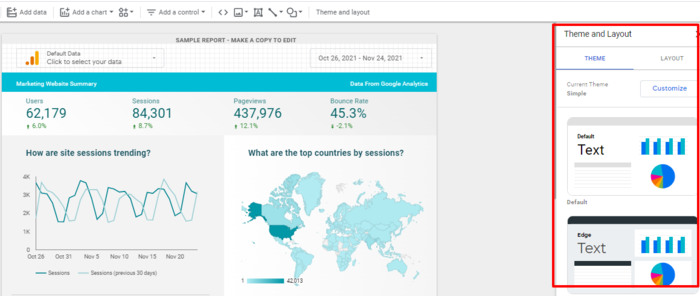
  • Theme and Layout: You can customize your report’s style and color combinations by changing or customizing your theme. 
Ways for Marketers to Use Google Data Studio - Edit Your Report

Once everything looks perfect, it’s time to present or share your report. Simply click the “Share” button at the top right corner of the window to invite other users directly or via your favorite communication channel.

Google Data Studio Conclusion

With Google Data Studio, creating personalized reports doesn’t need to be a time-consuming chore. It can also help you create personalized marketing campaigns thanks to the rich data you’ll be able to analyze and interpret more efficiently.

With data being an integral part of building effective marketing strategies, you need a way to analyze it in a meaningful manner. Google Data Studio is here to help.

Have you ever used Google Data Studio for marketing purposes? 


from Blog – Neil Patel https://ift.tt/31mCXZL
via IFTTT

Tuesday, 30 November 2021

The Impact of Continuous Scrolling on SEO

The Impact of Continuous Scrolling on SEO

Google recently made a change to mobile search results. It’s called continuous scrolling, and while it’s a minor tweak to the SERPs, it might have an impact on your SEO.

Here’s everything you need to know about continuous scrolling.

What Is Continuous Scrolling?

You always hear marketers talking about the distinction between page one and page two in SEO.

However, if you’ve performed any mobile Google searches in the U.S. lately, you might have noticed the results keep going as you scroll.

That’s because rather than breaking the results down into pages, Google now shows four pages worth of results through continuous scrolling. This is currently limited to mobile searches in the U.S. but set to expand in 2022.

Plus, continuous scrolling isn’t limited to Google.

Traditionally, we’ve used pagination to break up information on the web. However, this requires people to keep clicking. Particularly on mobile, this isn’t ideal for user experience.

Some websites, apps, and, of course, Google are turning to continuous scrolling.

The big question is, what does this mean for your SEO?

Effects of Continuous Scrolling in Mobile Search on SEO, Impressions, and CTR

What does continuous scrolling mean for SERP performance? Will you get more or fewer impressions and clicks?

The answer is…it remains to be seen. Continuous scrolling will undoubtedly change how we interact with the SERPs. Still, without pagination, your actual location on the scroll—your search engine results position rather than page—-will matter more than ever.  

Here are five predictions you might see come true as a result of continuous scrolling.

Page One Click-Through Rate (CTR) Will Go Down

When page two results are more accessible, the CTR for page one results is likely to drop. Continuous scrolling has the feel of a newsfeed from social media, so people are more likely to explore their options. 

continuous scrolling on mobile search will make the ctr go down

The results at the top of the rankings are there for a reason: They’re generally the best pages to answer the search query. As consumers, we’ve all been socialized to accept this point, as evidenced by the top result getting 43.32 percent of the clicks

With time, people might get more accustomed to scrolling through the results, which will likely impact CTRs for page one results. However, it’s still not time to start celebrating if you’re stuck on page two.

There May Be More Impressions for Page Two Results

If you make it easier for people to access page two results, they will get more impressions. The difficulty is, you’re also training people to scroll through the results and explore their options further, so they won’t necessarily stop on page two.

Pages on page two of the results might get some more impressions. At present, 0.78 percent of searchers click on something from the second page. However, those page two results have to compete with page one more immediately.

More Rich Results

When you imagine a news feed on social media, you see lots of images and videos. Google’s equivalent is rich results that contain features like shopping, video, featured snippets, commonly asked questions, and much more. 

"Bugs Bunny" search on Google's continuous scrolling

The more users feel comfortable scrolling the SERPs, the easier it is for Google to include rich results. With static pages, it’s challenging to have too many rich elements because it would be overkill. With continuous scrolling, this becomes easier from a user experience standpoint.

More Zero-Click Searches

Zero-click searches have been increasing rapidly over the years. Nearly 65 percent of searches result in the user not clicking a link, which is likely to increase with continuous scrolling. 

There are many reasons people might not click on results, but perhaps the biggest one is they got all the information they need from rich results or meta descriptions

If continuous scrolling results in more rich features, it may well mean more zero-click searches.

Desktop Will Follow

One of the reasons continuous scrolling has been rolled out on mobile is because it fits better with the user experience. On desktop, it’s easy to click the “see more” button.

That doesn’t mean desktop is going to stay the same, though.

If Google sees promising results from continuous scrolling, like increased ad revenue and improved UX, it’s likely continuous scrolling will also roll out on desktop.

What Continuous Scrolling Means for Marketers

While it’s difficult to make any significant recommendations until we see how continuous scrolling plays out, there are some essential things you should be thinking about.

Keep a Closer Eye on Your Data

Data is important no matter what’s happening in the world of SEO.

While marketers often focus on the information we can glean from Google Analytics, such as visitors, bounce rates, and time on page, the information in Google Search Console (GSC) can be equally important.

For this particular update, all the information you need will be in GSC.

This is where you can see how your page ranks for a search term and the click-through rate it gets. If you start seeing significant fluctuations in your CTR on mobile, it could be partly due to continuous scrolling.

Don’t just watch this happen; brainstorm how to get your CTR back up and keep bringing those clicks to your site.

Optimize to Feature in Rich Results

One of the ways to optimize for continuous scrolling is to make sure you’re doing schema markup well. Schema is like a language that allows you to communicate with the search engines and tell them what pages are about and which bits are most important. 

By using Schema markup correctly, you’re more likely to perform well in featured snippets, local results, and commonly asked questions. 

Focus on Your Titles and Metas

The more competition there is for clicks, the more you’ve got to use the limited real estate you have to stand out. For standard results, this means optimizing your titles and meta descriptions

It’s easy to get drawn to the rich results, but people are still looking for the same thing they always have—quick access to information. The right title and meta description can assure people they’re going to get this.

You’ve got to grab people’s attention, match user intent, and give people confidence that you’re going to answer their questions.

Look Out for the Continuous Scrolling Trend

Continuous scrolling has been around for a long time, especially on social media. You tend to see it more often on apps because they’re specifically designed for mobile devices, but that doesn’t mean it won’t become standard on websites. 

continuous scrolling on website

While continuous scrolling can offer a slightly improved UX (particularly on mobile), it comes with limitations. To get the maximum benefit, it has to be implemented exceptionally well, and even so, it doesn’t offer a big SEO boost. 

For now, continuous scrolling isn’t the norm on websites, but we can’t say this won’t change.

Frequently Asked Questions About Continuous Scrolling

Why should I care about continuous scrolling on search?

Continuous scrolling is going to affect a lot of searches. If you’re not ready for the changes, it could have a significant impact on your traffic.

Is there going to be continuous search scrolling on desktop?

For now, Google has only announced plans for continuous scrolling on mobile. However, this could change.

How are users affected by continuous scrolling on mobile search?

Continuous scrolling makes the results on pages two, three, and four more accessible.

When did Google roll out continuous scrolling on mobile search?

Google announced continuous scrolling for US mobile searches in October 2021.

Continuous Scrolling on Mobile Search Conclusion

Continuous scrolling certainly doesn’t mean you need to rip up the SEO rulebook.

It’s a SERP change designed to improve user experience. With additional pages’ results being more accessible, it might mean a drop in CTR for the top results. However, those results may still stay on top if they provide the most credible and immediate information.

We’re also likely to see more rich results on mobile, which could result in increased zero-click searches.

To keep up with these changes, marketers have to ensure they’re focused on getting their schema markup right, and optimizing titles and meta descriptions. Of course, these are all important for SEO anyway. As long as you’re doing the basics well, you shouldn’t have a problem. 

How do you feel about continuous scrolling?


from Blog – Neil Patel https://ift.tt/3FXH1i3
via IFTTT