Monday, 6 December 2021

The Best CRM Software (In-Depth Review)

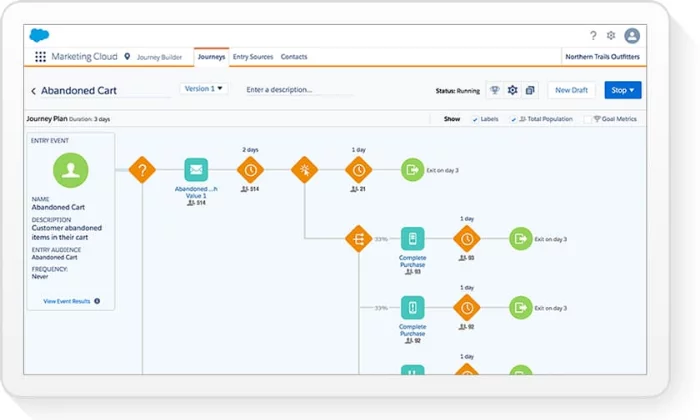
Salesforce interface for Best CRM Software

Disclosure: This content is reader-supported, which means if you click on some of our links that we may earn a commission.

The best customer relationship management (CRM) software helps you provide better service and captures valuable insight about what your clients really want.

It simplifies everyday tasks for employees. They always know which customer they are speaking to, for one thing, and automatically store all information in the same account. Everything your team needs is at their fingertips–no more confusion or tracking down info.

Good CRM software can do a lot more than that, the idea is simple: you are positioning your employees to deliver a five-star experience, every time.

There are a boatload of CRM software options to choose from. They each have strengths that play better for different types of companies. Which one is actually going to help your teams?

To sort things out, I reviewed the best CRM software available and put together a brief buyer’s guide to help you make an informed final decision.

#1 – Zoho CRM Review — The Best for Small to Midsize Businesses
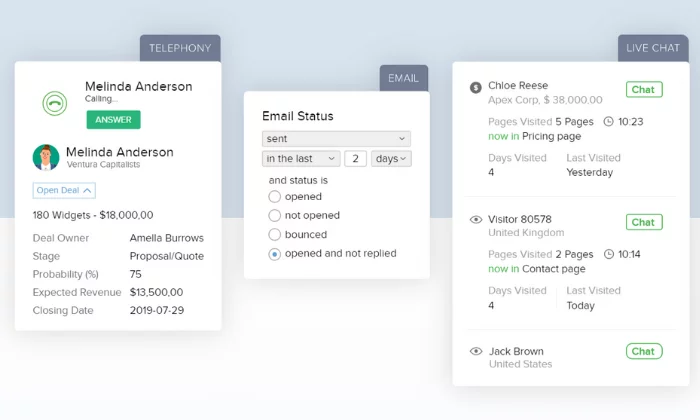
Zoho interface for Best CRM Software

Unlike some other options on this list, Zoho CRM is an all-in-one solution. There aren’t additional modules to look through for different departments or anything like that. This makes it an excellent option for small to midsize businesses.

This is a CRM tool that all of your employees will be able to use. That’s really important, because a CRM is only as good as the information that people put into it. With Zoho CRM, your employees are not going to need significant training in order to start taking advantage of its many features right away.

I love how much you can bend Zoho to your needs. Customize dashboards for different teams or projects, create multiple pipelines to match your different customer journeys, and whip up reports in just a couple clicks that give you deep insight into just about anything you can think of.

This platform also includes key CRM features like:

  • Real-time sales signals and customer notifications
  • Blueprint business management for both on and offline processes
  • Prospect scoring capabilities
  • Mass emails
  • Inventory management
  • An AI assistant
  • Advanced customizations

Best of all, Zoho CRM is affordable. The cheapest paid plan starts at $14 per user per month, and it doesn’t skimp on the features. If you need more customization and advanced features, Zoho’s upper-tier CRM plans run $23, $40, and $52 per user per month. 

Furthermore, Zoho offers a free forever plan with up to three users. It includes essential features like lead management, document sharing, task management, workflow rules, and a mobile application.

Sign up for a free 15-day trial to see if Zoho CRM is right for you. 

Note: Zoho also recently launched a sales-centric CRM specifically for small businesses. It’s called Bigin, and it includes a robust free plan if you’d like to try it out. Bigin’s paid plans are $7 per user per month. 

#2 – EngageBay Review — The Best CRM for Continuing Client Support
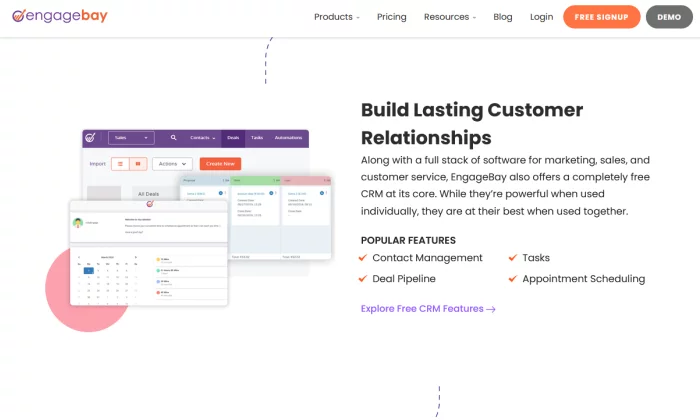
EngageBay CRM for Best CRM Software

A lot of CRMs do the same things. They collect and organize your contact data, have some automation tools for sending emails and posting to social, and overall make your sales team’s lives easier.

But not all of them cater to all three core departments—sales, marketing, and service. If you need an all-encompassing tool to boost all three, EngageBay might be the best solution for you.

You get a lot of the key features you need for customer relationship management. Set tasks, build a pipeline, and place automations for email sends, SMS messages, rep hand-offs, and more.

This all happens in an easy-to-grasp interface that lets you view your funnel, social media interactions and messages, email campaigns, and everything else in one place.

Plus, EngageBay syncs up with Gmail, Outlook, and Office with no pain or stress.

But what I really love is its suitability for organizations that value post-sale relationships as much as gathering, warming, and converting leads.

There’s a whole service bay module of features and tools in EngageBay that makes your support reps’ jobs a cinch.

On EngageBay’s lowest-tier plans, you get a way to manage tickets and contacts together that carries over all the information you’ve gathered during each customer’s sales journey. That way, no one’s going in blind and your support team can really turn customers into lifelong loyalists.

But with an upgrade from EngageBay’s free plan, you also unlock macros and canned responses.

I recommend their Growth plan, though, most of all. For $29.99 per user per month, you can apply the same robust automation capability—setting triggers and events that streamline workflows—that the marketing and sales teams get to customer service.

What’s great about this is that email sequences can come back into play after a service interaction.

I can see this being a boon for SaaS and many B2B operations. Not only is ongoing support vital in those fields to building long-term clients, but you can use a new drip campaign after successful service interactions to warm an existing customer up for an upgrade or add-on.

There’s a lot of potential to unlock in all three departments with a tool like EngageBay.

Get started on their free plan to get a feel for the platform and, when you’re ready, move on up to the Growth plan to really have your sales, marketing, and service firing on all cylinders.

#3 – HubSpot Review — The Best Free CRM Software
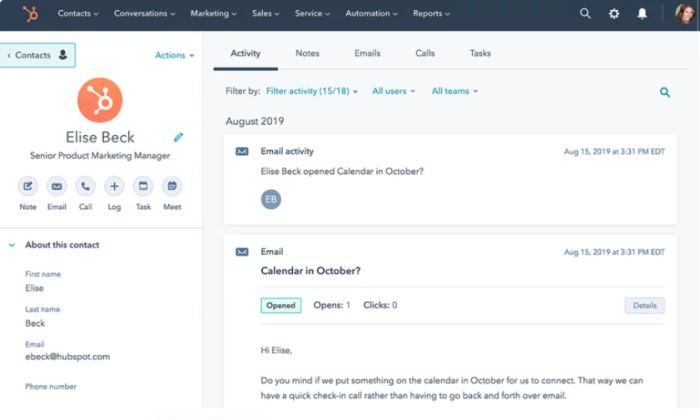
HubSpot CRM interface for Best CRM Software

If you’re in the sales or marketing industry, you’ve probably read HubSpot’s blog or taken one of their free certification courses. However, they also offer a robust and free CRM software to streamline your customer relationship management process. 

With HubSpot, you can gain unprecedented insight into how your audience behaves. 

Need to monitor when contacts open your emails so you can optimize your open rates? No problem. Maybe you want to see how a contact behaves on your website. With HubSpot, it’s easy. 

Furthermore, they offer a wide variety of solutions, depending on your role within your company. 

These position-specific solutions include sales, marketing, customer service, operations, and owners. 

The free plan includes a robust set of features. You get all the essentials of contact management, deal tracking, and reporting that you need from a CRM.

Combined, that gives you an incredible level of insight into your sales pipeline. And HubSpot allows you to organize and utilize that insight into creating your next great strategy or campaign.

That’s just the tip of the iceberg. HubSpot’s free CRM also includes:

  • Scheduled emails
  • 1:1 live chat
  • Meeting scheduler
  • Website activity tracking
  • Task management
  • Document sharing

These features are hard to beat on any other free plans on this list. However, HubSpot’s paid plans are well worth their price as well. 

The Starter Plan starts at $40 per month, paid annually. However, if you want to bundle all of HubSpot’s CRM software, you can get starter access to all four for $50 per month if you commit to a 12-month contract. 

So, for $10 extra dollars a month, you also get software specialized for marketing, sales, and customer service.  

However, keep in mind these prices are based on 1,000 contacts. The price increases for every additional 1,000 contacts you have. 

Sign up for a free plan to get started with HubSpot today.

#4 – Salesflare Review – Best Lead Management Tools for Small Business
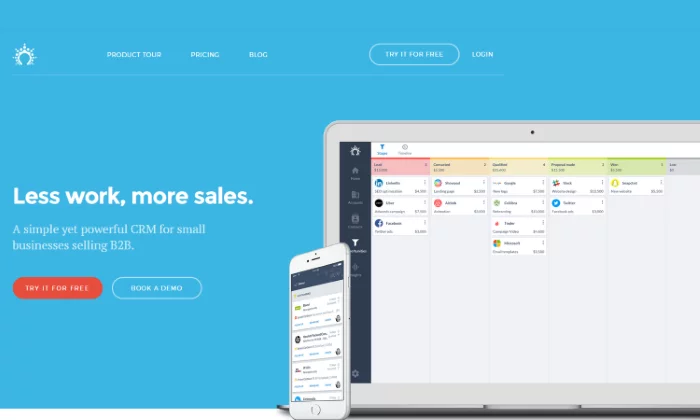
Salesflare splash page for Best CRM Software

Any CRM worth its salt should definitively answer one question—how does this help teams sell better?

As you see on this list, different platforms have come up with different answers to this question. Salesflare stands out for pushing lead management tools to the forefront without being bogged down with superfluous features.

If your team could use some help guiding opportunities from lead to win—and, honestly, what team doesn’t—Salesflare could be just the ticket.

It starts with the software’s intelligent information gathering. Salesflare pulls contact info, company role, and much more detail automatically from emails, social profiles, and other sources. This information is stored both in a dedicated section for each account you’re selling to and a universal contact book accessible by your whole team.

Salesflare automatically logs actions by your team—such as meetings, calls, and other touch points—and by the prospects and customers themselves, whether they open an email you sent, click a link, or visit a landing page.

In this way, Salesflare is very flexible for how your team approaches the buyer’s journey. Whether you prefer one member of your team to guide opportunities from start to finish or if you have hand-offs at various points, the information is all there.

Anyone can step in and have the latest information plus the current state of the lead based on recent actions.

When you add in the platform’s notifications for when prospects take an action or any other triggering event, your team will get really good at moving quickly on warm leads or prospects who have signaled their readiness to purchase.

The combination of simplicity and power inherent to Salesflare makes it a great tool for smaller B2B sales outfits.

Not only do you get useful automation and the tools to help really nail follow ups (and, thus, really encourage leads along the path to purchase), you get key features like:

  • Team-wide timeline view for tracking opportunities from lead to win
  • Personalized, scheduled, trackable email campaigns
  • Insights dashboard that can be segmented by team member, pipeline, or date range

That’s all included at the base Growth plan for $29/user per month.

One step up from there is the Pro plan, for $49/user per month. With that you’ll also get:

  • Custom email workflow builder for multiple simultaneous campaigns
  • User permissions, including view-only access
  • Custom dashboards

There is also an Enterprise plan for $99/user per month. The main benefits of that are the additional support you get, such as a dedicated account representative and custom-made training modules for your team.

Salesflare really shines for smaller B2B businesses and the lower two pricing tiers are quite palatable for that purpose. You can give it a try with Salesflare’s free trial or request a demo today.

#5 – Freshworks CRM Review — The Best CRM for Sales Teams
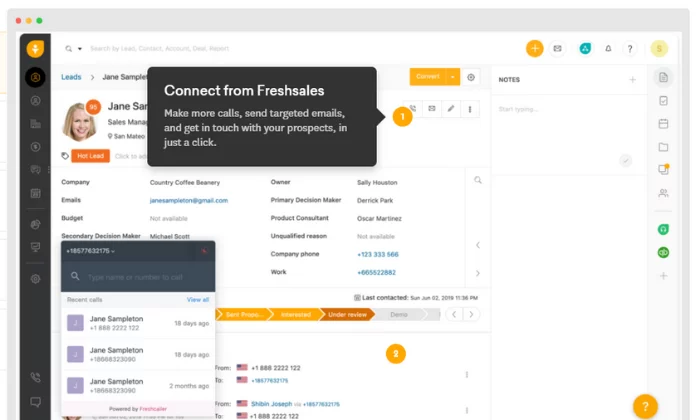
Freshworks interface for Best CRM Software

Freshworks CRM is specifically built for sales teams and lead management. From cold leads to customers, Freshworks helps you make better relationships while saving time with automation. 

Furthermore, this CRM helps you find the best leads, get in touch with them via their preferred method, and close the sale. 

And Freshworks includes a built-in email and phone system to help simplify the process. 

They have a customer base of over 40,000 businesses, including some big names like Dyson and Best Western. So, despite being newer to the industry, they’re not inexperienced by any means. 

With this platform, you get:

  • Lead, contact, account, and deal management
  • Tasks and appointment management
  • Website visitor tracking
  • iOS and Android mobile apps

Organizations of any size can leverage Freshworks CRM’s detailed lead scoring and sales pipelines, allowing for better clarity and efficiency in your workflows.

It’s especially potent as a single dashboard for wrangling all your sales conversations. Team inboxes and email forwarding make sure that messages are always directed to the right people and teams can see track every interaction without them getting buried in a bunch of irrelevant emails.

Plus, Freshworks allows you to schedule emails, utilize many email templates, and set up alerts. That way you can whip up fresh messages in a snap and always be able to respond or adjust on the fly.

Aside from an impressive set of features, they also offer industry-specific solutions for 15 different industries, including retail, ecommerce, manufacturing, logistics, healthcare, and more. 

Their free forever plan includes access for an unlimited number of users with limited features. However, it’s a great way to try it out before investing. 

Freshworks’ paid plans are more robust, yet still affordable for businesses of all sizes. Their premium plans include:

  • Blossom — $12/user per month (for small teams)
  • Garden — $25/user per month (for growing teams)
  • Estate — $45/user per month (for large teams)
  • Forest — $79/user per month (for enterprises)

Sign up for a free 21-day trial to see if Freshworks CRM is right for you and your sales team today.

#6 – Creatio Review — The Best Enterprise-Grade CRM Software
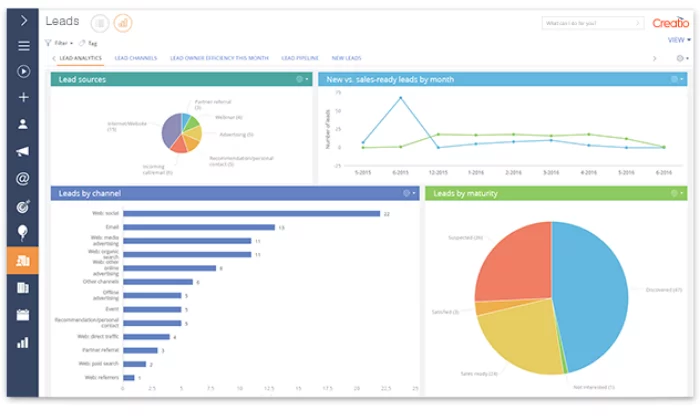
Creatio interface for Best CRM Software

While some of the other CRM software on this list includes an enterprise plan, you may find them limiting if you’re managing a large operation. However, Creatio is an enterprise-grade CRM software built with businesses like yours in mind. 

They offer specific CRM solutions for sales, marketing, and customer service teams.

Marketing Creatio gives enterprise businesses everything they need to streamline their multichannel marketing campaigns and manage incoming leads. It includes features like:

  • Visual campaign designer
  • Website behavior tracking and segmentation
  • Advanced trigger campaigns
  • Personalized email marketing
  • Event tracking and response management

Pricing depends on the number of contacts and the number of emails per contact. 

Sales Creatio is perfect for large sales teams taking over after marketing hands them over. It’s an end-to-end sales management platform built to simplify the process and save you time. 

It includes a wide range of features, including:

  • Opportunity management
  • Customer profiles and buying behavior insight
  • Field sales management
  • Performance and operations

Pricing starts at $30 per user per month. 

Lastly, Service Creatio is for customer service teams interested in streamlining their processes and creating excellent customer experiences from start to finish. It includes features, like:

  • Account and contact management
  • Case and knowledge management
  • Omnichannel communications
  • Service catalog
  • Contact center

Pricing starts at $45 per user per month. 

You can bundle all three CRM solutions if you need to. And you can use their online pricing calculator to estimate the total cost. 

Get started with a free trial to see if Creatio is right for you. 

#7 – Salesforce Review — The Best CRM Software for Versatility

Salesforce interface for Best CRM Software

Whether you’re a small business owner or a sales, marketing, IT, or customer support team, Salesforce has the perfect CRM solution. Known for its versatility, they offer specialized software that adapts to meet your needs. 

More than 150,000 businesses, including T Mobile, Adidas, and Yeti, rely on Salesforce to help them build strong relationships with their customers. 

They also offer specialized solutions for 14 different industries, including:

  • Financial services
  • Healthcare
  • Manufacturing
  • Consumer goods
  • Energy
  • Communications
  • Nonprofits

The system is so versatile because you can pick and choose which apps you need to build a complete CRM solution customized to match your business. 

From marketing automation and ecommerce sales to call-center software and self-service portals, Salesforce is dedicated to providing everything you need for unprecedented customer relationships. 

Their business plans include:

  1. Essentials — $25/user per month (basic sales and support)
  2. Sales Professional — $75/user per month (complete sales solution)
  3. Support Professional — $75/user per month (complete service solution)
  4. Pardot Growth — $1,250 per month for up to 10,000 contacts (marketing automation)

However, you can add additional features and applications depending on what you need. They also offer other plans for sales, customer service, commerce, and marketing CRM packages with varying features. 

Start your free trial to take Salesforce for a test drive today.

What I Looked at to Find the Best CRM Software

With so many options and types to choose from, finding the best CRM software for your business can feel like looking for a four-leaf clover.

Start with this. All of these products have been built to respond to problems that businesses face every day.

Yes, there are a lot of parts to CRM software, but each has a purpose.

You know the problems you face. And by reaching out to your customer service agents, sales reps, IT team, and anyone who will be using the CRM software, you can get a rich picture of their daily challenges.

There is CRM software that will help everyone at your organization make the most out of every customer relationship.

Finding it is a matter of understanding where your company is, and where it wants to go.

Business Size

The size of your business plays a role in which CRM software is best for you. If you have separate departments for marketing, sales, IT, and customer service, you need more advanced functions than a business with five employees. 

Furthermore, you need to consider who’s going to manage the software. Choosing and paying for software isn’t the same as using it to its full potential. 

You have to set it up and take advantage of its features for the investment to be worth it. 

For small teams, it may be a collaborative effort of everyone pitching in. However, large teams may have dedicated employees to set everything up and maintain the software moving forward. 

The size of your business also plays a role in how much the software is going to cost. The more user seats you need, the more expensive the software. 

Your Challenges

What’s not working? What could be working better?

Consider what systems you want to streamline and improve. It may help to think about current inefficiencies and how a CRM can help. 

Typically, CRM software helps with sales, marketing, IT, and customer service. Which of those do you want to improve, and do you have the capacity to set everything up and maintain it?

There are specific CRM solutions for particular industries.

These tend to be more expensive, but if they are the right fit for your situation, it’s worth it. Teams will have to spend less time configuring such purpose-built CRM software, which is an ongoing savings. 

Basic CRM Features

Most CRMs include a basic set of standard features. The CRM you choose should include them as well.

While the specifics of each feature vary from software to software, there should be a system in place to help you handle things like:

  • Contact and lead management
  • Document sharing and storage
  • Workflow automation
  • Interaction tracking
  • Mobile access

Look for these core CRM features before making any final decisions. It’s probably also a good idea to watch some videos of how these users manage these features.

Something like contact management is handled differently in each platform. Which one fits best with the way your teams work?

Advanced CRM Features

It’s also important to consider advanced CRM features that can have a big impact on your business.

The ability to automate routine workflows, process payments, and send invoices can save countless hours from every employee’s day.

Really rich automation capabilities are only available with high-tier plans. There’s definitely an added cost, but what about the benefit?

In the end, having advanced features for marketing automation and lead scoring can really drive revenue. Is the juice worth the squeeze?

Also, note that these advanced features are not distributed the same way by vendors. One may offer the high-end tools you need as part of a mid-level plan.

Third-Party Integrations

To really streamline and automate your business processes, your CRM tool needs to play well with the tools you’re already using to run your business.

Make a list of the tools you use and double-check to make sure your CRM integrates with them. I’m talking about:

  • Email platforms
  • Social media tools
  • Internal communication software
  • Customer service tools
  • Calling/video chat software
  • Shopping cart (for ecommerce)
  • Contract/proposal software
  • Connectors (i.e., Zapier)
  • Analytics tools
  • Calendar

Once you have your list, you can use it to narrow down your choices to the right CRM software. You can also use it when speaking with a sales team to make sure they offer everything you need. 

Summary

Having the right CRM software can make a huge difference very quickly. It makes staying organized easier and keeps customers happy. To recap my top picks:

  1. Zoho CRM – Best for small to midsize businesses
  2. EngageBay – Best CRM for continuing client support
  3. HubSpot – Best free CRM software
  4. Salesflare – Best lead management tools for small business
  5. Freshworks CRM – Best CRM for sales teams
  6. Creatio CRM – Best enterprise-grade CRM solution
  7. Salesforce – Best CRM software for versatility

Zoho CRM, HubSpot and Salesflare are my top recommendations for most businesses. Each one offers a wide range of features suitable for teams from all departments, including sales, marketing, and customer service. 

Furthermore, they’re all affordable, easy to set up, and easy to use.

However, the best CRM software for you depends on your business’s size and the features you need. So, use the criteria we talked about above as you go through the process of making your final decision. 

Which CRM software do you use?


from Blog – Neil Patel https://ift.tt/2Rt9lS2
via IFTTT

The Best Payroll Services (In-Depth Review)

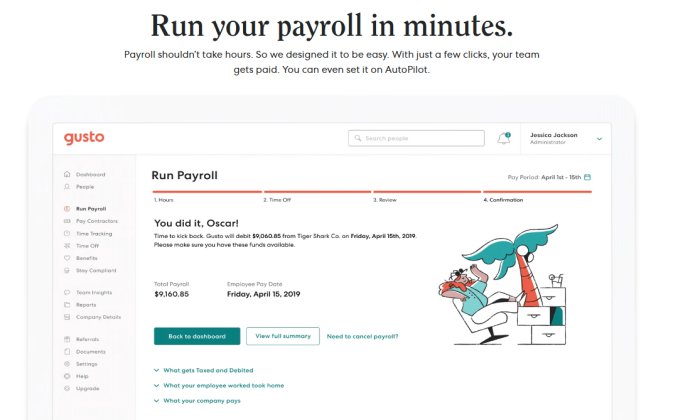
Gusto run payroll demo for Best Payroll Services

Disclosure: This content is reader-supported, which means if you click on some of our links that we may earn a commission.

What would you do with ten extra hours a month?

Maybe you’d catch up on work, or take a day off to spend with the family. 

However you spend that time is better than fighting with payroll. And yet, the average small business owner spends hours pushing paperwork through each pay period.

At tax time, it’s even worse.

It doesn’t have to be this way. 

The best payroll services streamline the process of paying your employees by automating most of the time-consuming tasks. When its time to cut checks, you have the tools you need to stay on top of taxes, benefits, paid time off, and so on.

Nobody likes payroll surprises. Make sure it’s easy for you to get people paid on time, every time, with as little busy-work as possible.

In this post, I’ve reviewed the top six solutions on the market today and included a short guide to help you evaluate your options. Keep reading to find the best payroll service for your specific needs.

#1 – Gusto Review — Best for Remote and New Businesses

Gusto run payroll demo for Best Payroll Services

For startups and small businesses with a remote workforce, Gusto is going to be the easiest way to take care of essential payroll and HR services.

Gusto is cloud-based and mobile friendly. Run payroll from any device with internet access, wherever you are.

It’s a full-service platform, which means Gusto takes care of tax filings, health benefits, and employee retirement plans. For companies where people aren’t coming into the office, having all this information in a centralized, easy-to-use platform is a boon.

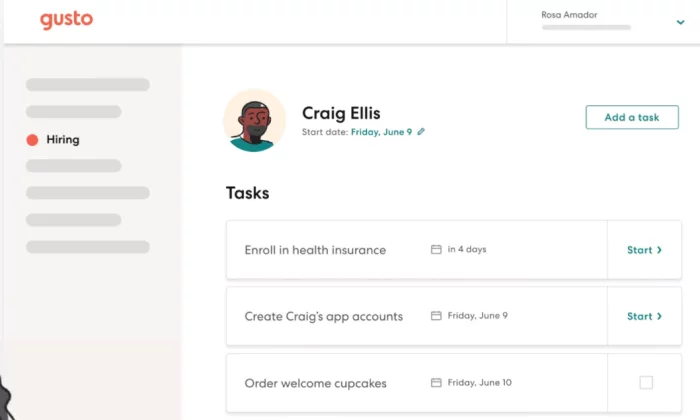
Gusto makes remote hiring and onboarding is a breeze. Employers build an onboarding checklist and send the new hire an invitation.

Employees complete each step of the simple process. They enter bank information directly into Gusto, so you never have to worry about sending sensitive data over email. 

Gusto dashboard for Best Payroll Services

Once the employee sets up their account, everything they need is self-service. They can see all of their pay stubs and documents. Employees quickly gain confidence on the friendly, approachable platform.

The ease-of-use is really important to teams without any on-site training or coaching. Plus it’s going to eliminate busy work for you.

You never have to hunt down someone’s W2 again. As soon as it’s available, employees are notified and get on-demand access.

Coordinating remote work is hard enough without having to deal with multiple middlemen to answer basic questions about payroll. Gusto makes everything transparent, which saves time and frustration for employers and employees alike.

Gusto has a growing list of more than 50 integrations with popular tools remote teams depend on. Connect to accounting software like Xero and QuickBooks or time tracking software like QuickBooks Time (formerly TSheets), Deputy, and Homebase.

Every integration cuts down on the information your teams are entering manually. Employees clock out and the data syncs immediately with your payroll. 

This creates fewer opportunities for errors and miscommunications, which can easily go unnoticed when people aren’t sharing an office.

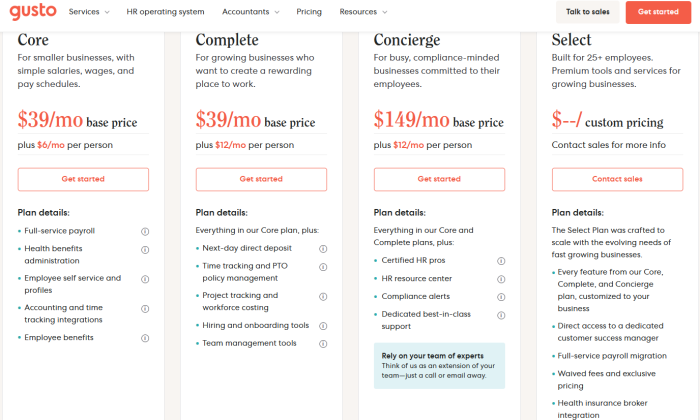
With Gusto, the features you get depend heavily on which of their plans you choose:

Gusto pricing page for Best Payroll Services

The pricing for Gusto includes a monthly base price plus a per-employee charge:

  • Core: $39/month + $6/employee
  • Complete: $39/month + $12/employee
  • Concierge: $149/month + $12/employee
  • Select: custom pricing

Gusto’s Core plan gives you full payroll tax service in any state, as well as access to direct integrations with time tracking and accounting tools. This product is all that smaller remote teams will need.

The Complete plan has a higher cost per employee than Core, but delivers essentials such as time tracking and paid time off management. You’ll get project and workforce costing along with customizable onboarding tools.

Gusto customer support has a very good reputation, regardless of the plan you choose. However, the Concierge plan gives you access to certified HR professionals who can help your company navigate complex tax and benefit scenarios.

And, of course, organizations with enterprise-grade or specialized needs can get a bespoke package with the Select plan. You get all the features of every other plan, white-glove payroll migration, a client success manager from Gusto, and more.

There is also a contractor-only plan that runs $6 per employee per month with no monthly base fee. If you don’t have any W-2 employees yet or never plan on hiring any, Gusto handles all of the tax stuff and your 1099 employees get the same great self-service features as the other plans offer for traditional employees.

For large, established, enterprise companies, Gusto is probably going to be too light. They aren’t able to handle health benefits in every state, for example, and that platform isn’t going to run as smoothly if you have over 100 employees.

This is the tradeoff of having such an easy platform to use. For new businesses and remote teams, Gusto is everything they need and nothing they don’t.

The guided onboarding and intuitive platform ensure that everyone gets off on the right foot, even if there’s no traditional HR department to oversee the process. Add to that the unlimited chat, email, and phone support, and you have the complete payroll toolkit for small business.

Get started with Gusto today!

#2 – OnPay Review — Best for Simplifying Complicated Payroll

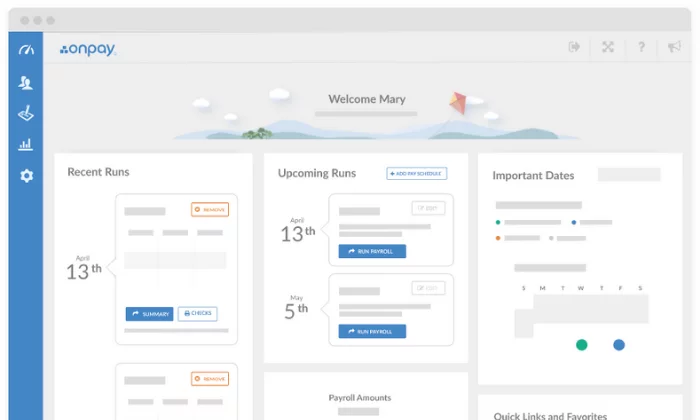
OnPay dashboard for Best Payroll Services

A lot of companies end up hiring a full-time payroll person once things get too complicated. A cheaper, easier alternative is to get OnPay.

This is an affordable solution that takes all of the complexity out of processing payroll. Anyone can learn how to run OnPay. It’s that simple.

There is one pricing plan with one low monthly rate and you get access to every payroll capability OnPay offers. No strings attached.

Say you have a business of less than 50 full-time employees and you want to offer a qualified small employer health reimbursement arrangement (QSEHRA). This is a good way to attract talent without having to offer a complete benefits package, but it can be a little tricky for a non-accountant to set up.

With OnPay, it’s easy to designate and track QSEHRA for payroll. Other providers don’t have this and you’ll be stuck trying to create a workaround or hiring someone to set it up for you.

These are just a few examples, but it’s true for Form 943 workers and other less common payroll scenarios that can easily trip up business owners. 

In fact, OnPay provides special modules for restaurants, farms, churches, and other organizations that can’t depend on traditional payroll templates to get things right.

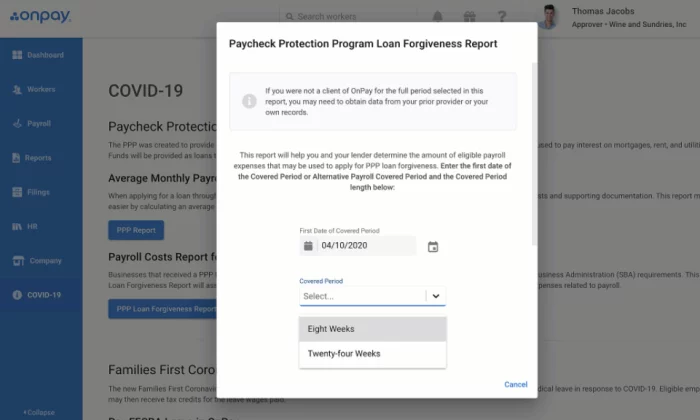
None of these capabilities cost you extra, and you can count on OnPay to keep providing new services. During the pandemic, they made it as simple as possible for companies to apply for the Paycheck Protection Program (PPP):

OnPay payroll protection for Best Payroll Services

Instead of having to wade through the complex government regulations, companies using OnPay could follow simple steps to complete their PPP application. 

OnPay is easy to navigate. It demystifies both common and edge-case payroll problems that trip up the average user. And if you run into issues, you can reach out to the OnPay customer service team. They are known for expert advice and solving problems quickly and that quality of support comes with no extra charge. 

Unemployment insurance, garnishments, multiple pay schedules, PTO—OnPay has you covered. Getting set up is not hard and you can reach OnPay by phone, email, and chat if things don’t make sense.

OnPay doesn’t have any annoying limits. With every subscription, you get:

  • Unlimited monthly payroll runs
  • W-2 and 1099 capabilities
  • Automatic tax calculations and filings
  • Employee self-service onboarding and dashboards
  • Intuitive mobile app for management on the go
  • PTO, e-signing, org charts, and custom workflows
  • Integrated workers’ comp, health insurance, and retirement
  • Multi-state payroll

For employers who can’t stick with a routine payment schedule, the unlimited payroll runs are a must. You won’t have to think about extra fees for 1099 workers or upping your subscription to get more HR features. Pay any employee in any state any time you want.

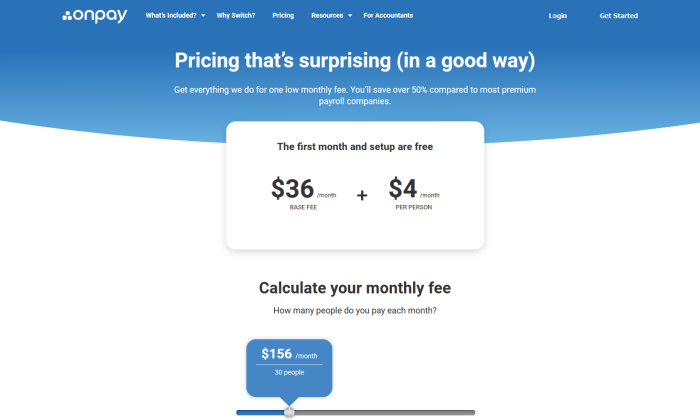
OnPay pricing page for Best Payroll Services

Pricing for OnPay is simple to calculate. Take their base rate of $36 per month and add $4 for each employee you have. So, using OnPay for an organization of 30 people will run you $156 per month.

OnPay offers free account migration and helps setting up the integrations you need. If you are tired of confusing payroll and hidden charges, get in touch with OnPay today. 

If you switch, your first month of OnPay is free.

Try OnPay free for 30 days to see if it’s right for you!

#3 – Paychex Review — Best for Replacing Your Current Payroll Service

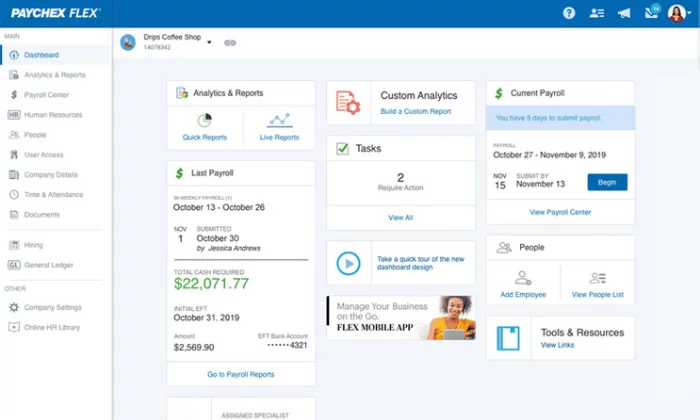
Paychex Flex dashboard for Best Payroll Services

Lots of companies switch from an outside payroll/accounting service to Paychex Flex to streamline HR.

Stuck with having to request filings and payroll information? If you’ve grown to the point where the middleman has become a bottleneck, that won’t work anymore.

Paychex provides self-service access to both the employer and employee. 

Now, you can get the same on-demand access with some of the lighter (and less expensive) options like OnPay. The thing is, OnPay doesn’t replace that outside expertise. 

With Paychex Flex, you get a dedicated payroll specialist. This will be your single point of contact at Paychex, which is much better than playing the old customer service lottery.

Don’t get me wrong, Wave and OnPay have excellent customer service reps, but they can’t stand in for someone who knows your business. That knowledge was a big part of the value from hiring an outside expert and no customer service call center can replicate that.

In addition to getting a payroll expert in your corner, you get the Paychex platform, which will accommodate any conceivable tax or benefits scenario. 

Instead of having to figure out workarounds, you can customize deductions and earnings with a few clicks. Paychex makes it easy to maintain accuracy and figure out when something’s wrong. 

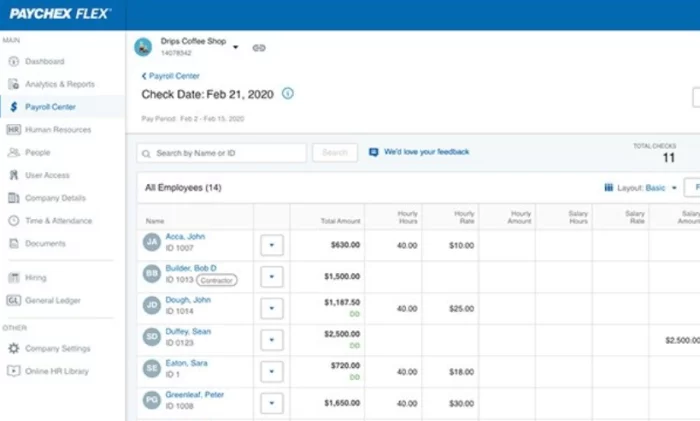
I really like the flexible views, which let you drill down into individual payroll records, list out your employees, or switch to a grid-view for easy data entry:

Paychex employee check management section for Best Payroll Services

The versatility of the platform, the depth of payroll capabilities, and the dedicated customer service rep combine to make Paychex Flex the best solution for replacing your old outside payroll service.

Enrolling employees in a retirement plan, for example, is a common reason that business owners have to hire help. With Paychex, you have a wide range of plans to choose from and an easy process to get set up.

Employees can check their retirement plan and contributions from their browser or phone and use the retirement calculator to track their savings.

There are also 160 pre-built reports and dashboards to help owners stay informed about the company’s financial health. Much of the insight and perspective of that would normally be supplied by an outside advisor is built right into the platform. 

Some of the other highlights include:

  • Recruiting and onboarding
  • Performance and learning management
  • Powerful real-time analytics
  • Payroll automation features
  • Direct deposit, paper checks, and paycards
  • Salary, hourly, and contract workers
  • Paycheck garnishments
  • PTO and benefits management
  • Job costing and labor distribution

What if you don’t need every capability? That’s okay, as Paychex Flex comes is available at three different tiers: Select, Pro, and Enterprise. You’ll have to get in touch with sales for pricing, as it’s not on the website.

Paychex Flex Select is aimed at businesses with basic payroll needs. You don’t get the self-service onboarding, which is useful, but you do get the dedicated payroll specialist to help with any problems you have.

With Paychex Flex Pro, you get access to the full platform. This includes additional support for workers compensation administration and state unemployment insurance. With the Enterprise plan you can build out customized reports and additional tools to manage HR compliance.

Paychex has 191 integrations with banks, employee retirement plans, and of course, tons of the popular software applications associated with payroll. This allows companies to oversee a centralized system that tracks employees from recruitment to retirement.

With Paychex Flex, companies can keep everything in-house. The platform makes payroll a cinch and gives business owners the insight and confidence they need to move forward without an outside service.

Contact their sales team for a custom quote to get started!

#4 – ADP Review — Best Bundled HR/Payroll Service

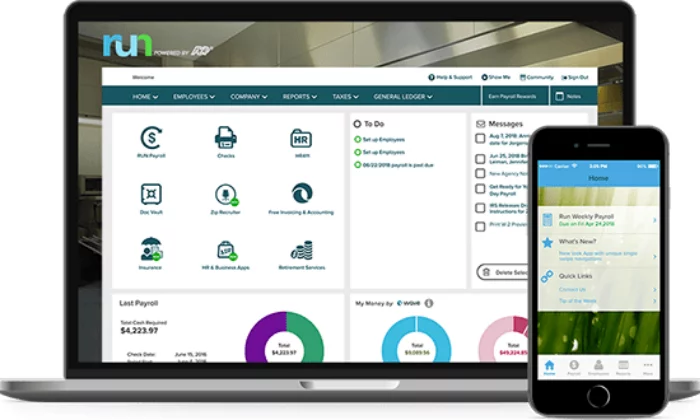
ADP Run interface for Best Payroll Services

ADP is a one-stop shop for companies that want to handle payroll and HR through a single provider. Over 700,000 businesses in more than 140 countries entrust ADP, which has earned a very strong reputation over seven decades of service.

With some payroll services that might be cheaper than ADP, you can run into annoying limits. Wave, for example, only offers tax services in select states. Gusto is a good option to handle payroll and HR, but only if you are in one of the 38 states that the company offers coverage. 

Plus, you only get HR compliance assistance with Gusto’s Concierge plan, whereas ADP makes options available regardless of what plan you are on.

When you are looking for bundled HR features, you may have complex payroll issues that a lighter platform like Gusto will struggle with. ADP can tackle any situation you can imagine.

Once you get set up, all payroll taxes are calculated and paid with minimal effort on your part. The system is set up to simplify the most complex retirement package or unique paid-leave package. ADP stays up to date with changing regulations, which keeps your books compliant and protects you from penalties.

Paychex is another full-service payroll provider with a deep feature set. When it comes to HR, however, Paychex is going to integrate with third-party services. ADP handles everything without the help of outside vendors.

If you just need payroll handled, ADP will knock it out of the park. Should you want more HR responsibilities taken off your plate, ADP can help with:

  • Time & attendance
  • Workforce management
  • Recruiting & hiring
  • Management & growth
  • Benefits administration
  • Retirement
  • Group health insurance
  • Business insurance
  • Workers compensation

Unlike other payroll providers that connect you to HR service, ADP can serve as a full-scale HR outsourcing service or professional employer organization (PEO). 

This is great for companies that want to minimize their HR workload or outsource their entire burden. While some of the other solutions on my list will help you streamline processes, ADP can take them over all together.

ADP has a wide range of payroll service offerings for companies of different sizes. First, you have to select your package based on company size:

  • Small Business Payroll: 1-49 employees
  • Midsize to Enterprise Payroll: 50+ employees

ADP’s small business option is a sleek platform that comes with all the essential payroll and HR features you’d expect. Instead of trying to water down their enterprise offering, ADP created a separate interface that’s not freighted by the tools larger companies need.

The midsize to enterprise offering is a much deeper platform built to manage payroll regardless of how large your organization grows.

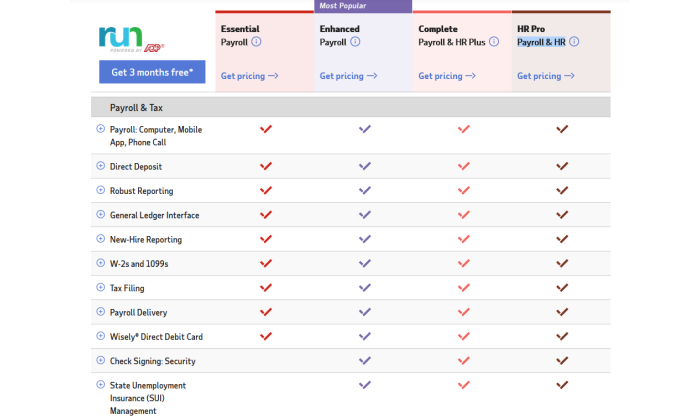
There are multiple plan options for both the Small Business Payroll and Midsize to Enterprise Payroll packages. You can see the small business plans laid out below:

ADP small business payroll packages for Best Payroll Services

Basically, the lowest tier is payroll only and you get more HR tools with higher plans, culminating in a 360-degree payroll and HR solution. It’s the same story for the midsize/enterprise package.

Enhanced Payroll is what you should look at if you also want assistance and tools for recruiting and hiring. If you have an in-house HR team, the two top-tier plans encompass many time-saving and tracking features they’ll benefit from.

You’ll have to get in touch with ADP to get a quote for how much the service costs.

Hundreds of thousands of companies depend on ADP for payroll and HR. If you are running into limits with another service or if you are tired of dealing with multiple vendors, choose ADP and never look back.

Request a free quote to see if ADP is right for you today. 

#5 – QuickBooks Payroll Review — Best If You Already Use QuickBooks

QuickBooks interface for Best Payroll Services

When QuickBooks Payroll launched, people who used QuickBooks’ popular accounting software were like, “Yes, please.” It almost makes too much sense.

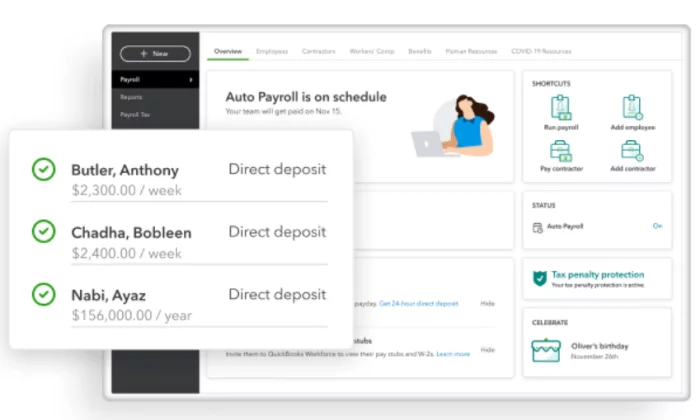
The integration is truly seamless. QuickBooks Payroll works through the same online platform. You can consolidate payroll, invoicing, cashflow, and expenses in a single place. All of this financial data syncs and updates automatically.

If you have experience with QuickBooks Online, everything is going to be legible to you. It’s a straightforward platform in its own right, but if you are already comfortable with the accounting solution, you can step right and get to work.

QuickBooks Payroll is optimized for up to 50 employees (including contractors) with a limit of 150. So it’s not for larger firms. 

While size is a limit, complexity is not. QuickBooks Payroll has a robust set of capabilities that work in all 50 states. 

Full-service payroll comes with every plan they offer. Once you enter payroll data into the system, QuickBooks processes payroll and takes care of all your tax filings.

  • Unlimited payroll runs
  • Automatic payments after the first run
  • Health benefits
  • 401(k) plans
  • Wage garnishments
  • Next-day direct deposit
  • 24/7 live chat support
  • Workforce mobile app

Employees really appreciate the next-day direct deposit, which is faster by a few days than some of the other popular payroll services. With premium QuickBooks payroll plans, you can actually get a same-day direct deposit.

The customer service options are decent compared to other options. There’s live chat any time you need it and phone support during business hours. They also offer phone support on Saturday’s for a few hours.

The Workforce mobile app is great for remote and on-the-go employees. This is especially true if you have workers in the field because QuickBooks Payroll integrates with QuickBooks Time (formerly TSheets), one of my favorite time clock software options.

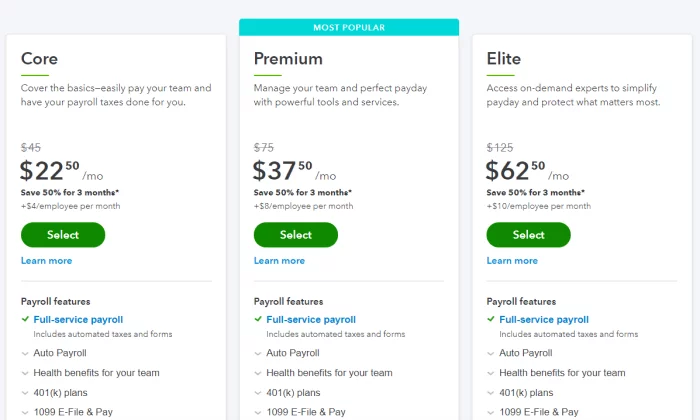
Pricing for QuickBooks Payroll breaks down into three tiers:

Quickbooks pricing tiers for Best Payroll Services

The Core plan includes full-service payroll, which automates all your taxes and forms. It also covers 401(k) plans and health benefits.

With the Premium plan, you get access to more HR support, workers’ compensation administration, and QuickBooks Time is included for anywhere employee time-tracking.

Elite plans come with prioritized customer support available 24/7. They’ll also help you deploy the QuickBooks to ensure everything is set up right.

The reason QuickBooks payroll isn’t my overall choice is that it’s less budget-friendly than some of the comparable solutions like OnPay and Gusto. It’s a little more expensive out of the box and there are some annoying fees, like paying extra for 1099 workers.

But, that price tag delivers payroll software just flat out works. It does exactly what you want it to do and it makes the routine tasks involved with paying people easier. That’s what you’re looking for from payroll software, right?

And if you are already set up on QuickBooks, this is an even more appealing option. It’s going to dovetail right into your workflows without any hiccups. 

It can also be much more effective for businesses like restaurants, retail, and construction companies that use QuickBooks for their inventory and bookkeeping. Keep everything in one place. Gusto and OnPay aren’t going to do that for you.

Try QuickBooks Payroll free for 30-days and see if it’s the payroll puzzle piece you’ve been missing.

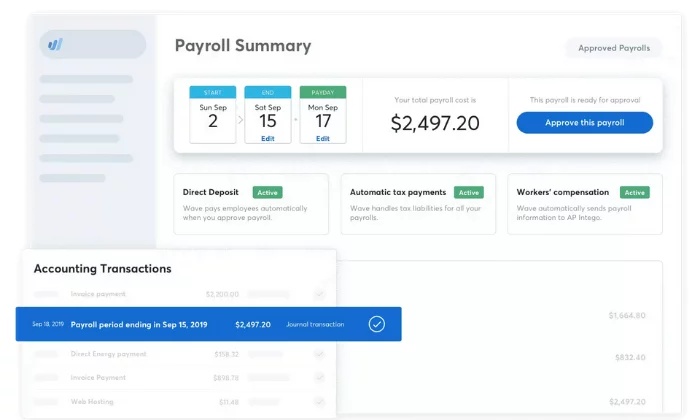
#6 – Wave Payroll Review — Most Affordable for DIY Taxes

Wave dashboard for Best Payroll Services

If you are on a tight budget, Wave Payroll might be your best option. 

Especially if you are the do-it-yourself type.

This is because Wave doesn’t offer full-service payroll in all 50 states. If they don’t offer tax service in your state, you pay a lot less.

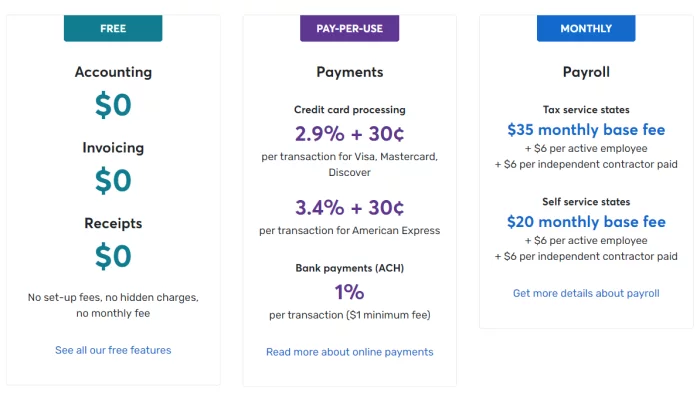
You don’t get to choose–tax service is either baked into the price, or unavailable in your state. Here’s how Wave Payroll pricing breaks down:

  • Tax service state: $35/month base fee + $6/employee
  • Self service state: $20/month base fee + $6/employee

These are the states where tax service is available: Arizona, California, Florida, Georgia,  Illinois, Indiana, Minnesota, New York, North Carolina, Tennessee, Texas, Virginia, Washington and Wisconsin.

Pricing is predictable, too. It’s $6 per active employee or independent contractor. There’s no hidden fees, no extra charges.

Wave Payroll is affordable in the tax service states and a real bargain everywhere else.

The obvious downside is that you have to pay and file your taxes. 

Here’s the thing: Wave makes it so easy to figure out what you need to do.

If you are used to doing payroll taxes yourself, Wave is going to feel like stepping into a Ferrari.

But even if you have never laid eyes on a ledger, the DIY option is well within reach.

Wave Payroll is an excellent teacher. It’s easy to find your way around, even if you don’t know what everything means right away. There’s a ton of guidance and the documentation is really helpful. 

Learning is the best part of doing things yourself. With Wave Payroll, explanation and clarification is always a click or two away. 

The live chat is phenomenal. It feels like the human on the other end is really invested in improving their service. The quick response is critical to get you through first-time jitters and reservations, to say nothing of preventing errors.

Some of the features that take no time to master include:

  • Automatic journal entries (if you use Wave Accounting)
  • Self-service pay stubs and tax forms for your employees
  • Workers’ compensation management
  • Basic payroll reporting
  • Automatic year-end tax forms (in tax service states)
  • Timesheets for PTO and accruals

Wave Payroll works best with Wave’s accounting software, which is free forever.

If price is a factor in your decision, this makes Wave really attractive. There are fees for accepting payments, but you will never have to pay for accounting or invoicing again.

Wave pricing for Best Payroll Services

Wave keeps prices low across the board. Small businesses will be able to handle most, if not all of their finances through Wave. Doing the same thing with QuickBooks would be a lot more expensive.

You can also temporarily deactivate your Wave account and stop paying. This can be really helpful for seasonal businesses.

There’s just a lot of freedom with Wave, and very few charges. It gets out of your way and lets you get payroll done.

As I said, Wave accounting is free forever, and you can test drive Wave Payroll with a free demo here.

What I Looked at To Find the Best Payroll Service Providers

I’d love to say, “Here’s the easiest payroll service to use,” but I can’t. 

It depends on your situation. Two dry cleaners in the same town might have completely different experiences with the same service, based on how they pay their employees or the other business software they use.

How many times do you want to switch payroll services? 

As few as possible would be my guess.

Here are the major criteria you need to consider in order to pick a payroll service that’s actually going to make payroll a breeze.

Payroll Capabilities

Who are your employees and how do you pay them? 

Before you evaluate your options, map out every factor that could possibly influence payroll. This may include:

  • Different types of workers (W2, 1099, hourly, salaried)
  • Tax liability (federal, state, and local)
  • Employee benefits (retirement plans, healthcare, PTO, stock options)
  • Pay cycles (bi-weekly, monthly, unlimited)
  • Payment (direct deposit, paper checks, Venmo, Apple Pay)
  • Garnishments (child support, credit card debt, student loans)

These are just some of the major factors to consider. If your business is subject to unusual taxes or regulations, double-check with the vendor to make sure you’re covered. 

It’s going to be tricky to keep the books accurate if you have to work around the system rather than as it’s designed.

The more mature payroll solutions, like ADP and Paychex, are going to support every conceivable tax and benefit situation. Lighter tools such as Gusto might not be able to handle complex retirement packages as easily.

If you don’t need all the capabilities of ADP or Paychex, the extra features are probably going to get in the way. Many small businesses can get everything they need from Gusto in a much more user-friendly and affordable platform.

Integrations

When your payroll service plays nice with your other business software, life is great. You don’t have to enter the same information in multiple places. In fact, a lot of data entry will be automated.

New hires are automatically on payroll. Whenever they clock in or record their tips, the information is all tracked and accounted for without any oversight on your part.

Integration with accounting, employee scheduling, time tracking, and HR software is a must. It really defeats the purpose of payroll software if you are constantly having to enter information manually.

Gusto is a standalone service, but it has direct integration with 52 of the most popular accounting, point-of-sale, time tracking, and business operations software.

Alternatively, you could look at bundling multiple solutions from the same provider. The payroll service from ADP is just one piece of a suite of financial and HR tools they offer. QuickBooks Payroll and Wave Payroll are the same way. 

Obviously Wave Payroll and Wave Accounting work together seamlessly. If you are already using one, it makes a lot of sense to use the other.

Customer Service

Managing taxes and benefits is hard on a good day. Congress makes one small change to the law and suddenly everyone has to rework how they do payroll to stay compliant. 

Is your payroll service on top of these changes? Can they take care of their end and help you sort out problems on yours? 

If you are hiring people in multiple states, it’s so easy to make a mistake. Is your payroll service going to catch it and alert you before the IRS penalizes the company?

Having a payroll service that responds quickly can solve a lot of problems before they start.

Another important aspect to consider is onboarding, both for your company and your employees. 

Does the vendor help you move your payroll data over if you are switching services mid-year? The more help they provide, the quicker and more accurate the transition will be.

Gusto and OnPay have a wonderfully simple employee onboarding process that is virtually hands-off for the employer. Beyond approvals, there’s little that isn’t handled by the employee and customer service.

Finding a payroll service that really supports you and your employees can make the difference between a frictionless experience and constant frustration.

Summary

For most users, Gusto and OnPay are my top recommendations. 

They’re all excellent for small and fast-growth businesses with the ability to scale to match your needs. Plus, they’re affordable and easy to use. 

However, different businesses require different solutions. Use the considerations we talked about as you go through the process of choosing the best payroll services for your business. 

To recap all of my top choices:

  1. Gusto – Best payroll service for remote and new businesses
  2. OnPay – Best payroll service for simplifying complicated payroll
  3. Paychex – Best for replacing your current payroll service
  4. ADP – Best bundled HR and payroll service
  5. QuickBooks Payroll – Best payroll service if you already use QuickBooks
  6. Wave Payroll – Most affordable payroll service for DIY taxes

Gusto and OnPay are phenomenal, but if you are the DIY-type, Wave might be the choice for you. And if you are looking to outsource more than the essential HR tasks, ADP is a very attractive option.

The only bad choice is sticking with spreadsheets, or a payroll provider that’s not working.

Save time, eliminate mistakes, and get back to running your business with dependable payroll service by your side.

What payroll services do you prefer?


from Blog – Neil Patel https://ift.tt/2FsiW9a
via IFTTT

Friday, 3 December 2021

Subject Matter Experts: Why You Should Use Them and How to Find Them

Subject Matter Experts: Why You Should Use Them and How to Find Them

In a world of information overload, subject matter experts (SMEs) are more important than ever.

SMEs can help give important insights and context for your blog or marketing content and help keep readers engaged with the subject.

Their specific knowledge and expertise can be of value to your readers, but subject matter experts can also help with search engine optimization (SEO) by providing the keywords and keyword phrases that will get you found in web searches.

The good news is identifying subject matter experts isn’t brain surgery; it just takes some basic research on who’s out there sharing relevant information on the subjects you want to cover.

With more than 600 million active blogs on the market, the competition online has never been fiercer.

To stay competitive, you need subject matter experts.

We’ve put together this blog post to help you find SMEs for your business that can help improve your content strategy now and into the future.

Benefits of Using Subject Matter Experts for Website Content

Subject matter experts can contribute to your website in many different ways.

They can be instrumental in the ideation phases of your content strategy, lending their expertise to brainstorming sessions and subject ideas. Once you get to the writing phase, subject matter experts offer the most valuable service of all: subject-specific content that is truly accurate and relatable.

They can also help with promotion once the content is published, sharing it on their social media accounts or writing a post of their own about your article’s subject matter.

By collaborating with subject matter experts, you can ensure the final product is engaging, accurate, and high-performing.

1. Improve your EAT Score

One of the biggest benefits of using a subject matter expert is improving your EAT score, which measures a site’s expertise, authoritativeness, and trustworthiness. 

The subject matter expert can help you turn a keyword with low search volume into something that has higher commercial intent. They also add relevance to the subject of the post, which is crucial for improving SEO rankings.

Including an SME in one of your blog posts also increases their exposure. They’re likely already connected to other experts in their field who will see and read your content once it’s published online.

They get the benefit of leveraging your audience and online authority, and you get the benefit of leveraging theirs.

2. Earn Audience Trust

An SME can provide insight into your customers’ thoughts and questions, improving reliability and authority more than if they were written by an outside source with limited knowledge.

This can go a long way in improving audience trust, as they will know they are getting expert information from someone who knows what they’re talking about.

When you use subject matter experts, your blog can become an invaluable source of information for people interested in the same things they are—which makes them likely to share your content with their audiences, further improving your digital reach.

3. Publish Higher Quality Content

Using a subject matter expert in your content inevitably creates higher-quality content. This is because subject matter experts are experts for a reason, meaning they make sure the content you create is of the highest caliber.

Nearly a quarter of readers say bad content quality destroys a blog’s credibility. By using an SME, you’ll be creating content that is trustworthy and reliable. You can also use subject matter expert quotes or references throughout your blog post to reinforce the information and ideas being presented.

This makes it more likely that readers will continue reading what you have to say—and even share it with more people.

4. Use Correct Terminology and Lingo

One of the easiest ways to tell if a blog is credible or not is by checking for correct terms and lingo. 

Unqualified writers may miss important nuances of language that are likely to confuse readers. Your subject matter expert will understand and use all industry jargon, helping you ensure that your content is accurate and relatable for the audience reading it.

As well, if industry terms change or a new term is introduced, a subject matter expert should be aware of these changes and update your content accordingly.

5. Streamline Content Creation

Subject matter experts can go a long way in improving efficiencies in your content marketing strategy.

The more qualified subject matter experts you have to help you write blog posts, the better the chance those topics are written correctly from the beginning—meaning less time editing before it’s published online.

As well, their in-depth knowledge of the subject will lessen the time needed to research, allowing you to spend more time on other content marketing initiatives.

Tips to Recruit Subject Matter Experts

Now that you understand the benefits of using subject matter experts in your content marketing, it’s time to learn how to find them.

Subject matter experts exist in all types of businesses and vary greatly in expertise and quality. While reading this blog, you may have thought of a few SMEs you’d like to collaborate with already.

That’s great!

If you can’t think of anyone off the top of your head, don’t worry. We can help. All you need is a bit of time, research, and patience to find the best subject matter expert for your brand.

1. Know What You’re Looking For

Subject matter experts vary greatly in their online presence and availability, so it’s important to know what you’re looking for from the start.

Some SMEs may be influencers in their space with large online followings. Others may be less visible but still provide subject matter expertise.

Before approaching a subject matter expert, consider the following needs:

  • Are you looking for someone who has done extensive research in your space?
  • Do you want someone with a large following?
  • How important is celebrity to you?
  • Does it matter where in the world they live?
  • Do you want someone to consult, or write the content themselves?
  • What is your budget?
  • What is your timeline?

Once you know what you need, it’s time to start searching.

2. Browse Social Media

Social media is an excellent place to start your search for subject matter experts.

When using a platform like Instagram, you can search hashtags related to the topic of your choice and follow subject matter experts while engaging with their content. This can help build a relationship before you ever ask for their help.

When using Google, you can include subject matter experts and your subject/keyword in the search. For example: “subject matter experts business blogging.”

You can also check Twitter by using a similar formula. Search for people tweeting about topics relevant to what you’re promoting with a subject matter expert or SME in the search.

LinkedIn is another great space to find subject matter experts.

Tips to Recruit Subject Matter Experts - Browse Social Media

In the search bar, you can include “subject matter expert” and your industry or topic to help find people who are active in LinkedIn groups related to those topics. For example: “subject matter experts marketing.”

You should also look at their existing posts for ideas on how they describe certain subject matters to ensure their content matches your needs.

Tips to Recruit Subject Matter Experts - Brene Brown posts social media infographic

3. Research Professional Associations

Professional associations and subject matter experts’ groups can help you find subject matter experts for your content.

For example, the American Marketing Association (AMA) has local chapters that include subject matter expert members active in their communities.

You could join a few of these organizations to meet subject matter experts or ask other people if they know subject matter experts in their communities.

Other organizations to search can include:

When reaching out to these organizations, be sure to mention you are looking for a subject matter expert post for your blog or that you need help finding subject matter experts in a specific field. If they don’t have someone that matches your needs, they may still be able to connect you with another organization that can.

4. Review Competitor Sites

Another way to find subject matter experts is to look at other companies’ websites. Many will have subject matter expert pages or author bylines that can help you find relevant experts in your field.

You can also browse competitor blogs and see who they reference in their posts. This can give you a great list of subject matter experts to reach out to, who may be willing and happy to share their experiences with your company.

Don’t know who your competitors are? Tools like Ubersuggest can help you see who’s ranking against you and why.

5. Ask Your Network

Leveraging your own network is a great way to find trusted subject matter experts. 

If you’re looking for someone proficient in Google advertising, maybe you know someone who works at Google or has worked with them in the past. Similarly, if you want to write about SEO, find someone that has been working in this space for many years.

You can also ask your existing subject matter experts to recommend other subject matter experts they know or have worked with.

This approach is a great way to find subject matter experts who already trust you and are willing to share their experiences as part of helping you out. With this tactic, you stand to form longstanding relationships with SMEs in your field.

Ways to Use Subject Matter Experts

Subject matter experts can be used to provide valuable insight to your audience on a subject they are passionate about. This can come in the form of blogs, webinars, lead magnets, live events, website copy, testimonials, and more!

Here are a few more ways to leverage their expertise:

  • interview them on a podcast
  • ask them to write a guest post (you’ll likley have to pay)
  • get help with your content strategy
  • get help reviewing content ideas, such as blog post or white paper topics
  • use quotes in your content to lend crediblity
  • have them work with ghostwriters to produce content
  • ask them to guest host a webinar (then create blog posts from the transcripts)

You can also use subject matter experts as industry influencers, building credibility and trust with the people you’re trying to reach. Remember, subject matter experts aren’t just limited to bloggers or traditional media types. Anyone who knows something special is fair game!

Just make sure to clearly define the role the SME will play in your content strategy and communicate regularly to ensure everyone is on the same page.

The most important thing to remember when choosing subject matter experts for your brand is to find people who are passionate about the subject and eager to share what they know.

This also makes it much easier for them to produce high-quality content, so you can be sure your business is getting a good return on investment (ROI).

Frequently Asked Questions About Subject Matter Experts

How much does it typically cost to use a subject matter expert?

Subject matter expert pricing depends on factors like subject matter expertise and the number of pieces created. Each individual will price their work in different ways, so it’s important to discuss your budget limits beforehand to minimize any potential issues.

Should my blog use subject matter experts?

All blogs can benefit from subject matter experts, but they are especially useful for larger companies with smaller in-house subject matter expertise.

How do you become a subject matter expert?

Becoming a subject matter expert starts with subject matter expertise; the only way to become a subject matter expert is through learning on your own and becoming educated in your field.

Should your subject matter experts be influencers?

Subject matter experts do not need to be influencers, though some are. For subject matter experts with many followers, their brand can help your blog posts gain more views and shares. That said, the quality of their expertise should always be your focus, as that is what will keep your audience coming back for more.

Subject Matter Experts for Website Content Conclusion

Subject matter experts are invaluable resources that can improve your existing content strategy and create trust. By including them throughout your content creation cycle, you can create high-quality content your audience loves to read.

When looking for subject matter experts, be sure to cast a wide net and leverage your existing networks to find the most qualified experts. While many subject matter experts are influencers, you should always focus on the quality of their expertise rather than how many followers they have.

When it comes to subject matter, expertise is what matters.

What have you learned from working with subject matter experts?


from Blog – Neil Patel https://ift.tt/3ptwFQt
via IFTTT

How to Attract and Keep Employees at Digital Marketing Agencies After the “Great Resignation”

How to Attract and Keep Employees at Digital Marketing Agencies After the "Great Resignation"

Employee turnover is a huge cost to any business. These costs have the potential to be incredibly damaging to marketing agencies. It hurts their productivity, increases costs, and can even compromise client relationships. 

Unfortunately, it’s a problem likely to get worse. 

You may have heard about the great resignation, but what is it, and what can you do to stop your digital marketing agency staff from leaving?

What Is the “Great Resignation” and What Is Causing It?

They’re calling it the “great resignation.” Workers are quitting jobs in the millions. In July alone, 4.4 million employees walked away from their workplace, while layoffs and discharges remained the same.

According to the Harvard Business Review, there are two distinct trends with mid-career employees resigning in large volumes. Employees working in the tech and health fields are the next biggest group to join the great resignation.

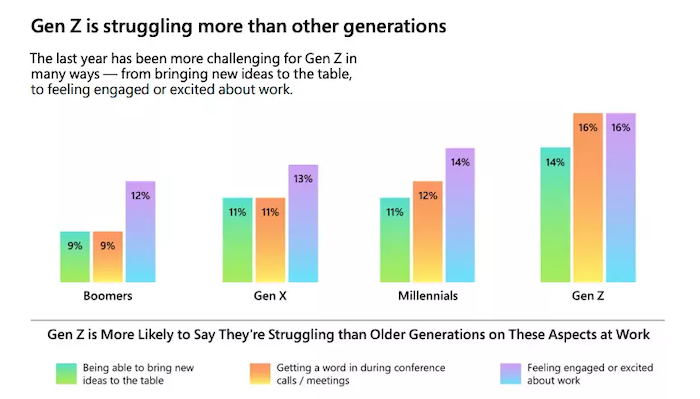
Why are staff leaving? Well, one reason is the shift towards remote working and burnout in high-stress industries. Burnout is a factor for Generation Z age groups too and this group also wants greater flexibility and control over their schedules, and they’re dissatisfied with their work/life balance.

The Great Resignation - Gen Z

Tips to Find and Keep Employees

Every company wants to attract happy, loyal employees, but if the great resignation is anything to go by, workers are feeling unfilled and unhappy. However, you can introduce procedures to limit the possibility of staff living, like:

  • making a point of understanding your employees
  • offering greater flexibility where you can
  • recognizing early stages of burnout and acting before it becomes a crisis or resignation issue
  • introducing a talent retention program
  • optimizing the employee experience

As Brain Kropp, group vice president of Gartner’s HR practice, says:

“Ultimately, employees want their 9-to-5 to look like their 5-to-9, and the organizations that deliver on that idea will gain a competitive advantage.”

Here are ten more tips to help attract and keep employees at your digital marketing agency during the great resignation.

1. Offer Remote or Hybrid Work for Eligible Employees

It’s official. The move towards remote working is gaining ground, and there seems to be no stopping it as more workers and companies realize the benefits of working from home.

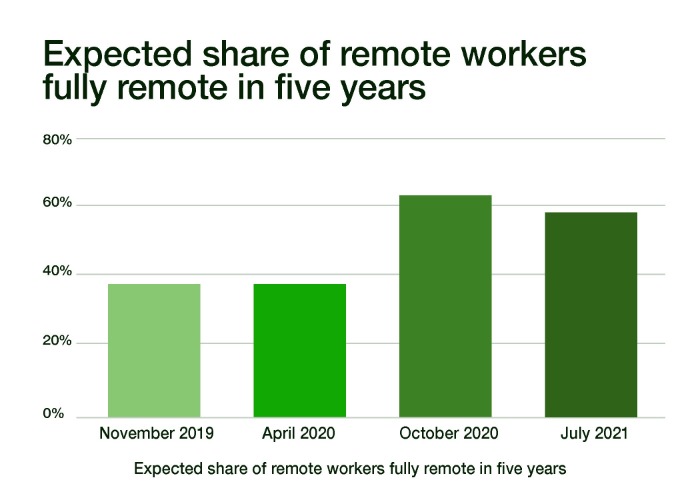
A 2021 Upwork study shows 40.7 million Americans expect to be working remotely by 2026. 

The Great Resignation - Upwork survey

That’s a considerable increase from the previous survey when only 22.9 percent of those questioned could imagine themselves working remotely.

If your agency is considering more remote working or a hybrid model, here are some tips to consider:

  • Provide support: Do employees have the technological and managerial support they need to thrive when they’re working remotely?
  • Maximize collaboration: Just because workers are in different locations, don’t let collaboration go out of the window!
  • Introduce team building: Use team-building sessions, so employees get the opportunity to connect and catch up.

Finally, talk to staff and find out which way of working they prefer, and if this is workable for your agency.

2. Offer Unlimited PTO

Under an unlimited paid time off (PTO) approach, employers don’t give staff a preassigned number of paid days off. Instead, they have the opportunity to take time out as they choose, provided it doesn’t impact the business.

Netflix and Github are just two companies using PTO, and research shows that workers only take marginally more time off.

If this sounds like an approach that might work for you, here are some tips:

  • Set a minimum amount of days for the year and individual stretches: Remote.com has a minimum of 20 days a year for its staff.
  • Encourage employee feedback: Is PTO something they want to see? See how PTO fits in with your overall company policies, values, and the way it works. Could this be a good model for your agency?
  • Have goals in place: Are employees still reaching their aims and responsibilities regardless of their time away?

3. Promote a Healthy Work/Life Balance

Work-life balance has become a more significant issue as the pace of life changes. For some, work has become more demanding as the needs of employers and clients intensify. This increased demand puts stress on workers to meet those goals, which leads to less time at home and less satisfaction with their jobs.

However, when there’s a better work-life balance, things get better, and it helps in all areas, including:

  • employee satisfaction 
  • happiness
  • productivity
  • motivation
  • efficiency 

It’s a win-win for everyone.

How do you ensure a better work-life balance for staff? 

Again, it’s understanding what works for them, and it’s about being realistic as an employer. No manager should be expecting their team to be “always-on” and ever available. Appreciate that staff value their downtime just as much as you do.

Additionally, if the workload is getting too much for staff and you need an extra pair of hands, consider outsourcing to an agency.

4. Increase Compensation

As digital marketing becomes more competitive, so does the need to offer employees higher salaries.

If an employee has an excellent track record and consistently delivers results, it makes sense to offer them a pay increase. If you don’t value them, then they are going to look for more rewarding positions.

When looking at pay increases, consider your employee’s contributions and how you can reflect this in their salary.

Indeed suggests providing some context to the pay increase. For example, is it because of their contributions or just rising in line with inflation and cost of living? Indeed also recommends presenting the increase as a dollar amount rather than a percentage.

5. Provide Excellent Healthcare

Providing excellent healthcare for employees can help companies to:

  • attract better talent
  • reduce employee turnover rates
  • cut down on the cost of hiring new people through employee retention
  • make your company a more attractive employer for job seekers

Ultimately, when you offer quality, affordable healthcare for employees, you’re more likely to attract and retain talented staff.

In addition, a good healthcare program positively impacts the business and can potentially decrease the risk of absenteeism and lost productivity.

However, don’t forget the importance of having great health and mental health policies by setting up health programs. 

For instance, Citibank offers rewards for staff taking part in health assessments and activities. Have an open-door policy for staff who may feel they need mental or emotional support, too.

6. Ensure Your Managers Motivate

Effective managers aren’t just great leaders and communicators. They are awesome motivators too.

Employees want to do their best work for motivational managers because they feel inspired to. Additionally, motivated employees are easier to engage and perhaps have an improved chance of staying in their roles.

Remember, though, management isn’t just about rallying staff on. 

It’s about providing positive, constructive feedback, being empathic, and accepting that sometimes a manager just needs to step back and let employees do their work.

As Lori Scherwin, founder of Strategize That in New York City, says, “Top performers want space to be their best.”

Keep that thought in mind.

7. Facilitate a Fun Working Environment, But Don’t Force It!

A fun working environment can make people feel connected to the company and their work, leading to higher morale and better productivity.

One way to improve the fun factor at work is through creating an enjoyable office space with areas for socializing. Hosting team-building events or fun quizzes can work well. Office days out are another option or try some virtual team-building exercises.

However, remember everyone is different, and not all employees enjoy the same kind of fun. Make your chosen activities optional and find opportunities for less outgoing employees where you can.

8. Give Your Employees Space to Grow

One of the most important and undervalued aspects of a work environment is the opportunity for growth and development. All employees need to feel empowered enough to take on new challenges and to learn new skills.

There are several ways you can encourage employee growth, like:

  • Training courses and letting employees choose areas they want to learn more about.
  • Encouraging volunteering. Perhaps get the company involved in a community project, allowing employees to see the difference they’re making and how it benefits others.
  • Give employees the tools they need to develop their career and take it to the next level.
  • Talk to each employee so you know how they see their job going and how you can help them.

9. Consider Your Company’s Values

Company values are the foundation of an organization. Values provide meaning to a company’s work, guide its decisions, and generate momentum for its continuing growth.

A company’s values are far more than just words on a page or a mission statement. They reflect how the company lives its mission day-to-day by how it treats others and operates in the world, and they’re crucial to employees

Company values ensure staff work toward common goals, aid decision-making, and communication while motivating and engaging employees.

If your company values need some work, there are some great examples online to guide your way.

10. Engage and Reward Your Employees

Employee engagement is crucial to retention and job satisfaction. Unfortunately, a Gallup survey shows workplace engagement is falling.

What can you do to improve engagement? Well, according to Gallup, one of the top reasons is unclear communication. Ensuring clarity in all your conversations with staff at all times is a good starting point.

Additionally, you can:

  • Invite feedback.
  • Give staff training when they need it.
  • Ensure staff knows what you expect of them.
  • Allow employees to shine and assign them tasks most suited to their talents.
  • Ensure your team has the resources to do their jobs effectively.

Another way to keep staff motivated is to reward them for doing well. Incentives can improve morale and productivity and help to retain talent.

Here’s how you can use incentives:

  • Reward your staff for reaching sales goals and best sales performance, but don’t make it uber-competitive.
  • Offer incentives at the end of project completion.
  • Provide rewards for consistent hard work, so staff knows you appreciate their efforts.

Great Resignation Frequently Asked Questions

How many people have left the workforce during the "Great Resignation?"

According to the U.S. Bureau of Labor Statistics, 20.2 million employees left their jobs during May-September.

In November, millions of employees left their jobs. It’s a figure that just keeps growing.

Why are people leaving their jobs during the “Great Resignation?”

Why are people leaving their jobs during the "Great Resignation?"

The reasons are different for everyone, but there are some specific factors, like a lack of work-life balance, burnout, and lack of flexibility in the workplace. Global and personal events can also cause people to look at their careers and reassess what they want.

What is meant by "The Great Resignation"?

It refers to the millions of people quitting their jobs. Although it’s a global phenomenon, the figures in the United States are exceptionally high, with millions of people leaving their workplaces every month.

Who coined the phrase "The Great Resignation"?

Anthony Klotz, a psychologist and an associate professor of management at Texas A&M University, was the first to use the phrase, announcing “The great resignation is coming”. Now the psychologist is also quitting his job for new pastures. 

The Great Resignation Conclusion

The proof is there in the stats. Employees are leaving companies in their droves. 

It’s not apparent yet if the great resignation is something that continues in future years. However, it’s happening here and now, and you ought to consider introducing steps if you want to keep staff at your digital marketing agency.

That includes introducing flexible, remote working if it’s suitable, having excellent healthcare, and paying staff what they’re worth.

Is the great resignation impacting your digital marketing agency? Tell us how below.


from Blog – Neil Patel https://ift.tt/2ZOZOfW
via IFTTT