Monday, 3 January 2022

Squarespace Review

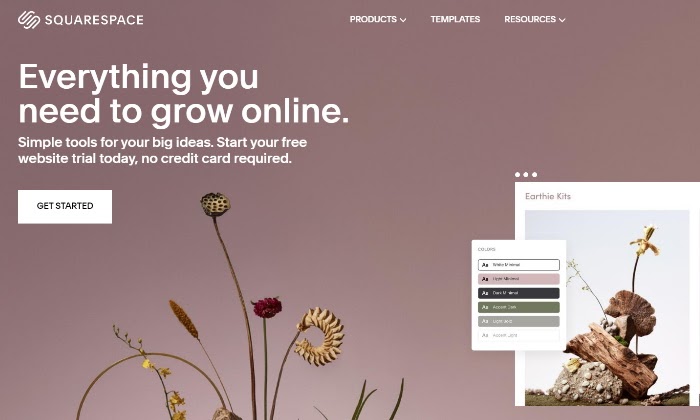
Squarespace main page for Squarespace Review

Disclosure: This content is reader-supported, which means if you click on some of our links that we may earn a commission.

Do you need a way to build beautiful sites without needing to learn all the technical stuff?

Squarespace would be one of my top recommendations. It’s an intuitive website builder that enables anyone to create beautiful websites easily and quickly.

The elegant platform was started in 2004 by a University of Maryland college student and has since flourished. Today, Squarespace is an incredibly popular website builder that millions of people have used to establish their online image.

Squarespace Compared to The Best Website Builders
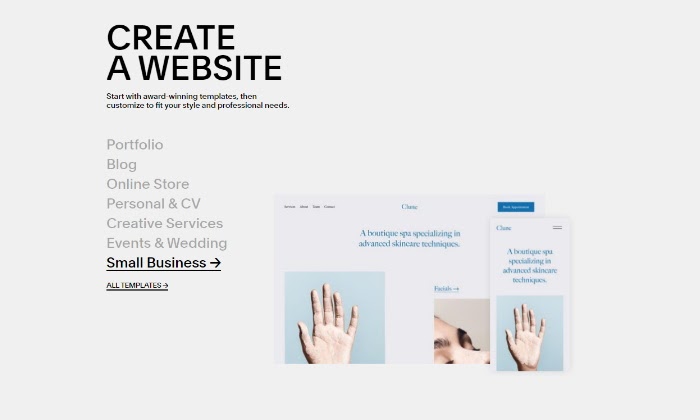
Create a website for Squarespace Review

Squarespace stands out for one main reason: it is amazingly easy to create beautiful websites for even the most clueless novice. Though it didn’t make our list of best site builders, Squarespace is still worth reviewing as one of the top website builders on the market today.

In our review of the best site builders, we painstakingly went through each website builder to determine the four top choices for different needs and use cases.

I’ve been building sites for years at this point, so you can bet I know a thing or two about what makes a great website builder. Once you read it, you can make the most informed choice. See all of our top picks for the best website builders. Let’s dive in. 

Who is Squarespace Best For?
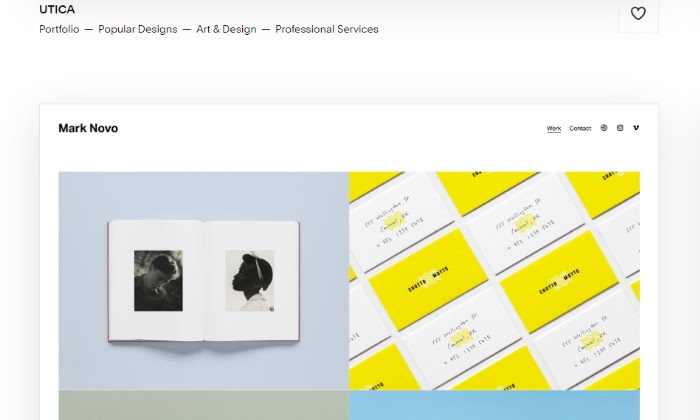
Template builder for Squarespace Review

Without a doubt, Squarespace is the best website builder for designers, artists, and ecommerce stores that want to create appealing sites with incredible visuals with minimal fuss. This makes it an excellent choice for small business owners that want a leg up visually but might not have the budget or know-how for it all.

Since Squarespace is a hosted solution, you don’t have to get into any extra steps to find a server or install software. You can create a beautifully designed site right on your browser, all in one place. 

Bottom line? Squarespace is great for creative people that like to work with templates and a style editor that lets you personalize even the smallest site details. Still, there are major pros and cons to take into account. 

Squarespace: The Pros and Cons

Pros

Responsive site templates: Squarespace offers more than 100 site templates to choose from. Best of all, they’re already built to be mobile responsive. A perk you might not always get with templates from other website builders.

Unlimited storage space: Squarespace offers unlimited storage on every plan. This is stellar news for creative sites that’ll inevitably build an extensive media library over time. With Squarespace, you won’t have to worry about hitting a storage or bandwidth limit.

Supportive live chat: Stuck? No need to worry. With its live chat feature, there is always an agent there ready to help you solve any site building problem you might run into. 

Webinars and help guides: As with most website builders, Squarespace does have a bit of a learning curve as far as the backend is concerned. But to remedy this, it has built an extensive library of detailed help guides and webinars that’ll get you to Squarespace expert level in no time. 

Built-in email marketing: One of my favorite Squarespace features is their built-in email marketing tool. To put it simply, it’s an add-on that empowers you to build eye-catching emails with beautiful templates without having to go through a third party. I don’t know about you, but the less software I have to deal with to get the job done, the happier I am. And you get plenty of integrated analytics to boot. 

Tools built specifically for ecommerce sites: Squarespace doesn’t stutter when it comes to who they cater to. As soon as you find out about them, it’s clear they care about visuals, but they also care about equipping you with the best ecommerce tools to create a dynamic online store. This helps narrow down your web builder choices if you’re specifically looking to create a great ecommerce site. 

Cons

Limited control over your domain name: If you buy your domain name through Squarespace, you won’t be able to migrate it to another hosting provider if you ever decide to do so. This can be a determining factor in whether you want to call Squarespace your site’s home and purchase your domain name in-house.

Limited SEO features: Lots of digital experts question the SEO capabilities of Squarespace. While there are plenty of success stories of sites ranking on Google, optimizing your posts and pages on Squarespace isn’t as intuitive as with other website builders like WordPress or Drupal. If SEO is the primary way you’ll drive traffic to your site, this is a point worth considering.

Squarespace Pricing

Now, what exactly do you need to pay to start using Squarespace and all its beautiful templates? Well, you can pick from a few excellent options

Squarespace pricing page for Squarespace Review
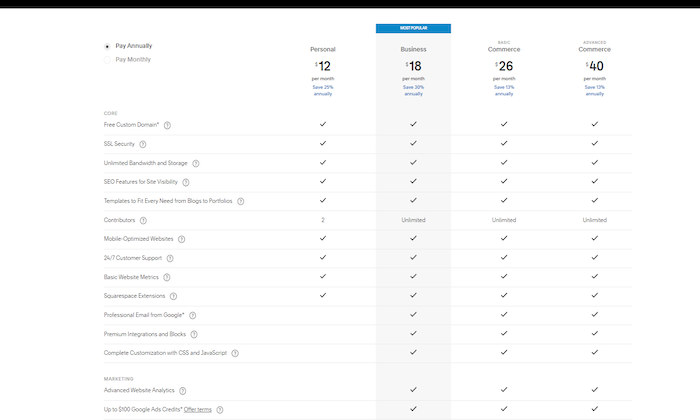
  • Personal – $12 per month billed annually
  • Business – $18 per month billed annually
  • Basic Commerce – $26 per month billed annually
  • Advanced Commerce – $40 per month billed annually

Let’s start with stating the obvious: Squarespace isn’t the cheapest web builder and host out there. But if you’re primarily looking to easily build jaw-dropping websites that catch your target audience’s attention, the price tag for even a personal plan might not be an issue for you.

Personal

Once you decide to go with the Personal tier, you’ll get access to basic site features like a free custom domain, SSL certification, unlimited bandwidth and storage, additional SEO features, access to Squarespace extensions, and 24/7 customer support.

All for $12 per month. While you can get all this and sometimes more with other web builders for less, it’s still worth looking into each of their tiers for a Squarespace plan that fits your needs. 

Business

Squarespace’s business tier is great if you’re trying to find a reasonable price point for an online store with entry-level tools. With its Business tier, you get everything in the Personal tier plus a suite of fully integrated ecommerce tools that’ll equip you to sell and track inventory, accept payments, and more.

You’ll also be able to sell an unlimited number of products, accept donations, and give your customers the ability to create and send gift cards. Bottom line? The Business Squarespace tool is what you should start with for a beginner to intermediate ecommerce business.

Basic Commerce

Think of Squarespace’s Basic Commerce tier like the Business tier’s older brother. While you’ll get all the business tier capabilities, you get a few more powerful perks if you go the $26 a month route.

With Basic Commerce, your online store will be ready to quickly list and tag your products on both Facebook and Instagram, have access to advanced ecommerce analytics, and even create customer accounts. While other web builders can offer a similar mix of services, Squarespace categorizes them so that they uniquely cater to online selling.

Advanced Commerce

Possibly the most significant appeal of the Advanced Commerce tier for Squarespace, at $40 a month, is that there are no transaction fees.

What does this mean for your ecommerce business? A built-in payment gateway ready to process payments with absolutely none of the fees that can quickly cut into your profit margin. 

While you get everything in all the previous tiers, you also get advanced tools to handle shipping, advanced discounts, as well as an abandoned cart recovery strategy that can put more money in your pocket. It’s clear Squarespace has thought of everything when it comes to successfully building an ecommerce business with special attention to both the frontend and backend of things. For this, I’d say they deserve plenty of brownie points. 

But don’t take my word for it. I recommend you carefully read through each of their pricing levels to see which one appeals to you the most. Once you lock into a website builder, it can take a lot of extra work and hassle to switch to a new one. 

Now, let’s see how Squarespace’s main offerings stack up and what you can learn about each of them as far as building your best website goes. 

Squarespace Offerings
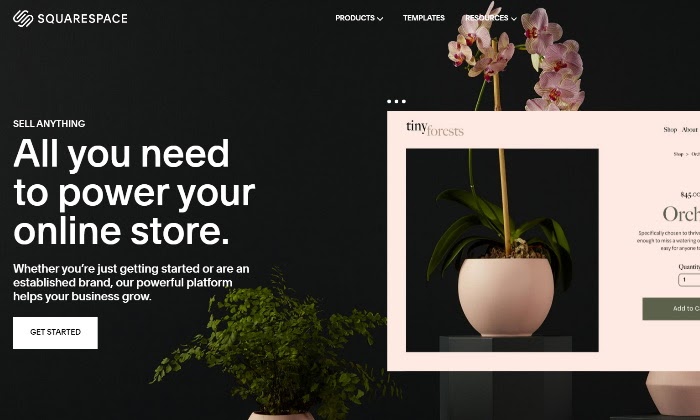
Squarespace online store for Squarespace Review

There are tons of features Squarespace offers to create and optimize your site. Overall, their offerings separate into three distinct yet helpful categories where they concentrate their web builder tools. Taking a closer look at each one can help you make the best web builder decisions. 

Website Builder and Hosting

Squarespace likes to call itself the leader in web design. And this claim isn’t made in vain. The drag-and-drop web builder and site templates help you create portfolios and professional websites that stand the test of time. To complement their roster of web builder tools, they also offer site analytics as a nice plus.

While I wouldn’t call Squarespace the absolute best content management web builder, it undoubtedly does its due diligence in the design and visual department. It also hones in on the flexibility you’ll need to create a portfolio that’s up to par with your design needs.

Ecommerce

Squarespace does its fair share in the ecommerce department, too, making them a strong contender to house your online store. Their offerings empower you to sell anything, whether it’s products, services, or by booking appointments of any kind. 

If you’re a brand that cares about first impressions to drive sales, Squarespace takes care of you not only with plenty of store templates but also a robust backend that can streamline your work order management. This sets it apart as a web builder tool for selling online since some others simply don’t go the extra mile in this department.

Squarespace goes as far as enabling you to create a membership site, which speaks volumes as far as innovation and keeping up with trends go. Not every web builder out there gets specific with the tools they provide. This is yet another feature that differentiates Squarespace from the rest. 

Brand Building Tools

If there’s one thing Squarespace focuses on as a web builder tool, it’s branding. We’ve already discussed Squarespace as a heavily visual builder. But this doesn’t mean they lack tools in the brand strategy department.

Squarespace lets you create dynamic email campaigns that are just as creative and visually powerful as your site. This means you can easily click and drag the products on your site that you want to showcase or let your audience know about a storewide sale. 

Along with email, Unfold is Squarespace’s unique “storyteller tool.” With it, you can create awe-inspiring social content that’s easily shareable for additional brand exposure. Filters, sticker packs, and easy image editing let you tell your story as a unique brand.

Squarespace is a groundbreaker in the web builder space when it comes to catering to a visual community. They do this by unifying both powerful website building tools that get results and the beauty of design. 

As a website builder that doubles as a host, you won’t see many other Squarespace-like builders that are truly comparable. At the same time, lots of Squarespace features make it more of a niche website builder. It caters to its intended audience powerfully well. 

The Best Website Builders

To make your best choice in website builders, don’t forget to read my in-depth review of four other top website builders you should consider. Here’s a quick overview for your convenience:

  1. Wix — Best for general use
  2. Weebly  — Best for beginners
  3. Shopify — Best for ecommerce
  4. WordPress — Best for content management

Squarespace is a reliable web builder for creatives, artists, and ecommerce stores that keep visuals at the forefront of their business strategy. While its site plans tend to be a bit pricier, Squarespace more than makes up for it by allowing you to build and host your site all in one place and equipping you with a long list of site templates you can customize to your heart’s content. 

Now it’s your turn. What has your experience with Squarespace been? I’d love to hear about it below. 

Get started with Squarespace today and start building your site. 


from Blog – Neil Patel https://ift.tt/3pEXX4e
via IFTTT

Account-Based Marketing: Past, Present, and Future

Account-Based Marketing: Past, Present, and Future

The average email click-through rate is 2.6 percent. The rate of return on direct mail is around 1 percent. A good social media campaign will convert at less than 1 percent.

Why are these numbers so low? Because many new marketing campaigns don’t have the right customer research, ideal client avatars, personalization, or segmentation. They dangle a worm out there to see if anyone bites.

These factors are important, and it is why account-based marketing is a great opportunity. It is a great way to find the ideal client who you will pay you month after month.

That’s the type of client you want, and that’s what we’re focusing on in this guide.

What Is Account-Based Marketing?

Account-based marketing is a B2B marketing strategy where the sales and marketing teams work together to find the most qualified accounts to become customers.

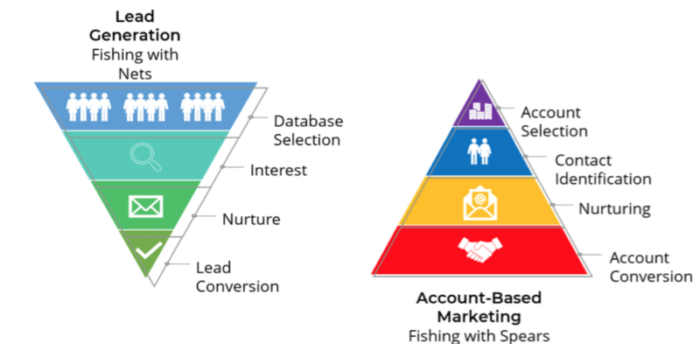
You’re flipping the traditional sales funnel upside down.

account-based-marketing-fishing-with-nets-vs-spears

I love the example of fishing with nets versus fishing with spears.

When you fish with nets, you throw out a generalized marketing campaign to fit the needs of your customer persona, but you’re not entirely sure what will stick.

When you fish with spears, you pinpoint the clients you want with the help of your sales team. Working together will help the marketing team identify ideal clients and then put together a campaign that speaks directly to that audience.

Examples of Account-Based Marketing

Account-based marketing works by creating campaigns for highly specific audiences. By going in with a certain target group in mind, you are able to customize campaigns like you never could before.

Here are some real-life examples of account-based marketing.

Webinars

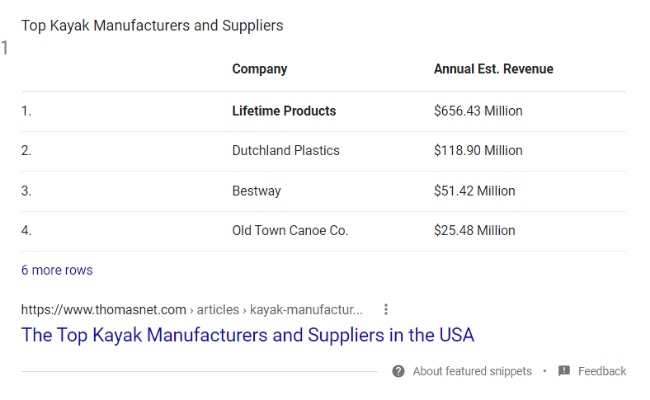
Let’s say you’re targeting an outdoor retailer that creates custom kayaks for professional fishermen. That’s a pretty specific audience, right? You can create a webinar dedicated to marketing for custom kayak companies.

Live Events

Even better than a webinar is a live event in-person. Work with the sales team to identify key prospects as you plan this event. You can also create personalized upsells such as VIP passes, VIP rooms, or merchandise for the people you want to close.

PPC

Google Ads, Facebook, LinkedIn, and Instagram are all ways to reach high ticket clients through account-based marketing. Once you’ve identified your targets, you can create specific campaigns for those few prospects.

Remember the fishing with spears versus fishing with nets analogy? We’re no longer just throwing a net out to see if we catch anything. We know what we want to catch, where it is, and how to get it. We just have to do it.

Why and When You Should Use Account-Based Marketing

account-based-marketing-abm-maturity-model

We tend to open the funnel with a broad-based marketing approach to “play the field” and see what’s out there. Eventually, we need to get away from that and narrow down to focus on the clients who will pay us what we’re worth and stick with us.

I like to call this the “ideal client.” Once you know who these clients are, account-based marketing helps you reach them.

Here are some ideal situations where you should use account-based marketing:

To Bring Marketing and Sales Together

One of the biggest issues many companies face is not having their sales and marketing team on the same page. Account-based marketing gives these two departments a chance to work together, understand a common goal, and help each other out.

To Increase Engagement

One indicator you’re targeting the wrong audience is if they’re not engaging. This can be a sign of fatigue with your marketing campaigns as well.

How often have you seen ads over and over to the point where you don’t notice them anymore?

When this happens, it’s time to change things up and switch to a personalized strategy that will speak to one specific audience.

To Maximize ROI

The goal of both marketing sales is to bring as many people through the funnel as possible. That is a key indicator for long-term success.

Even better is bringing qualified people through the funnel versus bringing everyone.

If we focus on ROI, we only bring the most qualified accounts through the funnel. This will save you money, time, and resources.

Benefits of Account-Based Marketing

Now let’s talk about the direct benefits of an account-based marketing strategy versus something more broad.

Shorter Sales Cycle

Shortening the sales cycle can save you so much time and money. This is one reason why an account-based marketing approach maximizes the ROI.

You are able to connect directly with key decision makers early instead of using resources to engage with employees who may not have that authority. Because you are targeting decision makers directly, you know they can pay, and you can serve them.

Personalization Saves Time and Money

How often does your sales team spend their time speaking with prospects who barely understand what your business does? That’s a sign of broad marketing.

With account-based marketing, you attract prospects who are already warmed up, familiar with your company, and ready to make a decision. This type of personalized marketing saves time and money in the long run.

Easier to Measure ROI

When we narrow down the funnel, we focus on fewer prospects. This makes it easier to figure out the ROI and deliver better results.

For instance, if we reach 100 ideal clients and convert 10 of them, we know our account-based marketing conversion rate is 10 percent.

This sure beats reaching out to the entire east coast with a marketing campaign and converting 10 people—then having four of them duck out after their first month.

Instead, you’re nurturing long-term, well-qualified prospects that will stick with you.

How to Plan and Begin Account-Based Marketing

Now that you have an overview of account-based marketing, let’s put it into practice with some actionable steps you can take.

1. Zero in on Your Targets

account-based-marketing-target-market

Who is your ideal client?

Work with the sales team to figure out some warm prospects. What characteristics describe them? What type of revenue do they have? What platforms do they live on?

Use all of this information to put together a personalized marketing campaign.

2. Research Them

Do plenty of research. Figure out what makes prospects tick and put together creative ideas that will make the prospect feel like the marketing campaign was made just for them—because it was.

3. Choose Your Avenue

Where are you going to market to this audience? What are you going to use to do it?

Do they have a younger demographic on platforms like Instagram and TikTok? Are they older executives that prefer direct mail or live events?

These are some key questions you should be asking before starting your campaign, especially if you expect to reach them and maximize your ROI.

4. Run Your Campaigns and Measure Frequently

One thing marketers are advised to do when running PPC, social media ads, or any other type of campaign is build up enough data before making a conclusion. With account-based marketing, things are a little bit different.

You can spill your entire ad budget pretty quickly when you have a narrow audience. You want to check on these campaigns frequently to see if your approach is hitting or not. If you don’t see the signs of success early, it is a good idea to adjust accordingly.

Tips for Implementing Account-Based Marketing

Here are some higher-level tips to make the most of your account-based marketing campaigns.

1. Plan Out Every Detail

You’re targeting a specific account, so the marketing campaigns need to be highly targeted. Information like competitors, customer relationships, buying points, selling points, and best-selling products/services are all important.

2. Align With the Sales Team

Make sure everyone is on board, from the president of marketing to the new trainee in sales. There should be no miscommunication on either side since everyone has the same goal of securing these high-ticket clients.

3. Build a Dedicated Account-Based Team

You should have a team of dedicated account managers working with these prospects before they become clients. Their focus should be on building relationships and understanding the needs of each account to streamline communications and limit the number of people you need to speak with before a close can happen.

4. Have a Small Target

Don’t spread yourself out too much. By limiting your focus to two or three high-value accounts, you are able to make sure that your campaigns speak directly to their specific needs and paint points.

If you go too broad too early, you risk the chance of your campaign alienating some or all of your target accounts.

5. Work With Decision Makers Only

You’re pouring a lot of resources into these two or three accounts, so you need to make sure you’re not wasting time. The key is to only deal with decision-makers in the company. If you can’t target specific decision-makers, they’re not a high-value target.

6. Target Warm Prospects Only

In addition to reaching decision-makers, work with your sales team to find the warmest targets. These people know who you are and have shown interest in the past but never converted.

7. Don’t Be Afraid to Adjust

Be sure to measure your results, change things as needed, and work with everyone involved to figure out what you can do differently.

Account-Based Marketing Frequently Asked Questions

What is an account-based marketing platform?

An account-based marketing platform is a form of technology that allows you to scale your marketing campaigns. These platforms allow you to run larger campaigns at narrower audiences.

How much does it cost to set up an account-based marketing plan?

It depends entirely on how much you do yourself and what you outsource. We can help you set up your account-based marketing to get you started on the right foot.

Why is account-based marketing important?

Account-based marketing is important because it caters to a specific audience which helps you maximize your ROI and bring in more high-ticket clients. This increases client retention over time and generally improves your company’s ROI.

How is ABM used?

Account-based marketing is used in various ways, but one of the most popular is to align marketing and sales teams. When these two departments work in perfect harmony, it helps bring in more high-value clients and shortens the sales process from beginning to end.

Conclusion: Account-Based Marketing

Account-based marketing is a smart choice for companies of sizes, allowing you to create deeper relationships with clients who will be more meaningful to your bottom line.

Taking on this strategy will bring in the exact type of clients you need to keep retention rates up and build a strong base. Work with your sales to identify the right accounts, create your ideal buyer persona, and pick an avenue to reach that audience.

Have you ever implemented a successful account-based marketing campaign?


from Blog – Neil Patel https://ift.tt/330tlV2
via IFTTT
Shopify Vs. Wix

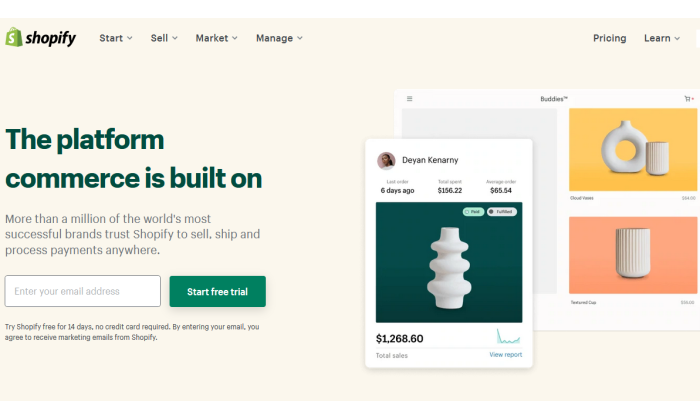
Shopify main page for Shopify Vs Wix

Disclosure: This content is reader-supported, which means if you click on some of our links that we may earn a commission.

As an ecommerce seller, you’ll find yourself making a lot of choices.

Is the clothing niche more profitable than accessories? Which theme would be better: Wokiee or Porto? Is Shopify better than Wix, or is it the other way around?

Of all the questions, choosing the best ecommerce platform remains the most crucial. Although Shopify and Wix have overlapping features, Shopify edges forward in the race if you’re specifically looking for ecommerce functionality.

Still, it’s a close call between the two that boils down to your intent. Small businesses or brand-conscious entrepreneurs will love Wix with its easy-to-use, cheap features, and greater design flexibility.

But if you want a powerful online store, Shopify can do a lot more. So long as you’ve got a bigger budget and the technical knowledge to flatten the learning curve, Shopify is going to be the better long-term ecommerce solution.

Shopify or Wix: Which Is Better?

Shopify main page for Shopify Vs Wix

Shopify is a solid option for ecommerce applications with its fully responsive templates, AMP support on product pages, and dropshipping features. It also supports multi-currency selling functionality and offers useful integrations with other essential apps.

Overall, it’s a more professional choice for anyone who wants to build an online store. If this is exactly what you’re looking for, make sure you sign up for a free trial ASAP.

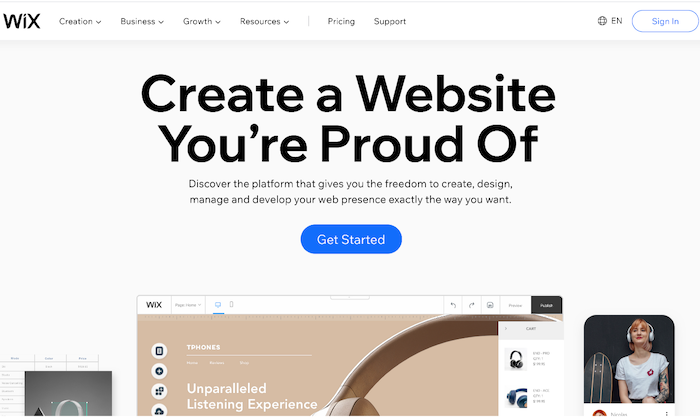
Wix main page for Shopify Vs Wix

Wix has a drag-and-drop interface and a wide range of bundled templates, making it a great choice for those who want to build a general-purpose website. It also comes loaded with page layout tools, data capture, and email marketing features.

Plus, it’s cheaper, and you don’t have to worry about paying transaction fees. Ready to check out Wix? Give it a try with a free trial.

A Review of the Best Ecommerce Platforms

Shopify and Wix are hardly your only two options for starting an online store, and you owe it to yourself to look around.

My team reviewed dozens of ecommerce platforms and narrowed them down to the eight best options that tick off all the right things on an ecommerce seller’s checklist. Wix and Shopify both made the list.

Head over to my best ecommerce platforms guide for an in-depth look at where every product stands, along with a buyer’s guide to help you navigate your options.

Shopify Wins 

Useful Ecommerce Features: As it’s specially designed to be for ecommerce, Shopify sites come with many useful ecommerce features to cover every little aspect of the sales process. It has multiple payment gateways, inventory management tools, third-party platform integrations, and shopping carts. The platform is also scalable, allowing you to grow with your expanding business needs.

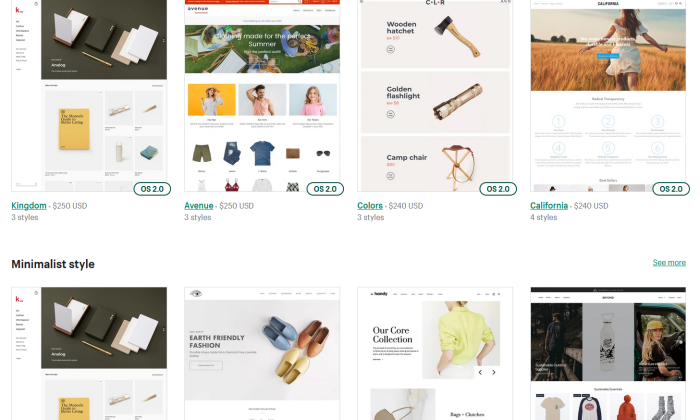
Fluid Themes and Greater Flexibility: Shopify offers 60+ professionally-designed and customized themes, giving you the liberty to add individual product pages based on your needs. Moreover, this customization and flexibility extend to changing page elements too. You can move, add, remove, or resize page elements to make your shop more on-brand.

Tweaking themes is also possible—provided you know HTML and CSS. If you’re tired of how your site looks, you simply have to choose a new theme, and you’ll have a brand new store within minutes!

Shopify themes for Shopify Vs Wix

Custom Domain Name: Every Shopify user gets a custom domain name that allows them to brand their respective stores and online business more efficiently and effectively. You can handle your domain on the same site location as your domain store, which, in turn, allows you to make changes to either with ease while simultaneously managing your domain.

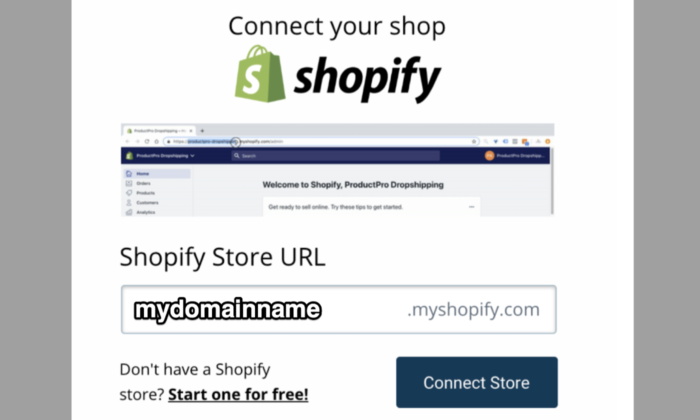
Shopify connect domain for Shopify Vs Wix

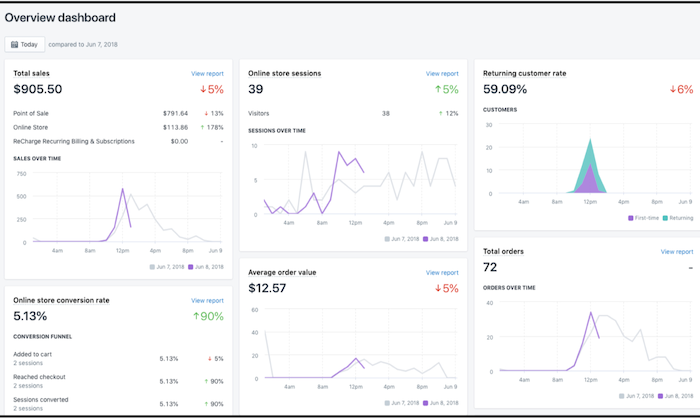
Excellent Built-In Analytics: Shopify goes the extra mile by offering you plenty of built-in analytics features like Google Analytics, customer behavior, stock levels, and conversion tracking to know exactly how your store is doing and which aspects need a bit of tweaking for better results.

You can also view online store sessions, total sales, top-selling products, returning customer rate, average order value, and behavior reports (phew!) on the platform to make better decisions.

Shopify analytics for Shopify Vs Wix

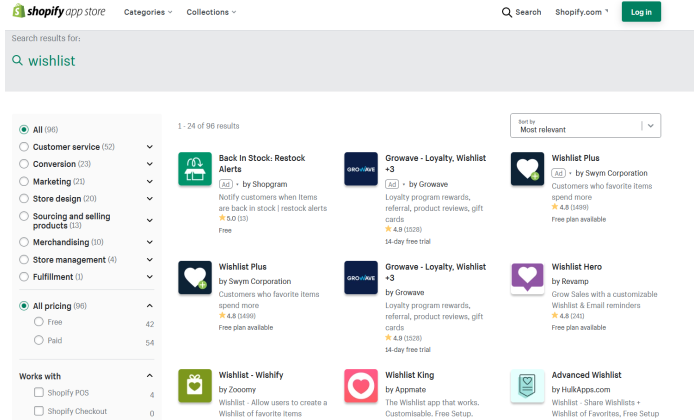
Shopify App Market: Nearly every ecommerce plugin and feature are developed for Shopify first due to its vast popularity. Whether it’s free or premium add-ons for marketing to content management, you get all kinds of unique features with this platform. Case in point: An augmented reality feature that allows you to use your smartphone to navigate the product and see every little detail.

What’s more, even other marketplaces like AliExpress and Oberlo offer compatible apps to make your store management easier.

Shopify app store search for Shopify Vs Wix

Faster Checkout Options: Shopify has prioritized customer preference when designing login and checkout options. You can make the registering of users before heading to checkout mandatory, optional, or prohibited. Plus, registration is also incredibly easy as users only have to fill out basic information. As a seller, you can add users manually or import the list via CSV and sort them through a tag system.

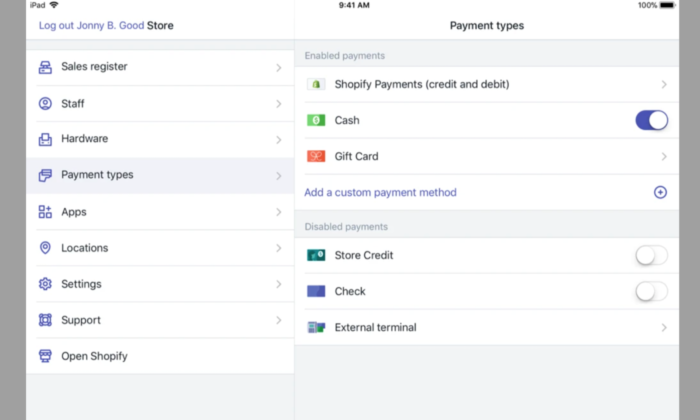
More Payment Options: Shopify gives you several options to sell items anywhere in the world thanks to its Amazon FBA or a 3PL order fulfillment support, along with multiple-currency support through a complex, non-supported HTML, CSS, JavaScript, and Liquid hack. This may not be ideal, but it’s definitely there. You also get direct access to 100+ different payment gateways, including PayPal, Stripe, and Shopify’s fully integrated payment system.

No Cap on Products and Inventory: Most web servers or external platforms restrict the number of products you can add to your store—but not Shopify. You can add unlimited products to your Shopify store. Even the lowest subscription package does not put any restriction on the number of products you can add to your inventory.

Shopify payment types for Shopify Vs Wix

Shopify Losses

Learning Curve: Shopify developers claim the platform is the best for creating and managing online stores, but they don’t claim to be the easiest, and rightfully so. Although Shopify uses templates that eliminate the need to edit HTML code and CSS styling, its websites are harder to edit than Wix. It’s because the focus is on the products and how you present the page. If you want to make additional changes, you’ll have to learn to edit the backend code.

Limited Free Themes: While we love how modern and responsive Shopify themes are, it’s the limited number can restrict your options. You have to pay a one-time fee for most themes, ranging between $140 to $180, as only ten themes are free.

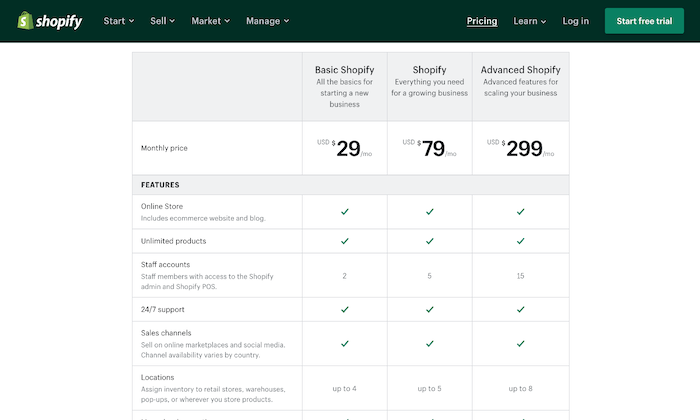
Expensive: Shopify gives you a wide range of subscription plans starting at $29 per month. However, not only is it more expensive, but you also don’t get a free plan (only a 14-day free trial). The basic plan includes only the barest of features, so if you want access to advanced features like fraud analysis and reports, you have to pay a higher price.

Further, unless you use Shopify Payments—something that isn’t available everywhere—you have to pay a transaction fee on top of the payment processor fee.

Shopify pricing for Shopify Vs Wix

Lacks Email Hosting Facility: You don’t get an email hosting feature despite web hosting being included in all Shopify plans. So, you can’t host a domain-based email address like info@shopname.com. What you can do, however, is set up email forwarding. This will forward all emails sent to info@shopname.com automatically to your regular email account. You’ll have to set up other third-party email hosting connections to use the email forwarding function.

Wix Wins

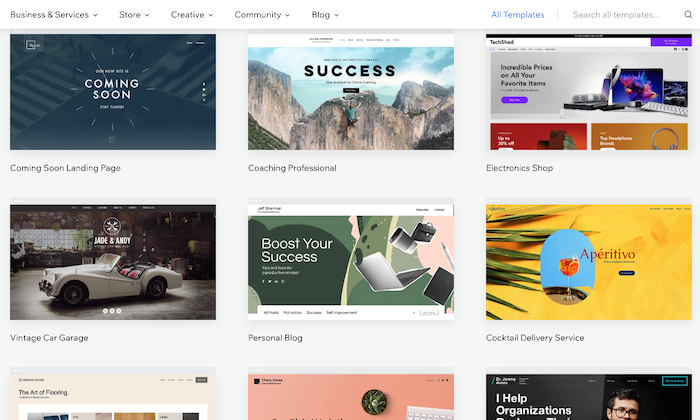
Massive Template Collection: The basic Wix editor lets you pick from 500+ beautiful templates for your site and populate it with any content of your choice. There are several built-in dynamic templates—from homepages to blogs to landing pages—suitable for novices and experts. People on a tight budget will be happy to know the platform offers 60 completely free, modern, and stylish ecommerce templates.

Wix themes for Shopify Vs Wix

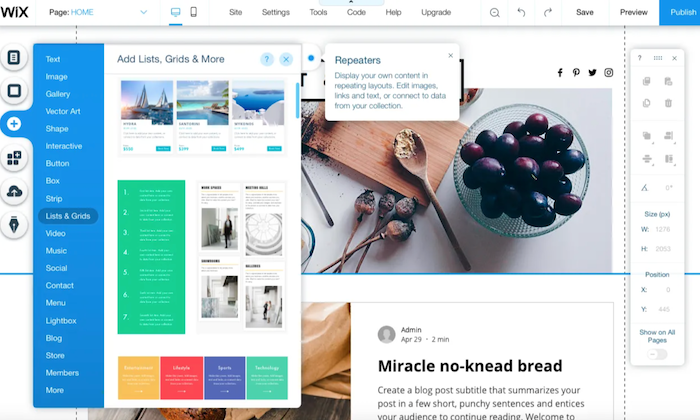
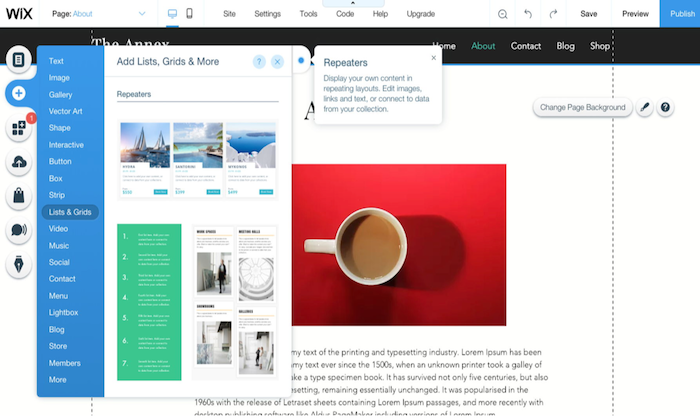
Intuitive Drag-and-Drop Interface: The drag-and-drop interface is the heart of Wix, making it incredibly user-friendly. Because of this, not only people with all levels of skills can use the platform, but it also gives you enough options to convert your side into a real powerhouse by extending its functionality. You can use the mobile editor to review and edit your site to optimize it for mobile devices.

Wix builder for Shopify Vs Wix

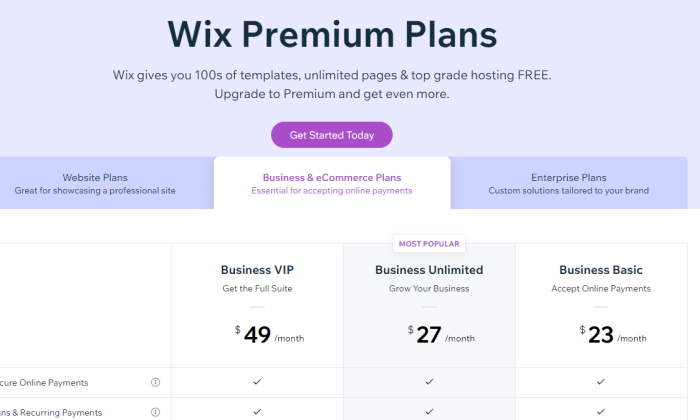
Free Plan: Wix is definitely the cheaper platform, with prices starting at $23 per month. There’s also an entirely free plan and a free domain name facility (for the first year) that further boosts its appeal. Plus, you don’t have to worry about paying any extra fees with the platform.

Wix pricing page for Shopify Vs Wix

Built-In Video Function: Wix seriously lets your products shine, which is one of its biggest USPs. It has a built-in product video function that helps improve customer experience by allowing them to see the product live. You’ll also appreciate the product zoom feature and the fact you can build a distinctive checkout page to make the checking out process as hassle-free as possible.

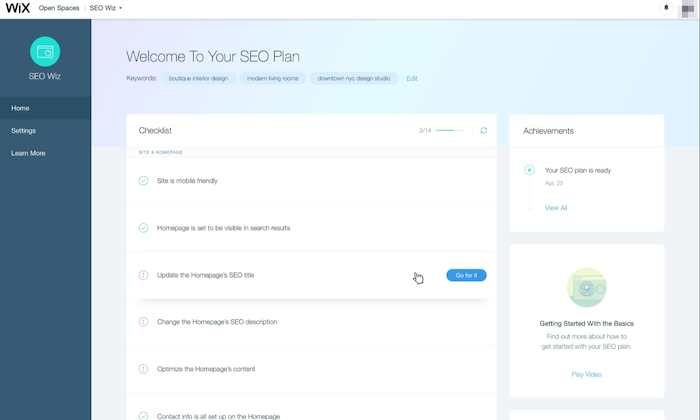
Efficient SEO Guidance: Wix helps you optimize your ecommerce site for SEO by highlighting areas that require your attention. It then does the hard work by letting you fill in keyboard tags and other metadata. You can also modify the URL of each page, so it best fits what Google needs to know.

Wix SEO tools for Shopify Vs Wix

Tons of Extra Features: Aside from the core functions, Wix is built with an entire ecosystem of useful tools and products to make website building easier. It offers your free HTTPS to ensure visitor interactions with your website remain secure, templates to create quotations for customers, and integrated payment options like PayPal and Stripe. There’s also a logo maker to make branding even easier!

Wix logo creation tool for Shopify Vs Wix

Online Store Integration: You can include an online store with your website at no additional cost with Wix. As the interface is easy to use, the integration process is very straightforward, and you don’t even require an external shopping solution.

Wix Losses

Harder to Redesign: The intuitive drag-and-drop interface of Wix makes designing your site simple, but it’s the redesigning where you have to pay the price. You don’t have the flexibility to make any major changes by just selecting a new theme. Instead, the redesigning process is extremely manual. If you want to make any drastic changes to your online store, you practically have to rebuild your entire website. Besides that, you don’t have access to HTML and CSS, which makes the overall process more time-consuming and tough.

Wix builder options for Shopify Vs Wix

Limited Integration With Third-Party Apps: When we talk about app integrations, it isn’t even a fair fight as Wix has far fewer ecommerce developers creating apps for its platform. For instance, you won’t find a Google Shopping Feed or Facebook Product Feed. This means you can’t run Google shopping ads or run dynamic product ads on Facebook from the platform. Native integration with email marketing applications is also absent, making it troubling for owners who rely on email marketing for revenue. The only way you can integrate a Wix store to an email marketing add-on is to use either Zapier or write the code yourself.

Forced Wix Branding: They say there’s no such thing as a free lunch, and Wix very well proves it. If you decide to choose and stay on Wix’s free plan, be prepared to carry Wix branding—right at the top of your site. It isn’t too obnoxious, but it isn’t exactly discreet. What makes it more annoying is it appears before your website header!

Wix forced branding for Shopify Vs Wix

Non-Transferrable Site: While some may justify Wix not wanting users to export websites created with their technology, it’s a con for those who want to migrate. And the fact that scalability isn’t Wix’s biggest forte, makes this an even bigger problem. If you want to recreate and transfer your website away from Wix, you have to pay some serious amount of cash. In short, if you sign up for Wix, they might just have you for life.

Comparing the Top Ecommerce Platforms

While Shopify and Wix are excellent ecommerce platforms, there are several other alternatives with their own advantages. Make sure you check our top picks for the best ecommerce platforms to find the right option based on your specific needs.

  1. Wix – Best for flexibility and customization
  2. Squarespace – Best ecommerce platform for creatives
  3. Bluehost – Best for hands-off WooCommerce store setup
  4. BigCommerce – Best for medium to large stores
  5. Shopify – Best all-in-one ecommerce platform
  6. WooCommerce – Best for WordPress websites
  7. OpenCart – Best for selling digital products 
  8. Ecwid – Best for integrating with your current platform

Summary

Shopify is the more obvious choice since we’re concerned with ecommerce functionalities in particular. But that doesn’t mean Wix has lost its charm.

Shopify is the best solution for sizable online stores that need all the bells and whistles of scaling and selling everywhere around the globe, while Wix is more appropriate for general-use cases and for owners who rely on content creation to acquire more traffic. It also offers more creative freedom as opposed to Shopify.

In the end, the choice is yours—just make sure you make the right one.


from Blog – Neil Patel https://ift.tt/3cGgJWf
via IFTTT

WordPress.com Vs. WordPress.org

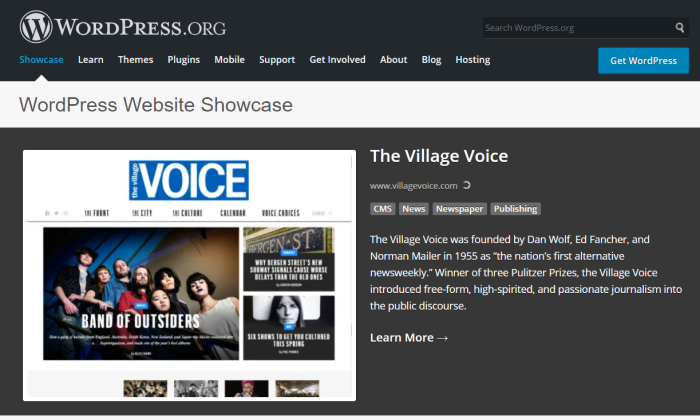
Village Voice showcase for WordPress.com Vs WordPress.org

Disclosure: This content is reader-supported, which means if you click on some of our links that we may earn a commission.

Trying to figure out whether you want to launch your site on WordPress.org or WordPress.com?

You can go to WordPress.org and download a free version of WordPress that will let you create a completely unique website. You have to pay for your own web hosting–but you can’t put a price on the ability to design, control, and monetize your site to your liking.

With WordPress.com, you can build a blog on their website. You don’t have to host anything, but you sacrifice a lot of the flexibility and design freedom that makes WordPress so popular.

While it takes the guesswork out of website building, WordPress.com has limitations that appeal more to beginners with limited technical knowledge. 

WordPress.com or WordPress.org: Which is Better?

WordPress.com is a free platform perfect for beginners who want to play around with a basic website. Its simplicity is second to none, so you can focus more on creating great content without worrying about technical stuff. Create an account today and have your free website ready in minutes. 

WordPress.org is best for bloggers and businesses who want to take full control of their websites. You’re free to integrate it with custom themes, plugins, and tools, so your website looks, functions, and makes money exactly the way you want it. Download WordPress now and build a website on your terms.

A Review of The Best Website Builders

If you’re looking for a website builder, this in-depth review of my picks should point you in the right direction. 

A website builder should help you create a website in minutes without touching any codes. I’ve built countless websites over the years, so I know firsthand what essential features to look for. 

Spoiler alert: WordPress is one of the best, but you may find other alternatives that might better meet your requirements. 

WordPress.com Wins

Easy to use: WordPress.com is a free managed hosting platform, so starting your website is as easy as creating an account. The team behind WordPress.com takes care of everything so that you won’t have to download any software, pay for a hosting plan, or manage a server. This hands-off style of website creation is ideal for those who want to focus more on their content and launch as many free websites as they want. 

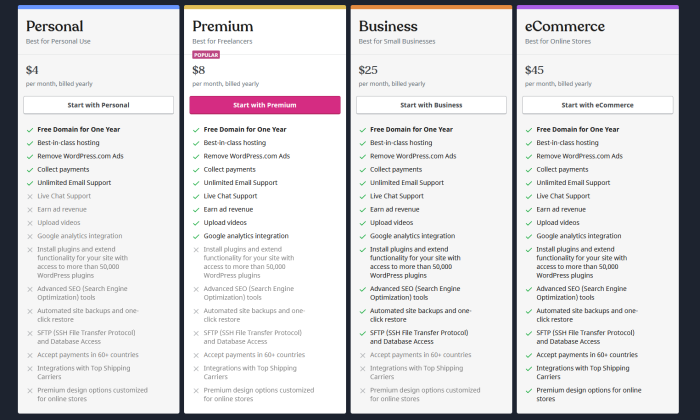
100% free for basic users: It’s free to start a website with WordPress.com. Paid plans are also available if you want to remove ads, have a custom domain (such as neilpatel.com) instead of the default subdomain (neilpatel.wordpress.com), and get a larger storage space. The cost of upgrading to paid plans can range from $48 per year for Personal to $540 per year for an Ecommerce plan. 

WordPress.com pricing plans for WordPress.com Vs WordPress.org

Hands-off maintenance: Having a WordPress.com website is like renting an apartment minus the rental fee. You get to enjoy the room while the landlord takes care of the maintenance. You don’t o need to worry about backups, updates, and other daunting technical stuff—all of that is handled by WordPress.com’s developers and support engineers. 

Multiple customer support channels: Support forums are available to answer any technical questions, whether you’re using a free plan or a premium one. Depending on the paid plan you’re subscribed to, you can also access more personalized, round-the-clock support via live chat or email. 

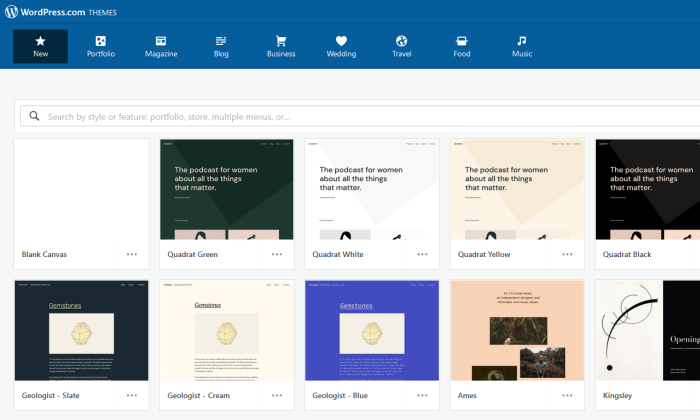
Basic customization options: Even if it’s free, WordPress.com still gives you enough elbow room to personalize your website to your liking. There are hundreds of free themes to choose from, so you can pick something that reflects your style and personality. Free WordPress.com websites also come with built-in features like social sharing buttons, polls, comments, image galleries, SEO, and contact forms, so you don’t need to install any third-party plugins. 

WordPress.com themes for WordPress.com Vs WordPress.org

Built-in security features: WordPress.com is a closed ecosystem that is already secured by default. You won’t have to install security features or monitor your website 24/7 for possible malware attacks. Everything is taken care of so you can focus your attention where it’s needed more–creating content. 

Painless migration option: Should you decide it’s time to let your website grow into a self-hosted platform, WordPress.com won’t stop you from doing so. Free WordPress.com has a built-in export tool that will pack your entire website into a single downloadable file. You can choose to do the transfer yourself for free or let WordPress.com hold your hand for a small fee. Completing the transfer is as easy as clicking the import tool button in your new self-hosted WordPress dashboard to have your files moved into their new home. 

WordPress.com Losses

Unreliable traffic monitoring tool: All users can view a Stats page to see how much traffic their websites get at any given time and where their visitors come from. However, it comes with many limitations, like new visitors not reflecting on the total view count until two hours later. If the visitor views the homepage while reading a post, the view will be counted towards the total views but not towards the individual post. Google Analytics presents more precise data, but you can’t integrate it with WordPress.com unless you’re on Premium or higher plans. 

WordPress.com traffic monitoring tool for WordPress.com Vs WordPress.org

Limited ability to monetize: The free WordPress.com is not designed nor allowed to make you money. You can try your luck with WordAds, WordPress.com’s own advertising network, but you need a custom domain and thousands of traffic per month to be qualified. And even if you get accepted, you’ll only be sharing your revenue with WordPress.com. Google Adsense and ecommerce functionality are only available if you upgrade to Business or higher plans. 

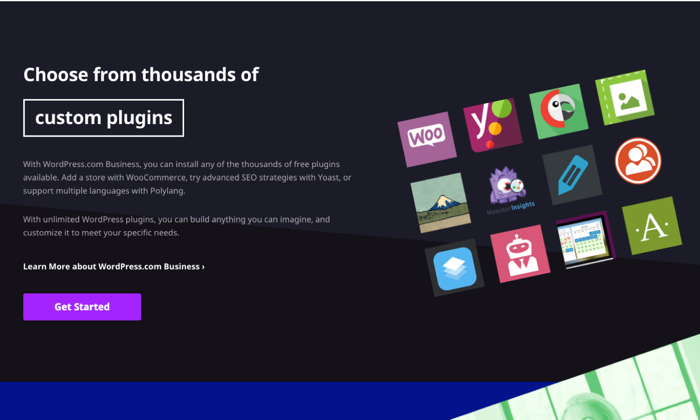
Not good for branding: WordPress.com handles everything for free at the expense of flexibility. Although the free themes and built-in features are enough if you only blog for fun, they leave a lot to be desired for most users. Furthermore, the WordPress.com default subdomain and ads won’t help you establish a solid brand in the long term. You have the option to customize your website with third-party themes and plugins, but this is a luxury only Business plan users can enjoy. 

WordPress.com plugins for WordPress.com Vs WordPress.org

Restricted ownership: Creating a free website with WordPress.com means you don’t have a say in the majority of things concerning your website. Their platform, their rules. First, your website address will use a generic subdomain (i.e., yoursite.wordpress.com) instead of a custom domain name that looks more professional. You also don’t have control over the number and types of ads your readers will see unless you decide to upgrade your plan. Since your ownership is restricted, WordPress.com can delete your website if they discover it violates their terms and conditions. 

Lackluster SEO: WordPress.com has built-in SEO features, but they’re barely enough to ensure a good user experience and maximum search visibility. Free accounts only have access to a limited number of free themes, so there’s no way to upload a custom theme that offers better site navigation. You also can’t install popular SEO plugins like Yoast SEO or All-in-One SEO, so it’s impossible to add unique titles and meta descriptions to your articles unless you upgrade to a premium plan. Lastly, free plan users can’t use a redirection plugin, so pages that should have been redirected to another page will just stay and clutter the website. 

WordPress.org Wins

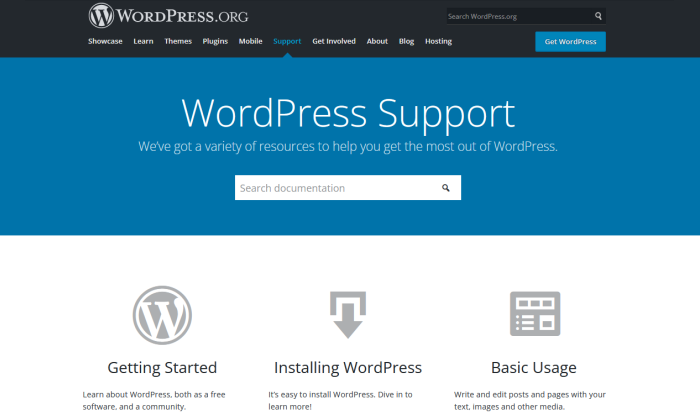
A wealth of DIY troubleshooting resources: WordPress.org is open-source software, so there’s an abundance of volunteers and experts who are willing to extend a helping hand. Should you need to fix a technical issue affecting WordPress, assistance is a few searches away through the WordPress.org support forums. 

WordPress.org support page for WordPress.com Vs WordPress.org

Free traffic reporting and tracking: Get real-time traffic reports through Google Analytics, a free tool you can install in WordPress by pasting a few codes into your website back end or activating a plugin that can do the same without all the hassle. Regardless of your hosting plan, you can use Google Analytics to get valuable, granular insights about your visitors and then use the data to guide you in making important business decisions. 

Unlimited money-making potential: If you have a self-hosted website with WordPress.org software, the sky’s the limit when it comes to earning money. You can run ads on your own without sharing the revenue with anyone. You’re also free to explore other monetization methods like affiliate marketing, publishing sponsored content, or building membership sites that sell premium content or courses. What’s more, if you want to build an online store, a WordPress.org website has the most robust ecommerce functionality. 

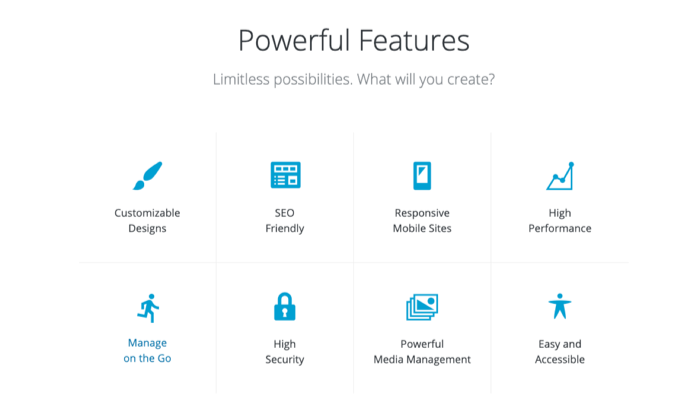
Impressive flexibility: Thanks to WordPress.org, you can have a self-hosted website and the freedom to do anything you want with it. Do you want to change your theme? You can install one of many custom themes online or build one from scratch with PHP and CSS. There’s also an endless list of third-party plugins you can install to improve your website’s look and functionality. From SEO tools to ecommerce extensions, there’s no restriction on how potent you want your website to become. 

WordPress.org features page for WordPress.com Vs WordPress.org

Uncomplicated security setup: Keeping your site secure is as easy as installing a few plugins and letting your hosting provider do the rest. It’s not totally hands-off, but ensuring your website is secure doesn’t require a steep learning curve either. After all, you can easily reach out to your web host or one of WordPress.org support forums if you’re struggling to implement security measures on your own. 

Full ownership and control: Building a website with WordPress.org means you have full ownership of your web property. There is no higher power breathing down your neck that can banish your website the first chance it gets. As long as you’re not doing any shenanigans, you can rest well at night thinking you have full control of your website’s destiny. 

Freedom to leverage SEO: With full control also comes the power to directly influence how your content ranks on search engines. A self-hosted website gives you all the freedom to tinker with different SEO tools that can optimize your images, titles, meta description, site maps, and internal links. Google Analytics is also easy to install to quantify how effective your SEO strategies are and identify areas of improvement. If the user experience is a priority, you can also install and tweak your preferred custom theme to help improve how your readers navigate your website. 

WordPress.org Losses

Lacks simplicity for non-tech savvy users: WordPress.org is an open-source content management system, not a full-blown website. To launch your website, you first need to purchase a domain name and pay for a hosting plan. After downloading the WordPress.org software, have it installed in your web host. Some hosting providers have also made this step easier by offering “one-click” WordPress installation. Although you don’t need to touch any codes, beginners may initially find the whole process intimidating. 

Building and keeping a website are not totally free: WordPress.org itself is free. However, it can’t stand on its own unless you have a domain name and a web host. A domain name is your website address (e.g., neilpatel.com) and will cost a minimum of $10 per year for a standard “.com” domain. On the other hand, a web host is where you’ll store your website files—including WordPress.org—and should cost you a minimum of $3 to $10 per month. And don’t forget the cost of premium themes and plugins that will further hurt your pocket unless you already have a site that pays for itself. 

Routine maintenance: Managing a self-hosted site is like having your own house. You’re free to do anything with it, but you have to fix it yourself should things break. As a website owner, you’re responsible for updating the WordPress software and all the plugins you have installed. Even if web hosts offer backups, these are rarely comprehensive and guaranteed, so you also need to back up the files yourself.

Comparing The Top Website Builders 

Whether you’re a clueless beginner or a tech-savvy webpreneur, my in-depth review of the best website builders will help you choose the platform that will best meet your goals. 

  1. Wix — Best for general use
  2. Weebly  — Best for beginners
  3. Web.com — Best for building landing pages
  4. Shopify — Best for ecommerce
  5. WordPress — Best for content management

Wix is the “jack of all trades” where you can build any website that doesn’t need bells and whistles. If you’re looking for fewer features and a more beginner-friendly platform, this is it.

Weebly will not disappoint with its drag-and-drop interface. Are you building an online store? Look no further than Shopify that is made specifically for this purpose. 

If you just need a landing page, Web.com has a ton of templates you can use. It’s great if you have a lot of campaigns and don’t want to spend all your time designing.

However, if you want to put your content front and center, nothing compares to the functionality of WordPress. As a content management system, it powers 39% of the Internet’s top 10 million websites. And for a compelling reason: It has everything you need to scale, optimize, and get the most out of your content. 


from Blog – Neil Patel https://ift.tt/2Otn5xX
via IFTTT