Thursday, 28 April 2022

How to Use Meta Business Suite (Formerly Facebook Business Suite)

How to Use Meta Business Suite (Formerly Facebook Business Suite)

Businesses spend nearly 115 billion total on advertising across the Meta (formerly Facebook) platforms. Why? It works! And not only that; Meta has great tools that allow you to easily manage and track your business accounts.

Are you struggling to keep up with your Instagram and Facebook marketing?

DMs and comments falling through the cracks?

Do the multiple tabs for all your accounts and features like the Ad Manager drive you nuts?

Then you’re going to fall head over heels with Meta Business Suite, called Facebook Business Suite before Facebook changed its name to Meta.

It’s the platform’s newest creation, designed to iron out the time-sucking road bumps in social media management and make it easier for businesses to manage their Instagram and Facebook profiles.

Below, I’m breaking down everything you need to know about Meta Business Suite. We’ll unpack what it is, everything you can do with the tool, how it can benefit your business and a quick walkthrough on how to set up your account.

What Is Facebook Business Suite (now Meta Business Suite) and How Does It Work?

Meta Business Suite streamlines your Facebook and Instagram accounts into one easy-to-use dashboard.

Through the platform, you can manage all accounts you own or administrate with various tools to make controlling your business’s social media presence much easier.

The best part? It’s free and available on mobile and desktop.

All you need to do is link up your accounts, and you’ll instantly have access to an overview dashboard of your Facebook Pages and Instagram accounts.

You’ll be able to:

  • create a to-do list of notifications to manage
  • check insights on your performance and audience growth
  • create or see recent posts or stories
  • create or manage recent ads
  • see content calendar
  • view content inspiration
  • communicate with an inbox for Facebook and Instagram DMs and comments
  • access the Commerce Manager
  • check Business Suite updates

That’s only the tip of the iceberg.

There’s an entire “more tools” section with 12 other features to play around with, including:

  • appointments
  • ad manager
  • events manager
  • instant forms
  • media library

Facebook (Meta) Business Suite vs. Facebook Business Manager

Before Facebook became Meta, they offered both Facebook Business Suite and Facebook Business Manager. Both options are still offered under Meta.

The Business Manager is a backend tool used to share or limit access to your business accounts by assigning one of six different “roles” to those with access to your accounts.

The Business Suite offers front-end management, like merging notifications, scheduling posts, and managing your inbox.

Facebook (Meta) Business Suite allows you to combine and streamline your activity across the Meta social media and messenger platforms.

Leveraging Meta Business Suite Insights

Meta Business Suite makes it easy to track your business accounts and campaigns across the Meta social and messenger platforms.

Here are some of the insights Meta Business Suite provides and how you can use them:

  • Ad spend: You can track your ad spend across all Meta platforms. Based on how well you’re performing, you can adjust your spend accordingly. For example, if you’re spending a lot on Instagram ads but see via other insights that the ads aren’t performing well, you can redirect your budget towards the Meta platforms you’re more successful on.
  • Engagement: Meta (Facebook) Business Suite allows you to see engagement with your organic and boosted content. You can see what content performs best and use that to inform your future strategies and the content you publish on social.
  • Audience demographics: With Business Suite, you can see data about the users who interact with your profile and content. For example, you can see where they’re from, their other interests, their age, and more. You can use this information to continue creating content that targets your existing users, or adjust your strategies if your content isn’t reaching the right audience.

Using the Meta Business Suite App

The Meta (Facebook) Business Suite mobile app allows you to manage your business accounts from your mobile device.

Everything you can do on desktop, you can also do on mobile. You can monitor your account activity, manage your inbox, and even get audience insights.

How to Use Meta Business Suite

Before you can start streamlining your social media management with Facebook (now Meta) Business Suite, you’ll need to follow a simple setup process.

Step 1: Create a Facebook Business Account

Go to https://business.facebook.com/ and select “Create a Facebook Business Account.” Enter your business account name and select “Next” when you’re done.
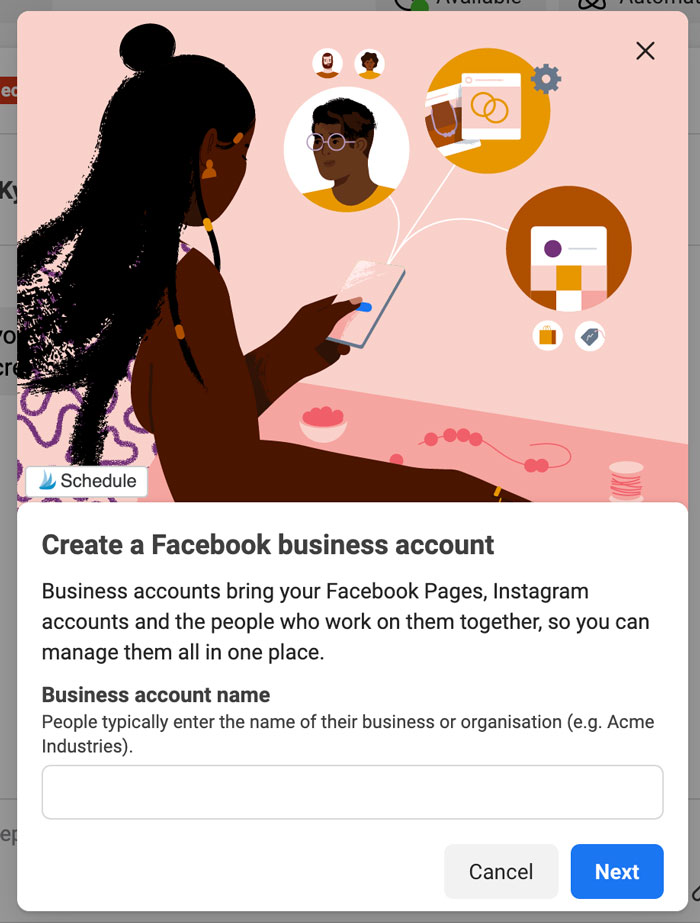
Create a Facebook Business Account in Facebook Business Suite

Step 2: Fill in Your Contact Information

Enter your full name and business email address. This information won’t be shared with your followers. Facebook will only use it to contact you.
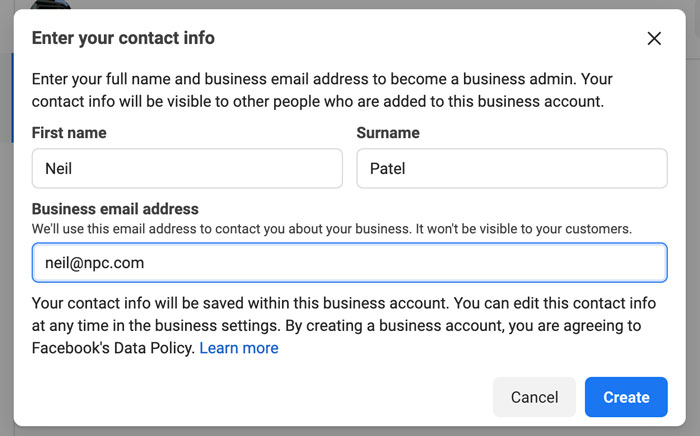
Contact information form in Facebook Business Suit

Step 3: Select Your Facebook and Instagram Accounts

The Facebook and Instagram accounts you own are available for you to claim. If you’re managing an account someone else owns, you won’t be able to select it.

In order to select an Instagram account, it needs to be converted to a business or creator account. If you try to select a personal account, Facebook will ask you to switch before continuing the setup process.
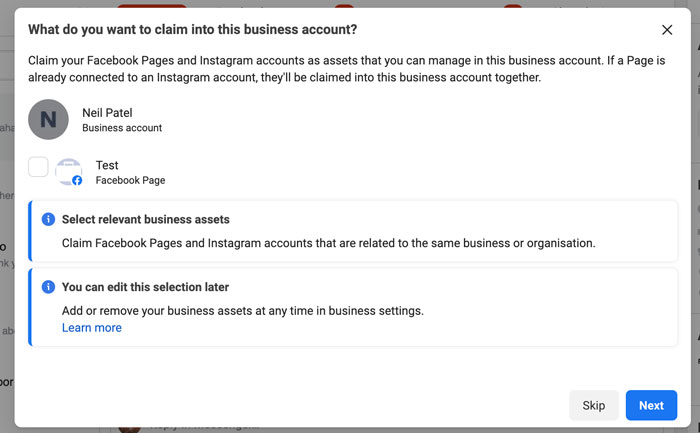
Select your facebook and Instagram accounts in Facebook Business Suite

Step 4: Add People to Your Business Account

Here, you can select your page admins. Enter their email address and assign each contact as an employee (limited access) or business admin (full access).

If you’re running your accounts solo, you can skip this step.
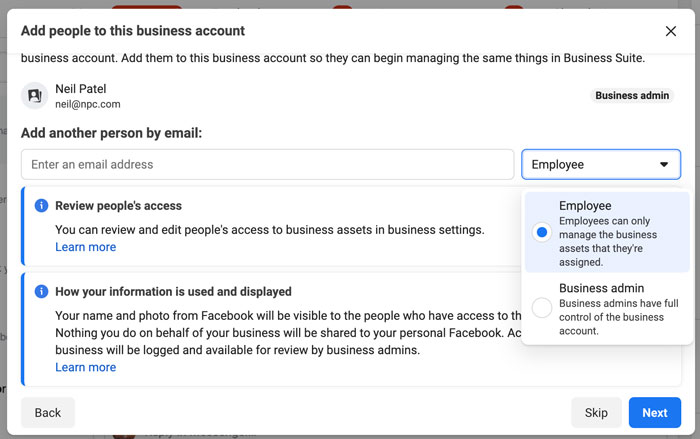
In Facebook Business Suite, add people to you business account

Step 5: Review Your Business Account

When you’re happy with your selection and who has access to your Business Suite, click on “Confirm.” Facebook will then take you to your dashboard overview, and you can start using all the tools inside the platform.
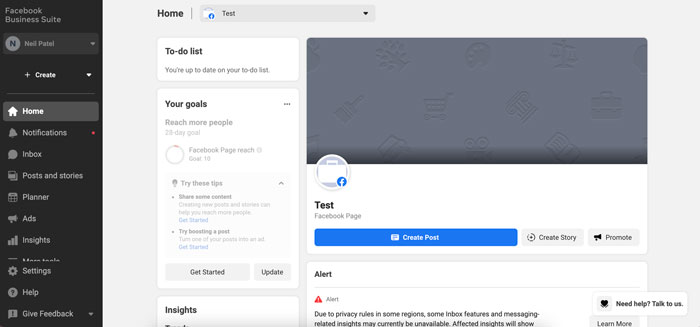
In Facebook Business Suit, review your business account

Tools to Use in Meta Business Suite

Curious about the tools inside Facebook Business Suite? Let’s take a deep dive and look at what you can do with the platform and how it can benefit your business.

Monitor Your Inbox

Are comments one of your biggest time suckers? Do you constantly find yourself hopping between apps on your phone or getting inundated with notifications on your desktop?

With the inbox tool in Business Suite, you can see all your Instagram and Facebook comments in one place.

Pop the kettle on, make some coffee, block out 30-minutes in your calendar and respond to everything at once.

  • What about direct messages (DMs)? You’ll find that here too.
  • Got the Facebook chat plugin on your website? You can manage all your messages here as well.
  • Sick of replying to the same question every single day? Business Suite lets you create automated replies for your frequently asked questions.

How’s that for efficiency?

Explore Insights

There are tons of free and paid tools that show you Facebook and Instagram analytics, but few compare the platform’s built-in option.

With Business Suite, you can see your latest statistics for all your accounts.

Gone are the days of toggling between the different apps or going in and out of individual posts.

On the Insights dashboard, you can see an overview of how your content is performing over a specific time period, and sort your posts by:

  • reach
  • likes and reactions
  • comments
  • shares
  • results
  • cost per result
  • link clicks
  • recent content

One of the most interesting features of Insights is the Audience section. It breaks down your current audience for both platforms, and you can see at a glance:

  • age and gender
  • towns and cities
  • top countries

There’s also a potential audience tab. It details your estimated audience size if you run an ad, as well as the top pages liked by your potential audience.
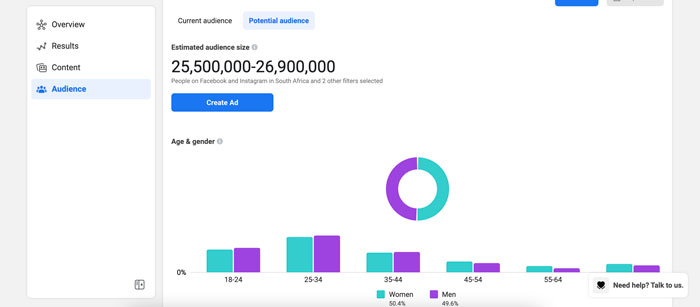
Facebook Business Suite estimated audience size

Not liking what you’re seeing? You can create a custom audience by clicking on the “filter” button and refining the results based on:

  • location
  • age
  • gender
  • interests
  • language
Facebook Business Suite custom audience

Create Posts and Stories

Are you using post-creation apps like Later or Planoly? Business Suite sets itself up as a rival by giving you the ability to create your posts and stories in one place and schedule each one out.

That’s not all.

If you go to the Planner section on your dashboard, you’ll see a calendar view of your past and upcoming posts.
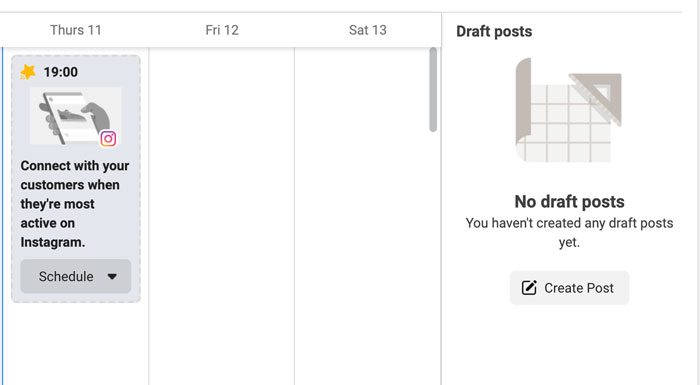
Facebook Business Suite planner section on your dashboard

Facebook also recommends a timeslot of when your audience is most online. Click on it, and you can start creating a new post or story.
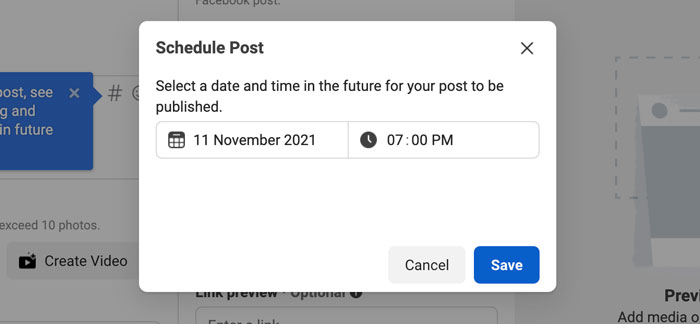
Facebook Business Suite recommended time slot for publishing

One of my favorite features in the “New Post” box is the hashtag tool. It shows you which hashtags are trending, the number of posts using a tag, and lets you save your favorites for later.
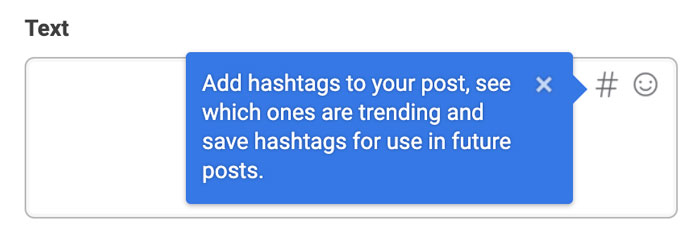
Facebook Business Suite hashtag tool

Plus, it shows you hashtag results for each platform and gives you recommendations based on what you’ve already selected.
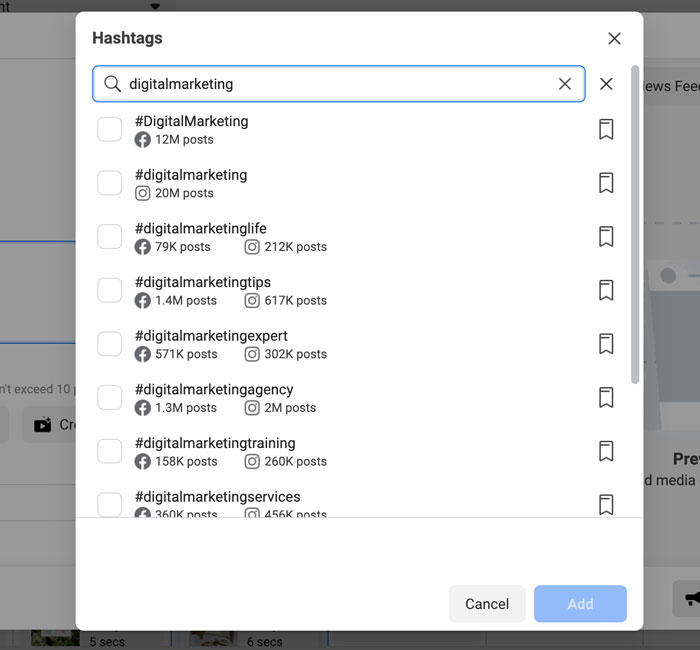
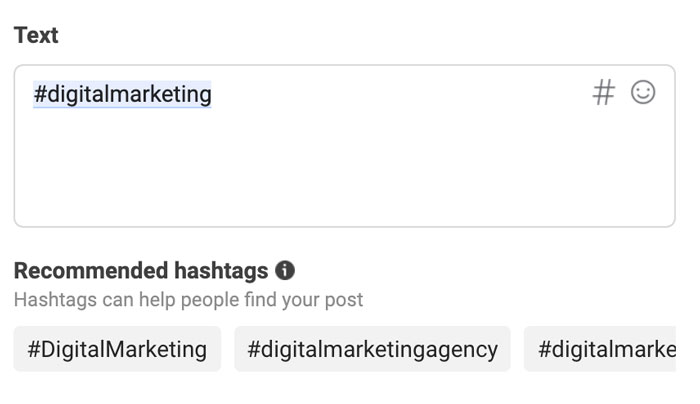
Facebook Business Suite hashtag recommendations based on your previous selections
Facebook Business Suite recommended hastags

While in create mode, you can put together your Instagram and Facebook posts at the same time. Switch between the different tabs, and you can see exactly how your post will look on the two platforms.
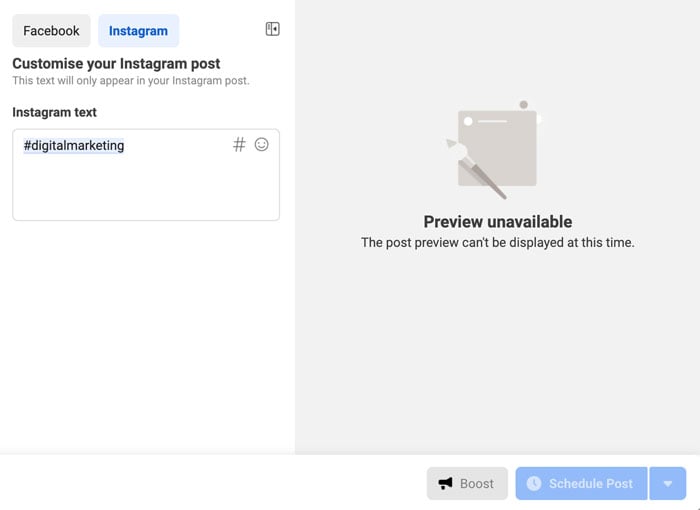
Creating Facebook and Instagram posts in Facebook Business Suite

For Stories, it works the same. Upload up to 10 photos or videos at once and schedule each one out when you’re done.
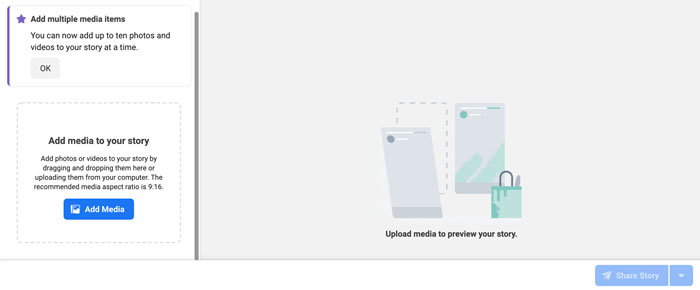
creating stories in Facebook Business Suite

Create Ads

Don’t want to have another tab open for Facebook Ad Manager? You can keep track of your ad performance and create ads from the Business Suite.

It’s another time-saver and allows you to see how you’re tracking towards goals.

On the dashboard, you can see:

  • reach
  • post engagement
  • link clicks
  • page likes

Switch between the different filter views to see your results over the last 90, 60, 30, and 7 days.

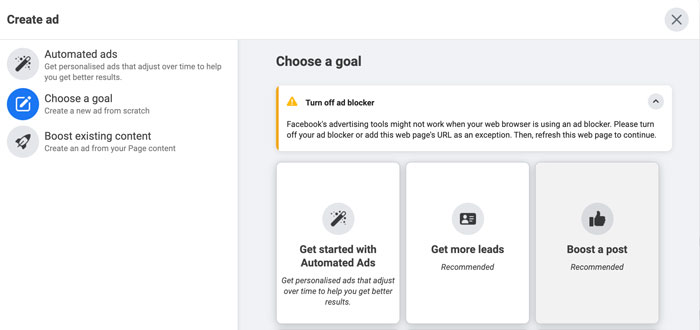
Click on the blue “Create Ad” button in the top right-hand corner to create an ad. A pop-up will load and take you through a step-by-step process for setting up a creative that converts.

First, you’ll select your ad goal. You can choose from:

  • automated ads
  • get more leads
  • boost a post
  • boost an Instagram post
  • promote a page
  • get more website visitors
  • get more messages
create an ad on Facebook Business Suite

Next, start designing your ad creative. You’ll see a live preview as you adjust your text and media.

Turn on automatic adjustments if you want Facebook to tweak your ad for each viewer. For example, the platform might adjust the brightness or show the original aspect ratio if it thinks the ad will perform better.

Scroll down to select your audience or create a new one, placements, and set your campaign budget and duration.

When you’re done, click on “Promote Now” for your ad to go into review.

Create Appointments for Your Business

Remember those extra options I spoke about earlier?

One of the most important features of an online business is the appointments scheduler.

If you’re running a service-based business, take advantage of Facebook’s capabilities and empower your audience to book directly through the platform.

When people don’t need to log onto another site to complete the process, you’re removing an extra step and making it that much easier to close a sale.

The result? A boost in your bottom line!

Inside Business Suite, you can manage your appointments, view requests, and adjust the settings to suit your schedule.
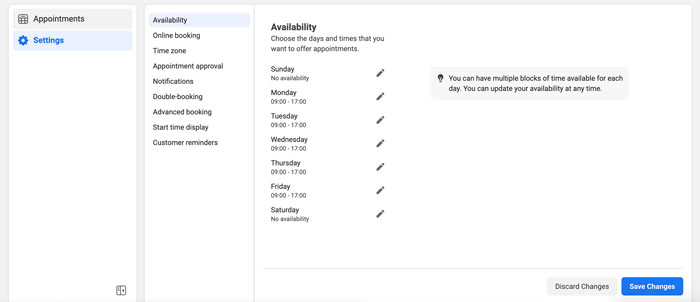
Manage appointments with Facebook Business Suite

Generate Leads With Instant Forms

Does your business rely heavily on lead gen? Start using Facebook’s Instant Forms.

What are Instant Forms? Think of it as a mini CRM system. When you create an ad and set your objective to find leads, you can create custom forms users can fill out without leaving the platform.

Again, you’re removing the obstacle of trying to get them to go from one website to another. Thus, improving your chances of someone filling out the form and requesting a callback.

With Business Suite, you can manage your forms and set up the CRM system.

When you create a form, Facebook offers different options depending on your lead generation goal.

For example, you can create a “more volume” form (a quick option) or a “higher intent” (adds an extra step for users to review their information before submitting).
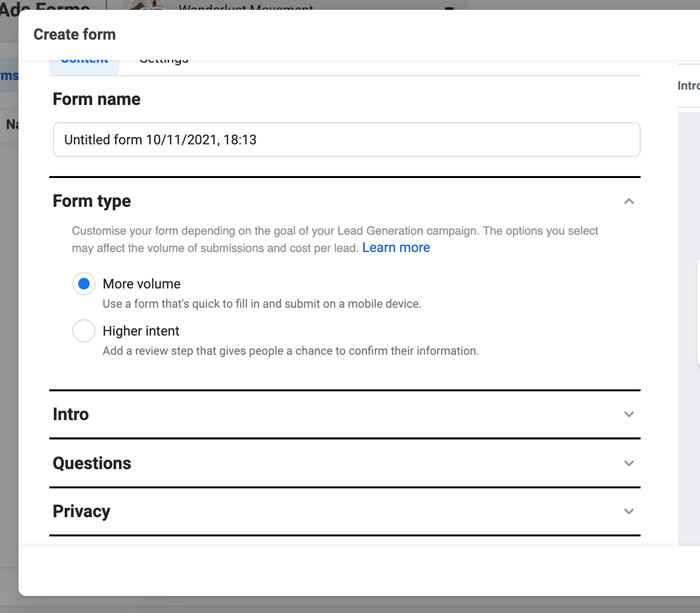
lead forms in facebook business suite

Frequently Asked Questions About Meta Business Suite

What is Meta Business Suite (formerly Facebook Business Suite) used for?

The Meta Business Suite is used for managing your Facebook Pages and Instagram accounts in one dashboard. You can reply to comments, create posts, schedule stories, run ads, and more.

How do you qualify for Meta Business Suite?

You need to have a Facebook page. If you have an Instagram account, you’ll need to convert it to a business account if you want to sync it to your Business Suite.

Is Business Suite on Facebook free?

Yes, Business Suite is free on Facebook to set up and use. All you need is a Facebook account and a Facebook Page to get started on the platform.

Is Facebook Business Suite the same as Meta Business Suite?

Yes, Facebook Business Suite is the same as Meta Business Suite. It was renamed “Meta Business Suite” when Facebook rebranded to Meta.

Conclusion: Meta Business Suite (Formerly Facebook Business Suite)

Meta Business Suite is perfect for creators, personal brands, and businesses to streamline their social media management across Facebook and Instagram.

It gives you everything you need to monitor your growth, stay on top of comments and DMs from your audience, schedule your content, create ads, and so much more.

If you’re only using these two platforms to run your business and you’re using other social media management tools, it’s worthwhile to take a peek inside Business Suite. You might find it’s a more robust tool, and you can nip another business expense from your monthly budget.

What are your thoughts on Meta (Facebook) Business Suite? Are you going to make the switch and use it to manage your Facebook and Instagram accounts?


from Neil Patel's Digital Marketing Blog https://ift.tt/SXPCcV0
via IFTTT

Wednesday, 27 April 2022

Link Building Strategies and Resources for Busy Marketers

In the past, link building focused on quantity, not quality.

Today? Link building is a different ball game.

If you’re building a link building strategy, it’s important to know that it won’t be instant. It’s a gradual process—at least, if you do it right.

That said, Brian Dean of Backlinko.com was able to grow search traffic by 110 percent via a link building strategy known as the “skyscraper technique.”

The pages where you build links, specifically the quality and authority of those pages, play a key role in determining how high you’ll rank in search engine results.

Blogging is an obvious way to get backlinks to your website. However, there are plenty of other proven ways to build the best links and raise your ranking in the SERPs.

This blog post will show you 13 fool-proof link building strategies you can put to work today. They’re especially helpful for busy marketers who have a lot on their plate and want to stay mindful of their standing with search engines.

What Is a Link Building Strategy?

Link building strategies refer to the techniques marketers and SEOs use to get other websites to link back to their own.

For example, if you run an e-commerce site that sells camping gear, you could write a blog post about camping safety precautions. Other websites that discuss safety issues may then link to your blog post so their users can find more information on the topic.

Why are Link Building Strategies so Important?

Link building is important for search engine optimization (SEO). It’s one of the major factors search engines use to determine rankings, meaning who gets the first-page search result.

In fact, pages in the top spot in the Google SERPs have an average of 3.8 times more backlinks than the pages in spots 2-10.

When deciding how to rank your website, Google, Bing, Yahoo, and other search engines look at how many links lead to your site (and the quality of those links).

The more high-quality, trustworthy, and authoritative sites linking to you, the higher your blog posts and sales pages will appear on search result pages.

Beyond that, links to your website help users find your site and can increase traffic and trust. After all, users are more likely to trust you if other sites think you know what you are talking about.

13 Link Building Strategies for Marketers

In a 2020 survey taken by more than 800 professional SEOs, nearly 40 percent of respondents said they spent over $1000 per month on link building.

But what strategies, specifically, should you invest in? And how do you get high-quality links from other websites? By following my link-building strategies.

These are the strategies I’ve used over the last ten years to build up Neil Patel Digital and become an authority in the digital marketing space.

Experiment and find a strategy or strategies that work best for you and your business.

1. Use Strategic Guest Blogging

Is guest blogging dead? Yes and no.

The old way of mass guest blogging just for links is dead. You don’t want to post an article on a site that’s not relevant to your niche and has zero authority just to get a backlink.

That style of guest blogging won’t cut it. The search engines are smart and can see you’re not guest blogging to add value.

However, in a 2021 survey, 60 percent of the bloggers who responded said they write between 1 and 5 guest posts a month.

If you want to reap the rewards of guest blogging, you need to be strategic and authentic. Make sure you’re creating a unique piece of content for the other site (for example, a case study) and that the site is relevant, authoritative, and attracts your audience.

When you guest blog selectively, you’ll reap the rewards of higher rankings, increased traffic, and qualified leads.

2. Create and Distribute Infographics

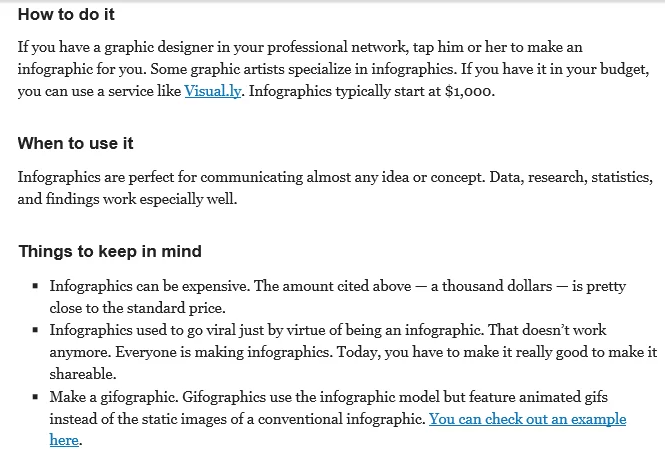
56 percent of companies use infographics, and 84 percent of those who use them find them to be effective. That’s because infographics still work today and can play a vital role in your link building strategy.

The good thing about infographics is you’ll continually generate organic traffic to your blog and earn quality links without even asking for them.

Link Building Strategies for Marketers - Create and Distribute Infographics

If you’re ready to create and promote your infographic, see the links below:

3. Get Active on Social Media

Ahrefs recently completed a link building case study. They got links from five different states for which they hadn’t done any outreach due to their social media efforts.

Social media networks have revolutionized marketing and can be a huge boon for your link building plan and guest post efforts. If you’re not active on social media, then you’re doing your brand a disservice.

Become active by sharing new posts, images, and updates. Help your fans find what they want to see by sharing it in more places using social media.

When you get active on social media, you can easily boost engagement, even if you’re new to it. Consequently, you’ll expose your brand and site to more people who could share your best posts with their target audience.

This will improve your link profile and bolster your visibility overall.

See also:

4. Use Resource Links From Trusted Sites

It’s time to start using resource links from trusted sites. A resource is like a guide that you create or compile for your target audience.

Some authority sites and blogs like Forbes, Entrepreneur, Huffington Post, Jeff Bullas, Social Media Examiner, and Copyblogger have resource pages that you could tap into as you’re creating yours.

If a leading site in your niche has compiled a list of blogs in your industry, their visitors can more easily find what they’re looking for.

Here’s an example from Copyblogger.

If you can create an even bigger resource article than the one above, you’ll get more backlinks. You can expand yours to 25, 50, or more.

Here are some fresh headline ideas that you can model for your resource:

  • 25 Copywriting Blogs That Will Make You More Money
  • 50 Copywriting Blogs You Didn’t Know Existed
  • 27 Copywriting and Content Marketing Blogs That Will Send You Free Traffic

This kind of resource can be a great tool for a marketing team. After it’s written, get links through email outreach. Send a simple email to all of the people whose blogs you included.

I once sent emails to 30 bloggers whom I referenced in my resource post. Twelve of them linked to my resource page within ten days, and I got lots of social love.

Email outreach tends to work better than the typical broken link or link request email because you’ve linked to them first.

You’ve established a certain level of trust, and you’ve shown some appreciation to them as well. They’ll be more inclined to reciprocate your generosity by linking to your web page.

5. Leverage the Broken Links Strategy

According to a Semrush study, 42.5 percent of websites have broken links. You can capitalize on this with the broken link strategy.

The broken link strategy may be the best way to go if you’re too busy to write content for your blog or a guest post.

As a busy marketer, I know you’ve got limited time to write content. That’s one reason why a large number of B2C content marketers struggle to create engaging content for their customers.

How does broken link building work?

This link building strategy is simple: Find pages on blogs with dead links (links that no longer work) and suggest replacing the broken link with a link to similar content on your own site.

If I linked to a particular web page from my Neil Patel blog and found the links to be dead, I could easily replace it with another relevant and high-value resource. If that high-value page belongs to you, that’s both search engine optimization juice and a valuable link.

There are several in-depth guides to help you understand the concept of broken link building and how to get it right the first time. You’ll find these resources really helpful:

6. Grow Your Personal Brand

One of the top link building strategies is growing your brand. Your brand evolves from your thoughts, then begins to express itself externally.

When it comes to link building that works, recognize that people will naturally link to you as your personal brand grows.

What do I mean by that? Let’s pause for a moment here.

While different definitions might circle through the marketing world, a natural link is a link that’s a) editorially earned, and b) organic in the context it appears.

It’s not part of a sponsorship or paid in any way. Often, a natural link gives credit where credit’s due, and it’s something every pro blogger should be after.

I’ve watched how powerful a natural link can be. Whenever I publish a new blog post, within 24 hours, I usually see new links from authority blogs.

Earning that comes back to the quality of your content and your brand. In a sense, your brand represents you. My definition of a brand is “your representative when you’re not there.”

I’ve been marketing online for over a decade. Throughout this time, one of the most effective strategies I used to grow my personal brand was consistent blogging. When you blog consistently, you get more attention.

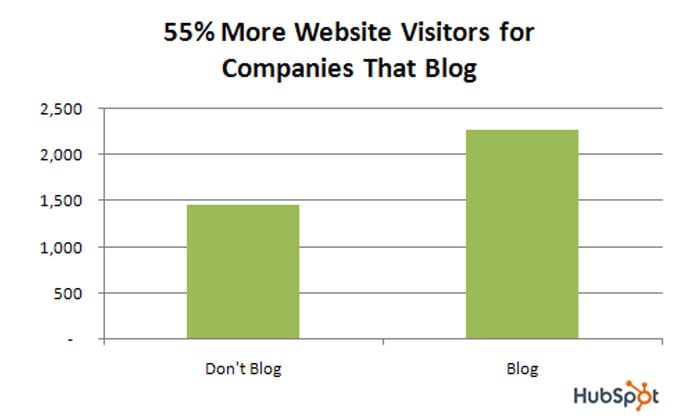
If link building is part of your strategy, get serious about blogging. You’ll get 97 percent more inbound links, and that will also improve your search engine rankings.

Link Building Strategies for Marketers - Grow Your Personal Brand

7. Check Competitors’ Backlinks

If your competitors are ranking higher than you in the search engines, they may be on the right track. You can be there, too.

There’s nothing as powerful as spying on your competitors to know where their links are coming from.

Spying on your competitors helps you see what keywords they’re ranking for, where their best links are coming from, and what they’re currently doing that helps them succeed is called “competitive analysis.”

So how do you check your competitor’s backlinks?

Follow these steps:

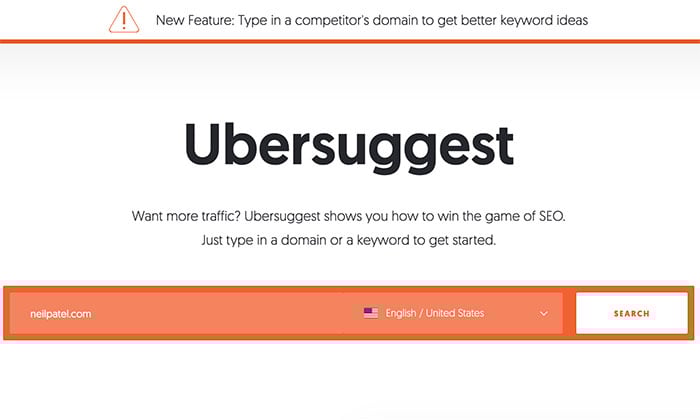
  • Step 1: Go to Ubersuggest and type in your competitor’s domain into the search bar.
Link Building Strategies for Marketers - Check Competitors' Backlinks
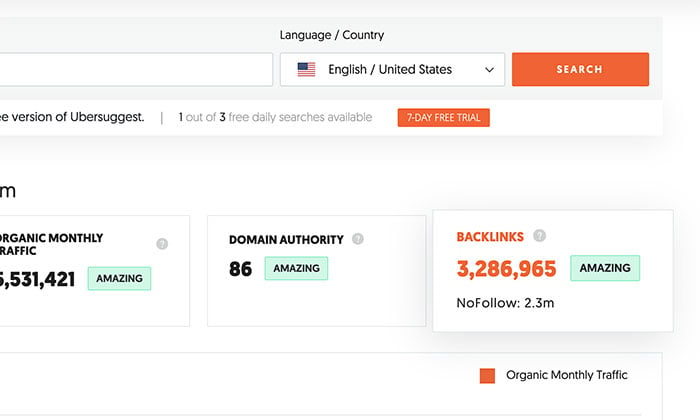
  • Step 2: On the results page, click on the backlinks box.
Link Building Strategies for Marketers - use Ubersuggest to Check Competitors' Backlinks
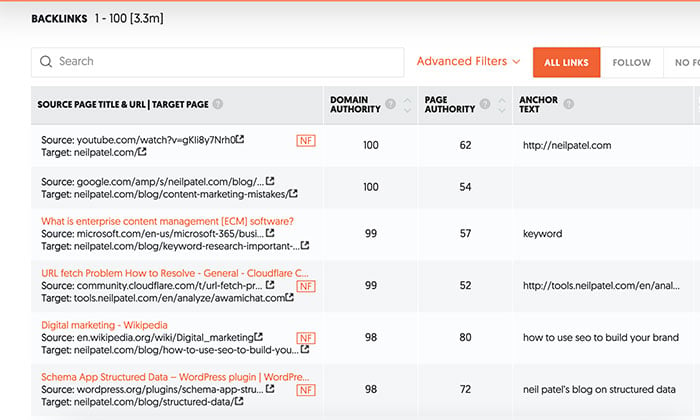
  • Step 3: Scroll down to see a list of sites linking to your competitor.
Link Building Strategies for Marketers - Use Ubersuggest to Check Backlinks

When you know which sites your competitors are generating their backlinks from, you’ve won half the battle—now you can focus on sites that are yielding results instead of reinventing the wheel.

8. Replicate Your Competitor’s Best Links

Now that you know where your competitors got their links, you need to answer the next question: How can you replicate their success?

For example, if you find several links are from related blogs, especially on the author profile, it’s obvious that guest blogging is working for them.

If their links are from corporate sites, your competitors are probably getting links through outreach and networking.

On the other hand, if their links are from high-value sites such as Entrepreneur, Forbes, CNN, Huffington Post, and the like, then you should know that a columnist or editor is likely involved, and this might be a paid placement.

Use Ubersuggest to help you focus on the links with a high domain and page authority. You want natural links from websites that Google (and the rest of your industry) already view as a thought leader.

9. Create Link Building Roundups

Recently, a blogger got over 20,000 page views in six days with his first roundup post.

If you want the right links, you’ve got to give first. Don’t be selfish with your posts by linking to your internal pages only. Learn to link out to other useful blog posts.

Link roundups are a powerful method of networking and a great link building strategy. All you need to do is create a list of blog posts from other bloggers.

How do you create link roundups?

First, find blog posts that are relevant to your topic. For example, if you want to compile a list of 50 blogs that deal with headline writing, you’d simply go to Google and try this search string:

intitle: roundup “YOUR KEYWORD”

You also want to pay attention to your traffic and current link profile. More blogs in your industry may be linking to your posts. When writing your roundup posts, start with the blogs that have sent you traffic.

Remember when you do a roundup post, don’t link solely to your internal pages. Site owners may not be inspired to link back to you because you didn’t use the principle of reciprocity.

Link to their posts, and they’ll be more likely to reciprocate by linking to your resource page.

10. Keep Track of Your Backlinks

Most people spend time and money to get new links, but they don’t track their status.

If you don’t track your backlinks, how will you know whether to build more or pause? You may have over 800 links pointing to your web pages right now, but when you check it after 30 to 60 days, some of the links might be gone.

Why?

You don’t have control over the blogs and authority sites that link to you. The site owners can easily remove your link from their post or resource page without notifying you.

This is why it’s important to monitor your backlinks.

If you’re not sure of the number of backlinks your site currently has, here’s how to find out.

  • Step 1: Visit Ubersuggest, type in your site’s URL, and click on “search.”
  • Step 2: Click on the backlinks box.
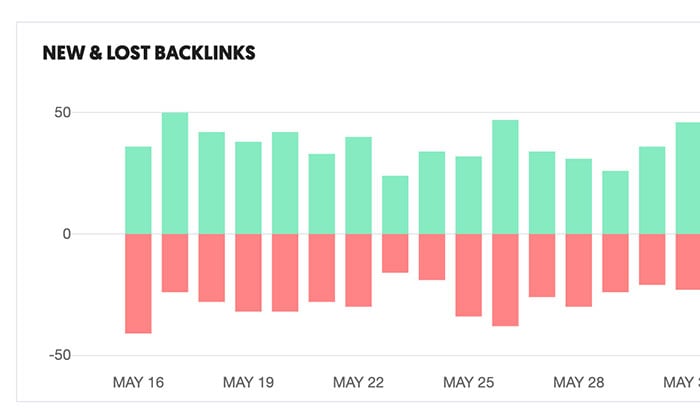
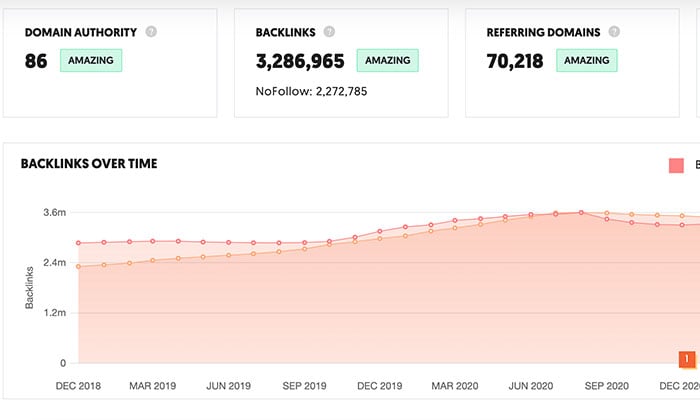
  • Step 3: Scroll down, and you’ll see a graph detailing links you’ve gained and lost.
Link Building Strategies for Marketers - Keep Track of Your Backlinks

Besides seeing who is linking to you, the backlinks tool also shows each site’s anchor text, DA, and page authority.

There’s also a graph showing your backlinks over time. This is useful to see if your link building strategies are paying off or if it’s time to try something new.

Link Building Strategies for Marketers - Keep Track of Your Backlinks with Ubersuggest

11. Establish Content Pillars

If you want people to take your content seriously, then you’ve got to write things that make people think. Create useful content, content that actually helps them do something, and the links will follow.

Content is the lifeblood of your online business. Whether you’re selling information products, like e-books or software, or you’re into physical products, like digital cameras and hard copy books, you’ve got to give people a reason to publicize you.

The challenge of creating content is frequency.

How often should you publish new content for your target audience?

Constantly bombarding them with one blog post after another may not be helpful, as it generally leads to information overload.

The real challenge is when and how often you need to publish new content for your prospects and customers. Some customers don’t mind if you posted daily, but it seems like a boatload of work to others.

This leaves you with two options:

  • ask your customers questions
  • create pillar content once in a while

You’ll likely get different responses from your email subscribers, blog readers, prospects, and customers if you follow the first option. This ends up complicating things.

The second option is a lot better. Instead of regularly creating and publishing new content, you can save yourself the hassle and create pillar content regularly.

What is pillar content?

According to Yaro Starak it is:

“A pillar article is usually a tutorial style article aimed to teach your audience something. Generally they are longer than 500 words and have lots of very practical tips or advice…This style of article has long term appeal, stays current (it isn’t news or time dependent) and offers real value and insight.”

When you start creating pillar content, you’ll no longer struggle to write and publish new posts every day of the week, yet your traffic will grow.

Instead, you’ll bring in traffic from users and other sites that are interested in the valuable content you’ve created.

If you want to increase conversion rate, generate organic and referral traffic and improve your search rankings, spend more time creating pillar content. It’s a great way to improve your link profile.

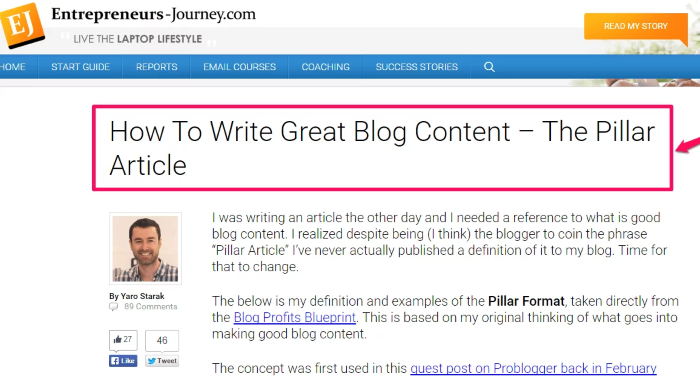
You could format your content pillar using the “how-to” style, as in this example from Yaro Starak:

Link Building Strategies for Marketers - Establish Content Pillars

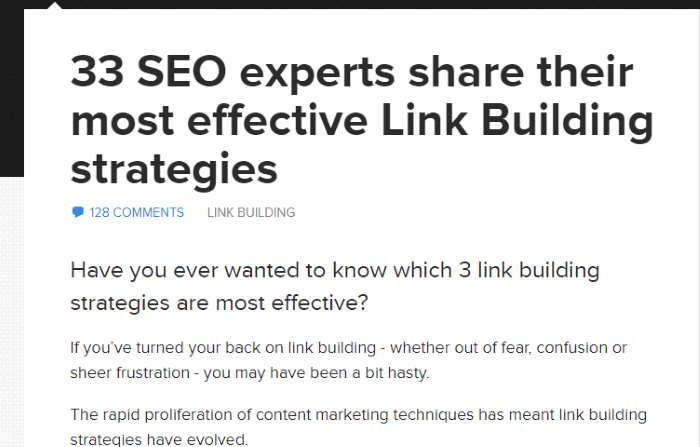
Alternatively, you could make your post a top list, like this one from Wordtracker.com:

link building guide - pillar post example

12. Reclaim Links Through Social Mentions

Over 2 percent of external links across the internet are broken, according to Semrush.

Link reclamation is a popular topic in search engine optimization and the social media world. You can reclaim broken 404 links and name drops that don’t link to your blog.

Check your Google Analytics for 404 pages that people link to, then point them to another active and relevant page while you fix the 404 pages.

Alternatively, you could just go ahead and fix your broken page to reclaim your links.

However, we’re particularly concerned about link reclamation through social mentions.

If you’ve been monitoring your brand and social media mentions using Google Alerts and not taking advantage of those mentions, then you’ve been making a mistake.

When you publish infographics with an attribution code below the graphic, your goal is to get people to embed the code on their blogs and link back to you.

How many of these people use your code or link back to the primary source?

I design and promote lots of helpful infographics. A lot of sites may decide to publish my infographics for their readers to enjoy.

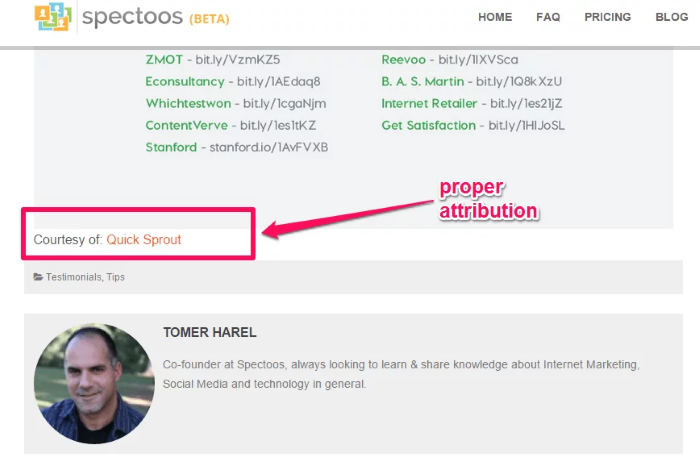
They’re supposed to credit my blog, but what if they saved the graphic and just uploaded it to their blog post? How do I reclaim what rightfully belongs to me, the link?

Follow these simple steps:

  • Step 1: Use Google Images Search. Do a keyword search for the complete title of your infographic.
  • Step 2: Click your infographic and visit the page. Check whether your link is attributed correctly or not.
Link Building Strategies for Marketers - Reclaim Links Through Social Mentions

You can see that Tomer Harel linked to my infographic page on QuickSprout.

Beyond infographics, you may want to know who is mentioning your blog URL. You can ask for the link once you discover that your name or URL was mentioned but not linked to your web page.

13. Earn Editorial Links

Editorial links don’t happen by chance. You create them by providing value. This is what Google has been after since the first Google Panda, Penguin, Hummingbird, and Mobile-geddon updates.

Editorial links are the most valuable and sought-after links because they’re freely given by sites that aren’t looking for anything in return.

The nature of editorial links is this: your content must be compelling before people link to it.

If all of your links are acquired or built manually, you’ll struggle to retain all of them, and Google may penalize you because you can’t be that careful all of the time. To avoid wasting time and effort, why not focus on producing great content?

Yes, I know that I’ve said it over 50 times in the past 30 days, but if it weren’t important, I’d have ignored it. I create high-quality content every day, and thousands of people link to it. My link profile thanks me for it.

To earn editorial links, you can start blogging with a strategy. Write content that will help people move from Point A to Point B. Create more tutorials and pillar content and make sure that you include accurate data in all of your content.

Read this guide on how to create better content that will earn you editorial links.

Link Building FAQs

Is link building dead?

No. It’s changed from focusing on the number of backlinks to the quality of backlinks.

What is a link building strategy?

The practice of gaining links back to your website to improve your authority and search engine rankings. Common link building strategies include creating infographics and guest posting.

Do I need permission to backlink to another site?

No, you do not need permission to link to another site.

What's the most common link building strategy?

Guest blogging is one of the most popular link building strategies. It’s all about creating quality content people want to link back to.

What's the best way to find the authority of a website that gives you a backlink?

Use a tool like Ubersuggest to find the Domain Authority for websites that give you backlinks.

Conclusion: Link Building Strategies

Your website’s link profile is one of the most crucial factors for ranking in search engine results. Remember, Google doesn’t care so much about how many links point to your pages, but rather about the experience you create for users.

Be smart and strategic about blogging, social media marketing, search engine optimization, and any other marketing techniques you use to build links.

Your real challenge isn’t link building, but earning quality, trusted, and natural links. That’s because it’s no longer about the number of links—it’s the quality that matters.

Follow these fool-proof link building strategies, and you’ll be on your way to building a successful blog that both users and Google will love.

Which of these link building best practices have you used?


from Neil Patel's Digital Marketing Blog https://ift.tt/k7nBx2C
via IFTTT

Monday, 25 April 2022

12 Local SEO Tips For Small Businesses You Can’t Ignore

12 Local SEO Tips For Small Businesses You Can't Ignore

As a small business, ranking for keyword terms can be difficult. With larger, more resourced businesses targeting those same terms, it can seem impossible to nudge your way to the top of the search engine results pages (SERPs).

How are small businesses expected to rank highly on SERPs? Fortunately, with the use of local SEO, there’s more than a good chance.

If there’s one thing that’s certain, it’s that local SEO has never been more important for small businesses than it is now. Just consider that “where to buy” + “near me” mobile queries have grown by over 200 percent from 2017 to 2019.

In addition, a recent study found that 69 percent of digital traffic is organic and local—meaning it’s more important than ever that your small business tightens up its local organic SEO strategies.

This guide will introduce local SEO for small businesses. We’ll then cover 12 local SEO tips and the tools you need to begin your journey.

What Is Local SEO for Small Business?

Search engine optimization (SEO) is the process of improving your website to increase the chances of it being seen when people search terms related to your business. Local SEO is a similar venture but with a particular focus on local keyword terms.

The goal is to drive local traffic to your website—traffic that’s more likely to convert, whether online or offline.

Why Is Local SEO Important for Small Businesses?

With more people relying on online information to make offline purchases, local SEO for small businesses has never been more important. In fact, one study found 78 percent of local searches on mobile result in an offline purchase. You can’t argue with those results!

Other reasons to optimize your website for local SEO include the opportunity to build your website up as an authority and educate your target audience on your products and services.

Your local SEO efforts don’t have to center around increasing sales. You can also use local SEO strategies to drive traffic to your website for the purpose of informing or educating.

12 Local SEO Tips for Small Businesses

Many local SEO tips can be implemented within minutes, while others take considerably more time. However, each of the tips below can greatly benefit your local business, both online and offline.

1. Optimize for Google My Business

Google My Business is a business directory owned and operated by Google. The goal of the platform is to provide the most accurate business information for local businesses to searchers.

With this in mind, most businesses will have a Google My Business listing within a year or so of starting their business. This is done automatically as Google learns of your business through its website crawl bots.

The problem with an automated listing, though, is that information may not be complete or accurate. Only when you claim your listing can you ensure you’re getting the most from the platform.

If you need even more reason to claim or create your own listing, then consider that businesses with 4 or more stars on Google My Business outrank those with less than 4 stars by about 11 percent. As a small business, you can’t afford to lose out on that edge.

How can you completely optimize your Google My Business listing? Here are a few essential steps to get you started:

  1. Claim or create your Google My Business listing.
  2. Complete profile data and publish your listing.
  3. Add photos and videos of your business and offerings to your profile.
  4. Respond to ratings and reviews in a professional and timely manner.
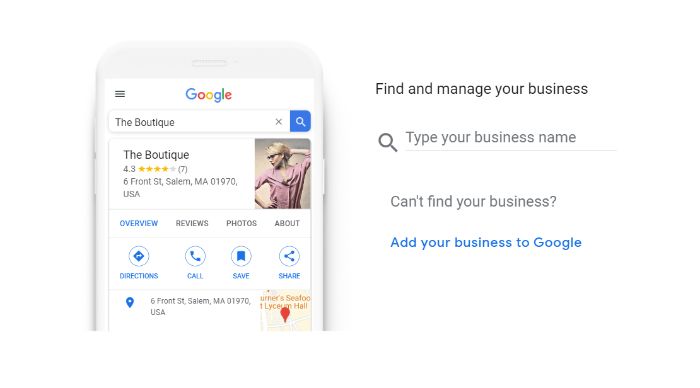
claim your profile for google my business to help local seo for your small business

It’s important that your business information is accurate and updated. You should ensure updates are made at least monthly, though weekly monitoring of your listing is important to success.

2. Claim All Business Directories

Speaking of business directories, you must be sure to stake your claim in all business directories. The most popular include Google My Business mentioned above and Yelp.

You may think that a Google Business Profile is sufficient to bring in traffic, both online and in-store. However, consider that a Yelp page is present in the top 5 results for 92 percent of search queries that contain a city and business category.

What difference does it make for your listing to be in the top 5 results on Google? The top 5 results on the SERPs account for 80 percent of click-throughs on the first page of Google. The first organic result alone accounts for almost 40 percent.

All of this to say, you can’t afford to not claim your business on all directories wherever possible.

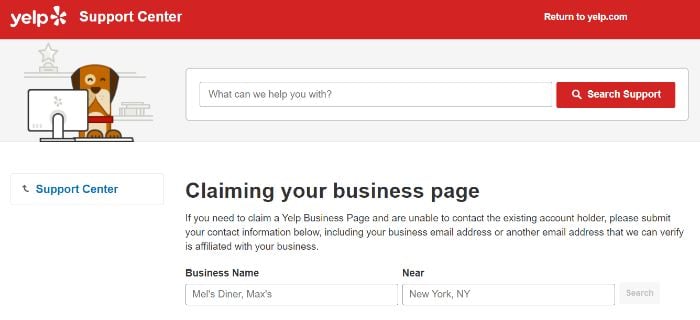
Fortunately, business directories make it easy to claim your listings. To claim your Yelp business page, for example, you can begin the process by verifying your business information.

claim Yelp local seo for small businesses

While Google and Yelp are the big dogs, other business directories to consider are Facebook, Bing, Yahoo, and Yellow Pages.

3. Perform a Local SEO Audit

Now that you’re established on business directories, it’s time to understand the landscape. This enables you to see what your competitors are doing so you, too, can make the same improvements (and better) on your website.

Results on the first page of SERPs provide the most insight and inspiration. After all, the first three positions alone account for 66.5 percent of the click-throughs on the SERPs!

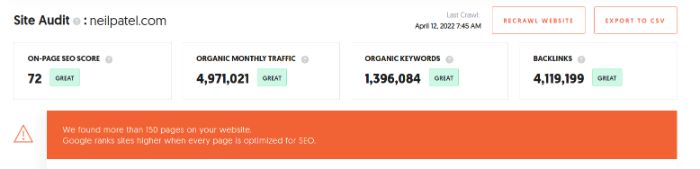
As you begin your audit, first consider free tools and analyzers like the SEO Analyzer. These tools give you a detailed overview of your website’s current status and what you can do to optimize.

neil patel seo analyzer for local seo for small business

Next, use your target keywords (which you’ll work out in the next section), and compare your website to the top five of each SERP. Consider types of content, website structure, page elements, and keyword density.

I would recommend keeping a spreadsheet of your findings to easily track and implement your changes.

4. Target Local Keywords

As a small business, keyword targeting can be daunting. You know you’ll be lost in the sea when you target high-volume keywords, but lower-volume keywords tend to yield little return.

As a local business, you actually have an edge when it comes to keyword targeting. “Near me” search term variations increased as little as 150 percent (e.g. “near me now”) to as much as 900 percent (e.g. “near me today/tonight”) in just a few years. This means that targeting a combination of high volume and local keywords can work in your favor.

What do I mean in practice?

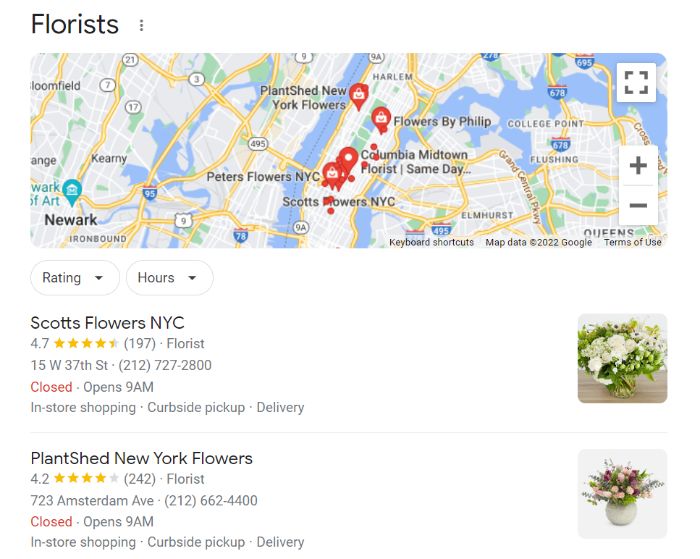
Let’s say you own a local flower shop. Your website naturally contains many high-volume keywords, such as “florist,” “flower shop,” and “flowers for sale.” The fact is you’re unlikely to beat out national flower providers, like 1-800-Flowers and Sam’s Club, with those keywords.

The goal should be to optimize your website with local keywords.

local organic keywords for local seo for small businesses

For example, search your website for every instance of “flowers for sale.” You’ll want to be wary of keyword stuffing, but take care to change most of these instances to more specific, local terms, such as:

  • “flowers for sale in [city or zip code]”
  • “[city or zip code] flowers for sale”
  • “flowers for sale [city or zip code]”

You don’t have to target only your specific town and zip code, though. Consider areas within 10 or 15 miles of your business and target those local keywords, too. This is especially good practice if you live in a smaller town outside of a larger city or metro area.

5. Encourage (and Reward) Customer Reviews

When was the last time you visited a restaurant or purchased an item without researching ratings and reviews? If you’re like 82 percent of consumers performing an online local search, then the answer is never.

Customer reviews are the lifeblood of your business. This is particularly true for new and small businesses.

How can you obtain online customer reviews?

First, ensure there is a place for customers to leave reviews. If you’ve claimed your Google My Business profile and Yelp business listing, then you’re off to a great start.

Second, offer an incentive to customers who leave reviews. Whether by word of mouth or marked on in-store receipts, let customers know they will receive a discount or a complimentary item for their rating and review.

The work doesn’t stop there, though. You must respond to all reviews, negative and positive. This gives you an opportunity to engage with your customers, and it can also instill faith in your brand by those who have yet to purchase.

6. Create Local Content

Above we talked about targeting local keywords while avoiding keyword stuffing. The best way to do this is to create local content for your website or website’s blog.

Local content can be a blog post, a news release, or a static web page. You can use these various content types to highlight local events (past and upcoming), local offerings, local business roundups (e.g., local businesses that complement but don’t compete with yours), or even to educate the public on your product or service.

The more natural content you have on your website, the more easily you can target local keywords. It can also help to establish you as an expert in the field, which is crucial for small business owners competing against larger businesses.

Continuing with the example of a flower shop, here are a few content ideas that will naturally target both the audience and the keywords:

  • Blog post: #X [your state] Flowers for Year-Round Decorating
  • Static web page: Our Local [your state] Flower Offerings
  • Static web page: [your state] Garden Flower Offerings
  • Blog post: [your state] Flower Events for [season/year]

7. Implement a Local Backlink Strategy

A backlink is a link to your website from another site. Depending on the quality of the third-party websites and the number of links to your website, this can have a considerable impact on your website’s authority.

Authority is a critical piece in determining how high your website ranks on the SERPs. How do we know this? Consider that the #1 result in Google has an average of 3.8x more backlinks than positions #2 to #10.

How can a small business website begin to build its backlink profile? A few things to consider are:

  • writing guest posts for relevant, high-quality websites in your industry
  • engaging in influencer outreach
  • participating in link outreaches
  • “listening” for brand mentions
  • writing shareable content

Speaking of shareable content, the key to any successful backlink strategy is quality, reasonably lengthy content. After all, it’s known that long-form content receives 77.2 percent more backlinks than short articles.

You don’t want long content for content’s sake, so keep the post relevant, valuable, and free of fluff.

8. Become Mobile-Friendly

Considering 82 percent of smartphone shoppers conduct “near me” searches, you can’t afford not to have a mobile-friendly site.

The hard work isn’t getting traffic to your site, but instead keeping it there once it arrives. If your site isn’t mobile-friendly, then local searchers will quickly leave your site and consider a competitor instead.

What is a mobile-friendly site? The four basic elements that every mobile-friendly site should contain include:

  • responsive page display
  • readable fonts
  • proper text formatting
  • optimized media display

Beyond a mobile-friendly website, you must also produce mobile-friendly content. The good news about mobile-friendly content is that it’s also viewable for desktop readers.

What does such content consist of?

  • short paragraphs
  • white space
  • subheadings
  • a summary
  • images
  • lists
  • styling (e.g., bold, italics)

If you’re not a web developer, the idea of creating a mobile-friendly website can be daunting. The good news is that most website platforms incorporate mobile-friendly elements into their themes and overlays. Keep an eye out for “responsive” as an indicator of such options.

9. Optimize Page Structure

Local SEO for business goes beyond business listings and content. An often-overlooked element is page structure.

Page structure includes title tags, headers, meta description, and URL. When used correctly, these can further enhance your content and improve your rankings on SERPs.

Perhaps you’re wondering just how much of an impact these elements can have on your rankings. Here’s the deal: To employ elements that your competitors may not be, you can get ahead.

Which page structure elements are most overlooked by small businesses? From greatest to least, here is what percentage of small business owners use the following key SEO features:

  • Title tag: 99 percent
  • Robots.txt: 88 percent
  • Sitemap.xml: 73 percent
  • Meta description: 72 percent
  • H1: 68 percent
  • Schema.org: 44 percent

You can address the title tag, meta description, and H1 most easily. However, robots.txt, sitemap.xml, and schema.org also have their place on a well-structured website.

10. Get Involved on Social Media

Social media isn’t just for big brands and influencers. A local business page can benefit from social media usage, too.

More specifically, a local business page can be a great place to keep customers up-to-date on the latest sales, events, and changes (e.g., hours of operation). That’s because even with a website, a social media profile is more like a “living” version of your business.

Perhaps Facebook users benefit most from local business pages. After all, ⅔ of Facebook users across all countries surveyed say they visit the Page of a local business at least once a week. However, other social media platforms like Instagram and TikTok can also offer your business an edge.

A few examples of the benefits of maintaining social media profiles for your small business include relationship building, trend tracking and analysis, and social commerce.

Here’s how small businesses can get involved on social media:

  1. Decide which platforms are right for your business based on features and target audience.
  2. Post quality content on a regular basis.
  3. Use scheduling and automation tools to test and improve engagement.
  4. Participate in local events and roundups.
  5. Make it easy for customers to purchase your products and services online.

Depending on your business and target audience, social media may or may not make up a large percentage of your sales and traffic. However, either way, a strong social media presence is a must for small businesses.

11. Participate in Local Business Events

Would you be surprised to learn you can do a lot offline to improve your website’s local SEO? 48 percent of marketers invest at least 20 percent of their marketing budget in live events.

Participating in local business events, especially those with a strong social media presence, can help grow your business in a few ways. They’re an opportunity to market your business but also are an easy way to get to know your audience and the community you serve. There’s likely to be a return on such events, too.

As a small business, you have the versatility to host your own event or sponsor and join with larger community events. An event you host yourself would likely yield a larger return, but a community event may be ideal for smaller budgets.

12. Invest in Google Ads With Local Keywords

Small business usually means small budget. It’s important that you invest wisely in the growth of your business online. Where should you hedge your bets? For most businesses, Google Ads is a good place to start.

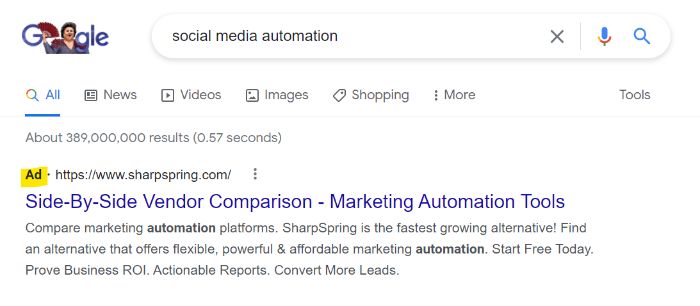
Google Ads is a paid advertising platform that enables you to appear in prominent places on the SERPs.

google ads for local seo for small businesses

You may think that you could never compete against big businesses. One way around this is to highlight your local status by targeting local keywords and local audiences. For example, instead of targeting “flowers for sale,” target “flowers for sale in [your city or zip code].”

How can we know this will be successful? According to Think with Google, 72 percent of computer or tablet users and 67 percent of smartphone users want ads that are customized to their city or zip code. Users want to find the options most local to them, so give them what they want.

It’s true that starting with Google Ads can be daunting, but fortunately, you have the option to invest in an advertising agency to help you set up and manage your account and keywords. If you want to go it alone, though, follow these essential steps:

  1. Conduct keyword research: This will include keywords you want to target but also keywords you want to exclude from your campaigns (negative keywords).
  2. Decide how your ad groups will be structured: Ad groups are ad campaigns grouped by a common element, like target audience, target keyword, or even location. Decide how your groups will break down so you can begin to create your campaigns.
  3. Create your first campaign: A campaign is a step above ad groups in that it encompasses a larger target audience. For example, you can have a “Wedding Flowers” campaign that includes ad groups like “Wedding Flowers in Queens” and “Wedding Flowers in Brooklyn.” This is where you will set campaign-level goals and settings.
  4. Create your first ad: Google Ads has multiple ad types. A text ad is a good place to begin, though your ad groups can contain multiple ad types, and it’s important to experiment with what works for your audience.

Continuous monitoring and tweaking of your campaigns are necessary for success.

Local SEO Tips for Small Businesses Frequently Asked Questions

As a small business, should I get an agency to help with my local SEO?

As a small business, budget can be a constraint. While you can make many changes yourself, a consulting agency can offer invaluable advice and resources.

How does local SEO help small businesses grow?

With local search intent being what it is, local SEO can be a boon to small businesses. It can put you on the map (or SERPs, as it happens) for keywords you may not have ever ranked for on a larger scale.

How much should a small business pay for local SEO?

The amount you invest will vary depending on what you find to be meaningful and valuable to your business. If you must invest, I recommend you do so in two places: 1) in an SEO consulting agency, and 2) in paid advertising.

What kind of small businesses need local SEO?

Local SEO can benefit small businesses of all kinds. If you provide products or services in a specific area (or multiple areas), then you can benefit from its use.

Conclusion: Local SEO for Small Business

As a small business owner, you know that hard work and dedication is needed to grow your sales. Much the same can be said for local SEO. While SEO can take time and patience, it can pay off in the long run.

With the 12 local SEO tips outlined above, even the smallest businesses can benefit. From keyword research to social media marketing to paid advertising, you can begin to make changes today to see benefits in the future.

Which of these local SEO tips for small businesses will you implement first?


from Neil Patel's Digital Marketing Blog https://ift.tt/B1Lajed
via IFTTT