Friday, 30 October 2020

Best Collaboration Software

Disclosure: This content is reader-supported, which means if you click on some of our links that we may earn a commission.

Collaboration software has become a must-have tool for businesses today. 

With teams scattered across different locations working remotely, these tools ensure that everyone can communicate and collaborate effectively. From simple check-ins and real-time status updates to ongoing project management, collaboration software can accommodate businesses of all shapes and sizes.

Your organization can even use collaboration software to improve the way you work with clients, contractors, and stakeholders in your business. 

By leveraging collaboration tools, everyone will benefit from improved workflows and have greater access to crucial information. 

But in order to take advantage of these benefits, your first task will be finding the right collaboration software for your business—and there are a ton of options out there.

To make your decision easier, use the buying guide and recommendations that I’ve reviewed in this post. 

The Top 6 Options For Collaboration Software

  1. Slack
  2. Trello
  3. Flock
  4. Zoho Projects
  5. Wrike
  6. BlueJeans

How to Choose the Best Collaboration Software For You

As previously mentioned, there are lots of different collaboration tools available on the market today. With dozens, if not hundreds of options to choose from, narrowing down the best option for your business can feel like a tall task.

To ease the buying process, I’ve identified the top factors that must be considered as you’re evaluating different options. I’ll quickly explain each one in greater detail below.

Software Type

Collaboration software comes in all different shapes and sizes. 

You’ll come across solutions built for project management, while others are made specifically for instant messaging or video conferencing. There are even some all-in-one solutions on the market today. 

The best option for you will depend on the needs of your business. Some of you might just need an internal messaging tool, as opposed to a platform for document storage or task management. We’ll discuss the different types of collaboration software in greater detail a bit later in this guide. 

Business Size

How large is your company? 

In addition to the number of people on your team, the amount of teams, departments, and other segments should also be taken into consideration. 

For example, you might want to have a tool that every single person within your organization can use to contact another employee. But files being shared by the accounting team or human resources department shouldn’t be available for your marketing team to access. Your sales staff shouldn’t be able to access sensitive financial records. 

So make sure the software you’re considering allows you to create different groups for each department or project. You’ll also want to look for features to manage permissions and access for each individual user. 

Usability

Collaboration software should be making your life easier, not more difficult. 

There are some tools out there that are undoubtedly more complex than others. Depending on your needs and the technical skill level of the end-users, that’s fine. Any time you’re using new software, there will always be a learning curve. So you’ll need to keep that in mind.

However, after the first couple of weeks or months using the software, your entire team should be fairly proficient. If not, it could add complexity to your processes, as opposed to boosting performance and productivity. 

I strongly recommended that you take advantage of demos and free trials. This will truly give you a better understanding of which options are the easiest to use. 

Organizational Tools

This piggybacks off of our last point. The best collaboration software will make it easy for you to stay organized. 

Depending on the software in question, there might be task cards, folders, groups, or other ways to keep everything in order. How can you jump from one project to another? Will users easily be able to find a file or document that was shared by a coworker? Can supervisors and project managers keep track of everything at a higher level?

At scale, the way everything gets organized within your collaboration software is amplified. If you’re just running a small team with five users working on a single project, this may not be important. But when that number jumps into the hundreds or thousands, staying organized becomes critical. 

Integrations

Your collaboration software should seamlessly integrate with other tools and software that your company is using. 

From CMS to CRMs, email software, cloud storage services, and more, make sure you check out those integrations before you finalize your decision. It’s easier to use collaboration software if everything can be managed and accessed from a single platform. Otherwise, users will have to bounce back and forth between different tools, which isn’t ideal from an efficiency standpoint. 

The Different Types of Collaboration Software

Before we jump into the reviews and recommendations, I want to clearly identify and explain the different types of collaboration tools on the market today. Here are some of the options that you’ll come across as you’re browsing around:

Project Management Software

As the name implies, project management software is designed for teams that are working on different projects. A project can be defined as something with a clearly defined start and end date. 

This could be anything from a full-scale app development project to a smaller marketing campaign. 

Project management tools allow your teams to work on projects collaboratively while sometimes automating tasks. If this is what you’re looking for, make sure you find a solution that fits your project management style (lean management, agile management, Kanban boards, Gantt charts, etc.).

Lots of project management tools are branded as an all-in-one team collaboration solution.

File Sharing and Document Storage

Some solutions are made specifically for sharing files and documents. 

With these tools, team members can transfer, distribute, and customize access to shared files. A file could be anything from an image to a PDF or even larger files like software, videos, or ebooks. 

It’s much easier and more secure to manage files and collaborate with a cloud tool as opposed to transferring files via email. 

Instant Messaging

Messaging tools are ideal for teams that want to benefit from real-time communication. If you need a quick answer or want to communicate back and forth with a coworker, an instant message is definitely more efficient than an email.

These are also great for group chats where multiple members can communicate in real-time with each other. Again, it’s a better alternative to traditional email.

Some collaboration tools will have built-in instant messaging features, while others specialize in instant messaging specifically. Not every collaboration software includes team messaging.

Conference Calling Software

Conference calling software takes real-time communication to the next level. 

Aside from instant messaging (or in addition to instant messaging), these tools allow teams to collaborate using voice and video chat. You can even benefit from extra features like screen sharing, presentation mode, etc. 

Businesses use conferencing calling software for both internal collaboration, as well as collaboration with clients, contractors, stakeholders, and more. 

Coordination Tools

Generally speaking, coordination tools are a component of collaboration software. 

I’m referring to features like time tracking, scheduling, calendars, status updates, etc. For example, a collaborative calendar can help you understand everyone’s availability in real-time without having to disturb them. It improves efficiency when scheduling meetings or similar tasks. 

Most collaboration software will have features for real-time status updates as well. So when someone completes a task, they won’t have to notify everyone about their progress. That information will be available within a general feed. 

#1 – Slack Review — The Best For Team Messaging

Slack is a name that many of you might already be familiar with. It’s quickly become the go-to platform for internal business messaging over the past few years.

Whether you’re working remotely or in a traditional office environment, Slack will be a great option to consider.

More than 750,000 businesses trust Slack for team collaboration. Here’s a quick overview of some of its noteworthy features and highlights:

  • Stay organized using Slack channels for projects, teams, or topics
  • File sharing capabilities
  • Audio and video calls with screen sharing
  • 2,200+ Slack apps for integrations (Zoom, Jira, Salesforce, Google Drive, etc.)
  • Create your own time-saving workflows
  • Use Slack API to integrate your internal tools
  • Enterprise-grade scalability and security
  • Collaborate with partners like clients, contractors, vendors, etc. by adding them to channels

Plans start at just $6.67 per user per month. All plans come with unlimited messaging. Regardless of your team size or industry, Slack is the best collaboration tool for team messaging.

#2 – Trello Review — The Best For Simple Task Management

Trello is a simple solution for task management. For ongoing work and projects alike, it’s one of the best ways for your entire team to collaborate and stay organized.

With the help of Trello’s boards, cards, and lists, businesses across any industry can use this platform to improve productivity. 
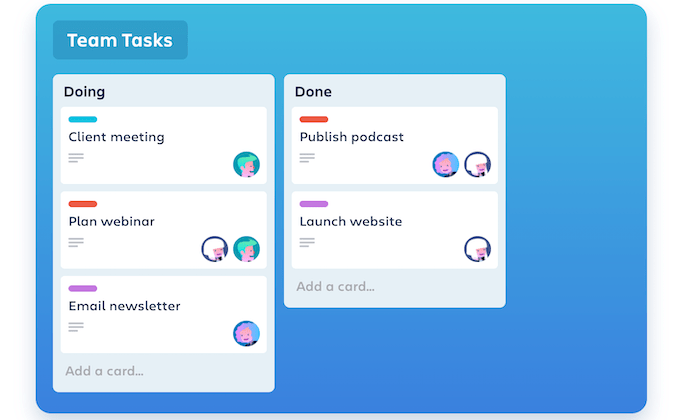
Here’s a quick explanation of what you can accomplish with Trello’s collaboration software:

  • Add comments, attachments, and due dates to cards
  • Create boards to separate projects and teams
  • Built-in workflow automation (rule-based triggers, due dates, etc.)
  • Add lists to create a unique workflow for each project
  • Integrate with third-party apps that you’re already using
  • Collaborate from anywhere using the Trello mobile app (iOS and Android)
  • Notifications and team tagging
  • Easy to assign tasks or cards to one or more users

Trello is powered by Atlassian, a global leader in the software and project management space. So you know that it’s a solution you can count on. That’s why more than one million teams across the globe rely on Trello.

This collaboration software is free for up to 10 boards with unlimited cards and lists. Paid plans start at $9.99 per user per month. 

#3 – Flock Review — The Best For Remote Work

Flock is another collaboration tool with a primary focus on messaging. But it’s a little bit more advanced than Slack in terms of the features and capabilities.

The software is great for teams that work collaboratively from remote locations.
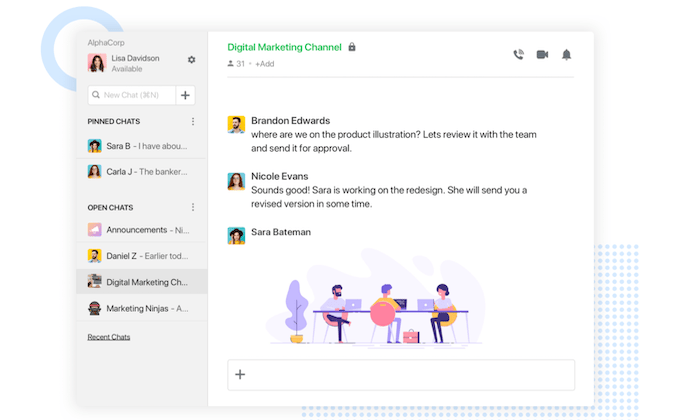
With Flock, you can keep all of your messages, apps, and productivity tools organized from the same place. Here are some of its features that are worth highlighting:

  • Real-time messaging
  • Customizable channels and team directory
  • Video conferencing
  • Screen sharing
  • File sharing
  • Powerful search (for messages, links, documents, etc.)
  • Productivity tools for note sharing, to-do lists, reminders, polls, and more
  • 50+ seamless app integrations (Google Drive, Asana, Twitter, etc.)

For small teams, Flock is free with 10 channels included. You’ll also get unlimited 1:1 and group messages. Paid plans start at just $4.50 per user per month, which is a great value.

Try Flock for free with a 30-day trial. 

#4 – Zoho Projects — Best Feature-Rich Collaboration Software

Zoho Projects is one of the most popular and easy-to-use collaboration tools on the market today. The software makes it easy for teams to collaborate, plan, and track work more efficiently. 

As a cloud-based solution, you can use Zoho Projects to collaborate and manage tasks from anywhere. 
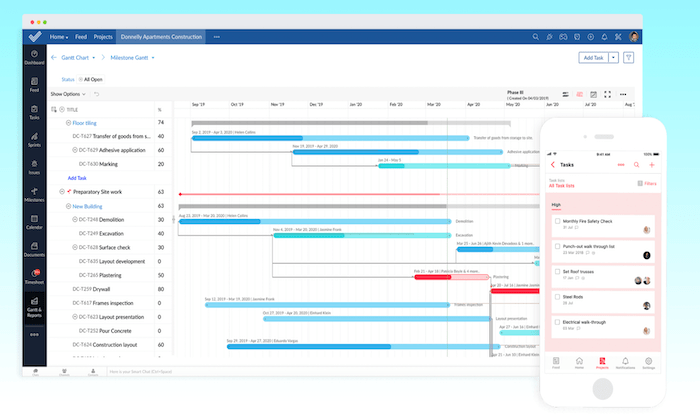
Compared to other tools out there, Zoho Projects is loaded with robust features. Here’s a quick overview of some of my favorites:

  • Task management with Kanban boards
  • Set dependencies between tasks based on the order they are completed
  • Map your entire workflow
  • Gantt charts
  • Task reports
  • Time tracking tools
  • Issue tracking
  • SLA management
  • Automations

Zoho Projects even has industry-specific solutions for categories like software development, real estate, construction, marketing, education, and more.

Plans start at just $3 per user per month (with a minimum of six users). You can try it for free with a 10-day trial. 

#5 – Wrike Review — Best All-in-One Project Management Tool

Wrike is a powerful and versatile project management solution. The software makes it easy to give your team complete control and visibility over projects and tasks.

If you’re looking for collaboration software with a primary emphasis on project management, this will be a top choice for you to consider.
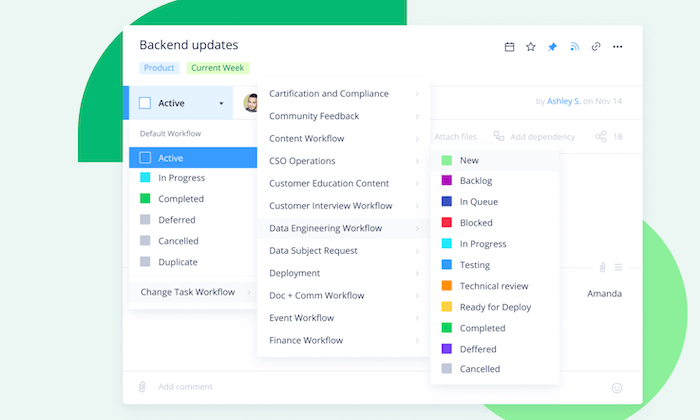
Wrike is trusted by 20,000+ companies across the globe, including some big names like Dell, Google, Airbnb, and Siemens. Let’s take a closer look at some of its features and benefits:

  • Agile project management
  • Custom dashboards and workflows
  • Process automation
  • Real-time comments and editing
  • Notifications
  • Live editing and dynamic reports
  • Easy to share information with stakeholders
  • End-to-end visibility and real-time updates
  • Enterprise-grade security
  • File sharing and attachments

Wrike is a popular choice for marketing teams, creative professionals, and product development teams. However, it’s versatile enough to accommodate the needs of really any business type.

The software is free for up to five users. But you’ll need to upgrade to a paid plan to take full advantage of the project planning and collaboration features. These start at $9.80 per user per month. Try it free for 14 days. 

#6 – BlueJeans Review — Best For Audio and Video Conferencing

For those of you who need collaboration software for conference calling, look no further than BlueJeans. It’s a simple and safe way to empower your remote staff with audio and video conferences. 

Brands like Zillow, Facebook, ADP, Intuit, and National Geographic all trust BlueJeans for team collaboration.
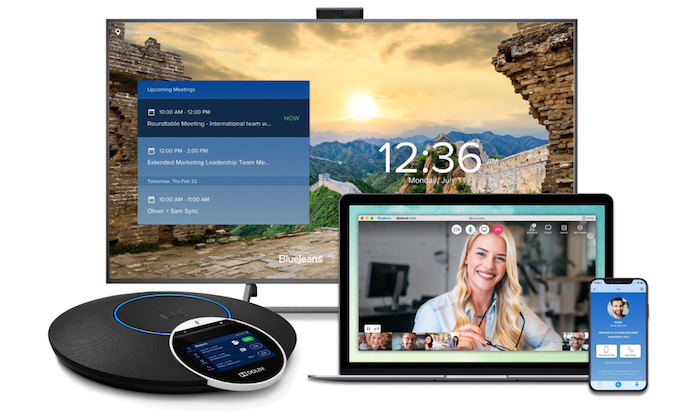
Let’s take a closer look at what makes BlueJeans so great for collaboration:

  • Collaborate with video, audio, and web conferencing from any device
  • Live meeting controls and automated alerts
  • Meeting highlights and transcriptions
  • Enterprise-grade security
  • Single-touch interoperability
  • Exceptional call quality with HD video and Dolby Voice audio
  • Dynamic content sharing
  • App network of software integrations (Microsoft Teams, Slack, etc.)
  • Support 24/7/365
  • Unlimited 1:1 meetings
  • Unlimited group meetings

Plans start at just $9.99 per host per month. If you’re not quite sold just yet, you can have unlimited access to BlueJeans and all of its features for free with a 7-day trial. 

Summary

Collaboration software makes it easy for your entire business to stay organized and connect with each other in real-time.

To find the best software for your business, start by reviewing the buying guide I highlighted at the begging of this article. Then go through the recommended options above to narrow down the best tool for you.

The post Best Collaboration Software appeared first on Neil Patel.


from Blog – Neil Patel https://ift.tt/35QHYIj
via IFTTT

How Email Marketing Can Fuel Your Cross-Channel Strategy

Email continues to outperform other marketing channels by a long way. According to Litmus’ State of Email survey results, email marketing ROI is $42 for every $1 spent. It makes sense: You’re marketing to people who raised their hand and want to hear from you. These are your most valuable customers. Don’t you want more of them? To attract a larger audience, you can use insights from your email marketing program to fuel your cross-channel strategy.

Leveraging email insights to make better decisions in other channels

When I was managing the email marketing program of an ecommerce brand, the marketing channels were siloed (sound familiar?). I dove right in and started creating more comprehensive and thematic email campaign strategies. Then I used their success to help make email the driver of the products we pushed and built the narrative around them. So email became the center of the company’s cross-channel strategy, bringing together all marketing channels to tell and reinforce a single-story consistently.
 

Want to know the secret to this email-first marketing strategy? Read the steps below.

Step 1: Create the most effective email campaigns possible

You want to repeat the goodness of your successful email campaigns, right? So how do you create effective emails in the first place? Great emails require a solid foundation to drive results—and what happens before you hit send affects how your subscribers will perceive and engage with your brand. If your pre-send process is flawed, email results suffer.

Fine-tune your email pre-send process, including:

Email conception and planning: Think through your email’s objective, goal, content, and audience—and make sure all stakeholders are on the same page. This helps minimize last-minute changes which can lead to frustration and mistakes.

Copywriting: Treat your subscribers like humans, not numbers, and write with empathy. This way, you create a genuine connection with your audience.

Graphics and design: Have brand guidelines in place to design emails faster, giving your subscribers a consistent brand experience. Inconsistency can dilute trust and make your subscribers mistake your email for spam.

Coding and development: If your emails aren’t accessible or don’t work the way they’re supposed to (looking at you, Outlook), your subscribers may not be able to take the intended action. And bloated code may load too slowly or not at all. Gmail remains in the top two in email client market share and is notorious for clipping!

Data logic and setting up in an email service provider: Ever accidentally send out an email too soon or to the wrong audience? How about calling someone FIRSTNAME instead of, you know, their actual first name? Oops. Been there, done that. These mistakes can negatively impact your relationship with your subscribers, so making sure you have the right checks in place is critical.

Testing and troubleshooting: The email landscape is constantly changing. Avoid email fails, and catch costly errors such as display issues, typos, broken links, and inbox placement.

Reviews and approvals: Speaking of catching errors, having at least one other person look everything over is a great idea. If you’ve been in the weeds, it’s easy to miss something.

So your emails are set up for success. Now what?

Step 2: Uncover insights to improve future email campaigns

Learn and optimize. Find out why your email campaigns are effective and what makes your subscribers click and convert. Gut feelings are prone to bias and are often wrong. The data doesn’t lie! Be sure to track email activity from your email service provider as well as deeper, engagement-level metrics using Google Analytics or a tool like Litmus. You can’t improve what you don’t measure, after all.

Armed with the right email analytics, you can uncover insights to improve:

Email segmentation strategy: Are you sending emails to the right people? Tweak your targeting, and consider a win-back or reactivation campaign for your inactive subscribers. If an email campaign didn’t do well, look into the people who did engage. Use this to create lookalike audiences and resend your email to them.

Email content strategy: Are you giving your subscribers what they want? Use what your audience has engaged with to deliver more of that type of content or nurture them with the appropriate next step. You can even start building preferences for more complete subscriber profiles.

Email design and development: Are you making it easy for your subscribers to engage? Dig into specific design elements and layouts to see what has your audience clicking. Maybe they react more positively to photos of people versus illustrations. Or you may find that most of your audience reads on Outlook, so you’ll have the pleasure of making sure your emails display properly there.

Step 3: Share insights across your entire marketing team

Once you’ve dialed in on the right audiences and the content that has them loving your brand, it’s time to bust out of your email silo and use your email insights to fuel your company’s cross-channel strategy. Say it loud, say it proud! Share your learnings and collaborate across teams by implementing routines like these:

  • Make email reporting dashboards accessible to everyone

  • Write up what campaign learnings might be interesting for other teams

  • Set up recurring meetings with leaders across marketing channels

One example we love to share at Litmus is about a blog post on an email design trend that got incredible engagement in our newsletter. We shared this with our social and advertising teams, and they turned around and created social and paid media campaigns on the same blog post. It more than doubled our average click-through rates in those channels! And now we have an ongoing blog post series about what’s trending in email design. That wouldn’t have happened without email. And there are tons of other ways to use email insights beyond email, too.

Remember, your email subscribers want to hear from you. They’re the most loyal to your brand, and whatever attracts them will attract other people like them—score! As you reach out across other marketing channels, you’re reinforcing a cohesive story and consistent brand experience, nurturing your audience with the right message in the right way along their personal customer journey.


For more resources on email and cross-channel marketing, please check out:


from Oracle Blogs | Oracle Marketing Cloud https://ift.tt/3jHBoJ2
via IFTTT

Thursday, 29 October 2020

How to Develop a Winning Digital Marketing Strategy in 4 Easy Steps

According to Smart Insights, 45 percent of companies don’t have a clearly defined digital marketing strategy; 17 percent of companies have a digital marketing strategy in place, but it’s separate from their marketing plan. 

This means 62 percent of companies are unprepared. 

They don’t have the strategy, tactics, or tools they need to market their business well. The bad news is that marketers waste 37 to 95 percent of their marketing budget. This is really common, but it doesn’t have to be; if you have the right digital marketing strategy in place, growing your business is easier. 

If you’re feeling unprepared, don’t worry. 

Today we’re going to cover the important ins and outs of creating a winning digital marketing strategy. 

Why You Need a Digital Marketing Strategy

Your digital marketing strategy gives your company direction. With a plan in place, you’ll have the details you need to help your company grow consistently. Your digital strategy document should: 

  1. Define your short and long term goals
  2. Show you who your customers are
  3. Show you where you can find them 
  4. Outline what you need to attract your customer’s attention
  5. Offer a step-by-step plan to attract and hold customer attention
  6. Show you how to analyze and improve marketing performance

Why go to all the trouble? 

Is it worth the time to create a strategy document? CoSchedule’s State of Marketing Strategy Report found winning marketers: 

  • Document their digital marketing strategy. Marketers who document are 538 percent more likely to achieve success than those who don’t.
  • Document their marketing processes. Those that do are 466 percent more likely to achieve success consistently over time than those who don’t.
  • Winning marketers set goals. Goal setters are 429 percent more likely to report success than those who don’t; 81 percent of these marketers achieve their goals; 10 percent of organized marketers always achieve their goals.
  • Winning marketers study their audience. These marketers are 242 percent more likely to conduct audience research four times a year. Almost 60 percent of the elite marketers featured in their study conduct audience research once or more per month.

It seems too good to be true, but it’s actually the reality.

The more time you spend thinking about your goals, getting to know your audience and planning how you’ll approach your digital marketing, the more likely you are to achieve success. 

What Should Be Included In Your Digital Marketing Strategy

I’ve already given you a sneak peek, did you catch it? 

To be successful, your digital marketing strategy should focus on four specific areas. 

  1. Setting goals, objectives, and key performance indicators (KPIs)
  2. Understanding and defining your audience 
  3. Creating and implementing your digital marketing strategy
  4. Auditing and improving your marketing campaigns 

You’ll want to break each of these areas down in enough detail so you (and your team) can work with each of these areas properly. With each of these areas, you should have a pretty clear idea about: 

  • The information, tools, and resources you’ll need to create a plan
  • Who will be responsible for creating your plan
  • Who will be responsible for implementing your plan
  • The KPIs and metrics you’ll use to measure the success (or failure) of your plan
  • The tools and resources you’ll need to implement and improve campaign performance

Each of these points needs to be defined clearly for the four steps areas above. 

Let’s take a closer look at these four areas and break things down a bit more clearly. 

1. Setting Goals, Objectives, and KPIs

This step is all about deciding what you want.. 

Planning your marketing strategy begins with setting quantitative and qualitative goals;  you’ll also want to set KPIs. These goals are sort of like the railroad tracks that keep your digital marketing strategy on the right track. 

What’s the difference between qualitative and quantitative goals?

G2 has a really helpful way of defining these, so I’m going to paraphrase their definition here. 

Quantitative goals can be counted, measured, or displayed using numbers. Goals like increasing monthly recurring revenue by 15 percent or boosting your conversion rate by 3 percent are good examples of quantitative goals.  Qualitative goals are abstract, descriptive, or conceptual — these goals are usually tied to the question “why.” Goals like increasing customer trust or improving brand reputation are examples of qualitative goals. They’re difficult to measure but just as important. 

You’ll want to make sure that your goals are: 

  • Challenging, realistic, and attainable
  • Tied to your company’s mission, vision, and values
  • Concise — 2-3 main goals 3-5 supporting goals
  • Specific, clear, and timely
  • Broken down into smaller, step-by-step milestones 

Your goals are important, but they’re difficult to achieve if you don’t have a step-by-step plan to follow. That’s where milestones come in; milestones are tactical. They’re great because you can use them to move towards your goals quickly. 

What about KPIs? 

Scoro has a list of 136 KPIs you can use to jumpstart your planning. I’ve listed a few of the more common examples you can use below.

  • Unique visitors per day/month
  • Pages per visit
  • New leads per day/month  
  • Marketing qualified leads (MQLs)
  • Conversion rates
  • Churn/attrition rate
  • Cost per conversion
  • Conversion rate per keyword
  • ROI per content
  • Click-through-rate on paid advertising

Focus is really important. 

It’ll be tough to focus on lots of metrics at once. Instead, you’ll want to focus your attention on a small number of really meaningful KPIs and metrics. 

Which ones are meaningful? 

They’re the KPIs that have the biggest impact on your company, the ones that generate consistent returns or a large amount of cash for your company. You’re looking for the 20 percent of KPIs and metrics that produce 80 percent of your results. 

That’s a pretty easy place to start. 

If you’re not sure which KPIs you should focus on, start with the common KPIs and metrics that have a direct impact on your business. These are typically metrics that focus on traffic, conversions, and optimization. 

2. Understanding and Defining Your Audience

You know what your goals and objectives are. Now you need to figure the same things out for your customer. This step requires some upfront research, but the success (or failure) of your digital marketing strategy starts here. 

Think about it. 

If you find the right customers, the people are excited to buy your product, then selling is a whole lot easier. It’s especially easier if you can understand what they want and how you can go about selling to them. So to do that, you’ll need information on your customer’s demographics and psychographics. 

What are you trying to figure out? 

  • The size of your market: You’ll want to figure out some important details about your market —is it new or established, niche or mainstream, broad or specialized. You’ll want to figure out who the major and minor players are, market expectations, areas you can disrupt, and the financial upside in your specific market. 
  • Who your customers are:  Are you targeting new moms, weekend warriors who are active on the weekends? You should have a basic idea of the customer you’re targeting. Are you focusing your attention on a specific niche, i.e., affluent travelers, price-conscious fashion aficionados? Use previous sales, competitor research, and market research sources like Ubersuggest and Google Trends to find the answer. 
  • Where they spend their time: Your customers have specific hangouts. Web developers spend their time on sites like ArsTechnica, Reddit, SitePoint, etc. New moms spend their time on sites like Babble, CafeMom, or Bundoo. If you know where your customers like to spend their time, you have a pretty good idea of the channels to target and the content to use. 
  • What they consume: This overlaps a little bit with where they spend their time. When there is an overlap, you’ll want to break the differences down even further. For example, your customers may spend a lot of time on Reddit, but this doesn’t tell you what they’re consuming on Reddit. Reddit is where they spend their time; the subreddit r/RobinHood is what they consume. See the difference? One tells you about their specific interests and desires; the other focuses on location. 
  • Why they buy: Your customers don’t buy for the same reasons. Sources like online reviews are a great way to get really helpful, in-depth feedback on why customers buy from customers themselves. You can also use tools like surveys or polls to attract responses. You’re not looking for an individual answer; you’re looking for trends. 
  • Where and how they buy: Do customers price shop offline, in your store, then order online from Amazon? Maybe your customers prefer a one-time purchase over recurring payment options? If you understand when and how your customers buy, you’ll be able to adjust your marketing around their expectations. Maybe that means persuading customers to do something different or stick with market expectations. 
  • What they need to buy: Online reviews are a helpful tool here as well. If you’re a new business, you can start with competitor reviews. Go through your competitor reviews, then make a list of the concerns brought up in each review. Look for customer objections, technology issues, complaints, reputation issues, any problem that customers felt were deal breakers. If you have reviews of your own, you can do the same thing there. 

Remember the research I shared earlier? 

Elite marketers study their audience, conducting audience research once or more per month. This step is important because it gives you the instructions you need to create a winning digital marketing strategy. Audience research shows you how to persuade your customers. 

This isn’t rocket science. 

But it requires more effort than most companies are willing to give. 

Here’s why. 

Most companies assume they already know their customers. They believe they know what their customers want and the best ways to approach them. 

They may be right. 

But the data they have on their customers changes often. Consistent research is the only way to stay on top of what your customers actually want. At this point, you’re ready for step three. 

3. Creating and implementing your digital marketing strategy

If you’ve done your homework, you should have the building blocks you need to create a well defined digital marketing strategy. You should be able to identify the marketing channels that will work best for your business. There are lots of digital marketing channels you can choose from. 

You can focus on: 

  • Content marketing
  • SEO
  • PPC
  • Display advertising
  • Email 
  • Online video
  • TV commercials
  • Mobile ads
  • Channel partnerships
  • Events 
  • Social media advertising 
  • Podcasts and radio advertising
  • Print advertising

In fact, there are more than 51 different marketing channels you can use to promote your business. Which one are you supposed to use? 

There are a few ways you can approach this. 

  1. Investing in the channels your customers use (e.g., search, social media) 
  2. Investing in the channels that give you independence and control (e.g., email, partnerships)
  3. Investing in the channels that are most common/popular (e.g., SEO, PPC, Social media) 

Start by testing the channels where there’s more overlap. 

If your customers use popular channels like Google search or Facebook, those are great places to start. If you’re looking for a channel that gives you maximum control and works well with other channels (i.e., email), you can start there. 

Don’t forget to test. 

Testing shows you what works. The tools you use for testing tend to be consistent with the channel (e.g., email comes with analytics. Google offers Google Analytics, etc.). Typically, you can branch out once you’ve identified the marketing channels that perform best for your business. 

You’re looking for stability. 

You want to get two to three channels working well before you decide to add more. Once you’ve identified your channels, use the data you’ve collected in step two to create the kind of marketing content that fits well with the customers you’ve identified.

Your content should: 

  • Attract their attention
  • Be fascinating 
  • Discuss a problem or challenge
  • Offer a solution to the problem or challenge you’ve just identified

Here’s another important detail. The research you’ve done should help you create a strong value proposition that answers the “why me?” question. Your value proposition is basically a promise. It’s the most important part of your marketing copy. 

It gives your customers a persuasive reason to do business with you. 

Your value proposition sets you apart from the competition. It gives your business an unfair advantage, and it gives you the opening you need to attract more customers, increase customer loyalty, command higher prices,  and beat your competitors. 

Here’s a detailed breakdown if you need help creating your own value proposition. 

If you’ve followed the steps I’ve mentioned above, you should have the information you need to create amazing content that draws customers in. 

4. Auditing and improving your marketing campaigns 

If you can’t measure your marketing, you can’t improve them. Part of the reason marketers waste 37 to 95 percent of their marketing budget is the lack of measurement.  Forrester’s research stated that between 60 – 73 percent of a company’s analytics data goes unused. 

Companies don’t know how to work with their data. 

  • They don’t know which problems to fix
  • They don’t know what they have 
  • They can’t see the value of their data
  • They don’t know how to evaluate or analyze their data
  • Their data isn’t available to analysts who can use it 
  • There’s too much data to go through and not enough people or time to use it

The other three steps aren’t all that helpful if you can’t see your marketing results. If you’re going to create a successful digital marketing strategy, you’ll need a plan that helps you to capture, report, and analyze the data. 

You’ll need analysts who can use your data to solve problems. 

That’s part of the problem. 

Most companies don’t have the people or processes in place to handle this. This is why it’s so important for businesses to get help. It’s too much for most companies to handle on their own — small, medium, and large companies all struggle with these issues. 

If this is the case for your organization, it may be a good idea to get help from an agency. 

You should be able to plan, implement, and optimize your digital marketing strategy.  If you can’t, it’s a good idea to get help with all or part of the process. 

Conclusion

Almost half of companies don’t have a clearly defined digital marketing strategy in place. A smaller segment of respondents haven’t connected their strategy and their marketing. Most companies are unprepared; they’re not ready to handle the requirements that come with creating their digital marketing strategy. 

If you’re feeling unprepared, don’t worry; use the information we’ve discussed as a guide. If you’re aware of the ins and outs of planning, you can create a winning digital marketing strategy in four easy steps.  

The post How to Develop a Winning Digital Marketing Strategy in 4 Easy Steps appeared first on Neil Patel.


from Blog – Neil Patel https://ift.tt/2Tyy0G3
via IFTTT

Is Getting “Google Guaranteed” Worth It?

Is Getting "Google Guaranteed" Worth It?

Google has rolled out a new consumer protection feature called Google Guaranteed. Businesses advertising through Local Services Ads can apply for a Google Guaranteed qualification, offering extra reassurance to customers.

Google Guaranteed could be a powerful lead generation tool to help you stand out from your competitors.

The program helps showcase home service providers who have been pre-screened. With an easily visible green Google Guaranteed Badge showing a checkmark, these ads may draw customers’ notice more than others will. And it’s not just because of the eye-catching badge—it’s the knowledge they’re able to choose a business already certified by Google.

What should you know before applying? Let’s have a look at what Google Guaranteed is, who it benefits, and why you might want to consider it for your business.

What Is Google Guaranteed?

Google Guaranteed is a certification program created to increase customer confidence in local businesses. Customers who are vetting companies online can look for the Google Guaranteed Badge, which offers protection if something goes wrong.

Many businesses are already using Google’s Local Services Ads to generate leads for their companies through paid search efforts. The Google Guarantee offers help for businesses who want to draw more organic traffic instead.

Services booked through Local Services Ads are automatically insured up to a lifetime cap, which varies by location. Any customer booking this way has the comfort of knowing they can claim the amount of the invoice should they be dissatisfied with the service.

How to Tell If a Business Has Been Google Guaranteed

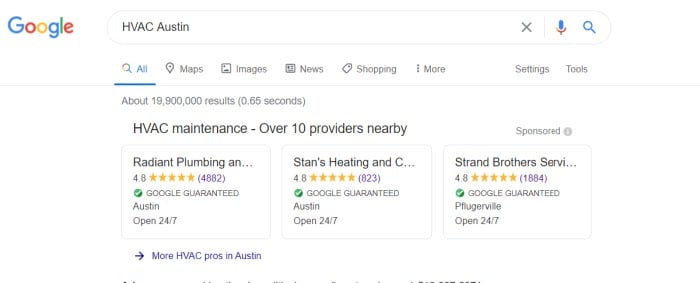
Google Guaranteed adds a green checkmark “badge” underneath the names of qualifying companies. If a customer uses an audio search on Google Assistant or Google Home instead of searching on a screen, there will be an audible confirmation of this guarantee.

Example of How Can Customers Tell If a Business Has Been Google Guaranteed

How Does Google Guaranteed Work?

If your business uses Local Services Ads, you can apply to the program by signing up for Local Services Ads and applying to be Google Guaranteed. If the service is available in your area and you receive certification, a badge or logo will be displayed next to your ad.

When you apply, Google will check your business license, insurance, and online reviews. They’ll also conduct background checks on employees—at no cost to you. Owners’ backgrounds are always checked, and other backgrounds are checked based on the nature of your business.  

If your company passes this screening, you’ll receive a badge to show customers Google has prequalified you.

If a customer is unhappy with your service, they can submit a claim to Google to be reimbursed for the amount of their invoice. Google will then reach out to you to learn more and may request additional information from the customer. You’ll have the opportunity to resolve things with your customer. If that doesn’t work, Google will decide on a fair resolution based on its discretion and findings.

What Does the Google Guaranteed Program Cover?

Google Guaranteed will cover customers the amount of the invoice in question up to $2000 in the US and Canada, with varying limits in other countries as the program expands.

Lifetime limits in different regions are as follows:

  • United States: $2,000 USD
  • Canada:  CAD $2,000
  • United Kingdom:  £1,500
  • Germany:  €1,500
  • France:  €1,500
  • Ireland:  €1,500
  • Italy:  €1,500
  • Spain:  €1,500
  • Belgium:  €1,500
  • Netherlands:  €1,500
  • Austria:  €1,500
  • Switzerland:  ₣2,000

What Isn’t Covered by Google Guaranteed?

There are limitations to the coverage that should be noted by both companies and customers. For instance, customers must have booked the work through Local Services Ads itself and claim reimbursement within 30 days of service completion.

The claim must be for the amount on the invoice for the original service performed, up to a lifetime maximum. It cannot include any additions, future projects, damages, or cancellations, and a customer’s dissatisfaction with the price is not considered a valid reason for a refund.

Is My Business Eligible for the Google Guaranteed Program?

If you’re eager to enroll, you may be in luck! Google Guaranteed has rolled out in many areas over the last couple of years, focusing on home services. The eligible industries for Google Guaranteed vary from region to region and may continue to change as the program expands. One of the first steps is to check eligibility to see if the program is available to you.

Google Guaranteed Program Eligibility

What Industries Are Eligible in the US?

In the USA, the following industries are eligible for Google Guaranteed: Appliance repair, auto glass, auto repair, carpet and upholstery cleaning, electrical, event planning, financial planning, garage door installation, home cleaning, HVAC (heating, ventilation, and air conditioning), junk removal, lawn care, locksmith services, pest control, pet grooming, photography, plumbing, roofing, tree services, water damage restoration, window cleaning, and window repair.

What Industries Are Eligible in Canada?

In Canada, Google Guaranteed covers HVAC companies, locksmith services, and plumbing businesses.

Does Google Guaranteed Cover All Professional Services?

The Google Guaranteed Program only covers home services for now. However, Google has a program called Google Screened, which covers professional services like financial planning, law, and real estate.

How Are Local Service Ads Related to Google Guaranteed?

The Local Services Ads program already offers you the ability to advertise to potential customers in your area through paid search.

Google Guaranteed is a feature of Local Service Ads intended to instill confidence in local businesses. It offers companies a way to potentially attract more organic traffic without investing the time and money needed for paid search engine marketing.

As a business owner, you may appreciate that it’s simpler to use, targets organic traffic, and costs you an easy-to-understand flat rate.

Is Google Guaranteed Worth It?

It depends on your business needs. You’ll need to decide if Google Guaranteed is worth the cost for your business, weighing the program’s cost and the time it will take to get and maintain the certification against the potential rewards.

You should also consider how much competition you typically have for your services. If you usually have to compete with a large number of other businesses, you’ll probably benefit more from having your ads highlighted.

How Does Google Guaranteed Benefit Businesses?

The Google Guaranteed Ads program offers a distinct way for businesses to rise to the top of search results, as they are displayed above the normal pay-per-click (PPC) Google Ads. Just keep in mind the ad format only allows you to show your company name, city, phone number, hours of operation, and customer rating.

What Does Google Guaranteed Offer Customers?

Google Guaranteed works to cut down on the confusion some experience when comparing local competitors by building customers’ trust in certified companies. The program acts as a consumer protection service, opening up a valuable avenue for customers to spend money with confidence. Vetting potential providers may become quicker and easier as customers know they have Google backing the quality.

Are There Any Drawbacks to the Google Guaranteed Program?

Applying to Google Guaranteed doesn’t result in an overnight acceptance, and you need to maintain your standing with the program. There are also costs associated with using the program, so any business should expect a bit of a learning curve to figure out how to measure results.

There is an in-depth certification process that includes background checks of some or all employees. Depending on the company’s size, this can take significant time to complete, so interested businesses should apply early and be patient while Google reviews their application.

It’s also worth noting this is a revenue source for Google, and they’re likely to expand it. While it may offer valuable benefits now, it will be interesting to see what happens in the future as more businesses sign up.

How will you stand out from the competition if they all get certified?

Is the Google Guaranteed Program Right for Your Business?

For many small businesses struggling to navigate the complicated world of pay-per-click search marketing, the Google Guaranteed Program could make a significant impact. It may allow you to spend less time worrying about keyword research and bidding strategies, so you could devote more of your time running your business.

While paid search can be a powerful tool, many businesses haven’t been able to devote the time or budget necessary to see a return on investment. While there is always expert digital marketing consulting available, those just getting started may want to try it out first.

How Much Does Getting Google Guaranteed Cost?

The program costs a base fee of $50 per month, for an annual cost of $600. However, there are also costs for every lead.

Google Guaranteed differs from pay-per-click. You’ll only pay when a customer calls or connects to engage your services, rather than paying each time a potential customer clicks on an ad.

Costs vary depending on your market and industry, but the average cost per Google Guaranteed lead seems to be about $25. Businesses are able to dispute leads that aren’t legitimate— for instance, if the customer is outside of the local area in your ad or if incomplete customer contact information is provided, preventing you from following up.

Similar programs have rolled out by other companies, such as Yelp’s Verified License, which you might compare with Google Guaranteed. Google’s new certification may resemble Yelp’s on the surface, but the Google Guaranteed program offers a powerful quality guarantee that Yelp doesn’t.

How to Set up Google Guaranteed for Your Business

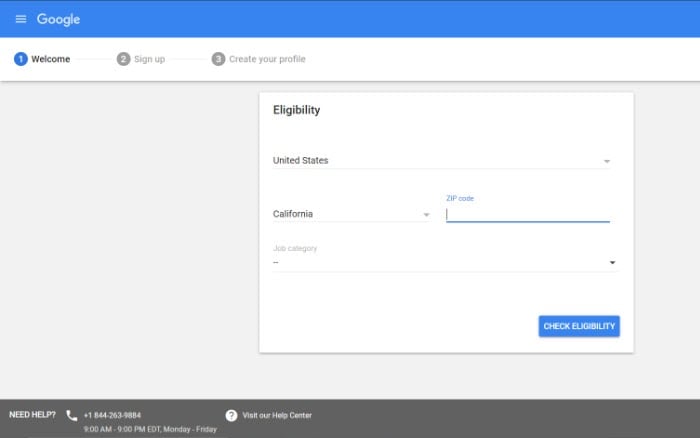
To set up Google Guaranteed for your business, you’ll send in your application for consideration with Google.

You’ll indicate what country you’re in, what industry your business is in, and your zip code or postal code. This step will confirm if Google Guaranteed is available in your area, as mentioned above. Once that’s been confirmed, you can finish your application.

How to Get Ready for Google Business

If Google Guaranteed is not available in your area yet, there are still steps you can take to get ready for when it is. Ensure your business license and insurance are up to date. You should also check your Google reviews, encouraging your satisfied customers to review your business online, and address any negative reviews.

Maintain Your Google Guaranteed Standing

If you’ve been accepted into the Google Guaranteed Program, congratulations! However, your effort shouldn’t stop there. You’ll need to maintain the standards you established in order to receive the certification in the first place. These standards mean keeping your business license and insurance up to date. Monitor your Google reviews to address any issues, and continue to encourage your customers to provide reviews to begin with.

Conclusion

Google Guaranteed could be a powerful source of lead generation for businesses looking to grow. It may help small and medium-sized companies pull more organic traffic and compete without wading into paid search platforms.

Will you be signing your business up for Google Guaranteed?

The post Is Getting “Google Guaranteed” Worth It? appeared first on Neil Patel.


from Blog – Neil Patel https://ift.tt/3jHnYwG
via IFTTT

Best Ecommerce Website Builder

Disclosure: This content is reader-supported, which means if you click on some of our links that we may earn a commission.

Every great online store starts from the same place—with an ecommerce website builder. These tools make it easy for anyone to launch an ecommerce business by building a website from scratch.

So if you’re interested in selling products or services on the web, you’ll need to find an ecommerce builder to create your online store. 

But as you’ll soon discover, ecommerce website builders come in all different shapes in sizes. Which one is the best? Continue below to view my buying guide and top recommendations. 

The Top 7 Options For Ecommerce Website Builders

  1. Shopify
  2. Wix
  3. BigCommerce
  4. Squarespace
  5. 3DCart
  6. Square Online
  7. WooCommerce

How to Choose the Best Ecommerce Website Builder For You

Before you start searching for different ecommerce site builders, you must understand how to evaluate these options. There are certain factors that must be taken into consideration as you’re shopping around and narrowing down your top picks. I’ll explain each one in greater detail below:

Technical Skill Level

What is your technical background?

Some ecommerce website builders are designed for beginners, others are made for advanced users and developers, and the rest fall somewhere in between. If you’re a DIY-type person, then your technical abilities will play a significant factor in choosing the right platform.

Beginners should aim for platforms that don’t require coding. These website builders will let you put everything together with simple drag-and-drop functionality.

Advanced users and developers may want the ability to access the site’s backend code for advanced customizations. Businesses should consult with their tech team or whoever will ultimately be working on the site before finalizing a decision.

Business Stage and Size

New business and rapidly scaling startups won’t necessarily have the same needs in an ecommerce website builder. Some of you might even be looking to sell a handful of products online as a small side project or part-time job. 

If you already have an existing website, you might not need a complete site builder. There are other tools out there that can add shopping cart functionality to your current site (more on this shortly).

Do you still need to register your domain name? Have you picked a web hosting plan yet?

There are website builders out there that provide you with all of these capabilities out of the box from a single platform. In other instances, you’ll need to get your domain and hosting plan separately. 

Dropshipping

Dropshipping makes it possible to run an ecommerce website without having to buy, store, or ship inventory to your customers. When someone purchases something from your website, the supplier handles fulfillment and ships the product directly to those customers. 

If you’re interested in running an ecommerce site that follows this business model, you need to make sure that your site builder supports dropshipping. 

While not every website builder will come with dropshipping functionality out of the box, the best ones will seamlessly integrate with dropshipping software and third-party tools.

Design and Templates

Start to think about the visual aesthetics of your ecommerce site. The best ecommerce website builders will make it possible for you to create a beautiful site without having to hire a designer. 

The easiest way to do this is by starting with a pre-built template and customizing it with your content. You should be able to choose a theme or template that fits with your brand image and industry. 

As you start browsing and evaluating different platforms, you’ll quickly realize that the templates and design tools aren’t equal across the board—some are undoubtedly better than others.  

Built-in Functionality

Not every ecommerce website builder comes standard with a long list of functions. In some cases, you’ll have to customize your site’s functionality by adding features from a marketplace or app store. Depending on the functionality you’re looking for, you might even need to integrate your site with a third-party tool or platform. 

With that said, other site builders will provide you with all of the functions you could possibly need out of the box (with some restrictions).

There’s really no right or wrong answer here; it’s all about personal preference. Would you rather have every feature at your disposal as soon as you create an account? Or do you prefer adding functionality as needed?

The answer to these questions will help you narrow down your choices. 

Limitations

Your ecommerce website builder might restrict how many products you can sell on the site. Some platforms will even charge you extra fees based on your traffic volume.

This usually isn’t a concern for new websites, but as your site scales, this can definitely become a problem. 

Look beyond the rock-bottom prices and entry-level plans offered by different platforms. See how much it will cost you if your product list doubles, triples, or quadruples. Will you incur extra fees? 

Some ecommerce site builders are better for selling just a dozen products or so as opposed to managing extensive product catalogs in the hundreds or thousands. 

The Different Types of Ecommerce Website Builders

Ecommerce website builders fall into a handful of different categories. I want to quickly explain the different types of ecommerce site builders before we continue. This will make it much easier to find the best option for you.

Traditional Website Builders

There are lots of great site builders out there that allow you to create any website from scratch. Some of the most popular platforms will also have plans for ecommerce sites. 

These are great options for beginners. You can create a new website using one of the world’s most popular site builders without having to write a single line of code. You’ll benefit from tools like drag-and-drop functionality and the ability to bundle domain registration and hosting into a single plan. Essentially, you’ll get everything you need from one place. 

Just make sure you choose an ecommerce plan offered by the traditional site builder you’re evaluating. Otherwise, you won’t be able to sell online.

WordPress Plugins

WordPress is a great option for people who want complete control of their ecommerce site. As a free and open-source CMS, the capabilities and customizations are virtually endless. 

For those of you with an existing WordPress website, you can add ecommerce functionality by installing a WordPress plugin. These plugins will give you the ability to start selling online.

Even if you’re starting a new ecommerce website from scratch, WordPress is still a viable option to consider. Some ecommerce WordPress plugins can even help you with the design and layout of your site, as opposed to just adding a shopping cart. 

Ecommerce Platforms

This is pretty self-explanatory. Ecommerce platforms are built specifically for ecommerce websites. 

Unlike a traditional website builder, these tools will have product catalogs and shopping cart functionality built into every plan. So you won’t have to worry about upgrading or choosing an ecommerce-specific plan to sell online. 

Ecommerce platforms are also great for SEO. The themes and templates are built to help your site and products rank organically in SERPs. 

Shopping Cart Extensions

Shopping cart extensions are perfect for people who already have a site that’s live on the web. Rather than building the whole site over from scratch, these tools simply add shopping cart functionality to your existing website. 

They aren’t always ideal for selling at scale, but they can be great for managing a handful of products.

For example, let’s say you’re a blogger that wants to start selling t-shirts, hats, or mugs. A shopping cart extension would be a quick and easy way to add ecommerce functionality to your blog. 

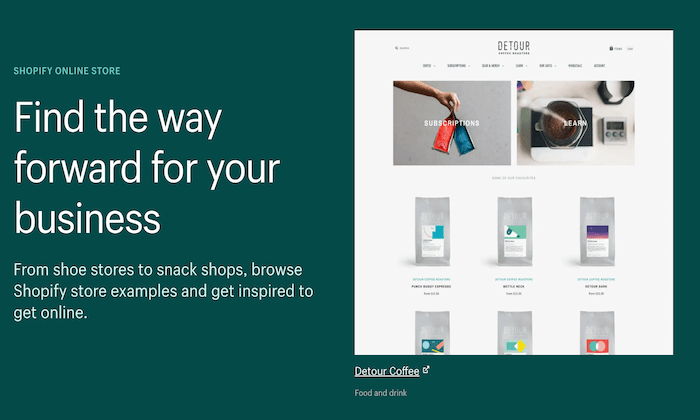
#1 – Shopify Review — Best Out-of-the-Box Ecommerce Functions

Shopify is king in the ecommerce space. Trusted by 1+ million websites in 175 countries, it’s one of the most popular ecommerce platforms available on the market today.

More than $200 billion in online sales have been facilitated via Shopify.

The platform is extremely versatile. Whether you’re starting a new ecommerce business from scratch or expanding your physical presence to an online store, Shopify can accommodate your needs. It comes with everything you need to build your website and start selling online:

  • Industry-specific templates
  • Supports multiple sales channels (point-of-sale, social media, online marketplaces, etc.)
  • Drag-and-drop store builder
  • 70+ templates
  • Custom domains
  • Secure checkout
  • Gift cards
  • 24/7 support
  • Unlimited products
  • Built-in payment processing
  • Shipping discounts
  • Marketing tools
  • Business insights

Regardless of your business size or industry, Shopify’s ecommerce platform is versatile enough to support your site.

Plans start at just $29 per month. You can try Shopify for free with a 14-day trial. 

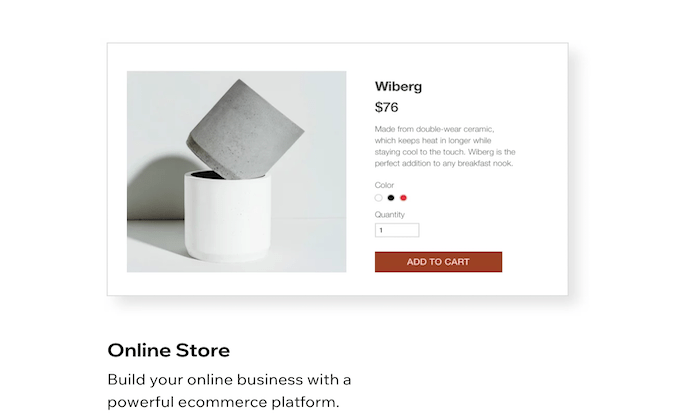
#2 – Wix Review — Best Drag-and-Drop Ecommerce Builder

Wix is one of the best overall site builders on the market today. The platform can be used to create any website—including ecommerce sites. 

More than 160 million people across the globe have used Wix to create a website from scratch.

Wix is a great option for beginners. Anyone can use this platform to build an ecommerce site, regardless of technical skill level. Here’s what makes Wix so great:

  • Intuitive drag-and-drop site builder
  • 500+ stunning templates
  • Optimized for SEO
  • App marketplace for custom functions
  • Advanced design features like video backgrounds, animations, and scroll effects
  • Mobile-optimized ecommerce site
  • Custom domain, free hosting, and free SSL certificate
  • Supports multiple payment methods
  • Product pages and store manager tools
  • $300 in advertising vouchers
  • 24/7 customer care
  • Unlimited products

Ecommerce plans from Wix start at $23. But I recommend starting with the Business Unlimited plan, at a minimum. It’s just $4 more per month and comes with enhanced features. 

You can start building your Wix site for free to try out the drag-and-drop builder. Then take advantage of a 14-day free trial to access premium features. 

#3 – BigCommerce Review — Best For Large Ecommerce Sites

BigCommerce is another industry leader in the ecommerce world. For more than a decade, this platform has served ecommerce sites in 120+ countries.

Over $25 billion in merchant sales have been powered by BigCommerce.

This platform is great for wholesalers, international ecommerce sites, B2B sellers, and multi-channel sales. For selling at scale, look no further than BigCommerce.

  • Easy to use and secure platform
  • Powerful ecommerce analytics and customer insights
  • Drag-and-drop building tools with no coding required
  • WordPress integration
  • Custom checkout capabilities with checkout API and SDK
  • Built-in Javascript, HTML, and CSS for full theme customization
  • Optimized for mobile and SEO
  • Built-in faceted search
  • Cross-channel sales support (brick & mortar, social, marketplaces, etc.)
  • Multiple currency support
  • Global CDN
  • Cross-border fulfillment
  • Built-in payment processing

Overall, BigCommerce is my top recommendation for large ecommerce websites. If you want to sell online without restrictions, this will be a top option to consider. 

Plans start at $29.95 per month. Try BigCommerce free for 15 days. 

#4 – Squarespace Review — Best Beautiful Ecommerce Designs

Squarespace is another all-in-one website builder that can be used to create any type of website. 

But unlike other traditional site builders out there, Squarespace is optimized for businesses. With the exception of the personal plan, all Squarespace subscriptions come with built-in ecommerce functionality.

Squarespace is a popular choice for creative professionals who want to showcase their portfolios and sell online. It comes with features like:

  • Award-winning design templates
  • Built-in tax tools
  • Supports sales for subscriptions and digital content 
  • Discount codes and gift cards
  • Secured checkout process from any device
  • Abandoned cart recovery tools
  • Ecommerce integrations for shipping and payment processing
  • 24/7 customer support

You’ll need to connect your own payment processor to run an online store with Squarespace. Ecommerce plans start at $18 per month. Upgrade to the Basic Commerce plan ($26 per month) to avoid 3% transaction fees.

If creating a visually appealing ecommerce site with stunning designs is your top priority, Squarespace should definitely be on your shortlist. 

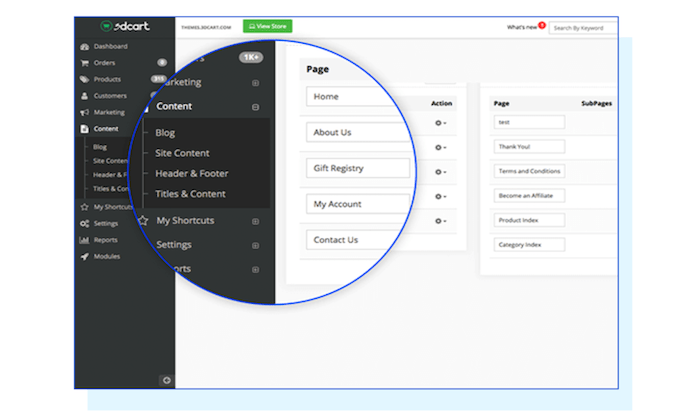
#5 – 3DCart Review — Best Developer-Friendly Ecommerce Software

If you have unique needs and you’re working with a developer or designer, 3DCart might be the solution for you.

3DCart isn’t quite as popular as some of the other ecommerce website builders on our list. But with that said, it’s not for everyone.

While 3DCart does have drag-and-drop building tools to accommodate beginners, the software is powerful enough to support the needs of developers and design experts. So it can essentially be as simple or complex as you want it to be.

Other top features and noteworthy highlights of 3DCart include:

  • 200+ built-in features
  • 200+ ways to accept payments
  • 50+ free themes
  • Simple and versatile shipping setups
  • Robust security
  • Supports dropshipping
  • Supports subscriptions, tickets, events, and print-on-demand sales
  • Powerful CMS
  • Optimized for SEO

All plans come with secure hosting, unlimited orders, 24/7 support, and no transaction fees. Pricing starts at just $8.55 per month. 

Subscriptions are backed by a 30-day money-back guarantee. Try it free for 15 days.

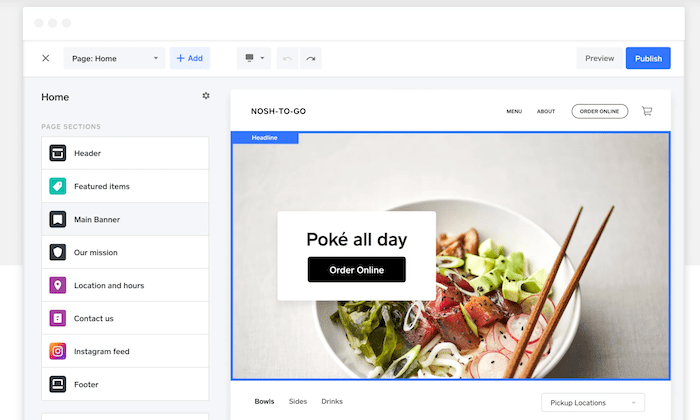
#6 – Square Online Review — Best For Small Businesses with Physical Retail Space

Square is best known for its payment processing and POS solutions. But the platform also provides business owners with the ability to create a free online store.

If you’re a brick and mortar retailer that’s currently selling with Square POS, you can easily expand your online presence by building an ecommerce site using Square Online.

Let’s take a closer look at some of the features and benefits that you’ll get with Square Online:

  • Fast setup with no coding required
  • Built-in payment processing
  • Automatic sync with your Square POS system
  • Supports in-house and on-demand delivery
  • Instagram integration
  • Inventory management tools
  • Accept gift cards, Google Pay, and Apple Pay

Launching an ecommerce site with Square Online is free; you’ll only pay the transactional fees (starting at 2.9% + $0.30). For advanced features, paid plans start at $12 per month. 

#7 – WooCommerce Review — Best Ecommerce WordPress Plugin

If you currently have a WordPress website and need to add shopping cart functionality to it, WooCommerce will be the best option for you. 

This plugin is built specifically for WordPress, and it’s one of the most popular WordPress plugins on the market today.

What makes WooCommerce so great? Let’s take a closer look:

  • Fully customizable with features that can extend its functionality
  • Flexible and open-source
  • 140+ gateways and payment integrations
  • Ability to manage orders on the go
  • Supports physical products, digital products, and subscriptions
  • Hundreds of free and paid extensions
  • Fully scalable
  • Developer-friendly with REST API

To get started with WooCommerce, you’ll need to have an existing WordPress site. That means you’ll have to handle the domain registration and hosting on your own as well. 

The WooCommerce plugin is free to install.

Summary

The first step to selling online is finding a viable ecommerce website builder. 

Which one is the best? It really depends on what you’re looking for. 

In order to find the best option for your website, refer to the buying guide, reviews, and recommendations outlined in this post. This will definitely help you narrow down your options.

The post Best Ecommerce Website Builder appeared first on Neil Patel.


from Blog – Neil Patel https://ift.tt/3jJ2IXw
via IFTTT