Disclosure: This content is reader-supported, which means if you click on some of our links that we may earn a commission.
What would happen to your WordPress site if all your data was wiped out?
If you don’t have a clear answer to this question, then you’ve landed in the right place.
Using a WordPress backup plugin is one of the smartest things you can do to ensure your site is protected from disaster.
If you get hacked or accidentally lose your password, you’ll save yourself the massive headache of losing everything on your site. But only if you have a backup plugin installed.
Without one, you’d be back to square one.
But which WordPress backup plugin should you use? You’ve got options.
In this post, I’ve reviewed my top five recommendations and included a short buyer’s guide to help you figure out which one fits your needs.
Ready? Let’s make sure your site’s backed up.
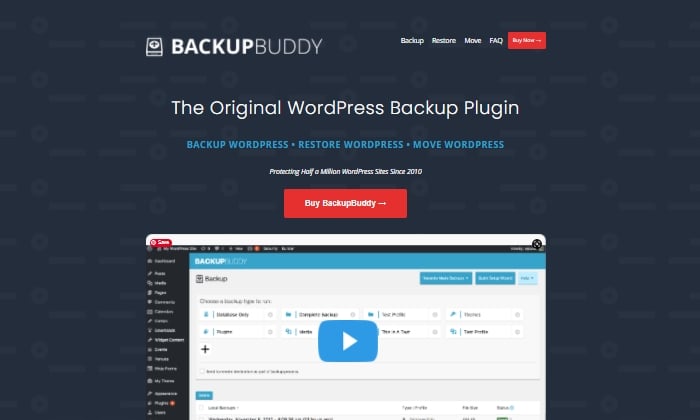
#1 – Backup Buddy Review — The Best For Efficiently Restoring Your Site
Like Backup Buddy rhetorically asks on their site, “What good is a backup if you don’t also have a way to restore your site properly?”
And they couldn’t be more right. Backup Buddy ensures you always have the latest backup of your site by providing you with a zip file you can use to upload and restore a broken site.
Once uploaded, Backup Buddy seamlessly walks you through the steps to get your media files, text, plugins, and more back up and running. Additionally, you can choose to restore individual files instead of restoring the whole site if that’s what you want to do. You can even schedule automated backups at intervals you customize.
Some top features of Backup Buddy include:
Backs up your entire WordPress installation
Customizable backup content that you can pick and choose to restore
Offers hourly, twice daily, daily, biweekly, weekly or monthly backups
Automatically sends your backup files to accessible remote storage locations like Dropbox or Google Drive
Backup Buddy has three pricing options, all with one-time fees:
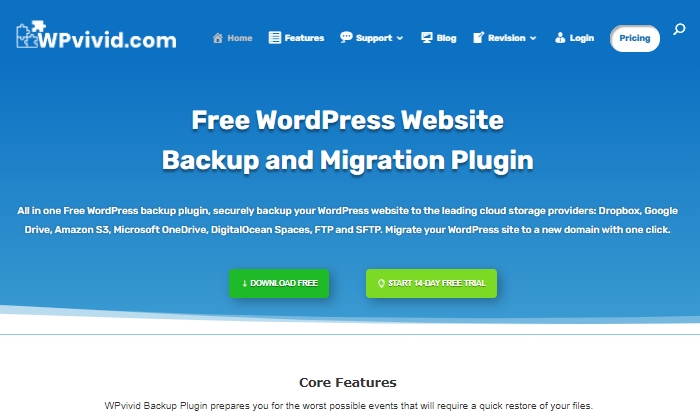
WPvivid Backup Pro is a great backup plugin you can safely set up and start using to migrate your site. They’ve been used on more than 90,000 websites to do more than just back up and safely migrate data files.
WPvivid Backup Pro offers incremental backups to ensure it isn’t slowing down your site as it works in the background to backup all your data once it’s been configured to your needs. As far as its backup migration capabilities, WPvivid Backup Pro supports manual migration methods, as well as auto migration and migration via remote storage (as a premium feature).
Some of WPvivid’s best features include:
Create either manual or scheduled backups
Advanced migration features in case you want to migrate your site quickly
The ability to create a staging site
It backs up all your core WordPress files
24/7 ticket support
Set a size limit for files that you’re not interested in backing up
Here’s a quick look at their pricing packages:
Basic — $49 per year for up to three websites
Freelancer — $99 per year for up to 100 websites
Ultimate — $149 per year for unlimited websites
All three plans are annual subscriptions, unlike other backup plugins, many of which are a one-time licensing fee. WPvivid also offers a 14-day free trial, visiting so you can test it out before you purchase a plan.
#3 – JetPackReview— The Best For Making Site Changes Safely
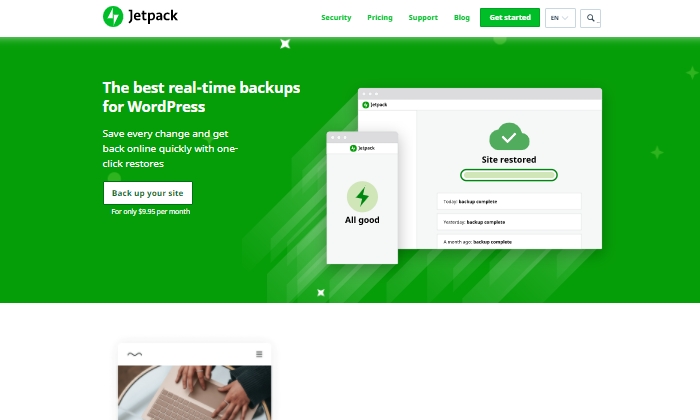
Jetpack is a strong contender for a reliable backup plugin that works great for making site changes safely.
Picture this: You’re making exciting new changes to your site, whether that’s CSS customization, adding new plugins, or altering your core site files. Then suddenly, something breaks. With Jetpack, you can quickly restore your site to how it was before you made that crucial mistake with just a few clicks. This makes it an easy and reliable plugin to work with if you’re constantly updating your website.
The Jetpack plugin even comes complete with a mobile app so that you can virtually restore your website right from your phone no matter where you are. Plus, Jetpack offers plenty of security features, too. This can only be a plus for a backup plugin and makes it worth keeping in your corner.
Some top features of Jetpack include:
Provides malware scanning and protects your site from spam
Downtime monitoring lets you know if your site is down immediately
Malicious hacking and attack protection
Mobile app you can take and use with you everywhere
Automatically cleans up spam comments off your site
If you choose to go with JetPack, the question becomes what kind of pricing package you’ll feel comfortable going with, as there are many options.
The three main packages are:
Backup Daily — $7.95 per month billed yearly
Security Daily — $19.95 per month billed yearly
Complete — $79.95 per month billed yearly
The Backup Daily tier offers automated backups, one-click restores, and unlimited site storage. On the other end, Complete provides the full Jetpack suite, including real-time security, enhanced search, CRM features, and even design tools.
Jetpack also offers a limited free forever plan that includes basic site protection, downtime monitoring, and changelogs.
Additional product bundles you can purchase separately on a per month basis include a Security Real-Time plan, a Real-Time Backup plan, a Scan package, an Anti-spam bundle, a Site Search plan, and the CRM Entrepreneur add-on.
Jetpack offers peace of mind by providing one-click restore options and monitoring your website’s security at pretty affordable rates. Still, I recommend you visit their comparison page to ensure you’re deciding on the right backup bundle.
#4 – BlogVaultReview— The Best All-In-One Backup Solution
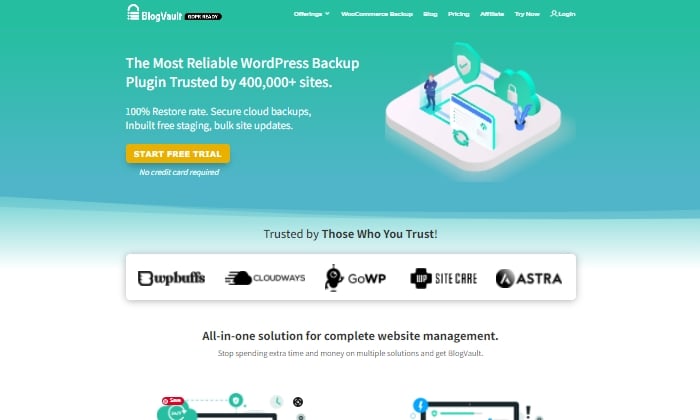
BlogVault makes for a reliable all-in-one backup plugin that ensures your site’s backup is stored securely in the cloud. It’s used by over 4,000,000 websites and trusted by businesses like Astra, Cloudways, and GoWP.
BlogVault’s plugin offers key storage features like changelogs that can help you identify problematic modifications to your website. They go as far as providing 90-day archives to ensure you recover from any site mistakes, which are bound to happen at some point in your site’s lifetime.
If your site experiences downtime, with BlogVault, you can make it so that your site’s backup still shows up to users. What exactly does BlogVault backup? Everything from the basics like blog posts, your media library, and media files to blog comments, plugin files, WordPress settings, categories and tags, theme settings, WordPress core files, and even user details.
Because of how complete and robust BlogVault is as a plugin, it’s one of my favorite backup plugin recommendations to make.
Some of BlogVault’s best features are:
Provides centralized dashboard where you can manage multiple sites
Provides custom WooCommerce table backups
Performance checks that inform you about site speed and ways to improve your site
Get uptime and downtime status checks
Handy customer support that gets in contact with you in less than 24 hours
Incremental backup option available so the plugin doesn’t slow down your site
If you’re not in love with everything BlogVault offers yet, take a look at their affordable pricing tiers:
Personal — $7.40 per month for daily backups
Plus — $12.40 per month for daily backups
Advanced — $20.75 per month for real-time backups
You can definitely take them for a test drive with their free trial. Otherwise, get started using BlogVault here.
#5 – UpdraftPlusReview— The Best Free Backup Plugin
If you’re looking for a free backup plugin, look no further than UpdraftPlus. It makes restoring all your site files hassle-free and straightforward. It has over 3,000,000 active installations and is a reliable backup option if you are running your site on a shoestring budget.
UpdraftPlus has a paid version you can upgrade to with a lot more features and capabilities. But for now, we’ll focus on what the free version can do for your site.
UpdraftPlus is a cloud-based plugin that ensures you have access to your site’s files and data in case of cyberattacks, server crashes, conflicting plugins, or anything else that would bring your site down. Once you upload the UdraftPlus plugin, you can set it up, forget it, and let it run in the background while you work on more important tasks for your business.
Best features of UpdraftPlus:
Backup to an exhaustive list of cloud options
Lets you set up automated backup schedules for convenience
Uses less server resources than other free backup plugins
Has the ability to restore your site
Updraft Plus is free, and you can read reviews and download it here.
What I Looked At To Find The Best WordPress Backup Plugins
The most basic use of a backup plugin is to keep updated backups of your site continuously. There are plenty of plugins on the market that will do just that.
Here are some of the criteria I looked at to find the best plugin options for your WordPress site. These will be helpful factors for you to think about as you choose which plugin to invest in.
Restoring Options and Complete Backups
If you’re frantically trying to get your site back up and running and want to restore it to how it was before it crashed, you’ll be thankful for a restoring option you can upload in minutes.
This way, you’re enabled to troubleshoot fast, save your rankings in search engines, and have a contingency plan for when things go south. It’s a great feature to look for in any backup plugin you decide to use. Especially if their pricing features hook you into yearly subscriptions.
Along with quick restoring options, it’s a good idea to ensure your backup plugin does complete backups, meaning it backs up everything on your site from images to texts, themes, media files, and your whole database. If your entire site goes down, a partial backup will be less useful. Full backups are worth any extra cost.
Preventative Overload Configuration
It’s always a plus to know that a plugin was built to work with your site and not against it. This means it was designed with every aspect of your site in mind. This includes not overloading your site so that it slows down or has trouble loading.
Some of the best backup plugins allow for interval backups, configured so that your site doesn’t suffer from slow loading times. As you probably know, load time is a crucial SEO factor that Google takes seriously as it decides where to place you in SERPs. The fewer resources your backup plugin takes up, the better your chances of ranking on search engines.
Cloud Storage
This brings me to cloud storage as a desirable feature in a backup plugin. It can be both a cost-effective and scalable option to give you peace of mind.
With cloud storage, you can store all your site information safely with your backup provider, where you’ll always have access to your data within minutes. This also helps you minimize storage overhead and have easy access.
Bringing It All Together
Using a reliable WordPress backup plugin is one of the best ways to keep your site safe while you sleep soundly at night. In the scenario that you lose everything on your site, meaning your files, images, blog posts, guides, PDFs, and more, you’ll want to be able to bring all of it back with a few clicks. That’s where backup plugins come in.
To summarize the plugins I reviewed in this guide, take a quick look at the list below:
Backup Buddy — The best for efficiently restoring your site
Take a moment to check out each one so that you’re comfortable with your final plugin choice. If you’re unsure, make sure to revisit this guide whenever you need it.
Now it’s your turn. Which plugin do you use to backup your sites? Comment below!
from Blog – Neil Patel https://ift.tt/2YsbBfM
via IFTTT
If the title of this made you laugh or cringe, you’re not alone. Finance doesn’t always see marketing as a driver of business growth, and marketing doesn’t always make their case very clearly. It’s a relationship that has been fraught with tension for many years.
However, business success in 2021 means aligning these two critical functions with a growth mindset. As we start to exit this pandemic rollercoaster, it should be clear by now that finance and marketing have equally important roles to play when it comes to company growth. Finance, with their company-wide view into budgets, plans, and performance is an incredible resource for marketers. And all of marketing’s programs and campaigns are critical to delivering that business growth.
Here are the three key ways that marketing and finance teams can come together to create a positive business impact.
Reach across the aisle
If you demonstrate a positive attitude toward improving this inter-team alignment, your team will adopt that outlook as well. It’s on leaders in both groups to set a good example and create a trickle-down effect of mutual respect and collaboration.
Start building a relationship by asking questions. Marketers can open up the dialogue around performance, and ask what their financial partners care about most. Ask what key benchmarks the company is using for metrics like spend versus revenue. Take time to understand their strategy, their revenue targets, and then think critically about how your marketing programs can help achieve those targets.
The next step is learning more about each other’s internal processes and timelines. You can make this discussion smoother by first understanding the level of detail finance needs about marketing programs and spend. Reconciling the two departments can be challenging enough without adding information that’s not critical for inter-team discussions. Work together to establish the right amount of detail so nothing is missing, but also so no one is overloaded by data. Information requirements may differ between finance and marketing, but both teams need to get on the same page to make their respective decisions.
At the end of the day, no company can operate successfully without a strong marketing plan, and marketing plans require money. If marketing and finance have a solid interpersonal relationship, it’s much less daunting to reach out and use one another as resources.
Partner for planning
It’s a delicate balancing act between moving quickly on new market opportunities while keeping on top of budgets so you don’t overextend on commitments. But I’m telling you: this balance is possible. And it starts with marketing and finance becoming planning partners.
The cleanest way to start is to create a closed loop between marketing plans, forecasts, and actuals. It also helps to have a clear investment taxonomy to foster alignment between different data sets. This will help both teams know where every dollar is, at any given moment. When teams can merge views of committed spend and future spend plans, marketing can quickly and confidently make adjustments knowing how and what those pivots will impact in the business.
Finance can also be an invaluable partner when it comes to scenario planning. The point of scenario planning is vetting options early so you can pivot quickly based on a business change or market opportunity. And finance’s opinion on how the business would want to approach these scenarios from an investment perspective is incredibly helpful. It’s not just a matter of Plan A, B, or C based on budget, but asking questions like:
In the case of A, what financial business outcomes are we most trying to optimize for?
If market opportunity X were to arise, how do we feel about investing more aggressively to pursue it?
Because what finance is likely to ask is:
What are the consequences of the investment?
Will it get us where we want to be, or if not all the way, then close?
And scenario planning isn't just about looking ahead, it's about tracking the impact of a scenario that’s triggered. This way, both teams have a clear understanding of what happened with a scenario and can use it for future planning.
Finance brings to the table the knowledge of the company-wide budget, where roadblocks lie, and the means to trigger the release of funds. At its core, scenario planning is a joint-team exercise that identifies when to pull which levers to drive the most significant impact.
Make every dollar count
COVID-19 has brought unique challenges to everyone - personally and professionally. In the business world, challenges can become opportunities. It’s a chance for us to pause and take a critical view of how we were operating. And then question if it’s leading us toward where we want to be.
We can strive for more clarity, more efficiency, and double-down on what we know is successful. Regardless of which department you’re in, it’s a chance to break the status quo and stop investing in the same things year after year out of a sense of obligation. If it’s not bringing in returns, stop investing.
For example, Juniper Networks identified a massive inefficiency within their marketing investment processes. Their teams aligned to make sure that every dollar they spend is aligned to company priorities. Now their team has the visibility to see that 100% of marketing spend is aligned to meet strategic objectives, and they have the flexibility to reallocate budget based on changes in the market and needs of the business.
Be proactive in communicating the impact associated with investments, because that clarity will help both teams understand why investments were made. Budget decisions are inevitable, and marketers and finance need to be partners in that process. The better marketers know their budgets, what’s needed to drive impact, and which marketing programs will best support corporate goals, the easier those decisions become. And the better the inter-team relationship will become when everyone is aligned and accountable to the same metrics.
Change is never easy. But looking at change as an opportunity to improve and to reassess is how we grow – both as individuals and as organizations. In my experience, an improved relationship between marketing and finance can serve as a catalyst for larger organizational changes and growth. Marketing and finance are stronger together and if you’re not on the same page today, it doesn’t mean you can’t be tomorrow. So take that first step today!
Whether you're a B2B or B2C marketer, or both, we have more resources for you.
Data is a godsend for marketers, helping us serve our audience with better, more relevant ads.
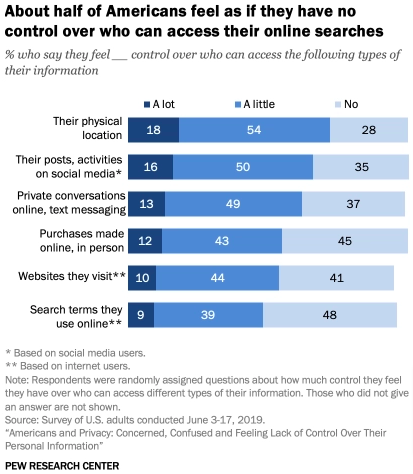
However, regardless of what we might think, consumers aren’t always fans of data-targeted advertising. According to the Pew Research Center, four in five Americans say the benefits they see from data collection are outweighed by the potential risks, while the same proportion admits they’re concerned about how brands are using their data.
Far from being excited about the prospect of seeing ads tailored to their preferences, they feel resigned to having little to no control over how their personal information is used.
Theoretically, this is where AdChoices comes in. We’ll cover what AdChoices is all about, discuss its relevance to marketers and consumers, and review the initiative’s benefits and potential drawbacks.
What is AdChoices?
AdChoices is nothing new. It’s been around since late 2010, and its roots go back even further. To properly understand what it does and why it matters, it’s worth taking a quick detour into the program’s history.
This investigation ruled that consumer privacy should be protected through stricter regulation around data collection. However, rather than directly implementing these regulations, the FTC called on the ad industry to regulate itself.
As a result, some of the biggest names in advertising joined forces under the Digital Advertising Alliance’s banner to establish the Self-Regulatory Program for Online Behavioral Advertising, which oversaw the launch of AdChoices in October 2010. Since then, it’s also been rolled out in Canada and across Europe.
The idea was that, by giving consumers an easy way to identify when online advertising data is being collected or used, people would feel empowered to manage their data and assume some level of control over the types of ads they see.
Back in 2007 (three years before AdChoices was born), market research firm Yankelovich estimated the average city resident saw 5,000 ads every single day, and it’s probably safe to assume that number has grown significantly since then. Many of the ads you see today are part of AdChoices, given that the program’s members include major advertisers and ad networks like:
Google
AT&T
Facebook
Microsoft
Procter & Gamble
Taboola
Yahoo!
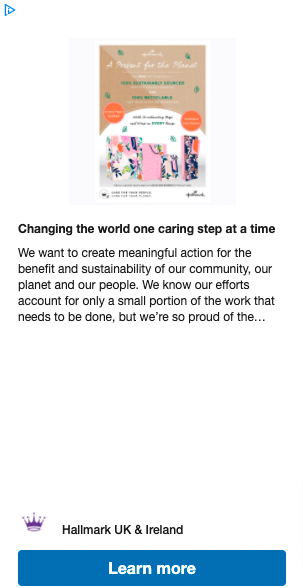
You can identify those behavioral ads by looking out for the AdChoices icon, a lowercase “i” inside a triangle. It typically appears in the top-right corner of behavioral internet ads served based on your data:
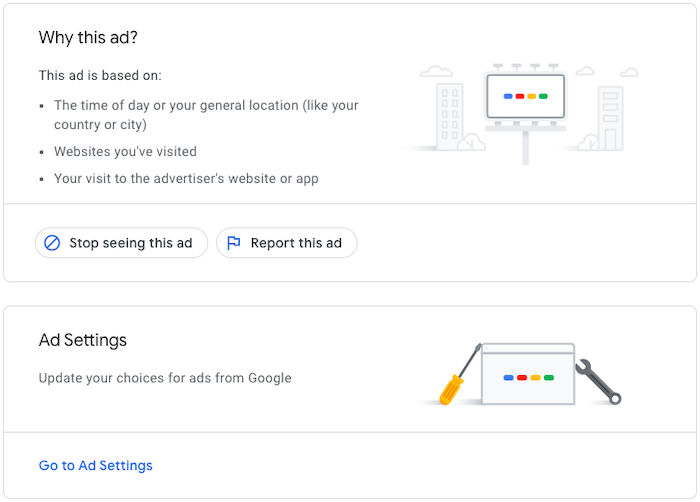
Clicking the icon will tell you more about why you’ve seen that ad or how the website in question collects data. You’ll also have the opportunity to opt-out of behavioral ad targeting.
Why Is AdChoices Important to Marketers?
There are a couple of reasons why AdChoices is such a big deal for marketers and advertisers.
Firstly, it should be apparent why self-regulation is better for the ad industry than being forced to adhere to many potentially far more stringent, government-enforced measures.
Secondly, it helps improve the user experience by ensuring (at least in theory) consumers are only served with ads they want to see.
Why Is AdChoices Important to Users?
Given how many internet users are concerned they have no control over how their data is collected and used online, AdChoices is broadly a good thing.
Simply put, it gives consumers more input into the ads displayed to them. If you see an ad you don’t like, you can hit the AdChoices icon and request to stop seeing it.
You might have any number of reasons for not wanting to see an ad anymore. Maybe you don’t like the company in question for moral reasons. Maybe you have no interest in the product; you could have been looking for gift ideas for a friend or family member, but you bought something else and have no need for it yourself. Perhaps you disagree with the way it’s being advertised. Whatever the case, you can block it.
Some ad networks, including Google, also allow you to dig into why you’ve been served with a particular ad in the first place.
3 Reasons to Use AdChoices
I know what you’re thinking: “PPC is a massive source of sales for my business. Why would I give the people I’m targeting the chance to switch off my ads?”
Actually, there are some excellent reasons for handing greater control and choice to your potential customers. Here are three of the biggest:
1. AdChoices Helps Marketers Target Users With Relevant Ads
Sure, you don’t want everyone to opt-out of your behavioral ad campaigns. However, at the same time, do you want to keep targeting people who actively dislike seeing your ads?
If you’re paying on a CPM basis (that is, you’re paying per 1,000 impressions), any impressions that reach the wrong people are money down the drain.
Even if you’re paying per click, it’s not helpful when your ads are served to people who don’t want to see them. Best-case scenario, those people will like you even less. Worst-case, they’ll also start deliberately clicking your ads with no intention to buy, burning your budget and skewing your figures.
There’s a flip side to this, too.
By giving consumers the opportunity to block ads they don’t like, there’s an increased chance of your ads being seen by the right people. That, in turn, means your campaigns generate better results.
2. AdChoices Helps Build Trust With Consumers
As shown by those Pew Research Center figures I mentioned earlier, consumers don’t exactly love online ads.
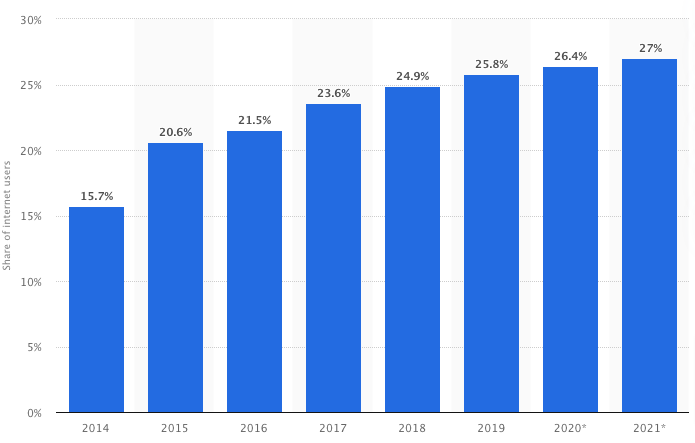
This is best demonstrated by the seemingly inexorable growth of ad-blocking software. Today, over one-quarter of U.S. internet users block ads on their connected devices, and while the increase in adoption has been slow, it’s also been consistent.
Universal uptake of ad blockers would clearly be a disaster for brands and marketers. Admittedly, that day may never come, but advertisers shouldn’t be complacent.
AdChoices could be the solution, or at least part of it. By raising awareness of the initiative and explaining how data is collected for ad targeting purposes, the online ad industry will appear more transparent and trustworthy to consumers.
This mitigates the risk of those consumers becoming frustrated with the number of targeted adverts they receive and resorting to ad-blocking technology.
3. AdChoices Helps Marketers Run More Effective Campaigns
You heard me right: By enrolling in AdChoices and enabling consumers to block your ads, you can improve campaign performance.
How? Because being more open about how and why you collect data may make your ads more effective.
A study published in the Journal of Consumer Research analyzed the impact of transparency on how campaigns perform. Of the authors’ learnings, I found these three points particularly interesting and relevant:
Consumers don’t automatically hate having their data captured: Instead, they’re broadly happy with it, as long as the data was collected from within the site (rather than from a third party) and was provided by the user, rather than inferred by the advertiser.
Transparency doesn’t guarantee success: If you leverage third-party data and infer things about the user, owning up to it won’t help you. In fact, revealing these “unacceptable information flows” can harm your ad effectiveness.
Platform trust is tied to performance: When consumers trust your website and the way you utilize their data, ad performance increases. They’ll spend longer on your site, click more recommended items, and purchase more.
3 Possible Drawbacks of Adopting AdChoices
Data transparency can improve ad performance, and AdChoices offers the transparency consumers crave. In that case, surely signing up to AdChoices is a total no-brainer?
Unfortunately, as with so many things in marketing, it’s not quite that simple. While there’s plenty of upside to AdChoices, there are also some pretty substantial drawbacks, such as:
1. Lack of Awareness Around AdChoices
The biggest criticism around AdChoices is that not enough people know what it is. Presumably, you’re a little hazy yourself, or you wouldn’t be reading this article.
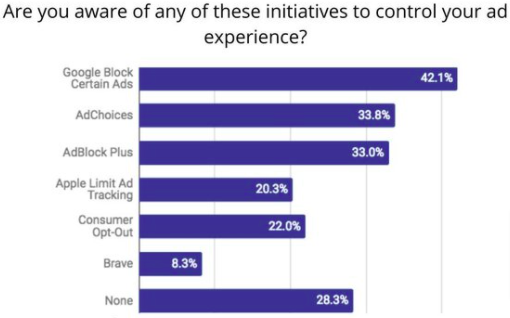
Given the financial clout behind the program’s backers, it’s hard to understand why awareness of AdChoices is so low. A poll conducted in 2013, three years after its introduction, found just six percent of consumers were aware of the AdChoices icon. By 2018, awareness of the program had reached almost 34 percent.
While that figure definitely represents a step in the right direction, it should be tempered by noting 28 percent of respondents said they weren’t familiar with any of the ad filtering or blocking programs presented to them, while 43 percent admitted they’d never used any of them.
Unless those numbers increase dramatically, it’s hard to see how AdChoices can achieve its stated aims of giving consumers greater control over their data.
2. Consumers Often Misunderstand the Purpose of AdChoices
Awareness isn’t the only issue. Even when consumers have heard of AdChoices, they often misunderstand why it exists.
As an example, in 2016, Advertising Standards Canada (ASC) received 283 complaints through the AdChoices platform, double the number from 2015.
That suggests the program was working as intended, right?
Sadly not. Of those complaints, only eight percent had anything to do with behavioral ads, which, if you remember, are the sole focus of the AdChoices initiative. In contrast, three-quarters were about different types of ads that weren’t targeted on data.
To make matters worse, of that tiny proportion of relevant complaints, most were from people who incorrectly believed opting out through AdChoices would stop them from seeing any online ads in the future. They contacted the ASC because they were annoyed ads were still being served to them.
AdChoices isn’t an ad blocker; it’s about seeing more relevant ads. For whatever reason, this message doesn’t seem to be getting through to consumers.
3. AdChoices Can Look Inconsistent
There are likely lots of reasons why consumers aren’t “getting” AdChoices, but it certainly doesn’t help that there’s so much inconsistency around the program and how the icon is implemented.
What do I mean by this?
See for yourself. First up, here’s an ad displaying the AdChoices icon in the top-right corner, but without the “X” icon next to it:
Next, here’s a different ad in which the AdChoices icon appears in the top-left instead:
Even more confusingly, here are two separate ads for the same product, seen on the same website, within minutes of one another. These ads are more or less identical, yet one displays the AdChoices icon:
The other doesn’t:
This happens because different vendors and ad technology providers are responsible for serving ad impressions, and not all of those companies have joined AdChoices.
When this sort of inconsistency exists, how can we expect consumers to understand AdChoices and trust that it’s working for their benefit?
Conclusion
As you can see, there are some pretty significant concerns about the viability of AdChoices.
If it’s going to deliver its goals and make the world of behavioral ads better for consumers, it needs to be adopted by the vast majority of ad platforms and providers. Otherwise, it’s hard to imagine there’ll be much growth in awareness of the program or support for the objectives it’s trying to achieve.
That’s not to say the underlying principles of AdChoices are bad or wrong. Consumers clearly want greater control over their data and the way it’s used by advertisers.
However, with Apple, Google, and Mozilla taking steps to ditch the third-party cookies that power behavioral ads, the days of relying on this type of advertising could be numbered.
Maybe it’s time we give consumers what they want and turn to less invasive, more traditional tactics like contextual and keyword-based advertising?
What do you think about AdChoices? How would you cope without behavioral targeting?
from Blog – Neil Patel https://ift.tt/3rEMvXe
via IFTTT
One of the tricky parts about this is the fact parents are such a varied group. Forty percent of US households have at least one child under the age of 18, and that large group includes people from all walks of life.
The USDA estimates that it costs $284,570 (with inflation factored in) to raise a child through age 17.
To successfully target parents through paid ads, you have to deeply understand your target audience and use this knowledge to inform your marketing strategy.
7 Ways to Target Parents Through Paid Ads
Parents spend a lot of time online, meaning they may be pretty likely to see your paid ads.
For the first time, women in the U.S. are more often having babies in their 30s than their 20s. This means you’re looking at an audience with a lot of millennials who spend a great deal of time on social media. This is also the case with younger parents, and both groups use search engines to find answers to everyday questions.
The difficulty is not reaching parents; it’s targeting the right people with the right message at the right time. For example, there’s no point in reaching a teenager’s parent with an ad for baby formula.
You may have a rough idea about your target audience, but you’ve got to drill down further and figure out what matters to parents when targeting them through paid ads.
1. Incorporate Life Events
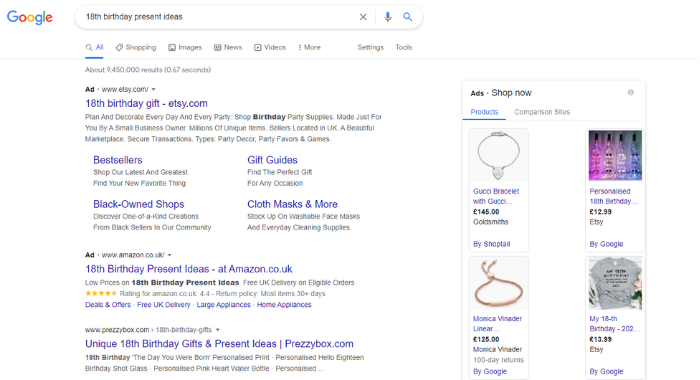
When we look back at our childhoods or those of our children, it’s often the big life events that stand out. There’s nothing wrong with turning 31 or 63, but it doesn’t quite carry the same excitement as your eighth birthday.
Events like birthdays, holidays, vacations, and graduations are important to children, and they’re equally important to parents. Even if money tight, most parents are willing to do what it takes to ensure their children have amazing memories of big moments.
For marketers, this is an opportunity to connect with parents. It’s not always easy to know what kids want, but through paid ads, your business can guide parents to the hottest gifts.
This should play an important part in your paid ads, especially at important times of the year like late spring, when kids often graduate from high school. Parents often want to mark these special days with the right gift or by throwing a wonderful party, and your business should be looking to help make sure this happens via paid ads.
What does your target audience look like, and what are its priorities?
Increasingly, parents are millennials. To target parents effectively, many brands have to understand how to target millennials.
Some key points that advertisers need to understand about millennials are generally:
tech-savvy
highly connected
seeking immediate gratification
caring about authenticity
collaborative
These characteristics are further enhanced by the fact that parents are busy. They want to use technology to help solve problems, and when they buy products, they need the experience to be fast and effective.
This means the experience you offer parents with your ads has to be perfectly optimized. Modern parents won’t waste their time on poorly optimized mobile sites or those with checkouts that take too long.
Paid ads should be backed up by a good user experience. If you get this right, it allows you to focus on solving your target audience’s pain points. Although parents have diverse needs, these often can be broken down into three categories:
saving time
saving money
doing things more effectively
If your website experience and products can come together to help parents achieve this, then you may find you have success with your paid ads.
3. Back Your Products with a Guarantee
Parents are usually fiercely protective of their children, and your products or services need to fit into this narrative.
When we buy products for ourselves, we make a complicated buying decision. When parents buy for their children, this is amplified. They want to know the products are safe, can benefit their children, and are going to last. If your products don’t demonstrate this, they’re not going to be as appealing for parents.
One of the ways you can help assure parents about your products is by offering a guarantee. If you believe in your products and services, you should be willing to offer assurances to your customers, and which you can state in your advertising.
In my article, “5 Simple Tips to Creating an Unbeatable Facebook Ad Campaign,” my first tip was “your offer will make or break your campaign,” and your guarantee is a part of this. Without the guarantee, your offer probably isn’t as appealing to parents.
Parents have to trust you and your products if they’re going to let your brand into their children’s lives.
4. Develop Trust
As I’ve mentioned, many parents are now Millennials who are very tech-savvy, connected, and collaborative. When it comes to making sales, this means you need to be able to create a brand people can trust. One of the most important aspects of this is social proof.
93 percent of people read online reviews before buying a product.
91 percent of 18- to 34-year-olds trust online reviews as much as personal recommendations.
Customers are likely to spend 31 percent more at a business with excellent reviews.
Reviews play a big part in modern consumer decisions, so you need to have a process in place to make sure you’re getting them. Once you do, you can use social proof to show parents that other parents have bought your product and had great experiences.
Parenting can be challenging, and there are many products out there that promise a lot but fail to deliver. Naturally, parents are eager to avoid such products, so a good review from a fellow parent can go a long way.
Of course, building this trust is based on you offering value for parents. If you’re doing this, you should take every opportunity to showcase it.
5. Be Informative
Children don’t come with a manual, and even if they did, following it would be nearly impossible. Naturally, parents look to authoritative sources to help them with their parenting—59 percent of parents say they have found useful parenting information on social media in the past 30 days. Your business may well be perfectly positioned to offer this information.
Targeting parents through paid ads doesn’t just have to be about your products. It can also make use of your knowledge.
Rather than just offering a quick solution to a problem, you can use your expertise to explain the reasons for the issue and offer advice.
For example, if a child struggles to organize their homework schedule, you can give parents tips about how to help their child become more organized rather than pushing your time-keeping app. You can naturally work your product into your resources, which begins to create a relationship with the reader.
Millennial consumers have grown up with internet marketing, and they’ve become skeptical about advertising. Using gimmicks doesn’t work with this demographic. It’s about offering value. The way you can do this is by showing your expertise and helping your target audience solve problems.
Your paid ads should have a collaborative feel to them, where you’re working together to make parenting easier, more affordable, and more effective.
6. Go Deeper With Your Targeting
What does a parent look like? It’s impossible to answer this question because they rarely look the same. There are so many different demographics within this audience:
parents of newborns
parents of teens
first-time parents
parents of multiple kids
two-parent families
single parents
young parents
older parents
The list is endless, and this is a good thing for marketers. If you can narrow down your target audience and understand who’s most likely to buy your products, you can target parents using relevant content.
For example, being a first-time mom is very different from doing it the second time around. First-time moms search for products in different ways than second-time moms, and they look for different things.
Through Google Ads, Facebook, Instagram, and other platforms, you can reach particular audiences. Make the most of this by working on your buyer personas.
7. Reach Parents When They’re Searching
Parents are exceptionally busy people. They’re often balancing bringing up a child with full-time employment and everything else that comes with life.
For example, due to work and daily schedules, parents may search for products late at night.
Understanding when parents search the internet can allow you to target them better and make your campaigns more effective.
Dig into your Google Analytics and find out when people are using your site and making purchases. Another great step is to ask parents about how they shop through surveys. People are often willing to answer quick questions, giving you great insights into how to target parents through paid ads.
Conclusion
It can be tricky to target parents through paid ads because they’re such a diverse group. Parents of teens are looking for very different things from parents of newborn babies, and your advertising needs to recognize this.
However, there’s one thing parents share: a desire to do the best for their children. To successfully advertise to parents, you need to understand how your business helps them with this.
One of the biggest challenges that bloggers and content marketers face is writing content that’s optimized for search engines, yet will also appeal to people.
If you want to build your blog audience, you’re going to have to get smarter with your content. The principal way to accomplish this is SEO copywriting.
To thrive, your online business must go beyond simply “writing content.” Your content needs to accomplish two goals:
solve a particular problem
appeal to the end-user (customers, clients, prospects, readers, etc.),
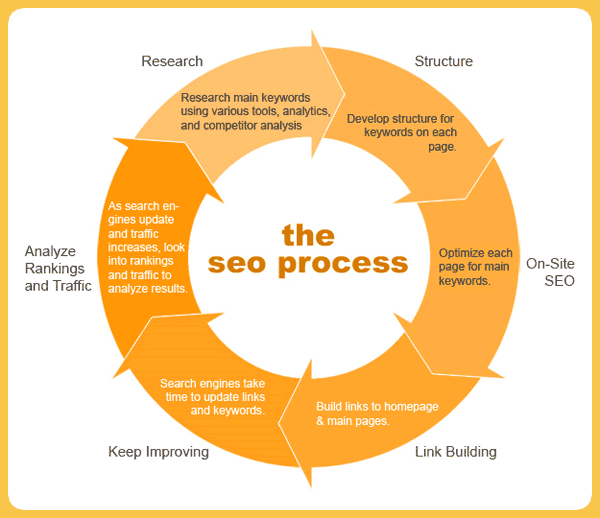
How do you create content that meets those goals? How do you create content that ranks well with Google and also persuades people? That’s what SEO copywriting is all about. Don’t worry if you can’t afford an expensive SEO copywriter. You can do it on your own following simple rules.
What Is SEO?
We all know what happens when you type a search query into a search engine and hit “enter”: You get a list of search results that are relevant to your search term.
Those results pages appear as a result of search engine optimization (SEO).
Which other people then read and share on Twitter, Facebook, their own blogs and other social media platforms.
According to Redevolution, Google displays web pages in their search results based on the authority and relevance of the page to enhance the user experience. How does it measure authority and relevance?
Google determines the relevance of your page by analyzing its content based on several factors, including where and how often you use certain words in that piece of content.
Google measures authority by the number of links pointing to that page and how trustworthy those links are.
On the internet, links are like votes, with a slight difference. The winner of the election is determined solely by the number of votes, whereas your web page’s rank doesn’t depend so much on how many incoming links it has (quantity), but rather on the quality of those links. You and your marketing team need to understand this.
Copywriting is the art and science of creating content that prompts the reader/end-user to either buy a product, subscribe to a list, take a test drive, or take some other action that will improve your.appeal to the end-user (customers, clients, prospects, readers, etc.),
Who drives a user to take action? A copywriter does. A copywriter is a skilled professional who writes copy for advertisements, promotions, and customer engagement. In the marketing world, they’re often referred to as “creatives.” An SEO copywriter tailors this to online content.
A copywriter is someone who understands people, knows what his audience likes and chooses the words that will appeal to them. The headline, words, phrases, sentences and paragraphs used in the content have to persuade and cause readers to take a specific action. An SEO copywriter also understand how Google feels about certain words and phrases, especially long tail phrases.
If you’re a blogger, freelance writer, or online business entrepreneur, you can become a sought-after copywriter when you develop your creativity and perfect your writing skills.
If you want to build a thriving online business and survive in the everchanging world of SEO, your job is to create useful content that’s interesting, persuasive, and well-optimized for search engines; and you have to do it consistently. That is part of the user experience, getting new fresh content on demand.
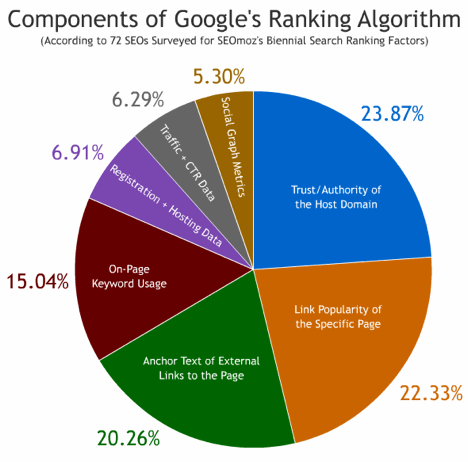
If you want to create highly useful content that ranks well in Google and simultaneously funnels paying clients or customers to your online business, you must think about the components of Google’s Ranking Algorithm.
SEO copywriting is all about creating useful, compelling, and valuable content that targets specific keywords so that other people will gladly promote it on social media platforms.
This increases the authority and relevance of your content and improves its ranking in Google for the selected keywords. So when you highly recommend something, Google sees it relevant and you will achieve greater SEO content results.
SEO copywriting helps you target your customers and solve their specific problems with well-crafted content.
40% of people will abandon a web page if it takes more than 3 seconds to fully load.
47% of end users expect a web page to load in two seconds or less.
Site speed has been a ranking factor since 2010 and it’s good for users, too. If your load time is more than 2 seconds, which is the standard load time for sites, then you should take steps to improve it.
That’s because if your content is useful and interesting, but it takes a long time for your page to load fully, your visitors will leave, because their attention span is short. They leave because of a bad user experience.
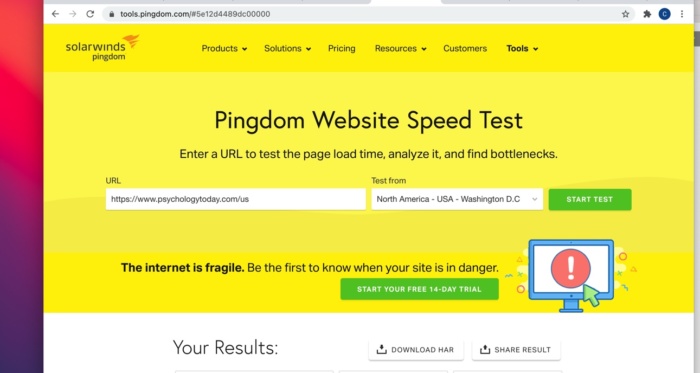
How do you measure your site load time? Follow these basic steps — I’ll use Psychology Today as an example:
You see that Psychology Today is fast. The load time is 770 milliseconds, beating the standard load time by 0.03 seconds.
Step three: Check the history. You want to determine the previous load times for your site.
In our example, the history shows that Psychology Toda≥≤≤÷y had a load time of 2.58 seconds on January 10, 2015. The page size was 1.6 MB at the time. Today, the page size has been reduced to 1.5 MB and the load time improved to 770 milliseconds. This is what SEO firms check first and so should you.
Go ahead and check your site load time using Pingdom.
If you want to improve your site speed, read these step-by-step guides:
Does site speed lead to improved conversion rates? Yes it does.
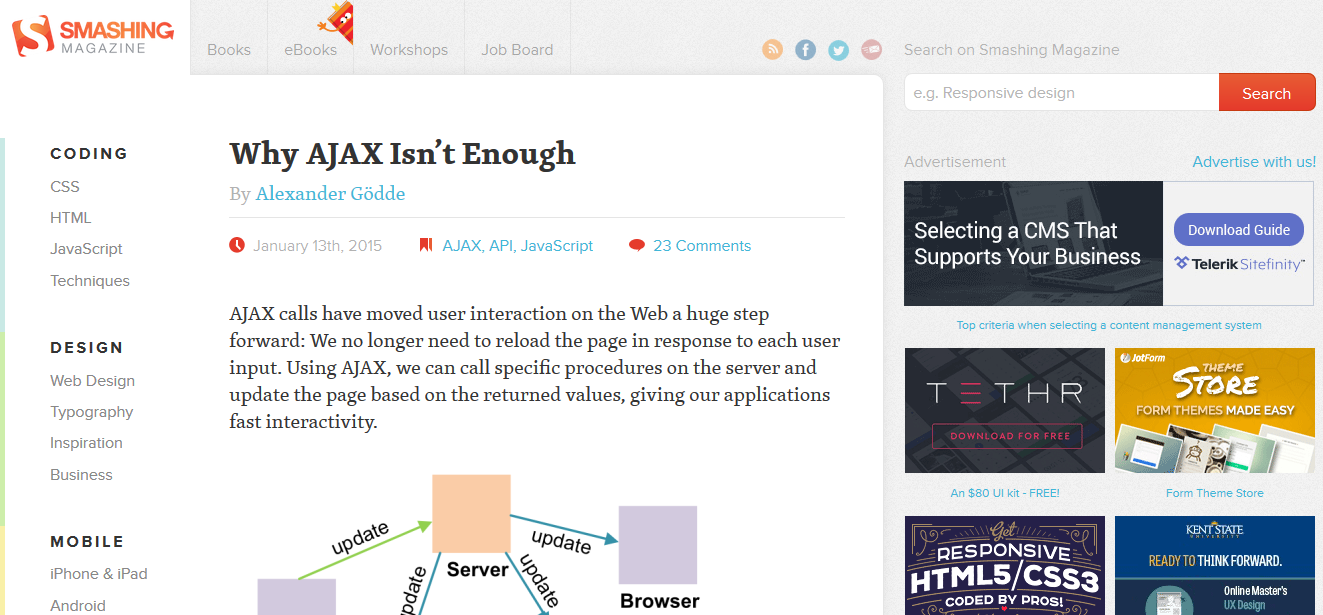
This case study reveals how Smashing Magazine experienced an impressive boost in their conversion rate when they cleared their database of all of the clutter that old plugins had created, then merged all of the databases into one.
2) Headline
Your content may be valuable, but if your headline is mediocre, your click-through rate will be low. Don’t waste valuable SEO copy.
On the average, five times as many people read the headline as read the body copy. When you have written your headline, you have spent eighty cents out of your dollar. —David Ogilvy
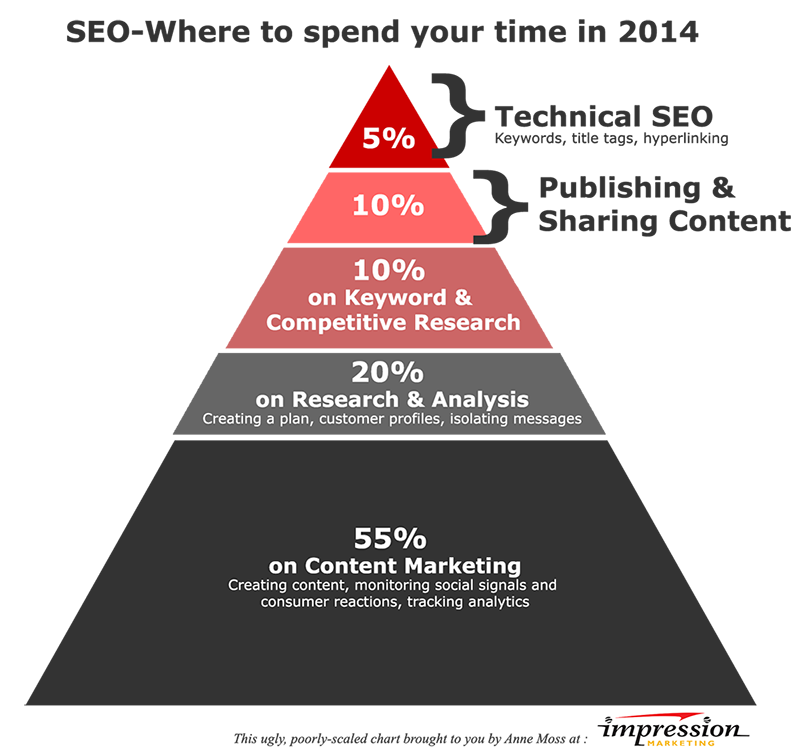
For the most success, bloggers should spend about six hours per post. Tasks that should be performed in those six hours include creating content, monitoring social signals and consumer reactions, tracking analysis, etc.
In SEO copywriting, your headline should attract people’s attention, then prompt them to click and read further.
As you learn to become a better writer, focus on the things your leads will see first. Such as the headline.
When you rank in Google’s top 10, if your headline is clickable and attractive, it doesn’t really matter whether you rank #1 or #4, because you will still attract organic visitors to your site. As a rule of thumb, a successful SEO copywriter creates the headline before moving on to the body of your article or blog post.
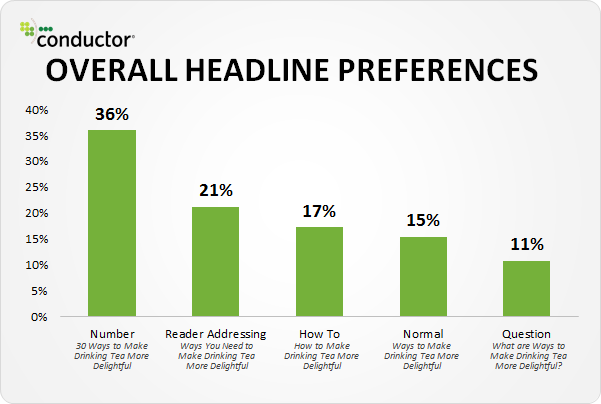
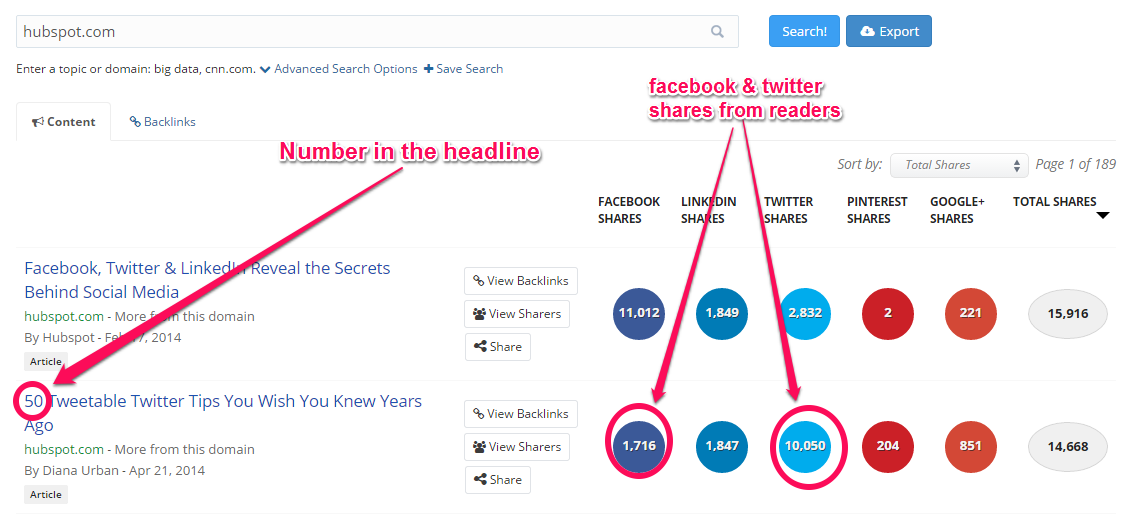
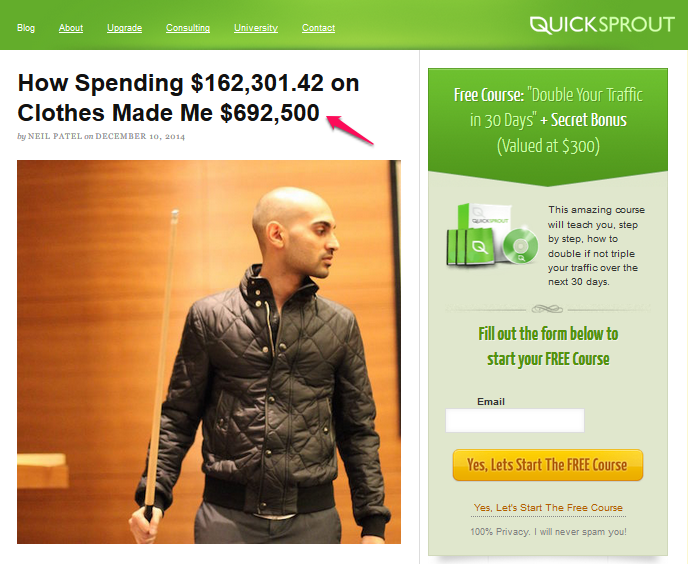
Note: Headlines that convey a specific message or idea work best with search users. According to Conversion XL, headlines with numbers are always winners. If it makes sense, include a figure in the headline.
Headlines that have numbers in them usually get shared more on Facebook and Twitter as well. For example, one of the most popular posts on HubSpot is a number-type headline.
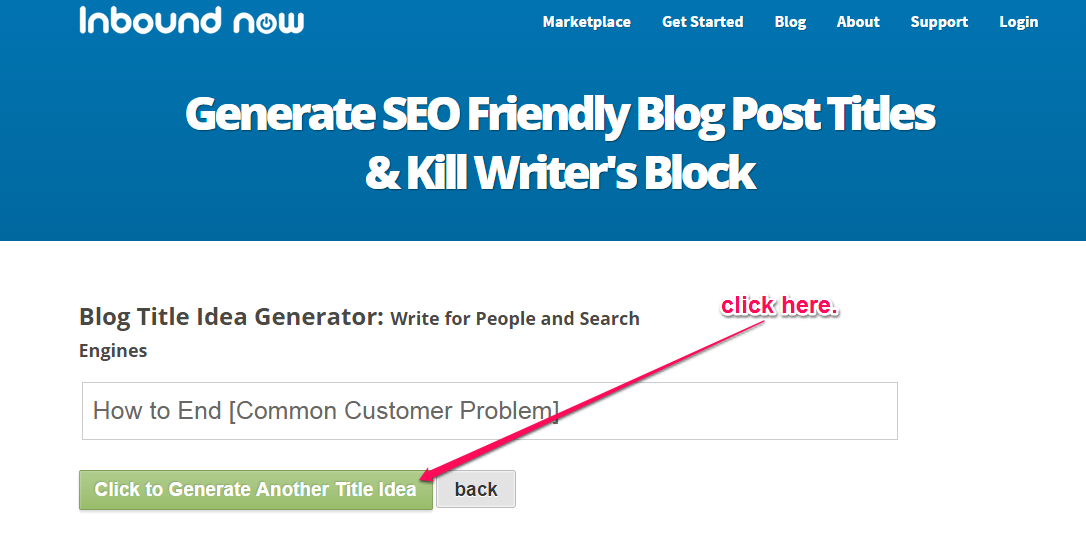
Generate article ideas: If you’re stuck and don’t know what to write about, you can use the Inbound Now tool to generate blog post/article ideas before you hire that SEO copywriter.
There are several resources for writing click-worthy and sharable headlines. To demonstrate, let’s write some fresh headlines in three popular industries: small business, fitness, and relationships.
Clickable and optimized small business headlines:
7 Small Business Trends That Will Affect Your Sales
How To Start a Small Business That Customers Will Love
Small Business Funding: How To Raise $20,000 In 60 Days
SEO and user-friendly fitness headlines:
10 Workout Secrets For Women That Work
Best Way To Lose 10 Pounds After Pregnancy
Personal Trainer Kits: Become a Certified Personal Trainer
Well-optimized and catchy “relationship” headlines:
3 Funny Ways To Get Your Ex-Boyfriend Back
How To Renew Your Love Life with Your Spouse
What Does It Take To Have a Fabulous Wedding?
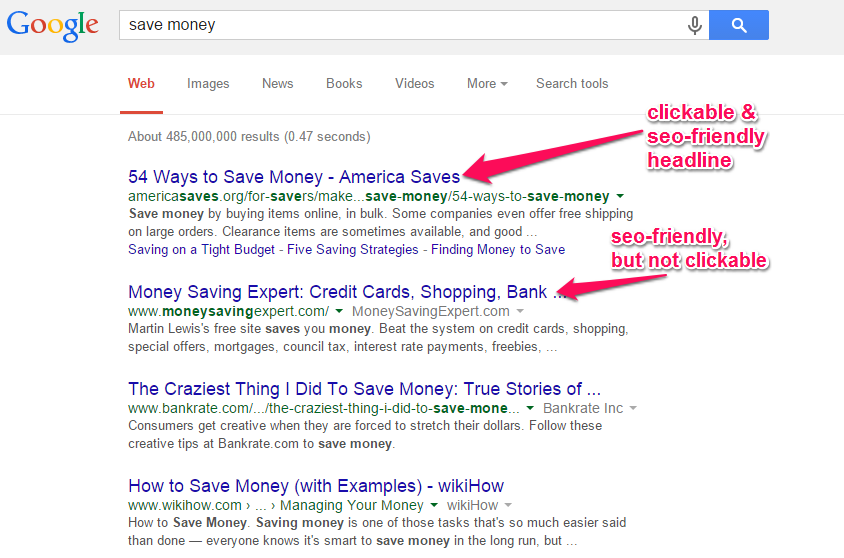
Analyzing the search engine results: Let’s say that we do a search in Google for “save money.” You can see that most search results are SEO-friendly (and target a keyword), but some of the headlines themselves are not attractive to the user. Adding a long tail to the title might help for those with specific inquiries.
New and experienced SEO copywriters highly recommend downloading Yoast SEO as a WordPress plugin to help optimize SEO copy. Once you learn SEO copywriting, you can write content that will both rank highly in Google result pages and also attract clicks from prospective customers or clients.
Note: If you want your whole title to be visible in search engine results, keep it under 72 characters. This will also increase your click-through rates.
3) Content
The content itself is a vital element of SEO copywriting. The major reason why people conduct searches in Google and other search engines is that they’re looking for useful content. Search engines also feed on fresh SEO content, which is why you must consistently update your site.
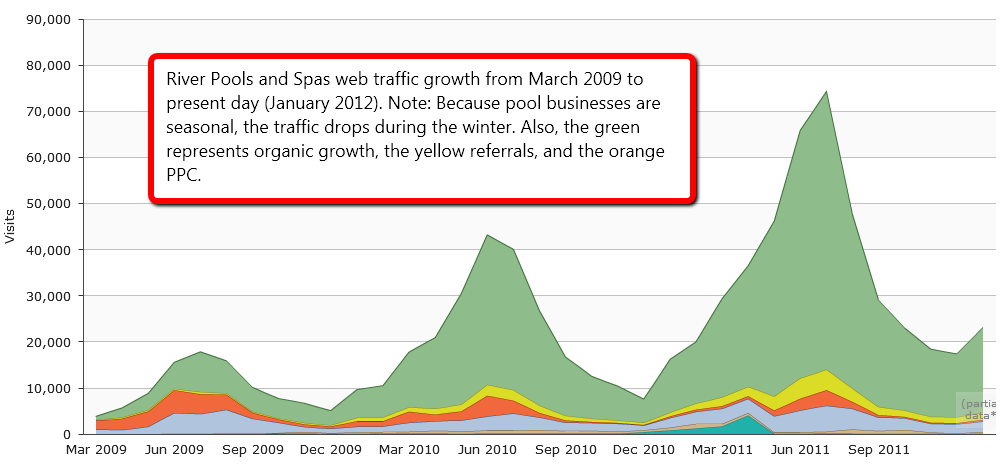
Marcus Sheridan grew his swimming pool company from less than 10,000 to 80,000 monthly visitors; within 6 months and he grew his organic traffic by blogging 2 -3 times a week.
When Marcus began to target long-tail keywords in his blog posts, everything changed. He said that “within hours of writing an article with specific keyword goals, we were showing up on the first page of Google.”
If you want to write the best content that will rank well in Google, you have to target keyword phrases. Avoid stuffing keywords or over-optimization. Ideally, put the keyword in your headline, but make sure that it reads smoothly for your readers.
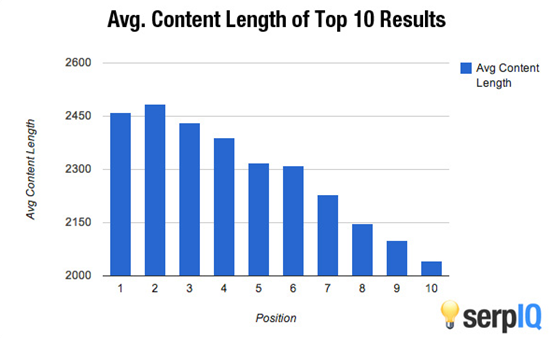
The Google Panda 4.1 update was designed to penalize “thin” or shallow content, by keeping lousy content from ranking highly in Google. A typical blog post or article should be at least 1000 words. But, it’s not all about length, because several detailed articles still struggle to rank and retain their position in Google results pages.
Before you write your SEO content, it’s essential to understand your reader. Then, niche down and focus on a particular problem that the reader is struggling with. Dare to solve that problem with your content – that’s another goal of combining SEO and copywriting.
Every piece of content you write needs a compelling introduction. The introduction is the portion that comes right after the headline (and sub-headline if you include one in your content). Your introduction should contain at least one of your targeted keyword phrases, especially a long tail keyword.
However, it’s crucial to understand that modern SEO copywriting has gone beyond keyword targeting and placement. The best approach now is to write content that addresses keyword intent. You will learn about that later on…
4) Meta Description
Before writing your content and again, before publishing it, use meta descriptions to help guide search engines. Meta descriptions help search engines and searchers understand what the topic is and why your targeted keywords and phrases keep appearing in the content. This is where SEO firms earn their money, only because they understand this.
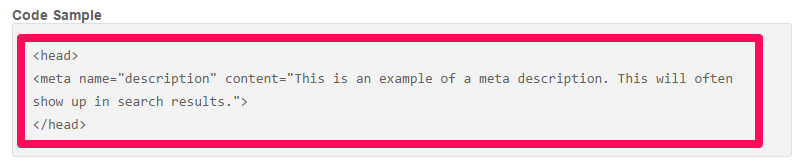
Moz noted that the meta description is the HTML attribute that provides a “concise explanation” to the search engines of your page’s content. The tag is enclosed with the <head> section </head> on your web page. This is the code sample:
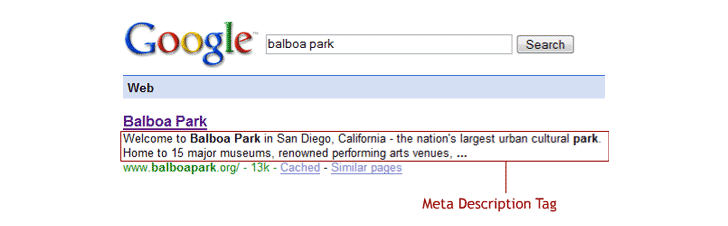
Google uses the meta description on your page as a snippet when people search for keywords that are relevant to your page. This snippet copy is what will determine whether or not you get clicks, no matter how highly you rank in the search results.
For SEO purposes, the meta description should be 150 – 160 characters and usually appears like this in Google:
Note: If you own a WordPress blog, you can install the All-In-One SEO Pack plugin and use it to set up your title, meta description, and relevant keywords. If you’re new to blogging, this guide will help you set up the plugin.
How do you write meta descriptions that catch people’s attention, as well as rank well in Google?
Step #1: Understand keyword intent. Keyword intent is the main purpose or reason behind keywords (whether seed or long-tail keywords).
For example, say you’re a social media consultant and you want to attract clients to your business. Then, your primary keyword might be “social media expert advice.”
When prospective clients type that keyword into Google search, what do you think they’re really interested in?
What they want is clear – a social media expert with advice on how they can move their online or brick-and-mortar business to the next level.
Maybe they want more Twitter followers, greater engagement or tips on how to acquire more leads. Your meta description has to be relevant and appeal to them.
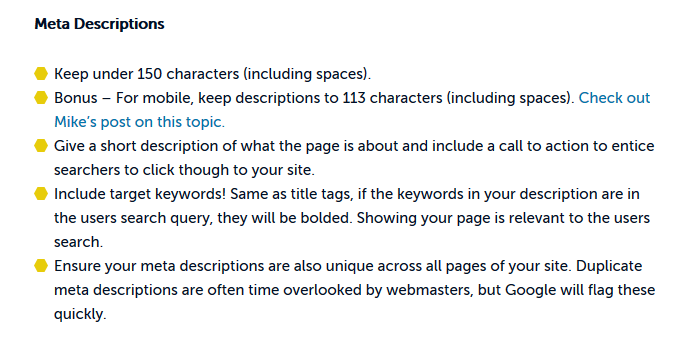
Step #2: Once your article or blog post has been written, the next thing is to write your meta description. Swell Path recommends you follow this checklist:
To demonstrate, let’s put the tips to work by writing two meta descriptions that are SEO-friendly and relevant to our target audience.
a) Begin with a question: Looking for expert social media tips to acquire new leads, convert visitors to customers, and improve your brand? First, set a definite goal.
Length – 141 characters.
b) State the obvious: Many companies have given up on social media marketing, because they don’t know what to do. All you need is expert advice that has produced success.
Length – 148 characters.
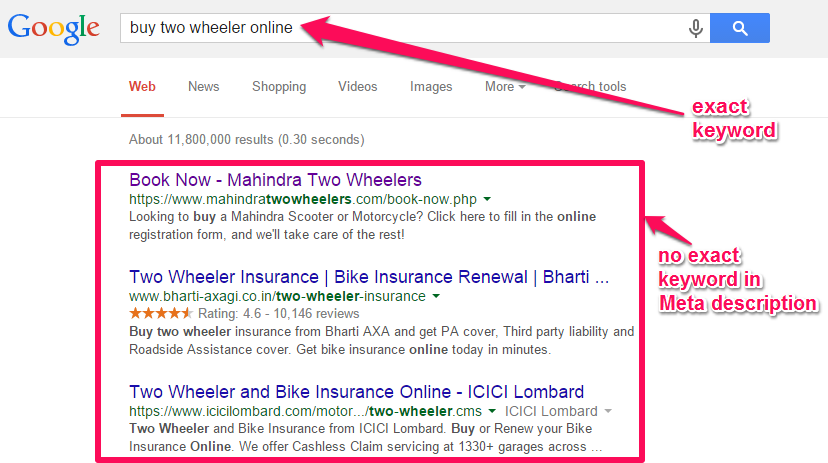
Note: You don’t necessarily need to include your exact keywords in your meta description, especially when it doesn’t flow smoothly. I’ve seen a lot of web pages rank in Google’s top 10 without the main keywords.
5) Keyword Frequency
Keyword frequency means how many times your chosen keywords appear on the web page.
For example, if your target keyword is “best london hotels,” how many times will this exact keyword phrase appear in your 300, 500 or 1000+ word article? In contrast, keyword density is concerned with the ratio of “best london hotels,” to other words on the same page.
Keyword frequency and density are no longer as effective as they used to be, before Google started rolling out frequent updates, but are still important parts of SEO content. Avoid on-page optimization mistakes, like keyword stuffing, excessive keyword insertion and header tag stuffing.
However, keyword density still impacts organic ranking to some extent. According to Brian Dean, keyword density/frequency is one of the 200 ranking factors, which means that you should still consider it. But, don’t go overboard.
The only way to tell if your repetition of keywords is super or spammy is to measure that frequency against the overall length of the content. A keyword density greater than 5.5% could make you guilty of keyword stuffing and your page could be penalized by Google. You don’t need to mindlessly repeat keywords to optimize. In fact, if you do, you’re likely to achieve the opposite result.
Links are the basic building blocks of your web page. One of the 10 things Google knows to be true is that “there’s always more information out there.”
Page links tell Google that you’re connected and sociable and that you’ve got useful content that people can access somewhere else. This content could be your own or it could be from another author or site.
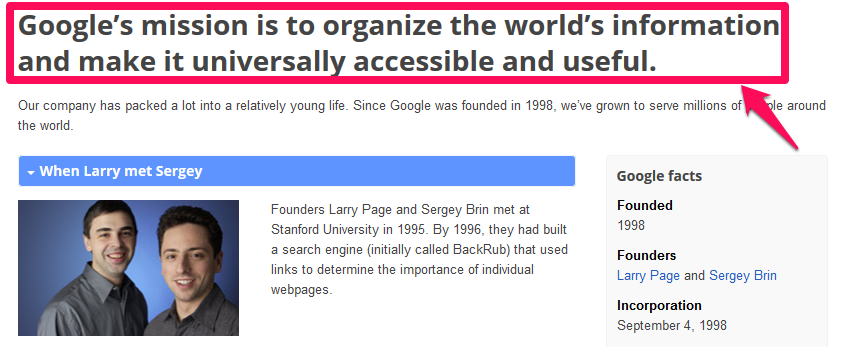
Linking out to other authority sites and pages is an indication that you value what other people create. Google will reward you for being in sync with their mission: organizing the world’s information and making it universally accessible. A good marketing team would highly recommend to appropriately link.
The rules for linking out to other sites are not set in stone. There are also no hard and fast rules for internal linking. However, as a smart online marketer who wants to achieve tremendous results in the search engines, you should:
Link to relevant pages within and outside your site in your introduction
Link to more in-depth guides or content on your page or other sites
Link with appropriate anchor text, which flows naturally with the content
As I said earlier, these rules are not set by Google or other search engines. If you can understand your target audience and you produce the best content that will solve your readers’ problems, you don’t need to worry about keyword density, page links, and social signals, because they will occur naturally.
Remember that the goals of highly useful content include thousands of social shares, comments, leads, clients, and sales. This is your job as the SEO copywriter.
SEO Copywriting Tools and Resources: To fully understand and implement SEO copywriting best practices, you need viable tools and resources. Here are some that I recommend:
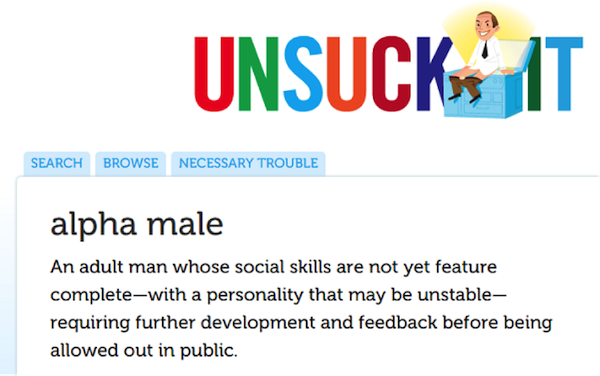
Unsuck-it: This is a free web app that you can use to make your words, sentences, and paragraphs flow smoothly. You can replace jargon with fun words in five seconds.
RhymeZone: A lot of people love reading poetry and admire poets. Use this handy tool to make your copy appealing to the right audience.
Read-Able: This simple tool helps you optimize your content for 7th – 8th grade level. This ensures that a wider audience will enjoy your content and click the headline when it shows up in Google results pages.
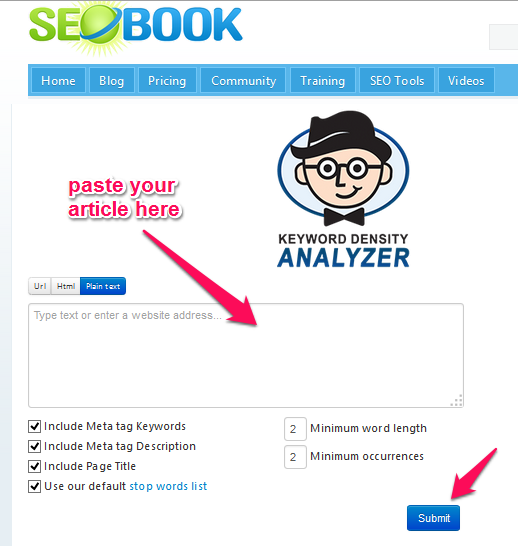
Live-Keyword-Analysis: Use this free SEO tool to accurately calculate the keyword density ratio for a piece of content.
Kill Writer’s Block: Highly recommend this tool to generate creative ideas for your next blog post.
Quick Sprout: Find out why you’re not generating enough traffic from Google, even when your long-tail keywords are ranking highly.
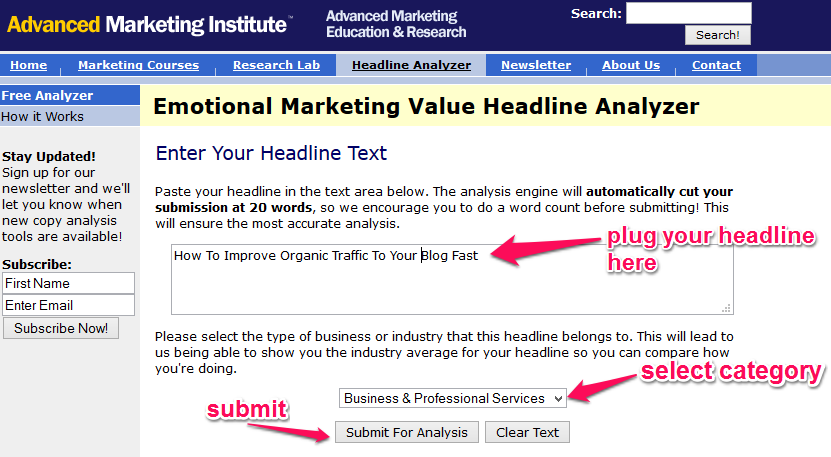
EMV Headline Analyzer: How much does your headline appeal to your readers’ emotions? I highly recommend this free tool to analyze your headline and give you a score.
For a list of other resources and tools that are useful for SEO copywriting, check out Writtent.
Copywriting optimization points: Search engine rankings can’t be predicted, no matter how knowledgeable you are, because Google is always updating their ranking algorithm. If you plan on hiring an SEO firm to create CEO copy, realize they are subject to a changing game as well.
However, there are actions that you can take to increase the likelihood of your web page showing up in Google for relevant search queries. Let’s explore those factors:
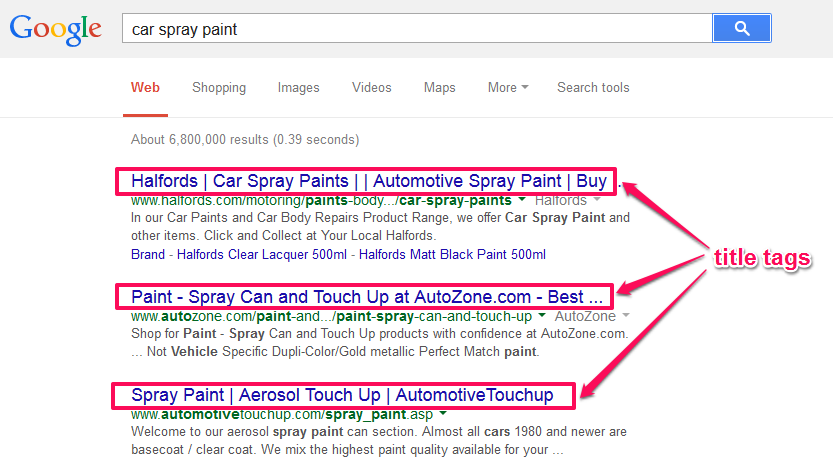
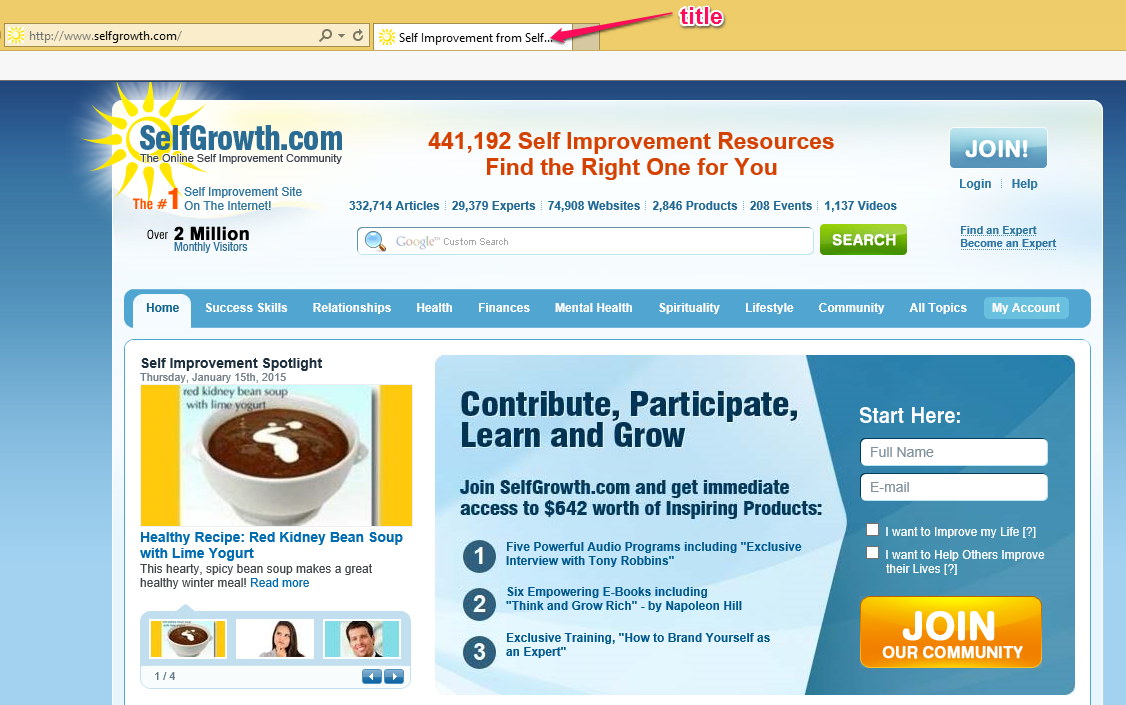
Title tags: It’s a good idea to know how to write title tags for search engine optimization. Again, Yoast SEO can help here. The title tag is a meta HTML tag, like the meta description we saw earlier. It is like the title of a book. It’s the first thing that appears in Google search results.
The title tag should be a concise and accurate description of your web page. Google will display 50 – 60 characters of your title in their search results. As well as thinking about length, write titles that will align with your brand.
Moz does highly recommend that the optimal format for your title is: Primary Keyword – Secondary Keyword | Brand Name
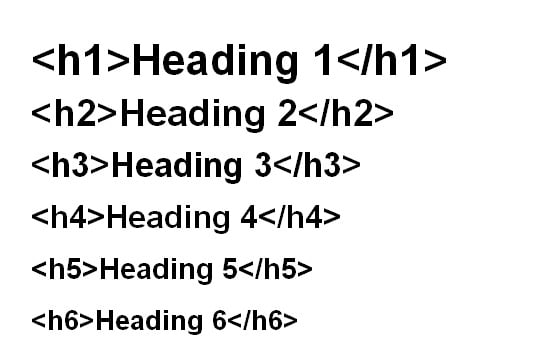
Heading tags: The heading tags are labeled h1 – h6. The heading tags will enlarge your font size and make it stand out. When you write content, it should be well structured for readers.
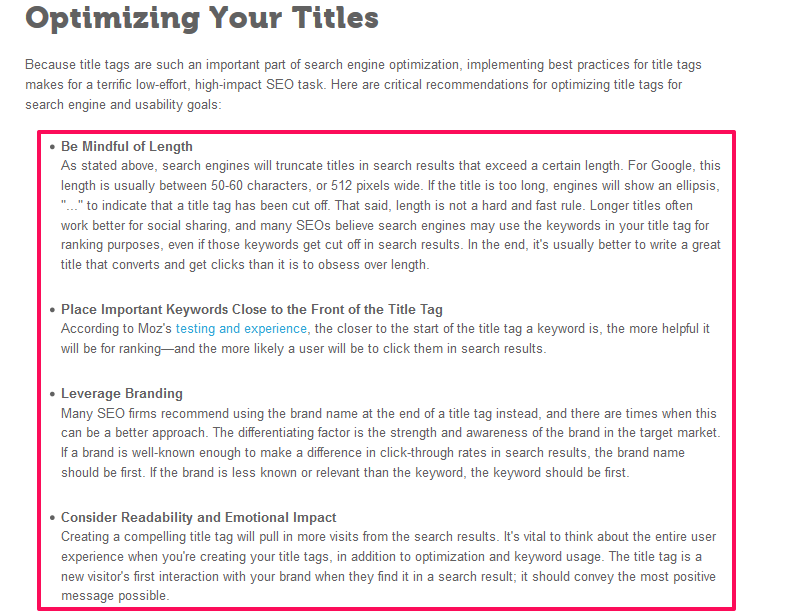
Optimizing your title: This is one of the most important things that you can do to ensure that your title ranks in Google, as well as attracting an audience. This screenshot of the Moz resource on title tags helps you optimize your titles effectively:
Writing Useful Content For People
Words are powerful. Words drive engagement. If you can piece words together to produce a valuable piece of content, your target audience will love you for it — and they’ll stick around. There is no alternative to writing great content.
The number of blogs that produce fresh content daily is ever-growing. Remember that duplicate content, keyword-stuffed content and low-quality content will not help your target audience. This is not a good SEO content strategy and can’t be emphasized enough. It also won’t do a thing to improve your organic ranking.
One study shows that even if your content is useful, it still needs three additional elements in order to drive organic traffic:
That’s how Brian Dean increased organic traffic by 110% in 14 days.
Keyword Research
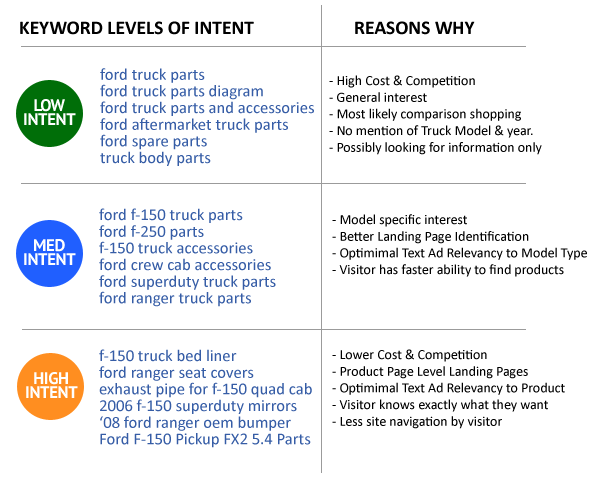
Keyword research is still necessary. The most important aspect of any keyword used by search users is the intent. Before you can write great content that solves a particular problem, you’ve got to know what each keyword stands for.
Don’t forget to pay attention to keyword classification. In other words, understand whether search users want to buy a product or not.
There are two important keyword classifications: informational and commercial keywords.
Informational keywords: The major reason why people search with these is that they want useful information without having to pay for it.
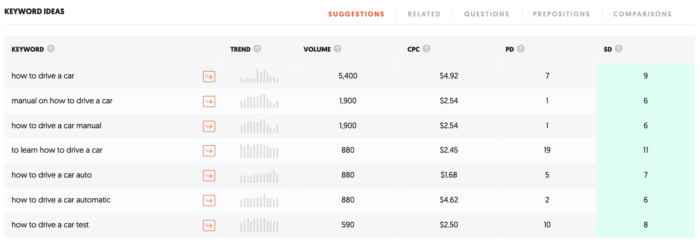
Informational keywords are usually “how-to” in nature. Here’s an example from Ubersuggest:
Of the seven keywords on this list, five of them begin with “how-to.”
These are informational because the searchers are probably only interested in free articles, videos, blog posts and lessons.
As an SEO copywriter, you can write useful content around informational keywords, but don’t expect to convert readers into customers, because most of them don’t want to buy. Instead, use informational keywords in your content to nurture an audience, engage them and build your brand.
Commercial keywords: Commercial keywords show an ‘intent’ to buy. These keywords usually show “desperation” from the searcher. They want solutions quickly – e.g., “lose 10 pounds in 3 days.”
The person searching for commercial keywords is likely going to buy a product, or sign up to an email list that will eventually convert them into customers.
The fact that someone typed a commercial keyword into Google means the person is ready to take action. Commercial keywords usually contain certain prefixes and suffixes, like reviews, buy, order, review, comparison, compare, free shipping, best, fast, etc. See this example in the weight loss niche:
Examples of commercial keywords from this list include lose weight gnc product, gnc product to lose weight, herbalife weight lose product, and herbalife product to lose weight.
Note: When you write content around commercial keywords, the ultimate goal is to provide useful information on how to use the product, its benefits and features and how to install it, if that’s required.
Should you target keywords? Yes. Google still uses keywords to gauge what a particular web page is about. Use caution and avoid over-optimization.
I follow a 3-step plan when targeting keywords in my content.
I include the primary keyword in the headline. For example, if my keyword is: conversion rate optimization. My headline may be, “7 Ways To Make Conversion Rate Optimization Work For You.”
I use alternative keywords in the introduction, meta description, and title tags. For example, What is the best way to increase your conversion rate with every blog post that you write? You know how important this is, especially when it seems as though your best content isn’t generating organic traffic, social shares, and sales.
I write naturally to please my readers and then deliberately include the primary keyword in the conclusion.
Storytelling
As an SEO copywriter, storytelling can set you apart, because human beings love good stories. If you can weave your brand story into your blog post, article or video, you will attract more attention.
Brand storytelling is not something new. Several brands have used it in the past and still do. According to Kristen Matthews, when you use natural storytelling in your content, you can make the maximum impact on the reader.
A great example of a successful brand story is The Lego Movie. According to Marcus Sheridan, who is also a great storyteller, “Lego doesn’t sell ‘blocks’ at all, they sell possibilities.”
In other words, your story should show others the possibility of achieving the same results. Your story shouldn’t be about you alone, however. Instead, find a way to make it appealing to your target audience.
That’s when brand storytelling will help improve your organic ranking, traffic and sales conversions.
Use Humor
One of the reasons why you should write with humor is to keep the reader/audience engaged. You can also infuse humor to simplify an uncomfortable or controversial topic.
SEO copywriting is not just about writing useful content that solves a particular problem in a boring manner. Your content also has to excite your readers.
They should be excited to click your headline, read the introduction and then move slowly down the body. That’s what it means to write persuasively. If you can do that, it doesn’t matter what you create: people will love it. Whatever you highly recommend, they will buy.
Here’s an example. A professional blogger and public speaker who usually adds humor to her content is Marie Forleo. Each of her video intros always entertains me.
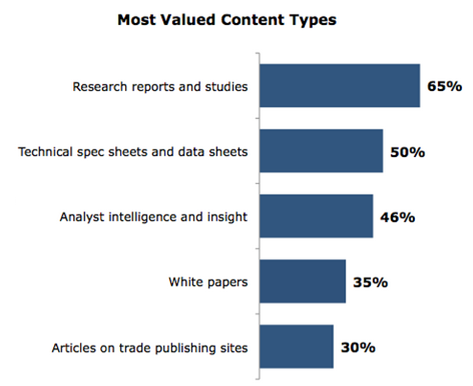
A study at Content Marketing Institute shows that B2B buyers prefer case studies and research-based content.
If you consistently write useful and detailed case studies, your major long-tail keywords will start showing up in Google’s top 10 for relevant keywords.
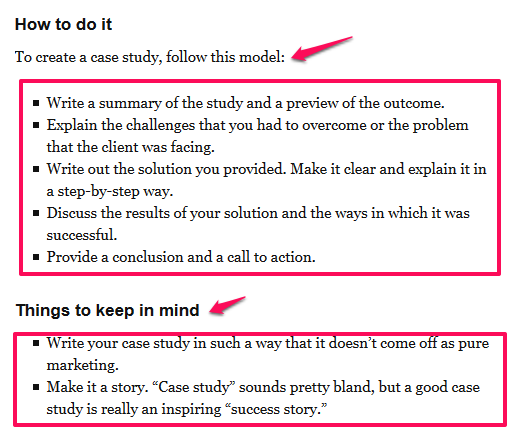
Case studies usually explain what your products and services are. A good case study will show the experiments, research studies and interviews that you conducted, as well as the results that you got. An SEO firm can help in analytics but isn’t absolutely necessary.
You can share any type of case study, even ones that didn’t get the results you hoped for. If you want to create a valuable and optimized case study, this screenshot will guide you:
Keyword Research for Content Creation
The first five sites that come up in a google search get 67.6% of the clicks.
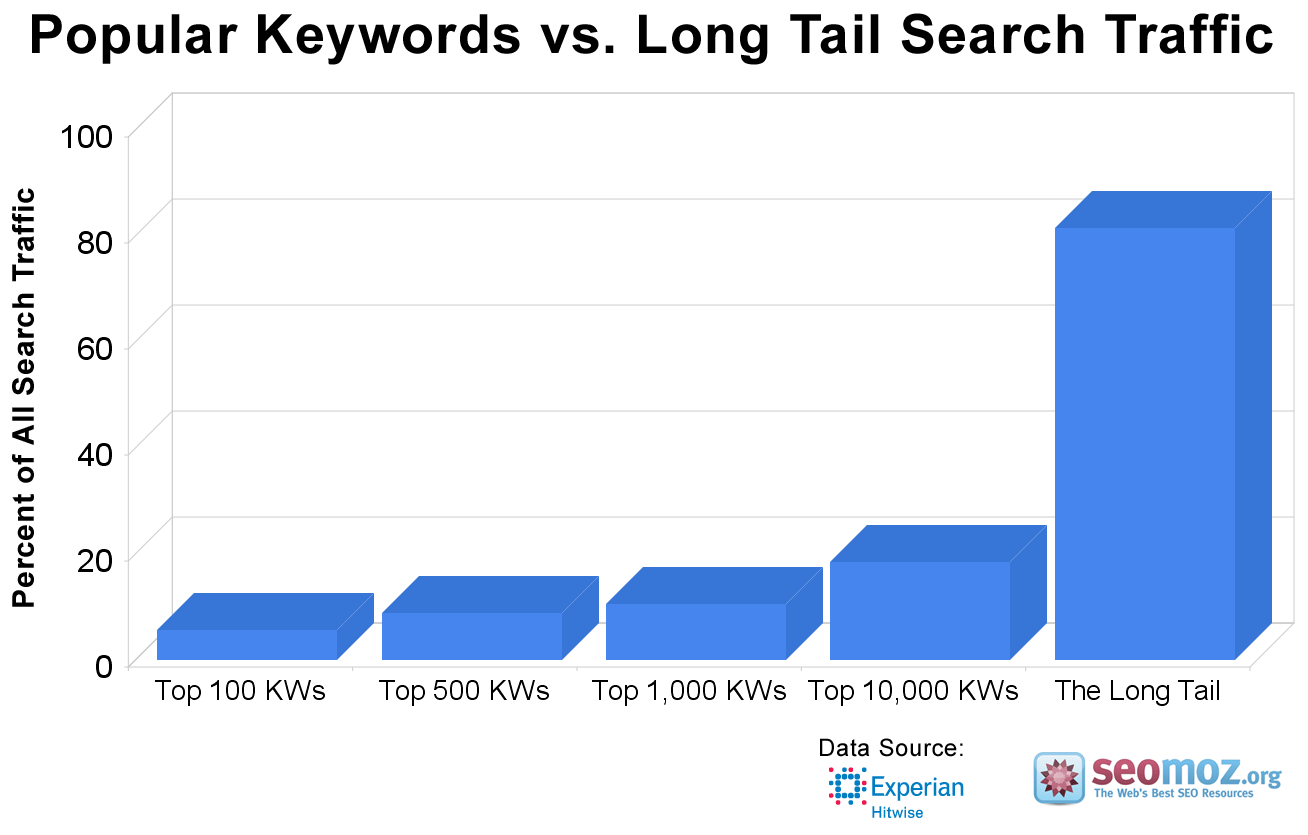
Long-tail keywords are the best way to go in modern SEO because top brands are not targeting those terms. And, if you can produce good content while naturally targeting these types of keywords, you will definitely dominate the search engines.
SEO isn’t complete without keyword research. That’s part of how you determine the mindset and intent of your target audience. Long tails help define that mindset.
In niche marketing, picking the right keywords is the most challenging aspect of building a profitable niche site.
Once you’ve chosen your topic, it’s time to find relevant keywords in that industry. Let’s find keywords for “waterproof digital cameras.”
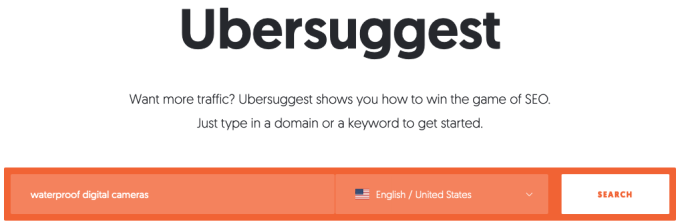
Go to Ubersuggest. Plug the topic into the search box, then click “Search.”
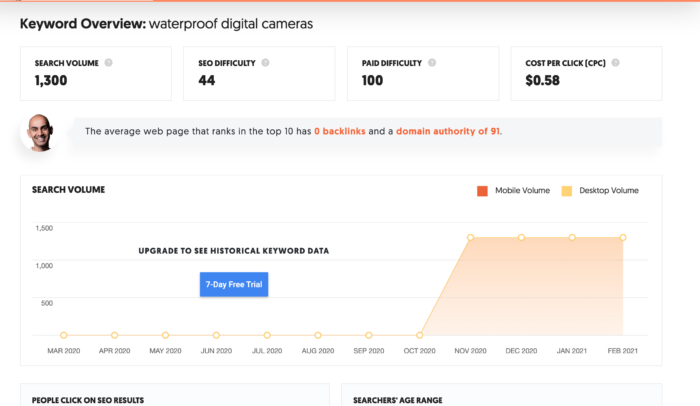
Here’s what the search returns:
Search volume – number of searches the keyword has during a month
SEO difficulty – estimated competition in organic search
Paid difficulty – estimated competition in paid search
Cost per click – average cost per click for a Google Ad
You’re also provided an overview of what it takes, on average, in terms of backlinks and domain score, to reach the first page of Google for the keyword. This is located above a chart displaying the keyword search volume over the past 12 month period. Pay close attention to any dips in traffic. For this particular keyword, it’s natural for volume to drop off during the fall and winter months.
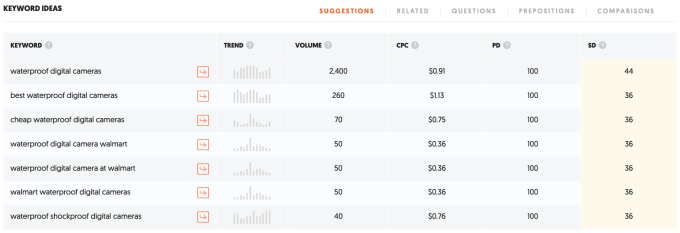
As you scroll down the page, you’ll find a list of long-tail keywords that we can optimize our content for:
From this list, “best waterproof digital cameras” is a good choice, as the search volume is still high enough to move the needle.
Optimizing content for search robots: Search engine robots or web robots (e.g. crawlers, spiders and so on) are programs that constantly scour the web.
When a Google spider crawls your web page, it’s looking for fresh content. Some people even say that spiders/crawlers feed on fresh content and will reward you for freshly updating your site regularly.
However, understand that when Google spiders index (add your fresh content to their search database), they’re only interested in the meta tags (title tag and meta description).
More importantly, they want to know the keywords that you’re targeting. This helps Google determine the industry your content will benefit, e.g., health, business, small business, internet marketing, etc.
For best results, you should optimize for search robots like this:
add the primary keyword in your title tag and meta description
add alternative keywords in your introduction and make sure that it flows well; if the keyword doesn’t flow well, ignore it and just write naturally.
Keywords like “best seo web design NY” won’t work in the title tag, description and content. The best approach is to use the keyword naturally, like this:
How To Find The Best SEO Firm and Web Design In NY
On-Page SEO Copywriting
On-page SEO doesn’t have to be tedious or complicated. A lot of posts have been written to address this topic.
Elements that add value to your site, such as internal links, are very important.
You control 98% of what happens within your site.
That’s why Google pays attention to your web pages and measures the engagement, bounce rate, retention rate, and social shares.
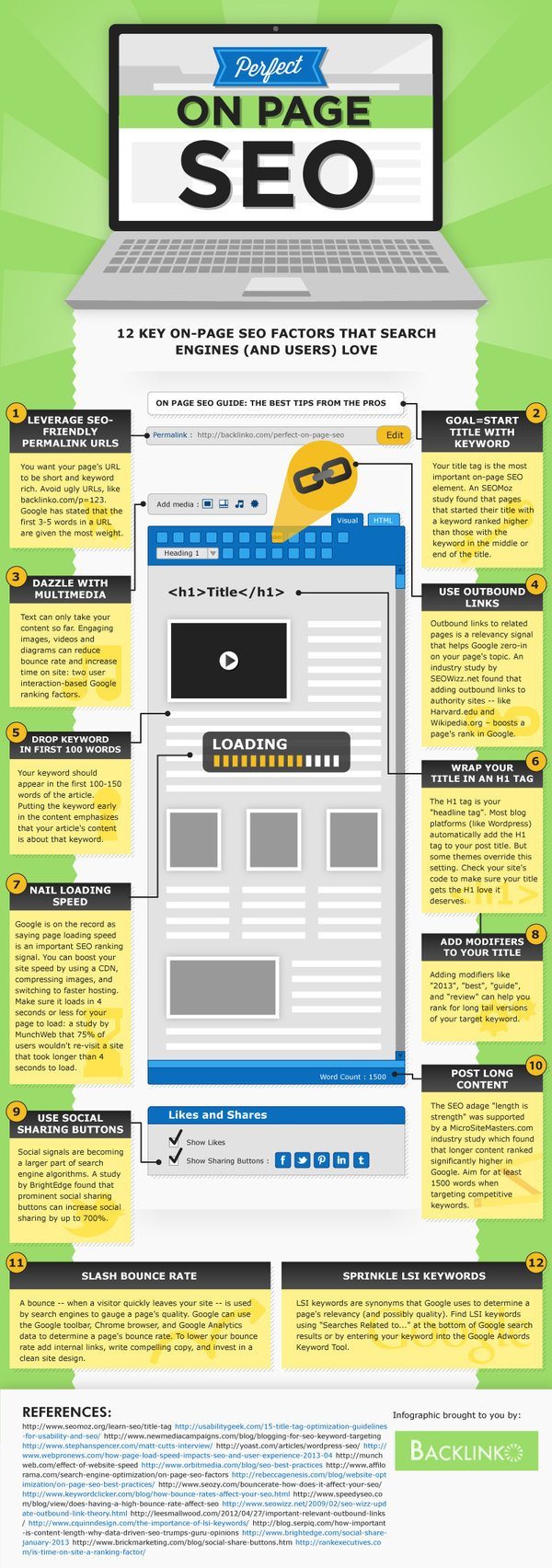
The foundation of an effective SEO campaign is what happens in-house (on your site). In other words, pay attention to how you target your keywords, which anchor is used to link internal pages, meta tags, etc.
This on-page optimization infographic from Backlinko will show you what matters when it comes to creating SEO-friendly content pages.
Off-page Optimization
In today’s digital marketing, the public determines how relevant and useful your content is. And, Google uses off-page factors to gauge the authority and value of your content pages.
Generally, you can’t control what happens outside your site. For example, you don’t control who links to you and you don’t control the quality of sites that choose to reference your work.
If you’re smart, you can use off-page SEO techniques to build a solid brand online and increase organic traffic.
Build and engage a raving community through social media
Expose your business and take advantage of local SEO
Instill brand confidence through business reviews
Promote local citation and Name/Address/Phone (NAP) consistency
Link building through blogging, guest posting, competitor link analysis, blog outreach, networking, and dofollow blog commenting.
Getting People to Act Through SEO Copywriting
The final piece of the puzzle in this in-depth article is “persuasion” — the ability of your copy to drive people to action. This isn’t difficult, because there are many high-quality resources and tools that you can use.
One of the ways to push people into action is to highlight the key points of your content or topic using bullet points. Before you write blog posts or articles, Vivian Giang recommends you list 3 or 4 strong benefits that you will cover. This is very important, as it also helps you create powerful headlines and paragraphs.
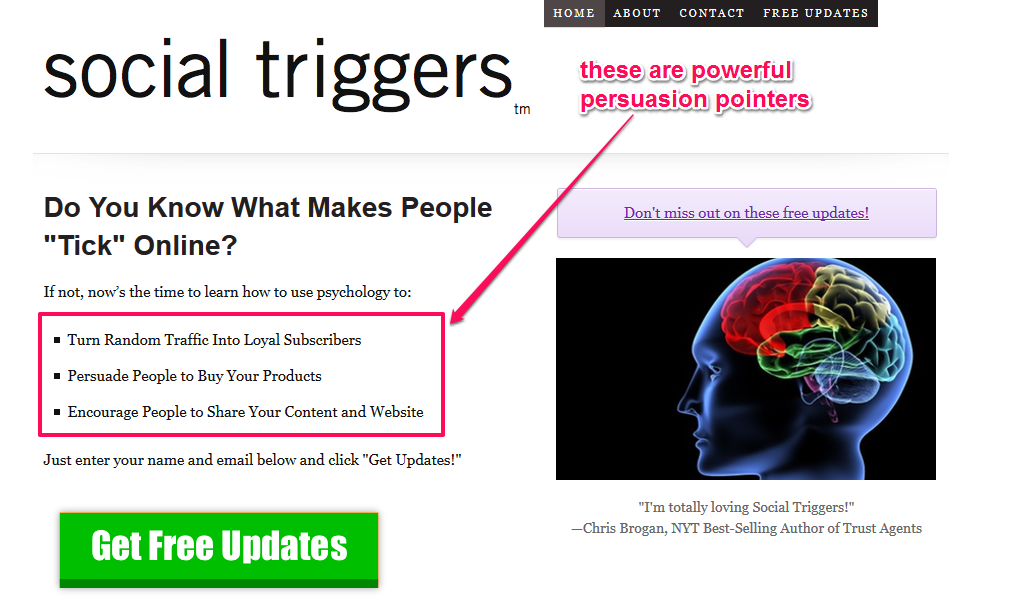
Derek Halpern, founder of Social Triggers, a giant SEO firm, combines the power of psychology and copywriting to produce compelling content. He also employs the same strategy on his landing page.
Create Irresistible and Valuable Headlines
Columbia University recognized headlines as the most important element of copy. They advise that you think like a reader and write the headline first. The headline should target a keyword and also look attractive.
Let’s craft more clickable headlines, using some of the results in Google. When I search for “diet plans,” here are the results I get:
The screenshot above shows the headlines showing up at #1 and #2 in Google for the keyword “diet plans.”
Original headline: Weight Loss & Diet Plans – Find Healthy Diet Plans And…
Here’s a much better headline: The Best Diet Plans To Help You Stay Fit
Original headline: 28-Day Fat-Burning Diet and Meal Plan | Muscle & Fitness
Let’s make the headline more compelling and useful: 28-Day Diet Plans That Will Help You Burn Fat
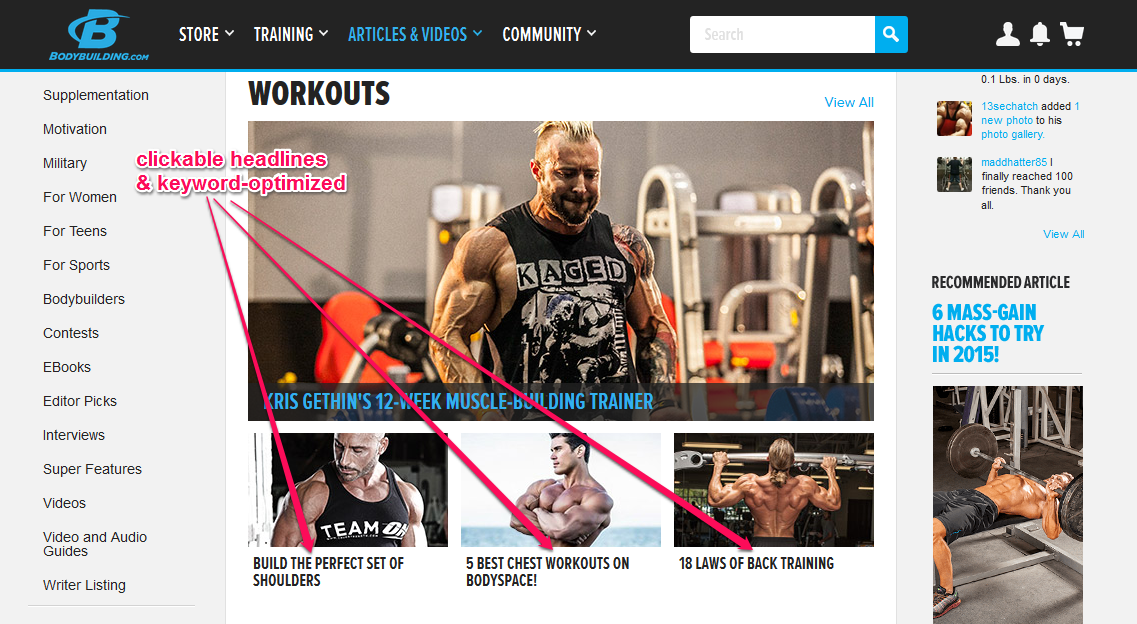
BodyBuilding.com has compelling, catchy headlines that are the right length (50 – 60 characters) and target a particular keyword.
Have Clarity of Purpose
Getting clear with your copy, blog post and message is very important. Wider Funnel increased their conversion rate from 10% to 277%, just by implementing clearer call-to-action buttons and reducing the number of form fields.
When you write content for your blog, focus on one idea and write your post to address a challenge, solve a problem or explain a complicated issue.
According to Success Consciousness, here are some of the ways that you can achieve clarity of purpose as you write your content:
Know exactly what you want, before you write it — e.g., How to Save $100 in the Grocery Store.
Use the word “you,” when writing for B2C customers and “we,” when your recipients are mostly business organizations.
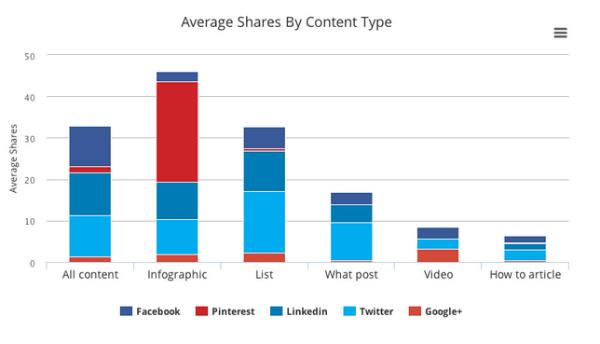
Research accurate data that are relevant to your topic. This study by Conversion XL shows that using a data-driven approach and creating infographics that have accurate data points will improve social shares.
Target 2 – 5 keywords in a blog post and ensure they read naturally. See an example below. If you read it aloud, you will notice how the keywords flow smoothly with the rest of the content.
Conclusion
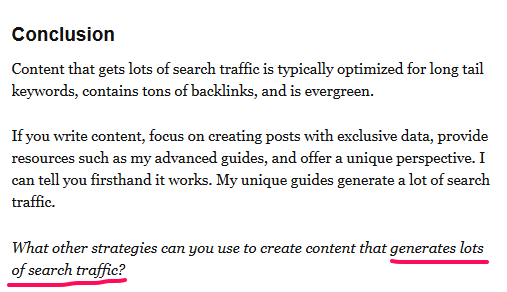
I’ve used these SEO strategies to increase my blog’s traffic by 206%. Even if you don’t achieve the same growth rate, by following these SEO copywriting strategies you are more likely to absolutely generate more traffic, improve your brand, and fall in love with content marketing.
If you want experts to help you with SEO for your website, we’re here to help.
What’s your take on SEO copywriting? Do you think it’s a major factor for online content marketing success?
from Blog – Neil Patel https://ift.tt/3sFqqcG
via IFTTT