Thursday, 29 July 2021

How to Get Listed in The YouTube Recommendation Sections

How to Get Listed in The YouTube Recommendation Sections

It’s widely known YouTube is the world’s second-largest search engine.

However, did you know the majority of video viewing on YouTube doesn’t actually originate from the search bar?

In fact, the video platform has confirmed its YouTube recommendation engine is responsible for more than 70 percent of the total time spent watching content on the site.

That means if you want to get more eyes on your YouTube content, it’s in your interest to understand how YouTube recommendations work.

What Is the “YouTube Recommended” Section?

As with any site, YouTube wants you to stick around for as long as possible. The more videos you watch, and the longer you watch for, the more ads it can serve you, and the more revenue it generates.

That’s precisely why the YouTube recommendation function exists. It’s designed to guide users toward content they love and actively want to watch, based on a range of factors (more on that later). 

YouTube recommendations appear in two places:

  1. On the homepage.
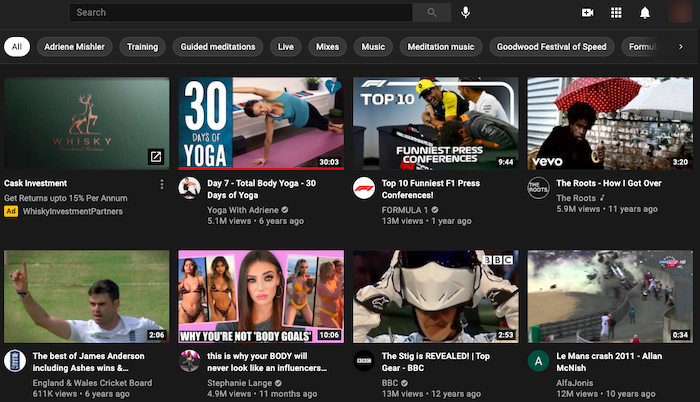
  2. In the “up next” section alongside the video you’re already watching:
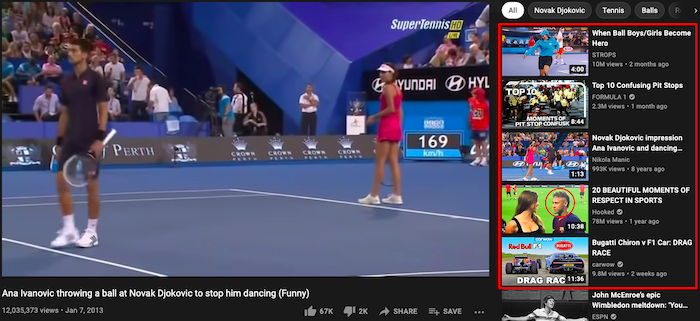
What do YouTube recommendations look like?

Benefits of Getting in the YouTube Recommended Sections

If your goal is to drive more video views on YouTube, it’s impossible to overstate the importance of the YouTube recommendation engine.

Whether or not they know it and understand how it works, most YouTube users make regular use of YouTube recommendations. According to a survey from Pew Research Center, 81 percent of users occasionally watch recommended videos, while 15 percent do so regularly.
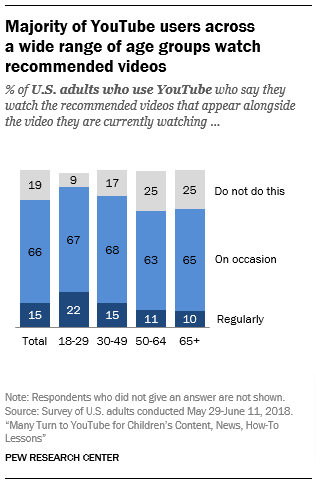
How to Get Listed in the YouTube Recommendation Section - How many people watch YouTube recommended videos

Importantly, YouTube’s audience skews younger, with 95 percent of 18 to 29-year-olds in the U.S. using the platform. Pew’s data shows us those younger users are more likely to find new content through the YouTube recommendation engine. More than one-fifth of users in that age group regularly watch recommended videos, compared to just one-tenth of users aged 65+.
Benefits of Getting in the YouTube Recommended Sections

Pew Research’s study also demonstrates just how powerful a YouTube recommendation can be. It used YouTube’s API to analyze 98,508 videos recommended by the YouTube algorithm. Over the six weeks of the study, those videos saw their view counts increase by an average of 38.5 million views. One video had 34,000 views when it was first discovered by Pew and almost 30 million by the final time it was recommended.

In short, if your video is recommended by YouTube, your visibility increases exponentially.

YouTube Recommended Sections Algorithm Factors

As with Google, YouTube’s recommendation algorithm is shrouded in secrecy and is constantly tweaked and tested to deliver the most accurate and helpful results. However, we know it takes a range of signals into account, including:

  • your viewing and search history (provided you have enabled them)
  • your channel subscriptions
  • contextual factors such as your location and the time of day

Additionally, YouTube uses a video’s retention rate, or the average percentage that people watch, as a sign of its quality. A high retention rate indicates a video is relevant, high-quality, and enjoyable, which means YouTube is happier to recommend it to other viewers.

YouTube also regularly asks users about their experiences on the platform, either in relation to individual videos or to the YouTube recommendation system in general. It uses this direct feedback to inform future algorithmic decisions in a bid to deliver the best experience.

Tips and Strategies for Getting Listed in the YouTube Recommended Sections

Just as every website owner wants to rank at the top of Google, every YouTuber wants their content to be recommended by the platform. Unfortunately, with more than 500 hours of video being uploaded to YouTube every minute, not all of them are going to succeed. 

Follow these six tips to increase your chances of winning a cherished YouTube recommendation.

1. Optimize Your Metadata

YouTube’s algorithm is smart, but it isn’t human. It doesn’t literally “watch” a video and decide whether or not to recommend it. Instead, it analyzes user behavior and metadata to make intelligent decisions.

Optimizing your metadata can boost your presence in YouTube recommendations (and also in search results). Specifically, metadata optimization means focusing on your:

  • video descriptions
  • titles
  • tags

Video Descriptions

Tips and Strategies for Getting Listed in the YouTube Recommended Sections - Optimize Your Metadata

The description is the text below your videos. As well as explaining what your content is about, it helps users find videos in the first place. Your descriptions should:

  • accurately describe the video
  • describe the type of content you create
  • compel users to subscribe to your channel
  • incorporate links to other relevant videos and playlists

Titles
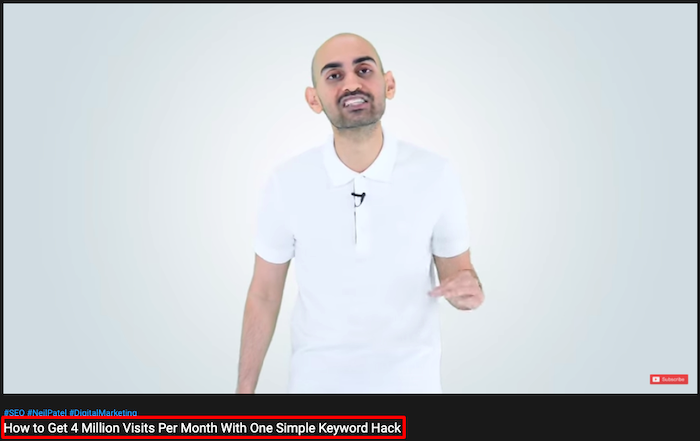
Tips and Strategies for Getting Listed in the YouTube Recommended Sections - Optimize Your Titles

Think of the title as your video’s headline. Its job is simple: persuading people to click. To do that, it should:

  • incorporate relevant keywords toward the start of the title
  • accurately represent the content of your video
  • include episode numbers where relevant
  • be regularly updated to keep your content fresh

Tags

Tips and Strategies for Getting Listed in the YouTube Recommended Sections - Optimize Your Tags

Tags are keywords that help people find your videos through search and recommendations. You can view a video’s tags by right-clicking on the video page, hitting “View Page Source,” and searching for “keywords.” Your tags should:

  • thoroughly and accurately describe your content
  • incorporate keywords from your video title
  • appear in order of relevance
  • fit within the 270-character limit

2. Localize Your Content 

I’ve already mentioned how YouTube considers your country and time of day in deciding what content to recommend.

That means you need to create content that’s relevant to your audience’s location and optimize it to increase your chances of appearing in YouTube recommendations and search bars. To do that, ensure your content is found by localizing your video metadata.

Fortunately, localizing your metadata doesn’t require uploading multiple versions of the same video, each with a different set of descriptions, titles, and tags. Instead, you can simply do it through the YouTube user interface, or by uploading a CSV file containing your translated metadata by following these six steps:

  1. Download the template “Video – Localization Update” from the Content Delivery Templates page.
  2. Add your translated metadata to the template.
  3. Save the file as .csv.
  4. Click “Validate & Upload” in the “Content Manager” menu.
  5. Click “Select Files” and choose your .csv file.
  6. Click “Process Package”.

3. Tap Into Trending Topics

Localization isn’t just about adjusting your metadata for multiple languages; it’s also about creating content that’s relevant to audiences in the locations you want to reach. 

After all, YouTube specifically uses the phrase “locally relevant news” when explaining the factors driving its YouTube recommendation engine. In short, if you create content around trending subjects that are relevant to your audience, you have a better chance of winning a YouTube recommendation.

Another Google tool can help you find those trending topics. Visit Google Trends and explore the “recently trending” section, which shows results from 47 countries. Here’s an example of how it looks for the U.S.:
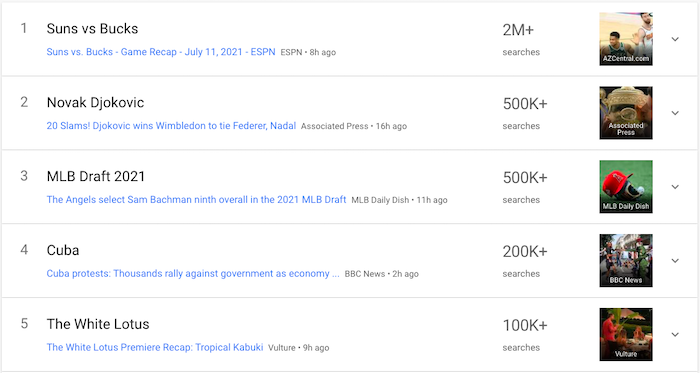
Tips and Strategies for Getting Listed in the YouTube Recommended Sections - Tap Into Trending Topics

We know those are the topics American audiences were searching for on July 11. By clicking into each of those examples, we can find out even more information, such as related queries. These add further context to the search and tell us what people are interested in finding out:
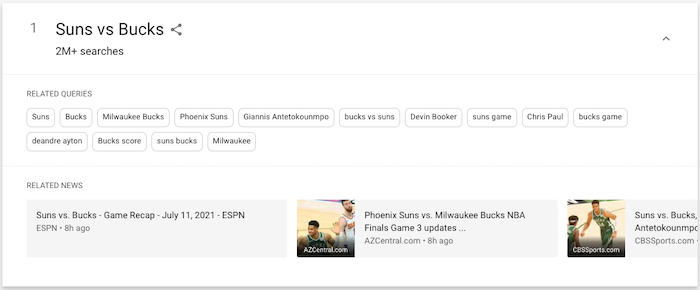
YouTube recommendation sections - How to create trending content

Based on this info, if you had a basketball channel, you could create a match preview focusing on key players like Devin Booker and Giannis Antetokounmpo, or a report discussing the score and highlighting key statistics.

What if those results are too top-level and you need to drill down into a specific topic? Google Trends can do that, too. Just click “Real-time Search Trends” and choose from five categories:

  1. Entertainment
  2. Health
  3. Sci/Tech
  4. Sports
  5. Top stories

4. Focus on Keeping the Beginning of Your Video as Engaging as Possible

Remember: an important factor in winning a YouTube recommendation is whether other people who clicked the same video watched it all the way through.

In reality, there are no guarantees people will stick around once they’ve clicked your video. One study analyzed over 56,000 YouTube views across four small but effective YouTube channels and found an average view duration of 50-60 percent of the total length. Those are comparatively high-performing channels; many see much poorer results.

What can you do to encourage your viewers to watch your videos from start to finish?

YouTube itself has long said the first 15 seconds can make or break your video. Get your audience engaged early by:

  • grabbing their attention from the outset, either through eye-catching visuals or by saying something interesting or surprising
  • clarifying what your video is about straight away, so viewers can be sure they’ve come to the right place
  • revealing what you’ll be discussing later in the video, without giving too much away

5. Encourage Viewers to Like & Share Your Content

YouTube uses various metrics to assess and understand a video’s popularity, such as:

  • click-through rate
  • average view duration
  • average percentage viewed
  • likes and dislikes
  • surveys

How does it get all that data? Well, every time a video is uploaded, YouTube serves it on the homepage for a small number of users. If they click on and engage with it by watching it to completion, sharing it, or hitting “like,” that video will appear on more homepages.

In this way, popular videos can quickly snowball. They get a bunch of views and engagement, which means they show up on more homepages, helping them to generate even more views and engagement. It’s a virtuous circle.

As such, it’s in your interest to encourage as many people to like and share your content as possible. That’s why so many YouTubers urge their audience to hit the “like” button after watching.

Additionally, bear in mind your most loyal viewers are most likely to engage with and share your content. It stands to reason someone who’s watched 20 of your videos all the way through will be more likely to share your next video than someone who’s never even heard of you before.

That’s why I often encourage people to subscribe to my channel at the end of my videos:
Tips and Strategies for Getting Listed in the YouTube Recommended Sections - Encourage Viewers to Like & Share Your Content

6. Upload Custom Thumbnail Images

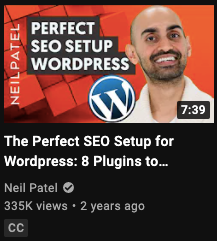
For your videos to attract the attention of the YouTube recommendation engine, you need people to watch them. One of the best ways to do that is by adding custom thumbnails to every video you post.

The thumbnail appears in lists of video results, just above the video title, so it plays a key role in persuading people to click. While YouTube will happily auto-generate a thumbnail for you, I highly recommend making your own.

YouTube’s own figures show 90 percent of top-performing videos have custom thumbnails, and while we can’t categorically say that’s because of the thumbnail, it’s too strong a correlation to ignore.
Tips and Strategies for Getting Listed in the YouTube Recommended Sections - Upload Custom Thumbnail Images

Follow these steps to create custom thumbnails that users just can’t help but click:

  • consider your thumbnail image before shooting the video so you can capture multiple images
  • review thumbnails for similar videos to ensure yours stands out
  • make your image as high-resolution as possible, while remaining under the 2 MB limit
  • bear in mind the ideal dimensions of 1280 x 720 pixels (or an aspect ratio of 16:9)
  • save your thumbnail as a JPG, GIF, BMP, or PNG

One final point: to upload a custom thumbnail image, you’ll first need to verify your YouTube account.

YouTube Recommended Sections Frequently Asked Questions

Will it hurt my chances of appearing in the recommended section if my other videos haven’t received much traffic?

Probably not, but if your other videos don’t have long user retention times or engagement (such as likes and shares), there’s less chance YouTube’ll recommend them. 

Will I be alerted if my video reaches a recommended section?

You are likely to notice if a video has reached a YouTube recommended section, due to a sudden boost in views or new subscribers. If a video seems to be growing and growing, it’s likely you’ve scored a top spot for your target audience.

How often does YouTube update its algorithm?

YouTube has made several major updates to its algorithm down the years, from optimizing for clicks and views, to prioritizing watch time and satisfaction. Also, bear in mind YouTube has multiple algorithms for ranking content in the different areas where videos appear, including the home page, suggested videos, and search results, all of which are regularly updated.

Where do the recommended sections appear in YouTube?

YouTube recommendations appear on the homepage and in the “up next” section.

YouTube Recommended Sections Conclusion

If you’re serious about monetizing your YouTube channel or getting a lot of views, you can’t afford to ignore the YouTube recommendation system. It’s the single biggest factor in getting people to see your videos once they’re within the YouTube platform.

Fortunately, if you’re already creating high-quality videos, you don’t need to do anything radically different to appear in a YouTube recommended section. Optimize your metadata, focus on driving engagement, and design compelling thumbnails, and you’ll give yourself the best possible chance of catching YouTube’s eye.

What tactics do you use to generate more engagement from your YouTube videos?


from Blog – Neil Patel https://ift.tt/2WxYeNE
via IFTTT

How to Use Reddit Ads to Generate Sales

How to Use Reddit Ads to Generate Sales - Featured image

Are you searching for a new digital advertising opportunity that can help you reach new audiences and widen your overall reach?

If you answered yes to that question, you should consider Reddit ads. Reddit has a very specific user base and culture, though, so you need to thoroughly understand the platform before you start advertising on it.

Why Should You Advertise on Reddit?

For starters, Reddit can drastically increase your audience exposure. Given the site’s emphasis on niche communities, you are also able to directly target small subsets (or subreddits) of your intended audience, offering them your services or products directly.

Ultimately, this connection with individualized subsets allows you to increase overall sales, particularly if the product you’re advertising aligns with that dedicated subset’s interests.

What Are the Different Types of Reddit Ads?

Reddit offers marketers two different ad types: promoted posts and display posts.

Promoted Posts

These ads are available as link ads or text ads. Regardless of which format you choose, they look very similar to general content on Reddit, featuring the same light blue background as non-sponsored posts. To differentiate between paid and non-paid content, these posts also contain a “Sponsored” tag.

  • Link ads: Easy to create and build, these Reddit ads feature a link to your website or to a specific product page. Link ads need only a headline and can be created through Reddit’s self-serve advertising platform.
  • Text ads: These ads link to another Reddit page that can essentially serve as a landing page for what you’re offering. These ads can drive to a forum about your product, a Reddit page with more information about your product, or any other internal Reddit page you want to create.
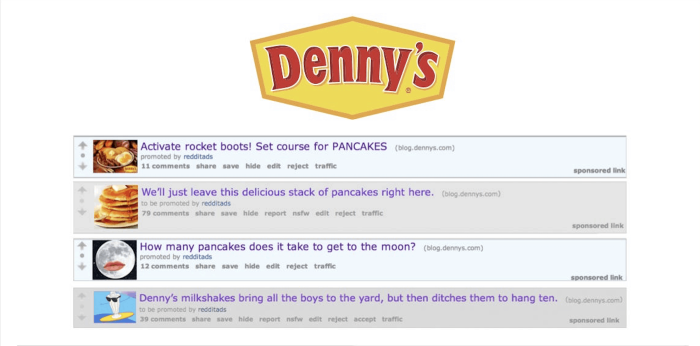
denny's reddit ads example

These ads, like the ones above from Denny’s, are perfect for driving interaction and interest with a new product or offering within a very specific community of users.

Display Posts

Much like other traditional display or banner ads, these Reddit ads are banners or rich media ads. If you’re interested in going all-in on a display post, be warned that these run at a base of $30,000.

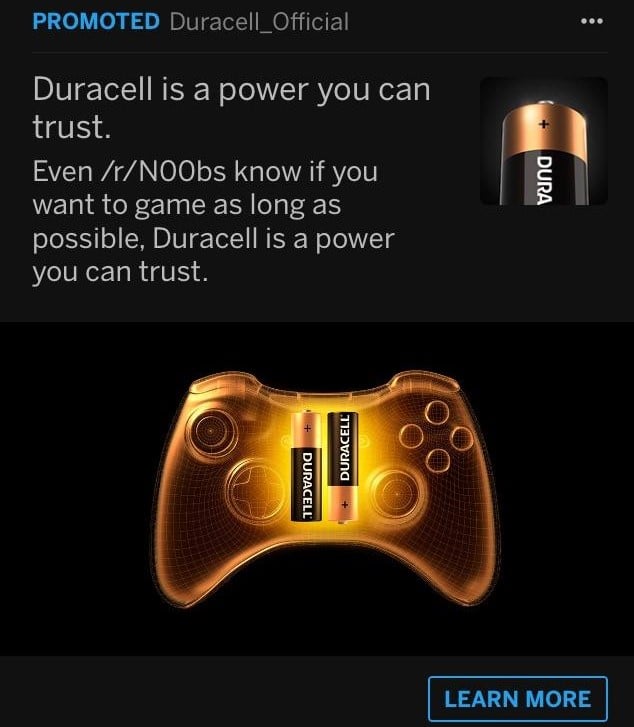
These ads are ideal for large companies with large budgets. A few notable campaigns include household names like Absolut and Duracell.

duracell reddit ads example

5 Strategies to Use Reddit Ads to Increase Your Sales

While Reddit does offer marketers and advertisers access to a massive audience, it is notoriously challenging to find success advertising on the platform.

However, that doesn’t mean achieving your marketing goals on Reddit is impossible. Be sure to adhere to these five strategies to ensure your Reddit ads are set up for success.

1. Find a Niche Topic Related to Your Brand

We’ve mentioned the term subset a lot in this post. What we mean is an extremely niche topic that not only is adjacent to your brand or product but also engenders conversation among followers of that topic.

By identifying these subsets, you can better align with audience members who are likely to be interested in what your Reddit ad is promoting, thus driving sales among these users.

2. Interact With Your Targeted Community

It’s no secret that Redditors are disdainful of marketing attempts on the platform. To ensure that your campaign doesn’t become an ignored eyesore, join and interact with your targeted community long before sending targeted Reddit ads to that particular group.

If you build up feelings of goodwill and general amicability, it will be that much easier to drive product sales as you have already established trust within your micro-community.

3. Offer Immediate Value

We’ve talked about Reddit users’ pervasive mistrust of marketing activity. To offset these sentiments, be sure to identify what value your ad offers to your particular community.

This is also beneficial as it further solidifies why you—and your product or brand—belong in that particular community. When you share the value of a specific ad in the text, you signal to viewers that you’re aware that their time is a commodity and that you’re worthy of them spending it on you.

By establishing expertise and proving value, you cement a connection with the community, assuring them that you’re not there only to market, but also to solve their pain points. And what impact do solved pain points have on your margins? Increased sales.

4. Allow Comments on Your Ad and Engage With Viewers

Reddit is all about community, and as we discussed above, if you enter an existing community with clear motives that don’t align with that community’s ideals, your Reddit ads aren’t going to go far.

To combat being perceived as a marketer out to make a buck, be sure to engage with the community you’ve opted to advertise toward. You can do this by allowing comments on your ads and engaging in genuine conversations with your audience to promote transparency and increase brand trust.

5. Use Reddit as a Customer Research Tool

Not sure which community you should be marketing toward? By using some functions that go beyond the search bar, you can identify which subreddits are right for you:

  • r/findareddit: This subreddit is dedicated to helping you find your people. In this group, you can ask questions about communities and get expert responses.
  • You can also use third-party tools like Redditlist that allow you to search for keywords within communities.

Reddit Ads for Increased Sales Best Practices

Reddit breaks its suggested best practices into three distinct categories: targeting, creative, and management.

According to the aggregation site, here are the best practices in each category:

Targeting

When building a Reddit ad, you can target your campaign through a variety of channels: by interest, community, targeting expansion, device, or location. By defining your audience through a combination of these lenses, you can get even more granular, ideally reaching your specific niche audience.

Creative

Follow these tips to develop a creative and successful ad:

  • Convey a clear value proposition.
  • Update your profile picture.
  • Experiment with longer headlines.
  • Use cultural touchpoints and humor.
  • Ensure headline and graphic tell a complete narrative.

Management

Reddit offers advertisers a dashboard that allows them to track the success or failure of their campaigns. These feature pretty standard marketing metrics, as well as some that are more Reddit-specific. Some helpful metrics to keep in mind include:

  • Impressions: the number of views your ad received
  • Clicks: the number of clicks your ad received that drove to your intended destination
  • Amount spent: the total spend you’ve used on your campaign or ad group
  • eCPM: the effective cost per thousand impressions
  • CTR: the percentage of times people viewed your ad and clicked
  • CPC: the average cost for each click

Examples of Great Reddit Ads

Looking for inspiration to launch your own Reddit ads campaign? While large companies like Duracell have seen equally large success on Reddit, so have smaller groups.

Below, we break down three of our all-time favorite Reddit ads.

Tushy

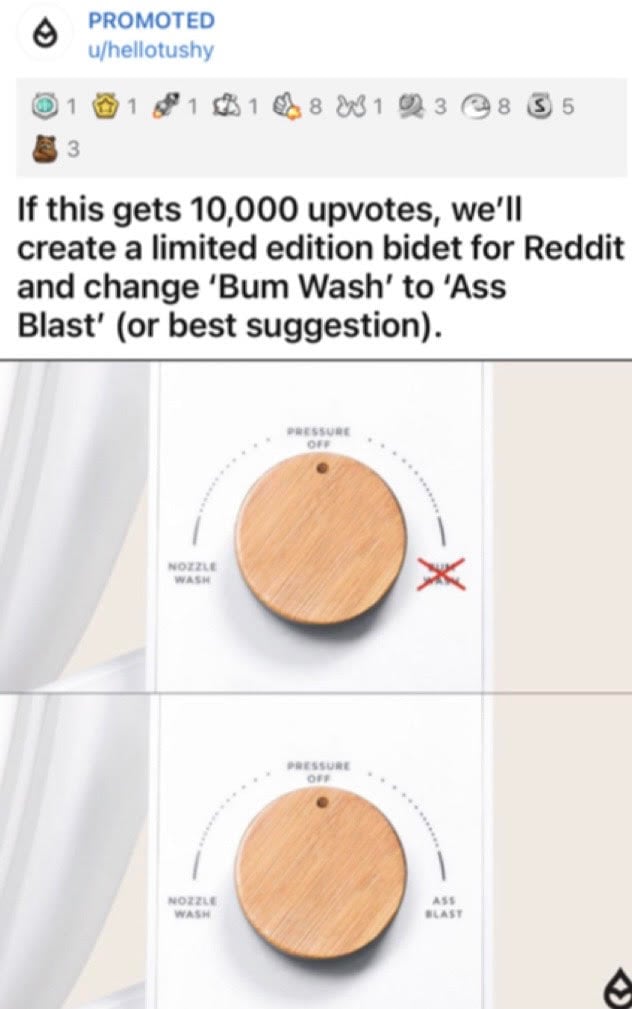
Cult-favorite bidet maker Tushy tapped into Reddit’s unique language to appeal to would-be consumers.

tushy reddit ads example

By appealing to the humor, Tushy was able to successfully launch a campaign that not only earned laughs, but upvotes. Here, we learn the true power of understanding the community you’re trying to market toward.

Ally Bank

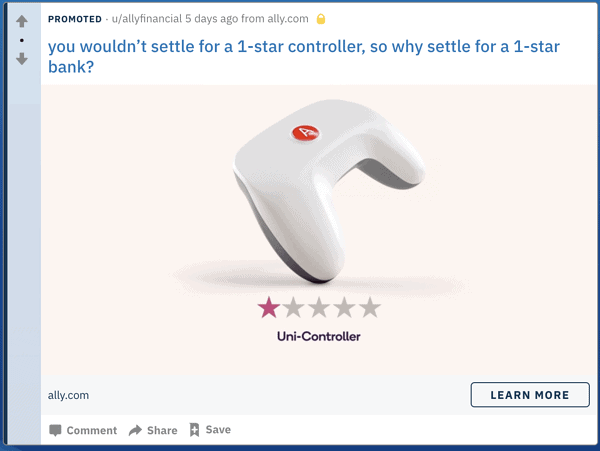
This bank used creative ad copy to appeal to a niche Reddit audience: financially savvy gamers.

ally bank reddit ads

By speaking directly to these two interests, Ally Bank managed to successfully market its brand, engaging an audience receptive to the topic and imagery.

Simple Health

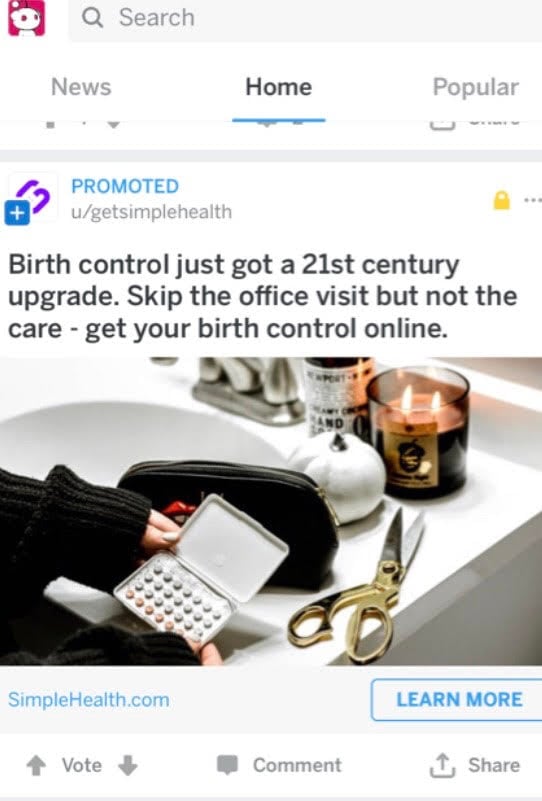
Simple Health harnessed the power of Reddit to increase conversions and drive sales.

simple health reddit ads

Through a comprehensive testing strategy, the company successfully identified their audience and delivered them content they couldn’t ignore.

How to Create Reddit Ads

After you’ve done the basic legwork of creating a Reddit account and signing into Reddit’s campaign management tool, building your first Reddit ad is relatively simple. Follow the four steps below:

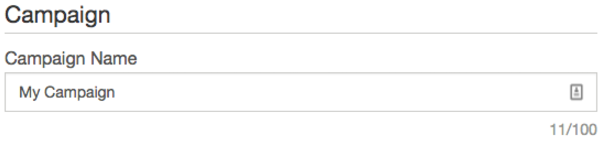
  1. Name Your Campaign

    This is only visible to you, not actual Reddit users.How to Create Reddit Ads - Name Your Campaign

  2. Define Your Audience

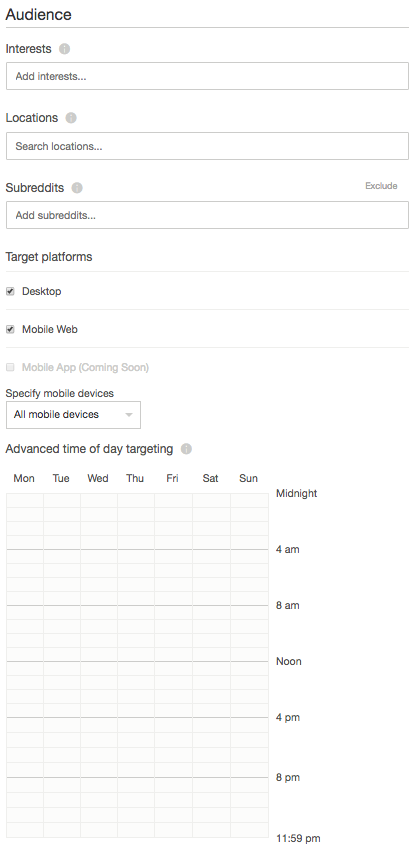
    In this step, you can identify your audience through six parameters:
    -interests
    -locations
    -subreddits
    -platforms (desktop and mobile web)
    -mobile devices (Android or iOS)
    -advanced time of day targetingHow to Create Reddit Ads - Define Your Audience

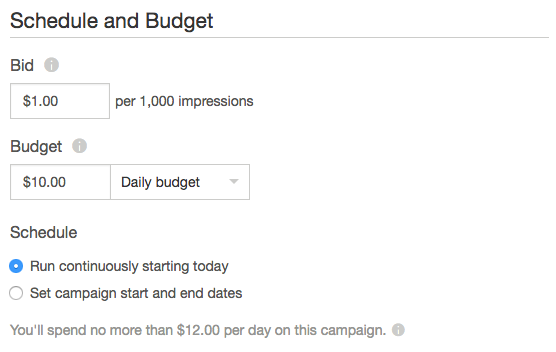
  3. Set Your Budget

    With Reddit ads, you can set either a daily maximum budget or a total campaign budget. Reddit ads are priced by cost per thousand impressions (CPM), meaning you pay a predetermined fee amount for an average of 1,000 impressions.How to Create Reddit Ads - Set Your Budget

  4. Select Your Creative

    You’re a final step away from sending your ad for approval. In this step, you must do these four things to create your ad:
    1. Select the ad type.
    2. Include your headline.
    3. Upload images.
    4. Submit for approval.

    That’s it! After completing those four steps, you’ve also completed your first Reddit ad.

Frequently Asked Questions About Reddit Ads

How much do ads cost on Reddit?

The cost of Reddit Ads depends upon the type of Reddit ad. If you elect to go the traditional route of banner posts, you better have a big budget as those ads start at $30,000. If you opt to go the route of promoted posts, your budget can go much further. Pricing for these ads clocks in at $0.75 CPM for self-serve advertising.

What size are Reddit ads?

If you’ve decided to employ promoted posts to make your campaign goals a reality, you’ll need to submit two images along with accompanying copy.
-thumbnail image (140×140 maximum)
-mobile card view image (1200×628)

Are Reddit Ads Targeted?

Yes, Reddit ads are targeted. As an advertiser, you can define your audience through a number of details, including location, age, and interests.

What Do Reddit Ads Look Like?

Reddit ads can look like the traditional banner ads that are ubiquitous to most digital advertising—you’ve seen these on Facebook, LinkedIn, or Instagram. Promoted ads, however, look just like any other Reddit post, save for the blue box that delineates them from organic posts from users.

Reddit Ads Conclusion

If you’re looking to increase your sales, Reddit is undeniably a great place to start.

However, as we discussed in this post, it is of the utmost importance that you have a deep understanding of your Reddit community; you cannot simply wade into a subreddit and start targeting members with ads. If this is your strategy, you’re likely to fail.

Instead, immerse yourself in the community. Learn the language of the group and the patterns of behavior and conversations. Engage with users to demonstrate your dedication and authenticity.

If you successfully ingratiate yourself with the community, you can then begin your Reddit marketing strategy. With this foundational understanding and shared respect, you have an increased likelihood of being one of the many success stories of increased sales through Reddit advertising.

What’s the most effective Reddit advertising technique you’ve encountered?


from Blog – Neil Patel https://ift.tt/2lVaPVm
via IFTTT
Wednesday, 28 July 2021

A Complete Guide to Outbound Marketing

a complete guide to outbound marketing

Is outbound marketing right for your business?

How do you decide which strategies are going to help you grow your brand?

If you’ve got questions about outbound, then you’ve come to the right place.

What Is Outbound Marketing?

Outbound marketing is where you (the business) initiate conversations with your customers to attract them to your brand. For example, TV commercials, cold calls, paid ads, and direct mail are all examples of outbound.

Inbound marketing, on the other hand, is when your customer initiates a conversation with you. For example, they visit your website, read an ebook, or download a white paper.

The goal for outbound marketing is to actively build authentic relationships through engagement, targeted communications, and putting your company in the right place at the right time. 

There’s no denying that inbound marketing has grown in popularity in recent years (and with good reason, as it produces tremendous results.) However, outbound still takes up 90 percent of marketing budgets due to the high cost per outreach.

To improve your ROI in outbound, you need to allocate your budget to the methods that work for your brand. Below, we’ll cover some strategies to try, but first, let’s talk about its relevancy.

Is Outbound Marketing Still Relevant Today? 

Every business owner loves to cut costs. When you, as a consumer, immediately delete a sales promotion email from your inbox without looking at it, you might wonder why that business would continually persist with an outbound strategy.

The likelihood is, they’ve built a huge mailing list and their promotions go to every single email address—paying no heed as to whether each customer is directly their target audience or not. 

Why? They’ve invested in building a mailing list, and outbound marketing is still an extremely useful tool. It’s amazingly good at driving brand awareness (as long as your emails aren’t repetitive enough that a customer ends up hating you), maintaining brand relevance, and introducing products to new audiences. It helps you be at the forefront of your customer’s mind, for recommendations, word of mouth marketing, and lead generation. 

Inbound marketing is great, and especially for smaller and low-budget businesses, but if customers don’t know your products exist in the first place, they can’t search for something they aren’t aware of. 

Outbound marketing guarantees you reach people. You won’t be shouting into the void. Blogs are great for SEO and hoping Google’s Algorithm will take pity on you, but when you pay for a TV ad in a half-time break of a popular show: you know it’s going to be seen.

It can be expensive, but, when done correctly, it still provides a good ROI and is still relevant today as a complement to inbound marketing. 

7 Outbound Marketing Strategies to Try

Most marketing success comes through a combination of different strategies. Whether it’s inbound or outbound, there are lots of different ways to reach your target audience, and often it will take lots of different strategies to achieve your goals. 

Here are seven outbound sales strategies you can use to boost your marketing. 

Outbound Marketing Strategy Number #1: Cold Email

Email seems to have been around a long time now, but it’s still bringing in an incredible ROI for marketers. 

We’re all accustomed to receiving newsletters from websites, but we tend to forget about an important part of outbound strategy: cold email.

Cold emails are unsolicited emails you send out to prospects. You’re initiating the interaction, so it firmly fits in with the principles of outbound marketing. 

“Everybody hates receiving unsolicited emails, spam is the worst.” 

Well, what if your cold emails didn’t feel like unsolicited emails? What if they were highly personalized, respected your customer’s time, and actually offered value to them beyond a product that can fix “all of life’s problems?”

Outbound marketing doesn’t have to be pushy, impersonal, sales-based spam. It can have all the creativity of inbound marketing. Using your understanding of your target audience, you can craft cold emails that get responses and create leads. 

Here are some things you will want to concentrate on with your cold emails:

  • cleaning your list: make sure you’re reaching live emails
  • engaging subject lines: earn the click
  • personalization: make people feel like they’re not the millionth person to receive this email
  • offering value: you want something from them, what can you offer in return?
  • A/B test everything: subject lines, signatures, CTA’s, interval between each email, the time you send each email, and, of course: the copy itself

Small details make a big difference, for example, 30 percent of people open an email based on the subject line, so make sure you’re optimizing every aspect of your outbound marketing.

Outbound Marketing Strategy Number #2: Direct Mail

First, I recommend “cutting edge technology” with emails, and now I’m telling you to send people letters through the mail?

Well, yes!

So much of our lives might have moved online, but we still exist away from the internet and we still receive mail. As it turns out, we still enjoy seeing something in the mailbox with our names on it, and this is an effective way of using outbound marketing. 

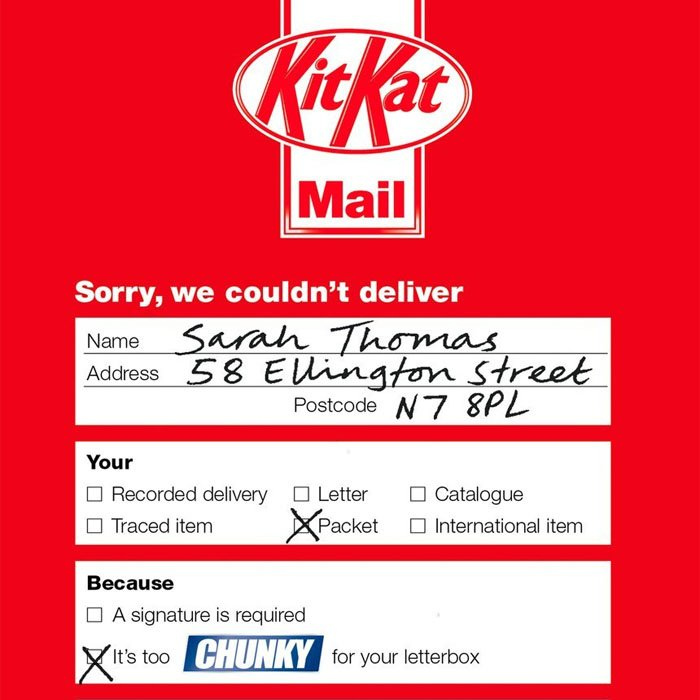
This scientific study found brand recall is 70 percent higher among participants exposed to direct mail than an online ad. It may not have the fancy analytics, and you may not be able to put a GIF on it, but it’s certainly a good way to gain traction for your brand, and can still be relevant to your ethos, voice, and how you want to present yourself.

Just take a look at KitKat’s amusing example: 

outbound marketing through direct mail

Estimates for the average ROI from direct mail vary a lot, and, like with most outbound marketing, it’s all about how good your campaign is. 

With direct mail, it’s important to:

  • Remain targeted with your approach and segment people based on past purchases, location, demographics, etc.
  • Be creative and make your ad stand out amongst the crowd.
  • Include a way to track the success of the campaign (unique discount codes are a great way to see which customers are responding).

It might not seem like it fits with the digital age, but direct mail is still a useful outbound strategy.

Outbound Marketing Strategy Number #3: Search Ads

Paid search ads can be seen as a cross between inbound and outbound marketing. While the targeted user has likely actively searched for information related to your products, you’re still artificially placing your brand in front of them in a way more reminiscent of outbound marketing.

Search ads are great for immediate success. 

With SEO, you write an article and watch as the search engines gradually start to rank it. When it does start to bring in traffic, it’s an amazing tool because you’re not paying for clicks, but it takes time and there’s no guarantee of success. 

When you invest in paid search ads, you give your brand an immediate presence in the SERPs, almost guaranteeing you traffic. Of course, you will be paying for each click which means the most important thing with search ads is optimization. 

Not only do your ads have to be on-point, but so do your landing pages (here’s how I make sure my landing pages are converting). 

Clearly set out what you’re trying to achieve with your paid ads and make sure everything is streamlined toward driving action from your customers. Small issues such as a clunky checkout page can hurt your conversion rate and make a big difference to your ROI on your search ads.

The average conversion rate for search ads on the Google network is 4.4 percent, but the hard work you put in might see you push well beyond this. 

Here’s my “Guide to Google Ads” to help you out.

Outbound Marketing Strategy Number #4: Social Media Ads

Billions of people are on social media every day. The average daily usage of social media is two hours and 25 minutes. 

In marketing, we talk a lot about reaching your customers where they’re hanging out, and the data shows this is overwhelmingly on social media. If you’re not running social media ads, then you’re missing out.

Social media is becoming more and more “pay to play,” increasingly making it an outbound tool. Paid social media is:

  • more cost-effective than organic social media
  • increases brand awareness
  • boosts reach

The average organic post reaches just five percent of your followers, so you need a huge following to make a difference with organic social media. Paid ads on the other hand allow you to immediately reach a highly targeted audience.

outbound marketing through social media ads book example

One of the most powerful aspects of advertising on platforms like Facebook, Instagram, TikTok, and LinkedIn is targeting. These companies have an incredible amount of data on their users and you can use this to be extremely targeted, serving your ads to the people they’re going to have the most impact on.

Outbound Marketing Strategy Number #5: Trade Shows/Events

Marketing may have shifted focus from the physical world to the digital one, but that certainly doesn’t mean getting out and meeting people is a dead art. One of the best ways to get your brand in front of a targeted audience is by attending a trade show. 

This can represent a large upfront cost (on average it costs $100-$150 per square foot of floor space), but the exposure and new connections you make can be well worth it. 

Maintaining brand relevance is something that takes constant commitment, and having a stand at a major trade show is one of the ways you can do this. Just think of any major trade show, and you’ll expect the biggest brands to be there. For example, what would an international farming show be without John Deere?

It may seem like these companies are so big it doesn’t matter whether they attend a trade show, but they recognize that to remain relevant you’ve got to be visible.

When planning for a tradeshow, make sure you’re setting goals and managing your budget appropriately. 

Outbound Marketing Strategy Number #6: Cold Calls 

Outbound doesn’t always have the best reputation and cold calls certainly fit this picture. Despite this, the inescapable reality is cold calling works for many businesses. 

Sales and marketing are still about reaching new audiences and starting conversations and that’s exactly what cold calling allows you to do. Of course, there are good and bad ways of doing this, and you need to consider your approach carefully.

Again, it’s easy to look at cold calling and think it’s all about numbers. Sure, outbound relies on volume, but the most important aspect is still quality, in this case, the quality of the conversations you can have. 

This is why there’s a push away from scripted sales pitches towards approaches like SPIN selling where the focus is on helping the customer to solve their problems (if you’ve read my inbound marketing articles then you know this is something I talk about all the time).

If you’re thinking about using cold calling as part of your outbound strategy then keep these important points in mind:

  • Invest in the right software: this will save you so much time and make you much more efficient.
  • Think about your brand image: don’t be pushy, work on growing relationships.
  • Research your prospect list: make sure you’re reaching a targeted audience.
  • Respect people’s privacy: take people off your contact list when requested.
  • Protect the vulnerable: look after your customers, especially the elderly, and put protections in place (such as a 30-day refund guarantee) to allow them to change their minds. 

Outbound Marketing Strategy Number #7: TV, Radio, and Print Ads

Online marketing has transformed the way businesses advertise, but traditional advertising is far from dead.

There are lots of online places you can advertise your business and continue to grow your brand. TV and radio ads may require a bigger investment than other forms. like PPC but they still bring in big results.

outbound marketing US tv consumption

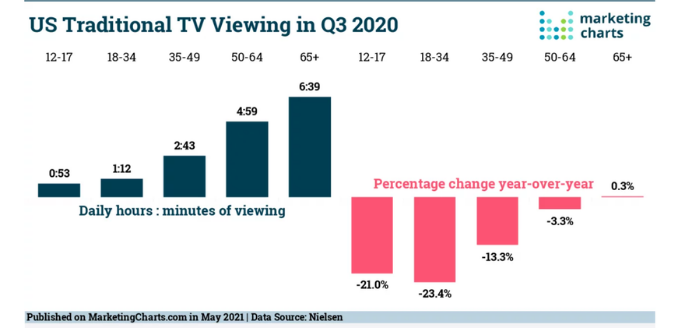
The average American might spend more than two hours a day on social media, but traditional TV consumption is even higher among the older generations:

  • 50-64-year-old Americans watch an average of four hours and 59 minutes of traditional TV each day.
  • Over 65s watch a massive six hours and 39 minutes.

Consumption of traditional media might be changing but it’s still there—and therefore it’s still a big opportunity for marketers. Make sure you understand your target demographics and are showcasing your brand with creative messaging and you can still see an excellent return on your investment.

Outbound Marketing Frequently Asked Questions

What is the difference between inbound and outbound marketing?

Outbound relies on the business initiating the interaction whereas inbound marketing relies on the customer searching for your brand.

Is social media inbound or outbound marketing?

Social media can be both inbound and outbound. Paid social media ads would be classed as outbound, whereas organic reach is inbound marketing.


Why is outbound marketing effective?

Outbound marketing is often effective because it’s immediate. You’re not waiting for people to find you, you’re putting your brand in front of people and initiating interactions.

Is outbound marketing dead?

No, it is very much alive. Many businesses still use outbound to achieve a good return on their investment. 

What are examples of outbound marketing?

Examples include paid search ads, social media ads, cold email, cold calls, trade shows, and tv/radio/print ads.

Outbound Marketing Conclusion

Outbound marketing is something that’s still relevant today. It’s a great complement for your inbound marketing and an excellent way to grow your brand. 

Marketing is a competitive field, and sometimes you can’t rely on people coming to you, instead, you’ve got to put your name out there and guarantee you’re getting exposure. In these cases, cold emails, search ads, social media ads, trade shows, cold calls, and traditional media ads can make a huge difference. 

The most important thing to remember is that many of the same principles of inbound marketing still apply to outbound. You still need to understand your target audience, and you’ve got to be able to provide value and help solve people’s pain points. 

If you can successfully do this, then outbound marketing can be an important part of your strategy. 

What’s your favorite outbound marketing strategy?


from Blog – Neil Patel https://ift.tt/3iaazQh
via IFTTT
Shopify Vs. Wix

Disclosure: This content is reader-supported, which means if you click on some of our links that we may earn a commission.

As an ecommerce seller, you’ll find yourself making a lot of choices.

Is the clothing niche more profitable than accessories? Which theme would be better: Wokiee or Porto? Is Shopify better than Wix, or is it the other way around?

Of all the questions, choosing the best ecommerce platform remains the most crucial. Although Shopify and Wix have overlapping features, Shopify edges forward in the race if you’re specifically looking for ecommerce functionality.

Still, it’s a close call between the two that boils down to your intent. Small businesses or brand-conscious entrepreneurs will love Wix with its easy-to-use, cheap features, and greater design flexibility.

But if you want a powerful online store, Shopify can do a lot more. So long as you’ve got a bigger budget and the technical knowledge to flatten the learning curve, Shopify is going to be the better long-term ecommerce solution.

Shopify or Wix: Which Is Better?

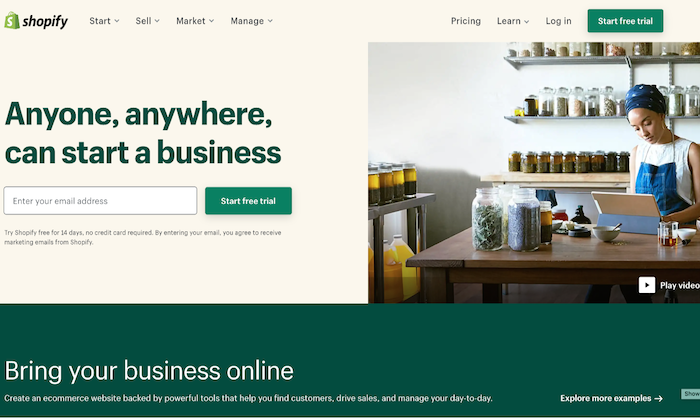
Shopify is a solid option for ecommerce applications with its fully responsive templates, AMP support on product pages, and dropshipping features. It also supports multi-currency selling functionality and offers useful integrations with other essential apps.

Overall, it’s a more professional choice for anyone who wants to build an online store. If this is exactly what you’re looking for, make sure you sign up for a free trial ASAP.

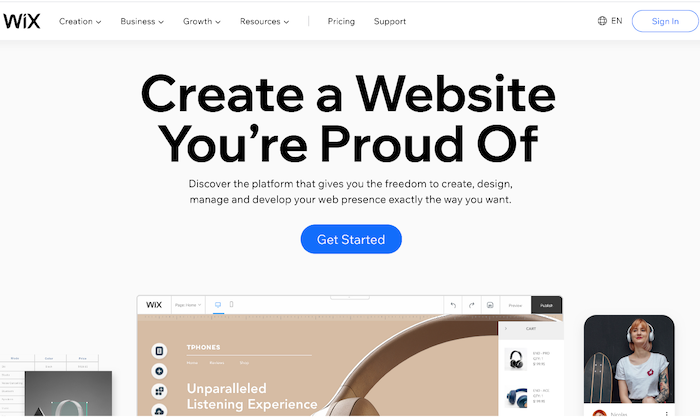
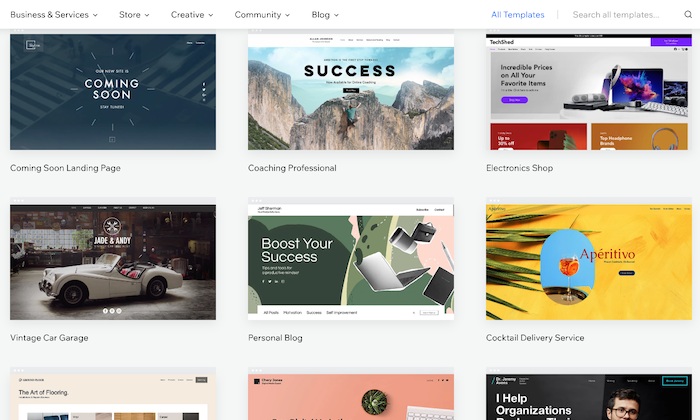
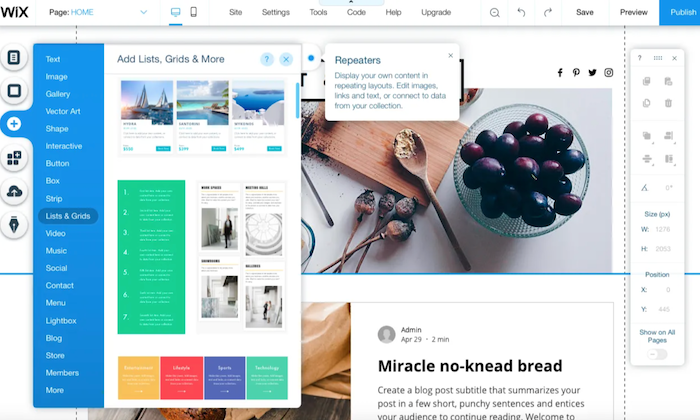
Wix has a drag-and-drop interface and a wide range of bundled templates, making it a great choice for those who want to build a general-purpose website. It also comes loaded with page layout tools, data capture, and email marketing features.

Plus, it’s cheaper, and you don’t have to worry about paying transaction fees. Ready to check out Wix? Give it a try with a free trial.

A Review of the Best Ecommerce Platforms

Shopify and Wix are hardly your only two options for starting an online store, and you owe it to yourself to look around.

My team reviewed dozens of ecommerce platforms and narrowed them down to the eight best options that tick off all the right things on an ecommerce seller’s checklist. Wix and Shopify both made the list.

Head over to my best ecommerce platforms guide for an in-depth look at where every product stands, along with a buyer’s guide to help you navigate your options.

Shopify Wins 

Useful Ecommerce Features: As it’s specially designed to be for ecommerce, Shopify sites come with many useful ecommerce features to cover every little aspect of the sales process. It has multiple payment gateways, inventory management tools, third-party platform integrations, and shopping carts. The platform is also scalable, allowing you to grow with your expanding business needs.

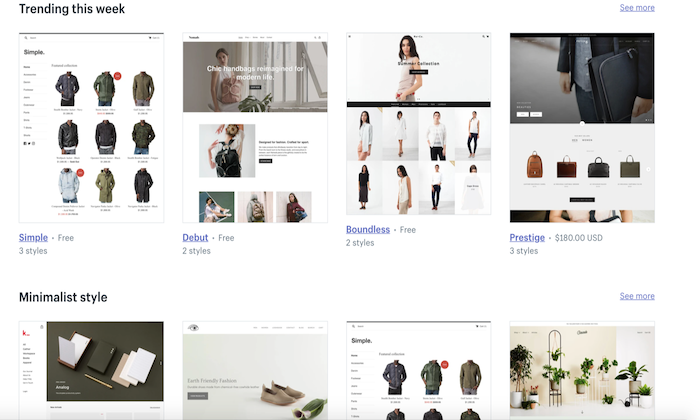
Fluid Themes and Greater Flexibility: Shopify offers 60+ professionally-designed and customized themes, giving you the liberty to add individual product pages based on your needs. Moreover, this customization and flexibility extend to changing page elements too. You can move, add, remove, or resize page elements to make your shop more on-brand.

Tweaking themes is also possible—provided you know HTML and CSS. If you’re tired of how your site looks, you simply have to choose a new theme, and you’ll have a brand new store within minutes!

Custom Domain Name: Every Shopify user gets a custom domain name that allows them to brand their respective stores and online business more efficiently and effectively. You can handle your domain on the same site location as your domain store, which, in turn, allows you to make changes to either with ease while simultaneously managing your domain.

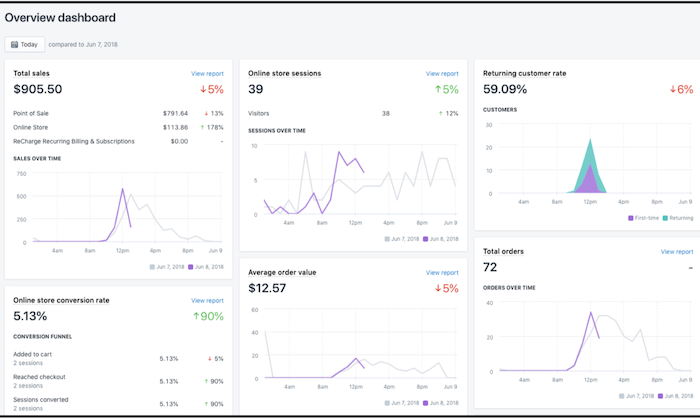
Excellent Built-In Analytics: Shopify goes the extra mile by offering you plenty of built-in analytics features like Google Analytics, customer behavior, stock levels, and conversion tracking to know exactly how your store is doing and which aspects need a bit of tweaking for better results.

You can also view online store sessions, total sales, top-selling products, returning customer rate, average order value, and behavior reports (phew!) on the platform to make better decisions.

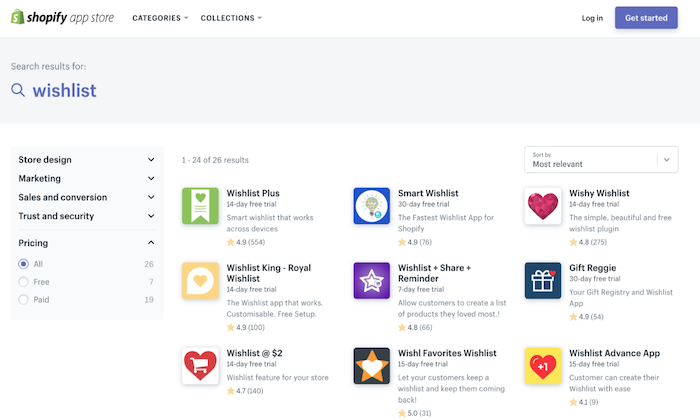
Shopify App Market: Nearly every ecommerce plugin and feature are developed for Shopify first due to its vast popularity. Whether it’s free or premium add-ons for marketing to content management, you get all kinds of unique features with this platform. Case in point: An augmented reality feature that allows you to use your smartphone to navigate the product and see every little detail.

What’s more, even other marketplaces like AliExpress and Oberlo offer compatible apps to make your store management easier.

Faster Checkout Options: Shopify has prioritized customer preference when designing login and checkout options. You can make the registering of users before heading to checkout mandatory, optional, or prohibited. Plus, registration is also incredibly easy as users only have to fill out basic information. As a seller, you can add users manually or import the list via CSV and sort them through a tag system.

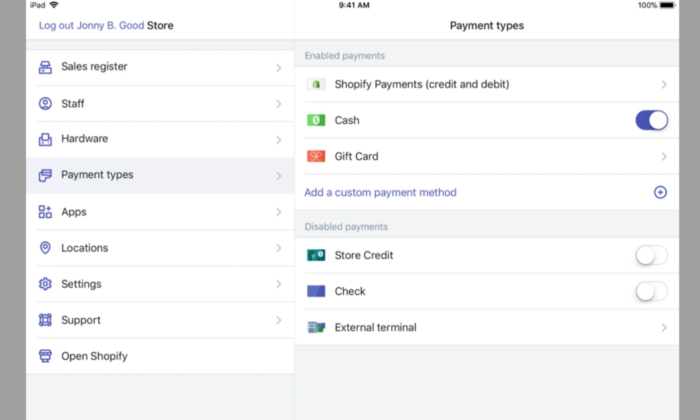
More Payment Options: Shopify gives you several options to sell items anywhere in the world thanks to its Amazon FBA or a 3PL order fulfillment support, along with multiple-currency support through a complex, non-supported HTML, CSS, JavaScript, and Liquid hack. This may not be ideal, but it’s definitely there. You also get direct access to 100+ different payment gateways, including PayPal, Stripe, and Shopify’s fully integrated payment system.

No Cap on Products and Inventory: Most web servers or external platforms restrict the number of products you can add to your store—but not Shopify. You can add unlimited products to your Shopify store. Even the lowest subscription package does not put any restriction on the number of products you can add to your inventory.

Shopify Losses

Learning Curve: Shopify developers claim the platform is the best for creating and managing online stores, but they don’t claim to be the easiest, and rightfully so. Although Shopify uses templates that eliminate the need to edit HTML code and CSS styling, its websites are harder to edit than Wix. It’s because the focus is on the products and how you present the page. If you want to make additional changes, you’ll have to learn to edit the backend code.

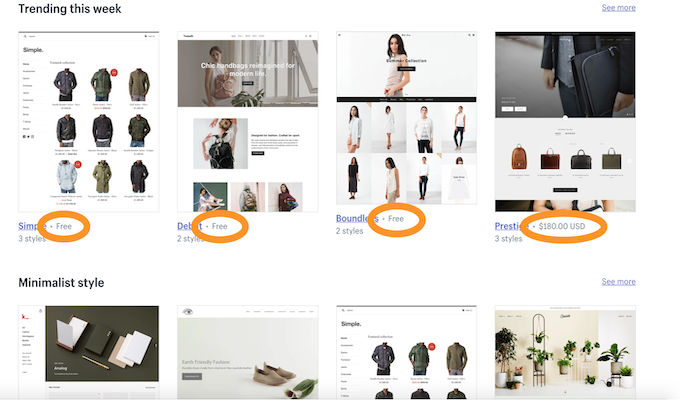
Limited Free Themes: While we love how modern and responsive Shopify themes are, it’s the limited number can restrict your options. You have to pay a one-time fee for most themes, ranging between $140 to $180, as only ten themes are free.

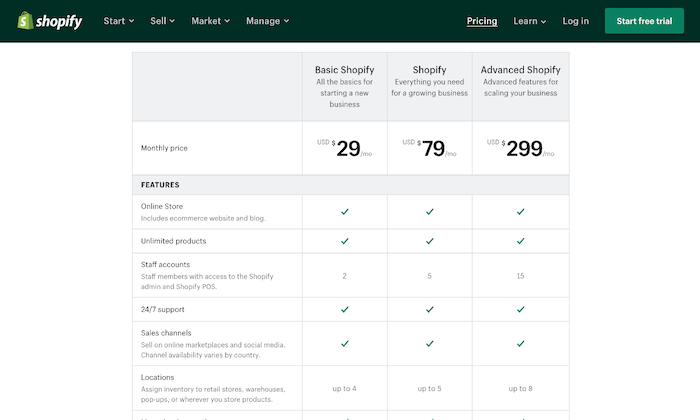
Expensive: Shopify gives you a wide range of subscription plans starting at $29 per month. However, not only is it more expensive, but you also don’t get a free plan (only a 14-day free trial). The basic plan includes only the barest of features, so if you want access to advanced features like fraud analysis and reports, you have to pay a higher price.

Further, unless you use Shopify Payments—something that isn’t available everywhere—you have to pay a transaction fee on top of the payment processor fee.

Lacks Email Hosting Facility: You don’t get an email hosting feature despite web hosting being included in all Shopify plans. So, you can’t host a domain-based email address like info@shopname.com. What you can do, however, is set up email forwarding. This will forward all emails sent to info@shopname.com automatically to your regular email account. You’ll have to set up other third-party email hosting connections to use the email forwarding function.

Wix Wins

Massive Template Collection: The basic Wix editor lets you pick from 500+ beautiful templates for your site and populate it with any content of your choice. There are several built-in dynamic templates—from homepages to blogs to landing pages—suitable for novices and experts. People on a tight budget will be happy to know the platform offers 60 completely free, modern, and stylish ecommerce templates.

Intuitive Drag-and-Drop Interface: The drag-and-drop interface is the heart of Wix, making it incredibly user-friendly. Because of this, not only people with all levels of skills can use the platform, but it also gives you enough options to convert your side into a real powerhouse by extending its functionality. You can use the mobile editor to review and edit your site to optimize it for mobile devices.

Free Plan: Wix is definitely the cheaper platform, with prices starting at $23 per month. There’s also an entirely free plan and a free domain name facility (for the first year) that further boosts its appeal. Plus, you don’t have to worry about paying any extra fees with the platform.

Built-In Video Function: Wix seriously lets your products shine, which is one of its biggest USPs. It has a built-in product video function that helps improve customer experience by allowing them to see the product live. You’ll also appreciate the product zoom feature and the fact you can build a distinctive checkout page to make the checking out process as hassle-free as possible.

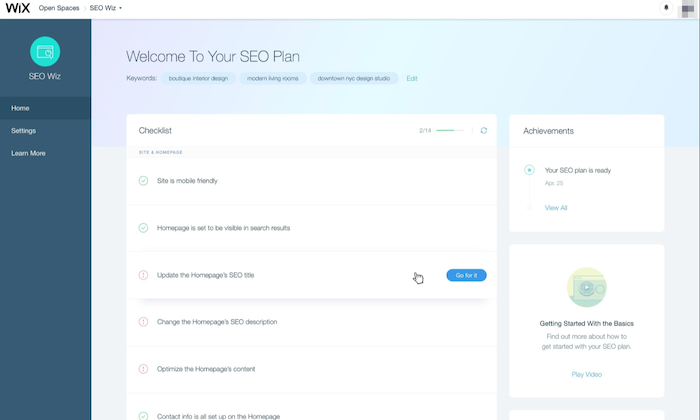
Efficient SEO Guidance: Wix helps you optimize your ecommerce site for SEO by highlighting areas that require your attention. It then does the hard work by letting you fill in keyboard tags and other metadata. You can also modify the URL of each page, so it best fits what Google needs to know.

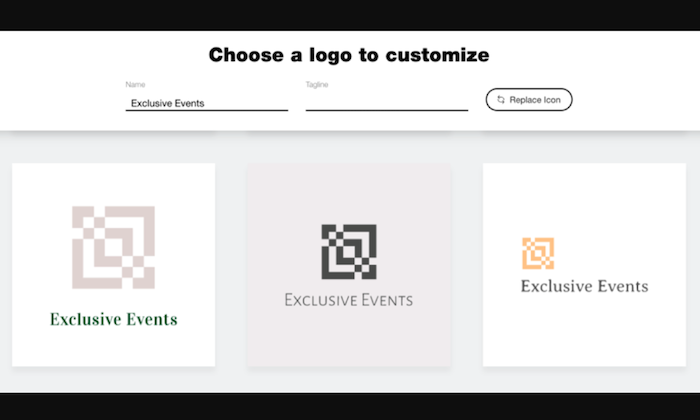
Tons of Extra Features: Aside from the core functions, Wix is built with an entire ecosystem of useful tools and products to make website building easier. It offers your free HTTPS to ensure visitor interactions with your website remain secure, templates to create quotations for customers, and integrated payment options like PayPal and Stripe. There’s also a logo maker to make branding even easier!

Online Store Integration: You can include an online store with your website at no additional cost with Wix. As the interface is easy to use, the integration process is very straightforward, and you don’t even require an external shopping solution.

Wix Losses

Harder to Redesign: The intuitive drag-and-drop interface of Wix makes designing your site simple, but it’s the redesigning where you have to pay the price. You don’t have the flexibility to make any major changes by just selecting a new theme. Instead, the redesigning process is extremely manual. If you want to make any drastic changes to your online store, you practically have to rebuild your entire website. Besides that, you don’t have access to HTML and CSS, which makes the overall process more time-consuming and tough.

Limited Integration With Third-Party Apps: When we talk about app integrations, it isn’t even a fair fight as Wix has far fewer ecommerce developers creating apps for its platform. For instance, you won’t find a Google Shopping Feed or Facebook Product Feed. This means you can’t run Google shopping ads or run dynamic product ads on Facebook from the platform. Native integration with email marketing applications is also absent, making it troubling for owners who rely on email marketing for revenue. The only way you can integrate a Wix store to an email marketing add-on is to use either Zapier or write the code yourself.

Forced Wix Branding: They say there’s no such thing as a free lunch, and Wix very well proves it. If you decide to choose and stay on Wix’s free plan, be prepared to carry Wix branding—right at the top of your site. It isn’t too obnoxious, but it isn’t exactly discreet. What makes it more annoying is it appears before your website header!

Non-Transferrable Site: While some may justify Wix not wanting users to export websites created with their technology, it’s a con for those who want to migrate. And the fact that scalability isn’t Wix’s biggest forte, makes this an even bigger problem. If you want to recreate and transfer your website away from Wix, you have to pay some serious amount of cash. In short, if you sign up for Wix, they might just have you for life.

Comparing the Top Ecommerce Platforms

While Shopify and Wix are excellent ecommerce platforms, there are several other alternatives with their own advantages. Make sure you check our top picks for the best ecommerce platforms to find the right option based on your specific needs.

  1. Wix – Best for flexibility and customization
  2. Squarespace – Best ecommerce platform for creatives
  3. Bluehost – Best for hands-off WooCommerce store setup
  4. BigCommerce – Best for medium to large stores
  5. Shopify – Best all-in-one ecommerce platform
  6. WooCommerce – Best for WordPress websites
  7. OpenCart – Best for selling digital products 
  8. Ecwid – Best for integrating with your current platform

Summary

Shopify is the more obvious choice since we’re concerned with ecommerce functionalities in particular. But that doesn’t mean Wix has lost its charm.

Shopify is the best solution for sizable online stores that need all the bells and whistles of scaling and selling everywhere around the globe, while Wix is more appropriate for general-use cases and for owners who rely on content creation to acquire more traffic. It also offers more creative freedom as opposed to Shopify.

In the end, the choice is yours—just make sure you make the right one.


from Blog – Neil Patel https://ift.tt/3cGgJWf
via IFTTT